OMG just jacked up Win 7 install, constant loop, what to do?

When you finish your install, download DISM++. It uses a different search engine that M$ update and provides you with choices of what KBs to install. It doesn't go through the shenanigans of installing a superseded update or require multiple reboots and days to install updates as M$ update does. Start it before you hit the hay and in the morning, your computer is updated with all the current updates, minus the ones you choose to not install. Kudos to SIW2 for the tip!

Dism++ | New Windows Utility

Nic


Ok just finished S.M.A.R.T. test.....Test status "PASS"


Short Drive Self test got to 50% and stated "FAIL"


Also I have bugged you guys SO MUCH I am sorry but got any drive recommendations?


I need 9mm SATA Ia assume. 250 GB or more, does not have to be new but would love to spend sub $20
 
Last edited:

My Computer My Computer

At a glance

32
Computer type
PC/Desktop
Computer Manufacturer/Model Number
Dell Studio 1555
OS
32
Your installation media is corrupt.
Obtain a new Windows ISO at TechBench by WZT all editions (pro, home premium, etc. ) can be made available from any windows 7 iso - either by removing the ei.cfg file from the sources folder, or by using eicfg_removal_utility.zip
You want Windows 7 Ultimate x32 (only one that will download) then run the eicfg utility to access all the other versions.
You have to burn the ISO to DVD or USB you can't copy and paste.
DVD ImgBurn
USB Rufus 3.2 or Rufus 3.2 Portable
Nic


Also did this as instructed just to see what happens, have the ISO disk but 5 consecutive times now I restart and boot from CD and it goes right into XP, not booting from disk
 

My Computer My Computer

At a glance

32
Computer type
PC/Desktop
Computer Manufacturer/Model Number
Dell Studio 1555
OS
32
Hi irishmike,

I restart and boot from CD and it goes right into XP, not booting from disk
It sounds like the ISO didn't burn correctly to the disk!

I hope this helps!
 

My Computer My Computer

At a glance

Win 7 HP SP1 64-bit Vista HB SP2 32-bit Linux...Intel(R) Pentium(R) CPU P6200 @ 2.13GHz4.00 GBIntel(R) Graphics Media Accelerator HD
Computer type
Laptop
Computer Manufacturer/Model Number
Fujitsu LIFEBOOK
OS
Win 7 HP SP1 64-bit Vista HB SP2 32-bit Linux Mint 18.3
CPU
Intel(R) Pentium(R) CPU P6200 @ 2.13GHz
Motherboard
FUJITSU FJNBB06
Memory
4.00 GB
Graphics Card(s)
Intel(R) Graphics Media Accelerator HD
Sound Card
[1] Realtek High Definition Audio [2] Intel(R) Display Audio
Screen Resolution
1366 x 768 x 32 bits (4294967296 colors) @ 59 Hz
Hard Drives
TOSHIBA MK5076GSX
Antivirus
AVG FREE
Hi irishmike,


It sounds like the ISO didn't burn correctly to the disk!

I hope this helps!


Thanks I'll burn another later after I drop the kids off

I double clicked it in the drive, it fired up to the install screen but not sure if I should install "over" XP
 

My Computer My Computer

At a glance

32
Computer type
PC/Desktop
Computer Manufacturer/Model Number
Dell Studio 1555
OS
32

My Computer My Computer

At a glance

Win 7 HP SP1 64-bit Vista HB SP2 32-bit Linux...Intel(R) Pentium(R) CPU P6200 @ 2.13GHz4.00 GBIntel(R) Graphics Media Accelerator HD
Computer type
Laptop
Computer Manufacturer/Model Number
Fujitsu LIFEBOOK
OS
Win 7 HP SP1 64-bit Vista HB SP2 32-bit Linux Mint 18.3
CPU
Intel(R) Pentium(R) CPU P6200 @ 2.13GHz
Motherboard
FUJITSU FJNBB06
Memory
4.00 GB
Graphics Card(s)
Intel(R) Graphics Media Accelerator HD
Sound Card
[1] Realtek High Definition Audio [2] Intel(R) Display Audio
Screen Resolution
1366 x 768 x 32 bits (4294967296 colors) @ 59 Hz
Hard Drives
TOSHIBA MK5076GSX
Antivirus
AVG FREE
No need to apologize, we're here to help those whom are less tech savvy. I am very patient and more than willing to explain or provide links to answer questions.

Being that you could run the DVD from within windows that tells us that the ISO burn was successful. It sounds like you did not select the CD/DVD drive in Boot Menu to boot from that. Simply placing the CD/DVD in the drive and starting the computer won't start the CD/DVD.

You have two choices Boot Menu and Boot Options. On my HP desktop the Boot Menu is F8, yours according to Booting to the Boot Menu and BIOS - WISC KB is F12, if you have UEFI, you will be looking in the Legacy portion that are the below choices.

When you press the power button immediately begin pressing the F12 key, the screen should that appears should have SATA1, SATA2, SATA3 etc. as headings and indented are the choices. There should be a CD/DVD drive choice.

Nic
 
Last edited:

My Computer My Computer

At a glance

Win 10 x64, Linux Lite, Win 7 x64, BlackArch,...
Computer type
PC/Desktop
Computer Manufacturer/Model Number
HP Desktop & Compaq Laptop
OS
Win 10 x64, Linux Lite, Win 7 x64, BlackArch, & Kali
Hard Drives
Samsung 850 Pro 256Gb,
Hitachi HDD 1Tb,
Crucial MX SSD 250Gb
Segate 3Tb USB 3.0 Ext. Backup HDD
Internet Speed
150Mbps dn, 20Mbps up
Antivirus
Avast Free, Malwarebytes Anti-Exploit & Anti-Ransomware
Browser
Firefox, Chrome, Opera, & VPN
No need to apologize, we're here to help those whom are less tech savvy. I am very patient and more than willing to explain or provide links to answer questions.

Being that you could run the DVD from within windows that tells us that the ISO burn was successful. It sounds like you did not select the CD/DVD drive in Boot Options to boot from that. Simply placing the CD/DVD in the drive and starting the computer won't start the CD/DVD.

You have two choices Boot Menu and Boot Options. On my HP desktop the Boot Menus is F8, yours according to Booting to the Boot Menu and BIOS - WISC KB is F12, if you have UEFI, you will be looking in the Legacy portion that are the below choices.

Nic


Cool thanks

I'm 100% in booting from CD, it's just not found it so after the hell I went through with Win 7 booting in thing the HDD is fried. Cannot get to bios, Phoenix password. I tried a couple backdoors, it locked me out once
 

My Computer My Computer

At a glance

32
Computer type
PC/Desktop
Computer Manufacturer/Model Number
Dell Studio 1555
OS
32
Patience irishmike,

You don't need to get into the BIOS that is for changing the boot order and to set it to that.
You want to access Boot Menu, not Boot Options in BIOS.

The Boot Menu will provide you with boot choices, for that time only, there should be no password for that, at least, that I'm aware of currently.

As I stated I believe your boot Menu F key is F12, it may be different so process of elimination works. Each manufacturer selects what F keys will do what so there is no standard set of key does what.

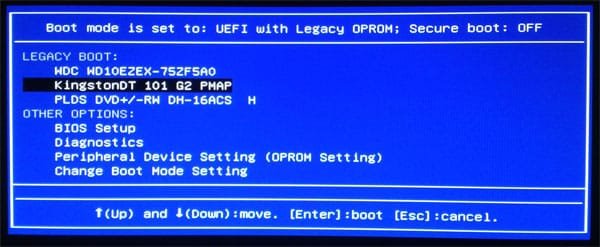
This is a boot menu example, as you can see it has an entry with DVD, yours will be somewhat similar. If your boot menu has UEFI and Legacy you will want the choice under Legacy. Your Win7 DVD will not boot choosing it under UEFI secure boot.

hao3g5a8.jpg

Nic
 

My Computer My Computer

At a glance

Win 10 x64, Linux Lite, Win 7 x64, BlackArch,...
Computer type
PC/Desktop
Computer Manufacturer/Model Number
HP Desktop & Compaq Laptop
OS
Win 10 x64, Linux Lite, Win 7 x64, BlackArch, & Kali
Hard Drives
Samsung 850 Pro 256Gb,
Hitachi HDD 1Tb,
Crucial MX SSD 250Gb
Segate 3Tb USB 3.0 Ext. Backup HDD
Internet Speed
150Mbps dn, 20Mbps up
Antivirus
Avast Free, Malwarebytes Anti-Exploit & Anti-Ransomware
Browser
Firefox, Chrome, Opera, & VPN
Patience irishmike,

You don't need to get into the BIOS that is for changing the boot order and to set it to that.
You want to access Boot Menu, not Boot Options in BIOS.

The Boot Menu will provide you with boot choices, for that time only, there should be no password for that, at least, that I'm aware of currently.

As I stated I believe your boot Menu F key is F12, it may be different so process of elimination works. Each manufacturer selects what F keys will do what so there is no standard set of key does what.

This is a boot menu example, as you can see it has an entry with DVD, yours will be somewhat similar. If your boot menu has UEFI and Legacy you will want the choice under Legacy. Your Win7 DVD will not boot choosing it under UEFI secure boot.

View attachment 405353

Nic


OK then I've been doing it right I guess

Here are the 2 screen I get, but it launches into XP and never boots from disk

NmAq9gN.jpg


rYgrj7i.jpg
 
Last edited:

My Computer My Computer

At a glance

32
Computer type
PC/Desktop
Computer Manufacturer/Model Number
Dell Studio 1555
OS
32
Decided to run diagnostics and got this error


B2k9UhY.jpg
 

My Computer My Computer

At a glance

32
Computer type
PC/Desktop
Computer Manufacturer/Model Number
Dell Studio 1555
OS
32
Your second image you posed pretty much backs up what you've already checked with SeaTools and the program you ran in a previous post, I don't remember the name exactly, but that's irrelevant.
Error code: 2000-046, the drive has a hardware problem.

Your first image you posted is the proper screen Boot Menu, and choice obviously is CD/DVD/CD-RW Drive.

Don't understand why you can't boot the DVD other than a botched burn.
Did you burn it with ImgBurn? ImgBurn is pretty much bulletproof in burning Windows ISO to disk. I've never had an issue with it.

Even with a failed HDD or for that matter, no drive installed whatsoever, you should still be able to boot from the CD/DVD drive.

I'm assuming you downloaded the ISO from TechBench. I would suggest burning the ISO to another DVD with ImgBurn and make sure the verify option is checked. Yea, DVDs can be defective right out of the box but I doubt that is the issue. As I stated previously, it informs you if you have any configurations incorrect, which you shouldn't if you didn't mess with any settings, and ask you if you would like to (whatever the issue is ImgBurn stated) make a change.

If you have an empty USB flash drive (larger than 4GB) laying around you could burn the ISO to it with Rufus. Never had an issue with Rufus either. Accordingly, when you access the boot menu you would choose the USB as the boot device.

Nic
 
Last edited:

My Computer My Computer

At a glance

Win 10 x64, Linux Lite, Win 7 x64, BlackArch,...
Computer type
PC/Desktop
Computer Manufacturer/Model Number
HP Desktop & Compaq Laptop
OS
Win 10 x64, Linux Lite, Win 7 x64, BlackArch, & Kali
Hard Drives
Samsung 850 Pro 256Gb,
Hitachi HDD 1Tb,
Crucial MX SSD 250Gb
Segate 3Tb USB 3.0 Ext. Backup HDD
Internet Speed
150Mbps dn, 20Mbps up
Antivirus
Avast Free, Malwarebytes Anti-Exploit & Anti-Ransomware
Browser
Firefox, Chrome, Opera, & VPN
You'll be looking for a new drive, unfortunately. :(

If you plan on keeping the computer I'd invest in a Solid State Drive (SSD), boot times, access times and performance in general, much faster.
Googling your system specifications, it appears to have a 250GB SATA drive, correct?
I have Samsung 850 Pro 256GB (over $120) and 1TB Hitachi as my data storage drive in my HP desktop.
I have a Crucial MX500 250GB SATA 2.5-inch 7mm Internal SSD ($59.99) in my Compaq laptop.
If I purchased them now, I would opt for at least a 512 GB drive, albeit more expensive.

Here's a link to Tom's Hardware excellent review of all computer hardware.

The Best Cheap SSDs of 2018 PC Mag take your time and read through the article.

My opinion, any major brand is acceptable, they all provide warranties and you won't notice much if any difference is speed on your machine.
 

My Computer My Computer

At a glance

Win 10 x64, Linux Lite, Win 7 x64, BlackArch,...
Computer type
PC/Desktop
Computer Manufacturer/Model Number
HP Desktop & Compaq Laptop
OS
Win 10 x64, Linux Lite, Win 7 x64, BlackArch, & Kali
Hard Drives
Samsung 850 Pro 256Gb,
Hitachi HDD 1Tb,
Crucial MX SSD 250Gb
Segate 3Tb USB 3.0 Ext. Backup HDD
Internet Speed
150Mbps dn, 20Mbps up
Antivirus
Avast Free, Malwarebytes Anti-Exploit & Anti-Ransomware
Browser
Firefox, Chrome, Opera, & VPN
Sounds like a bad burn to me too.

Create another install dvd or usb stick.

But in order to do that you need a good ISO file.

This link should work to download a proper ISO file of W7 Ultimate.

TechBench by WZT (v4.1.1)

And if you have no data to save on the hard drive, delete any/all partitions down to unallocated space and then just click next.

Step 6 and step 7

Clean Install Windows 7

Getting a SSD is a great suggestion

And right now a 500GB Samsung EVO is on sale for $99.99 :-) And will drastically reduce the heat of the entire laptop.

SSD 860 EVO 2.5" SATA III 500GB Memory & Storage - MZ-76E500B/AM | Samsung US
 
Last edited:

My Computer My Computer

At a glance

Windows 10 Pro x64Intel Core i7 6700KGSkill TridentZ RGB 16GB 3600 16-16-16-36EVGA GTX 980 Ti SC x2
Computer type
PC/Desktop
Computer Manufacturer/Model Number
Skylake Special #666
OS
Windows 10 Pro x64
CPU
Intel Core i7 6700K
Motherboard
Asus Sabertooth Z170 Mark 1
Memory
GSkill TridentZ RGB 16GB 3600 16-16-16-36
Graphics Card(s)
EVGA GTX 980 Ti SC x2
Sound Card
Realtek High Definition
Monitor(s) Displays
AOC G2460PG
Screen Resolution
1920 x 1080 144Hz
Hard Drives
Samsung 860 Pro 256GB, Seagate Barracuda 4TB x2
PSU
EVGA 1000 P2, EVGA White Custom Braided Cables
Case
Corsair Vengeance C70 Gunmetal Black
Cooling
Corsair H100i v2, Corsair ML120 x2, Thermal Grizzly Kryonaut
Keyboard
Logitech G910 Orion Spectrum
Mouse
Logitech G700s
Internet Speed
Verizon Fios Quantum Gateway 75/75
Antivirus
Windows Defender, Malwarebytes Free 3.8.3
Browser
Chrome
Other Info
Corsair SP120 x4, LG Blu-ray Drive, Durabrand HT-395 100 Watt Dolby Digital Amp, Corsair H2100 Wireless 7.1 Headset
You'll be looking for a new drive, unfortunately. :(

If you plan on keeping the computer I'd invest in a Solid State Drive (SSD), boot times, access times and performance in general, much faster.
Googling your system specifications, it appears to have a 250GB SATA drive, correct?
I have Samsung 850 Pro 256GB (over $120) and 1TB Hitachi as my data storage drive in my HP desktop.
I have a Crucial MX500 250GB SATA 2.5-inch 7mm Internal SSD ($59.99) in my Compaq laptop.
If I purchased them now, I would opt for at least a 512 GB drive, albeit more expensive.

Here's a link to Tom's Hardware excellent review of all computer hardware.

The Best Cheap SSDs of 2018 PC Mag take your time and read through the article.

My opinion, any major brand is acceptable, they all provide warranties and you won't notice much if any difference is speed on your machine.


TY


I ran the Rufus program, created an image of Win 7 on my USB, everything worked great but but for 1 hour 30 minutes the scree shows "Windows 7 is finalizing you settings"


I know this is way to long for this step so I am just going to halt everything and do some hard drive shopping


What to do about this stuck step in the install process? Just shut it down?
 

My Computer My Computer

At a glance

32
Computer type
PC/Desktop
Computer Manufacturer/Model Number
Dell Studio 1555
OS
32
Great added recommendations/suggestions AddRAM

Yea, since your drive is shot, shut it down with power button! If you have sensitive info on it you might want to wipe it!
How to Wipe a Hard Drive

Wishing you the BEST OF LUCK!

Nic
 

My Computer My Computer

At a glance

Win 10 x64, Linux Lite, Win 7 x64, BlackArch,...
Computer type
PC/Desktop
Computer Manufacturer/Model Number
HP Desktop & Compaq Laptop
OS
Win 10 x64, Linux Lite, Win 7 x64, BlackArch, & Kali
Hard Drives
Samsung 850 Pro 256Gb,
Hitachi HDD 1Tb,
Crucial MX SSD 250Gb
Segate 3Tb USB 3.0 Ext. Backup HDD
Internet Speed
150Mbps dn, 20Mbps up
Antivirus
Avast Free, Malwarebytes Anti-Exploit & Anti-Ransomware
Browser
Firefox, Chrome, Opera, & VPN
Great added recommendations/suggestions AddRAM

Yea, since your drive is shot, shut it down with power button! If you have sensitive info on it you might want to wipe it!
How to Wipe a Hard Drive

Wishing you the BEST OF LUCK!

Nic


Got my 500 GB HDD today. Said it had Win 10 on it, which I do not want.


here is the screen I see when doing a clean Win 7 install, should I delete all of them and have only partition before install?


gCBbKZT.jpg
 

My Computer My Computer

At a glance

32
Computer type
PC/Desktop
Computer Manufacturer/Model Number
Dell Studio 1555
OS
32
Go to advanced - delete ALL partitions - create new.
It will create two partitions:
- MS reserved - 120M - RAW (unformated)
- Big NTFS
Choose to install on the big NTFS

Clean Install Windows 7

You should have bought a small SSD (128G) for Windows and Programs and a HDD for data.
To install a second drive on a laptop, replace the ODD (CD/DVD) buy a caddy.
VANTEC MRK-HC127A-BK SSD/HDD Aluminum Caddy for 12.7mm ODD Laptop Drive Bay - Newegg.com

You have no idea what a SSD can do for an old laptop.
 

My Computers My Computers

  • At a glance

    Windows 7 HP 64i5 6600K - 800MHz to 4200MHz4+4G GSkill DDR4 3000IG - Intel 530
    Computer type
    PC/Desktop
    Computer Manufacturer/Model Number
    custom build
    OS
    Windows 7 HP 64
    CPU
    i5 6600K - 800MHz to 4200MHz
    Motherboard
    GA-Z170-HD3P
    Memory
    4+4G GSkill DDR4 3000
    Graphics Card(s)
    IG - Intel 530
    Monitor(s) Displays
    Samsung 226BW
    Screen Resolution
    1680x1050
    Hard Drives
    (1) -1 SM951 – 128GB M.2 AHCI PCIe SSD drive for Windows 7 and Lubuntu
    (2) -1 WD SATA 3 - 1T for Data
    (3) -1 WD SATA 3 - 1T for backup
    PSU
    Thermaltake 450W TR2 gold
    Keyboard
    Old and good Chicony mechanical keyboard
    Mouse
    Logitech mX performance - 9 buttons (had to disable some)
    Internet Speed
    500Mb/s
    Browser
    Firefox 64
    Other Info
    TinyWall firewall
  • At a glance

    Windows 7 Proi7-4500U 800MHz to 3.0GHz(4+4)G DDR3 1600IG intel 4400 + NVIDIA GeForce GT 745M
    Computer type
    Laptop
    System Manufacturer/Model Number
    Asus Q550LF
    OS
    Windows 7 Pro
    CPU
    i7-4500U 800MHz to 3.0GHz
    Motherboard
    Asus Q550LF
    Memory
    (4+4)G DDR3 1600
    Graphics Card(s)
    IG intel 4400 + NVIDIA GeForce GT 745M
    Sound Card
    Realtek
    Monitor(s) Displays
    LG Display LP156WF4-SPH1
    Screen Resolution
    1920 x 1080
    Hard Drives
    BX500 120G SSD for Windows and programs +
    1T HDD for data
    Internet Speed
    500 Mb/s
    Browser
    Firefox
    Other Info
    TinyWall firewall
Where did you get a hard drive or ssd that said it already had W10 on it ?

What exactly did you buy/get ?
 

My Computer My Computer

At a glance

Windows 10 Pro x64Intel Core i7 6700KGSkill TridentZ RGB 16GB 3600 16-16-16-36EVGA GTX 980 Ti SC x2
Computer type
PC/Desktop
Computer Manufacturer/Model Number
Skylake Special #666
OS
Windows 10 Pro x64
CPU
Intel Core i7 6700K
Motherboard
Asus Sabertooth Z170 Mark 1
Memory
GSkill TridentZ RGB 16GB 3600 16-16-16-36
Graphics Card(s)
EVGA GTX 980 Ti SC x2
Sound Card
Realtek High Definition
Monitor(s) Displays
AOC G2460PG
Screen Resolution
1920 x 1080 144Hz
Hard Drives
Samsung 860 Pro 256GB, Seagate Barracuda 4TB x2
PSU
EVGA 1000 P2, EVGA White Custom Braided Cables
Case
Corsair Vengeance C70 Gunmetal Black
Cooling
Corsair H100i v2, Corsair ML120 x2, Thermal Grizzly Kryonaut
Keyboard
Logitech G910 Orion Spectrum
Mouse
Logitech G700s
Internet Speed
Verizon Fios Quantum Gateway 75/75
Antivirus
Windows Defender, Malwarebytes Free 3.8.3
Browser
Chrome
Other Info
Corsair SP120 x4, LG Blu-ray Drive, Durabrand HT-395 100 Watt Dolby Digital Amp, Corsair H2100 Wireless 7.1 Headset
Hi irishmike,

Got my 500 GB HDD today. Said it had Win 10 on it, which I do not want.
Is it a new HDD?
If it is second hand, then format it and install Windows 7!
If so, HDD's don't come pre-installed with Windows, whatever version. Normally the manufacturer only puts on a free trial of something or thier own utilities suite or something like that!

I hope this helps!
 

My Computer My Computer

At a glance

Win 7 HP SP1 64-bit Vista HB SP2 32-bit Linux...Intel(R) Pentium(R) CPU P6200 @ 2.13GHz4.00 GBIntel(R) Graphics Media Accelerator HD
Computer type
Laptop
Computer Manufacturer/Model Number
Fujitsu LIFEBOOK
OS
Win 7 HP SP1 64-bit Vista HB SP2 32-bit Linux Mint 18.3
CPU
Intel(R) Pentium(R) CPU P6200 @ 2.13GHz
Motherboard
FUJITSU FJNBB06
Memory
4.00 GB
Graphics Card(s)
Intel(R) Graphics Media Accelerator HD
Sound Card
[1] Realtek High Definition Audio [2] Intel(R) Display Audio
Screen Resolution
1366 x 768 x 32 bits (4294967296 colors) @ 59 Hz
Hard Drives
TOSHIBA MK5076GSX
Antivirus
AVG FREE
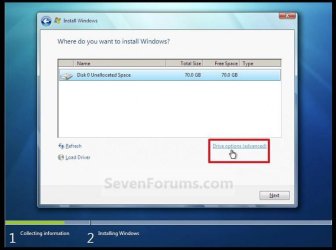
Yes you should delete ALL the partitions, all you want to see is unallocated space, then click next. Ignore the red square in this picture, just click next.

I already posted the link to clean install W7 in reply #33
 

Attachments

  • Capture.JPG
    Capture.JPG
    45.7 KB · Views: 0

My Computer My Computer

At a glance

Windows 10 Pro x64Intel Core i7 6700KGSkill TridentZ RGB 16GB 3600 16-16-16-36EVGA GTX 980 Ti SC x2
Computer type
PC/Desktop
Computer Manufacturer/Model Number
Skylake Special #666
OS
Windows 10 Pro x64
CPU
Intel Core i7 6700K
Motherboard
Asus Sabertooth Z170 Mark 1
Memory
GSkill TridentZ RGB 16GB 3600 16-16-16-36
Graphics Card(s)
EVGA GTX 980 Ti SC x2
Sound Card
Realtek High Definition
Monitor(s) Displays
AOC G2460PG
Screen Resolution
1920 x 1080 144Hz
Hard Drives
Samsung 860 Pro 256GB, Seagate Barracuda 4TB x2
PSU
EVGA 1000 P2, EVGA White Custom Braided Cables
Case
Corsair Vengeance C70 Gunmetal Black
Cooling
Corsair H100i v2, Corsair ML120 x2, Thermal Grizzly Kryonaut
Keyboard
Logitech G910 Orion Spectrum
Mouse
Logitech G700s
Internet Speed
Verizon Fios Quantum Gateway 75/75
Antivirus
Windows Defender, Malwarebytes Free 3.8.3
Browser
Chrome
Other Info
Corsair SP120 x4, LG Blu-ray Drive, Durabrand HT-395 100 Watt Dolby Digital Amp, Corsair H2100 Wireless 7.1 Headset
Back
Top