Unable to open google search or facebook

goodlad

New member
Member
VIP
Local time
1:43 PM
Messages
239
To make it short - I have the latest FF & Chrome version installed.

Everything was fine until yesterday evening, suddenly when Facebook stopped opening up on FF, thought it was their usual downtime thing & tried to open the site after 4-5 hrs, still same issue - I get an blank page.

*I use FB for work purposes only.


Thought of googling if I was the only one having an issue - google.com would open but the search wouldn't show up - its also giving an blank page.

Thought probably.. FF screwed up something - so used Chrome - for FB same prob but at least google showed up results.

Tried hard refresh, scanned the entire system via Bitdefender, malwarebytes, sfc scannow, used CCcleaner - no change.

But I had seamonkey (which uses FF 54.0.3 if I remember correctly for development), so thought of giving it an try - bingo, FB opens, so does google. After finishing my work, restarted my lappy - after restart - everything seemed to work normal.. Thought, glad at least restart fixed..


went to bed, kept lappy in sleep mode, now when I am back - same old problem repeating - SeaMonkey working like an charm..

I'm not sure what to make out of it, if it was an Firewall or IP issue - Seamonkey shouldn't open these 2 sites either (rest of the sites are loading fine). I tried disabling addons too still no change. Tried VPN, no change.

Can someone point me, what else I could look into, if it was only FF - I thought of approaching FF support forums but the prob is also on Chrome as well - both actually have 2 different FB accounts, my FB accounts aren't locked either - as I can open them without an issue in Sea Monkey,.
 

My Computer My Computer

At a glance

windows 7 ultimate x32T6670,8GB DDR3
Computer type
Laptop
Computer Manufacturer/Model Number
DELL
OS
windows 7 ultimate x32
CPU
T6670,
Motherboard
INTEL CORE 2 DUO, 0TFXK9
Memory
8GB DDR3
Screen Resolution
1366*768
Hard Drives
512GB SSD
Mouse
Logitech M165 w/sidebuttons
Internet Speed
30-150 mb/s
Antivirus
Bitdefender
Browser
FF, Opera GX
Hi goodlad,

To your knowledge, were there any updates or software updates done prior to this happening?
Have you tried clearing the cache for FF and Chrome?
Have you tried a previous restore point?

I hope this helps!
 

My Computer My Computer

At a glance

Win 7 HP SP1 64-bit Vista HB SP2 32-bit Linux...Intel(R) Pentium(R) CPU P6200 @ 2.13GHz4.00 GBIntel(R) Graphics Media Accelerator HD
Computer type
Laptop
Computer Manufacturer/Model Number
Fujitsu LIFEBOOK
OS
Win 7 HP SP1 64-bit Vista HB SP2 32-bit Linux Mint 18.3
CPU
Intel(R) Pentium(R) CPU P6200 @ 2.13GHz
Motherboard
FUJITSU FJNBB06
Memory
4.00 GB
Graphics Card(s)
Intel(R) Graphics Media Accelerator HD
Sound Card
[1] Realtek High Definition Audio [2] Intel(R) Display Audio
Screen Resolution
1366 x 768 x 32 bits (4294967296 colors) @ 59 Hz
Hard Drives
TOSHIBA MK5076GSX
Antivirus
AVG FREE
Hi goodlad,

To your knowledge, were there any updates or software updates done prior to this happening?
Have you tried clearing the cache for FF and Chrome?
Have you tried a previous restore point?

I hope this helps!


Hey Paul, thanks for the reply :-)


I had updated my browsers on the very date the updates were released - FF is on 62.0 for a while now, chrome latest update released today & I just updated it - I tried accessing FB before update & after update as well - no change.

yep I cleared cache using CClearner last night, along with logs & other usual stuffs in CC - kept only the cookies, history intact.

Strangely for a short while FF was able to access FB, after I raised the question over here - may be 10 mins or so, then again - things back to normal. The only updates I did was Bitdefender but if it was the one causing issues, it should've blocked my seamonkey as well :o

no I haven't tried restore point, I'm not sure if I even have it enabled though. I had disabled it during windows updates, which forced upgrade to win10.
 

My Computer My Computer

At a glance

windows 7 ultimate x32T6670,8GB DDR3
Computer type
Laptop
Computer Manufacturer/Model Number
DELL
OS
windows 7 ultimate x32
CPU
T6670,
Motherboard
INTEL CORE 2 DUO, 0TFXK9
Memory
8GB DDR3
Screen Resolution
1366*768
Hard Drives
512GB SSD
Mouse
Logitech M165 w/sidebuttons
Internet Speed
30-150 mb/s
Antivirus
Bitdefender
Browser
FF, Opera GX
Hi goodlad,

I know this is a shot in the dark, but, have you checked your Firewall settings?
Did you try accessing FB via a favourites entry?
Have you tried entering FB in the browser and then clicking the link?

I hope this helps!
 

My Computer My Computer

At a glance

Win 7 HP SP1 64-bit Vista HB SP2 32-bit Linux...Intel(R) Pentium(R) CPU P6200 @ 2.13GHz4.00 GBIntel(R) Graphics Media Accelerator HD
Computer type
Laptop
Computer Manufacturer/Model Number
Fujitsu LIFEBOOK
OS
Win 7 HP SP1 64-bit Vista HB SP2 32-bit Linux Mint 18.3
CPU
Intel(R) Pentium(R) CPU P6200 @ 2.13GHz
Motherboard
FUJITSU FJNBB06
Memory
4.00 GB
Graphics Card(s)
Intel(R) Graphics Media Accelerator HD
Sound Card
[1] Realtek High Definition Audio [2] Intel(R) Display Audio
Screen Resolution
1366 x 768 x 32 bits (4294967296 colors) @ 59 Hz
Hard Drives
TOSHIBA MK5076GSX
Antivirus
AVG FREE
Hi Goodlad,


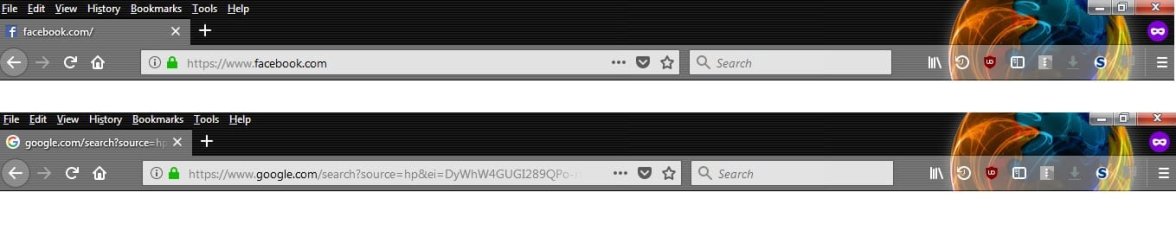
In the browser address bar, are the site certificates (google and FB) still showing as valid?
 

My Computer My Computer

At a glance

Windows 7 x64, Vista x64, 8.1 smartphoneIntel E8400 65W 64-bitDDR2 2 x 2GB, 1GB x 2XFX Radeon HD5750
Computer type
PC/Desktop
OS
Windows 7 x64, Vista x64, 8.1 smartphone
CPU
Intel E8400 65W 64-bit
Motherboard
Gigabyte EP45-UD3LR
Memory
DDR2 2 x 2GB, 1GB x 2
Graphics Card(s)
XFX Radeon HD5750
Sound Card
AMD High Definition Audio; Realtek High Definition Audio
Monitor(s) Displays
iiyama prolite X2377HDS
Screen Resolution
1920 x 1080
Hard Drives
500GB 7200 rpm Seagate ST3500413AS 16MB, 500GB 5400 rpm Toshiba MQ02ABF050H 32MB, 200GB 7200 rpm Seagate ST3200820AS 8MB, 2TB 7200 rpm Western Digital WD20EZRX 64MB
PSU
Enermax Liberty Modular
Case
Antec P193 Midi Tower
Keyboard
Mionix ZIBAL 60
Mouse
Razer USB 2.0 Diamondback Mouse or Huion Graphics Tablet
Browser
Internet Explorer, Lunascape, Firefox, Opera, Avast Safezone
Hi goodlad,

I know this is a shot in the dark, but, have you checked your Firewall settings?
Did you try accessing FB via a favourites entry?
Have you tried entering FB in the browser and then clicking the link?

I hope this helps!

Paul I'm not sure accessing FB via favorites/bookmarks would help, as I can't see the site at the moment, I have to bookmark an blank page

In the BD firewall, its showing up as - "All/Any - for all options" access to both Firefox & Chrome

I have tried accessing the link from duckduckgo but not luck, it either keeps on loading or shows the blank page as earlier.
 

My Computer My Computer

At a glance

windows 7 ultimate x32T6670,8GB DDR3
Computer type
Laptop
Computer Manufacturer/Model Number
DELL
OS
windows 7 ultimate x32
CPU
T6670,
Motherboard
INTEL CORE 2 DUO, 0TFXK9
Memory
8GB DDR3
Screen Resolution
1366*768
Hard Drives
512GB SSD
Mouse
Logitech M165 w/sidebuttons
Internet Speed
30-150 mb/s
Antivirus
Bitdefender
Browser
FF, Opera GX
Hi Goodlad,


In the browser address bar, are the site certificates (google and FB) still showing as valid?


it does look like it, here are my address bar screenshots for both fb & google, both these were showing blank pages, that's the white thing underneath the address bar - not part of paint :geek:
 

Attachments

  • sshot.jpg
    sshot.jpg
    42.5 KB · Views: 0

My Computer My Computer

At a glance

windows 7 ultimate x32T6670,8GB DDR3
Computer type
Laptop
Computer Manufacturer/Model Number
DELL
OS
windows 7 ultimate x32
CPU
T6670,
Motherboard
INTEL CORE 2 DUO, 0TFXK9
Memory
8GB DDR3
Screen Resolution
1366*768
Hard Drives
512GB SSD
Mouse
Logitech M165 w/sidebuttons
Internet Speed
30-150 mb/s
Antivirus
Bitdefender
Browser
FF, Opera GX
Back
Top