Solved External USB 3.0 vs Internal SATA II ???

BuckSkin

Member
Power User
VIP
Local time
11:39 AM
Messages
523
Machine is DELL Optiplex 780 Tower, Windows 7 Pro, 5-port USB 3.0 card, 4-port front panel USB 3.0.
Two internal HDDs; one is O/S and Miscellaneous documents; the other is 2TB pictures only.

I am getting close to running out of storage space on my internal 2TB HDD.
All four of my internal SATA ports are occupied, as are the PCIe ports.
I have two unused PCI ports.

Although it would be more convenient and seamless to just up the size of my pictures HDD, I dislike the idea of a HDD of more capacity = just more to lose when it fails (I do meticulously back things onto other ext. HDDs).
Also, it has been my observation that, once you go past 2TB, the bigger the HDD the bigger the percentage of negative early-failure reviews.

I have plenty of USB 3.0 ports plus two self-powered 7-port USB 3.0 hubs.

Which is my better option for more working pictures storage, install one of these 6-port SATA II PCI cards, or go with a USB-connected external enclosure ?

https://www.amazon.com/gp/product/B002PX9BX2/ref=ask_ql_qh_dp_hza

Thanks for reading and all help is appreciated.
 

My Computer My Computer

At a glance

Windows 7 Pro x64Intel Core Two Duo E8600 3.33 ghz8GBGigabyte Radeon R7 240
Computer type
PC/Desktop
Computer Manufacturer/Model Number
Dell Optiplex 780m "mini-tower"
OS
Windows 7 Pro x64
CPU
Intel Core Two Duo E8600 3.33 ghz
Motherboard
Whatever DELL put in it
Memory
8GB
Graphics Card(s)
Gigabyte Radeon R7 240
Monitor(s) Displays
HP 2159m
PSU
750 Watt Corsair CX750
Keyboard
Logitech Wireless
Mouse
Logitech Wireless
Browser
Chrome, Firefox, IE
I would just replace the 2TB drive with a larger one. There is nothing wrong with using a larger HDD as long as you have it properly backed up.
 

My Computer My Computer

At a glance

Win 7 Ultimate 64 bitIntel i7-3930KKingston HyperX Genesis 32GB Kit (8x4GB Modul...MSI R7850 Twin Frozr 2GD5/OC Radeon HD 7850 2...
Computer type
PC/Desktop
Computer Manufacturer/Model Number
Custom Build
OS
Win 7 Ultimate 64 bit
CPU
Intel i7-3930K
Motherboard
ASUS P9X79 WS
Memory
Kingston HyperX Genesis 32GB Kit (8x4GB Modules) 1600MHz DDR
Graphics Card(s)
MSI R7850 Twin Frozr 2GD5/OC Radeon HD 7850 2GB 256-bit GDDR
Sound Card
Asus Xonar Essence STX
Monitor(s) Displays
3x Asus VG248QE 24", Vizio 32" TV
Screen Resolution
1920 x 1080, ?
Hard Drives
Samsung 128GB 840 Pro SSD (1),
Samsung 4TB 850 EVO SSDs (4)
Samsung 4TB 850 EVO SSDs (16) external backup drives used in 2.5" hot swap bays in the computer.
PSU
Corsair HX750w
Case
Antec Two Hundred v2 (modified)
Cooling
Cooler Master GeminII S524 120mm (fan replaced with a 140mm)
Keyboard
Logitech G510s
Mouse
Logitech M525 (two in use)
Internet Speed
=< 32Mbps down, 8Mbps up
Antivirus
AVAST!, MBAM, SAS, Spybot S&D (all but MBAM free) Glary Util
Browser
IE11
Other Info
LSI 9211-8i HBA card (8 SATA III ports), 2.5" & 3.5" Hot Swap Bays, HooToo HT-CR001 PCI-E to USB 3.0 Internal Hub + 6 Slot Card Reader, and LG Model CH12LS28 BD-ROM Optical Drive. Also, ScanSnap S1500 ADF duplexing scanner, Canon 9000F flat bed scanner, Corsair SP2500 2.1 speakers, Samsung CLP 415nw laser color printer, Cyberpower PP2200SW UPS
If you're worried about larger HDDs failing, then I'd go the SATA II route. USB can and will fail at times. But USB 3.0 would be faster since it supports up to 5 Gbps, but I've never encountered that speed myself.

Do you even have space in the PC to accommodate another HDD with a PCI SATA II card?

The better solution would be to get a 4TB HDD and another 4TB HDD for backups. I've heard great things about Hitachi with large HDDs and their failure rate. And I've read that HDD repair and data recovery services don't often see Hitachi's. Though that could also be due to people simply not buying Hitachi drives. Dell used to use them in their laptops. I have a 1TB Hitachi myself and it's about 3 years old now and still going strong. * knocks on plastic* Like you, I have a backup strategy as well with all my computers and HDDs. Some data is even backed up and encrypted to Amazon S3 and on DVD/RW. Been meaning to get a nice high quality Blu-ray burner to burn data to 100 GB disks. I just don't trust flash-based or mechanical media for really, REALLY important data.

Here's some drive stats: Enterprise vs. Consumer Hard Drives: 2018 Hard Drive Performance Review
 

My Computer My Computer

At a glance

Windows 7 Ultimate x64
Computer type
PC/Desktop
OS
Windows 7 Ultimate x64
Room inside the case and PCI slots is no problem.

Another poor man's reason that I have against the larger HDDs is that if anything fails it all fails and is twice the cost to get back in action again.

If I have a ten gallon bucket and the bottom falls out of it, I have lost the bucket and ten gallons; whereas, if I have two five gallon buckets and the bottom falls out of one of them, I still have one serviceable bucket and half of my ten gallons.
 

My Computer My Computer

At a glance

Windows 7 Pro x64Intel Core Two Duo E8600 3.33 ghz8GBGigabyte Radeon R7 240
Computer type
PC/Desktop
Computer Manufacturer/Model Number
Dell Optiplex 780m "mini-tower"
OS
Windows 7 Pro x64
CPU
Intel Core Two Duo E8600 3.33 ghz
Motherboard
Whatever DELL put in it
Memory
8GB
Graphics Card(s)
Gigabyte Radeon R7 240
Monitor(s) Displays
HP 2159m
PSU
750 Watt Corsair CX750
Keyboard
Logitech Wireless
Mouse
Logitech Wireless
Browser
Chrome, Firefox, IE
Room inside the case and PCI slots is no problem.

Another poor man's reason that I have against the larger HDDs is that if anything fails it all fails and is twice the cost to get back in action again.

If I have a ten gallon bucket and the bottom falls out of it, I have lost the bucket and ten gallons; whereas, if I have two five gallon buckets and the bottom falls out of one of them, I still have one serviceable bucket and half of my ten gallons.

If you get an HDD with a good warranty, you don't have to worry about the cost of replacing it if it fails while under warranty. There are plenty of good HDDs with five year warranties.

Again, if you have your data backed up, you will not lose any, no matter what size the drive is. When ever you add a drive to your computer, you should budget for three drives: one for the computer, one for an onsite backup, and one for an offsite backup (even just one backup drive, while not ideal, is still better than no backups).
 

My Computer My Computer

At a glance

Win 7 Ultimate 64 bitIntel i7-3930KKingston HyperX Genesis 32GB Kit (8x4GB Modul...MSI R7850 Twin Frozr 2GD5/OC Radeon HD 7850 2...
Computer type
PC/Desktop
Computer Manufacturer/Model Number
Custom Build
OS
Win 7 Ultimate 64 bit
CPU
Intel i7-3930K
Motherboard
ASUS P9X79 WS
Memory
Kingston HyperX Genesis 32GB Kit (8x4GB Modules) 1600MHz DDR
Graphics Card(s)
MSI R7850 Twin Frozr 2GD5/OC Radeon HD 7850 2GB 256-bit GDDR
Sound Card
Asus Xonar Essence STX
Monitor(s) Displays
3x Asus VG248QE 24", Vizio 32" TV
Screen Resolution
1920 x 1080, ?
Hard Drives
Samsung 128GB 840 Pro SSD (1),
Samsung 4TB 850 EVO SSDs (4)
Samsung 4TB 850 EVO SSDs (16) external backup drives used in 2.5" hot swap bays in the computer.
PSU
Corsair HX750w
Case
Antec Two Hundred v2 (modified)
Cooling
Cooler Master GeminII S524 120mm (fan replaced with a 140mm)
Keyboard
Logitech G510s
Mouse
Logitech M525 (two in use)
Internet Speed
=< 32Mbps down, 8Mbps up
Antivirus
AVAST!, MBAM, SAS, Spybot S&D (all but MBAM free) Glary Util
Browser
IE11
Other Info
LSI 9211-8i HBA card (8 SATA III ports), 2.5" & 3.5" Hot Swap Bays, HooToo HT-CR001 PCI-E to USB 3.0 Internal Hub + 6 Slot Card Reader, and LG Model CH12LS28 BD-ROM Optical Drive. Also, ScanSnap S1500 ADF duplexing scanner, Canon 9000F flat bed scanner, Corsair SP2500 2.1 speakers, Samsung CLP 415nw laser color printer, Cyberpower PP2200SW UPS
If you get an HDD with a good warranty, you don't have to worry about the cost of replacing it if it fails while under warranty. There are plenty of good HDDs with five year warranties.

I appreciate the advice and will consider it; however, I have had very little real world luck with warranties, especially with computer/electronics warranties; and, the bigger the company, the more impossible it is to get actual satisfaction; once they get your money, they aim to keep it.
In my own experience, a warranty is no better than the thirty-day return window; once that thirty days is up, you are on your own.
I am not saying that others haven't had wonderful warranty experiences, just that that has never been the case with me.
 

My Computer My Computer

At a glance

Windows 7 Pro x64Intel Core Two Duo E8600 3.33 ghz8GBGigabyte Radeon R7 240
Computer type
PC/Desktop
Computer Manufacturer/Model Number
Dell Optiplex 780m "mini-tower"
OS
Windows 7 Pro x64
CPU
Intel Core Two Duo E8600 3.33 ghz
Motherboard
Whatever DELL put in it
Memory
8GB
Graphics Card(s)
Gigabyte Radeon R7 240
Monitor(s) Displays
HP 2159m
PSU
750 Watt Corsair CX750
Keyboard
Logitech Wireless
Mouse
Logitech Wireless
Browser
Chrome, Firefox, IE
I had a similar problem with my storage of photographs, and a similar philosophy about capacity/reliability.

So, what I did was to buy a 5.25" Bay Internal HDD Hot Swap Caddie for my computer. I can now easily swap out HDD and install different HDD according to my personal needs.

Amazon.co.uk: hot swap hard drive caddy
 

My Computer My Computer

At a glance

Windows 7 x64, Vista x64, 8.1 smartphoneIntel E8400 65W 64-bitDDR2 2 x 2GB, 1GB x 2XFX Radeon HD5750
Computer type
PC/Desktop
OS
Windows 7 x64, Vista x64, 8.1 smartphone
CPU
Intel E8400 65W 64-bit
Motherboard
Gigabyte EP45-UD3LR
Memory
DDR2 2 x 2GB, 1GB x 2
Graphics Card(s)
XFX Radeon HD5750
Sound Card
AMD High Definition Audio; Realtek High Definition Audio
Monitor(s) Displays
iiyama prolite X2377HDS
Screen Resolution
1920 x 1080
Hard Drives
500GB 7200 rpm Seagate ST3500413AS 16MB, 500GB 5400 rpm Toshiba MQ02ABF050H 32MB, 200GB 7200 rpm Seagate ST3200820AS 8MB, 2TB 7200 rpm Western Digital WD20EZRX 64MB
PSU
Enermax Liberty Modular
Case
Antec P193 Midi Tower
Keyboard
Mionix ZIBAL 60
Mouse
Razer USB 2.0 Diamondback Mouse or Huion Graphics Tablet
Browser
Internet Explorer, Lunascape, Firefox, Opera, Avast Safezone
I appreciate the advice and will consider it; however, I have had very little real world luck with warranties, especially with computer/electronics warranties; and, the bigger the company, the more impossible it is to get actual satisfaction; once they get your money, they aim to keep it.
In my own experience, a warranty is no better than the thirty-day return window; once that thirty days is up, you are on your own.
I am not saying that others haven't had wonderful warranty experiences, just that that has never been the case with me.

Buy from Western Digital (WD) or HGST (which is owned by WD). I've had to invoke their warranty only once. I had a WD Green start throwing reallocation errors shortly before the warranty ran out and they quickly replaced it with a refurbished drive. Stick with WD or HGST drives that have five year warranties. HGST especially has a good reputation.
 

My Computer My Computer

At a glance

Win 7 Ultimate 64 bitIntel i7-3930KKingston HyperX Genesis 32GB Kit (8x4GB Modul...MSI R7850 Twin Frozr 2GD5/OC Radeon HD 7850 2...
Computer type
PC/Desktop
Computer Manufacturer/Model Number
Custom Build
OS
Win 7 Ultimate 64 bit
CPU
Intel i7-3930K
Motherboard
ASUS P9X79 WS
Memory
Kingston HyperX Genesis 32GB Kit (8x4GB Modules) 1600MHz DDR
Graphics Card(s)
MSI R7850 Twin Frozr 2GD5/OC Radeon HD 7850 2GB 256-bit GDDR
Sound Card
Asus Xonar Essence STX
Monitor(s) Displays
3x Asus VG248QE 24", Vizio 32" TV
Screen Resolution
1920 x 1080, ?
Hard Drives
Samsung 128GB 840 Pro SSD (1),
Samsung 4TB 850 EVO SSDs (4)
Samsung 4TB 850 EVO SSDs (16) external backup drives used in 2.5" hot swap bays in the computer.
PSU
Corsair HX750w
Case
Antec Two Hundred v2 (modified)
Cooling
Cooler Master GeminII S524 120mm (fan replaced with a 140mm)
Keyboard
Logitech G510s
Mouse
Logitech M525 (two in use)
Internet Speed
=< 32Mbps down, 8Mbps up
Antivirus
AVAST!, MBAM, SAS, Spybot S&D (all but MBAM free) Glary Util
Browser
IE11
Other Info
LSI 9211-8i HBA card (8 SATA III ports), 2.5" & 3.5" Hot Swap Bays, HooToo HT-CR001 PCI-E to USB 3.0 Internal Hub + 6 Slot Card Reader, and LG Model CH12LS28 BD-ROM Optical Drive. Also, ScanSnap S1500 ADF duplexing scanner, Canon 9000F flat bed scanner, Corsair SP2500 2.1 speakers, Samsung CLP 415nw laser color printer, Cyberpower PP2200SW UPS
Also, it has been my observation that, once you go past 2TB, the bigger the HDD the bigger the percentage of negative early-failure reviews.

I doubt this is true of home use storage for your pictures.

Generally these folks are using them for data centers, security etc. and who knows what they are doing with them. How many times they'd been formatted and or written over. I've seen people do some stupid stuff, and god knows I've done some myself. Just on forums alone I've seen people destroy drives right in front of me. One guy had a drive that showed good, kept formatting it due to inexperience installing windows. He said fifty times he formatted it after botched installs, and it died. Even with a new drive you might get a bad one but that's just how it goes. All the happy people and not the ones writing these reviews though they do write them, mostly it is people that are unhappy. Best we can do is make an informative guess to buy the best one we see with these reviews. WD Seems to be a fine brand for me.

If you do get a new drive I would copy over chunks of the data a little at a time to keep the heat down on the drive. Is this a scientific approach...No, but it seems like a good idea to me as heat is not good for these things. Same thing with my USB's. When I get a new one I transfer the data in chunks so it don't get to hot all at once.

I'm not real computer savvy but I would be more worried about exceeding the power usage on this thing.
 

My Computer My Computer

At a glance

Windows 7 Home Premium 64bitAMD A8-3520M6.00GB DDR3 @ 674MHz (9-9-9-24)512MB ATI AMD Radeon HD 6620G
Computer type
Laptop
Computer Manufacturer/Model Number
HP Pavilion dv7-6c23cl
OS
Windows 7 Home Premium 64bit
CPU
AMD A8-3520M
Motherboard
Hewlett-Packard 180B (Socket FS1)
Memory
6.00GB DDR3 @ 674MHz (9-9-9-24)
Graphics Card(s)
512MB ATI AMD Radeon HD 6620G
Sound Card
IDT High Definition Audio CODEC
Monitor(s) Displays
Generic PnP Monitor
Screen Resolution
(1600x900@60Hz)
Hard Drives
Samsung 850 EVO 250GB SSD
Mouse
Logitec M525
Internet Speed
30-75Mbps
Antivirus
Avast Free, Unfortunately
Browser
Google Chrome, Firefox, IE
...Also, it has been my observation that, once you go past 2TB, the bigger the HDD the bigger the percentage of negative early-failure reviews...

That certainly doesn't jibe with my experience. Before I abandoned HDDs for SSDs, the only 4TB HDD I had "failed" was a 4TB WD Black that arrived DOA (probably due to bad handling during shipping since it was ordered and delivered post Thanksgiving) but was quickly replaced by the vendor with a new drive. Again, it depends a lot on the quality of the drive. Buy cheap drives, that's the quality you will probably get. As long as you get good, quality drives with long warranties and you keep them properly backed up, your data and investment will be reasonably safe.
 

My Computer My Computer

At a glance

Win 7 Ultimate 64 bitIntel i7-3930KKingston HyperX Genesis 32GB Kit (8x4GB Modul...MSI R7850 Twin Frozr 2GD5/OC Radeon HD 7850 2...
Computer type
PC/Desktop
Computer Manufacturer/Model Number
Custom Build
OS
Win 7 Ultimate 64 bit
CPU
Intel i7-3930K
Motherboard
ASUS P9X79 WS
Memory
Kingston HyperX Genesis 32GB Kit (8x4GB Modules) 1600MHz DDR
Graphics Card(s)
MSI R7850 Twin Frozr 2GD5/OC Radeon HD 7850 2GB 256-bit GDDR
Sound Card
Asus Xonar Essence STX
Monitor(s) Displays
3x Asus VG248QE 24", Vizio 32" TV
Screen Resolution
1920 x 1080, ?
Hard Drives
Samsung 128GB 840 Pro SSD (1),
Samsung 4TB 850 EVO SSDs (4)
Samsung 4TB 850 EVO SSDs (16) external backup drives used in 2.5" hot swap bays in the computer.
PSU
Corsair HX750w
Case
Antec Two Hundred v2 (modified)
Cooling
Cooler Master GeminII S524 120mm (fan replaced with a 140mm)
Keyboard
Logitech G510s
Mouse
Logitech M525 (two in use)
Internet Speed
=< 32Mbps down, 8Mbps up
Antivirus
AVAST!, MBAM, SAS, Spybot S&D (all but MBAM free) Glary Util
Browser
IE11
Other Info
LSI 9211-8i HBA card (8 SATA III ports), 2.5" & 3.5" Hot Swap Bays, HooToo HT-CR001 PCI-E to USB 3.0 Internal Hub + 6 Slot Card Reader, and LG Model CH12LS28 BD-ROM Optical Drive. Also, ScanSnap S1500 ADF duplexing scanner, Canon 9000F flat bed scanner, Corsair SP2500 2.1 speakers, Samsung CLP 415nw laser color printer, Cyberpower PP2200SW UPS
So, what I did was to buy a 5.25" Bay Internal HDD Hot Swap Caddie for my computer. I can now easily swap out HDD and install different HDD according to my personal needs.

Thanks for the idea; one of those would allow a single SATA connection to serve for an unlimited number of HDDs.

I have looked at those before and considered their advantages; in my case, I would have to either ditch one of my DVD/optical drives or finagle some way around it.
On a quick thinking about this, I have a closet-full of old desktops and towers; I may investigate the feasibility of annexing one of these beside my machine; I have one old monster that has three optical drive bays and eight HDD slots.

Which particular brand and model of Hot Swap Caddie are you using?
 

My Computer My Computer

At a glance

Windows 7 Pro x64Intel Core Two Duo E8600 3.33 ghz8GBGigabyte Radeon R7 240
Computer type
PC/Desktop
Computer Manufacturer/Model Number
Dell Optiplex 780m "mini-tower"
OS
Windows 7 Pro x64
CPU
Intel Core Two Duo E8600 3.33 ghz
Motherboard
Whatever DELL put in it
Memory
8GB
Graphics Card(s)
Gigabyte Radeon R7 240
Monitor(s) Displays
HP 2159m
PSU
750 Watt Corsair CX750
Keyboard
Logitech Wireless
Mouse
Logitech Wireless
Browser
Chrome, Firefox, IE

My Computer My Computer

At a glance

Windows 7 x64, Vista x64, 8.1 smartphoneIntel E8400 65W 64-bitDDR2 2 x 2GB, 1GB x 2XFX Radeon HD5750
Computer type
PC/Desktop
OS
Windows 7 x64, Vista x64, 8.1 smartphone
CPU
Intel E8400 65W 64-bit
Motherboard
Gigabyte EP45-UD3LR
Memory
DDR2 2 x 2GB, 1GB x 2
Graphics Card(s)
XFX Radeon HD5750
Sound Card
AMD High Definition Audio; Realtek High Definition Audio
Monitor(s) Displays
iiyama prolite X2377HDS
Screen Resolution
1920 x 1080
Hard Drives
500GB 7200 rpm Seagate ST3500413AS 16MB, 500GB 5400 rpm Toshiba MQ02ABF050H 32MB, 200GB 7200 rpm Seagate ST3200820AS 8MB, 2TB 7200 rpm Western Digital WD20EZRX 64MB
PSU
Enermax Liberty Modular
Case
Antec P193 Midi Tower
Keyboard
Mionix ZIBAL 60
Mouse
Razer USB 2.0 Diamondback Mouse or Huion Graphics Tablet
Browser
Internet Explorer, Lunascape, Firefox, Opera, Avast Safezone
I'm not real computer savvy but I would be more worried about exceeding the power usage on this thing.

That is a very good point and well taken; on this machine, I have upgraded the power supply to a 750-Watt Corsair (if I am remembering the name correctly).

When ever you add a drive to your computer, you should budget for three drives: one for the computer, one for an onsite backup, and one for an offsite backup.

I totally agree and that reasoning brings about another theory that I just recently read posted on DPR(Digital Photography Review).
After I thought about the guy's post, it did make a head-full of sense.
He said that one should avoid buying multiple HDDs of same-brand/same-model at the same time and putting them into service at the same time.
His reasoning (and it makes good sense to me) was that HDDs are very much like headlights and when one fails, the other(s) are not far behind.

Of course, I hadn't yet read that advice when I came into some rare unexpected money and bought my three WD-Blue 2TB HDDs --- all at the same time from the same place.

But then, in real world use, these three HDDs, although same/same, unlike headlights which when one is ON both are ON, will have a very differing history of use; one is in action almost constantly, one is powered ON whenever I think that it is time for a back-up, and the third may not get put into action once a month.

I have no explainable reason to back up my preference and very little experience with other brands; but, when I shop for HDDs, I only ever look at WD brand.
I am however bewildered by WDs overwhelming selection of Colors and have not yet been able to make any sense between how they differ.
 

My Computer My Computer

At a glance

Windows 7 Pro x64Intel Core Two Duo E8600 3.33 ghz8GBGigabyte Radeon R7 240
Computer type
PC/Desktop
Computer Manufacturer/Model Number
Dell Optiplex 780m "mini-tower"
OS
Windows 7 Pro x64
CPU
Intel Core Two Duo E8600 3.33 ghz
Motherboard
Whatever DELL put in it
Memory
8GB
Graphics Card(s)
Gigabyte Radeon R7 240
Monitor(s) Displays
HP 2159m
PSU
750 Watt Corsair CX750
Keyboard
Logitech Wireless
Mouse
Logitech Wireless
Browser
Chrome, Firefox, IE
I am using ICY DOCK Duo Hot Swap drive caddie, The power switch and the HDD eject buttons are separate, which means I can keep the HDD inside the caddie with the power off, if need be.

Thanks; and thanks for mentioning the independent power/eject feature; I may not have thought of that until I found out that the one I ended up with lacked it.
 

My Computer My Computer

At a glance

Windows 7 Pro x64Intel Core Two Duo E8600 3.33 ghz8GBGigabyte Radeon R7 240
Computer type
PC/Desktop
Computer Manufacturer/Model Number
Dell Optiplex 780m "mini-tower"
OS
Windows 7 Pro x64
CPU
Intel Core Two Duo E8600 3.33 ghz
Motherboard
Whatever DELL put in it
Memory
8GB
Graphics Card(s)
Gigabyte Radeon R7 240
Monitor(s) Displays
HP 2159m
PSU
750 Watt Corsair CX750
Keyboard
Logitech Wireless
Mouse
Logitech Wireless
Browser
Chrome, Firefox, IE
...I totally agree and that reasoning brings about another theory that I just recently read posted on DPR(Digital Photography Review).
After I thought about the guy's post, it did make a head-full of sense.
He said that one should avoid buying multiple HDDs of same-brand/same-model at the same time and putting them into service at the same time.
His reasoning (and it makes good sense to me) was that HDDs are very much like headlights and when one fails, the other(s) are not far behind...

You are overthinking this. Even if you were unlucky enough to buy a bad batch of drives, they may all fail withing a few weeks to a few months of each other but the chance they will fail simultaneously are slim to none. As long as you have good backups and get drives with a decent warranty, you don't need to worry about it.

Btw, WD Blues have had some issues with early failures. In the future, I suggest staying away from them and using better drives, such as the WD Blacks or HGSTs. Remember, with the exception of sales, you generally get what you pay for. Drives with cheap prices are usually, cheap drives.
 

My Computer My Computer

At a glance

Win 7 Ultimate 64 bitIntel i7-3930KKingston HyperX Genesis 32GB Kit (8x4GB Modul...MSI R7850 Twin Frozr 2GD5/OC Radeon HD 7850 2...
Computer type
PC/Desktop
Computer Manufacturer/Model Number
Custom Build
OS
Win 7 Ultimate 64 bit
CPU
Intel i7-3930K
Motherboard
ASUS P9X79 WS
Memory
Kingston HyperX Genesis 32GB Kit (8x4GB Modules) 1600MHz DDR
Graphics Card(s)
MSI R7850 Twin Frozr 2GD5/OC Radeon HD 7850 2GB 256-bit GDDR
Sound Card
Asus Xonar Essence STX
Monitor(s) Displays
3x Asus VG248QE 24", Vizio 32" TV
Screen Resolution
1920 x 1080, ?
Hard Drives
Samsung 128GB 840 Pro SSD (1),
Samsung 4TB 850 EVO SSDs (4)
Samsung 4TB 850 EVO SSDs (16) external backup drives used in 2.5" hot swap bays in the computer.
PSU
Corsair HX750w
Case
Antec Two Hundred v2 (modified)
Cooling
Cooler Master GeminII S524 120mm (fan replaced with a 140mm)
Keyboard
Logitech G510s
Mouse
Logitech M525 (two in use)
Internet Speed
=< 32Mbps down, 8Mbps up
Antivirus
AVAST!, MBAM, SAS, Spybot S&D (all but MBAM free) Glary Util
Browser
IE11
Other Info
LSI 9211-8i HBA card (8 SATA III ports), 2.5" & 3.5" Hot Swap Bays, HooToo HT-CR001 PCI-E to USB 3.0 Internal Hub + 6 Slot Card Reader, and LG Model CH12LS28 BD-ROM Optical Drive. Also, ScanSnap S1500 ADF duplexing scanner, Canon 9000F flat bed scanner, Corsair SP2500 2.1 speakers, Samsung CLP 415nw laser color printer, Cyberpower PP2200SW UPS
Update on the situation = This is what I did:
I got this:

https://www.amazon.com/dp/B002PX9BX...olid=3CJELDVJIPH7N&psc=0&ref_=lv_ov_lig_dp_it

I got the 6-port PCI version; found a brand-new-in-sealed-box on EBay for $15 delivered.

I got two of these:

https://www.amazon.com/dp/B00L9R3AK...colid=VDGQW4YUMCWX&psc=0&ref_=lv_ov_lig_dp_it

I also got a better made version from China/EBay for $1.90 delivered, just to check the quality for another project; I will be using the China versions on the next project = 5 for the price of 2 with 74c to spare.
The reason I went ahead and also got the Amazon ones is because they got here in two days instead of four weeks.
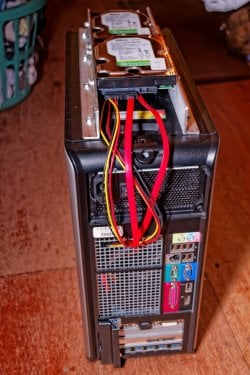
To make the connection between the all-together-made 20-inch extensions, and to make the whole mess plenty long enough, I used a six-inch SATA power splitter and two 18-inch SATA data cables inside the box.
Never doing this before, I was a wee bit concerned that having so many extra SATA data and power connections might impede transfer speeds and integrity; however, after quite a bit of use, I have not noticed any difference whatsoever between these outside-mounted SATA-card drives and the two internally mounted motherboard-connected ones.

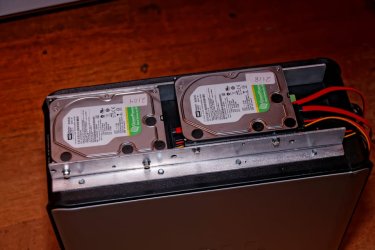
I built this:

DT3_15-Dec-2018_007_DxO_W-960.jpg

DT3_15-Dec-2018_009_DxO_W-960.jpg

That is a piece of aluminum angle that I salvaged out from under a 57-foot spread-axle trailer that sort of got twisted -- the trailer, not the angle; hence, a few odd holes here and there. Cost = Free
Those HDD screws are household electrical switch-plate screws = a standard HDD screw was too short by the thickness of the angle; I searched the place over and the only screws I could come up with were these.

I got two [FONT=&quot]WD [/FONT][FONT=&quot]RE WD2000FYYZ 2TB 7200RPM 64MB Cache SATA 6.0Gb/s 3.5" Enterprise Hard Drive [/FONT]
[FONT=&quot]that have been mounted on the homemade hard-drive rail since the pictures were taken.
These two are brand-new/old stock that came with a so-called 5-year warranty from invoice date from the seller --- not from WD.

The two brand-new/old stock [/FONT]

[FONT=&quot]NEW WESTERN DIGITAL AV-GP WD20EURS 2TB 64MB SATA 3.5" INTERNAL HARD DRIVE
that you see in the pictures have been relocated to two of these and will serve as back-ups to the two described above:

https://www.amazon.com/gp/product/B00UAA4J6G/ref=oh_aui_detailpage_o00_s00?ie=UTF8&psc=1

We currently have six of the Inateck enclosures and I will buy nothing else until something far better comes along; I have been using these since I first discovered that I could put a real HDD in an external box; if my first ones were trucks, they would have over a million miles on them.

I have these and four other externals connected to a[/FONT]
Plugable 7 port USB 3.0 hub - 25W Powered USB HUB.

I also highly recommend the Plugable 7-port hub; however, as best I can tell, they are no longer available new; I got mine New/Open Box for $15.

I had similar speed/connection concerns having so many ext. HDDs connected via a single 3.0-USB rear port via the 7-port hub; however, in use, I cannot tell any difference from the HDDs being single-cable connected.


In case anyone is wondering, I have a five-port 3.0 USB card in the bottom/rear card slots, plus a four-port 3.0 USB hub residing in the front floppy-disk hole.


As for the six-port Vantec SATA card: as delivered, only four ports can be in use at any given time, the ports being chosen via moving around little jumpers on the card.
My plan is, with a bit of soldering and good old country-boy engineering, to incorporate two 4-pole/double throw toggle-switches, conveniently mounted, so I can quickly/easily put the remaining two ports in action --- this experiment may or may not work, but it looks good in my mind.

Sorry for so long and thanks for reading.
 

My Computer My Computer

At a glance

Windows 7 Pro x64Intel Core Two Duo E8600 3.33 ghz8GBGigabyte Radeon R7 240
Computer type
PC/Desktop
Computer Manufacturer/Model Number
Dell Optiplex 780m "mini-tower"
OS
Windows 7 Pro x64
CPU
Intel Core Two Duo E8600 3.33 ghz
Motherboard
Whatever DELL put in it
Memory
8GB
Graphics Card(s)
Gigabyte Radeon R7 240
Monitor(s) Displays
HP 2159m
PSU
750 Watt Corsair CX750
Keyboard
Logitech Wireless
Mouse
Logitech Wireless
Browser
Chrome, Firefox, IE
Back
Top