My desktop computer is on my home office, and the ISP router (with class N (300Mbps) WiFi) is on the opposite side, about 3m (10ft) away.
Is important to say that I don’t have any other computer, tablet, printer or cell phone to connect to the desktop. The Wi-Fi is only to connect to the Internet.
To avoid the Ethernet cable across the room, I was using a PCI Wi-Fi class G access board (TP-Link WN551G). The installation was plug and play as Win 7 found and installed a driver for it. Never had an issue with it.
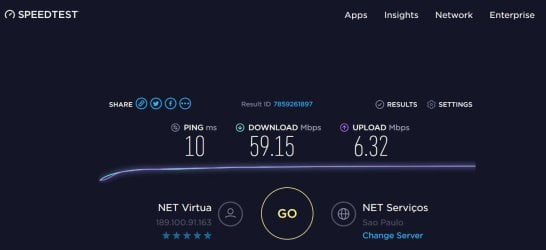
Recently (due to another ISP competition) my ISP gave me a free speed upgrade from 15Mbps to 60Mbps. As maximum speed achieved with the WN551G is around 25Mbps, less than half the internet speed, I bought a PCIe Wi-Fi class N (150Mbps) access board (TP-Link WN781ND).
Can’t make it work under Win 7.
I have a SSD (for daily work) with Win 7 HP and Lubuntu and a Win 7 boot able HDD used for backup and maintenance. I also have a boot able Win 10 PE USB pendrive (with a lot of tools).
The TP-Link WN781ND was also plug and play under Lubuntu and Win 10 PE. That excludes a hardware or router problem. The issue is only under Win 7 HP (Doesn’t work on both Win 7 installations).
After physical installing and booting, I installed the driver.
- First ran the driver setup that came with the WN781ND. Didn’t work.
- I downloaded a driver from TP-Link site. Didn’t work.
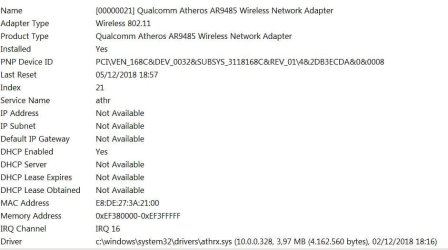
- The chipset is a Qualcomm Atheros AR9485 so I also tried a driver from it. Didn’t work.
Under device manager – properties it says that the Device is working Properly.
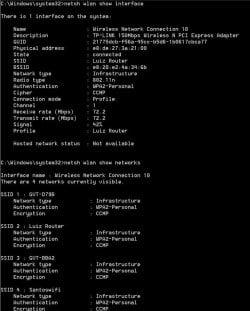
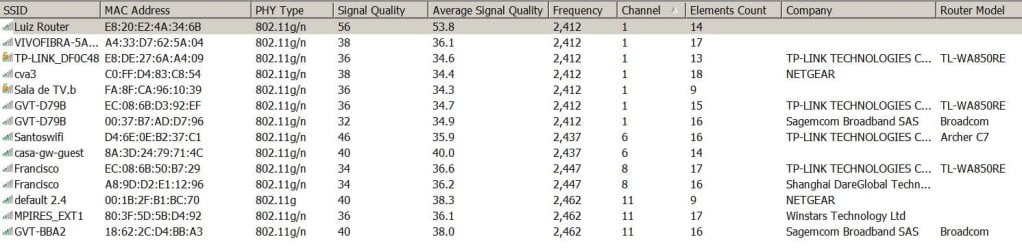
The problem is that it doesn’t find any Wi-Fi and there are at least 4 around.
The Hardware Id is PCI\VEN_168C&DEV_0032&SUBSYS_3118168C&REV_01
I have searched the internet for a solution and tried many options as setting WLAN Autoconfig service to on. Network Access Protection (NAP) is off.
Any ideas?
Thanks, Megahertz07
Solved: Please read Solved
Is important to say that I don’t have any other computer, tablet, printer or cell phone to connect to the desktop. The Wi-Fi is only to connect to the Internet.
To avoid the Ethernet cable across the room, I was using a PCI Wi-Fi class G access board (TP-Link WN551G). The installation was plug and play as Win 7 found and installed a driver for it. Never had an issue with it.
Recently (due to another ISP competition) my ISP gave me a free speed upgrade from 15Mbps to 60Mbps. As maximum speed achieved with the WN551G is around 25Mbps, less than half the internet speed, I bought a PCIe Wi-Fi class N (150Mbps) access board (TP-Link WN781ND).
Can’t make it work under Win 7.
I have a SSD (for daily work) with Win 7 HP and Lubuntu and a Win 7 boot able HDD used for backup and maintenance. I also have a boot able Win 10 PE USB pendrive (with a lot of tools).
The TP-Link WN781ND was also plug and play under Lubuntu and Win 10 PE. That excludes a hardware or router problem. The issue is only under Win 7 HP (Doesn’t work on both Win 7 installations).
After physical installing and booting, I installed the driver.
- First ran the driver setup that came with the WN781ND. Didn’t work.
- I downloaded a driver from TP-Link site. Didn’t work.
- The chipset is a Qualcomm Atheros AR9485 so I also tried a driver from it. Didn’t work.
Under device manager – properties it says that the Device is working Properly.
The problem is that it doesn’t find any Wi-Fi and there are at least 4 around.
The Hardware Id is PCI\VEN_168C&DEV_0032&SUBSYS_3118168C&REV_01
I have searched the internet for a solution and tried many options as setting WLAN Autoconfig service to on. Network Access Protection (NAP) is off.
Any ideas?
Thanks, Megahertz07
Solved: Please read Solved
Attachments

Last edited:
My Computers
-
At a glance
Windows 7 HP 64i5 6600K - 800MHz to 4200MHz4+4G GSkill DDR4 3000IG - Intel 530- Computer type
- PC/Desktop
- Computer Manufacturer/Model Number
- custom build
- OS
- Windows 7 HP 64
- CPU
- i5 6600K - 800MHz to 4200MHz
- Motherboard
- GA-Z170-HD3P
- Memory
- 4+4G GSkill DDR4 3000
- Graphics Card(s)
- IG - Intel 530
- Monitor(s) Displays
- Samsung 226BW
- Screen Resolution
- 1680x1050
- Hard Drives
- (1) -1 SM951 – 128GB M.2 AHCI PCIe SSD drive for Windows 7 and Lubuntu
(2) -1 WD SATA 3 - 1T for Data
(3) -1 WD SATA 3 - 1T for backup
- PSU
- Thermaltake 450W TR2 gold
- Keyboard
- Old and good Chicony mechanical keyboard
- Mouse
- Logitech mX performance - 9 buttons (had to disable some)
- Internet Speed
- 500Mb/s
- Browser
- Firefox 64
- Other Info
- TinyWall firewall
-
At a glance
Windows 7 Proi7-4500U 800MHz to 3.0GHz(4+4)G DDR3 1600IG intel 4400 + NVIDIA GeForce GT 745M- Computer type
- Laptop
- System Manufacturer/Model Number
- Asus Q550LF
- OS
- Windows 7 Pro
- CPU
- i7-4500U 800MHz to 3.0GHz
- Motherboard
- Asus Q550LF
- Memory
- (4+4)G DDR3 1600
- Graphics Card(s)
- IG intel 4400 + NVIDIA GeForce GT 745M
- Sound Card
- Realtek
- Monitor(s) Displays
- LG Display LP156WF4-SPH1
- Screen Resolution
- 1920 x 1080
- Hard Drives
- BX500 120G SSD for Windows and programs +
1T HDD for data
- Internet Speed
- 500 Mb/s
- Browser
- Firefox
- Other Info
- TinyWall firewall