Solved Fresh W7 Install: Tried using WSUS Offline for Updates but....

KokoLoko

New member
Local time
12:02 PM
Messages
9
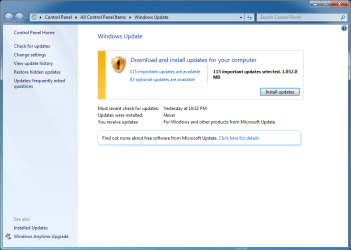
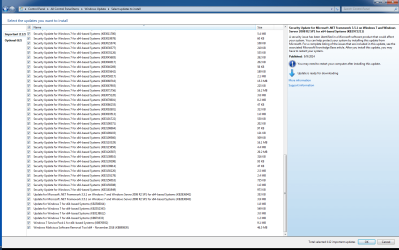
.... Windows Update still lists the same 115 Important Updates after running WSUSOffline!

Custom built desktop, last fresh W7 install at least 5 years ago - love this thing! Finally went for a SSD upgrade and decided for a fresh Windows 7 install.


After installation, Windows Updates had 115 Important updates. Overwhelming. Came to 7Forums for a list of "must-avoid" updates and in the researching process, I came across a post recommending WSUSOffline.

So I decided to try WSUSOffline. I went with the basic selection. It downloaded files for a while. I thought I was being hacked by Russians. Then I went for the install phase, also with the basic settings. No error messages and everything seemed to be fine. Let the machine do its thing overnight, as it took a while.

At the end of the process, after a few reboots, Windows Update still shows the same 115 needed updates. As if WSUSOffline didnt do anything.

Now I am questioning even the validity of WSUSOffline and whether I can trust what it did to the fresh Windows install.

Can someone please shed some light here?

- Is WSUSOffline a trusted tool? It was def crunching a LOT of data.
- Why is Windows Update still listing the same number of updates? Did I mess up the process or is there still something to be done in order to complete the updating process?
- Should I re-install W7 and manually pick updates for the system? If so, then I still need a list of "must avoid" KB. I could not find a definite list of must-avoid or must-install updates.


Thanks in advance!
 

My Computer My Computer

At a glance

Windows 7 Pro x64Q945016 GBNVIDIA Geforce GTX650
Computer type
PC/Desktop
Computer Manufacturer/Model Number
Custom
OS
Windows 7 Pro x64
CPU
Q9450
Motherboard
Gigabyte
Memory
16 GB
Graphics Card(s)
NVIDIA Geforce GTX650
Hard Drives
Crucial SSD 1TB
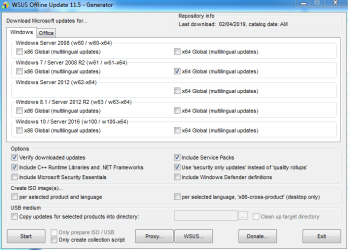
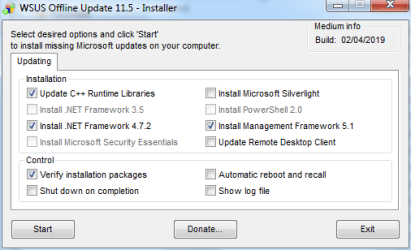
WSUS Offline Settings:

Windows Updates_04.PNG

Windows Updates_05.PNG


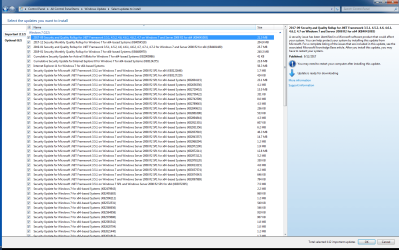
Windows Update AFTER running WSUS Offline:

Windows Updates_01.PNG

Windows Updates_02.PNG

Windows Updates_03.PNG
 

My Computer My Computer

At a glance

Windows 7 Pro x64Q945016 GBNVIDIA Geforce GTX650
Computer type
PC/Desktop
Computer Manufacturer/Model Number
Custom
OS
Windows 7 Pro x64
CPU
Q9450
Motherboard
Gigabyte
Memory
16 GB
Graphics Card(s)
NVIDIA Geforce GTX650
Hard Drives
Crucial SSD 1TB
Hi KokoLoko,

Welcome to SevenForums!

.... Windows Update still lists the same 115 Important Updates after running WSUSOffline!

Can someone please shed some light here?

- Should I re-install W7 and manually pick updates for the system? If so, then I still need a list of "must avoid" KB. I could not find a definite list of must-avoid or must-install updates.

A lot of members here use DISM++ [a much faster and easier method] to get the OS upto date with regard to WU's [Windows Updates]. Using M$ Windows update to update your OS involves many hours of downloading, installing and re-booting.

DISM++ [Deployment Image Servicing and Management]

DISM++ is a FREE implementation tool that has the ability to perform Windows Updates [WU]. Some of the advantages [but not all] are:

[1] The GUI is very easy to understand and use.
[2] It is much faster than M$’s WU because it uses a different engine.
[3] It downloads the latest WU DB from the M$ servers, scans your OS, and then lists the updates available.
[4] It doesn’t install superseded updates like M$ does.
[5] It gives you the option of what you want to install.
[6] The pre-ticked updates are what is recommended and are similar to the WU critical and recommended updates. The un-ticked updates are similar to the WU optional updates.

[7] It warns you if an update:
  • Includes telemetry.
  • Has known issues with certain hardware.
  • Needs exclusive access.
  • Is suspect.
  • Your OS doesn't need it.
  • Has any other known issues.
[8] It doesn’t require re-booting between updates.
[9] It can be used to either update an install.wim image OFFLINE, or to update the LIVE OS.

If you want to go down this route then let us know and we will post the procedure.

I hope this helps!
 

My Computer My Computer

At a glance

Win 7 HP SP1 64-bit Vista HB SP2 32-bit Linux...Intel(R) Pentium(R) CPU P6200 @ 2.13GHz4.00 GBIntel(R) Graphics Media Accelerator HD
Computer type
Laptop
Computer Manufacturer/Model Number
Fujitsu LIFEBOOK
OS
Win 7 HP SP1 64-bit Vista HB SP2 32-bit Linux Mint 18.3
CPU
Intel(R) Pentium(R) CPU P6200 @ 2.13GHz
Motherboard
FUJITSU FJNBB06
Memory
4.00 GB
Graphics Card(s)
Intel(R) Graphics Media Accelerator HD
Sound Card
[1] Realtek High Definition Audio [2] Intel(R) Display Audio
Screen Resolution
1366 x 768 x 32 bits (4294967296 colors) @ 59 Hz
Hard Drives
TOSHIBA MK5076GSX
Antivirus
AVG FREE
Paul,

Thanks for the feedback. I gather from your response that I had chosen the long (or even wrong) path for this new install. It is still very early in the game that I could easily re-do the Windows 7 install and try this tool you mention.

Is this what you recommend?

If so, how do I get a hold of this DISM++ and what are the steps?

I am basically looking for minimum required Windows Updates - hecka, my previous install run beautifully for more than 5 years with no issues.

Thanks in advance,

BB
 

My Computer My Computer

At a glance

Windows 7 Pro x64Q945016 GBNVIDIA Geforce GTX650
Computer type
PC/Desktop
Computer Manufacturer/Model Number
Custom
OS
Windows 7 Pro x64
CPU
Q9450
Motherboard
Gigabyte
Memory
16 GB
Graphics Card(s)
NVIDIA Geforce GTX650
Hard Drives
Crucial SSD 1TB
Hi KokoLoko,

I gather from your response that I had chosen the long (or even wrong) path for this new install. It is still very early in the game that I could easily re-do the Windows 7 install and try this tool you mention.

Is this what you recommend?

If so, how do I get a hold of this DISM++ and what are the steps?

I am basically looking for minimum required Windows Updates - hecka, my previous install run beautifully for more than 5 years with no issues.

I am not saying that using WSUSOffline is the wrong way to do it, although in your case it appears not to have worked!

You do not need to do a re-installation of the OS in order to use DISM++ to get the OS upto date. As mentioned in my previous post: [9] It can be used to either update an install.wim image OFFLINE, or to update the LIVE OS.

If you want the procedure then I will post it!
 

My Computer My Computer

At a glance

Win 7 HP SP1 64-bit Vista HB SP2 32-bit Linux...Intel(R) Pentium(R) CPU P6200 @ 2.13GHz4.00 GBIntel(R) Graphics Media Accelerator HD
Computer type
Laptop
Computer Manufacturer/Model Number
Fujitsu LIFEBOOK
OS
Win 7 HP SP1 64-bit Vista HB SP2 32-bit Linux Mint 18.3
CPU
Intel(R) Pentium(R) CPU P6200 @ 2.13GHz
Motherboard
FUJITSU FJNBB06
Memory
4.00 GB
Graphics Card(s)
Intel(R) Graphics Media Accelerator HD
Sound Card
[1] Realtek High Definition Audio [2] Intel(R) Display Audio
Screen Resolution
1366 x 768 x 32 bits (4294967296 colors) @ 59 Hz
Hard Drives
TOSHIBA MK5076GSX
Antivirus
AVG FREE
Hi KokoLoko,
You do not need to do a re-installation of the OS in order to use DISM++ to get the OS upto date. As mentioned in my previous post: [9] It can be used to either update an install.wim image OFFLINE, or to update the LIVE OS.

If you want the procedure then I will post it!

Paul,

I do not know (nor trust) what happened with my attempt with WSUSOffline but I know it crunched a LOT of data, so I rather do another fresh install and try DISM++

Please post the DISM++ procedure to install Windows Updates on a fresh operating Windows 7 Pro x64 install.

Thanks in advance
 

My Computer My Computer

At a glance

Windows 7 Pro x64Q945016 GBNVIDIA Geforce GTX650
Computer type
PC/Desktop
Computer Manufacturer/Model Number
Custom
OS
Windows 7 Pro x64
CPU
Q9450
Motherboard
Gigabyte
Memory
16 GB
Graphics Card(s)
NVIDIA Geforce GTX650
Hard Drives
Crucial SSD 1TB
Hi KokoLoko,

I do not know (nor trust) what happened with my attempt with WSUSOffline but I know it crunched a LOT of data, so I rather do another fresh install and try DISM++.

Please post the DISM++ procedure to install Windows Updates on a fresh operating Windows 7 Pro x64 install.

I doubt very much that WSUSOffline has done anything serious or harmful to your OS because it is a recognised and trusted utility.

If I was you I would use DISM++ to update your current system. This way you will get a feel for using [and how to use it] DISM++ if you do decide to clean install!

To run the DISM++ [Deployment Image Servicing & Management] utility on the LIVE OS, please follow my instructions below!

NOTE: The light blue text below are links to the relevant websites and programs, just click them!

RECOMMENDED: It is best to run the DISM++ Windows updates a couple of times to make sure you get ALL the updates that are needed. DON’T install ANY of the ORANGE updates though. It can also install the required .NET Framework updates. Then just run WU to see what other updates are available, if any.

DISM++ - Run Windows Updates On The LIVE OS

DISM++ Direct download [zip] => DISM++.

Here is the quick procedure guide:

[1] Download the latest version of DISM++ [see the DISM++ Direct download [zip] link above].
[2] Extract the files using something like 7-Zip here => 7-Zip.
[3] Turn Sleep mode OFF in Power Options [you can turn it back on after you have finished].
[4] Double-click Dism++x86 or Dism++x64 and then click Run.
[5] Click Updates in the left-hand pane and then click Scan [bottom right].
[6] Once the scan has completed, click Install Updates [blue button to the right of Scan].
[7] If any warning pop-ups appear [see item [7] in the Basic Overview above], click Cancel and it will skip that one. There could be several of these appear so click Cancel to all of them.
[8] It is advisable to run the DISM++ WU a couple of times. To do this, just re-boot and Scan again [from number [4] above].
[9] Run M$ WU [Windows Update] to see if there are any other updates available.

That's it!

I hope this helps!
 

My Computer My Computer

At a glance

Win 7 HP SP1 64-bit Vista HB SP2 32-bit Linux...Intel(R) Pentium(R) CPU P6200 @ 2.13GHz4.00 GBIntel(R) Graphics Media Accelerator HD
Computer type
Laptop
Computer Manufacturer/Model Number
Fujitsu LIFEBOOK
OS
Win 7 HP SP1 64-bit Vista HB SP2 32-bit Linux Mint 18.3
CPU
Intel(R) Pentium(R) CPU P6200 @ 2.13GHz
Motherboard
FUJITSU FJNBB06
Memory
4.00 GB
Graphics Card(s)
Intel(R) Graphics Media Accelerator HD
Sound Card
[1] Realtek High Definition Audio [2] Intel(R) Display Audio
Screen Resolution
1366 x 768 x 32 bits (4294967296 colors) @ 59 Hz
Hard Drives
TOSHIBA MK5076GSX
Antivirus
AVG FREE
Hi KokoLoko,

If I was you I would use DISM++ to update your current system. This way you will get a feel for using [and how to use it] DISM++ if you do decide to clean install!

Paul, very good advice, I am happy I waited for your response before proceeding with the formatting. Great advice actually. I have a fresh Windows installation to practice this tool!


RECOMMENDED: It is best to run the DISM++ Windows updates a couple of times to make sure you get ALL the updates that are needed. DON’T install ANY of the ORANGE updates though. It can also install the required .NET Framework updates. Then just run WU to see what other updates are available, if any.

Paul, I have everything done as you listed. After I run "Scan", a list of items are orange as you pointed out and a range of updates under "Security Updates" & "Critical Updates" were already selected.

I just want to understand this: who pre-selected these updates and what was this list based on? Is this recommended list accepted in the community as the must-have updates? I am trying to understand how this works.

For instance: in the 7Forums I came across a few posts listing KB3020369 as a must-have update. Under DISM++ it is not pre-selected. Same for KB3179573.

I am updating the pre-selected list as recommended by DISM++ to see if anything else pops. Hopefully not.

Thanks once again!
 

My Computer My Computer

At a glance

Windows 7 Pro x64Q945016 GBNVIDIA Geforce GTX650
Computer type
PC/Desktop
Computer Manufacturer/Model Number
Custom
OS
Windows 7 Pro x64
CPU
Q9450
Motherboard
Gigabyte
Memory
16 GB
Graphics Card(s)
NVIDIA Geforce GTX650
Hard Drives
Crucial SSD 1TB
Hi KokoLoko,

Paul, very good advice, I am happy I waited for your response before proceeding with the formatting. Great advice actually. I have a fresh Windows installation to practice this tool!

You are most welcome! With a fresh install to work on it is even better!

After I run "Scan", a list of items are orange as you pointed out and a range of updates under "Security Updates" & "Critical Updates" were already selected.

I just want to understand this: who pre-selected these updates and what was this list based on? Is this recommended list accepted in the community as the must-have updates? I am trying to understand how this works.

The pre-ticked updates are what is recommended and are similar to the WU critical and recommended updates. The un-ticked updates are similar to the WU optional updates.

For instance: in the 7Forums I came across a few posts listing KB3020369 as a must-have update. Under DISM++ it is not pre-selected. Same for KB3179573.

Those updates are only needed on a clean install prior to installing the un-official Win 7 SP2. So there is no need to worry about them!

I am updating the pre-selected list as recommended by DISM++ to see if anything else pops. Hopefully not.
:thumbsup:
 

My Computer My Computer

At a glance

Win 7 HP SP1 64-bit Vista HB SP2 32-bit Linux...Intel(R) Pentium(R) CPU P6200 @ 2.13GHz4.00 GBIntel(R) Graphics Media Accelerator HD
Computer type
Laptop
Computer Manufacturer/Model Number
Fujitsu LIFEBOOK
OS
Win 7 HP SP1 64-bit Vista HB SP2 32-bit Linux Mint 18.3
CPU
Intel(R) Pentium(R) CPU P6200 @ 2.13GHz
Motherboard
FUJITSU FJNBB06
Memory
4.00 GB
Graphics Card(s)
Intel(R) Graphics Media Accelerator HD
Sound Card
[1] Realtek High Definition Audio [2] Intel(R) Display Audio
Screen Resolution
1366 x 768 x 32 bits (4294967296 colors) @ 59 Hz
Hard Drives
TOSHIBA MK5076GSX
Antivirus
AVG FREE
Paul Black,

All seems to be fine. Thank you very much for the feedback and guide.

Cheers!

Koko
 

My Computer My Computer

At a glance

Windows 7 Pro x64Q945016 GBNVIDIA Geforce GTX650
Computer type
PC/Desktop
Computer Manufacturer/Model Number
Custom
OS
Windows 7 Pro x64
CPU
Q9450
Motherboard
Gigabyte
Memory
16 GB
Graphics Card(s)
NVIDIA Geforce GTX650
Hard Drives
Crucial SSD 1TB
Hi KokoLoko,

All seems to be fine. Thank you very much for the feedback and guide.

You are very welcome. I am glad you have resolved it.
 

My Computer My Computer

At a glance

Win 7 HP SP1 64-bit Vista HB SP2 32-bit Linux...Intel(R) Pentium(R) CPU P6200 @ 2.13GHz4.00 GBIntel(R) Graphics Media Accelerator HD
Computer type
Laptop
Computer Manufacturer/Model Number
Fujitsu LIFEBOOK
OS
Win 7 HP SP1 64-bit Vista HB SP2 32-bit Linux Mint 18.3
CPU
Intel(R) Pentium(R) CPU P6200 @ 2.13GHz
Motherboard
FUJITSU FJNBB06
Memory
4.00 GB
Graphics Card(s)
Intel(R) Graphics Media Accelerator HD
Sound Card
[1] Realtek High Definition Audio [2] Intel(R) Display Audio
Screen Resolution
1366 x 768 x 32 bits (4294967296 colors) @ 59 Hz
Hard Drives
TOSHIBA MK5076GSX
Antivirus
AVG FREE
Hi. it appears the dism++ tool no longer works properly. I've set it to scan for updates and it's just sitting there with a downloading database message. The latest I'm using is 10.1.1002.1. The homepage chuyu.me is no longer functional.
I also think Microsoft have changed something on their servers recently
Is there a newer version of dism++ that I can get elsewhere, or do I have to try something else?
Thanks.
 

My Computer My Computer

At a glance

windows 7 professional x64AMD
Computer type
PC/Desktop
Computer Manufacturer/Model Number
custom built
OS
windows 7 professional x64
CPU
AMD
Browser
Mozilla firefox

My Computers My Computers

  • At a glance

    7 X64i5 84002x8gb 3200mhz
    Computer type
    PC/Desktop
    OS
    7 X64
    CPU
    i5 8400
    Motherboard
    gigabyte b365m ds3h
    Memory
    2x8gb 3200mhz
    Hard Drives
    various
    PSU
    pure power 11 400w cm
    Case
    Coolermaster
    Cooling
    cryorig m9i
  • At a glance

    7x64g54008gb ddr4 2400
    Computer type
    PC/Desktop
    OS
    7x64
    CPU
    g5400
    Motherboard
    ga b365m ds3h
    Memory
    8gb ddr4 2400
    PSU
    xfx pro 450w
Thank you so much for your help.
several questions
How long should I wait for the scan to take place after clicking the scan button?
Should I just install windows 7 sp1, and then run dism++, or are there some updates that need to be downloaded through windows update first?
Thanks.

- - - Updated - - -

Oh, and do I have to activate windows first before using it?
Also, I am totally blind and use a screen reader, and I find github a real pain to use. How do I download the latest binary release? all I can access are the sources.
Thanks.
 

My Computer My Computer

At a glance

windows 7 professional x64AMD
Computer type
PC/Desktop
Computer Manufacturer/Model Number
custom built
OS
windows 7 professional x64
CPU
AMD
Browser
Mozilla firefox
here is the direct link to the wsusscn3 cab for dism++
https://github.com/Chuyu-Team/Dism-...wsusscn3_476c45753d48d180f41138fd4031b2b3.cab

after scanning it shows a very long list, some of which are ticked which should be installed first, then reboot and repeat the scan . Then tick the remaining updates you want. Not easy if you can't see the tickboxes.

Might be easier to try simplix update pack instead . Don't have to fiddle about ticking lots of boxes.
There is a little downloader to download first.
link here:
https://update7.simplix.info/UpdatePack7R2+.exe

Then run the downloader which is called UpdatePack7R2+.exe which then downloads the whole pack.

Then run the pack and click the Install button. It will scan, extract any relevant updates and install them.

After a while it asks to reboot so it can install a few more. If it is a mechanical hard disk it could take 45 minutes or more. On an ssd probably about 20 minutes before it asks for a reboot. Installs the final few updates and then it will clean up by automatically running cleanmgr.

you dont need to select which updates, it just does it.

- - - Updated - - -

Another way is to use windows update if that is easier.

But an update needs to be manually installed first for windows update to function.

here is the direct link to the 64 bit .msu file that needs to be installed by double clicking on it.

https://catalog.s.download.windowsu..._f7b1de8ea7cf8faf57b0138c4068d2e899e2b266.msu

then windows update should work if you have the driver for your network card.

windows 7 can work for 30 days unactivated before it starts going into reduced functionality so you have a bit of time to activate it.
 

My Computers My Computers

  • At a glance

    7 X64i5 84002x8gb 3200mhz
    Computer type
    PC/Desktop
    OS
    7 X64
    CPU
    i5 8400
    Motherboard
    gigabyte b365m ds3h
    Memory
    2x8gb 3200mhz
    Hard Drives
    various
    PSU
    pure power 11 400w cm
    Case
    Coolermaster
    Cooling
    cryorig m9i
  • At a glance

    7x64g54008gb ddr4 2400
    Computer type
    PC/Desktop
    OS
    7x64
    CPU
    g5400
    Motherboard
    ga b365m ds3h
    Memory
    8gb ddr4 2400
    PSU
    xfx pro 450w
Now this just gets weirder and weirder.
I put the cab file you gave me to download in the c:\dp\config folder and then reran dism++
right now, it's just been sitting there for about 20 minutes, with a message that says downloading database.
No list of any sort has come up yet
I'll try the other updater and see what happens.

- - - Updated - - -

I was able to download the simplix update pack and get it to download the 800MB file successfully, so that's one problem solved.
But now I am really intrigued.
How long do I wait with dism++ for the database to be downloaded after clicking updates and scan?
Does it matter if I leave system protection turned on or off? or switch off windows defender and firewall before running dism++?
Yes, it's still got that annoying message up there about downloading the database.
If all else fails, I'll need a step by step guide about what you do on your system after reformatting and installing windows 7sp1 so as to get dism++ up and running.

- - - Updated - - -

Huff, puff, huff, puff, huff, puff
I think I can, I think I can, I think I can, I think I can
Took a look at the dism.log file to see if I could find any clue about why the database was taking so long to download.
A lot of it was in Chinese, but then there was this address
http://gh.api.99988866.xyz/github.c...wsusscn3_dfbfdb1c5bab3a6782937078878554ad.cab
So I went directly to the URL with firefox, and I now have an 11kbps download running.
Oh yes, I tried the URL you gave me to the Cab file, but when I put it in the config folder, it says that my file was out of date.
It's going to take me 1 and a half hours to download this 90something megabyte file.
Reminds me of a time that feels like it was not so long ago where there was an electronic screeeeeeeeeeech! sound, like an old fax machine (does anyone still use faxes any more?), and then you'd be connected to the net at a whopping great speed of...... wait for it.....
56k! oh joy!
(telix anyone?)
Oh well, all I can do is wait I spose.
Here's hoping I'm downloading the right file that will allow dism++ to work it's magic.

- - - Updated - - -

Me again, with another update.
With dism++, at least, It looks like I'll need to get sighted assistance to pick which update I want to download, or, I'll just run the simplix update pack and be done with it.
But, I'm one of these people who likes to know exactly how things are done, and do them manually where possible, so I like to install each update, one at a time, so that I can keep track of exactly what is being updated.
I do have a puzzling issue with a driver, which I'll post in the drivers area.
OH well, you can't have everything, I guess.
 

My Computer My Computer

At a glance

windows 7 professional x64AMD
Computer type
PC/Desktop
Computer Manufacturer/Model Number
custom built
OS
windows 7 professional x64
CPU
AMD
Browser
Mozilla firefox
The download address for the cab file you posted is pointing at v10.1.1001.10

I think that is an earlier cab file.

Here is a link to dism++10.1.1002.1 which includes the latest cab file in the config folder.

Dism++10.1.1002.1.zip
 
Last edited:

My Computers My Computers

  • At a glance

    7 X64i5 84002x8gb 3200mhz
    Computer type
    PC/Desktop
    OS
    7 X64
    CPU
    i5 8400
    Motherboard
    gigabyte b365m ds3h
    Memory
    2x8gb 3200mhz
    Hard Drives
    various
    PSU
    pure power 11 400w cm
    Case
    Coolermaster
    Cooling
    cryorig m9i
  • At a glance

    7x64g54008gb ddr4 2400
    Computer type
    PC/Desktop
    OS
    7x64
    CPU
    g5400
    Motherboard
    ga b365m ds3h
    Memory
    8gb ddr4 2400
    PSU
    xfx pro 450w
Hey, thanks. that works. Thank you so much.
It's a pity my screen reader can't read the check boxes and other controls, because it doesn't use a standard windows interface, with IA2 or microsoft accessibility widgets.

Are you able to help out with portable update?
I can't get it working, it thinks my computer is offline when it isn't.
 

My Computer My Computer

At a glance

windows 7 professional x64AMD
Computer type
PC/Desktop
Computer Manufacturer/Model Number
custom built
OS
windows 7 professional x64
CPU
AMD
Browser
Mozilla firefox
Back
Top