
Solved 0x80070035 win 7 to win 7 / Netgear 7900 and powerline adapters

ChrisPbass

New member
Member
VIP
Local time
11:00 PM
Messages
317
Location
Fairfax, VA
Hello!2 win 7 wired PCs connected to the same network, home, file and discovery ON.
They can see each other but connecting gets 0x80070035
All AV/Security software is off.
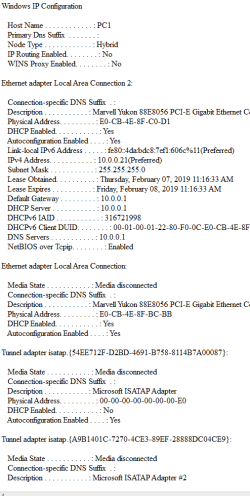
Route is: win 7 > powerline adapter > Netgear 7900 > win 7 pc. The network worked and then simply stopped.
I don't see anything in the netgear 7900 that would stop this. Both PCs show as connected to the router.
I can ping the 2nd pc
 

Attachments
  • network 1150 2_7.PNG
    network 1150 2_7.PNG
    23.8 KB · Views: 0

My Computer My Computer

At a glance

7 Ultimate 64 bit2x4Gb DDR3-SDRAMt750
Computer type
PC/Desktop
Computer Manufacturer/Model Number
need to update!
OS
7 Ultimate 64 bit
Memory
2x4Gb DDR3-SDRAM
Graphics Card(s)
t750
Monitor(s) Displays
AOC 24" yee haw and Dell 19"
Screen Resolution
1680 x 1050 @60hz
Hard Drives
Samsung 840EVO
Internet Speed
100/20
Antivirus
MSE
Browser
Firefox
Hi ChrisPbass,

They can see each other but connecting gets 0x80070035.

There is a known problem with one of the latest updates causing this or a similar issue. Downloading KB4487345 has worked for a few people! Download and run KB4487345 from here => MS Update Catalog KB4487345.

I hope this helps!
 

My Computer My Computer

At a glance

Win 7 HP SP1 64-bit Vista HB SP2 32-bit Linux...Intel(R) Pentium(R) CPU P6200 @ 2.13GHz4.00 GBIntel(R) Graphics Media Accelerator HD
Computer type
Laptop
Computer Manufacturer/Model Number
Fujitsu LIFEBOOK
OS
Win 7 HP SP1 64-bit Vista HB SP2 32-bit Linux Mint 18.3
CPU
Intel(R) Pentium(R) CPU P6200 @ 2.13GHz
Motherboard
FUJITSU FJNBB06
Memory
4.00 GB
Graphics Card(s)
Intel(R) Graphics Media Accelerator HD
Sound Card
[1] Realtek High Definition Audio [2] Intel(R) Display Audio
Screen Resolution
1366 x 768 x 32 bits (4294967296 colors) @ 59 Hz
Hard Drives
TOSHIBA MK5076GSX
Antivirus
AVG FREE
Hi ChrisPbass,


There is a known problem with one of the latest updates causing this or a similar issue. Downloading KB4487345 has worked for a few people! Download and run KB4487345 from here => MS Update Catalog KB4487345.

I hope this helps!

MY
MAN
God bless you!
 

My Computer My Computer

At a glance

7 Ultimate 64 bit2x4Gb DDR3-SDRAMt750
Computer type
PC/Desktop
Computer Manufacturer/Model Number
need to update!
OS
7 Ultimate 64 bit
Memory
2x4Gb DDR3-SDRAM
Graphics Card(s)
t750
Monitor(s) Displays
AOC 24" yee haw and Dell 19"
Screen Resolution
1680 x 1050 @60hz
Hard Drives
Samsung 840EVO
Internet Speed
100/20
Antivirus
MSE
Browser
Firefox

My Computer My Computer

At a glance

Win 7 HP SP1 64-bit Vista HB SP2 32-bit Linux...Intel(R) Pentium(R) CPU P6200 @ 2.13GHz4.00 GBIntel(R) Graphics Media Accelerator HD
Computer type
Laptop
Computer Manufacturer/Model Number
Fujitsu LIFEBOOK
OS
Win 7 HP SP1 64-bit Vista HB SP2 32-bit Linux Mint 18.3
CPU
Intel(R) Pentium(R) CPU P6200 @ 2.13GHz
Motherboard
FUJITSU FJNBB06
Memory
4.00 GB
Graphics Card(s)
Intel(R) Graphics Media Accelerator HD
Sound Card
[1] Realtek High Definition Audio [2] Intel(R) Display Audio
Screen Resolution
1366 x 768 x 32 bits (4294967296 colors) @ 59 Hz
Hard Drives
TOSHIBA MK5076GSX
Antivirus
AVG FREE
Back
Top