Win7 update won't install any Security Rollups or Siverlight updates

1metalguru

New member
Member
Local time
2:37 AM
Messages
61
Location
Calgary Canada
Hi Guys:

My Windows 7 64 bit home premium refuses to install any "Quality Rollups" from the last several months, as well as any security or other updates for Silverlight .

The Security updates for Silverlight fail with a Code 643
The monthly Preview and Security Quality Rollups fail with Code 80073701

I downloaded the SURT as per the posting instructions, but it refuses to install. Just sits there for hours with "Initializing Installation" message.

I ran SFC Scan, it shows no errors.

CBS.zip file - It's 50megs, it won't let me upload it.... Says max 8.95 Mb - What do I do?

Thanks guys. Looking forward to getting this fixed. Been happening for months.

Darrell
 

My Computer My Computer

At a glance

Windows 7 64 bit home premium SP1AMD Phenom x4 96416gbNvidia GTX1050 Ti
Computer type
PC/Desktop
Computer Manufacturer/Model Number
custom
OS
Windows 7 64 bit home premium SP1
CPU
AMD Phenom x4 964
Motherboard
asus
Memory
16gb
Graphics Card(s)
Nvidia GTX1050 Ti
Monitor(s) Displays
50" Plasma TV
Screen Resolution
1920x1080
Hard Drives
256Gb SSd
1Tb WD
PSU
big
Cooling
big
Keyboard
Logitech K800
Mouse
Logitech M570
Internet Speed
15MB/S
Antivirus
Avast, MSSE, SAS, Malwarebytes
Browser
Firefox, chrome
Hi 1metalguru,

I downloaded the SURT as per the posting instructions, but it refuses to install. Just sits there for hours with "Initializing Installation" message.


Did you turn off the power options for sleep etc when you run it [it does take a while]?
 

My Computer My Computer

At a glance

Win 7 HP SP1 64-bit Vista HB SP2 32-bit Linux...Intel(R) Pentium(R) CPU P6200 @ 2.13GHz4.00 GBIntel(R) Graphics Media Accelerator HD
Computer type
Laptop
Computer Manufacturer/Model Number
Fujitsu LIFEBOOK
OS
Win 7 HP SP1 64-bit Vista HB SP2 32-bit Linux Mint 18.3
CPU
Intel(R) Pentium(R) CPU P6200 @ 2.13GHz
Motherboard
FUJITSU FJNBB06
Memory
4.00 GB
Graphics Card(s)
Intel(R) Graphics Media Accelerator HD
Sound Card
[1] Realtek High Definition Audio [2] Intel(R) Display Audio
Screen Resolution
1366 x 768 x 32 bits (4294967296 colors) @ 59 Hz
Hard Drives
TOSHIBA MK5076GSX
Antivirus
AVG FREE
Hi 1metalguru,

To reset the WU Agent, please follow my instructions below.

Reset The WU Agent

NOTE: This will not clear the view update history details list [cache].

[1] Download and save the Reset_Reregister_Windows_Update_Components file to your Desktop from here => Reset_Reregister_Windows_Update_Components.bat.

[2] Right-click the Reset_Reregister_Windows_Update_Components file and select Run as administrator.

NOTE: An elevated command prompt window will now open and run the Windows batch file. When it has finished, the elevated command prompt window will automatically close.

[3] Restart the computer for the changes to be applied.
[4] Run WU [Windows Update].

I hope this helps!
 

My Computer My Computer

At a glance

Win 7 HP SP1 64-bit Vista HB SP2 32-bit Linux...Intel(R) Pentium(R) CPU P6200 @ 2.13GHz4.00 GBIntel(R) Graphics Media Accelerator HD
Computer type
Laptop
Computer Manufacturer/Model Number
Fujitsu LIFEBOOK
OS
Win 7 HP SP1 64-bit Vista HB SP2 32-bit Linux Mint 18.3
CPU
Intel(R) Pentium(R) CPU P6200 @ 2.13GHz
Motherboard
FUJITSU FJNBB06
Memory
4.00 GB
Graphics Card(s)
Intel(R) Graphics Media Accelerator HD
Sound Card
[1] Realtek High Definition Audio [2] Intel(R) Display Audio
Screen Resolution
1366 x 768 x 32 bits (4294967296 colors) @ 59 Hz
Hard Drives
TOSHIBA MK5076GSX
Antivirus
AVG FREE
Yeah, followed your instructions above, no success. The WU Agent seemed to run Ok, but retrying to install the same updates resulted in failures and the same error codes as above.

Darrell
 

My Computer My Computer

At a glance

Windows 7 64 bit home premium SP1AMD Phenom x4 96416gbNvidia GTX1050 Ti
Computer type
PC/Desktop
Computer Manufacturer/Model Number
custom
OS
Windows 7 64 bit home premium SP1
CPU
AMD Phenom x4 964
Motherboard
asus
Memory
16gb
Graphics Card(s)
Nvidia GTX1050 Ti
Monitor(s) Displays
50" Plasma TV
Screen Resolution
1920x1080
Hard Drives
256Gb SSd
1Tb WD
PSU
big
Cooling
big
Keyboard
Logitech K800
Mouse
Logitech M570
Internet Speed
15MB/S
Antivirus
Avast, MSSE, SAS, Malwarebytes
Browser
Firefox, chrome
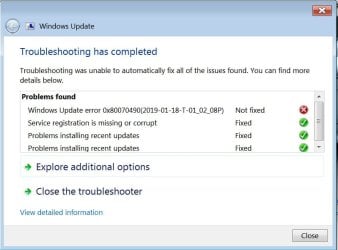
Ran the Windows Update Troubleshooter. Here is what it returned:
 

Attachments

  • Untitled3.jpg
    Untitled3.jpg
    47.5 KB · Views: 1

My Computer My Computer

At a glance

Windows 7 64 bit home premium SP1AMD Phenom x4 96416gbNvidia GTX1050 Ti
Computer type
PC/Desktop
Computer Manufacturer/Model Number
custom
OS
Windows 7 64 bit home premium SP1
CPU
AMD Phenom x4 964
Motherboard
asus
Memory
16gb
Graphics Card(s)
Nvidia GTX1050 Ti
Monitor(s) Displays
50" Plasma TV
Screen Resolution
1920x1080
Hard Drives
256Gb SSd
1Tb WD
PSU
big
Cooling
big
Keyboard
Logitech K800
Mouse
Logitech M570
Internet Speed
15MB/S
Antivirus
Avast, MSSE, SAS, Malwarebytes
Browser
Firefox, chrome
Hi 1metalguru,

I ran SFC Scan, it shows no errors.

Run CHKDSK [Check Disk], OPTION 2 below!

CHKDSK [Check Disk]

CHKDSK [Check Disk] is a Windows utility program for detecting and repairing any corruptions of the file system [FAT16, FAT32, and NTFS drives]. CHKDSK must be run from an elevated command prompt:
  • Click Start.
  • In the search box type cmd.
  • Right-click the cmd icon from the search results under Programs and select Run as administrator.
  • The elevated command prompt window will now open.
IMPORTANT: When running CHKDSK, if any bad sectors are found, and when attempting to repair that sector, the data available on that sector might be lost.

[1] Run CHKDSK in non-invasive read-only and detect mode. Copy chkdsk C: [yes there is a space there] and Paste it [you need to use the mouse right-click and paste for this as CTRL+V doesn’t work] into the elevated command prompt window and press Enter - This analyses drive C:\ and reports any errors or corruptions, but doesn’t repair them.

[2] If there are any errors or corruptions, then run CHKDSK in repair mode. This one repairs errors on the disk without scanning for any bad sectors. Copy chkdsk C: /F [yes there are 2 spaces there] and Paste it [you need to use the mouse right-click and paste for this as CTRL+V doesn’t work] into the elevated command prompt window and press Enter - This does repair any file system errors or corruptions on drive C:\, provided that the disk isn’t in use. If the disk is in use [locked], CHKDSK displays a prompt that asks whether you want to schedule the disk to be checked the next time you restart the OS, click Yes to schedule this check and then Restart. After CHKDSK has completed, Windows should boot normally [possibly after a second auto-reboot].

[3] If there are still any errors or corruptions, then run CHKDSK in repair mode again. This one repairs errors on the disk and scans for bad sectors, it then attempts to repair or recover any readable information [implies /F]. Copy chkdsk C: /R [yes there are 2 spaces there] and Paste it [you need to use the mouse right-click and paste for this as CTRL+V doesn’t work] into the elevated command prompt window and press Enter - This does repair any file system errors or corruptions on drive C:\, provided that the disk isn’t in use. If the disk is in use [locked], CHKDSK displays a prompt that asks whether you want to schedule the disk to be checked the next time you restart the OS, click Yes to schedule this check and then Restart. After CHKDSK has completed, Windows should boot normally [possibly after a second auto-reboot].

CHKDSK [Check Disk] - Log File

NOTE: The CHKDSK log can be found in the Event Viewer:

[1] Click Start.
[2] In the search box type eventvwr.msc and press Enter.
[3] On the left-hand side under Event Viewer (Local) expand Windows Logs and click Application.
[4] On the right-hand side under the Actions pane click Filter current log.
[5] In the Event sources: dropdown box list select Wininit and press Enter, then click OK.

You should now only see the CHKDSK log files and the information pertaining to each of them.

ALTERNATIVELY: You can create your own log location on the Root of C:/ for example at the same time you run CHKDSK. Here is an example for each of the three options above, assuming that the HDD is C:/ and you want the log created on the Root of C:/:

[1] chkdsk C: > C:\ chkdskC_log.txt [change the log name to your own].
[2] chkdsk C: /F > C:\ chkdskCF_log.txt [change the log name to your own].
[3] chkdsk C: /R > C:\ chkdskCR_log.txt [change the log name to your own].

You can Delete the log file if you so wish once you are satisfied and finished with it!

I hope this helps!
 

My Computer My Computer

At a glance

Win 7 HP SP1 64-bit Vista HB SP2 32-bit Linux...Intel(R) Pentium(R) CPU P6200 @ 2.13GHz4.00 GBIntel(R) Graphics Media Accelerator HD
Computer type
Laptop
Computer Manufacturer/Model Number
Fujitsu LIFEBOOK
OS
Win 7 HP SP1 64-bit Vista HB SP2 32-bit Linux Mint 18.3
CPU
Intel(R) Pentium(R) CPU P6200 @ 2.13GHz
Motherboard
FUJITSU FJNBB06
Memory
4.00 GB
Graphics Card(s)
Intel(R) Graphics Media Accelerator HD
Sound Card
[1] Realtek High Definition Audio [2] Intel(R) Display Audio
Screen Resolution
1366 x 768 x 32 bits (4294967296 colors) @ 59 Hz
Hard Drives
TOSHIBA MK5076GSX
Antivirus
AVG FREE

My Computer My Computer

At a glance

Win 7 HP SP1 64-bit Vista HB SP2 32-bit Linux...Intel(R) Pentium(R) CPU P6200 @ 2.13GHz4.00 GBIntel(R) Graphics Media Accelerator HD
Computer type
Laptop
Computer Manufacturer/Model Number
Fujitsu LIFEBOOK
OS
Win 7 HP SP1 64-bit Vista HB SP2 32-bit Linux Mint 18.3
CPU
Intel(R) Pentium(R) CPU P6200 @ 2.13GHz
Motherboard
FUJITSU FJNBB06
Memory
4.00 GB
Graphics Card(s)
Intel(R) Graphics Media Accelerator HD
Sound Card
[1] Realtek High Definition Audio [2] Intel(R) Display Audio
Screen Resolution
1366 x 768 x 32 bits (4294967296 colors) @ 59 Hz
Hard Drives
TOSHIBA MK5076GSX
Antivirus
AVG FREE
Hi 1metalguru,

Run DISM.exe /Online /Cleanup-image /Scanhealth from an elevated command prompt:
  • Click Start.
  • In the search box type cmd.
  • Right-click the cmd icon from the search results under Programs and select Run as administrator.
  • The elevated command prompt window will now open.
NOTE: If you use Copy and Paste for the command, you will need to use the mouse right-click and paste option because CTRL+V doesn’t work in the elevated command prompt window.
 

My Computer My Computer

At a glance

Win 7 HP SP1 64-bit Vista HB SP2 32-bit Linux...Intel(R) Pentium(R) CPU P6200 @ 2.13GHz4.00 GBIntel(R) Graphics Media Accelerator HD
Computer type
Laptop
Computer Manufacturer/Model Number
Fujitsu LIFEBOOK
OS
Win 7 HP SP1 64-bit Vista HB SP2 32-bit Linux Mint 18.3
CPU
Intel(R) Pentium(R) CPU P6200 @ 2.13GHz
Motherboard
FUJITSU FJNBB06
Memory
4.00 GB
Graphics Card(s)
Intel(R) Graphics Media Accelerator HD
Sound Card
[1] Realtek High Definition Audio [2] Intel(R) Display Audio
Screen Resolution
1366 x 768 x 32 bits (4294967296 colors) @ 59 Hz
Hard Drives
TOSHIBA MK5076GSX
Antivirus
AVG FREE
Hi Paul

I attached the Chkdsk log file, it found nothing unusual.

I tried to install the (KB3177467) Servicing Stack update, Windows said it was already installed.

Ran the DISM, redirected output to dismlog.txt, attached. CheckSUR.log also attached.

Keep me posted.

Thanks,
Darrell
 

Attachments

Last edited:

My Computer My Computer

At a glance

Windows 7 64 bit home premium SP1AMD Phenom x4 96416gbNvidia GTX1050 Ti
Computer type
PC/Desktop
Computer Manufacturer/Model Number
custom
OS
Windows 7 64 bit home premium SP1
CPU
AMD Phenom x4 964
Motherboard
asus
Memory
16gb
Graphics Card(s)
Nvidia GTX1050 Ti
Monitor(s) Displays
50" Plasma TV
Screen Resolution
1920x1080
Hard Drives
256Gb SSd
1Tb WD
PSU
big
Cooling
big
Keyboard
Logitech K800
Mouse
Logitech M570
Internet Speed
15MB/S
Antivirus
Avast, MSSE, SAS, Malwarebytes
Browser
Firefox, chrome
Hi 1metalguru,

I downloaded the SURT as per the posting instructions, but it refuses to install. Just sits there for hours with "Initializing Installation" message.

This can take a very long time to run, so you have to be patient!
When you say it just sits there for hours, how long are you actually talking about exactly?

I ran SFC Scan, it shows no errors.

Run it again two or three more times, re-booting in between. For some reason, this can make a difference. I think it has to do with the settings.ini file sometimes showing false positives!

Did you download the System Update Readiness Tool from here => System Update Readiness Tool - Windows 7 x64-based Systems.
 

My Computer My Computer

At a glance

Win 7 HP SP1 64-bit Vista HB SP2 32-bit Linux...Intel(R) Pentium(R) CPU P6200 @ 2.13GHz4.00 GBIntel(R) Graphics Media Accelerator HD
Computer type
Laptop
Computer Manufacturer/Model Number
Fujitsu LIFEBOOK
OS
Win 7 HP SP1 64-bit Vista HB SP2 32-bit Linux Mint 18.3
CPU
Intel(R) Pentium(R) CPU P6200 @ 2.13GHz
Motherboard
FUJITSU FJNBB06
Memory
4.00 GB
Graphics Card(s)
Intel(R) Graphics Media Accelerator HD
Sound Card
[1] Realtek High Definition Audio [2] Intel(R) Display Audio
Screen Resolution
1366 x 768 x 32 bits (4294967296 colors) @ 59 Hz
Hard Drives
TOSHIBA MK5076GSX
Antivirus
AVG FREE
Hi 1metalguru,

You asked me to run checkdisk and a couple of other utilities in an earlier post, but you did not comment on the results. One of the programs came up with several hundred mum errors, whatever that is.

I will let someone who understands how to read those logs reply to that question.

wusa - Windows Update Standalone Installer

Download the System Update Readiness Tool again from here => System Update Readiness Tool - Windows 7 x64-based Systems and save it to your Desktop.

Try installing SURT by running wusa from an elevated command prompt:
  • Click Start.
  • In the search box type cmd.
  • Right-click the cmd icon from the search results under Programs and select Run as administrator.
  • The elevated command prompt window will now open.
NOTE: If you use Copy and Paste for the command below, you will need to use the mouse right-click and paste option because CTRL+V doesn’t work in the elevated command prompt window.

wusa - Install Update

To install the downloaded .msu desktop file please follow my instructions below.

You must use the full path of the .msu file. For example, if the .msu file is on your Desktop, type the following command at the elevated command prompt [change Your_Name to your user name]:

wusa.exe C:\Users\Your_Name\Desktop\Windows6.1-KB947821-v34-x64 [yes, there is one space there]. Press Enter.

wusa - Log File

NOTE: The wusa log can be found in the Event Viewer:

[1] Click Start.
[2] In the search box type eventvwr.msc and press Enter.
[3] On the left-hand side under Event Viewer (Local) expand Windows Logs and click Setup.
[4] On the right-hand side under the Actions pane click Filter current log.
[5] In the Event sources: dropdown box list select WUSA and press Enter, then click OK.

You should now only see the WUSA log files and the information pertaining to each of them.

I hope this helps!
 

My Computer My Computer

At a glance

Win 7 HP SP1 64-bit Vista HB SP2 32-bit Linux...Intel(R) Pentium(R) CPU P6200 @ 2.13GHz4.00 GBIntel(R) Graphics Media Accelerator HD
Computer type
Laptop
Computer Manufacturer/Model Number
Fujitsu LIFEBOOK
OS
Win 7 HP SP1 64-bit Vista HB SP2 32-bit Linux Mint 18.3
CPU
Intel(R) Pentium(R) CPU P6200 @ 2.13GHz
Motherboard
FUJITSU FJNBB06
Memory
4.00 GB
Graphics Card(s)
Intel(R) Graphics Media Accelerator HD
Sound Card
[1] Realtek High Definition Audio [2] Intel(R) Display Audio
Screen Resolution
1366 x 768 x 32 bits (4294967296 colors) @ 59 Hz
Hard Drives
TOSHIBA MK5076GSX
Antivirus
AVG FREE
I did finally get the SURT tool to finish, took around 5 hours. Still no joy as far as installing the updates, SURT made no difference.
 

My Computer My Computer

At a glance

Windows 7 64 bit home premium SP1AMD Phenom x4 96416gbNvidia GTX1050 Ti
Computer type
PC/Desktop
Computer Manufacturer/Model Number
custom
OS
Windows 7 64 bit home premium SP1
CPU
AMD Phenom x4 964
Motherboard
asus
Memory
16gb
Graphics Card(s)
Nvidia GTX1050 Ti
Monitor(s) Displays
50" Plasma TV
Screen Resolution
1920x1080
Hard Drives
256Gb SSd
1Tb WD
PSU
big
Cooling
big
Keyboard
Logitech K800
Mouse
Logitech M570
Internet Speed
15MB/S
Antivirus
Avast, MSSE, SAS, Malwarebytes
Browser
Firefox, chrome
Hi Paul:

I ran SFC /scannow three times from an elevated command prompt, rebooting between each, with 0 results. No errors.

Now what?
 

My Computer My Computer

At a glance

Windows 7 64 bit home premium SP1AMD Phenom x4 96416gbNvidia GTX1050 Ti
Computer type
PC/Desktop
Computer Manufacturer/Model Number
custom
OS
Windows 7 64 bit home premium SP1
CPU
AMD Phenom x4 964
Motherboard
asus
Memory
16gb
Graphics Card(s)
Nvidia GTX1050 Ti
Monitor(s) Displays
50" Plasma TV
Screen Resolution
1920x1080
Hard Drives
256Gb SSd
1Tb WD
PSU
big
Cooling
big
Keyboard
Logitech K800
Mouse
Logitech M570
Internet Speed
15MB/S
Antivirus
Avast, MSSE, SAS, Malwarebytes
Browser
Firefox, chrome
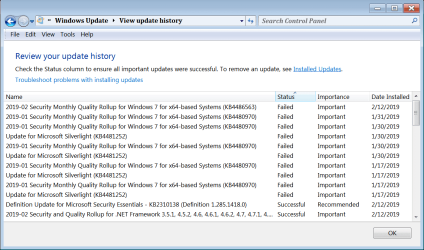
Guys, I'm dyin here. It's bee almost 2 weeks since I got any reply on this.

Nothing has been resolved, and no one is answering.

What do I do?
 

Attachments

  • Untitled.png
    Untitled.png
    32.6 KB · Views: 2
Last edited:

My Computer My Computer

At a glance

Windows 7 64 bit home premium SP1AMD Phenom x4 96416gbNvidia GTX1050 Ti
Computer type
PC/Desktop
Computer Manufacturer/Model Number
custom
OS
Windows 7 64 bit home premium SP1
CPU
AMD Phenom x4 964
Motherboard
asus
Memory
16gb
Graphics Card(s)
Nvidia GTX1050 Ti
Monitor(s) Displays
50" Plasma TV
Screen Resolution
1920x1080
Hard Drives
256Gb SSd
1Tb WD
PSU
big
Cooling
big
Keyboard
Logitech K800
Mouse
Logitech M570
Internet Speed
15MB/S
Antivirus
Avast, MSSE, SAS, Malwarebytes
Browser
Firefox, chrome
Hi 1metalguru,

Deployment Image Servicing and Management tool
Summary:
Found 359 errors
CSI C Mark Deployment Missing Total count: 2
CBS MUM Missing Total count: 357

With the amount of errors in the file above I would do a Repair Install, especially as chkdsk, sfc and SURT were unable to repair your OS! I also noticed that you ran the February 2019 update which also didn't work.

Repair Install - Overview

A repair install differs from a clean install in the fact that it ONLY replaces the corrupted OS with a new fresh copy. This means that ALL your User Accounts, Folders, Files, Documents, Pictures, Music, Videos, Data Files, Icons, and any installed programs are left intact. It does however, delete ALL the Window updates, and can affect, sounds, services, visual effect settings and device drivers by re-setting them to default. You cannot do a repair install at boot, in Safe Mode, using a system repair disk, or using an integrated Windows update disk. Basically, this process can ONLY be performed from within the LIVE OS.
 

My Computer My Computer

At a glance

Win 7 HP SP1 64-bit Vista HB SP2 32-bit Linux...Intel(R) Pentium(R) CPU P6200 @ 2.13GHz4.00 GBIntel(R) Graphics Media Accelerator HD
Computer type
Laptop
Computer Manufacturer/Model Number
Fujitsu LIFEBOOK
OS
Win 7 HP SP1 64-bit Vista HB SP2 32-bit Linux Mint 18.3
CPU
Intel(R) Pentium(R) CPU P6200 @ 2.13GHz
Motherboard
FUJITSU FJNBB06
Memory
4.00 GB
Graphics Card(s)
Intel(R) Graphics Media Accelerator HD
Sound Card
[1] Realtek High Definition Audio [2] Intel(R) Display Audio
Screen Resolution
1366 x 768 x 32 bits (4294967296 colors) @ 59 Hz
Hard Drives
TOSHIBA MK5076GSX
Antivirus
AVG FREE
I don't want to do that. Is there any other way? That would mean reinstalling SP1 and thousands of updates, which I am not prepared to do.

I have never had a reinstallation of Windows go well. It always results in loss of data.

Besides this Windows update problem, the computer runs flawlessly.

Is there any other way to manually update the security updates without using the rollup?

If I just continue to ignore these, will it affect my system security?

Thanks
 

My Computer My Computer

At a glance

Windows 7 64 bit home premium SP1AMD Phenom x4 96416gbNvidia GTX1050 Ti
Computer type
PC/Desktop
Computer Manufacturer/Model Number
custom
OS
Windows 7 64 bit home premium SP1
CPU
AMD Phenom x4 964
Motherboard
asus
Memory
16gb
Graphics Card(s)
Nvidia GTX1050 Ti
Monitor(s) Displays
50" Plasma TV
Screen Resolution
1920x1080
Hard Drives
256Gb SSd
1Tb WD
PSU
big
Cooling
big
Keyboard
Logitech K800
Mouse
Logitech M570
Internet Speed
15MB/S
Antivirus
Avast, MSSE, SAS, Malwarebytes
Browser
Firefox, chrome
Hi 1metalguru,

I don't want to do that. Is there any other way? That would mean reinstalling SP1 and thousands of updates, which I am not prepared to do.

I have never had a reinstallation of Windows go well. It always results in loss of data.

Besides this Windows update problem, the computer runs flawlessly.

Is there any other way to manually update the security updates without using the rollup?

OK, if you want to persevere with it you could try updating the OS using DISM++.

DISM++ - Basic Overview

DISM++ is a FREE implementation tool that has the ability to perform Windows Updates [WU]. Some of the advantages [but not all] are:

[1] The GUI is very easy to understand and use.
[2] It is much faster than M$’s WU because it uses a different engine.
[3] It downloads the latest WU DB from the M$ servers, scans your OS, and then lists the updates available.
[4] It doesn’t install superseded updates like M$ does.
[5] It gives you the option of what you want to install.
[6] The pre-ticked updates are what is recommended and are similar to the WU critical and recommended updates. The un-ticked updates are similar to the WU optional updates.

[7] It warns you if an update:
  • Includes telemetry.
  • Has known issues with certain hardware.
  • Needs exclusive access.
  • Is suspect.
  • Your OS doesn't need it.
  • Has any other known issues.
[8] It doesn’t require re-booting between updates.[9] It can be used to either update an install.wim image OFFLINE, or to update the LIVE OS.

I hope this helps!
 

My Computer My Computer

At a glance

Win 7 HP SP1 64-bit Vista HB SP2 32-bit Linux...Intel(R) Pentium(R) CPU P6200 @ 2.13GHz4.00 GBIntel(R) Graphics Media Accelerator HD
Computer type
Laptop
Computer Manufacturer/Model Number
Fujitsu LIFEBOOK
OS
Win 7 HP SP1 64-bit Vista HB SP2 32-bit Linux Mint 18.3
CPU
Intel(R) Pentium(R) CPU P6200 @ 2.13GHz
Motherboard
FUJITSU FJNBB06
Memory
4.00 GB
Graphics Card(s)
Intel(R) Graphics Media Accelerator HD
Sound Card
[1] Realtek High Definition Audio [2] Intel(R) Display Audio
Screen Resolution
1366 x 768 x 32 bits (4294967296 colors) @ 59 Hz
Hard Drives
TOSHIBA MK5076GSX
Antivirus
AVG FREE
A repair install
DOES NOT REMOVE SP1 OR YOUR PERSONAL DATA

it does however delete all MS Updates from that point


Having looked back over your OTHER threads, suspect this was caused during your BSOD issues, where the missing cat and mum files became corrupt/lost


Roy
 

My Computer My Computer

At a glance

W7 home premium 32bit/W7HP 64bit/w10 tp insid...E5300 dual core3gbNvidia Geforce 7100 Nforce 630i
Computer type
PC/Desktop
Computer Manufacturer/Model Number
medionl/Aspire 6930G/acer x55a
OS
W7 home premium 32bit/W7HP 64bit/w10 tp insider ring
CPU
E5300 dual core
Motherboard
medion MS7366
Memory
3gb
Graphics Card(s)
Nvidia Geforce 7100 Nforce 630i
Monitor(s) Displays
avixc
Internet Speed
n (isp resticted to 72)
Antivirus
mse/pands
Browser
palemoon
Other Info
Belkin Fd7050 n USB using Railink RT2870 drivers, more upto date
Roy:

Thanks. From what point would I have to reinstall updates? If it's from the point of install of Windows, that would be 10 years of updates, possibly hundreds of update files. That is definitely too much work.

Any way to just replace the missing/corrupted files without doing a repair install? As I said, Windows works perfectly except for this one little detail. I can't see doing 10 or 20 hours of work just to fix it.

I tried using DISM, but it seems to fail as well. Although, the problem with DISM is that it fails to download the updates. Some updates seem to start up fine, but at some point during the install it seems to hang and timeout. Is this possibly a network or firewall issue?
 

My Computer My Computer

At a glance

Windows 7 64 bit home premium SP1AMD Phenom x4 96416gbNvidia GTX1050 Ti
Computer type
PC/Desktop
Computer Manufacturer/Model Number
custom
OS
Windows 7 64 bit home premium SP1
CPU
AMD Phenom x4 964
Motherboard
asus
Memory
16gb
Graphics Card(s)
Nvidia GTX1050 Ti
Monitor(s) Displays
50" Plasma TV
Screen Resolution
1920x1080
Hard Drives
256Gb SSd
1Tb WD
PSU
big
Cooling
big
Keyboard
Logitech K800
Mouse
Logitech M570
Internet Speed
15MB/S
Antivirus
Avast, MSSE, SAS, Malwarebytes
Browser
Firefox, chrome
Guys:

A bit more information. I installed DISM and managed to get several security updates to install, however there is at least one that won't, and that's the Feb 12 security update.

The interesting thing here is not that the update won't install, but it won't download from WU site. If DISM downloads the update, it installs normally, however on updates that fail, its the download that fails and not the installation. I also noted that this file is 240MB in size, I wonder if the size of the file has something to do with it? Smaller updates seem to work normally.

Please don't abandon me now, we are getting close...

Darrell
 

My Computer My Computer

At a glance

Windows 7 64 bit home premium SP1AMD Phenom x4 96416gbNvidia GTX1050 Ti
Computer type
PC/Desktop
Computer Manufacturer/Model Number
custom
OS
Windows 7 64 bit home premium SP1
CPU
AMD Phenom x4 964
Motherboard
asus
Memory
16gb
Graphics Card(s)
Nvidia GTX1050 Ti
Monitor(s) Displays
50" Plasma TV
Screen Resolution
1920x1080
Hard Drives
256Gb SSd
1Tb WD
PSU
big
Cooling
big
Keyboard
Logitech K800
Mouse
Logitech M570
Internet Speed
15MB/S
Antivirus
Avast, MSSE, SAS, Malwarebytes
Browser
Firefox, chrome
Back
Top