Solved Problem Installing Windows 7/10 on Hard Drive with 0 mb of space

EtsWindows2002

New member
Local time
12:16 PM
Messages
16
Location
Hong Kong
Hi, I'm new here on SevenForums. I have a problem installing Windows 7 on my hard drive.
It's a Western Digital Caviar Blue 320gb WD3200AAJS-60M040 Hard Drive.
My PC is an HP Compaq DC7900 Small Form Factor.
Currently, I'm running windows 10 on another hard drive by Western Digital.
My problem in detail:
I tried to install Windows 7 Ultimate 64 Bit on the hard drive, but when I got to the Where Do You Want to Install Windows section, I got an error saying "Windows cannot be installed to this disk. This Computer's Hardware may not support booting."
I checked my BIOS, it said the SATA control mode is AHCI, but to no avail.
I also have reset the BIOS, but it's still not working.
Anyone can help me, please? Feedback and help are very much appreciated.
 

My Computer My Computer

At a glance

Windows 7 Ultimate 64 bitIntel Core 2 Duo E84008 gb of RAM
Computer type
PC/Desktop
Computer Manufacturer/Model Number
HP Compaq DC7900 Small Form Factor
OS
Windows 7 Ultimate 64 bit
CPU
Intel Core 2 Duo E8400
Memory
8 gb of RAM
Monitor(s) Displays
Benq monitor with webcam
Screen Resolution
1920x1080p
Hard Drives
1 Western Digital 80GB Hard Drive
Keyboard
Dell
Mouse
HP
Antivirus
Avast
Browser
Google Chrome
Hello EtsWindows2002

Welcome to Seven Forums!

Sounds like to me that you are installing onto the wrong volume. Does the HDD contain any disk partitioning?

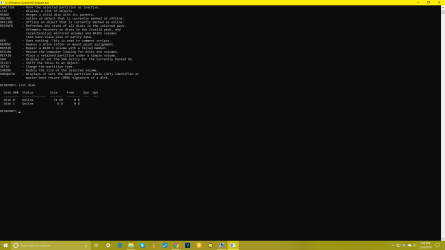
Perhaps you can go into DISKPART and do a LIST DISK. Take a picture of the results and upload picture to another post in this thread.
 

My Computer My Computer

At a glance

Windows 7 x64, Vista x64, 8.1 smartphoneIntel E8400 65W 64-bitDDR2 2 x 2GB, 1GB x 2XFX Radeon HD5750
Computer type
PC/Desktop
OS
Windows 7 x64, Vista x64, 8.1 smartphone
CPU
Intel E8400 65W 64-bit
Motherboard
Gigabyte EP45-UD3LR
Memory
DDR2 2 x 2GB, 1GB x 2
Graphics Card(s)
XFX Radeon HD5750
Sound Card
AMD High Definition Audio; Realtek High Definition Audio
Monitor(s) Displays
iiyama prolite X2377HDS
Screen Resolution
1920 x 1080
Hard Drives
500GB 7200 rpm Seagate ST3500413AS 16MB, 500GB 5400 rpm Toshiba MQ02ABF050H 32MB, 200GB 7200 rpm Seagate ST3200820AS 8MB, 2TB 7200 rpm Western Digital WD20EZRX 64MB
PSU
Enermax Liberty Modular
Case
Antec P193 Midi Tower
Keyboard
Mionix ZIBAL 60
Mouse
Razer USB 2.0 Diamondback Mouse or Huion Graphics Tablet
Browser
Internet Explorer, Lunascape, Firefox, Opera, Avast Safezone

My Computer My Computer

At a glance

Win 7 HP SP1 64-bit Vista HB SP2 32-bit Linux...Intel(R) Pentium(R) CPU P6200 @ 2.13GHz4.00 GBIntel(R) Graphics Media Accelerator HD
Computer type
Laptop
Computer Manufacturer/Model Number
Fujitsu LIFEBOOK
OS
Win 7 HP SP1 64-bit Vista HB SP2 32-bit Linux Mint 18.3
CPU
Intel(R) Pentium(R) CPU P6200 @ 2.13GHz
Motherboard
FUJITSU FJNBB06
Memory
4.00 GB
Graphics Card(s)
Intel(R) Graphics Media Accelerator HD
Sound Card
[1] Realtek High Definition Audio [2] Intel(R) Display Audio
Screen Resolution
1366 x 768 x 32 bits (4294967296 colors) @ 59 Hz
Hard Drives
TOSHIBA MK5076GSX
Antivirus
AVG FREE
Hello EtsWindows2002

Welcome to Seven Forums!

Sounds like to me that you are installing onto the wrong volume. Does the HDD contain any disk partitioning?

Perhaps you can go into DISKPART and do a LIST DISK. Take a picture of the results and upload picture to another post in this thread.

No it doesn't. Another problem is that it's clicking.
 

My Computer My Computer

At a glance

Windows 7 Ultimate 64 bitIntel Core 2 Duo E84008 gb of RAM
Computer type
PC/Desktop
Computer Manufacturer/Model Number
HP Compaq DC7900 Small Form Factor
OS
Windows 7 Ultimate 64 bit
CPU
Intel Core 2 Duo E8400
Memory
8 gb of RAM
Monitor(s) Displays
Benq monitor with webcam
Screen Resolution
1920x1080p
Hard Drives
1 Western Digital 80GB Hard Drive
Keyboard
Dell
Mouse
HP
Antivirus
Avast
Browser
Google Chrome
Screenshot (2).png
I'm using Windows 10 on another Hard Drive.
I have the original Wd 320gb HD attached.
Diskpart lists it as disk 1. Its (the hard drive I'm trying to install on) size is 0b and free space is 0b when its actual size is 320GB.
 

My Computer My Computer

At a glance

Windows 7 Ultimate 64 bitIntel Core 2 Duo E84008 gb of RAM
Computer type
PC/Desktop
Computer Manufacturer/Model Number
HP Compaq DC7900 Small Form Factor
OS
Windows 7 Ultimate 64 bit
CPU
Intel Core 2 Duo E8400
Memory
8 gb of RAM
Monitor(s) Displays
Benq monitor with webcam
Screen Resolution
1920x1080p
Hard Drives
1 Western Digital 80GB Hard Drive
Keyboard
Dell
Mouse
HP
Antivirus
Avast
Browser
Google Chrome
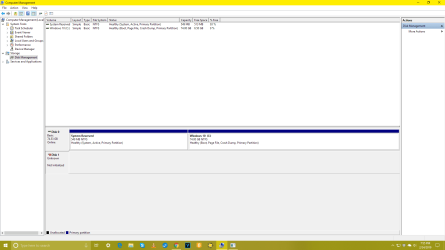
Screenshot (3).png
Another problem is that Disk Management says the disk is Unknown, and Not Initialised.
 

My Computer My Computer

At a glance

Windows 7 Ultimate 64 bitIntel Core 2 Duo E84008 gb of RAM
Computer type
PC/Desktop
Computer Manufacturer/Model Number
HP Compaq DC7900 Small Form Factor
OS
Windows 7 Ultimate 64 bit
CPU
Intel Core 2 Duo E8400
Memory
8 gb of RAM
Monitor(s) Displays
Benq monitor with webcam
Screen Resolution
1920x1080p
Hard Drives
1 Western Digital 80GB Hard Drive
Keyboard
Dell
Mouse
HP
Antivirus
Avast
Browser
Google Chrome
Moreover, when I tried to initialize it. i got an I/O error.
 

My Computer My Computer

At a glance

Windows 7 Ultimate 64 bitIntel Core 2 Duo E84008 gb of RAM
Computer type
PC/Desktop
Computer Manufacturer/Model Number
HP Compaq DC7900 Small Form Factor
OS
Windows 7 Ultimate 64 bit
CPU
Intel Core 2 Duo E8400
Memory
8 gb of RAM
Monitor(s) Displays
Benq monitor with webcam
Screen Resolution
1920x1080p
Hard Drives
1 Western Digital 80GB Hard Drive
Keyboard
Dell
Mouse
HP
Antivirus
Avast
Browser
Google Chrome
Have you used the Western Digital Data LifeGuard tool? You can obtain the tool from Data Lifeguard diagnostic for windows.

The tool will test the disk or erase anything that is on there.
 

My Computer My Computer

At a glance

Windows 7 x64, Vista x64, 8.1 smartphoneIntel E8400 65W 64-bitDDR2 2 x 2GB, 1GB x 2XFX Radeon HD5750
Computer type
PC/Desktop
OS
Windows 7 x64, Vista x64, 8.1 smartphone
CPU
Intel E8400 65W 64-bit
Motherboard
Gigabyte EP45-UD3LR
Memory
DDR2 2 x 2GB, 1GB x 2
Graphics Card(s)
XFX Radeon HD5750
Sound Card
AMD High Definition Audio; Realtek High Definition Audio
Monitor(s) Displays
iiyama prolite X2377HDS
Screen Resolution
1920 x 1080
Hard Drives
500GB 7200 rpm Seagate ST3500413AS 16MB, 500GB 5400 rpm Toshiba MQ02ABF050H 32MB, 200GB 7200 rpm Seagate ST3200820AS 8MB, 2TB 7200 rpm Western Digital WD20EZRX 64MB
PSU
Enermax Liberty Modular
Case
Antec P193 Midi Tower
Keyboard
Mionix ZIBAL 60
Mouse
Razer USB 2.0 Diamondback Mouse or Huion Graphics Tablet
Browser
Internet Explorer, Lunascape, Firefox, Opera, Avast Safezone
Where did the disk came from?
It seems that the disk is dead. Try the WD Data LifeGuard tool Iko suggested.

If you have 4G of memory (or less) I suggest you to install win 7 32 bits. Will run better.
 

My Computers My Computers

  • At a glance

    Windows 7 HP 64i5 6600K - 800MHz to 4200MHz4+4G GSkill DDR4 3000IG - Intel 530
    Computer type
    PC/Desktop
    Computer Manufacturer/Model Number
    custom build
    OS
    Windows 7 HP 64
    CPU
    i5 6600K - 800MHz to 4200MHz
    Motherboard
    GA-Z170-HD3P
    Memory
    4+4G GSkill DDR4 3000
    Graphics Card(s)
    IG - Intel 530
    Monitor(s) Displays
    Samsung 226BW
    Screen Resolution
    1680x1050
    Hard Drives
    (1) -1 SM951 – 128GB M.2 AHCI PCIe SSD drive for Windows 7 and Lubuntu
    (2) -1 WD SATA 3 - 1T for Data
    (3) -1 WD SATA 3 - 1T for backup
    PSU
    Thermaltake 450W TR2 gold
    Keyboard
    Old and good Chicony mechanical keyboard
    Mouse
    Logitech mX performance - 9 buttons (had to disable some)
    Internet Speed
    500Mb/s
    Browser
    Firefox 64
    Other Info
    TinyWall firewall
  • At a glance

    Windows 7 Proi7-4500U 800MHz to 3.0GHz(4+4)G DDR3 1600IG intel 4400 + NVIDIA GeForce GT 745M
    Computer type
    Laptop
    System Manufacturer/Model Number
    Asus Q550LF
    OS
    Windows 7 Pro
    CPU
    i7-4500U 800MHz to 3.0GHz
    Motherboard
    Asus Q550LF
    Memory
    (4+4)G DDR3 1600
    Graphics Card(s)
    IG intel 4400 + NVIDIA GeForce GT 745M
    Sound Card
    Realtek
    Monitor(s) Displays
    LG Display LP156WF4-SPH1
    Screen Resolution
    1920 x 1080
    Hard Drives
    BX500 120G SSD for Windows and programs +
    1T HDD for data
    Internet Speed
    500 Mb/s
    Browser
    Firefox
    Other Info
    TinyWall firewall
Where did the disk came from?
It seems that the disk is dead. Try the WD Data LifeGuard tool Iko suggested.

If you have 4G of memory (or less) I suggest you to install win 7 32 bits. Will run better.

I did. the ram is 8gb.
 

My Computer My Computer

At a glance

Windows 7 Ultimate 64 bitIntel Core 2 Duo E84008 gb of RAM
Computer type
PC/Desktop
Computer Manufacturer/Model Number
HP Compaq DC7900 Small Form Factor
OS
Windows 7 Ultimate 64 bit
CPU
Intel Core 2 Duo E8400
Memory
8 gb of RAM
Monitor(s) Displays
Benq monitor with webcam
Screen Resolution
1920x1080p
Hard Drives
1 Western Digital 80GB Hard Drive
Keyboard
Dell
Mouse
HP
Antivirus
Avast
Browser
Google Chrome
I ran it again. it said passed.
 

My Computer My Computer

At a glance

Windows 7 Ultimate 64 bitIntel Core 2 Duo E84008 gb of RAM
Computer type
PC/Desktop
Computer Manufacturer/Model Number
HP Compaq DC7900 Small Form Factor
OS
Windows 7 Ultimate 64 bit
CPU
Intel Core 2 Duo E8400
Memory
8 gb of RAM
Monitor(s) Displays
Benq monitor with webcam
Screen Resolution
1920x1080p
Hard Drives
1 Western Digital 80GB Hard Drive
Keyboard
Dell
Mouse
HP
Antivirus
Avast
Browser
Google Chrome
I ran it again. it said passed
 

My Computer My Computer

At a glance

Windows 7 Ultimate 64 bitIntel Core 2 Duo E84008 gb of RAM
Computer type
PC/Desktop
Computer Manufacturer/Model Number
HP Compaq DC7900 Small Form Factor
OS
Windows 7 Ultimate 64 bit
CPU
Intel Core 2 Duo E8400
Memory
8 gb of RAM
Monitor(s) Displays
Benq monitor with webcam
Screen Resolution
1920x1080p
Hard Drives
1 Western Digital 80GB Hard Drive
Keyboard
Dell
Mouse
HP
Antivirus
Avast
Browser
Google Chrome
I think you ran on disk 0, 75G.
Did you run on Disk 1, WD3200AAJS 320G?
 

My Computers My Computers

  • At a glance

    Windows 7 HP 64i5 6600K - 800MHz to 4200MHz4+4G GSkill DDR4 3000IG - Intel 530
    Computer type
    PC/Desktop
    Computer Manufacturer/Model Number
    custom build
    OS
    Windows 7 HP 64
    CPU
    i5 6600K - 800MHz to 4200MHz
    Motherboard
    GA-Z170-HD3P
    Memory
    4+4G GSkill DDR4 3000
    Graphics Card(s)
    IG - Intel 530
    Monitor(s) Displays
    Samsung 226BW
    Screen Resolution
    1680x1050
    Hard Drives
    (1) -1 SM951 – 128GB M.2 AHCI PCIe SSD drive for Windows 7 and Lubuntu
    (2) -1 WD SATA 3 - 1T for Data
    (3) -1 WD SATA 3 - 1T for backup
    PSU
    Thermaltake 450W TR2 gold
    Keyboard
    Old and good Chicony mechanical keyboard
    Mouse
    Logitech mX performance - 9 buttons (had to disable some)
    Internet Speed
    500Mb/s
    Browser
    Firefox 64
    Other Info
    TinyWall firewall
  • At a glance

    Windows 7 Proi7-4500U 800MHz to 3.0GHz(4+4)G DDR3 1600IG intel 4400 + NVIDIA GeForce GT 745M
    Computer type
    Laptop
    System Manufacturer/Model Number
    Asus Q550LF
    OS
    Windows 7 Pro
    CPU
    i7-4500U 800MHz to 3.0GHz
    Motherboard
    Asus Q550LF
    Memory
    (4+4)G DDR3 1600
    Graphics Card(s)
    IG intel 4400 + NVIDIA GeForce GT 745M
    Sound Card
    Realtek
    Monitor(s) Displays
    LG Display LP156WF4-SPH1
    Screen Resolution
    1920 x 1080
    Hard Drives
    BX500 120G SSD for Windows and programs +
    1T HDD for data
    Internet Speed
    500 Mb/s
    Browser
    Firefox
    Other Info
    TinyWall firewall

My Computer My Computer

At a glance

Windows 7 Ultimate 64 bitIntel Core 2 Duo E84008 gb of RAM
Computer type
PC/Desktop
Computer Manufacturer/Model Number
HP Compaq DC7900 Small Form Factor
OS
Windows 7 Ultimate 64 bit
CPU
Intel Core 2 Duo E8400
Memory
8 gb of RAM
Monitor(s) Displays
Benq monitor with webcam
Screen Resolution
1920x1080p
Hard Drives
1 Western Digital 80GB Hard Drive
Keyboard
Dell
Mouse
HP
Antivirus
Avast
Browser
Google Chrome
Have you tried to recover the partition? I have seen other people on the Web who have this problem, and they use Partition Wizard to recover the Partition, and that works for them.

Try Partition Wizard to recover the Partition, and see what you get:

www.partitionwizard.com
 

My Computer My Computer

At a glance

Windows 7 x64, Vista x64, 8.1 smartphoneIntel E8400 65W 64-bitDDR2 2 x 2GB, 1GB x 2XFX Radeon HD5750
Computer type
PC/Desktop
OS
Windows 7 x64, Vista x64, 8.1 smartphone
CPU
Intel E8400 65W 64-bit
Motherboard
Gigabyte EP45-UD3LR
Memory
DDR2 2 x 2GB, 1GB x 2
Graphics Card(s)
XFX Radeon HD5750
Sound Card
AMD High Definition Audio; Realtek High Definition Audio
Monitor(s) Displays
iiyama prolite X2377HDS
Screen Resolution
1920 x 1080
Hard Drives
500GB 7200 rpm Seagate ST3500413AS 16MB, 500GB 5400 rpm Toshiba MQ02ABF050H 32MB, 200GB 7200 rpm Seagate ST3200820AS 8MB, 2TB 7200 rpm Western Digital WD20EZRX 64MB
PSU
Enermax Liberty Modular
Case
Antec P193 Midi Tower
Keyboard
Mionix ZIBAL 60
Mouse
Razer USB 2.0 Diamondback Mouse or Huion Graphics Tablet
Browser
Internet Explorer, Lunascape, Firefox, Opera, Avast Safezone
You don't need do do anything to the disk.

- Detach the power and SATA cable of Disk 0 (win 10) from the MB.
- Boot from Win 7 installation disk, go to install - advanced - delete all partitions - create new. It will create a 120 m -MS reserved - RAW and a big NTFS.
Choose to install on the big NTFS.
Clean Install Windows 7
 

My Computers My Computers

  • At a glance

    Windows 7 HP 64i5 6600K - 800MHz to 4200MHz4+4G GSkill DDR4 3000IG - Intel 530
    Computer type
    PC/Desktop
    Computer Manufacturer/Model Number
    custom build
    OS
    Windows 7 HP 64
    CPU
    i5 6600K - 800MHz to 4200MHz
    Motherboard
    GA-Z170-HD3P
    Memory
    4+4G GSkill DDR4 3000
    Graphics Card(s)
    IG - Intel 530
    Monitor(s) Displays
    Samsung 226BW
    Screen Resolution
    1680x1050
    Hard Drives
    (1) -1 SM951 – 128GB M.2 AHCI PCIe SSD drive for Windows 7 and Lubuntu
    (2) -1 WD SATA 3 - 1T for Data
    (3) -1 WD SATA 3 - 1T for backup
    PSU
    Thermaltake 450W TR2 gold
    Keyboard
    Old and good Chicony mechanical keyboard
    Mouse
    Logitech mX performance - 9 buttons (had to disable some)
    Internet Speed
    500Mb/s
    Browser
    Firefox 64
    Other Info
    TinyWall firewall
  • At a glance

    Windows 7 Proi7-4500U 800MHz to 3.0GHz(4+4)G DDR3 1600IG intel 4400 + NVIDIA GeForce GT 745M
    Computer type
    Laptop
    System Manufacturer/Model Number
    Asus Q550LF
    OS
    Windows 7 Pro
    CPU
    i7-4500U 800MHz to 3.0GHz
    Motherboard
    Asus Q550LF
    Memory
    (4+4)G DDR3 1600
    Graphics Card(s)
    IG intel 4400 + NVIDIA GeForce GT 745M
    Sound Card
    Realtek
    Monitor(s) Displays
    LG Display LP156WF4-SPH1
    Screen Resolution
    1920 x 1080
    Hard Drives
    BX500 120G SSD for Windows and programs +
    1T HDD for data
    Internet Speed
    500 Mb/s
    Browser
    Firefox
    Other Info
    TinyWall firewall
You don't need do do anything to the disk.

- Detach the power and SATA cable of Disk 0 (win 10) from the MB.
- Boot from Win 7 installation disk, go to install - advanced - delete all partitions - create new. It will create a 120 m -MS reserved - RAW and a big NTFS.
Choose to install on the big NTFS.
Clean Install Windows 7

Actually, i tried to create a partition. it said 0 mb.
 
Last edited:

My Computer My Computer

At a glance

Windows 7 Ultimate 64 bitIntel Core 2 Duo E84008 gb of RAM
Computer type
PC/Desktop
Computer Manufacturer/Model Number
HP Compaq DC7900 Small Form Factor
OS
Windows 7 Ultimate 64 bit
CPU
Intel Core 2 Duo E8400
Memory
8 gb of RAM
Monitor(s) Displays
Benq monitor with webcam
Screen Resolution
1920x1080p
Hard Drives
1 Western Digital 80GB Hard Drive
Keyboard
Dell
Mouse
HP
Antivirus
Avast
Browser
Google Chrome
Have you tried to recover the partition? I have seen other people on the Web who have this problem, and they use Partition Wizard to recover the Partition, and that works for them.

Try Partition Wizard to recover the Partition, and see what you get:

www.partitionwizard.com

i'll see what i can do.
 

My Computer My Computer

At a glance

Windows 7 Ultimate 64 bitIntel Core 2 Duo E84008 gb of RAM
Computer type
PC/Desktop
Computer Manufacturer/Model Number
HP Compaq DC7900 Small Form Factor
OS
Windows 7 Ultimate 64 bit
CPU
Intel Core 2 Duo E8400
Memory
8 gb of RAM
Monitor(s) Displays
Benq monitor with webcam
Screen Resolution
1920x1080p
Hard Drives
1 Western Digital 80GB Hard Drive
Keyboard
Dell
Mouse
HP
Antivirus
Avast
Browser
Google Chrome
actually, I was actually going to dual boot Windows 7 with Windows 10 with a YouTube video from a British YouTuber called Britec09.
Link to the YouTube video here:
 

My Computer My Computer

At a glance

Windows 7 Ultimate 64 bitIntel Core 2 Duo E84008 gb of RAM
Computer type
PC/Desktop
Computer Manufacturer/Model Number
HP Compaq DC7900 Small Form Factor
OS
Windows 7 Ultimate 64 bit
CPU
Intel Core 2 Duo E8400
Memory
8 gb of RAM
Monitor(s) Displays
Benq monitor with webcam
Screen Resolution
1920x1080p
Hard Drives
1 Western Digital 80GB Hard Drive
Keyboard
Dell
Mouse
HP
Antivirus
Avast
Browser
Google Chrome

My Computer My Computer

At a glance

Windows 7 Ultimate 64 bitIntel Core 2 Duo E84008 gb of RAM
Computer type
PC/Desktop
Computer Manufacturer/Model Number
HP Compaq DC7900 Small Form Factor
OS
Windows 7 Ultimate 64 bit
CPU
Intel Core 2 Duo E8400
Memory
8 gb of RAM
Monitor(s) Displays
Benq monitor with webcam
Screen Resolution
1920x1080p
Hard Drives
1 Western Digital 80GB Hard Drive
Keyboard
Dell
Mouse
HP
Antivirus
Avast
Browser
Google Chrome
Back
Top