
Clean Install with a Upgrade Windows 7 Version

How to Do a Clean Install with an Upgrade Windows 7 Version


   Information
This will show you how to do a Clean Install using a retail Upgrade Windows 7 installation disc.

   Warning
Remember that you need to legally own a valid qualifying previous version of Windows to use a Upgrade Windows 7, and to stop using (or uninstall) the qualifying OS while you have the upgrade installed. Microsoft only made doing a clean install from a upgrade Windows 7 possible to make it more convenient so you do not have to reinstall both the old Windows version (ex: Vista) and upgrade to Windows 7 everytime you needed or wanted to reinstall.

If you do not legally own a valid qualifying previous version of Windows, then you are violating the terms of Microsoft's Windows 7 End User License Agreement and could get your product key number invalidated by Microsoft. Plus, it is considered illegal.

For more about this, please see: Microsoft SMB Community Blog : Regardless of what any hack says, a Windows 7 Upgrade is an Upgrade. What you need to know.


OPTION ONE

A Normal Clean Install


1. Do a clean install at boot without checking the Automatically activate Windows when I'm online box during the installation process.

2. When the installation is finished, then manually activate Windows 7 with your product key number.

3. If your Windows should fail to activate, then pick up at step 2 in OPTION THREE below.


OPTION TWO

Through a Custom Install


   Note
This option will let you do a clean install of Windows 7 without formating the current Windows installation to have your current Windows installation backed up to the Windows.old folder during the installation of your retail upgrade Windows 7. This way you can copy any files back that you want from the C:\Windows.old folder (previous installation) back into your new installation afterwards.

1. Do a custom install at boot or from within your current Windows installation without checking the Automatically activate Windows when I'm online box during the installation process.

2. When the installation is finished, then manually activate Windows 7 with your product key number.

3. Copy any files that you want back from the C:\Windows.old folder into where you want it in you new installation.

4. You can now delete the Windows.old folder using Disk Cleanup to have a clean install now.


OPTION THREE

Clean Install with a Registry Workaround for Error Code 0xc004f061


   Note
If you get a activation error code 0xc004f061 while doing OPTION ONE or OPTION TWO above, then you will need to use this option instead
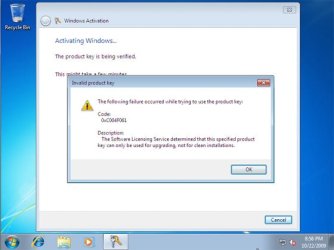
win7_upgrade_media_06.jpg


1. Do a clean install of your upgrade Windows 7 at boot without checking the Automatically activate Windows when I'm online box during the installation process.
NOTE: If you already did this from OPTION ONE above and got a activation error, then skip this step and just proceed to step 2 below instead. There's no need to reinstall again.

2. Click on the Download button below to download the .bat file below, and save it to your desktop.
Activate_Windows_Upgrade_after_Clean_Install.bat


Download


3. Right click on the downloaded .bat file, and click on Run as administrator.

4. If prompted, click/tap on Run and Yes (UAC).
NOTE: If you like, you can stop getting the Run prompt by unblocking the downloaded .bat file.

5. You will now notice a command prompt quickly open and close while applying the changes to your registry.

6. Click/tap on OK. (see screenshot below)
OK.jpg
7. Restart the computer.

8. When the computer is finished restarting, then manually activate Windows 7 with your product key number.


OPTION FOUR

Double Installing Windows 7


   Note
This option is the same that was used to do a clean install of an upgrade copy of Windows 7. It's more work, but if the options above did not work for you, then this should since this is the most reliable option.

1. Do a clean install of your upgrade Windows 7 at boot without checking the Automatically activate Windows when I'm online box during the installation process, and do not activate Windows 7. When finished with the clean install, do not or install any Windows Updates, drivers, or programs yet.

2. When finished with the clean install, start at step 4 at this link to do an in-place "upgrade" install with your upgrade Windows 7 installation disk from within the just now finished clean install of Windows 7.

3. When the in-place upgrade installation is completely finished, then manually activate Windows 7 with your product key number. You can now also install any Windows Updates drivers, and programs you like.
That's it,
Shawn


Attachments

Last edited:
Hello Nabilalk,

Could be a problem with the key number. If it was an issue about a clean install VS upgrade, you would get a error like the one in OPTION THREE of the tutorial. You might contact Digital Rivers about it to see if they can get you a replacement key number. :(
Thanks for the feedback. I contacted Microsoft and they confirmed that the product key is valid. I emailed DigitalRiver and hopefully they will help. I'm assuming if I was able to install, that there is nothing wrong with the ISO that I burned to a bootable DVD? I downloaded the 29.99 Pro Win 7 64 bit student version. Could this be the issue? I will post back once this gets resolved.
 

My Computer

Computer Manufacturer/Model Number
Gateway M6827
OS
Win 7 Professional 32-bit
CPU
Intel Core 2 Duo CPU T5750 @ 2.00 GHz
Memory
3GB
Monitor(s) Displays
ViewSonic Vx900
Screen Resolution
1280x1024
Hard Drives
150GB Hard Drive
Last edited:

My Computer

Computer type
PC/Desktop
Computer Manufacturer/Model Number
Self built custom
OS
64-bit Windows 11 Pro for Workstations
CPU
Intel i7-8700K OC'd to 5 GHz
Motherboard
ASUS ROG Maximus XI Formula Z390
Memory
64 GB (4x16GB) G.SKILL TridentZ RGB DDR4 3600 MHz
Graphics Card(s)
ASUS ROG-STRIX-GTX1080TI-O11G-GAMING
Sound Card
Integrated
Monitor(s) Displays
2 x Samsung Odyssey G7 27"
Screen Resolution
2560x1440
Hard Drives
1TB Samsung 990 PRO M.2,
4TB Samsung 990 PRO PRO M.2,
TerraMaster F8 SSD Plus NAS
PSU
Seasonic Prime Titanium 850W
Case
Thermaltake Core P3
Cooling
Corsair Hydro H115i
Keyboard
Logitech wireless K800
Mouse
Logitech MX Master 4
Internet Speed
2 Gb/s Download and 100 Mb/s Upload
Antivirus
Malwarebyte Anti-Malware Premium
Browser
Google Chrome
Other Info
Logitech Z625 speaker system,
Logitech BRIO 4K Pro webcam,
HP Color LaserJet Pro MFP M477fdn,
APC SMART-UPS RT 1000 XL - SURT1000XLI,
Galaxy S23 Plus phone
You can try recreating and reburning the ISO to see if that may be it, but it most likely a error with the key number.

http://www.sevenforums.com/tutorials/30470-make-bootable-iso-student-d-l.html
I figure if there was something wrong with the ISO (and I did use those instructions to make the ISO), then there would have been some kind of error with the install itself. I don't know why Microsoft says the key is valid. Hopefully I can get an answer tomorrow. Thanks for the help.
 
Last edited by a moderator:

My Computer

Computer Manufacturer/Model Number
Gateway M6827
OS
Win 7 Professional 32-bit
CPU
Intel Core 2 Duo CPU T5750 @ 2.00 GHz
Memory
3GB
Monitor(s) Displays
ViewSonic Vx900
Screen Resolution
1280x1024
Hard Drives
150GB Hard Drive
No problem. Please let us know how it went.
 

My Computer

Computer type
PC/Desktop
Computer Manufacturer/Model Number
Self built custom
OS
64-bit Windows 11 Pro for Workstations
CPU
Intel i7-8700K OC'd to 5 GHz
Motherboard
ASUS ROG Maximus XI Formula Z390
Memory
64 GB (4x16GB) G.SKILL TridentZ RGB DDR4 3600 MHz
Graphics Card(s)
ASUS ROG-STRIX-GTX1080TI-O11G-GAMING
Sound Card
Integrated
Monitor(s) Displays
2 x Samsung Odyssey G7 27"
Screen Resolution
2560x1440
Hard Drives
1TB Samsung 990 PRO M.2,
4TB Samsung 990 PRO PRO M.2,
TerraMaster F8 SSD Plus NAS
PSU
Seasonic Prime Titanium 850W
Case
Thermaltake Core P3
Cooling
Corsair Hydro H115i
Keyboard
Logitech wireless K800
Mouse
Logitech MX Master 4
Internet Speed
2 Gb/s Download and 100 Mb/s Upload
Antivirus
Malwarebyte Anti-Malware Premium
Browser
Google Chrome
Other Info
Logitech Z625 speaker system,
Logitech BRIO 4K Pro webcam,
HP Color LaserJet Pro MFP M477fdn,
APC SMART-UPS RT 1000 XL - SURT1000XLI,
Galaxy S23 Plus phone
vista 32 to 7 64 question

i have downloaded windows 7 64 bit. All I have is the exe that allows me to begin the remote installation. How do i get an iso in order to do the "clean" install that is required??:mad:
 

My Computer

OS
vista 32bit home
i have downloaded windows 7 64 bit. All I have is the exe that allows me to begin the remote installation. How do i get an iso in order to do the "clean" install that is required??:mad:
You cannot upgrade from a 32-bit OS to a 64-bit OS...

a clean install is your only option
 

My Computer

Computer Manufacturer/Model Number
Compal JFT02 (Custom Build Laptop)
OS
Windows 7 Home Premium x64 - Mac OS X 10.6.4 x64
CPU
Intel Core 2 Duo T9300 2.5 GHz
Motherboard
JFT02
Memory
4GB Kingston DDR2-800
Graphics Card(s)
NVIDIA Geforce 8600M GT (512MB Model)
Sound Card
Realtek HD Audio
Monitor(s) Displays
WUXGA Standard Laptop Display
Screen Resolution
1680*1050
Hard Drives
Toshiba 320GB 5400RPM Laptop HD
PSU
Standard Laptop Power Supply
Case
Standard Laptop Case
Cooling
Standard Laptop Cooling
Keyboard
Standard Laptop 105 Key-Keyboard
Mouse
Synaptics Touchpad
Internet Speed
Verizion Online DSL 3360/864 kbs (dl/up)

My Computer

OS
win 7 pro x64
CPU
6600 quad
Motherboard
asus p5k
Memory
4 gig
Graphics Card(s)
7800 gtx
Monitor(s) Displays
32inch lcd
Hard Drives
1.5 tb 32mb sumsung
PSU
antec 850 truepower
Case
antec 900 hundred
Cooling
none
Just wanted to say that the rearm method works like a charm and thanks to Brink for all of his great tutorials!
 

My Computer

Computer Manufacturer/Model Number
Acer AM1100-E104A
OS
Win7 HP (RTMx86), Win7 Ultimate (7229x86)
CPU
AMD Athlon 64 x2 4400+ (2.3 GHz)
Motherboard
Acer F690GVM
Memory
3 Gigs DDr2 Ram
Graphics Card(s)
ATI Radeon HD 2600 Pro
Sound Card
integrated HD sound
Monitor(s) Displays
1 LG 21" Flatron Wide LCD Monitor
Screen Resolution
1680x1050
Hard Drives
Seagate 320 Gb 7200 sata, Seagate 500 Gb 7200 Sata
PSU
420 W
Case
Acer
Keyboard
Logitech wireless keyboard
Mouse
Logitech wireless mouse
Internet Speed
10 Mbit download, 1Mbit upload
Other Info
Never had a major problem with Vista but am enjoying Windows 7!
i have downloaded windows 7 64 bit. All I have is the exe that allows me to begin the remote installation. How do i get an iso in order to do the "clean" install that is required??:mad:
Here is a letter I received from Digital Rivers that has a link to the 64 bit ISO:

Thank you for ordering from the Windows 7 Student Offer online store.

We understand that you want the Windows 7 ISO file.

Here is additional information regarding the Windows 7 64-bit download
process. The Student Offer has been extended for those customers who
wish to install the 64-bit version of Windows 7, but are currently
running a 32-bit Operating System. Microsoft’s offer now includes a
downloadable ISO file of Windows 7.

The ISO file contains all the Windows 7 installation files combined into
a single uncompressed file. When you download the ISO file using the
download manager link, you need to copy it to some medium (DVD or USB
flash drive) in order to install Windows 7. A download for the Windows 7
USB/DVD Download tool has been provided. This tool allows you to create
bootable media to a USB flash drive or a DVD. Here is the link that
you’ll need:

Detailed Instructions: Windows 7 US Online Store


Windows 7 Download Manager for ISO Image: http://msft-dnl.digitalrivercontent.net/msvista/pub/dlm/DLMWin7Pro64US-ISO.exe

Support Information:

For online store purchase, downloads, or product key questions,
please contact Digital River

http://windows7.digitalriver.com/store/mswpus/en_US/DisplayHelpPage/

If you need to contact Microsoft Technical Support, use Microsoft’s
Online Assisted Support process to get your regional specific contact
information.

Help and Support

Sincerely,
Mailen G.
Windows 7 Student Offer online store
Customer Service
studentwindows.us@digitalriver.com
Email ID: 12359761
 

My Computer

Computer Manufacturer/Model Number
Gateway M6827
OS
Win 7 Professional 32-bit
CPU
Intel Core 2 Duo CPU T5750 @ 2.00 GHz
Memory
3GB
Monitor(s) Displays
ViewSonic Vx900
Screen Resolution
1280x1024
Hard Drives
150GB Hard Drive
Just of to Confirm Brink's point, I bought the family pack (Home Premium upgrade) and was actually able to do a clean install on three PCs. Thank you again Brink for the heads up.
 

My Computer

OS
windows 7 Home Premium
You're welcome Mutant. Thank you for posting back your results to help further confirm it. :)
 

My Computer

Computer type
PC/Desktop
Computer Manufacturer/Model Number
Self built custom
OS
64-bit Windows 11 Pro for Workstations
CPU
Intel i7-8700K OC'd to 5 GHz
Motherboard
ASUS ROG Maximus XI Formula Z390
Memory
64 GB (4x16GB) G.SKILL TridentZ RGB DDR4 3600 MHz
Graphics Card(s)
ASUS ROG-STRIX-GTX1080TI-O11G-GAMING
Sound Card
Integrated
Monitor(s) Displays
2 x Samsung Odyssey G7 27"
Screen Resolution
2560x1440
Hard Drives
1TB Samsung 990 PRO M.2,
4TB Samsung 990 PRO PRO M.2,
TerraMaster F8 SSD Plus NAS
PSU
Seasonic Prime Titanium 850W
Case
Thermaltake Core P3
Cooling
Corsair Hydro H115i
Keyboard
Logitech wireless K800
Mouse
Logitech MX Master 4
Internet Speed
2 Gb/s Download and 100 Mb/s Upload
Antivirus
Malwarebyte Anti-Malware Premium
Browser
Google Chrome
Other Info
Logitech Z625 speaker system,
Logitech BRIO 4K Pro webcam,
HP Color LaserJet Pro MFP M477fdn,
APC SMART-UPS RT 1000 XL - SURT1000XLI,
Galaxy S23 Plus phone
Its really nice tutorial, Thank you.
 

My Computer

Computer Manufacturer/Model Number
HP Pavilion dv5
OS
windows 7 Ultimate
CPU
2 GHz Intel Core 2 Duo Processor P7350
Motherboard
Hewlett-Packard HP Pavilion dv5 Notebook PC
Memory
3GB
Graphics Card(s)
NVIDIA GeForce 9200M GS
Sound Card
IDT High Definition Audio CODEC
Monitor(s) Displays
15.4” WXGA High Definition BrightView Widescreen(1280 x 800)
Screen Resolution
1280 x 800
Hard Drives
250GB
Hi all & thank you Shawn for the tutorial, I was wondering if anyone has tried this with the Hewlett Packard Windows 7 upgrade disc (Clean install from boot)
 

My Computer

Computer Manufacturer/Model Number
Hewlett Packard Compaq Presario CQ60-305au
OS
Windows Seven Home Premium 32bit SP1
CPU
AMD Athlon QI46 2.1Ghz
Motherboard
Wistron 303c
Memory
2048 Mb DDR2 SD RAM
Graphics Card(s)
NVidea GE GoForce 8200M G/256mb dedicated graphics memory
Sound Card
MCP78S NVidea high definition
Monitor(s) Displays
15.6" High definition Brightview Widescreen
Screen Resolution
1336x768
Hard Drives
Toshiba MK2555GSX ATA
Hi all & thank you Shawn for the tutorial, I was wondering if anyone has tried this with the Hewlett Packard Windows 7 upgrade disc (Clean install from boot)

Just to confirm about the Hewlett Packarard Windows 7 upgrade offer disks, I tried option 1 (clean install) and did not have any problems activation was succesfull and went without a hitch :D
 

My Computer

Computer Manufacturer/Model Number
Hewlett Packard Compaq Presario CQ60-305au
OS
Windows Seven Home Premium 32bit SP1
CPU
AMD Athlon QI46 2.1Ghz
Motherboard
Wistron 303c
Memory
2048 Mb DDR2 SD RAM
Graphics Card(s)
NVidea GE GoForce 8200M G/256mb dedicated graphics memory
Sound Card
MCP78S NVidea high definition
Monitor(s) Displays
15.6" High definition Brightview Widescreen
Screen Resolution
1336x768
Hard Drives
Toshiba MK2555GSX ATA
Thank you Mitchell for posting back to confirm this with that one. :)
 

My Computer

Computer type
PC/Desktop
Computer Manufacturer/Model Number
Self built custom
OS
64-bit Windows 11 Pro for Workstations
CPU
Intel i7-8700K OC'd to 5 GHz
Motherboard
ASUS ROG Maximus XI Formula Z390
Memory
64 GB (4x16GB) G.SKILL TridentZ RGB DDR4 3600 MHz
Graphics Card(s)
ASUS ROG-STRIX-GTX1080TI-O11G-GAMING
Sound Card
Integrated
Monitor(s) Displays
2 x Samsung Odyssey G7 27"
Screen Resolution
2560x1440
Hard Drives
1TB Samsung 990 PRO M.2,
4TB Samsung 990 PRO PRO M.2,
TerraMaster F8 SSD Plus NAS
PSU
Seasonic Prime Titanium 850W
Case
Thermaltake Core P3
Cooling
Corsair Hydro H115i
Keyboard
Logitech wireless K800
Mouse
Logitech MX Master 4
Internet Speed
2 Gb/s Download and 100 Mb/s Upload
Antivirus
Malwarebyte Anti-Malware Premium
Browser
Google Chrome
Other Info
Logitech Z625 speaker system,
Logitech BRIO 4K Pro webcam,
HP Color LaserJet Pro MFP M477fdn,
APC SMART-UPS RT 1000 XL - SURT1000XLI,
Galaxy S23 Plus phone
Hi all,


Greetings from Australia!

i got vista ultimate x64 installed currently on my laptop. planning to buy/dl student upgrade windows 7 Pro x64 offer here AU$50
I am bit of noob, so could you please let me know how to do the clean install using upgrade student dl??


Do I just need to :
1. purchase and dl windows from Microsoft site
2. make an iso from it
3. burn the iso to dvd (BTW how big the iso will be?? normal 4.7 GB DVD enough??)
4. boot the PC from the DVD
5. format the harddisk from there
6. continue with Windows 7 Installation


Could you please tell me if those steps are correct? I am scared screwing up my PC..
Thanks heaps in advance.
 

My Computer

OS
Vista Ultimate x64

My Computer

Computer type
PC/Desktop
Computer Manufacturer/Model Number
Self built custom
OS
64-bit Windows 11 Pro for Workstations
CPU
Intel i7-8700K OC'd to 5 GHz
Motherboard
ASUS ROG Maximus XI Formula Z390
Memory
64 GB (4x16GB) G.SKILL TridentZ RGB DDR4 3600 MHz
Graphics Card(s)
ASUS ROG-STRIX-GTX1080TI-O11G-GAMING
Sound Card
Integrated
Monitor(s) Displays
2 x Samsung Odyssey G7 27"
Screen Resolution
2560x1440
Hard Drives
1TB Samsung 990 PRO M.2,
4TB Samsung 990 PRO PRO M.2,
TerraMaster F8 SSD Plus NAS
PSU
Seasonic Prime Titanium 850W
Case
Thermaltake Core P3
Cooling
Corsair Hydro H115i
Keyboard
Logitech wireless K800
Mouse
Logitech MX Master 4
Internet Speed
2 Gb/s Download and 100 Mb/s Upload
Antivirus
Malwarebyte Anti-Malware Premium
Browser
Google Chrome
Other Info
Logitech Z625 speaker system,
Logitech BRIO 4K Pro webcam,
HP Color LaserJet Pro MFP M477fdn,
APC SMART-UPS RT 1000 XL - SURT1000XLI,
Galaxy S23 Plus phone
Thank you very much

Thank you very much for making this information available - worked like a champ. So why would MS try to cripple this option when 1) They should know smart guys like you would come up with a work-around, especially if it is primarily a switch in the registry, and 2) What are users supposed to do when their system crashes or gets munched by a virus and they need to to a fresh install - install Vista and 7? Oh well. Thanks again, I really appreciate your very clear instructions.
 

My Computer

Computer Manufacturer/Model Number
Shuttle SX38P2
OS
win7-64
CPU
Intel C2D 3.0
Motherboard
Shuttle
Memory
4 GB
Graphics Card(s)
Quatro FX 1500
Hard Drives
Barracuda 7200 - 256 x 2
You're welcome Rick, and welcome to Seven Forums.

Well, Microsoft wants to make it easy to do a clean install with a upgrade Windows 7 for those that have a valid previous copy of Windows, but do not want people violating the EULA license aggreement, or stealing, by doing a clean install with a upgrade and not having a valid previous copy of Windows. Doing the later, can get your product key number permanently invalidated.
 

My Computer

Computer type
PC/Desktop
Computer Manufacturer/Model Number
Self built custom
OS
64-bit Windows 11 Pro for Workstations
CPU
Intel i7-8700K OC'd to 5 GHz
Motherboard
ASUS ROG Maximus XI Formula Z390
Memory
64 GB (4x16GB) G.SKILL TridentZ RGB DDR4 3600 MHz
Graphics Card(s)
ASUS ROG-STRIX-GTX1080TI-O11G-GAMING
Sound Card
Integrated
Monitor(s) Displays
2 x Samsung Odyssey G7 27"
Screen Resolution
2560x1440
Hard Drives
1TB Samsung 990 PRO M.2,
4TB Samsung 990 PRO PRO M.2,
TerraMaster F8 SSD Plus NAS
PSU
Seasonic Prime Titanium 850W
Case
Thermaltake Core P3
Cooling
Corsair Hydro H115i
Keyboard
Logitech wireless K800
Mouse
Logitech MX Master 4
Internet Speed
2 Gb/s Download and 100 Mb/s Upload
Antivirus
Malwarebyte Anti-Malware Premium
Browser
Google Chrome
Other Info
Logitech Z625 speaker system,
Logitech BRIO 4K Pro webcam,
HP Color LaserJet Pro MFP M477fdn,
APC SMART-UPS RT 1000 XL - SURT1000XLI,
Galaxy S23 Plus phone
i have downloaded windows 7 64 bit. All I have is the exe that allows me to begin the remote installation. How do i get an iso in order to do the "clean" install that is required??:mad:
Here is a letter I received from Digital Rivers that has a link to the 64 bit ISO:

Thank you for ordering from the Windows 7 Student Offer online store.

We understand that you want the Windows 7 ISO file.

Here is additional information regarding the Windows 7 64-bit download
process. The Student Offer has been extended for those customers who
wish to install the 64-bit version of Windows 7, but are currently
running a 32-bit Operating System. Microsoft’s offer now includes a
downloadable ISO file of Windows 7.

The ISO file contains all the Windows 7 installation files combined into
a single uncompressed file. When you download the ISO file using the
download manager link, you need to copy it to some medium (DVD or USB
flash drive) in order to install Windows 7. A download for the Windows 7
USB/DVD Download tool has been provided. This tool allows you to create
bootable media to a USB flash drive or a DVD. Here is the link that
you’ll need:

Detailed Instructions: Windows 7 US Online Store


Windows 7 Download Manager for ISO Image: http://msft-dnl.digitalrivercontent.net/msvista/pub/dlm/DLMWin7Pro64US-ISO.exe

......

Hi,nabilalk, how could you get this information?
 

My Computer

OS
vista home base
Back
Top