Network icon in the taskbar is always disconnected even when connected

Windower7

New member
Local time
11:03 PM
Messages
22
Title pretty much says it all. I am running Win 7 Ultimate. About 3 months ago, my wireless network icon stopped showing connected status. Please see below. (The picture shows a disconnected icon yet I am online via wifi)

Like I said I can get connected, but the problem is that the icon will ALWAYS show that I am disconnected. It is a hassle as at times the connection drops and I can't tell.

Any ideas on how to fix this please. Much appreciated.
 

Attachments

  • Connection Problema.JPG
    Connection Problema.JPG
    9.4 KB · Views: 45

My Computer My Computer

At a glance

Win 7 Ultimate 64-bit
Computer type
PC/Desktop
OS
Win 7 Ultimate 64-bit
I'm not entirely sure other than perhaps try uninstalling your wireless driver and reinstall it. I initially thought reading the topic title it was the yellow exclamation icon. That is actually generated if Windows doesn't make a connection to Microsoft to detect that you in fact have Internet ability. That's a registry setting. In your case it seems like it may be driver related. WIFI can be a real PITA and for me it's hard to diagnose on a forum. I'd have to be in front of the computer to look at it.

If you do uninstall and reinstall the WIFI driver, do so in safe mode using Revouninstaller. Then reboot and then reinstall the driver.

Something else that could be going on is the TCP/IP stack, but I have my doubts since if that was the case your Internet access would most likely be flaky.

All you need is the free version. Download Revo Uninstaller Freeware - Free and Full Download - Uninstall software, remove programs, solve uninstall problems
 

My Computer My Computer

At a glance

Windows 7 Ultimate x64
Computer type
PC/Desktop
OS
Windows 7 Ultimate x64
If you are using a VPN (especially Express VPN) then the connected icon appears as a yellow triangle + exclamation mark. I haven't the foggiest idea why but I rely on the red express vpn icon with the green tick which shows you are connected.
 

My Computer My Computer

At a glance

win7 home premium 64bit3.47 gigahertz AMD Phenom II X4 9558192MbATI Radeon HD 5700 Series [Display adapter]
Computer type
PC/Desktop
Computer Manufacturer/Model Number
custom
OS
win7 home premium 64bit
CPU
3.47 gigahertz AMD Phenom II X4 955
Motherboard
ASUSTeK Computer INC. M4A89TD PRO USB3 Rev 1.xx
Memory
8192Mb
Graphics Card(s)
ATI Radeon HD 5700 Series [Display adapter]
Sound Card
asus xonar essence stx
Monitor(s) Displays
prolite E2472HD
Hard Drives
ST31500341AS [Hard drive] (1500.30 GB) -- drive 0, s/n 9VS42ED0, rev CC1H, SMART Status: Healthy
ST3750528AS [Hard drive] (750.16 GB) -- drive 1, s/n 9VP8EPRF, rev CC44, SMART Status: Healthy
Case
antec
Cooling
4 inner and 1 top
Keyboard
logitech
Mouse
MS
Internet Speed
80/20
Antivirus
ESET
Browser
firefox
open regedit and navigate to....

HKEY_LOCAL_MACHINE\SYSTEM\CurrentControlSet\Services\NlaSvc\Parameters\Internet

Under the Internet key, double-click EnableActiveProbing, and then in Value data, type:1

This was the only solution that worked for me when I had the same issue
 

My Computer My Computer

At a glance

Windows 7 Ultimate x86
Computer type
PC/Desktop
OS
Windows 7 Ultimate x86
Thanks guys. Sadly, none of these ideas worked. :(
 

My Computer My Computer

At a glance

Win 7 Ultimate 64-bit
Computer type
PC/Desktop
OS
Win 7 Ultimate 64-bit
Even following my driver reinstall instructions? Did you follow them to a T?
 

My Computer My Computer

At a glance

Windows 7 Ultimate x64
Computer type
PC/Desktop
OS
Windows 7 Ultimate x64
Even following my driver reinstall instructions? Did you follow them to a T?

I am going to try later when I get home. Will keep you posted. Thanks.
 

My Computer My Computer

At a glance

Win 7 Ultimate 64-bit
Computer type
PC/Desktop
OS
Win 7 Ultimate 64-bit
try logging off windows then log back on
 

My Computer My Computer

At a glance

Win7 pro x64stock i7 7700kCorsair Vengeance LPX 16GB (2x8GB) DDR4 @ 320...integrated Intel HD 630
Computer type
PC/Desktop
Computer Manufacturer/Model Number
diy
OS
Win7 pro x64
CPU
stock i7 7700k
Motherboard
Gigabyte Z270N-WIFI mini-ITX
Memory
Corsair Vengeance LPX 16GB (2x8GB) DDR4 @ 3200MHz
Graphics Card(s)
integrated Intel HD 630
Sound Card
onboard Realtek ALC1220
Monitor(s) Displays
two vertically mounted samsung 55" 4k un55mu8000
Screen Resolution
1920x1280
Hard Drives
256GB Samsung EVO 960 M.2 pci-e NVMe SSD
PSU
SilverStone Nightjar ST45NF 450Watt Fanless
Case
No case. Motherboard is mounted directly onto power supply
Cooling
Evercool low profile 815EP with Panaflow 12L fan at 7v
Keyboard
Ortek MCK-86 mini
Mouse
Belkin 5-button USB
Internet Speed
spectrum 400mbps
If you do uninstall and reinstall the WIFI driver, do so in safe mode using Revouninstaller. Then reboot and then reinstall the driver.

Do I need to reboot win into safe mode to do the uninstall?
 

My Computer My Computer

At a glance

Win 7 Ultimate 64-bit
Computer type
PC/Desktop
OS
Win 7 Ultimate 64-bit
Even following my driver reinstall instructions? Did you follow them to a T?

How do I uninstall drivers using Revo? I looked through all options and scrolled down through programs one by one and could not find any network drivers.
Also searching for words like: "Network", "Network Adapter", "Network Controller", "Intel" in the search bar did not bring up my driver.
My Network adapter is "Intel (R) Centrino (R) Advanced-N 6205.
 

My Computer My Computer

At a glance

Win 7 Ultimate 64-bit
Computer type
PC/Desktop
OS
Win 7 Ultimate 64-bit
Yes, use safe mode to uninstall.

If you can't even find the driver scrolling though the list, then it isn't there. Sometimes they don't show up in Revouninstaller. So you'll have to use the regular Programs uninstall in the control panel.

Is it not under Intel? Make sure you scroll though the list.
 

My Computer My Computer

At a glance

Windows 7 Ultimate x64
Computer type
PC/Desktop
OS
Windows 7 Ultimate x64
I think revo uninstaller is for uninstalling programs, not drivers. So you can use it to uninstall any programs like Intel Wireless or whatever it may be called, but to uninstall the driver you will need to do start > run > devmgmt.msc > network adatpers > then find your wireless adapter in the network adapter section > right click > uninstall, and proceed. When it asks you "do you want to delete the software for this device", say yes.

I did not hear back on post #8
 

My Computer My Computer

At a glance

Win7 pro x64stock i7 7700kCorsair Vengeance LPX 16GB (2x8GB) DDR4 @ 320...integrated Intel HD 630
Computer type
PC/Desktop
Computer Manufacturer/Model Number
diy
OS
Win7 pro x64
CPU
stock i7 7700k
Motherboard
Gigabyte Z270N-WIFI mini-ITX
Memory
Corsair Vengeance LPX 16GB (2x8GB) DDR4 @ 3200MHz
Graphics Card(s)
integrated Intel HD 630
Sound Card
onboard Realtek ALC1220
Monitor(s) Displays
two vertically mounted samsung 55" 4k un55mu8000
Screen Resolution
1920x1280
Hard Drives
256GB Samsung EVO 960 M.2 pci-e NVMe SSD
PSU
SilverStone Nightjar ST45NF 450Watt Fanless
Case
No case. Motherboard is mounted directly onto power supply
Cooling
Evercool low profile 815EP with Panaflow 12L fan at 7v
Keyboard
Ortek MCK-86 mini
Mouse
Belkin 5-button USB
Internet Speed
spectrum 400mbps
Yes, use safe mode to uninstall.

If you can't even find the driver scrolling though the list, then it isn't there. Sometimes they don't show up in Revouninstaller. So you'll have to use the regular Programs uninstall in the control panel.

Is it not under Intel? Make sure you scroll though the list.

Yes, I used windows explorer (control panel) to remove and delete the driver in safe mode, did reboot then installed the new driver I downloaded and still the same problem. I cannot get the bars icon when connected. I did this twice. :(
 

My Computer My Computer

At a glance

Win 7 Ultimate 64-bit
Computer type
PC/Desktop
OS
Win 7 Ultimate 64-bit
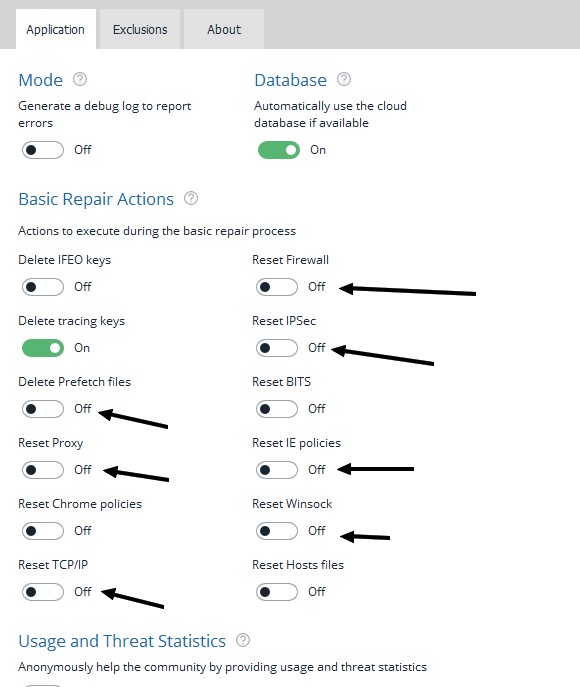
Try safe mode again and remove the driver. Go into device manager in the control panel and under Network adapters right click your driver and uninstall there as well if it exists.

Now run ADwcleaner and look at my screen shot. Turn all those on and run ADwcleaner.

Make sure you are just running safe mode and NOT safe mode with networking. Of course download ADwcleaner first before you use safe mode.


AdwCleaner - Free Adware Cleaner & Removal Tool | Malwarebytes


DbSl8wN.jpg
 

My Computer My Computer

At a glance

Windows 7 Ultimate x64
Computer type
PC/Desktop
OS
Windows 7 Ultimate x64
Well, this is funny guys. After so much hassle, after installing and uninstalling drivers a few times, the issue is finally fixed.

As it is usually the case with those tough problems that seem to have no resolution, the solution was quite easy, but I stumbled upon it by pure chance.

So I was reviewing my Bluetooth adapter settings and went to the Network and Sharing Center in the Control Panel just to notice that my Network map looks funny. It shows unknown. A couple of clicks later, I discovered that my "Basic Network information" tool was off. (Don't ask me how that happened :rolleyes:) Once I turned it back on, the magic network bars just appeared once again. :party::party::party:

I just wanted to update everyone who participated in this thread and wanted also to thank you all for your suggestions and help. No matter what, I learned a few things during this process.
 

My Computer My Computer

At a glance

Win 7 Ultimate 64-bit
Computer type
PC/Desktop
OS
Win 7 Ultimate 64-bit
my "Basic Network information" tool was off. Once I turned it back on, the magic network bars just appeared once again


I don't know what you mean by Basic Network Information Tool. Can you elaborate?
 

My Computer My Computer

At a glance

Win7 pro x64stock i7 7700kCorsair Vengeance LPX 16GB (2x8GB) DDR4 @ 320...integrated Intel HD 630
Computer type
PC/Desktop
Computer Manufacturer/Model Number
diy
OS
Win7 pro x64
CPU
stock i7 7700k
Motherboard
Gigabyte Z270N-WIFI mini-ITX
Memory
Corsair Vengeance LPX 16GB (2x8GB) DDR4 @ 3200MHz
Graphics Card(s)
integrated Intel HD 630
Sound Card
onboard Realtek ALC1220
Monitor(s) Displays
two vertically mounted samsung 55" 4k un55mu8000
Screen Resolution
1920x1280
Hard Drives
256GB Samsung EVO 960 M.2 pci-e NVMe SSD
PSU
SilverStone Nightjar ST45NF 450Watt Fanless
Case
No case. Motherboard is mounted directly onto power supply
Cooling
Evercool low profile 815EP with Panaflow 12L fan at 7v
Keyboard
Ortek MCK-86 mini
Mouse
Belkin 5-button USB
Internet Speed
spectrum 400mbps
What I have found most effective is restarting your "explorer.exe". For whatever reason, even after having worked on this app for close to 30 years, M$ has not solved its fundamental problem, that of it freezing and not refreshing.

I use a batch file and run "pskill.exe explorer.exe" followed by say 3 seconds delay and then "explorer.exe".

PSKILL is one of the free utilities from Sysinternals, now owned by M$.
 

My Computer My Computer

At a glance

windows 7
OS
windows 7
Back
Top