
CHKDSK Recommended During Boot-Stopped-Checked Later Autorepair Off

baumgrenze

New member
Member
VIP
Local time
10:25 PM
Messages
300
Location
Charlottesville, VA
Recently Win7/Pro x64 has been recommending a chkdsk of my System Disk during the boot. I've used the 'any key to ignore' option and then run it once booted.

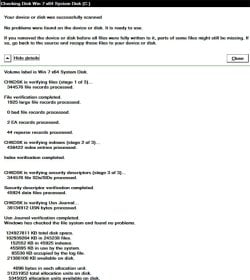
To do so I select "Start" then "Computer" and right click the System Drive and select "Properties" and then the tab "Tools" and select the "Check Now" option. This opens a dialog box "Check Disk Win 7 x64 System Disk (C:)" in which the "Automatically fix file system errors" is checked by default and I uncheck it I run this version of chkdsk and open "See details." I have attached an image of the report it generates.

Would CHKDSK find something different if I allowed "Automatically fix file system errors?"

thanks,
baumgrenze
 

Attachments
  • CHKDSK_032419_Details.jpg
    CHKDSK_032419_Details.jpg
    71.1 KB · Views: 32

My Computer My Computer

At a glance

Win 7 Pro 64Intel Core 2 Quad Q6600 (2.4 GHz) Quad Core2 x Crucial 4GB Kit (2GBx2) DDR2 CT2KIT25664A...Sapphire Radeon HD 3870 PCIe 512 Mb
Computer type
PC/Desktop
Computer Manufacturer/Model Number
Custom built by GamePC/Solid Electric - Palo Alto - on 03/10/08
OS
Win 7 Pro 64
CPU
Intel Core 2 Quad Q6600 (2.4 GHz) Quad Core
Motherboard
Gigabyte GA-P35-DS3P Intel P35 ATX (rev. 2.1)
Memory
2 x Crucial 4GB Kit (2GBx2) DDR2 CT2KIT25664AA800
Graphics Card(s)
Sapphire Radeon HD 3870 PCIe 512 Mb
Sound Card
RealTek audio on MOBO + EDIROL UA-1EX
Monitor(s) Displays
Samsung S24A450BW 24" LED monitor
Screen Resolution
1600 x 1200 at 75 Hz
Hard Drives
2 Crucial 128 Gb SSD (CT128M550SSD1)
one mounted and running Win7/Pro x64
one disconnected containing only Win10/Pro upgrade - in process
1 1TB WD Caviar Black (WD1003FZEX-00MK2A0) (Data drive)
1 2TB Seagate 2TB (PN/ 9JB1N3-576 - ST2000DM001-1ER
PSU
Seasonic S12-HT 650W 80% Efficiency Power Supply
Case
Lian Li PC-B25B
Cooling
Gigabyte Silent-Pipe
Keyboard
Dell MS Comfort
Mouse
HP x4000 wireless
Internet Speed
Sonic FTTN @ 23 Mbps
Antivirus
Avast
Browser
SeaMonkey
Other Info
BIOS: Award Software International, Inc. F6 06/18/2009

System Specs - Updated on 09//16/19
It has to run at boot before windows loads as windows may lock files or maybe in use
 

My Computer My Computer

At a glance

win 8 32 bit
Computer type
PC/Desktop
OS
win 8 32 bit
https://www.sevenforums.com/newreply.php?do=postreply&t=418985

Thank you, Samuria for your reply,

The CHKDSK message shows just after the "splash" image forms but before the Password Request is displayed, if that is a helpful clue.

Is there a technique for running this 'version' of CHKDSK and seeing what problems it uncovers without running the risk of the System Disk being rendered inoperable by the 'repairs' run by CHKDSK? The answer to this is not immediately apparent.

I did a surface scan of the SDD and it is clean, but I'm unclear on what 'surface' of a drive that is not a spinning disk is tested.

CrystalDiskInfo 8.0.0 reports it as "Good - 88%), having run 19,032 hours, 793 days, or 22.17 hours.

I only have 5 items checked in my Startup System Configuration:

Avast (2 instances but locations are different)
MS Windows
Java
MS Office

thanks,
baumgrenze
 

My Computer My Computer

At a glance

Win 7 Pro 64Intel Core 2 Quad Q6600 (2.4 GHz) Quad Core2 x Crucial 4GB Kit (2GBx2) DDR2 CT2KIT25664A...Sapphire Radeon HD 3870 PCIe 512 Mb
Computer type
PC/Desktop
Computer Manufacturer/Model Number
Custom built by GamePC/Solid Electric - Palo Alto - on 03/10/08
OS
Win 7 Pro 64
CPU
Intel Core 2 Quad Q6600 (2.4 GHz) Quad Core
Motherboard
Gigabyte GA-P35-DS3P Intel P35 ATX (rev. 2.1)
Memory
2 x Crucial 4GB Kit (2GBx2) DDR2 CT2KIT25664AA800
Graphics Card(s)
Sapphire Radeon HD 3870 PCIe 512 Mb
Sound Card
RealTek audio on MOBO + EDIROL UA-1EX
Monitor(s) Displays
Samsung S24A450BW 24" LED monitor
Screen Resolution
1600 x 1200 at 75 Hz
Hard Drives
2 Crucial 128 Gb SSD (CT128M550SSD1)
one mounted and running Win7/Pro x64
one disconnected containing only Win10/Pro upgrade - in process
1 1TB WD Caviar Black (WD1003FZEX-00MK2A0) (Data drive)
1 2TB Seagate 2TB (PN/ 9JB1N3-576 - ST2000DM001-1ER
PSU
Seasonic S12-HT 650W 80% Efficiency Power Supply
Case
Lian Li PC-B25B
Cooling
Gigabyte Silent-Pipe
Keyboard
Dell MS Comfort
Mouse
HP x4000 wireless
Internet Speed
Sonic FTTN @ 23 Mbps
Antivirus
Avast
Browser
SeaMonkey
Other Info
BIOS: Award Software International, Inc. F6 06/18/2009

System Specs - Updated on 09//16/19
Check disk didn't found any problems so there is no need for a fix.
If you want to do a check disk with the fix option:
Open a CMD window as admin and type:
chkdsk c: /f
It will say your disk is in use and if you what to schedule to next start=yes
Reboot
 

My Computers My Computers

  • At a glance

    Windows 7 HP 64i5 6600K - 800MHz to 4200MHz4+4G GSkill DDR4 3000IG - Intel 530
    Computer type
    PC/Desktop
    Computer Manufacturer/Model Number
    custom build
    OS
    Windows 7 HP 64
    CPU
    i5 6600K - 800MHz to 4200MHz
    Motherboard
    GA-Z170-HD3P
    Memory
    4+4G GSkill DDR4 3000
    Graphics Card(s)
    IG - Intel 530
    Monitor(s) Displays
    Samsung 226BW
    Screen Resolution
    1680x1050
    Hard Drives
    (1) -1 SM951 – 128GB M.2 AHCI PCIe SSD drive for Windows 7 and Lubuntu
    (2) -1 WD SATA 3 - 1T for Data
    (3) -1 WD SATA 3 - 1T for backup
    PSU
    Thermaltake 450W TR2 gold
    Keyboard
    Old and good Chicony mechanical keyboard
    Mouse
    Logitech mX performance - 9 buttons (had to disable some)
    Internet Speed
    500Mb/s
    Browser
    Firefox 64
    Other Info
    TinyWall firewall
  • At a glance

    Windows 7 Proi7-4500U 800MHz to 3.0GHz(4+4)G DDR3 1600IG intel 4400 + NVIDIA GeForce GT 745M
    Computer type
    Laptop
    System Manufacturer/Model Number
    Asus Q550LF
    OS
    Windows 7 Pro
    CPU
    i7-4500U 800MHz to 3.0GHz
    Motherboard
    Asus Q550LF
    Memory
    (4+4)G DDR3 1600
    Graphics Card(s)
    IG intel 4400 + NVIDIA GeForce GT 745M
    Sound Card
    Realtek
    Monitor(s) Displays
    LG Display LP156WF4-SPH1
    Screen Resolution
    1920 x 1080
    Hard Drives
    BX500 120G SSD for Windows and programs +
    1T HDD for data
    Internet Speed
    500 Mb/s
    Browser
    Firefox
    Other Info
    TinyWall firewall
Thanks, Megahertz07

I want to be able to 'control' the CHKDSK before Win7 fully loads and it appears to me that letting that happen during the loading process will allow the routine to do whatever it wants once it is started.

Is my memory of past experiences with this process faulty? In every case I've been taken unawares and if the option to pause and reflect is offered, I don't recall it.

Are there aspects of running CHDKSK before Win7 loads that are different than after? Your initial reply seems to say that.

The system seems to run fine without the proposed 'repair' during the boot sequence loading of Win7.

I'm trying to avoid having to reinstall Win7 and all my program files.

thanks
baumgrenze
 

My Computer My Computer

At a glance

Win 7 Pro 64Intel Core 2 Quad Q6600 (2.4 GHz) Quad Core2 x Crucial 4GB Kit (2GBx2) DDR2 CT2KIT25664A...Sapphire Radeon HD 3870 PCIe 512 Mb
Computer type
PC/Desktop
Computer Manufacturer/Model Number
Custom built by GamePC/Solid Electric - Palo Alto - on 03/10/08
OS
Win 7 Pro 64
CPU
Intel Core 2 Quad Q6600 (2.4 GHz) Quad Core
Motherboard
Gigabyte GA-P35-DS3P Intel P35 ATX (rev. 2.1)
Memory
2 x Crucial 4GB Kit (2GBx2) DDR2 CT2KIT25664AA800
Graphics Card(s)
Sapphire Radeon HD 3870 PCIe 512 Mb
Sound Card
RealTek audio on MOBO + EDIROL UA-1EX
Monitor(s) Displays
Samsung S24A450BW 24" LED monitor
Screen Resolution
1600 x 1200 at 75 Hz
Hard Drives
2 Crucial 128 Gb SSD (CT128M550SSD1)
one mounted and running Win7/Pro x64
one disconnected containing only Win10/Pro upgrade - in process
1 1TB WD Caviar Black (WD1003FZEX-00MK2A0) (Data drive)
1 2TB Seagate 2TB (PN/ 9JB1N3-576 - ST2000DM001-1ER
PSU
Seasonic S12-HT 650W 80% Efficiency Power Supply
Case
Lian Li PC-B25B
Cooling
Gigabyte Silent-Pipe
Keyboard
Dell MS Comfort
Mouse
HP x4000 wireless
Internet Speed
Sonic FTTN @ 23 Mbps
Antivirus
Avast
Browser
SeaMonkey
Other Info
BIOS: Award Software International, Inc. F6 06/18/2009

System Specs - Updated on 09//16/19
If there are errors it fixes they need fixing if you don't fix then the files are corrupted anyway so may bring the system down
 

My Computer My Computer

At a glance

win 8 32 bit
Computer type
PC/Desktop
OS
win 8 32 bit
Samuria, on the image on post #1 it says "Windows has checked the file system and found NO problems.

Baumgrenze, you can run check disk under Windows any time but to fix problems (chkdsk c: /f) it can't be done under Windows as the drive is in use. It must be on boot.
 

My Computers My Computers

  • At a glance

    Windows 7 HP 64i5 6600K - 800MHz to 4200MHz4+4G GSkill DDR4 3000IG - Intel 530
    Computer type
    PC/Desktop
    Computer Manufacturer/Model Number
    custom build
    OS
    Windows 7 HP 64
    CPU
    i5 6600K - 800MHz to 4200MHz
    Motherboard
    GA-Z170-HD3P
    Memory
    4+4G GSkill DDR4 3000
    Graphics Card(s)
    IG - Intel 530
    Monitor(s) Displays
    Samsung 226BW
    Screen Resolution
    1680x1050
    Hard Drives
    (1) -1 SM951 – 128GB M.2 AHCI PCIe SSD drive for Windows 7 and Lubuntu
    (2) -1 WD SATA 3 - 1T for Data
    (3) -1 WD SATA 3 - 1T for backup
    PSU
    Thermaltake 450W TR2 gold
    Keyboard
    Old and good Chicony mechanical keyboard
    Mouse
    Logitech mX performance - 9 buttons (had to disable some)
    Internet Speed
    500Mb/s
    Browser
    Firefox 64
    Other Info
    TinyWall firewall
  • At a glance

    Windows 7 Proi7-4500U 800MHz to 3.0GHz(4+4)G DDR3 1600IG intel 4400 + NVIDIA GeForce GT 745M
    Computer type
    Laptop
    System Manufacturer/Model Number
    Asus Q550LF
    OS
    Windows 7 Pro
    CPU
    i7-4500U 800MHz to 3.0GHz
    Motherboard
    Asus Q550LF
    Memory
    (4+4)G DDR3 1600
    Graphics Card(s)
    IG intel 4400 + NVIDIA GeForce GT 745M
    Sound Card
    Realtek
    Monitor(s) Displays
    LG Display LP156WF4-SPH1
    Screen Resolution
    1920 x 1080
    Hard Drives
    BX500 120G SSD for Windows and programs +
    1T HDD for data
    Internet Speed
    500 Mb/s
    Browser
    Firefox
    Other Info
    TinyWall firewall
I know it said no errors but was trying to point out if there are errors not fixing them doesn't solve anything
 

My Computer My Computer

At a glance

win 8 32 bit
Computer type
PC/Desktop
OS
win 8 32 bit
Samuria, thanks for being so patient.

I tried chkntfs C: at an elevated command prompt and got the reply below, so Win7 is 'upset' about something.

Microsoft Windows [Version 6.1.7601]
Copyright (c) 2009 Microsoft Corporation. All rights reserved.

C:\Windows\system32>chkntfs C:
The type of the file system is NTFS.
C: is dirty. You may use the /C option to schedule chkdsk for this drive.

I've been trying to get my Mozilla profile back together so that all my mail files are where they belong in the email client in SeaMonkey as time permits. I hope that is what has it 'upset.'

I'll reboot soon and let it run its course.

thanks again,
baumgrenze
 
Last edited:

My Computer My Computer

At a glance

Win 7 Pro 64Intel Core 2 Quad Q6600 (2.4 GHz) Quad Core2 x Crucial 4GB Kit (2GBx2) DDR2 CT2KIT25664A...Sapphire Radeon HD 3870 PCIe 512 Mb
Computer type
PC/Desktop
Computer Manufacturer/Model Number
Custom built by GamePC/Solid Electric - Palo Alto - on 03/10/08
OS
Win 7 Pro 64
CPU
Intel Core 2 Quad Q6600 (2.4 GHz) Quad Core
Motherboard
Gigabyte GA-P35-DS3P Intel P35 ATX (rev. 2.1)
Memory
2 x Crucial 4GB Kit (2GBx2) DDR2 CT2KIT25664AA800
Graphics Card(s)
Sapphire Radeon HD 3870 PCIe 512 Mb
Sound Card
RealTek audio on MOBO + EDIROL UA-1EX
Monitor(s) Displays
Samsung S24A450BW 24" LED monitor
Screen Resolution
1600 x 1200 at 75 Hz
Hard Drives
2 Crucial 128 Gb SSD (CT128M550SSD1)
one mounted and running Win7/Pro x64
one disconnected containing only Win10/Pro upgrade - in process
1 1TB WD Caviar Black (WD1003FZEX-00MK2A0) (Data drive)
1 2TB Seagate 2TB (PN/ 9JB1N3-576 - ST2000DM001-1ER
PSU
Seasonic S12-HT 650W 80% Efficiency Power Supply
Case
Lian Li PC-B25B
Cooling
Gigabyte Silent-Pipe
Keyboard
Dell MS Comfort
Mouse
HP x4000 wireless
Internet Speed
Sonic FTTN @ 23 Mbps
Antivirus
Avast
Browser
SeaMonkey
Other Info
BIOS: Award Software International, Inc. F6 06/18/2009

System Specs - Updated on 09//16/19
It seems there is a Catch 22.


I snapped a digital image of the transient message during the boot. It is probably in a log file, too, no?


Windows will now check the disk.
Cannot open volume for direct access.
Autochk cannot run due to an error caused by a recently installed software package
Use the System Restore feature from the control panel to restore the system to a point prior to the recent software package installation.
An unspecified error occurred (766f6c756d652e63 3f1)


I have a System Restore point from 3/23/19 when Java 8 Update 201 8.0.2010.9 was installed. Unfortunately System Restore cannot restore. I have images but chose too transpose the text just now.


System Restore
The disk Win 7 x64 System Disk (C:) has errors.
Windows has detected file system corruption on Win 7 x64 System Disk (C:). You must check the disk for errors before it can be restored.

Check the disk for errors. (underlined - a hyperlink to)
Windows can't check the disk while it's in use
Do you want to check the hard disk errors next time you start your computer?
The option "Schedule disk check" was selected.
On rebooting the same process occurred.


Is there a way around this Catch 22?


thanks,
baumgrenze
 

My Computer My Computer

At a glance

Win 7 Pro 64Intel Core 2 Quad Q6600 (2.4 GHz) Quad Core2 x Crucial 4GB Kit (2GBx2) DDR2 CT2KIT25664A...Sapphire Radeon HD 3870 PCIe 512 Mb
Computer type
PC/Desktop
Computer Manufacturer/Model Number
Custom built by GamePC/Solid Electric - Palo Alto - on 03/10/08
OS
Win 7 Pro 64
CPU
Intel Core 2 Quad Q6600 (2.4 GHz) Quad Core
Motherboard
Gigabyte GA-P35-DS3P Intel P35 ATX (rev. 2.1)
Memory
2 x Crucial 4GB Kit (2GBx2) DDR2 CT2KIT25664AA800
Graphics Card(s)
Sapphire Radeon HD 3870 PCIe 512 Mb
Sound Card
RealTek audio on MOBO + EDIROL UA-1EX
Monitor(s) Displays
Samsung S24A450BW 24" LED monitor
Screen Resolution
1600 x 1200 at 75 Hz
Hard Drives
2 Crucial 128 Gb SSD (CT128M550SSD1)
one mounted and running Win7/Pro x64
one disconnected containing only Win10/Pro upgrade - in process
1 1TB WD Caviar Black (WD1003FZEX-00MK2A0) (Data drive)
1 2TB Seagate 2TB (PN/ 9JB1N3-576 - ST2000DM001-1ER
PSU
Seasonic S12-HT 650W 80% Efficiency Power Supply
Case
Lian Li PC-B25B
Cooling
Gigabyte Silent-Pipe
Keyboard
Dell MS Comfort
Mouse
HP x4000 wireless
Internet Speed
Sonic FTTN @ 23 Mbps
Antivirus
Avast
Browser
SeaMonkey
Other Info
BIOS: Award Software International, Inc. F6 06/18/2009

System Specs - Updated on 09//16/19
Have you tried pressing <ESC> or one of the F keys as you boot to enter menus?

On my desktop <F8> enters screen to choose safe mode, safe mode with networking, etc., and the one you should try: Start Computer with last known good configuration (advanced).

I had to boot and repeatedly press <F8> about every 1 second, to get to that screen. Sometimes my machine goes straight to loading windows and I have to try the process again.
 

My Computer My Computer

At a glance

Win 10 x64, Linux Lite, Win 7 x64, BlackArch,...
Computer type
PC/Desktop
Computer Manufacturer/Model Number
HP Desktop & Compaq Laptop
OS
Win 10 x64, Linux Lite, Win 7 x64, BlackArch, & Kali
Hard Drives
Samsung 850 Pro 256Gb,
Hitachi HDD 1Tb,
Crucial MX SSD 250Gb
Segate 3Tb USB 3.0 Ext. Backup HDD
Internet Speed
150Mbps dn, 20Mbps up
Antivirus
Avast Free, Malwarebytes Anti-Exploit & Anti-Ransomware
Browser
Firefox, Chrome, Opera, & VPN
...
Windows will now check the disk.
Cannot open volume for direct access.
Autochk cannot run due to an error caused by a recently installed software package
Use the System Restore feature from the control panel to restore the system to a point prior to the recent software package installation.
An unspecified error occurred (766f6c756d652e63 3f1)

I have a System Restore point from 3/23/19 when Java 8 Update 201 8.0.2010.9 was installed. Unfortunately System Restore cannot restore. I have images but chose too transpose the text just now.

System Restore
The disk Win 7 x64 System Disk (C:) has errors.
Windows has detected file system corruption on Win 7 x64 System Disk (C:). You must check the disk for errors before it can be restored.
...

Is there a way around this Catch 22?

thanks,
baumgrenze


I had this exact problem and error message, and it took me a couple of weeks to figure out what was causing it. In my case, it was the Avast (free version) AV I was using on my Win7 Pro box. Somehow, even when completely disabled, Avast is locking something on the disk that prevents boot time chkdsk from running.

Before any attempt to fix it, I cloned the drive to an external drive, just in case something died.

What did fix it was completely uninstalling Avast, and making sure all remaining Avast files were deleted, as uninstall leaves a service behind called "Overseer". That's located in c:\Program Files\Common Files\Avast Software\, and I just deleted the Avast Software folder to remove.

Once the Avast gremlin was removed, boot time chkdsk worked fine.

This appears to have been caused by the latest version update of Avast, as I've been using it for years. Now that it's gone, I've install good ol MS Security Essentials.


Al McCann in Cape May, NJ
 

My Computer My Computer

At a glance

Windows 7 Professional 64bit
Computer type
PC/Desktop
Computer Manufacturer/Model Number
Dell
OS
Windows 7 Professional 64bit

My Computer My Computer

At a glance

Win 7 Pro 64Intel Core 2 Quad Q6600 (2.4 GHz) Quad Core2 x Crucial 4GB Kit (2GBx2) DDR2 CT2KIT25664A...Sapphire Radeon HD 3870 PCIe 512 Mb
Computer type
PC/Desktop
Computer Manufacturer/Model Number
Custom built by GamePC/Solid Electric - Palo Alto - on 03/10/08
OS
Win 7 Pro 64
CPU
Intel Core 2 Quad Q6600 (2.4 GHz) Quad Core
Motherboard
Gigabyte GA-P35-DS3P Intel P35 ATX (rev. 2.1)
Memory
2 x Crucial 4GB Kit (2GBx2) DDR2 CT2KIT25664AA800
Graphics Card(s)
Sapphire Radeon HD 3870 PCIe 512 Mb
Sound Card
RealTek audio on MOBO + EDIROL UA-1EX
Monitor(s) Displays
Samsung S24A450BW 24" LED monitor
Screen Resolution
1600 x 1200 at 75 Hz
Hard Drives
2 Crucial 128 Gb SSD (CT128M550SSD1)
one mounted and running Win7/Pro x64
one disconnected containing only Win10/Pro upgrade - in process
1 1TB WD Caviar Black (WD1003FZEX-00MK2A0) (Data drive)
1 2TB Seagate 2TB (PN/ 9JB1N3-576 - ST2000DM001-1ER
PSU
Seasonic S12-HT 650W 80% Efficiency Power Supply
Case
Lian Li PC-B25B
Cooling
Gigabyte Silent-Pipe
Keyboard
Dell MS Comfort
Mouse
HP x4000 wireless
Internet Speed
Sonic FTTN @ 23 Mbps
Antivirus
Avast
Browser
SeaMonkey
Other Info
BIOS: Award Software International, Inc. F6 06/18/2009

System Specs - Updated on 09//16/19
Back
Top