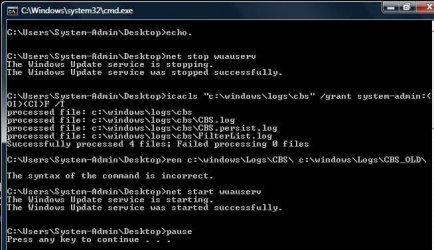
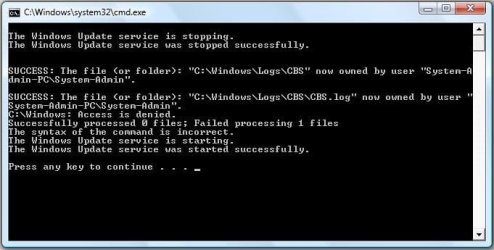
I am trying to rename the CBS [C:\Windows\Logs\CBS] folder to CBS_OLD but got an Access Denied error.
I have tried numerous combinations of commands but to no avail and Google has been no help!
Is there an easy way [probably not] to run commands as an Administrator from within a batch file please?
I am not interested in running from the command line or right-clicking and Run as administrator.
This is the latest code I have...
Here is the current output...
Thanks in advance.
I have tried numerous combinations of commands but to no avail and Google has been no help!
Is there an easy way [probably not] to run commands as an Administrator from within a batch file please?
I am not interested in running from the command line or right-clicking and Run as administrator.
This is the latest code I have...
Code:
@echo off
echo.
net stop wuauserv
rem net stop bits
takeown /f %systemroot%\Logs\CBS /r /d y
ICACLS %systemroot% /grant %username%:F /T
rename %systemroot%\Logs\CBS %systemroot%\Logs\CBS_OLD
net start wuauserv
pause
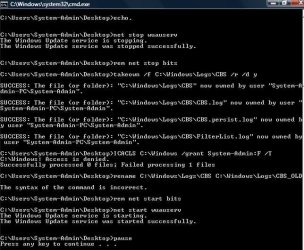
Here is the current output...
Thanks in advance.
My Computer
- Computer type
- Laptop
- Computer Manufacturer/Model Number
- Fujitsu LIFEBOOK
- OS
- Win 7 HP SP1 64-bit Vista HB SP2 32-bit Linux Mint 18.3
- CPU
- Intel(R) Pentium(R) CPU P6200 @ 2.13GHz
- Motherboard
- FUJITSU FJNBB06
- Memory
- 4.00 GB
- Graphics Card(s)
- Intel(R) Graphics Media Accelerator HD
- Sound Card
- [1] Realtek High Definition Audio [2] Intel(R) Display Audio
- Screen Resolution
- 1366 x 768 x 32 bits (4294967296 colors) @ 59 Hz
- Hard Drives
- TOSHIBA MK5076GSX
- Antivirus
- AVG FREE


 Don't believe that's possible!