Are all NVMe PCIe drivers for Win7 64 bit the same?

Basil

New member
Member
Local time
10:22 AM
Messages
97
Or do I need specific drivers from Corsair for the M.2 SSD I have, which is a Corsair MP510 at 240GB NVMe PCIe Gen3 x4 drive? I am installing it on a Gigabyte H170-D3HP motherboard with the intention of loading afresh Windows 7 64 bit Pro to the M.2 drive, with a normal mechanical storage drive as the D: drive. Thanks. My other worry is whether a x4 M.2 SSD is compatible with this board, I was told it was fine when I bought it, but as we know, some vendors hate to lose a sale... ;) Great forum, you experts have been a Godsend on the few times I have had issues or concerns, long may it continue!
 

My Computer My Computer

At a glance

Win 7 Pro 64 BitIntel i5-4670K @ 3.4 GHz16 gigOn board
Computer type
PC/Desktop
Computer Manufacturer/Model Number
Custom
OS
Win 7 Pro 64 Bit
CPU
Intel i5-4670K @ 3.4 GHz
Motherboard
Gigabyte GA-Z97X-Gaming 3
Memory
16 gig
Graphics Card(s)
On board
Hard Drives
SSD C: Drive
2 off 1 gig SATA in software RAID1 as D: Drive
Antivirus
Avast
Browser
Firefox
That is a good question. The short answer is no, your corsair drive cannot use the samsung driver for instance, however all nvme drives can use the standard microsoft nvme driver that was released several years ago for win7. As to your compatibility question, your GA-H170-D3HP has "1 x M.2 Socket 3 connector (Socket 3, M key, type 2242/2260/2280 SATA & PCIe x4/x2/x1 SSD support)" and your Corsair MP510 drive is "M.2 Socket 3 M key PCIe x4 2280" per their sites, so you are all set there.

Though the microsoft nvme driver is all you need, after installation with that driver many users then install the specific nvme manufacturers' driver and software utility program to make sure trim is enabled and provides updates to firmware and if applicable, the driver. But I do not believe Corsair has an nvme driver, so you will be using the win7 microsoft nvme driver, which needs to be integrated into your win7 installation USB or DVD. An easy way to do this is to use gigabytes' "windows usb installation tool" way down in the utility section of your motherboard support page

GA-H170-D3HP (rev. 1.0) | Motherboard - GIGABYTE U.S.A.

just download it, run windowsimagetool.exe, check all three boxes, then click start. It will update your win7 installation usb so that it has the usb3 and nvme drivers you need at install time. I would not connect your D: data drive until after installation is done, just use the nvme drive by itself when you install win7 onto it using the win7 installation usb or dvd.

Just to point this out, if you already have win7 up and running on that motherboard using a different hard disk, the easiest path for you to take is to run the win7 nvme driver hotfix on your current win7 drive

https://files.soupcan.tech/KB2990941-NVMe-Hotfix/Windows6.1-KB2990941-x64.msu

then shutdown, install your nvme drive, boot up, clone your existing drive onto the nvme drive using macrium reflect, then shut down, remove your existing drive, boot using only the nvme drive (and setting it as the primary boot drive in bios), and boot to the desktop. At that point you can shut down again and reconnect your data D: drive so it will be detected on the next boot. Depends if you want to go to the trouble of a clean install or not, but you do not have to if your system is already running and loaded with programs and/or tweaks.
 

My Computer My Computer

At a glance

Win7 pro x64stock i7 7700kCorsair Vengeance LPX 16GB (2x8GB) DDR4 @ 320...integrated Intel HD 630
Computer type
PC/Desktop
Computer Manufacturer/Model Number
diy
OS
Win7 pro x64
CPU
stock i7 7700k
Motherboard
Gigabyte Z270N-WIFI mini-ITX
Memory
Corsair Vengeance LPX 16GB (2x8GB) DDR4 @ 3200MHz
Graphics Card(s)
integrated Intel HD 630
Sound Card
onboard Realtek ALC1220
Monitor(s) Displays
two vertically mounted samsung 55" 4k un55mu8000
Screen Resolution
1920x1280
Hard Drives
256GB Samsung EVO 960 M.2 pci-e NVMe SSD
PSU
SilverStone Nightjar ST45NF 450Watt Fanless
Case
No case. Motherboard is mounted directly onto power supply
Cooling
Evercool low profile 815EP with Panaflow 12L fan at 7v
Keyboard
Ortek MCK-86 mini
Mouse
Belkin 5-button USB
Internet Speed
spectrum 400mbps
Or do I need specific drivers from Corsair for the M.2 SSD I have, which is a Corsair MP510 at 240GB NVMe PCIe Gen3 x4 drive? I am installing it on a Gigabyte H170-D3HP motherboard with the intention of loading afresh Windows 7 64 bit Pro to the M.2 drive, with a normal mechanical storage drive as the D: drive. Thanks. My other worry is whether a x4 M.2 SSD is compatible with this board, I was told it was fine when I bought it, but as we know, some vendors hate to lose a sale... ;) Great forum, you experts have been a Godsend on the few times I have had issues or concerns, long may it continue!


You can do it with my this:

Update your Win 7 installation media.

1. Put the nvme updates into the:

UPDATES\Bootx64 and UPDATES\Installx64 folders

2. Put the oem nvme drivers into:

DRIVERS\Bootx64 and DRIVERS\Installx64 folders

3. Put usb3 drivers into

DRIVERS\Bootx64 and DRIVERS\Installx64 folders

4. Then run 7updater.cmd

It will offer the option to download simplix update pack. That will put in the updates till april2019. It takes a while, and is not essential.

If you say No to downloading the updatepack, then only the updates and drivers you placed in the above mentioned folders will be integrated.
 
Last edited:

My Computers My Computers

  • At a glance

    7 X64i5 84002x8gb 3200mhz
    Computer type
    PC/Desktop
    OS
    7 X64
    CPU
    i5 8400
    Motherboard
    gigabyte b365m ds3h
    Memory
    2x8gb 3200mhz
    Hard Drives
    various
    PSU
    pure power 11 400w cm
    Case
    Coolermaster
    Cooling
    cryorig m9i
  • At a glance

    7x64g54008gb ddr4 2400
    Computer type
    PC/Desktop
    OS
    7x64
    CPU
    g5400
    Motherboard
    ga b365m ds3h
    Memory
    8gb ddr4 2400
    PSU
    xfx pro 450w
You need to install the MS nvme updates into the installation media.
That is a prerequsite for any oem nvme drivers.
You won't be able to see an nvme disk unless you have installed the MS nvme updates.

You can do it with my program

Update your Win 7 installation media.

1. Put the nvme updates into the:

UPDATES\Bootx64 and UPDATES\Installx64 folders

2. Put the oem nvme drivers into:

DRIVERS\Bootx64 and DRIVERS\Installx64 folders

3. Put usb3 drivers into

DRIVERS\Bootx64 and DRIVERS\Installx64 folders

4. Then run 7updater.cmd

It will offer the option to download simplix update pack. That will put in the updates till april2019. It takes a while, and is not essential.

If you say No to downloading the updatepack, then only the updates and drivers you placed in the above mentioned folders will be integrated.


I am attempting this as I type, thanks for the link and the app! What I am not finding are the USB drivers. I have the PCIe SSB drivers ready to add, may I ask where I can get the USB drivers to also add please?
 

My Computer My Computer

At a glance

Win 7 Pro 64 BitIntel i5-4670K @ 3.4 GHz16 gigOn board
Computer type
PC/Desktop
Computer Manufacturer/Model Number
Custom
OS
Win 7 Pro 64 Bit
CPU
Intel i5-4670K @ 3.4 GHz
Motherboard
Gigabyte GA-Z97X-Gaming 3
Memory
16 gig
Graphics Card(s)
On board
Hard Drives
SSD C: Drive
2 off 1 gig SATA in software RAID1 as D: Drive
Antivirus
Avast
Browser
Firefox
That is a good question. The short answer is no, your corsair drive cannot use the samsung driver for instance, however all nvme drives can use the standard microsoft nvme driver that was released several years ago for win7. As to your compatibility question, your GA-H170-D3HP has "1 x M.2 Socket 3 connector (Socket 3, M key, type 2242/2260/2280 SATA & PCIe x4/x2/x1 SSD support)" and your Corsair MP510 drive is "M.2 Socket 3 M key PCIe x4 2280" per their sites, so you are all set there.


<BIG SNIP>


Wow, what a great, and detailed, reply, I really appreciate your time writing all that up. I feel easier now and have a much clearer understanding of what i have and what I need to get and do, thanks again, I'll print this out!
 

My Computer My Computer

At a glance

Win 7 Pro 64 BitIntel i5-4670K @ 3.4 GHz16 gigOn board
Computer type
PC/Desktop
Computer Manufacturer/Model Number
Custom
OS
Win 7 Pro 64 Bit
CPU
Intel i5-4670K @ 3.4 GHz
Motherboard
Gigabyte GA-Z97X-Gaming 3
Memory
16 gig
Graphics Card(s)
On board
Hard Drives
SSD C: Drive
2 off 1 gig SATA in software RAID1 as D: Drive
Antivirus
Avast
Browser
Firefox
Will look for the correct usb drivers for your mobo.

Shouldn't take long.
 

My Computers My Computers

  • At a glance

    7 X64i5 84002x8gb 3200mhz
    Computer type
    PC/Desktop
    OS
    7 X64
    CPU
    i5 8400
    Motherboard
    gigabyte b365m ds3h
    Memory
    2x8gb 3200mhz
    Hard Drives
    various
    PSU
    pure power 11 400w cm
    Case
    Coolermaster
    Cooling
    cryorig m9i
  • At a glance

    7x64g54008gb ddr4 2400
    Computer type
    PC/Desktop
    OS
    7x64
    CPU
    g5400
    Motherboard
    ga b365m ds3h
    Memory
    8gb ddr4 2400
    PSU
    xfx pro 450w

My Computers My Computers

  • At a glance

    7 X64i5 84002x8gb 3200mhz
    Computer type
    PC/Desktop
    OS
    7 X64
    CPU
    i5 8400
    Motherboard
    gigabyte b365m ds3h
    Memory
    2x8gb 3200mhz
    Hard Drives
    various
    PSU
    pure power 11 400w cm
    Case
    Coolermaster
    Cooling
    cryorig m9i
  • At a glance

    7x64g54008gb ddr4 2400
    Computer type
    PC/Desktop
    OS
    7x64
    CPU
    g5400
    Motherboard
    ga b365m ds3h
    Memory
    8gb ddr4 2400
    PSU
    xfx pro 450w
Excellent, thanks again, I believe I now have a bootable image on a USB stick with the added drivers to load it, so tonight I'll see if I can load my Win 7 64 bit onto this new fangled drive, I'll be sure to let you know if I succeed, and I appreciate all the help.
 

My Computer My Computer

At a glance

Win 7 Pro 64 BitIntel i5-4670K @ 3.4 GHz16 gigOn board
Computer type
PC/Desktop
Computer Manufacturer/Model Number
Custom
OS
Win 7 Pro 64 Bit
CPU
Intel i5-4670K @ 3.4 GHz
Motherboard
Gigabyte GA-Z97X-Gaming 3
Memory
16 gig
Graphics Card(s)
On board
Hard Drives
SSD C: Drive
2 off 1 gig SATA in software RAID1 as D: Drive
Antivirus
Avast
Browser
Firefox
Omgg please someone tell me

Is it possible for me to just have my Windows 7 Ultimate (64 bit) OS simply recognize that I'm running two sticks of NVMe? No, I don't want to migrate my OS. No, I don't want to install Windows 7 on NVMe. I would just be very happy to get rid of the yellow warning in my device manager. If I can access the NVMe quick storage so much the better. Is this possible? If so please tell me how because the hot fixes are gone and I don't even know if they apply to what I want. Hoping this doesn't count as a hijack but the thread is 550 days old and as close as I got to a solution. Thanks in advance. :o
 

My Computers My Computers

  • At a glance

    Windows 7 Ultimate, Windows 8.1 Pro, Linux Mi...INTEL 6900KCORSAIR DOMINATOR PLATINUM 128GBEVGA GTX 1070 FTW
    Computer type
    PC/Desktop
    Computer Manufacturer/Model Number
    ASUS CUSTOM BUILD IN THERMALTAKE LEVEL 10 GT CASE
    OS
    Windows 7 Ultimate, Windows 8.1 Pro, Linux Mint/Cinnimon (Triple Boot)
    CPU
    INTEL 6900K
    Motherboard
    X99-E WS USB 3.1
    Memory
    CORSAIR DOMINATOR PLATINUM 128GB
    Graphics Card(s)
    EVGA GTX 1070 FTW
    Sound Card
    Onboard Crystal Sound - very nice ;)
    Monitor(s) Displays
    SAMSUNG 4K 28"
    Screen Resolution
    3140 x 2160 - A little extreme. Need to change it.
    Hard Drives
    1) LSI LOGICAL VOLUME RAID 10 (250 GBX4) SSD ARRAY
    2) INTEL RAID 0 KINGSTON (2) SSD ARRAY
    3) INTEL RAID 1 SEAGATE (2) 1TB ARRAY (secured backup)
    4) INTEL RAID 1 SEAGATE HYBRID (2) (secure secured backup)
    5) AHCI SEAGATE 3TB (1) BACKUP & STORAGE (back
    PSU
    CORSAIR HX 1000i
    Case
    THERMAL TAKE LEVEL 10 GT
    Cooling
    NOCTUA TOWER COOLING - PUSH/PULL
    Keyboard
    LOGITECH PRODIGY (One day I'll get a real keyboard.)
    Mouse
    LOGITECH (One day I'll get a real mouse.)
    Internet Speed
    300 Gb down 12 up Intel(R) I210 Gigabit Network Connection
    Antivirus
    several - Network implementing vs from other PCs - ask me
    Browser
    Mostly FireFox these days
    Other Info
    NOT ENOUGH ROOM TO LIST ALL HARD DRIVES HERE. Cuts me off at 5. Did you know that if you run a network you can scan your PC for viruses via other PCs using several different virus scanners? No virus scanner gets it all. This is narrows down the window for contracting a virus. By using multiple operating systems you can use different virus scanners with no risk of conflict.
  • Antivirus
    KASPERSKY
:rolleyes:

They are linked at the bottom of post #3 post#6 post #7 in this thread.

And also at the bottom of this post .
 

My Computers My Computers

  • At a glance

    7 X64i5 84002x8gb 3200mhz
    Computer type
    PC/Desktop
    OS
    7 X64
    CPU
    i5 8400
    Motherboard
    gigabyte b365m ds3h
    Memory
    2x8gb 3200mhz
    Hard Drives
    various
    PSU
    pure power 11 400w cm
    Case
    Coolermaster
    Cooling
    cryorig m9i
  • At a glance

    7x64g54008gb ddr4 2400
    Computer type
    PC/Desktop
    OS
    7x64
    CPU
    g5400
    Motherboard
    ga b365m ds3h
    Memory
    8gb ddr4 2400
    PSU
    xfx pro 450w
Thank you, danke schön, merci

I wondered about that but it seemed as though this thread was focused on helping those who wanted to install Win 7 on NVMe. (I just hate those yellow triangles in the device manager.) I'm happy with my OS on Kingston SSDs in RAID 0 and have no plans of migrating it. I have Linux on one of the NVMe drives and it does nicely there. The other makes for very quick storage and is proving quite useful for when I have hundreds of GB to move but no time to waste. (Very handy for data recovery.) Still, this was as close as I could get to what I wanted so I took a chance and d-loaded and installed. VIOLA! PROBLEM SOLVED! And again, thank you so much. :-)
 
Last edited:

My Computers My Computers

  • At a glance

    Windows 7 Ultimate, Windows 8.1 Pro, Linux Mi...INTEL 6900KCORSAIR DOMINATOR PLATINUM 128GBEVGA GTX 1070 FTW
    Computer type
    PC/Desktop
    Computer Manufacturer/Model Number
    ASUS CUSTOM BUILD IN THERMALTAKE LEVEL 10 GT CASE
    OS
    Windows 7 Ultimate, Windows 8.1 Pro, Linux Mint/Cinnimon (Triple Boot)
    CPU
    INTEL 6900K
    Motherboard
    X99-E WS USB 3.1
    Memory
    CORSAIR DOMINATOR PLATINUM 128GB
    Graphics Card(s)
    EVGA GTX 1070 FTW
    Sound Card
    Onboard Crystal Sound - very nice ;)
    Monitor(s) Displays
    SAMSUNG 4K 28"
    Screen Resolution
    3140 x 2160 - A little extreme. Need to change it.
    Hard Drives
    1) LSI LOGICAL VOLUME RAID 10 (250 GBX4) SSD ARRAY
    2) INTEL RAID 0 KINGSTON (2) SSD ARRAY
    3) INTEL RAID 1 SEAGATE (2) 1TB ARRAY (secured backup)
    4) INTEL RAID 1 SEAGATE HYBRID (2) (secure secured backup)
    5) AHCI SEAGATE 3TB (1) BACKUP & STORAGE (back
    PSU
    CORSAIR HX 1000i
    Case
    THERMAL TAKE LEVEL 10 GT
    Cooling
    NOCTUA TOWER COOLING - PUSH/PULL
    Keyboard
    LOGITECH PRODIGY (One day I'll get a real keyboard.)
    Mouse
    LOGITECH (One day I'll get a real mouse.)
    Internet Speed
    300 Gb down 12 up Intel(R) I210 Gigabit Network Connection
    Antivirus
    several - Network implementing vs from other PCs - ask me
    Browser
    Mostly FireFox these days
    Other Info
    NOT ENOUGH ROOM TO LIST ALL HARD DRIVES HERE. Cuts me off at 5. Did you know that if you run a network you can scan your PC for viruses via other PCs using several different virus scanners? No virus scanner gets it all. This is narrows down the window for contracting a virus. By using multiple operating systems you can use different virus scanners with no risk of conflict.
  • Antivirus
    KASPERSKY
:-)
 

My Computers My Computers

  • At a glance

    7 X64i5 84002x8gb 3200mhz
    Computer type
    PC/Desktop
    OS
    7 X64
    CPU
    i5 8400
    Motherboard
    gigabyte b365m ds3h
    Memory
    2x8gb 3200mhz
    Hard Drives
    various
    PSU
    pure power 11 400w cm
    Case
    Coolermaster
    Cooling
    cryorig m9i
  • At a glance

    7x64g54008gb ddr4 2400
    Computer type
    PC/Desktop
    OS
    7x64
    CPU
    g5400
    Motherboard
    ga b365m ds3h
    Memory
    8gb ddr4 2400
    PSU
    xfx pro 450w
You can do it with my this:

Update your Win 7 installation media.

1. Put the nvme updates into the:

UPDATES\Bootx64 and UPDATES\Installx64 folders

2. Put the oem nvme drivers into:

DRIVERS\Bootx64 and DRIVERS\Installx64 folders

3. Put usb3 drivers into

DRIVERS\Bootx64 and DRIVERS\Installx64 folders

4. Then run 7updater.cmd

It will offer the option to download simplix update pack. That will put in the updates till april2019. It takes a while, and is not essential.

If you say No to downloading the updatepack, then only the updates and drivers you placed in the above mentioned folders will be integrated.

I recently ordered one of these: U.2 SFF-8639 Adapter PCIe 2.5&apos; SSD PCI-E X4 intel PCIe3.0 PCI-E3.0 GEN3 M-KEY | eBay
And will match it with a U.2 NVMe Western Digital SSD. I'm looking forward in Win7P SP1 64-bit to try out these drivers and see how it goes. I'm also on a Lenovo S30 Workstation which I know doesn't always play nice but its worth a try. Thanks for the info and I'll report back how it goes.
 

My Computer My Computer

At a glance

Windows 7 Professional SP1 x64Intel Xeon E5-2650v2 Ivy Bridge-EP64gb PC3-14900/1866mhz Registered ECC RAMGeforce GTX 750Ti
Computer type
PC/Desktop
Computer Manufacturer/Model Number
Lenovo S30 ThinkStation
OS
Windows 7 Professional SP1 x64
CPU
Intel Xeon E5-2650v2 Ivy Bridge-EP
Motherboard
Lenovo using C601 Intel
Memory
64gb PC3-14900/1866mhz Registered ECC RAM
Graphics Card(s)
Geforce GTX 750Ti

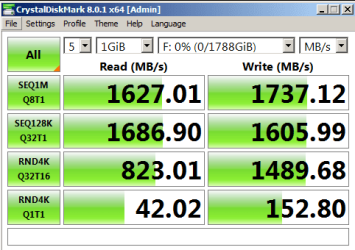
Ok so the Win7x64 hotfix archive worked. My BIOS detected the drive right away, using on the PCIe x16 bus and after a couple restarts then an initialization its functional and quick. Thanks very much for that.

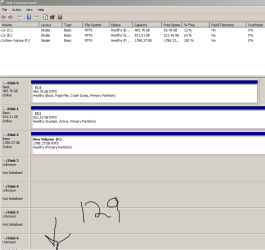
However, it shows about 127 non-initialized disks along with the main NVMe U.2 unit, so I wonder what can be done about that or if its just a trade-off of it being an enterprise drive. (see attachments)
 

Attachments

  • manydisks.PNG
    manydisks.PNG
    18.5 KB · Views: 0
  • u2CDMnvme.PNG
    u2CDMnvme.PNG
    11.5 KB · Views: 0

My Computer My Computer

At a glance

Windows 7 Professional SP1 x64Intel Xeon E5-2650v2 Ivy Bridge-EP64gb PC3-14900/1866mhz Registered ECC RAMGeforce GTX 750Ti
Computer type
PC/Desktop
Computer Manufacturer/Model Number
Lenovo S30 ThinkStation
OS
Windows 7 Professional SP1 x64
CPU
Intel Xeon E5-2650v2 Ivy Bridge-EP
Motherboard
Lenovo using C601 Intel
Memory
64gb PC3-14900/1866mhz Registered ECC RAM
Graphics Card(s)
Geforce GTX 750Ti
Back
Top