Solved Zipped Thunderbird and now i can't find it

Novel8

New member
Member
VIP
Local time
9:05 AM
Messages
182
It went through the normal process of zipping the Folder Thunderbird, and took a few minutes. Now, i cant find it.
I did a search for all zip files and nothing appears. I believe the title was Thunderbird.zip, and still cannot find it. Has anyone have an idea of why i cannot find it? I have in Folder's options to show all hidden files.
 

My Computer My Computer

At a glance

Win 7 x64.Win 10AMD A10 7850K8 gbNil
Computer type
PC/Desktop
Computer Manufacturer/Model Number
Build OEM Desktop
OS
Win 7 x64.Win 10
CPU
AMD A10 7850K
Motherboard
Asus A88X-Pro
Memory
8 gb
Graphics Card(s)
Nil
Sound Card
Nil
Monitor(s) Displays
Insignia
Screen Resolution
1376 x
Hard Drives
500 gb
Case
ABS
Keyboard
Sony
Mouse
OEM
Antivirus
Windows defender, Windows essential, Malware, autospyware
Browser
Firefox,Vivaldi
What did you zip it with ie winraras most have a list of last files or open recant. You can open a cmd prompt then type
cd\
dir thunderbird.* /s
that should find it maybe it wasnt zip but rar file
 

My Computer My Computer

At a glance

win 8 32 bit
Computer type
PC/Desktop
OS
win 8 32 bit
What did you zip it with ie winraras most have a list of last files or open recant. You can open a cmd prompt then type
cd\
dir thunderbird.* /s
that should find it maybe it wasnt zip but rar file


Cool, so far...it showed that it exist, but does not say where its located. I just used whatever win 7 has i guess. I right clicked on the folder and the menu appeared and asked if i want to zip the folder..i said yes and it took a few minutes to do over a billion bytes.
 

My Computer My Computer

At a glance

Win 7 x64.Win 10AMD A10 7850K8 gbNil
Computer type
PC/Desktop
Computer Manufacturer/Model Number
Build OEM Desktop
OS
Win 7 x64.Win 10
CPU
AMD A10 7850K
Motherboard
Asus A88X-Pro
Memory
8 gb
Graphics Card(s)
Nil
Sound Card
Nil
Monitor(s) Displays
Insignia
Screen Resolution
1376 x
Hard Drives
500 gb
Case
ABS
Keyboard
Sony
Mouse
OEM
Antivirus
Windows defender, Windows essential, Malware, autospyware
Browser
Firefox,Vivaldi

My Computer My Computer

At a glance

Win 7 Ult 64-bitG620 2.6GHZ Pentium R6 GB
Computer type
PC/Desktop
Computer Manufacturer/Model Number
HP p6-2020t
OS
Win 7 Ult 64-bit
CPU
G620 2.6GHZ Pentium R
Memory
6 GB
Monitor(s) Displays
25" HPLV2311
Screen Resolution
1920 x 1200
Hard Drives
1 SATA, 1 exterior SATA
Case
HP
Cooling
PSU
Antivirus
Glasswire
Browser
Waterfox; Firefox; Chrome for work
Other Info
Firewall--Glasswire
Similar specs in Gateway DX4200
Verizon FIOS Wired network

1 other Win7 computer-- has SSD
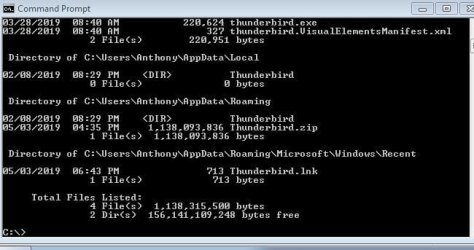
It does show the folder you may have to go up a bit to see it
 

My Computer My Computer

At a glance

win 8 32 bit
Computer type
PC/Desktop
OS
win 8 32 bit
Install Everything.exe and search in there. Once found, right click the entry and navigate to its path.

Downloads - voidtools
 

My Computer My Computer

At a glance

Windows 7 Ultimate x64
Computer type
PC/Desktop
OS
Windows 7 Ultimate x64
Nice thing about computers: there are many ways to do the same task.
 

My Computer My Computer

At a glance

Win 7 Ult 64-bitG620 2.6GHZ Pentium R6 GB
Computer type
PC/Desktop
Computer Manufacturer/Model Number
HP p6-2020t
OS
Win 7 Ult 64-bit
CPU
G620 2.6GHZ Pentium R
Memory
6 GB
Monitor(s) Displays
25" HPLV2311
Screen Resolution
1920 x 1200
Hard Drives
1 SATA, 1 exterior SATA
Case
HP
Cooling
PSU
Antivirus
Glasswire
Browser
Waterfox; Firefox; Chrome for work
Other Info
Firewall--Glasswire
Similar specs in Gateway DX4200
Verizon FIOS Wired network

1 other Win7 computer-- has SSD

My Computer My Computer

At a glance

Win 7 x64.Win 10AMD A10 7850K8 gbNil
Computer type
PC/Desktop
Computer Manufacturer/Model Number
Build OEM Desktop
OS
Win 7 x64.Win 10
CPU
AMD A10 7850K
Motherboard
Asus A88X-Pro
Memory
8 gb
Graphics Card(s)
Nil
Sound Card
Nil
Monitor(s) Displays
Insignia
Screen Resolution
1376 x
Hard Drives
500 gb
Case
ABS
Keyboard
Sony
Mouse
OEM
Antivirus
Windows defender, Windows essential, Malware, autospyware
Browser
Firefox,Vivaldi

My Computer My Computer

At a glance

Win 7 x64.Win 10AMD A10 7850K8 gbNil
Computer type
PC/Desktop
Computer Manufacturer/Model Number
Build OEM Desktop
OS
Win 7 x64.Win 10
CPU
AMD A10 7850K
Motherboard
Asus A88X-Pro
Memory
8 gb
Graphics Card(s)
Nil
Sound Card
Nil
Monitor(s) Displays
Insignia
Screen Resolution
1376 x
Hard Drives
500 gb
Case
ABS
Keyboard
Sony
Mouse
OEM
Antivirus
Windows defender, Windows essential, Malware, autospyware
Browser
Firefox,Vivaldi
Open "Documents" in your Start Menu, find your file, right-click it and hit "File location."

Or D/L a new copy here and navigate it to your Downloads folder
Directory Listing: /pub/thunderbird/releases/


I checked both Documents and MyDocuments and I did not see it there.


I am not looking to get a NEW copy of TB...its the one that has all my files and email address's, that I copied.
 

My Computer My Computer

At a glance

Win 7 x64.Win 10AMD A10 7850K8 gbNil
Computer type
PC/Desktop
Computer Manufacturer/Model Number
Build OEM Desktop
OS
Win 7 x64.Win 10
CPU
AMD A10 7850K
Motherboard
Asus A88X-Pro
Memory
8 gb
Graphics Card(s)
Nil
Sound Card
Nil
Monitor(s) Displays
Insignia
Screen Resolution
1376 x
Hard Drives
500 gb
Case
ABS
Keyboard
Sony
Mouse
OEM
Antivirus
Windows defender, Windows essential, Malware, autospyware
Browser
Firefox,Vivaldi
zip screenshot

Cool, so far...it showed that it exist, but does not say where its located. I just used whatever win 7 has i guess. I right clicked on the folder and the menu appeared and asked if i want to zip the folder..i said yes and it took a few minutes to do over a billion bytes.


Here is a screenshot of what I got with the cmd option


Everything.exe did not find it, or i am using that program wrong.
 

Attachments

  • Zip.JPG
    Zip.JPG
    42.6 KB · Views: 10

My Computer My Computer

At a glance

Win 7 x64.Win 10AMD A10 7850K8 gbNil
Computer type
PC/Desktop
Computer Manufacturer/Model Number
Build OEM Desktop
OS
Win 7 x64.Win 10
CPU
AMD A10 7850K
Motherboard
Asus A88X-Pro
Memory
8 gb
Graphics Card(s)
Nil
Sound Card
Nil
Monitor(s) Displays
Insignia
Screen Resolution
1376 x
Hard Drives
500 gb
Case
ABS
Keyboard
Sony
Mouse
OEM
Antivirus
Windows defender, Windows essential, Malware, autospyware
Browser
Firefox,Vivaldi
I know Win 10 had "everything.exe''...but i am in Win 7....your saying i can install "E>E" in win 7?


Win 10 does not have everything.exe. It is a program developed by a company called VoidTools. Please download it and do as I say and you'll find the folder providing you have the name correct. This isn't rocket science and there's no need to keep asking questions.
 

My Computer My Computer

At a glance

Windows 7 Ultimate x64
Computer type
PC/Desktop
OS
Windows 7 Ultimate x64
Here is a screenshot of what I got with the cmd option


Everything.exe did not find it, or i am using that program wrong.

Can't you just open Explorer to your 'Computer" view, open your C drive, and then Search for "Thunderbird" in the Search Box in the upper right of the Address Bar? You might have to change your Explorer View Settings to get that view, but I think Search shows by default. It's miles better than the Windows XP Search Box.

One thing you might want to consider: What did you use, what software did you use to create the ZIP? Was it Explorer itself or did you use WinZIP or WinRAR or 7Zip? depending on what you used, the archive MAY not even be called "Thunderbird" - And especially if you created the Zip with Windows Explorer, the ZIP will be named for the DIRECTORY where the Thunderbird folder was located. So if that was in Program Files, the ZIP will be named Program Files, maybe. Just depends on what you used.
 

My Computer My Computer

At a glance

Windows 10/Windows 7 (My Idea- Virtual PC)Intel(R) Core(TM) i5-3470 CPU @ 3.20GHz16 GBnVidia GeForce GTX 750 Ti (2GB)
Computer type
PC/Desktop
Computer Manufacturer/Model Number
Lenovo Thinkcenter M92p
OS
Windows 10/Windows 7 (My Idea- Virtual PC)
CPU
Intel(R) Core(TM) i5-3470 CPU @ 3.20GHz
Motherboard
Lenovo MahoBay
Memory
16 GB
Graphics Card(s)
nVidia GeForce GTX 750 Ti (2GB)
Sound Card
nVidia HD Audio
Monitor(s) Displays
RCA 4KTV 50"
Screen Resolution
3840p x 2160p
Hard Drives
Onboard:
Seagate ST500DM009-2F110A 500GB
WDC WD4000FYYZ-01UL1B1 (WD-WCC131910831) [3726 GB]

USB 3.0
My Book 1140 (WCAZAD122454) [1862 GB]
Apple MDT MD10EAVS-00D7B0 (0000AB123473) [931 GB]

External:
WD Blue Innostar/Matsunichi (465 GB)
WD
PSU
Stock Thinkcenter M92p
Case
Stock Thinkcenter M92p
Cooling
Active
Keyboard
BYTEC BY-GA-KT-100-AC
Mouse
BYTEC
Internet Speed
1 GHz Down, 40 Mbps Up
Antivirus
Windows Defender
Browser
EDGE
Other Info
Old Other Info:
I finally have an Intel machine that has more than 8GB of Ram.
My ASUS M2N-SE AMD Windows 7 machine is back to Windows 7. Replaced the AMD 4400+ CPU and maxed out the RAM (4GB).
My Core Duo machine is only 2GB of Ram and it is locked to Windows XP in order to run Pro Tools 6.4, which I have been using since 2004.
I have one other Dell OptiPlex 980 tower, Identical to this one,
Can't you just open Explorer to your 'Computer" view, open your C drive, and then Search for "Thunderbird" in the Search Box in the upper right of the Address Bar? You might have to change your Explorer View Settings to get that view, but I think Search shows by default. It's miles better than the Windows XP Search Box.

One thing you might want to consider: What did you use, what software did you use to create the ZIP? Was it Explorer itself or did you use WinZIP or WinRAR or 7Zip? depending on what you used, the archive MAY not even be called "Thunderbird" - And especially if you created the Zip with Windows Explorer, the ZIP will be named for the DIRECTORY where the Thunderbird folder was located. So if that was in Program Files, the ZIP will be named Program Files, maybe. Just depends on what you used.


Thank you...I did compress it with Windows Explorer. I used the cmd %appdata" mode and there it was...the weird part of all this 'mess', that was the first placed i checked and it wasn't shown...go figure. Thanks to all, except you know who.
 

My Computer My Computer

At a glance

Win 7 x64.Win 10AMD A10 7850K8 gbNil
Computer type
PC/Desktop
Computer Manufacturer/Model Number
Build OEM Desktop
OS
Win 7 x64.Win 10
CPU
AMD A10 7850K
Motherboard
Asus A88X-Pro
Memory
8 gb
Graphics Card(s)
Nil
Sound Card
Nil
Monitor(s) Displays
Insignia
Screen Resolution
1376 x
Hard Drives
500 gb
Case
ABS
Keyboard
Sony
Mouse
OEM
Antivirus
Windows defender, Windows essential, Malware, autospyware
Browser
Firefox,Vivaldi
Back
Top