Making Win10 look and act like Win7

johnhoh

New member
Guru
VIP
Local time
11:40 PM
Messages
1,363
I've been asked to make a thread about making win10 look and operate like win7. I currently have two identical systems, same hardware, same programs, same start menu, same desktop, same icons, same theme, but one system is Win7 and one is Win10. Other people who use my computers do not know they are different OSs other than minor details like the font in explorer, a little different look when you right-click on the taskbar, minor things like that. Here are the steps I took.

Install win10. Then immediately install Classic Shell and customize it to your liking. Reboot and let windows update do its thing to get you up to date. Then install Winaero Tweaker, get a gigantic bag of potato chips, and take your time going through every menu of the program. You will be checking boxes that start with the words "Disable Windows xxx" over and over. Its easy to use and self explanatory and would take me too long to go back and find all the boxes I checked. But some basic things I checked were Disable Windows Update, Disable Microsoft Store, Disable Cortana, Disable Windows Search, Disable Edge pre-launching, Disable UAC, Disable Telemetry and Data Collection, you get the idea. If you are a fast eater you will finish the chips before you are finished checking boxes. Okay not really. Quite a few of things I disabled were the same things I disabled on Win7, btw.

Install the current version of Sledgehammer (which is 2.6.0 as of this writing). This program is a script that does the following: briefly enables windows update from its disabled status WHILE ALSO keeping it from automatically updating in the background, checks ask-woody.com for its Win10 MS-DEFCON rating so you know if the recent win10 updates are likely to create an issue for you, then prompts you to proceed (I only proceed if Defcon isn't level 1 or 2), at which time it loads WuMgr or WUMT, two very similar programs that give you manual control over windows update. As soon as you do your updates (or not - up to you) and exit, Sledgehammer then re-disables windows update. It does several other things I have not mentioned, but suffice it to say keeping MS from doing things automatically behind your back is an extensive process and Sledgehammer does a superb job of keeping MS from reaching your system.

Install your favorite wallpaper, themes, programs, customize your Explorer interface, change your deskop icons (mine are taken from Win98), all the same things you would do when you install win7. I didn't discover winaero tweaker until late in my customization process, so can't be sure it can do everything as most of my changes were done via regedit, but it appears that it may have everything I need if I had to do it all over again, so perhaps would not need to touch regedit. There was NOTHING I wanted to do to Win10 that turned out to be impossible to do, or even difficult to do. The amount and the quality of user programming that has gone into making it easy to correct Win10 annoyances with these three programs is amazing, and the process was miles easier than I expected.

One caveat. Out of the box Win7 treats you like a mindless 6th grader who is about to walk off a cliff if you are not warned constantly to be careful. Win10 takes that to a whole new level with its helicopter parenting. I hated that about win7 and also hate it about win10, so many of my customizations remove those warnings and give me total control over the machine, such as disabling UAC. If you want to make win10 look like win7 YET ALSO keep all those warnings intact, its on you to be smart about what you disable when using winaero tweaker.

Once the interface looks like win7 and MS is exiled from probing your system, you will find a few small benefits to Win10 vs Win7:

a handy settings app that is a gateway into system settings. I created a shortcut on my start menu ("powershell start ms-settings:") which goes straight to it.

a more customizable tray clock, with month date, seconds, etc.

native multi-monitor taskbar support

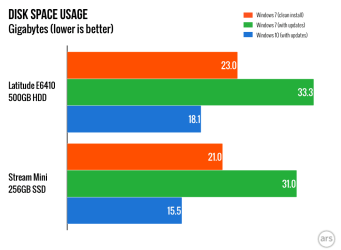
smaller hard disk footprint

faster program loading (no idea why, perhaps smarter caching?)

driver support for any and every piece of hardware you buy

things like task manager and network settings are fuller featured and more informative

every command prompt command you ever used on win7 will work on win10

After you've taken a couple days to finalize your setup, make a clone of your disk or a system image backup. You're done.

This post is not meant to be comprehensive and maybe folks are looking for more detail. Sorry. I wanted to take 15 minutes to do this and my time is up.
 
Last edited:

My Computer My Computer

At a glance

Win7 pro x64stock i7 7700kCorsair Vengeance LPX 16GB (2x8GB) DDR4 @ 320...integrated Intel HD 630
Computer type
PC/Desktop
Computer Manufacturer/Model Number
diy
OS
Win7 pro x64
CPU
stock i7 7700k
Motherboard
Gigabyte Z270N-WIFI mini-ITX
Memory
Corsair Vengeance LPX 16GB (2x8GB) DDR4 @ 3200MHz
Graphics Card(s)
integrated Intel HD 630
Sound Card
onboard Realtek ALC1220
Monitor(s) Displays
two vertically mounted samsung 55" 4k un55mu8000
Screen Resolution
1920x1280
Hard Drives
256GB Samsung EVO 960 M.2 pci-e NVMe SSD
PSU
SilverStone Nightjar ST45NF 450Watt Fanless
Case
No case. Motherboard is mounted directly onto power supply
Cooling
Evercool low profile 815EP with Panaflow 12L fan at 7v
Keyboard
Ortek MCK-86 mini
Mouse
Belkin 5-button USB
Internet Speed
spectrum 400mbps
But the big question is: is the bag of potato chips big enough to last through the whole task?

Good tutorial, thanks. I made my Win 7 look like XP, but I had made my XP look like Win 98. So my 7 looks like 98. Only the UI, of course, not the internals.

Classic Shell stopped its development at 7. Has someone forked a Win 10 version?
 

My Computer My Computer

At a glance

Win 7 Ult 64-bitG620 2.6GHZ Pentium R6 GB
Computer type
PC/Desktop
Computer Manufacturer/Model Number
HP p6-2020t
OS
Win 7 Ult 64-bit
CPU
G620 2.6GHZ Pentium R
Memory
6 GB
Monitor(s) Displays
25" HPLV2311
Screen Resolution
1920 x 1200
Hard Drives
1 SATA, 1 exterior SATA
Case
HP
Cooling
PSU
Antivirus
Glasswire
Browser
Waterfox; Firefox; Chrome for work
Other Info
Firewall--Glasswire
Similar specs in Gateway DX4200
Verizon FIOS Wired network

1 other Win7 computer-- has SSD
Classic Shell stopped its development at 7. Has someone forked a Win 10 version?
It actually supported Win10 for several years and the final release was 8/2017. Its now been taken over as an open source project called Open Shell. I tried open shell on Win10 but it was buggy in multi-monitor mode so I went back to the final release of classic shell.
 

My Computer My Computer

At a glance

Win7 pro x64stock i7 7700kCorsair Vengeance LPX 16GB (2x8GB) DDR4 @ 320...integrated Intel HD 630
Computer type
PC/Desktop
Computer Manufacturer/Model Number
diy
OS
Win7 pro x64
CPU
stock i7 7700k
Motherboard
Gigabyte Z270N-WIFI mini-ITX
Memory
Corsair Vengeance LPX 16GB (2x8GB) DDR4 @ 3200MHz
Graphics Card(s)
integrated Intel HD 630
Sound Card
onboard Realtek ALC1220
Monitor(s) Displays
two vertically mounted samsung 55" 4k un55mu8000
Screen Resolution
1920x1280
Hard Drives
256GB Samsung EVO 960 M.2 pci-e NVMe SSD
PSU
SilverStone Nightjar ST45NF 450Watt Fanless
Case
No case. Motherboard is mounted directly onto power supply
Cooling
Evercool low profile 815EP with Panaflow 12L fan at 7v
Keyboard
Ortek MCK-86 mini
Mouse
Belkin 5-button USB
Internet Speed
spectrum 400mbps
I've bookmarked this thread in case I ever get forced into 10. Let's break out the potato chips and iced tea!

Do you think Brink will let you post this in the official tutorials? Maybe with numbered steps and a little more use of Bold and color to highlight items?.
 

My Computer My Computer

At a glance

Win 7 Ult 64-bitG620 2.6GHZ Pentium R6 GB
Computer type
PC/Desktop
Computer Manufacturer/Model Number
HP p6-2020t
OS
Win 7 Ult 64-bit
CPU
G620 2.6GHZ Pentium R
Memory
6 GB
Monitor(s) Displays
25" HPLV2311
Screen Resolution
1920 x 1200
Hard Drives
1 SATA, 1 exterior SATA
Case
HP
Cooling
PSU
Antivirus
Glasswire
Browser
Waterfox; Firefox; Chrome for work
Other Info
Firewall--Glasswire
Similar specs in Gateway DX4200
Verizon FIOS Wired network

1 other Win7 computer-- has SSD
Win10 control

Install Sledghammer 2.6.1 (or current version).

.


I'm clearly being dumb, but I cannot find this program. I do suspect Google is deliberately "losing" links to it, but nonetheless ...


It's so critical. The strongest dealbreaker for Win10 is the sheer rudeness of enforced "updates" that continually destroy your installation - and the complete loss of your machine while this mayhem occurs, nightly.
 

My Computer My Computer

At a glance

Windows 7 Pro x64Intel i5-8265U8gbIntel Iris Plus 655
Computer type
Laptop
Computer Manufacturer/Model Number
HP 250 G7
OS
Windows 7 Pro x64
CPU
Intel i5-8265U
Motherboard
Intel Coffee Lake
Memory
8gb
Graphics Card(s)
Intel Iris Plus 655
Sound Card
Realtek HDA
Monitor(s) Displays
Generic
Screen Resolution
1366 x 768
Hard Drives
Crucial P5 NVMe 1Tb internal
WD's 4Tb, 3Tb, 2 x 2Tb external
Mouse
Logi wireless
Internet Speed
45 Mbps
Antivirus
AVG
Browser
Firefox 88, Pale Moon 29, Brave 129
Other Info
Combination of i5-8265U with Crucial P5 achieves Crystal Bench scores > 5000

Iris Plus GPU (Whiskey Lake) driver from BioStar

HP 250 G7 is a budget machine
I'm clearly being dumb, but I cannot find this program. I do suspect Google is deliberately "losing" links to it, but nonetheless ...
That's on me. I had thought 2.6.1 would be out by now (its due any day), but 2.6.0 is actually still the latest release. And I misspelled it, forgot the e after the g, so I just fixed that in the top post.

Google Sledgehammer 2.6.0 and you'll find it.
 

My Computer My Computer

At a glance

Win7 pro x64stock i7 7700kCorsair Vengeance LPX 16GB (2x8GB) DDR4 @ 320...integrated Intel HD 630
Computer type
PC/Desktop
Computer Manufacturer/Model Number
diy
OS
Win7 pro x64
CPU
stock i7 7700k
Motherboard
Gigabyte Z270N-WIFI mini-ITX
Memory
Corsair Vengeance LPX 16GB (2x8GB) DDR4 @ 3200MHz
Graphics Card(s)
integrated Intel HD 630
Sound Card
onboard Realtek ALC1220
Monitor(s) Displays
two vertically mounted samsung 55" 4k un55mu8000
Screen Resolution
1920x1280
Hard Drives
256GB Samsung EVO 960 M.2 pci-e NVMe SSD
PSU
SilverStone Nightjar ST45NF 450Watt Fanless
Case
No case. Motherboard is mounted directly onto power supply
Cooling
Evercool low profile 815EP with Panaflow 12L fan at 7v
Keyboard
Ortek MCK-86 mini
Mouse
Belkin 5-button USB
Internet Speed
spectrum 400mbps
Thanks - now I don't feel so dumb.


Your post, apart from minor (!) glitches, is very helpful.
 

My Computer My Computer

At a glance

Windows 7 Pro x64Intel i5-8265U8gbIntel Iris Plus 655
Computer type
Laptop
Computer Manufacturer/Model Number
HP 250 G7
OS
Windows 7 Pro x64
CPU
Intel i5-8265U
Motherboard
Intel Coffee Lake
Memory
8gb
Graphics Card(s)
Intel Iris Plus 655
Sound Card
Realtek HDA
Monitor(s) Displays
Generic
Screen Resolution
1366 x 768
Hard Drives
Crucial P5 NVMe 1Tb internal
WD's 4Tb, 3Tb, 2 x 2Tb external
Mouse
Logi wireless
Internet Speed
45 Mbps
Antivirus
AVG
Browser
Firefox 88, Pale Moon 29, Brave 129
Other Info
Combination of i5-8265U with Crucial P5 achieves Crystal Bench scores > 5000

Iris Plus GPU (Whiskey Lake) driver from BioStar

HP 250 G7 is a budget machine
Install Sledgehammer 2.6.1 (or current version). This program is a script that does the following: briefly enables windows update from its disabled status WHILE ALSO keeping it from automatically updating in the background, checks ask-woody.com for its Win10 MS-DEFCON rating so you know if the recent win10 updates are likely to create an issue for you, then prompts you to proceed (I only proceed if Defcon is level 1 or 2), at which time it loads WuMgr or WUMT, two very similar programs that give you manual control over windows update. As soon as you do your updates (or not - up to you) and exit Sledgehammer re-disables windows update. It does several other things I have not mentioned, but suffice it to say keeping MS from doing things automatically behind your back is an extensive process and Sledgehammer does a superb job of keeping MS from reaching your system.


From https://www ask woody.com/ms-defcon-system it says that you should only install the patch if Defcon is level 4 or 5
 

My Computers My Computers

  • At a glance

    Windows 7 HP 64i5 6600K - 800MHz to 4200MHz4+4G GSkill DDR4 3000IG - Intel 530
    Computer type
    PC/Desktop
    Computer Manufacturer/Model Number
    custom build
    OS
    Windows 7 HP 64
    CPU
    i5 6600K - 800MHz to 4200MHz
    Motherboard
    GA-Z170-HD3P
    Memory
    4+4G GSkill DDR4 3000
    Graphics Card(s)
    IG - Intel 530
    Monitor(s) Displays
    Samsung 226BW
    Screen Resolution
    1680x1050
    Hard Drives
    (1) -1 SM951 – 128GB M.2 AHCI PCIe SSD drive for Windows 7 and Lubuntu
    (2) -1 WD SATA 3 - 1T for Data
    (3) -1 WD SATA 3 - 1T for backup
    PSU
    Thermaltake 450W TR2 gold
    Keyboard
    Old and good Chicony mechanical keyboard
    Mouse
    Logitech mX performance - 9 buttons (had to disable some)
    Internet Speed
    500Mb/s
    Browser
    Firefox 64
    Other Info
    TinyWall firewall
  • At a glance

    Windows 7 Proi7-4500U 800MHz to 3.0GHz(4+4)G DDR3 1600IG intel 4400 + NVIDIA GeForce GT 745M
    Computer type
    Laptop
    System Manufacturer/Model Number
    Asus Q550LF
    OS
    Windows 7 Pro
    CPU
    i7-4500U 800MHz to 3.0GHz
    Motherboard
    Asus Q550LF
    Memory
    (4+4)G DDR3 1600
    Graphics Card(s)
    IG intel 4400 + NVIDIA GeForce GT 745M
    Sound Card
    Realtek
    Monitor(s) Displays
    LG Display LP156WF4-SPH1
    Screen Resolution
    1920 x 1080
    Hard Drives
    BX500 120G SSD for Windows and programs +
    1T HDD for data
    Internet Speed
    500 Mb/s
    Browser
    Firefox
    Other Info
    TinyWall firewall
From https://www ask woody.com/ms-defcon-system it says that you should only install the patch if Defcon is level 4 or 5
thanks for pointing that out, I meant to say isn't level 1 or 2. Level 3, while usually a new and unproven patch, is often an environment where not having the patch is also a risk. The ZombieLoad is a level 3 for instance.
 

My Computer My Computer

At a glance

Win7 pro x64stock i7 7700kCorsair Vengeance LPX 16GB (2x8GB) DDR4 @ 320...integrated Intel HD 630
Computer type
PC/Desktop
Computer Manufacturer/Model Number
diy
OS
Win7 pro x64
CPU
stock i7 7700k
Motherboard
Gigabyte Z270N-WIFI mini-ITX
Memory
Corsair Vengeance LPX 16GB (2x8GB) DDR4 @ 3200MHz
Graphics Card(s)
integrated Intel HD 630
Sound Card
onboard Realtek ALC1220
Monitor(s) Displays
two vertically mounted samsung 55" 4k un55mu8000
Screen Resolution
1920x1280
Hard Drives
256GB Samsung EVO 960 M.2 pci-e NVMe SSD
PSU
SilverStone Nightjar ST45NF 450Watt Fanless
Case
No case. Motherboard is mounted directly onto power supply
Cooling
Evercool low profile 815EP with Panaflow 12L fan at 7v
Keyboard
Ortek MCK-86 mini
Mouse
Belkin 5-button USB
Internet Speed
spectrum 400mbps
I might downgrade to Win10 if your "disable" entries were actually "uninstall."
 

My Computer My Computer

At a glance

Linux Mint / XP / Win7 Home, Pro, Ultimate / ...
Computer type
PC/Desktop
Computer Manufacturer/Model Number
(7 different computers booting up to 10 systems)
OS
Linux Mint / XP / Win7 Home, Pro, Ultimate / Win8.1 / Win10
Other Info
Four desktops, two laptops, one notebook and one tablet
I might downgrade to Win10 if your "disable" entries were actually "uninstall."
Uninstall is possible for most things but I did not include those steps because its not part of winaero tweaker. I really just wanted to outline the quick and easy route for people and so just focused on using the three freeware programs. But the same guys who wrote winaero tweaker also have over 500 scripts you can download, such as UninstallCortana.cmd and UninstallEdge.cmd.

Downloads / Other / Uninstall Cortana for Windows 10
Downloads / Other / Uninstall Edge browser for Windows 10

Its worth noting that as long as programs never run the only annoyance is they take up space, and win10 takes up significantly less space than win7 even if you do not uninstall anything, so its not really a big deal either way.
 

Attachments

  • chartz.001.png
    chartz.001.png
    12.6 KB · Views: 0

My Computer My Computer

At a glance

Win7 pro x64stock i7 7700kCorsair Vengeance LPX 16GB (2x8GB) DDR4 @ 320...integrated Intel HD 630
Computer type
PC/Desktop
Computer Manufacturer/Model Number
diy
OS
Win7 pro x64
CPU
stock i7 7700k
Motherboard
Gigabyte Z270N-WIFI mini-ITX
Memory
Corsair Vengeance LPX 16GB (2x8GB) DDR4 @ 3200MHz
Graphics Card(s)
integrated Intel HD 630
Sound Card
onboard Realtek ALC1220
Monitor(s) Displays
two vertically mounted samsung 55" 4k un55mu8000
Screen Resolution
1920x1280
Hard Drives
256GB Samsung EVO 960 M.2 pci-e NVMe SSD
PSU
SilverStone Nightjar ST45NF 450Watt Fanless
Case
No case. Motherboard is mounted directly onto power supply
Cooling
Evercool low profile 815EP with Panaflow 12L fan at 7v
Keyboard
Ortek MCK-86 mini
Mouse
Belkin 5-button USB
Internet Speed
spectrum 400mbps
It just needs some polishing and some screenshots, then I would ask Brink if he can use it in Tutorials. Or sticky it in the tenforums.
 

My Computer My Computer

At a glance

Win 7 Ult 64-bitG620 2.6GHZ Pentium R6 GB
Computer type
PC/Desktop
Computer Manufacturer/Model Number
HP p6-2020t
OS
Win 7 Ult 64-bit
CPU
G620 2.6GHZ Pentium R
Memory
6 GB
Monitor(s) Displays
25" HPLV2311
Screen Resolution
1920 x 1200
Hard Drives
1 SATA, 1 exterior SATA
Case
HP
Cooling
PSU
Antivirus
Glasswire
Browser
Waterfox; Firefox; Chrome for work
Other Info
Firewall--Glasswire
Similar specs in Gateway DX4200
Verizon FIOS Wired network

1 other Win7 computer-- has SSD

My Computer My Computer

At a glance

Win7 pro x64stock i7 7700kCorsair Vengeance LPX 16GB (2x8GB) DDR4 @ 320...integrated Intel HD 630
Computer type
PC/Desktop
Computer Manufacturer/Model Number
diy
OS
Win7 pro x64
CPU
stock i7 7700k
Motherboard
Gigabyte Z270N-WIFI mini-ITX
Memory
Corsair Vengeance LPX 16GB (2x8GB) DDR4 @ 3200MHz
Graphics Card(s)
integrated Intel HD 630
Sound Card
onboard Realtek ALC1220
Monitor(s) Displays
two vertically mounted samsung 55" 4k un55mu8000
Screen Resolution
1920x1280
Hard Drives
256GB Samsung EVO 960 M.2 pci-e NVMe SSD
PSU
SilverStone Nightjar ST45NF 450Watt Fanless
Case
No case. Motherboard is mounted directly onto power supply
Cooling
Evercool low profile 815EP with Panaflow 12L fan at 7v
Keyboard
Ortek MCK-86 mini
Mouse
Belkin 5-button USB
Internet Speed
spectrum 400mbps
I don't know the glitches, I was referring to the other posters. But shouldn't this thread be in tenforums?
 

My Computer My Computer

At a glance

Win 7 Ult 64-bitG620 2.6GHZ Pentium R6 GB
Computer type
PC/Desktop
Computer Manufacturer/Model Number
HP p6-2020t
OS
Win 7 Ult 64-bit
CPU
G620 2.6GHZ Pentium R
Memory
6 GB
Monitor(s) Displays
25" HPLV2311
Screen Resolution
1920 x 1200
Hard Drives
1 SATA, 1 exterior SATA
Case
HP
Cooling
PSU
Antivirus
Glasswire
Browser
Waterfox; Firefox; Chrome for work
Other Info
Firewall--Glasswire
Similar specs in Gateway DX4200
Verizon FIOS Wired network

1 other Win7 computer-- has SSD
Stardock Start 10 is the best Start Menu solution. It's paid,. but I don't think it costs that much, last I checked it was 10 bucks. That's where you start. Next, you gotta get your ICONS onto the desktop, that's in the new POS "Immersive" settings panel... Somewhere. There are other things you can do to make it more like Win 7, you can activate the Windows 7 style "Preview" context item so that you can look at images without having to open Photoshop. There is also a way to get the AERO effects happening too. I have the files backed up on my PC. But there is a program that activates it. I forget the name of it. Works well though, Also, GadgetPack will add Gadgets to your Desktop, I like to use speedometers and tachometers hehe. I can File-mail some of this stuff as long as someone downloads it, you want it? It'll take me a while to find it.

PS: Between Classic Explorer and Start10, you want START!0! It's MUCH better than Classic Explorer. And, you gotta pay for that, I can't give it to you.
 

My Computer My Computer

At a glance

Windows 10/Windows 7 (My Idea- Virtual PC)Intel(R) Core(TM) i5-3470 CPU @ 3.20GHz16 GBnVidia GeForce GTX 750 Ti (2GB)
Computer type
PC/Desktop
Computer Manufacturer/Model Number
Lenovo Thinkcenter M92p
OS
Windows 10/Windows 7 (My Idea- Virtual PC)
CPU
Intel(R) Core(TM) i5-3470 CPU @ 3.20GHz
Motherboard
Lenovo MahoBay
Memory
16 GB
Graphics Card(s)
nVidia GeForce GTX 750 Ti (2GB)
Sound Card
nVidia HD Audio
Monitor(s) Displays
RCA 4KTV 50"
Screen Resolution
3840p x 2160p
Hard Drives
Onboard:
Seagate ST500DM009-2F110A 500GB
WDC WD4000FYYZ-01UL1B1 (WD-WCC131910831) [3726 GB]

USB 3.0
My Book 1140 (WCAZAD122454) [1862 GB]
Apple MDT MD10EAVS-00D7B0 (0000AB123473) [931 GB]

External:
WD Blue Innostar/Matsunichi (465 GB)
WD
PSU
Stock Thinkcenter M92p
Case
Stock Thinkcenter M92p
Cooling
Active
Keyboard
BYTEC BY-GA-KT-100-AC
Mouse
BYTEC
Internet Speed
1 GHz Down, 40 Mbps Up
Antivirus
Windows Defender
Browser
EDGE
Other Info
Old Other Info:
I finally have an Intel machine that has more than 8GB of Ram.
My ASUS M2N-SE AMD Windows 7 machine is back to Windows 7. Replaced the AMD 4400+ CPU and maxed out the RAM (4GB).
My Core Duo machine is only 2GB of Ram and it is locked to Windows XP in order to run Pro Tools 6.4, which I have been using since 2004.
I have one other Dell OptiPlex 980 tower, Identical to this one,
Uninstall is possible for most things but I did not include those steps because its not part of winaero tweaker. I really just wanted to outline the quick and easy route for people and so just focused on using the three freeware programs. But the same guys who wrote winaero tweaker also have over 500 scripts you can download, such as UninstallCortana.cmd and UninstallEdge.cmd.

Downloads / Other / Uninstall Cortana for Windows 10
Downloads / Other / Uninstall Edge browser for Windows 10

Its worth noting that as long as programs never run the only annoyance is they take up space, and win10 takes up significantly less space than win7 even if you do not uninstall anything, so its not really a big deal either way.


The Green Graphs are true ONLY if you leave the Update Installer files in your /Windows/SoftwareDistribution/ folder intact - Normally, after an install is applied, you don't need the installer files anymore, you can delete the $&#! outta 'em. You can do this with "Start Menu - All Programs - Accessories - System Tools - Disk Cleanup utility". There are also 3rd party tools that can excise what's left. As long as you know you don't need to uninstall a Windows Update, cos you do need the installer files to do THAT. :( But then again, if you create system restore points every 3 days or so, you should be able to restore to a point before any updates were installed.
 

My Computer My Computer

At a glance

Windows 10/Windows 7 (My Idea- Virtual PC)Intel(R) Core(TM) i5-3470 CPU @ 3.20GHz16 GBnVidia GeForce GTX 750 Ti (2GB)
Computer type
PC/Desktop
Computer Manufacturer/Model Number
Lenovo Thinkcenter M92p
OS
Windows 10/Windows 7 (My Idea- Virtual PC)
CPU
Intel(R) Core(TM) i5-3470 CPU @ 3.20GHz
Motherboard
Lenovo MahoBay
Memory
16 GB
Graphics Card(s)
nVidia GeForce GTX 750 Ti (2GB)
Sound Card
nVidia HD Audio
Monitor(s) Displays
RCA 4KTV 50"
Screen Resolution
3840p x 2160p
Hard Drives
Onboard:
Seagate ST500DM009-2F110A 500GB
WDC WD4000FYYZ-01UL1B1 (WD-WCC131910831) [3726 GB]

USB 3.0
My Book 1140 (WCAZAD122454) [1862 GB]
Apple MDT MD10EAVS-00D7B0 (0000AB123473) [931 GB]

External:
WD Blue Innostar/Matsunichi (465 GB)
WD
PSU
Stock Thinkcenter M92p
Case
Stock Thinkcenter M92p
Cooling
Active
Keyboard
BYTEC BY-GA-KT-100-AC
Mouse
BYTEC
Internet Speed
1 GHz Down, 40 Mbps Up
Antivirus
Windows Defender
Browser
EDGE
Other Info
Old Other Info:
I finally have an Intel machine that has more than 8GB of Ram.
My ASUS M2N-SE AMD Windows 7 machine is back to Windows 7. Replaced the AMD 4400+ CPU and maxed out the RAM (4GB).
My Core Duo machine is only 2GB of Ram and it is locked to Windows XP in order to run Pro Tools 6.4, which I have been using since 2004.
I have one other Dell OptiPlex 980 tower, Identical to this one,
win10 like win7

Let me know the glitches and I'll fix them


There's a plethora of bewildering jargon. For example, I have no idea at all what "defcon 1, 3 ... whatever" means or its' relevance.


All sorts of caveats suddenly appear on the horizon. As I understand your initial post, installing Sledgehammer into a Win10 setup allows a cmd file to be run that blocks intrusive MS upgrades unless you permit them. Sounds great and simple ... but then:


we have defcon, askwoody, green graphs. What on earth ? :confused:


And interestingly, Google finds the Sledgehammer 2.6.0 in search and lists a few links, including Softpedia. Yet the Softpedia search box itself comes up empty. So Google accurately lists the download screen for Softpedia, yet Softpedia itself insists it cannot find it. Clearly MS dislikes Sledgehammer a lot.
 

My Computer My Computer

At a glance

Windows 7 Pro x64Intel i5-8265U8gbIntel Iris Plus 655
Computer type
Laptop
Computer Manufacturer/Model Number
HP 250 G7
OS
Windows 7 Pro x64
CPU
Intel i5-8265U
Motherboard
Intel Coffee Lake
Memory
8gb
Graphics Card(s)
Intel Iris Plus 655
Sound Card
Realtek HDA
Monitor(s) Displays
Generic
Screen Resolution
1366 x 768
Hard Drives
Crucial P5 NVMe 1Tb internal
WD's 4Tb, 3Tb, 2 x 2Tb external
Mouse
Logi wireless
Internet Speed
45 Mbps
Antivirus
AVG
Browser
Firefox 88, Pale Moon 29, Brave 129
Other Info
Combination of i5-8265U with Crucial P5 achieves Crystal Bench scores > 5000

Iris Plus GPU (Whiskey Lake) driver from BioStar

HP 250 G7 is a budget machine
There's a plethora of bewildering jargon. For example, I have no idea at all what "defcon 1, 3 ... whatever" means or its' relevance....we have defcon, askwoody, green graphs
I make all my posts assuming that google will come to the rescue if anyone is not familiar with something.

If you google MS-DEFCON the very first hit takes you to an internet website called askwoody, where in the first paragraph the site author says he has developed a system he calls "MS-DEFCON" which tells users how much risk they are taking on by installing the latest windows updates.

If you google sledgehammer 2.6.0 the first two hits take you to a majorgeeks download link that works. The third google hit takes you to a softpedia download link that works. But I checked and you are correct, if you simply go directly to softpedia then do a search on the word sledgehammer, nothing comes up. Note though that I never advised doing that.

As for green graphs? That is not a term that appears in my post at all.
 

My Computer My Computer

At a glance

Win7 pro x64stock i7 7700kCorsair Vengeance LPX 16GB (2x8GB) DDR4 @ 320...integrated Intel HD 630
Computer type
PC/Desktop
Computer Manufacturer/Model Number
diy
OS
Win7 pro x64
CPU
stock i7 7700k
Motherboard
Gigabyte Z270N-WIFI mini-ITX
Memory
Corsair Vengeance LPX 16GB (2x8GB) DDR4 @ 3200MHz
Graphics Card(s)
integrated Intel HD 630
Sound Card
onboard Realtek ALC1220
Monitor(s) Displays
two vertically mounted samsung 55" 4k un55mu8000
Screen Resolution
1920x1280
Hard Drives
256GB Samsung EVO 960 M.2 pci-e NVMe SSD
PSU
SilverStone Nightjar ST45NF 450Watt Fanless
Case
No case. Motherboard is mounted directly onto power supply
Cooling
Evercool low profile 815EP with Panaflow 12L fan at 7v
Keyboard
Ortek MCK-86 mini
Mouse
Belkin 5-button USB
Internet Speed
spectrum 400mbps
> "If you google MS-DEFCON the very first hit takes you to an internet website called askwoody, where in the first paragraph the site author says he has developed a system he calls "MS-DEFCON" which tells users how much risk they are taking on by installing the latest windows updates."


So, nothing to do with the actual application of Sledgehammer. Good ...


Installing Win10 now has a little more practicality over the next few years. Thank you for the post.
 

My Computer My Computer

At a glance

Windows 7 Pro x64Intel i5-8265U8gbIntel Iris Plus 655
Computer type
Laptop
Computer Manufacturer/Model Number
HP 250 G7
OS
Windows 7 Pro x64
CPU
Intel i5-8265U
Motherboard
Intel Coffee Lake
Memory
8gb
Graphics Card(s)
Intel Iris Plus 655
Sound Card
Realtek HDA
Monitor(s) Displays
Generic
Screen Resolution
1366 x 768
Hard Drives
Crucial P5 NVMe 1Tb internal
WD's 4Tb, 3Tb, 2 x 2Tb external
Mouse
Logi wireless
Internet Speed
45 Mbps
Antivirus
AVG
Browser
Firefox 88, Pale Moon 29, Brave 129
Other Info
Combination of i5-8265U with Crucial P5 achieves Crystal Bench scores > 5000

Iris Plus GPU (Whiskey Lake) driver from BioStar

HP 250 G7 is a budget machine
Maybe a dumb question, but.... has anyone ever thought about creating piece of software entitled "Make Win10 Look and Act Like Win7" that does all the mods, tweaks, and refinements, mentioned above and create a disk that will simply load up and do the magic? Run the disk in Win10, let it do its thing, re-boot, and now you have a Win7 cocoon around Win10. I bet MSFT would be ticked and get the lawyers involved but it probably would be legal, eh? Maybe not. Just a thought, and if I thought of it I'm sure MANY others have also.
 

My Computer My Computer

At a glance

Win 7 Home Prem x64 SP1AMD FX6350 Vishera 3.9Ghz16Gb Ballistix Sport 2x8Gb DDR3-1600nVidia GEForce 1050Ti 4mg
Computer type
PC/Desktop
Computer Manufacturer/Model Number
Custom Build
OS
Win 7 Home Prem x64 SP1
CPU
AMD FX6350 Vishera 3.9Ghz
Motherboard
ASUS M5A97 R2.0
Memory
16Gb Ballistix Sport 2x8Gb DDR3-1600
Graphics Card(s)
nVidia GEForce 1050Ti 4mg
Sound Card
on board Realtek HD w/Logitech 2.1 speakers
Monitor(s) Displays
AOC 2243w
Screen Resolution
1920x1080
Hard Drives
500g Samsung Evo 850 OS SSD,
250g Samsung Evo 850 SSD for data,
1Tb Toshiba SSD for b/u's.
PSU
Corsair CX750 modular
Case
MasterCooler Elite 330
Cooling
2x case, Coolermaster Viper CPU stack
Keyboard
ms wireless desktop 2000
Mouse
ms wireless desktop 2000
Internet Speed
Cable:Average about 250Mbps down, 25Mbps Up +/-
Antivirus
MSE, Cclnr, MwBytes, SA-S
Browser
IE11
Back
Top