Modifying Windows XP 64 using Windows 7 Dlls to run Latest Programs!

Oobe

New member
Local time
7:58 PM
Messages
24
Location
Egypt
:devil:

Hello


I want to run a program that requires windows vista or higher
i want to run it on Windows XP Pro x64 sp2

i installed the program successfully including it's prerequisities

when i launch it i get this error:

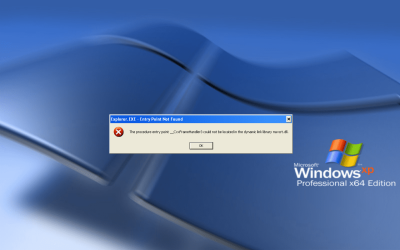
"procedure entry point shgetknownfolderpath could not be located in dynamic library shell32.dll"

of course it runs on my windows 7 ultimate sp1 x64 (I have dual boot win7 + xp 64) \\thanks to your tut//

so... i decided to replace those shell32.dll's on xp with the 2 in win7

i booted from my usb WinPE & copied the following:

shell32.dll from win7:\windows\system32 twice-to 1.xp64:\windows\system32 & 2.dllchache

shell32.dll from win7:\windows\sysWOW64 twice-to 1.xp64:\windows\sysWOW64 & 2.dllcache as "wShell32.dll"

i restarted & booted from xp, what do you think happened???
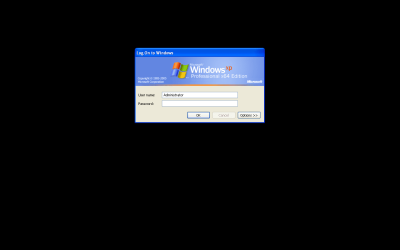
it booted successfully!!! but changed the logon screen to the classic one
the one that shows when you disable "Use the welcome screen" in users accounts> change the way users log on to computer

so... i typed my password & hit enter then i got a box that says:

"windows logged you in but couldn't load your profile"
the box also has a counter saying it will terminate in 30 seconds & was counting down


so i clicked "Ok"

then blaaaa.... nothing... an empty desktop

i clicked (Ctrl + Alt + Delete) it gave me an error... something like "could not find task manager" or something like that

same when i click [Ctrl + Shift + Esc]
i waited a bit but nothing happened

after some retries, it didn't work. strange thing is later i found a newly created Folders "users" + "Pragramdata" in xp's C drive!

so back to WinPE i recopied (windows + documents & settings) folders from my backup partition to recover xp to it's working state...

so my question is what do i need to do?, I'm not a programmer nor a reverse engineer (i wish i could be one or both :)

i know it can be done! to me it's more like an adventure, a quest, or a challenge & i would like to make it work to prove that it's possible
for the pleasure of proving that it's possible + because i love XP & want it as my main OS

Will you help me? in this endeavor my friends?


Thank you! Keep up the amazing work
 

My Computer

Computer type
PC/Desktop
Computer Manufacturer/Model Number
Custom
OS
Windows XP 64-bit SP2
CPU
FX-8370 (Died) Now: FX-6100
Motherboard
MSI 970a Sli krait (Died & killed my CPU) Now: Asus M5a87
Memory
2 x 8GB Kingston KVR16N11/8
Graphics Card(s)
manli gtx 960
Sound Card
The Venerable Emu10k Sound Blaster Live! CT4780
Monitor(s) Displays
Dell P2014H IPS Monitor
Screen Resolution
1600 x 900
PSU
S12II 430W 80 PLUS Bronze Certified
Cooling
Covers removed... Leave the Case Opened ;)
Browser
360 Extreme Browser, Brave, Vivaldi, Waterfox, Serpent
Welcome to the forum. dlls contain programs which can be called by anything for them to work you pass data to it and it expects certain data to call a certain program. change it and it will get the wrong data and crash as you have found out. It also does a lot of core things for windows its self. So you can just change dlls.


As your running a 64 bit system which is bassed on a server that gives more problems this patch may work but use at your own risk Getting XP updates - PC / Smartphones / sonstige Gerate - Home of the Sebijk.com
 

My Computer

Computer type
PC/Desktop
OS
win 8 32 bit
What you are attempting is unsupported and attempts generally don't end well. I have no suggestions but can only explain the problems.

Windows does not cope well with upgrades to individual system DLL's. At bootup Windows will check the versions of important DLL's and will not start if they are not as expected. That is for minor version upgrades and what are attempting is far from minor. Typically such DLL's must be replaced as a set. That works for minor upgrades as would happen with Windows update. For what you are attempting there would likely be widespread problems.

A Windows 7 DLL in an XP OS may try to call functions in other DLL's that were only introduced in Vista and later. Naturally this would fail. Documented DLL functions tend to be very stable from one OS version to another to avoid compatibility problems. But DLL's like shell32.dll have many undocumented functions intended only for internal use and not by applications and they are not bound by compatibility constraints. These may change with even a minor update. Naturally Microsoft does not document changes in undocumented behavior. For these reasons important DLL versions must match.

I would not care to try what you are attempting. And I do have programming knowledge. I am not saying it can't be done but it will not be easy.
 

My Computer

Computer type
PC/Desktop
Computer Manufacturer/Model Number
HP
OS
Windows 7 Pro 64 bit
CPU
Xeon W3520
Memory
8 GB
Graphics Card(s)
Nvidia Geforce 210
Your odds of success will be increased if you can give us more background detail, such as:

- why exactly is it necessary to run this program on winxp instead of vista or 7?
- what is the program you are trying to run? Specific name and version.

I hope you have a full backup or clone of your hard drive btw.
 

My Computer

Computer type
PC/Desktop
Computer Manufacturer/Model Number
diy
OS
Win7 pro x64
CPU
stock i7 7700k
Motherboard
Gigabyte Z270N-WIFI mini-ITX
Memory
Corsair Vengeance LPX 16GB (2x8GB) DDR4 @ 3200MHz
Graphics Card(s)
integrated Intel HD 630
Sound Card
onboard Realtek ALC1220
Monitor(s) Displays
two vertically mounted samsung 55" 4k un55mu8000
Screen Resolution
1920x1280
Hard Drives
256GB Samsung EVO 960 M.2 pci-e NVMe SSD
PSU
SilverStone Nightjar ST45NF 450Watt Fanless
Case
No case. Motherboard is mounted directly onto power supply
Cooling
Evercool low profile 815EP with Panaflow 12L fan at 7v
Keyboard
Ortek MCK-86 mini
Mouse
Belkin 5-button USB
Internet Speed
spectrum 400mbps
Thank you Samuria, i tried this registry fix & yes you can install Posready 2009 updates on win xp pro x64 sp2

Thanks Larry :) here are some resources i found

Getting All "Special Folders" in .NET
SHGetFolderPathA function
https://groups.google.com/forum/#!topic/comp.os.ms-windows.programmer.win32/30V_Hqxw-_w Using SHGetFolderPath or SHGetKnownFolderPath according to OS ver
Recommended installation folders
SHGetFolderPath DllCall
SHGetFolderPath(CSIDL_COMMON_DOCUMENTS... returns "Wring" Path!
Multiples issues with Libo when %appdata% special folder is redirected to UNC share path
Windows XP DLL File Information - shell32.dll

oh by the way your flag... there is a beautiful track by Redbox called "Saskatchewan" i've never known it's a name of a city!!!

Thanks johnhoh you want to know why :) :) :)

before buying my new computer about... or less than a couple of years ago
i have made sure that every component is xp compatible... because i had a HUUUUGE library of installed software
that i will copy to the new system & then use the repair windows setup to do an in-place repair & get all my software up & runnning
and... there is no ANY upgrade path for XP 64, the orphaned OS ahead of it's time!

and...
i've seen that new os called win7 in my sisters laptop, where they have changed the location of everything
& you have to go around in circles just to do what was once before "a very simple task"
one has to start over & learn everything again! it was slow, clunky, with absurd look!
annoying popus when installing software, takes eternity to access folders & after you wait you get error, can't get properties of folders
permesissions needed to copy files/folders, can't find the location of my network card "local area connection" where they hid it???

there was no way in H*LL that i'm going to use that OS!!!

i carefully researched motherboards
i wanted my new sys to be AMD, i looked for an asus but couldn't find any, (by that time Ryzen was out)
there were gigabyte's... but No THANKS! i kept searching, luckily i was able to find an MSI it was the only 1 left
it was more expensive than new ryzen boards! & ofcourse more expensive than gigabyte's, but better off with anything other than gigabyte...
i chose the fx-8370 i got it for 105$ 8-cores for less than 4-core ryzen price! & ocourse (chipset drivers available for XP64)
i also made sure MB contains pci slot for my beloved sound card... sound blaster live emu10k1 (ct4870)

my bro sent me the latest graphics card at that time for my build, it was the MSI Radeon RX 470 ARMOR 4G OC
i was so happy with it until i sadly discovered that there are no drivers for win xp 64
so i searched & searched & searched until i found the gtx 960 - the latest card that has xp 64 drivers!
so luckily i found a store, so i took my rx 470 & sold it to him for the gtx 960 plus he gave me 17% of gtx price in my pocket
it was difficult to collect those components with ryzen filling the shelves!

finally! i have all my components for my new build ready for XP, so i began installing
& then BSOD!!! everything was right! so i tried again then BSOD! then again & again & again
it appears that this new hardware doesn't work on XP despite the motherboard 970a Sli krait website has drivers for xp
but it says "Supports Windows 7 and Windows 8/ 8.1"!!!

i was so disappointed... eventually

i gave up!

& installed yuk winDoze 7 :(

i got used to it ocourse now... but then guess what?!!! i was on youtube watching tech reviews & on the side
youtube recommended a video "Running windows 98 on modern hardware"
so i watched it, then!!! i got this idea... why don't i replace "win98" with "XP" & hit the search button???!!!

& BAM!!! found some videos!!! i watched them one by one & found ppl having the same issue & the solution was...
to go to bios & replace xhci/ahci with IDE/Legacy
so i did as video suggested & i thought "heh it's not going to work..." so i inserted xp 64 cd
setup used to crash at 100% so now what's going to happen?! will it really work?! loading...
90-91-92-93-94-95-96-97-98-99.... 100 & & & & & & & & & & & & BOOOOOOM IT loaded noooooooo BSOD!!!!!! :) :) :)
UNBELIEVABLE!!! it was that simple - if i only knew this!!! :cry:

so here we are... XP 64 now is running on the metal Pedal to the metal! :D

then installed net framework 3.5 SP1 then windows intaller 4.5 then Net framework 4.0 then all updates from microsoft
then installed directx, all drivers & all necessary software... then with this clean state, i made a copy of folders...
Windows + Documents and settings + Program Files + Program Files (x86) using WinPE a 100% byte to byte identical copy
to my drive d... the backup drive

"what is the program you are trying to run? Specific name and version"

the program in question is ZBrush 2018
Zbrush 2018 System Requirements:
Operating System: Windows Vista or newer. Mac OS X 10.7 or newer. (32-bits
or 64-bits for either platform.)
• CPU: Pentium D or newer (or equivalent such as AMD Athlon 64 X2 or newer) <<<------- :D :D :D
with optional multithreading or hyperthreading capabilities.
• 6 GB recommended.
• Disk Space: 750 MB for ZBrush, plus 16 GB for the scratch disk.
• Pen tablet: Wacom or Wacom compatible.

i also want to run the latest versions of Firefox, Opera, Bluestacks...
i want to remove those artificial fake restrictions, why would a mere browser not be able to run on XP 64?!!!
i want it all :)

EXPERIMENT 2

i found in the mentioned above links that shell32.dll is statically linked to the following files:

ADVAPI32.dll
GDI32.dll
KERNEL32.dll
msvcrt.dll
ntdll.dll
RPCRT4.dll
SHLWAPI.dll
USER32.dll
This means that when shell32.dll is loaded, the above files are automatically loaded too. If one of these files is corrupted or missing, shell32.dll won't be loaded.

So i'm going to replace all those files but this time i'm going to do it on a Virtual Machine, an exact Physical to Virtual copy of my XP 64 using disk2vhd

& i will report back...
 
Last edited:

My Computer

Computer type
PC/Desktop
Computer Manufacturer/Model Number
Custom
OS
Windows XP 64-bit SP2
CPU
FX-8370 (Died) Now: FX-6100
Motherboard
MSI 970a Sli krait (Died & killed my CPU) Now: Asus M5a87
Memory
2 x 8GB Kingston KVR16N11/8
Graphics Card(s)
manli gtx 960
Sound Card
The Venerable Emu10k Sound Blaster Live! CT4780
Monitor(s) Displays
Dell P2014H IPS Monitor
Screen Resolution
1600 x 900
PSU
S12II 430W 80 PLUS Bronze Certified
Cooling
Covers removed... Leave the Case Opened ;)
Browser
360 Extreme Browser, Brave, Vivaldi, Waterfox, Serpent

My Computer

Computer type
PC/Desktop
Computer Manufacturer/Model Number
diy
OS
Win7 pro x64
CPU
stock i7 7700k
Motherboard
Gigabyte Z270N-WIFI mini-ITX
Memory
Corsair Vengeance LPX 16GB (2x8GB) DDR4 @ 3200MHz
Graphics Card(s)
integrated Intel HD 630
Sound Card
onboard Realtek ALC1220
Monitor(s) Displays
two vertically mounted samsung 55" 4k un55mu8000
Screen Resolution
1920x1280
Hard Drives
256GB Samsung EVO 960 M.2 pci-e NVMe SSD
PSU
SilverStone Nightjar ST45NF 450Watt Fanless
Case
No case. Motherboard is mounted directly onto power supply
Cooling
Evercool low profile 815EP with Panaflow 12L fan at 7v
Keyboard
Ortek MCK-86 mini
Mouse
Belkin 5-button USB
Internet Speed
spectrum 400mbps
Yes Samuria, last version that runs on XP 64 was Zrush 4R2
Edit: which really feels smoother on XP 64 compared to ZBrush 2018 on Win 7 Ult SP1 x64

Thank you johnhoh, I'm really grateful to you & will definitely try your solution :)

now i made a p2v copy of my XP 64, Ran the VM, removed some unnecessary stuff & installed vmware tools, copied all necessary dll's in a folder inside my Virtual Machine's C drive
then took a snapshot to revert to, in case something didn't work. i then booted from WinPE inside VMware Workstation to paste dll's into XPVM Windows folder & here is a log of what i did... & the results...

=======================
source: [win7's C:\windows folder] destination: [VMxp64's C:\windows folder]

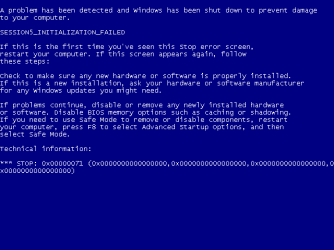
-1st try all dlls 32 & 64 > BSOD
Windows XP Professional x64 Edition-2019-05-24-17-49-47.png
[i reverted to snapshot] then...


-2nd try shell32+user32 32 & 64 > BSOD [i reverted to snapshot] then...


-3rd try shell32 64-only > Loaded successully, [which means the game is only in 64bit dlls!] task manager is working, everything is fine except dxdiag "the procedure entry point swprintf_s could not be located in dynamic link library msvcrt.dll", Zbrush installer same Msvcrt.dll message


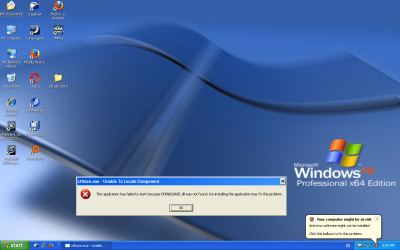
-4th try shell32+msvcrt 64-only > Loaded successfully with error titled "ctfmon.exe - Unable To Locate Component" same for dxdiag & zbrush installer
Windows XP Professional x64 Edition-2019-05-22-05-54-15.png
now it's a cat & mouse game, using "everything" i searched my win7\windows folder for kernelbase.dll & found 1 in sys32 & another in SysWow
i did the same for XP's C Windows but found nothing! so next try...


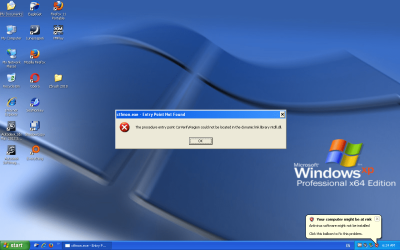
-5th try kernelbase.dll 32 & 64 > loaded successfully with this error
Windows XP Professional x64 Edition-2019-05-22-06-24-10.png
same error for dxdiag & zbrush installer


-6th try ntdll 64-only > loaded successfully with no errors! so i ran Dxdiag but nothing happened, it didn't run same for zbrush installer


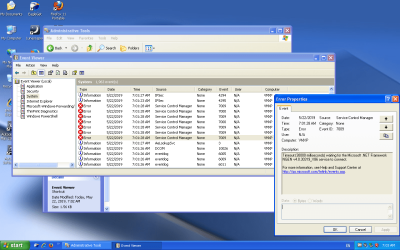
-7th try all 64bit dlls only > loaded successfully with no errors! task manager is working, dxdiag & zbrush installer same result as 6th try, didn't run!
Windows XP Professional x64 Edition-2019-05-22-07-03-30.png


-8th try add shell32 32bit to the current composition > i received this
Windows XP Professional x64 Edition-2019-05-22-07-09-36.png
i typed my password & hit enter... i got this
Windows XP Professional x64 Edition-2019-05-22-07-09-49.png
i hit ok... then got this
Windows XP Professional x64 Edition-2019-05-22-07-10-13.png


-9th try add msvcrt 32bit to the current compo > BSOD


so any suggestions? what is needed for this to work?
what needs to be patched/modified the app or the os?!

help me breathe life into my poor FranXPstein :cry:
 
Last edited:

My Computer

Computer type
PC/Desktop
Computer Manufacturer/Model Number
Custom
OS
Windows XP 64-bit SP2
CPU
FX-8370 (Died) Now: FX-6100
Motherboard
MSI 970a Sli krait (Died & killed my CPU) Now: Asus M5a87
Memory
2 x 8GB Kingston KVR16N11/8
Graphics Card(s)
manli gtx 960
Sound Card
The Venerable Emu10k Sound Blaster Live! CT4780
Monitor(s) Displays
Dell P2014H IPS Monitor
Screen Resolution
1600 x 900
PSU
S12II 430W 80 PLUS Bronze Certified
Cooling
Covers removed... Leave the Case Opened ;)
Browser
360 Extreme Browser, Brave, Vivaldi, Waterfox, Serpent

My Computer

Computer type
PC/Desktop
OS
Windows 7 Pro 64-bit
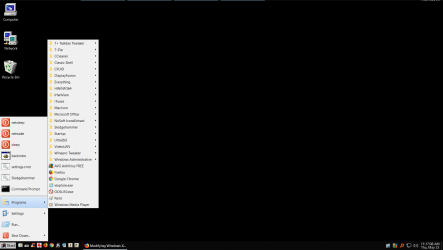
here's my desktop. Actually this is win10 but its identical to my win7 machine. Win95 start button, win98 menus, win98 icons, UAC turned off, MS updates off (done manually). All done with winaero tweaker and classic shell.
 

Attachments

  • Clipboard01.png
    Clipboard01.png
    102.7 KB · Views: 1

My Computer

Computer type
PC/Desktop
Computer Manufacturer/Model Number
diy
OS
Win7 pro x64
CPU
stock i7 7700k
Motherboard
Gigabyte Z270N-WIFI mini-ITX
Memory
Corsair Vengeance LPX 16GB (2x8GB) DDR4 @ 3200MHz
Graphics Card(s)
integrated Intel HD 630
Sound Card
onboard Realtek ALC1220
Monitor(s) Displays
two vertically mounted samsung 55" 4k un55mu8000
Screen Resolution
1920x1280
Hard Drives
256GB Samsung EVO 960 M.2 pci-e NVMe SSD
PSU
SilverStone Nightjar ST45NF 450Watt Fanless
Case
No case. Motherboard is mounted directly onto power supply
Cooling
Evercool low profile 815EP with Panaflow 12L fan at 7v
Keyboard
Ortek MCK-86 mini
Mouse
Belkin 5-button USB
Internet Speed
spectrum 400mbps
here's my desktop. Actually this is win10 but its identical to my win7 machine. Win95 start button, win98 menus, win98 icons, UAC turned off, MS updates off (done manually). All done with winaero tweaker and classic shell.

WOW i'm impressed :eek:

do you install one of them or both altogether?
 

My Computer

Computer type
PC/Desktop
Computer Manufacturer/Model Number
Custom
OS
Windows XP 64-bit SP2
CPU
FX-8370 (Died) Now: FX-6100
Motherboard
MSI 970a Sli krait (Died & killed my CPU) Now: Asus M5a87
Memory
2 x 8GB Kingston KVR16N11/8
Graphics Card(s)
manli gtx 960
Sound Card
The Venerable Emu10k Sound Blaster Live! CT4780
Monitor(s) Displays
Dell P2014H IPS Monitor
Screen Resolution
1600 x 900
PSU
S12II 430W 80 PLUS Bronze Certified
Cooling
Covers removed... Leave the Case Opened ;)
Browser
360 Extreme Browser, Brave, Vivaldi, Waterfox, Serpent
do you install one of them or both altogether?
You install each separately. Classic shell mostly allows you to make it look and work like win9x, winaero tweaker is mostly about disabling all the annoying things that were added to windows since win9x.
 

My Computer

Computer type
PC/Desktop
Computer Manufacturer/Model Number
diy
OS
Win7 pro x64
CPU
stock i7 7700k
Motherboard
Gigabyte Z270N-WIFI mini-ITX
Memory
Corsair Vengeance LPX 16GB (2x8GB) DDR4 @ 3200MHz
Graphics Card(s)
integrated Intel HD 630
Sound Card
onboard Realtek ALC1220
Monitor(s) Displays
two vertically mounted samsung 55" 4k un55mu8000
Screen Resolution
1920x1280
Hard Drives
256GB Samsung EVO 960 M.2 pci-e NVMe SSD
PSU
SilverStone Nightjar ST45NF 450Watt Fanless
Case
No case. Motherboard is mounted directly onto power supply
Cooling
Evercool low profile 815EP with Panaflow 12L fan at 7v
Keyboard
Ortek MCK-86 mini
Mouse
Belkin 5-button USB
Internet Speed
spectrum 400mbps
Back
Top