Convert FAT or FAT32 Volume to NTFS

How to Convert a FAT or FAT32 Volume to NTFS in Windows 7


   Information
This will show you how to convert a drive or partition volume with a FAT (FAT16) or FAT32 file system to a NTFS file system in Windows 7 without having to format the volume and lose your data on it.
   Note
Before you start to convert a FAT or FAT32 volume to NTFS, please consider the following limitations and requirements:
  • UDF and CDfs file systems are only used with optical media and cannot be converted to NTFS.
  • FAT12 is the only format used on floppy diskettes (as if these are used anymore ;)). This does not apply to a USB flash key though.
  • The conversion to NTFS is a one-way process. After you convert a drive or a partition to NTFS, you cannot convert it back to FAT or to FAT32 unless you format it again as FAT or FAT32.
  • The convert command requires that you have enough free space on the drive or on the partition that you want to convert to be able to convert it. If Convert.exe determines that there is not sufficient free space on the volume, it will not convert the volume.
  • If the files are being used on the volume that you are trying to convert, then you will be prompted with:
    "Convert cannot run because the volume is in use by another process. Convert may run if this volume is dismounted first. ALL OPENED HANDLES TO THIS VOLUME WOULD THEN BE INVALID. Would you like to force a dismount on this volume? <Y/N>"
    • Quit all the programs that are using the files on the drive, and then type Y at the command prompt to convert the drive to NTFS.
  • If the drive or partition volume that you are trying to convert is in use, then you will be prompted with:
    "Convert cannot gain exclusive access to the drive letter drive, so it cannot convert it now. Would you like to schedule it to be converted the next time the system restarts? <Y/N>"
    • To resolve this issue, type Y at the command prompt. The volume or drive will be converted to NTFS the next time that you restart the computer.
   Warning
Although the chance of corruption or data loss during the conversion is minimal, it is recommended that you backup any data that you do not want to lose on the volume that you want to convert before you start the conversion to be extra safe.

The only way to convert a NTFS disk back to a FAT or FAT32 disk is to format the disk.

Before you begin, note that the FAT32 file system has size limitations. In this version of Windows, you cannot create a FAT32 partition greater than 32 GB (32728 MB). In addition, you cannot store a file larger than 4 GB on a FAT32 partition. For more information, see Comparing NTFS and FAT file systems.


Here's How:
1. To Use a Elevated Command Prompt in Windows
A) Open an elevated command prompt.

B) Go to step 3.
2. To Use a Command Prompt at Boot
A) Open a command prompt at boot.

B) In the command prompt, type diskpart and press Enter. (see screenshot below)

C) In the command prompt, type list volume and press Enter. (see screenshot below)
NOTE: This will let you see what the drive letter is for the drive that you want to connvert since it may not always be the same drive letter that it is in Windows.

D) After making note of the drive letter, type exit and press Enter. (see screenshot below)
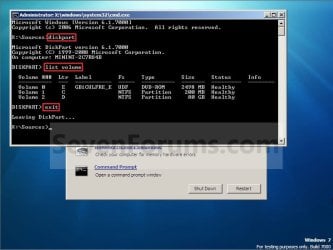
Command-1.jpg
E) Continue on to step 3 to convert the drive.
3. In the command prompt, type convert drive letter: /fs:ntfs and press Enter. (See screenshot below)
NOTE: Substitute drive letter for the drive letter of the FAT or FAT32 drive or partition that you want to convert to NTFS. For example, I want to convert my USB flash key with the drive letter G: , so I would type convert g: /fs:ntfs and press enter.
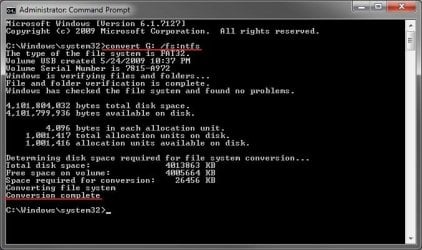
Command.jpg
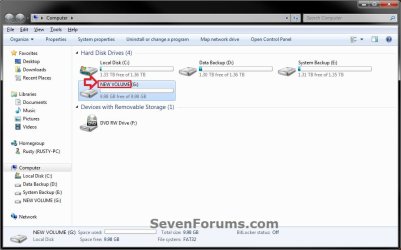
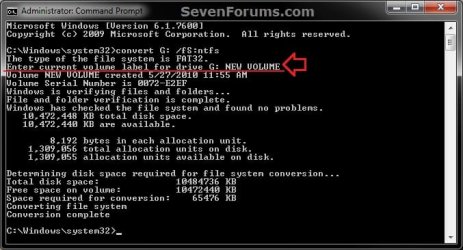
4. If prompted to Enter current volume label for drive (drive letter) (ex: G: ), then enter the name (ex: NEW VOLUME) of this drive letter as it is displayed in the Computer window and press Enter. (see screenshots below)
Current_Volume_Label-1.jpg

Current_Volume_Label-2.jpg
5. When the conversion to NTFS is complete, you receive the Conversion complete message. (See screenshot above)
NOTE: This may take a while to convert depending on full and large the drive is. It may also seem like it has hung at points, but be patient and let it finish.

6. Close the command prompt.
NOTE: If you used a command prompt at boot, then also close the System Recovery Options window and restart the computer.
That's it,
Shawn


Last edited:
The chkdsk worked fine. I'm now able to transfer 4gb files and create them on the drive, Thanks for all the help!!
 

My Computer My Computer

At a glance

Windows 7 64bitAmd Athlon(tm) 7750 Dual-Core ProcessorATI Radeon HD 4600 series
OS
Windows 7 64bit
CPU
Amd Athlon(tm) 7750 Dual-Core Processor
Graphics Card(s)
ATI Radeon HD 4600 series
That's great news Warrof. Thank you for posting back with your results. :)
 

My Computer My Computer

At a glance

64-bit Windows 11 Pro for WorkstationsIntel i7-8700K OC'd to 5 GHz64 GB (4x16GB) G.SKILL TridentZ RGB DDR4 3600...ASUS ROG-STRIX-GTX1080TI-O11G-GAMING
Computer type
PC/Desktop
Computer Manufacturer/Model Number
Self built custom
OS
64-bit Windows 11 Pro for Workstations
CPU
Intel i7-8700K OC'd to 5 GHz
Motherboard
ASUS ROG Maximus XI Formula Z390
Memory
64 GB (4x16GB) G.SKILL TridentZ RGB DDR4 3600 MHz
Graphics Card(s)
ASUS ROG-STRIX-GTX1080TI-O11G-GAMING
Sound Card
Integrated
Monitor(s) Displays
2 x Samsung Odyssey G7 27"
Screen Resolution
2560x1440
Hard Drives
1TB Samsung 990 PRO M.2,
4TB Samsung 990 PRO PRO M.2,
TerraMaster F8 SSD Plus NAS
PSU
Seasonic Prime Titanium 850W
Case
Thermaltake Core P3
Cooling
Corsair Hydro H115i
Keyboard
Logitech wireless K800
Mouse
Logitech MX Master 4
Internet Speed
2 Gb/s Download and 100 Mb/s Upload
Antivirus
Malwarebyte Anti-Malware Premium
Browser
Google Chrome
Other Info
Logitech Z625 speaker system,
Logitech BRIO 4K Pro webcam,
HP Color LaserJet Pro MFP M477fdn,
APC SMART-UPS RT 1000 XL - SURT1000XLI,
Galaxy S23 Plus phone
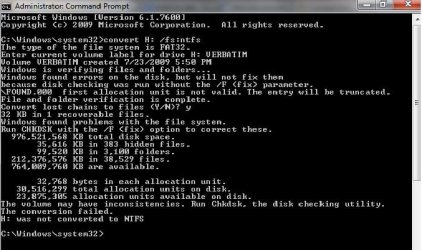
I have a problem with converting FAT32 to NTFS. I've also done Chkdsk and there were no problems. Please, help me!
 

Attachments

  • fat32 to ntfs FAILED.jpg
    fat32 to ntfs FAILED.jpg
    51.6 KB · Views: 1,783

My Computer My Computer

At a glance

Windows 7 Professional 32bit
OS
Windows 7 Professional 32bit
Hello Marex, and welcome to Seven Forums.

There appears to be some sort of issue with the HDD. I would recommend to copy anything that you do not want to lose from it to another location temporarily, then format the HDD as NTFS without doing a "quick format", then copy the data back to the HDD.
 

My Computer My Computer

At a glance

64-bit Windows 11 Pro for WorkstationsIntel i7-8700K OC'd to 5 GHz64 GB (4x16GB) G.SKILL TridentZ RGB DDR4 3600...ASUS ROG-STRIX-GTX1080TI-O11G-GAMING
Computer type
PC/Desktop
Computer Manufacturer/Model Number
Self built custom
OS
64-bit Windows 11 Pro for Workstations
CPU
Intel i7-8700K OC'd to 5 GHz
Motherboard
ASUS ROG Maximus XI Formula Z390
Memory
64 GB (4x16GB) G.SKILL TridentZ RGB DDR4 3600 MHz
Graphics Card(s)
ASUS ROG-STRIX-GTX1080TI-O11G-GAMING
Sound Card
Integrated
Monitor(s) Displays
2 x Samsung Odyssey G7 27"
Screen Resolution
2560x1440
Hard Drives
1TB Samsung 990 PRO M.2,
4TB Samsung 990 PRO PRO M.2,
TerraMaster F8 SSD Plus NAS
PSU
Seasonic Prime Titanium 850W
Case
Thermaltake Core P3
Cooling
Corsair Hydro H115i
Keyboard
Logitech wireless K800
Mouse
Logitech MX Master 4
Internet Speed
2 Gb/s Download and 100 Mb/s Upload
Antivirus
Malwarebyte Anti-Malware Premium
Browser
Google Chrome
Other Info
Logitech Z625 speaker system,
Logitech BRIO 4K Pro webcam,
HP Color LaserJet Pro MFP M477fdn,
APC SMART-UPS RT 1000 XL - SURT1000XLI,
Galaxy S23 Plus phone
I am trying to convert my Toshiba 2tb external drive from fat32 to ntfs, but this is what it shows:

Converting file system
Insufficient Memory
Error converting file 01-DRA~1.ORI.
[repeat the last line but for different files]
The file may be damaged or there may be insufficient disk space.

which seems self explanitory, except I've got 8GB of memory, and have only used 750GB of the 2TB drive. Help!
 

My Computer My Computer

At a glance

windows 7 home premium 64bit
OS
windows 7 home premium 64bit
Sorry if I am bumping this topic but when I tried doing this it said convert was not available for exfat formats.

I have a PNY 128gb usb stick that I am trying to format to fat32 so it can play on my WD media player. Any help would be greatly appreciated =)
 

My Computer My Computer

At a glance

Windows 7 Ultimate x64
Computer type
PC/Desktop
Computer Manufacturer/Model Number
Gateway
OS
Windows 7 Ultimate x64
Hello k1255, and welcome to Seven Forums.

Yeah, this tutorial is only for converting FAT or FAT32 to NTFS.

The problem in your situation is that FAT32 only supports drives up to 32 GB in size. Since you have a 128 GB USB flash drive, you would need to either leave it formatted with exFAT or NTFS instead.

NTFS.com. NTFS vs FAT vs exFAT

Hope this helps, :)
Shawn
 

My Computer My Computer

At a glance

64-bit Windows 11 Pro for WorkstationsIntel i7-8700K OC'd to 5 GHz64 GB (4x16GB) G.SKILL TridentZ RGB DDR4 3600...ASUS ROG-STRIX-GTX1080TI-O11G-GAMING
Computer type
PC/Desktop
Computer Manufacturer/Model Number
Self built custom
OS
64-bit Windows 11 Pro for Workstations
CPU
Intel i7-8700K OC'd to 5 GHz
Motherboard
ASUS ROG Maximus XI Formula Z390
Memory
64 GB (4x16GB) G.SKILL TridentZ RGB DDR4 3600 MHz
Graphics Card(s)
ASUS ROG-STRIX-GTX1080TI-O11G-GAMING
Sound Card
Integrated
Monitor(s) Displays
2 x Samsung Odyssey G7 27"
Screen Resolution
2560x1440
Hard Drives
1TB Samsung 990 PRO M.2,
4TB Samsung 990 PRO PRO M.2,
TerraMaster F8 SSD Plus NAS
PSU
Seasonic Prime Titanium 850W
Case
Thermaltake Core P3
Cooling
Corsair Hydro H115i
Keyboard
Logitech wireless K800
Mouse
Logitech MX Master 4
Internet Speed
2 Gb/s Download and 100 Mb/s Upload
Antivirus
Malwarebyte Anti-Malware Premium
Browser
Google Chrome
Other Info
Logitech Z625 speaker system,
Logitech BRIO 4K Pro webcam,
HP Color LaserJet Pro MFP M477fdn,
APC SMART-UPS RT 1000 XL - SURT1000XLI,
Galaxy S23 Plus phone
Convert FAT32 To NTFS

Please am trying to format my FAT32 to NTFS using the procedure of CMD running as admin with command "convert f: /fs:ntfs" but when it gets to giving my flash space which is enough cause it's 16GB and no data inside.
After the information it said
"The first NTFS boot sector is unwriteable.
All NTFS boot sectors are unwriteable. Cannot contune
"

Please what does this mean and what do i do to solve this problem because I've spent 4hours exploring everything on this page. Thanks
 

My Computer My Computer

At a glance

Window 7, 64 bit8GB
Computer type
PC/Desktop
Computer Manufacturer/Model Number
HP
OS
Window 7, 64 bit
Memory
8GB
Antivirus
ESET Smart Security
Hello lovehasnoend213, and welcome to Seven Forums. :)

That error message indicates that this is a bootable flash drive, and the boot sector is write protected.

Since this is a USB flash drive, it would be best to format it using FAT32 instead.
 

My Computer My Computer

At a glance

64-bit Windows 11 Pro for WorkstationsIntel i7-8700K OC'd to 5 GHz64 GB (4x16GB) G.SKILL TridentZ RGB DDR4 3600...ASUS ROG-STRIX-GTX1080TI-O11G-GAMING
Computer type
PC/Desktop
Computer Manufacturer/Model Number
Self built custom
OS
64-bit Windows 11 Pro for Workstations
CPU
Intel i7-8700K OC'd to 5 GHz
Motherboard
ASUS ROG Maximus XI Formula Z390
Memory
64 GB (4x16GB) G.SKILL TridentZ RGB DDR4 3600 MHz
Graphics Card(s)
ASUS ROG-STRIX-GTX1080TI-O11G-GAMING
Sound Card
Integrated
Monitor(s) Displays
2 x Samsung Odyssey G7 27"
Screen Resolution
2560x1440
Hard Drives
1TB Samsung 990 PRO M.2,
4TB Samsung 990 PRO PRO M.2,
TerraMaster F8 SSD Plus NAS
PSU
Seasonic Prime Titanium 850W
Case
Thermaltake Core P3
Cooling
Corsair Hydro H115i
Keyboard
Logitech wireless K800
Mouse
Logitech MX Master 4
Internet Speed
2 Gb/s Download and 100 Mb/s Upload
Antivirus
Malwarebyte Anti-Malware Premium
Browser
Google Chrome
Other Info
Logitech Z625 speaker system,
Logitech BRIO 4K Pro webcam,
HP Color LaserJet Pro MFP M477fdn,
APC SMART-UPS RT 1000 XL - SURT1000XLI,
Galaxy S23 Plus phone
I had trouble making a password reset disk on a FAT32 USB stick. Should I convert it to NTFS first. Does reformatting do this for me or do I need to specify I want NTFS when I reformat.Hope this is not the wrong thread but spent some time trying to find out.
I use Windows 7 Home Premium.
 

My Computer My Computer

At a glance

Windows 7 Home Premium Upgrade designed for W...
Computer type
PC/Desktop
Computer Manufacturer/Model Number
Mesh
OS
Windows 7 Home Premium Upgrade designed for Windows Vista
Browser
Internet Explorer
Hello Windy, :)

Usually you would want a USB flash drive to be FAT32, but it doesn't matter for a password reset disk. The main thing is to make sure that you have your BIOS set to enable USB devices at boot (usually is by default) so it will be able to detect the password reset disk while connected at boot if you should ever need to use it.
 

My Computer My Computer

At a glance

64-bit Windows 11 Pro for WorkstationsIntel i7-8700K OC'd to 5 GHz64 GB (4x16GB) G.SKILL TridentZ RGB DDR4 3600...ASUS ROG-STRIX-GTX1080TI-O11G-GAMING
Computer type
PC/Desktop
Computer Manufacturer/Model Number
Self built custom
OS
64-bit Windows 11 Pro for Workstations
CPU
Intel i7-8700K OC'd to 5 GHz
Motherboard
ASUS ROG Maximus XI Formula Z390
Memory
64 GB (4x16GB) G.SKILL TridentZ RGB DDR4 3600 MHz
Graphics Card(s)
ASUS ROG-STRIX-GTX1080TI-O11G-GAMING
Sound Card
Integrated
Monitor(s) Displays
2 x Samsung Odyssey G7 27"
Screen Resolution
2560x1440
Hard Drives
1TB Samsung 990 PRO M.2,
4TB Samsung 990 PRO PRO M.2,
TerraMaster F8 SSD Plus NAS
PSU
Seasonic Prime Titanium 850W
Case
Thermaltake Core P3
Cooling
Corsair Hydro H115i
Keyboard
Logitech wireless K800
Mouse
Logitech MX Master 4
Internet Speed
2 Gb/s Download and 100 Mb/s Upload
Antivirus
Malwarebyte Anti-Malware Premium
Browser
Google Chrome
Other Info
Logitech Z625 speaker system,
Logitech BRIO 4K Pro webcam,
HP Color LaserJet Pro MFP M477fdn,
APC SMART-UPS RT 1000 XL - SURT1000XLI,
Galaxy S23 Plus phone
2TB external drive refuses to format to NTFS

Hello,
I got a 2TB external hard drive and it came formatted as exFAT, so I downloaded EaseUS and it couldn't format it directly to NTFS as I hoped it would, so I formatted it as FAT32. Now the drive won't format to NTFS no matter what I try.

I have no problem formatting the drive or anything, I would just like to be able to download games and such onto it and have them work.

Thank you in advance.
 

My Computer My Computer

At a glance

Windows 7 Professional 64bit4GB DDR4
Computer type
PC/Desktop
Computer Manufacturer/Model Number
Certera
OS
Windows 7 Professional 64bit
Memory
4GB DDR4
Hard Drives
Drive C: -OS drive - 120GB - NTFS
Drive D: - Backup drive - 50GB - NTFS
Drive G: -External hard drive - 2TB - FAT32
Browser
Chrome
Hello Mooper, and welcome to Seven Forums. :-)

If you try to format the external disk in Disk Management, do you have the option to select NTFS?

If yes, do you get any error messages when trying to format with NTFS?

:ar: Format Disk or Drive in Windows 10 | Tutorials
 

My Computer My Computer

At a glance

64-bit Windows 11 Pro for WorkstationsIntel i7-8700K OC'd to 5 GHz64 GB (4x16GB) G.SKILL TridentZ RGB DDR4 3600...ASUS ROG-STRIX-GTX1080TI-O11G-GAMING
Computer type
PC/Desktop
Computer Manufacturer/Model Number
Self built custom
OS
64-bit Windows 11 Pro for Workstations
CPU
Intel i7-8700K OC'd to 5 GHz
Motherboard
ASUS ROG Maximus XI Formula Z390
Memory
64 GB (4x16GB) G.SKILL TridentZ RGB DDR4 3600 MHz
Graphics Card(s)
ASUS ROG-STRIX-GTX1080TI-O11G-GAMING
Sound Card
Integrated
Monitor(s) Displays
2 x Samsung Odyssey G7 27"
Screen Resolution
2560x1440
Hard Drives
1TB Samsung 990 PRO M.2,
4TB Samsung 990 PRO PRO M.2,
TerraMaster F8 SSD Plus NAS
PSU
Seasonic Prime Titanium 850W
Case
Thermaltake Core P3
Cooling
Corsair Hydro H115i
Keyboard
Logitech wireless K800
Mouse
Logitech MX Master 4
Internet Speed
2 Gb/s Download and 100 Mb/s Upload
Antivirus
Malwarebyte Anti-Malware Premium
Browser
Google Chrome
Other Info
Logitech Z625 speaker system,
Logitech BRIO 4K Pro webcam,
HP Color LaserJet Pro MFP M477fdn,
APC SMART-UPS RT 1000 XL - SURT1000XLI,
Galaxy S23 Plus phone

My Computer My Computer

At a glance

Windows 7 Professional 64bit4GB DDR4
Computer type
PC/Desktop
Computer Manufacturer/Model Number
Certera
OS
Windows 7 Professional 64bit
Memory
4GB DDR4
Hard Drives
Drive C: -OS drive - 120GB - NTFS
Drive D: - Backup drive - 50GB - NTFS
Drive G: -External hard drive - 2TB - FAT32
Browser
Chrome
It sounds like there may be some sort of issue with the drive.

You might scan the drive with the recommended tool (ex: SeaTools or Windows Data Lifeguard Diagnostics) from the manufacturer to check its health.
 

My Computer My Computer

At a glance

64-bit Windows 11 Pro for WorkstationsIntel i7-8700K OC'd to 5 GHz64 GB (4x16GB) G.SKILL TridentZ RGB DDR4 3600...ASUS ROG-STRIX-GTX1080TI-O11G-GAMING
Computer type
PC/Desktop
Computer Manufacturer/Model Number
Self built custom
OS
64-bit Windows 11 Pro for Workstations
CPU
Intel i7-8700K OC'd to 5 GHz
Motherboard
ASUS ROG Maximus XI Formula Z390
Memory
64 GB (4x16GB) G.SKILL TridentZ RGB DDR4 3600 MHz
Graphics Card(s)
ASUS ROG-STRIX-GTX1080TI-O11G-GAMING
Sound Card
Integrated
Monitor(s) Displays
2 x Samsung Odyssey G7 27"
Screen Resolution
2560x1440
Hard Drives
1TB Samsung 990 PRO M.2,
4TB Samsung 990 PRO PRO M.2,
TerraMaster F8 SSD Plus NAS
PSU
Seasonic Prime Titanium 850W
Case
Thermaltake Core P3
Cooling
Corsair Hydro H115i
Keyboard
Logitech wireless K800
Mouse
Logitech MX Master 4
Internet Speed
2 Gb/s Download and 100 Mb/s Upload
Antivirus
Malwarebyte Anti-Malware Premium
Browser
Google Chrome
Other Info
Logitech Z625 speaker system,
Logitech BRIO 4K Pro webcam,
HP Color LaserJet Pro MFP M477fdn,
APC SMART-UPS RT 1000 XL - SURT1000XLI,
Galaxy S23 Plus phone
It's by Flameer, and they don't have a recommended scan tool that I can find.

I've also tried to format the drive and scan it and all with command prompt and Advanced System Repair Pro with no avail.
 

My Computer My Computer

At a glance

Windows 7 Professional 64bit4GB DDR4
Computer type
PC/Desktop
Computer Manufacturer/Model Number
Certera
OS
Windows 7 Professional 64bit
Memory
4GB DDR4
Hard Drives
Drive C: -OS drive - 120GB - NTFS
Drive D: - Backup drive - 50GB - NTFS
Drive G: -External hard drive - 2TB - FAT32
Browser
Chrome
That's ok. You can still use "SeaTools for Windows" to scan the drive with to see if it will pass the health test or not.
 

My Computer My Computer

At a glance

64-bit Windows 11 Pro for WorkstationsIntel i7-8700K OC'd to 5 GHz64 GB (4x16GB) G.SKILL TridentZ RGB DDR4 3600...ASUS ROG-STRIX-GTX1080TI-O11G-GAMING
Computer type
PC/Desktop
Computer Manufacturer/Model Number
Self built custom
OS
64-bit Windows 11 Pro for Workstations
CPU
Intel i7-8700K OC'd to 5 GHz
Motherboard
ASUS ROG Maximus XI Formula Z390
Memory
64 GB (4x16GB) G.SKILL TridentZ RGB DDR4 3600 MHz
Graphics Card(s)
ASUS ROG-STRIX-GTX1080TI-O11G-GAMING
Sound Card
Integrated
Monitor(s) Displays
2 x Samsung Odyssey G7 27"
Screen Resolution
2560x1440
Hard Drives
1TB Samsung 990 PRO M.2,
4TB Samsung 990 PRO PRO M.2,
TerraMaster F8 SSD Plus NAS
PSU
Seasonic Prime Titanium 850W
Case
Thermaltake Core P3
Cooling
Corsair Hydro H115i
Keyboard
Logitech wireless K800
Mouse
Logitech MX Master 4
Internet Speed
2 Gb/s Download and 100 Mb/s Upload
Antivirus
Malwarebyte Anti-Malware Premium
Browser
Google Chrome
Other Info
Logitech Z625 speaker system,
Logitech BRIO 4K Pro webcam,
HP Color LaserJet Pro MFP M477fdn,
APC SMART-UPS RT 1000 XL - SURT1000XLI,
Galaxy S23 Plus phone
SeaTools for Windows doesn't recognize the drive as a supported drive. The only one that shows up on the main screen is my main hard drive.
 

My Computer My Computer

At a glance

Windows 7 Professional 64bit4GB DDR4
Computer type
PC/Desktop
Computer Manufacturer/Model Number
Certera
OS
Windows 7 Professional 64bit
Memory
4GB DDR4
Hard Drives
Drive C: -OS drive - 120GB - NTFS
Drive D: - Backup drive - 50GB - NTFS
Drive G: -External hard drive - 2TB - FAT32
Browser
Chrome
I hate to say it, but it looks like the drive may be dead. :(
 

My Computer My Computer

At a glance

64-bit Windows 11 Pro for WorkstationsIntel i7-8700K OC'd to 5 GHz64 GB (4x16GB) G.SKILL TridentZ RGB DDR4 3600...ASUS ROG-STRIX-GTX1080TI-O11G-GAMING
Computer type
PC/Desktop
Computer Manufacturer/Model Number
Self built custom
OS
64-bit Windows 11 Pro for Workstations
CPU
Intel i7-8700K OC'd to 5 GHz
Motherboard
ASUS ROG Maximus XI Formula Z390
Memory
64 GB (4x16GB) G.SKILL TridentZ RGB DDR4 3600 MHz
Graphics Card(s)
ASUS ROG-STRIX-GTX1080TI-O11G-GAMING
Sound Card
Integrated
Monitor(s) Displays
2 x Samsung Odyssey G7 27"
Screen Resolution
2560x1440
Hard Drives
1TB Samsung 990 PRO M.2,
4TB Samsung 990 PRO PRO M.2,
TerraMaster F8 SSD Plus NAS
PSU
Seasonic Prime Titanium 850W
Case
Thermaltake Core P3
Cooling
Corsair Hydro H115i
Keyboard
Logitech wireless K800
Mouse
Logitech MX Master 4
Internet Speed
2 Gb/s Download and 100 Mb/s Upload
Antivirus
Malwarebyte Anti-Malware Premium
Browser
Google Chrome
Other Info
Logitech Z625 speaker system,
Logitech BRIO 4K Pro webcam,
HP Color LaserJet Pro MFP M477fdn,
APC SMART-UPS RT 1000 XL - SURT1000XLI,
Galaxy S23 Plus phone
I can still copy files to it, but I can't download stuff like games onto it. There is no way to help it?
 

My Computer My Computer

At a glance

Windows 7 Professional 64bit4GB DDR4
Computer type
PC/Desktop
Computer Manufacturer/Model Number
Certera
OS
Windows 7 Professional 64bit
Memory
4GB DDR4
Hard Drives
Drive C: -OS drive - 120GB - NTFS
Drive D: - Backup drive - 50GB - NTFS
Drive G: -External hard drive - 2TB - FAT32
Browser
Chrome
Back
Top