Solved FAT32 to NTFS conversion causing external HDD to disappear.

dsmith

New member
Local time
5:34 PM
Messages
4
It all started with a 4.3GB file. I attempted to move this file on to my 1.5TB external HDD when windows told me the file was to large. I searched on google and learned about FAT32 and NTFS. I wanted to format my HDD to NTFS without losing any of my 600+GB of data so I found a guide.

http://www.sevenforums.com/tutorials/11106-convert-fat-fat32-volume-ntfs.html

Everything went off without a hitch and I later went to bed. When I awoke today I found my hard drive has pulled a Houdini. It will not show up in my computer, however it does show that i have a device plugged in at the bottom of the screen. I have tried giving the HDD a system letter through the control panel but all i see is this..


My drive is considered 4 drives or something to that effect. I don't know if it is always like that or not. All i know is i cannot give it a system letter or access the files on it in any way.
Any ideas?
 
Last edited by a moderator:

My Computer My Computer

Computer type
PC/Desktop
OS
Windows 7 Home Premium 64bit
Hello dsmith, and welcome to Seven Forums.

Please go ahead and post a screenshot showing the full layout of your Disk Management with the external drive connected to see if it may help show what the issue is. :)

Disk Management - Post a Screen Capture Image

If you have not already, try connecting the drive to a different USB connector to see if there may be an issue with the one you did use.
 

My Computer My Computer

Computer type
PC/Desktop
Computer Manufacturer/Model Number
Self built custom
OS
64-bit Windows 11 Pro for Workstations
CPU
Intel i7-8700K OC'd to 5 GHz
Motherboard
ASUS ROG Maximus XI Formula Z390
Memory
64 GB (4x16GB) G.SKILL TridentZ RGB DDR4 3600 MHz
Graphics Card(s)
ASUS ROG-STRIX-GTX1080TI-O11G-GAMING
Sound Card
Integrated
Monitor(s) Displays
2 x Samsung Odyssey G7 27"
Screen Resolution
2560x1440
Hard Drives
1TB Samsung 990 PRO M.2,
4TB Samsung 990 PRO PRO M.2,
TerraMaster F8 SSD Plus NAS
PSU
Seasonic Prime Titanium 850W
Case
Thermaltake Core P3
Cooling
Corsair Hydro H115i
Keyboard
Logitech wireless K800
Mouse
Logitech MX Master 4
Internet Speed
2 Gb/s Download and 100 Mb/s Upload
Antivirus
Malwarebyte Anti-Malware Premium
Browser
Google Chrome
Other Info
Logitech Z625 speaker system,
Logitech BRIO 4K Pro webcam,
HP Color LaserJet Pro MFP M477fdn,
APC SMART-UPS RT 1000 XL - SURT1000XLI,
Galaxy S23 Plus phone
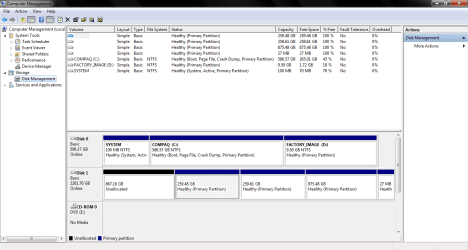
I think i did it right
 

Attachments

  • Capture.PNG
    Capture.PNG
    29.7 KB · Views: 6

My Computer My Computer

Computer type
PC/Desktop
OS
Windows 7 Home Premium 64bit
You'll need to delete one of the partitions to only have 3 primary partitions. I would recommend to delete the 27 MB partition so it will so as "unallocated", and extend the 875.48 GB partition just to the left of it into all of the "Unallocated" space to the right of it.

If you have something that you want to keep on the 27 MB partition, then add a drive letter to it, and back up the contents to another location first. You can also add a driver letter to the other primary partitions.

Did you ever have anything on the 867.16 GB Unallocated space on the far left? Unallocated means that it was deleted. If you had something on it and wanted to try and recover the data that was on it, then you could try an option in the tutorial below to do so.

Partition - Recover Deleted Partitions in Windows
 

My Computer My Computer

Computer type
PC/Desktop
Computer Manufacturer/Model Number
Self built custom
OS
64-bit Windows 11 Pro for Workstations
CPU
Intel i7-8700K OC'd to 5 GHz
Motherboard
ASUS ROG Maximus XI Formula Z390
Memory
64 GB (4x16GB) G.SKILL TridentZ RGB DDR4 3600 MHz
Graphics Card(s)
ASUS ROG-STRIX-GTX1080TI-O11G-GAMING
Sound Card
Integrated
Monitor(s) Displays
2 x Samsung Odyssey G7 27"
Screen Resolution
2560x1440
Hard Drives
1TB Samsung 990 PRO M.2,
4TB Samsung 990 PRO PRO M.2,
TerraMaster F8 SSD Plus NAS
PSU
Seasonic Prime Titanium 850W
Case
Thermaltake Core P3
Cooling
Corsair Hydro H115i
Keyboard
Logitech wireless K800
Mouse
Logitech MX Master 4
Internet Speed
2 Gb/s Download and 100 Mb/s Upload
Antivirus
Malwarebyte Anti-Malware Premium
Browser
Google Chrome
Other Info
Logitech Z625 speaker system,
Logitech BRIO 4K Pro webcam,
HP Color LaserJet Pro MFP M477fdn,
APC SMART-UPS RT 1000 XL - SURT1000XLI,
Galaxy S23 Plus phone
I deleted the 27MB partition but i don't know if i ever had anything in the Unallocated part. I never even knew there were partitions on this disk until today. And i cannot extend any volumes. All options are grayed out except for delete and help.
 

My Computer My Computer

Computer type
PC/Desktop
OS
Windows 7 Home Premium 64bit
Yep, that's what I was afraid of that the order that the partitions were created was not all done adjacently.

I would see if you could recover the 867.16 GB Unallocated space to see if anything was on it or not first.

You should be able to use the free program MiniTool Partition Wizard Home Edition to merge the 27 MB unallocated partition with one of the other primary partitions. If nothing was on the 867.16 GB Unallocated space, then you could also merge it with one of the other primary partitions as well.

How to merge partition without data loss with magic partition software? Partition Wizard help.

Normally, you would only want up to 3 primary partitions, and any others as logical partitions just right of the primary partitions.
 

My Computer My Computer

Computer type
PC/Desktop
Computer Manufacturer/Model Number
Self built custom
OS
64-bit Windows 11 Pro for Workstations
CPU
Intel i7-8700K OC'd to 5 GHz
Motherboard
ASUS ROG Maximus XI Formula Z390
Memory
64 GB (4x16GB) G.SKILL TridentZ RGB DDR4 3600 MHz
Graphics Card(s)
ASUS ROG-STRIX-GTX1080TI-O11G-GAMING
Sound Card
Integrated
Monitor(s) Displays
2 x Samsung Odyssey G7 27"
Screen Resolution
2560x1440
Hard Drives
1TB Samsung 990 PRO M.2,
4TB Samsung 990 PRO PRO M.2,
TerraMaster F8 SSD Plus NAS
PSU
Seasonic Prime Titanium 850W
Case
Thermaltake Core P3
Cooling
Corsair Hydro H115i
Keyboard
Logitech wireless K800
Mouse
Logitech MX Master 4
Internet Speed
2 Gb/s Download and 100 Mb/s Upload
Antivirus
Malwarebyte Anti-Malware Premium
Browser
Google Chrome
Other Info
Logitech Z625 speaker system,
Logitech BRIO 4K Pro webcam,
HP Color LaserJet Pro MFP M477fdn,
APC SMART-UPS RT 1000 XL - SURT1000XLI,
Galaxy S23 Plus phone
That Worked. Everything appears to be in working order. Thank you so very much!
 

My Computer My Computer

Computer type
PC/Desktop
OS
Windows 7 Home Premium 64bit
You're most welcome. :)
 

My Computer My Computer

Computer type
PC/Desktop
Computer Manufacturer/Model Number
Self built custom
OS
64-bit Windows 11 Pro for Workstations
CPU
Intel i7-8700K OC'd to 5 GHz
Motherboard
ASUS ROG Maximus XI Formula Z390
Memory
64 GB (4x16GB) G.SKILL TridentZ RGB DDR4 3600 MHz
Graphics Card(s)
ASUS ROG-STRIX-GTX1080TI-O11G-GAMING
Sound Card
Integrated
Monitor(s) Displays
2 x Samsung Odyssey G7 27"
Screen Resolution
2560x1440
Hard Drives
1TB Samsung 990 PRO M.2,
4TB Samsung 990 PRO PRO M.2,
TerraMaster F8 SSD Plus NAS
PSU
Seasonic Prime Titanium 850W
Case
Thermaltake Core P3
Cooling
Corsair Hydro H115i
Keyboard
Logitech wireless K800
Mouse
Logitech MX Master 4
Internet Speed
2 Gb/s Download and 100 Mb/s Upload
Antivirus
Malwarebyte Anti-Malware Premium
Browser
Google Chrome
Other Info
Logitech Z625 speaker system,
Logitech BRIO 4K Pro webcam,
HP Color LaserJet Pro MFP M477fdn,
APC SMART-UPS RT 1000 XL - SURT1000XLI,
Galaxy S23 Plus phone
Back
Top