Deleted the winsxs folder in an old hard disk drive - Help pls

yunote

New member
Local time
7:42 AM
Messages
3
** I am not well-versed at computers at all so please bear with me.

To keep it short, I bought a second hand CPU and it has 3 hard disk drives, 2 old which includes my old files and 1 new (drive C). I wanted to free up space in one of the old drives so I deleted the winsxs folder, thought it will affect nothing and the old drive will just serve as kinda like a larger flash drive. I double checked everything immediately afterwards and all seemed fine, until my system slowly crumbling!

Here's what happening so far:

  • The old disk drives have the same capacity but when I open them they're completely empty
  • The recycle bin has 28 items in it but shows blank, I can only click "restore all" or "empty recycle bin"
  • Exploring folders through double-clicking will ALWAYS open a new window
  • There was a small loading window on the mid-upper left of my screen and then my desktop background and theme suddenly reverted to default

I tried a third party recovery software which I downloaded for free called iMyFone AnyRecover to no avail, been searching online for the specific problem I'm experiencing and still don't know what to do. Any help please? I'm extremely anxious about this because of my files not recoverable and my semi-new and clean CPU not functioning just after a day. :'(

I hope someone can help me here... Thank you very much in advance!!
 
Last edited:

My Computer My Computer

At a glance

windows 7 64 bit
Computer type
PC/Desktop
OS
windows 7 64 bit
Hi yunote,

Welcome to SevenForums!

I bought a second hand CPU and it has 3 hard disk drives, 2 old which includes my old files and 1 new (drive C). I wanted to free up space in one of the old drives so I deleted the winsxs folder, thought it will affect nothing and the old drive will just serve as kinda like a larger flash drive. I double checked everything immediately afterwards and all seemed fine, until my system slowly crumbling!

I don't follow what you are saying above. A CPU is the central processing unit which is basically the brains of a computer. Are you saying that you bought a new CPU and put it in your existing computer?
 

My Computer My Computer

At a glance

Win 7 HP SP1 64-bit Vista HB SP2 32-bit Linux...Intel(R) Pentium(R) CPU P6200 @ 2.13GHz4.00 GBIntel(R) Graphics Media Accelerator HD
Computer type
Laptop
Computer Manufacturer/Model Number
Fujitsu LIFEBOOK
OS
Win 7 HP SP1 64-bit Vista HB SP2 32-bit Linux Mint 18.3
CPU
Intel(R) Pentium(R) CPU P6200 @ 2.13GHz
Motherboard
FUJITSU FJNBB06
Memory
4.00 GB
Graphics Card(s)
Intel(R) Graphics Media Accelerator HD
Sound Card
[1] Realtek High Definition Audio [2] Intel(R) Display Audio
Screen Resolution
1366 x 768 x 32 bits (4294967296 colors) @ 59 Hz
Hard Drives
TOSHIBA MK5076GSX
Antivirus
AVG FREE
Hi yunote,

Welcome to SevenForums!


I don't follow what you are saying above. A CPU is the central processing unit which is basically the brains of a computer. Are you saying that you bought a new CPU and put it in your existing computer?

Thanks for the greeting and the response!

To give more context, I bought the CPU second hand, had my 2 hard disks from my broken CPU transferred there. Those 2 hard disk drives are Local D and E respectively, with Local Disk C being a new one. I deleted the winsxs folder of Local Disk E and everything else in the computer is affected. I hope that clarifies my situation, sorry for not being clear earlier.

I tried other stuff like installing the Service Pack for Microsoft Windows in Windows Update with no changes still. What else can I try to amend the situation?

Thank you.
 

My Computer My Computer

At a glance

windows 7 64 bit
Computer type
PC/Desktop
OS
windows 7 64 bit
Hi yunote,

To give more context, I bought the CPU second hand, had my 2 hard disks from my broken CPU transferred there.

[1] When you say CPU, do you mean computer?

Those 2 hard disk drives are Local D and E respectively, with Local Disk C being a new one.

[2] Did you re-install Windows on the new C:\ drive?

I deleted the winsxs folder of Local Disk E and everything else in the computer is affected.

[3] Was the E:\ drive the original OS drive?

I tried other stuff like installing the Service Pack for Microsoft Windows in Windows Update with no changes still.

[4] What is the reason for trying to install SP1?

Please do the following . . .

Disk Management

Can you post a screenshot of the Disk Management please => Click Start => right-click Computer => click Manage => click Disk Management.

Screenshots And Files - Upload And Post In SevenForums

This tutorial [Published by Brink] will show you how to upload the file => Screenshots & Files - Upload & Post.

I hope this helps!
 

My Computer My Computer

At a glance

Win 7 HP SP1 64-bit Vista HB SP2 32-bit Linux...Intel(R) Pentium(R) CPU P6200 @ 2.13GHz4.00 GBIntel(R) Graphics Media Accelerator HD
Computer type
Laptop
Computer Manufacturer/Model Number
Fujitsu LIFEBOOK
OS
Win 7 HP SP1 64-bit Vista HB SP2 32-bit Linux Mint 18.3
CPU
Intel(R) Pentium(R) CPU P6200 @ 2.13GHz
Motherboard
FUJITSU FJNBB06
Memory
4.00 GB
Graphics Card(s)
Intel(R) Graphics Media Accelerator HD
Sound Card
[1] Realtek High Definition Audio [2] Intel(R) Display Audio
Screen Resolution
1366 x 768 x 32 bits (4294967296 colors) @ 59 Hz
Hard Drives
TOSHIBA MK5076GSX
Antivirus
AVG FREE
Thanks for getting back to me Paul. To answer the following...


1. When you say CPU, do you mean computer?
The big rectangle, the entire thing. My old one wasn't working anymore and the hard drive got transferred to the "new" CPU (second hand).


2. Did you re-install Windows on the new C:\ drive?
I think it went there?? I installed it from the Start Menu > All Programs > Windows Update
Should it have been installed in drive E:\ and is it possible? Man since both hard disks are basically inaccessible, I don't even know where I originally deleted the winsxs folder anymore if it's in E:\ or D:\ .


3. Was the E:\ drive the original OS drive?
Apologies, I'm not sure what you meant by this. :(


4. What is the reason for trying to install SP1?
A friend just suggested it.


Please do the following . . .

Disk Management

Can you post a screenshot of the Disk Management please => Click Start => right-click Computer => click Manage => click Disk Management.

Screenshots And Files - Upload And Post In SevenForums

This tutorial [Published by Brink] will show you how to upload the file => Screenshots & Files - Upload & Post.

I hope this helps!


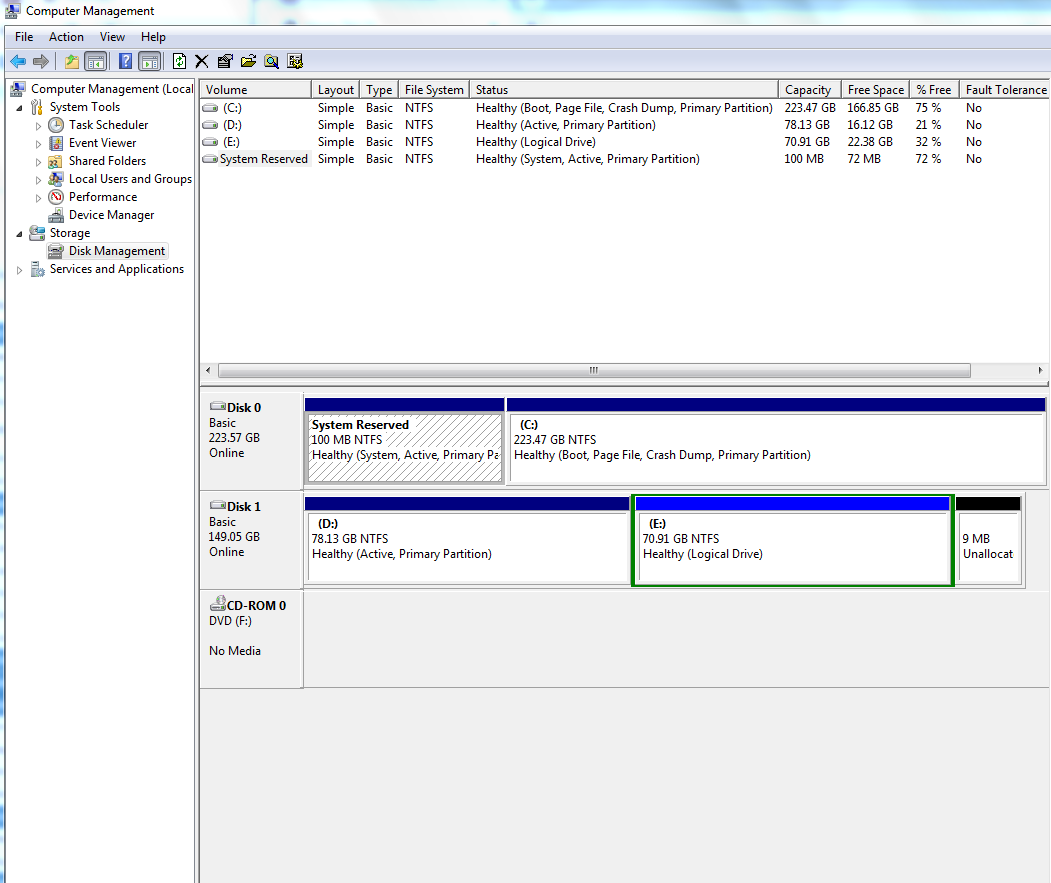
Here's what I have in Disk Management:
pLACjbT.png


From my understanding the black portion is the one not working, but drives D and E are blue so I don't know what else to to...


Thank you again for the suggestions!
 

My Computer My Computer

At a glance

windows 7 64 bit
Computer type
PC/Desktop
OS
windows 7 64 bit
Hi yunote,

I am just on my way out for a while so I will quickly respond!

1. When you say CPU, do you mean computer?
The big rectangle, the entire thing. My old one wasn't working anymore and the hard drive got transferred to the "new" CPU (second hand).

It is not the CPU it is the computer.

2. Did you re-install Windows on the new C:\ drive?
I think it went there?? I installed it from the Start Menu > All Programs > Windows Update
Should it have been installed in drive E:\ and is it possible? Man since both hard disks are basically inaccessible, I don't even know where I originally deleted the winsxs folder anymore if it's in E:\ or D:\.

The SP1 is the service pack that needs to be installed after you have re-installed Win 7 if the installation disk didn't already include SP1.

3. Was the E:\ drive the original OS drive?
Apologies, I'm not sure what you meant by this.

I meant was the original installation of Win 7 [on the old computer] installed on the E:\ drive instead of on the C:\ drive.

4. What is the reason for trying to install SP1?
A friend just suggested it.

I am sorry to say that your friend doesn't know what he/she is talking about!

Your Disk Management is not what is expected as the C:\ drive does not show as being system or active!

[1] What was originally on the new C:\ drive?
[2] Did you re-install Win 7 to the C:\ drive, if so, how?

I hope this helps!
 

My Computer My Computer

At a glance

Win 7 HP SP1 64-bit Vista HB SP2 32-bit Linux...Intel(R) Pentium(R) CPU P6200 @ 2.13GHz4.00 GBIntel(R) Graphics Media Accelerator HD
Computer type
Laptop
Computer Manufacturer/Model Number
Fujitsu LIFEBOOK
OS
Win 7 HP SP1 64-bit Vista HB SP2 32-bit Linux Mint 18.3
CPU
Intel(R) Pentium(R) CPU P6200 @ 2.13GHz
Motherboard
FUJITSU FJNBB06
Memory
4.00 GB
Graphics Card(s)
Intel(R) Graphics Media Accelerator HD
Sound Card
[1] Realtek High Definition Audio [2] Intel(R) Display Audio
Screen Resolution
1366 x 768 x 32 bits (4294967296 colors) @ 59 Hz
Hard Drives
TOSHIBA MK5076GSX
Antivirus
AVG FREE
Hi yunote,

You can mark the C drive as Active by doing the following . . .

Click Start => Run => type diskmgmt.msc => Enter => right-click the C drive => Mark Partition as Active => Yes.

Restart the computer once you have marked the C drive as active and check if you have any boot problems. If you do, then you can use the installation DVD to run Startup Repair.

I hope this helps!
 

My Computer My Computer

At a glance

Win 7 HP SP1 64-bit Vista HB SP2 32-bit Linux...Intel(R) Pentium(R) CPU P6200 @ 2.13GHz4.00 GBIntel(R) Graphics Media Accelerator HD
Computer type
Laptop
Computer Manufacturer/Model Number
Fujitsu LIFEBOOK
OS
Win 7 HP SP1 64-bit Vista HB SP2 32-bit Linux Mint 18.3
CPU
Intel(R) Pentium(R) CPU P6200 @ 2.13GHz
Motherboard
FUJITSU FJNBB06
Memory
4.00 GB
Graphics Card(s)
Intel(R) Graphics Media Accelerator HD
Sound Card
[1] Realtek High Definition Audio [2] Intel(R) Display Audio
Screen Resolution
1366 x 768 x 32 bits (4294967296 colors) @ 59 Hz
Hard Drives
TOSHIBA MK5076GSX
Antivirus
AVG FREE
Back
Top