How to move the details pane at the top in Windows Explorer ?

ceo54

New member
Member
Local time
1:52 PM
Messages
61
Hi everyone,

System: Windows 8.1 (64-bit)

For one particular theme, I need to move the details pane on the top, right under the command module (enabled with OldNewExplorer). I understand this is done by manipulating the shell32.dll. I followed a guide written for Windows 7 but it didn't work and crashed my Windows. I had restore the Windows to get back online again.

Here's the guide I followed:
How to Move / Show "Details Pane" at Top in Windows Vista and 7 Explorer? - AskVG

I checked my edited shell32.dll's had no digital signature on them. Probably that's why Windows rejected them.

Any idea how can I accomplish this ? Any help will be greatly appreciated.

Thank you for reading.
 

My Computer My Computer

At a glance

Windows 7 Ultimate x64
Computer type
Laptop
Computer Manufacturer/Model Number
HP
OS
Windows 7 Ultimate x64

My Computer My Computer

At a glance

Windows 7 Pro SP1 64 bit8 GB
Computer type
Laptop
Computer Manufacturer/Model Number
Dell M6500 Precision Work Station
OS
Windows 7 Pro SP1 64 bit
Memory
8 GB
Screen Resolution
1920x
Internet Speed
30 Mbps
Antivirus
Norton Security
Browser
IE 11
Windows 8.1 has a very low userbase and no one responds there. So I'm better trying my luck out here. Thanks for the suggestion though.
 

My Computer My Computer

At a glance

Windows 7 Ultimate x64
Computer type
Laptop
Computer Manufacturer/Model Number
HP
OS
Windows 7 Ultimate x64
I didn't realize that forum had so little activity. I almost see more in the Vista forum.

In looking around, all I could find was the same link you posted (it was in another thread in this forum).

Hope someone else jumps in.
 

My Computer My Computer

At a glance

Windows 7 Pro SP1 64 bit8 GB
Computer type
Laptop
Computer Manufacturer/Model Number
Dell M6500 Precision Work Station
OS
Windows 7 Pro SP1 64 bit
Memory
8 GB
Screen Resolution
1920x
Internet Speed
30 Mbps
Antivirus
Norton Security
Browser
IE 11
Windows 8.1 has a very low userbase and no one responds there. So I'm better trying my luck out here. Thanks for the suggestion though.

I'm not sure you will have any more luck here, most people have moved on to Windows 10 now.
 

My Computer My Computer

At a glance

Windows 11
Computer type
PC/Desktop
OS
Windows 11
I didn't realize that forum had so little activity. I almost see more in the Vista forum.

In looking around, all I could find was the same link you posted (it was in another thread in this forum).

Hope someone else jumps in.

Thank you for trying it nonetheless. Be happy.
 

My Computer My Computer

At a glance

Windows 7 Ultimate x64
Computer type
Laptop
Computer Manufacturer/Model Number
HP
OS
Windows 7 Ultimate x64
I'm not sure you will have any more luck here, most people have moved on to Windows 10 now.

Seems that way. I'm sticking to Windows 7 and 8.1 for as long as I can find the drivers for new machines. :p
 

My Computer My Computer

At a glance

Windows 7 Ultimate x64
Computer type
Laptop
Computer Manufacturer/Model Number
HP
OS
Windows 7 Ultimate x64
Hi everyone,

System: Windows 8.1 (64-bit)

For one particular theme, I need to move the details pane on the top, right under the command module (enabled with OldNewExplorer). I understand this is done by manipulating the shell32.dll. I followed a guide written for Windows 7 but it didn't work and crashed my Windows. I had restore the Windows to get back online again.

Here's the guide I followed:
How to Move / Show "Details Pane" at Top in Windows Vista and 7 Explorer? - AskVG

I checked my edited shell32.dll's had no digital signature on them. Probably that's why Windows rejected them.

Any idea how can I accomplish this ? Any help will be greatly appreciated.

Thank you for reading.

you have not to change any system file.

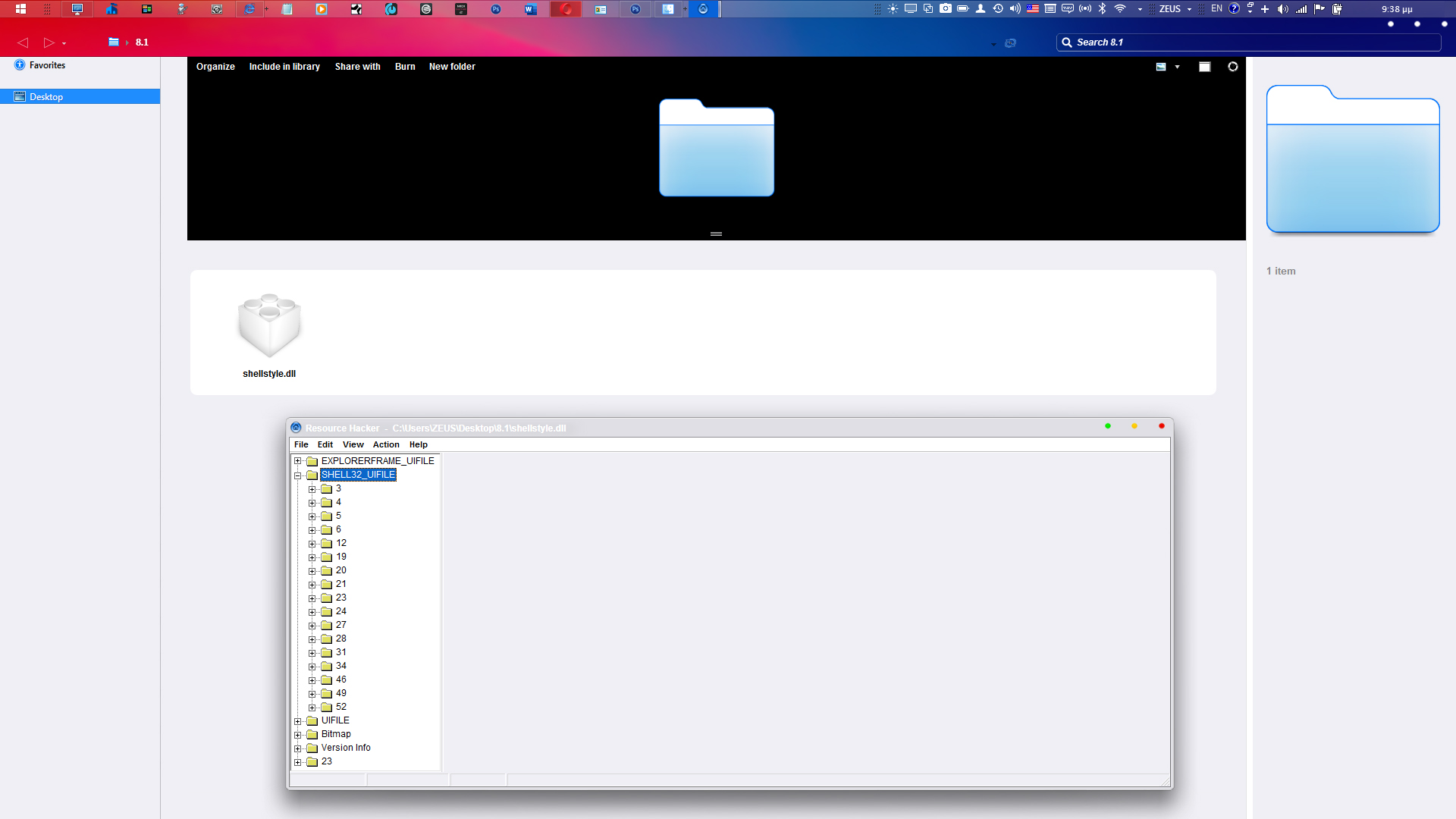
You have to add the information you want to an add new part of code customizing your custom shellstyle.dll of your custom theme you use. you can use freeware Resourcehacker to add the code part categorie of shell32.dll to shellstyle.dll

U9duLew.jpg


then when you use olnewexplorer this new parameters applied with your modified shellstyle.dll theme to your system.

I dont enable modifications of my themes, but you can apply one of mines to see the way it works.
see

Dont forget to use oldnewexplorer, which activate the shellstyle32.dll code that exist to shellstyle.dll of the theme.

---------------

ps. Ι stopped the enforce microsoft ugrading of my system in windows 10 , and i return using win 7, when i also found that in any update the themes are not compatible with the previous win 10 version. So i made a theme for the first version of 10 without knowing microsoft's plans.
I made some new themes for 7, perchaps I will make another theme for 8.1 in future if I have time, but never again for 10. never 10.
 
Last edited:

My Computer My Computer

At a glance

win 7
OS
win 7
Back
Top