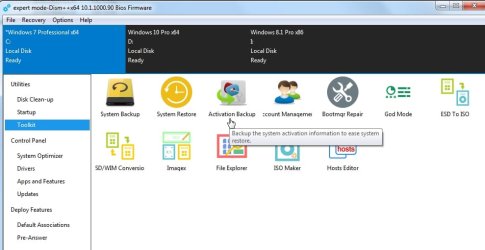
I originally made a thread here: How to make minimise-restore-down-and-X buttons permanently normal?
I eventually took this question to another forum (one that I often frequent), and we made some progress there. However, in the end (after some months of looking into this), it was determined that the only real way to fix the caption button problem (that wouldn't involve what would essentially be the digital equivalent of destroying everything in a house but its initial foundation beams) would be a repair install.
However:
I no longer have my activation key from when I first got this computer (I first got this computer back in 2010). Furthermore, it is an OEM installation, and Windows does not accept OEM keys, from what I understand.
I have everything that I would need to do a repair install already, but the fact that it seems that I would not be able to reactivate Windows afterwards is stopping me from doing the repair install.
So I ask:
How does one do a repair install and still maintain activation?
I eventually took this question to another forum (one that I often frequent), and we made some progress there. However, in the end (after some months of looking into this), it was determined that the only real way to fix the caption button problem (that wouldn't involve what would essentially be the digital equivalent of destroying everything in a house but its initial foundation beams) would be a repair install.
However:
I no longer have my activation key from when I first got this computer (I first got this computer back in 2010). Furthermore, it is an OEM installation, and Windows does not accept OEM keys, from what I understand.
I have everything that I would need to do a repair install already, but the fact that it seems that I would not be able to reactivate Windows afterwards is stopping me from doing the repair install.
So I ask:
How does one do a repair install and still maintain activation?
My Computer
At a glance
Windows 7 Home Premium (64-bit) - Service Pack 1AMD Athlon™ X2 235e Processor 2.70 GHz4.00 GB (3.75 GB usable)ATI Mobility Radeon HD 4200
- Computer type
- PC/Desktop
- Computer Manufacturer/Model Number
- Gateway/7X4300
- OS
- Windows 7 Home Premium (64-bit) - Service Pack 1
- CPU
- AMD Athlon™ X2 235e Processor 2.70 GHz
- Memory
- 4.00 GB (3.75 GB usable)
- Graphics Card(s)
- ATI Mobility Radeon HD 4200
- Sound Card
- Basic Windows ("High Definition Audio Device")
- Screen Resolution
- 1600 x 900
- Hard Drives
- Gateway NTFS (581.07 GB max capacity)
- Keyboard
- Average Windows 7 Layout USB Wired Keyboard
- Mouse
- Insignia Wired Optical Mouse
- Internet Speed
- Ping: 10 milliseconds, Download: 29.79 mbs Upload: 10.34 mbs
- Browser
- Pale Moon (32-bit)