A tale of two laptops and usable memory

Yaworski

DOS Guru
Local time
1:41 AM
Messages
6
I needed a laptop for some automotive diagnostic software so I grabbed my daughter's old Gateway (made by Acer). I put a new harddrive and installed Win 7. System is an Intel quad core, 2.25 GHz, and 4 MB of ram.

Thing ran sloooooowly. I look at the system properties, it showed 4 GB of RAM and said that 2.3 were usable. Hmmmmm.... maybe more RAM. So I got an extra 4 GB stick, same brand and model. I popped it into the computer and it reported 8 GB of RAM but only 2.3 were usable. Hmmmm. . ..

So I grabbed another laptop, an old Acer (virtually identical to the Gateway) which is connected to my TV and has 4 GB of RAM and popped the 8 Gigs into it and it too reported 8 GB of RAM but only 2.3 usable. Hmmmmm. . . .

Back to the Gateway, put the 8 gigs back into it and booted and I was greeted with a blue screen of death and then Windows tried to recover but failed. I grabbed my distribution disk and reinstalled Win 7 and lo and behold, it now reports 8 GB with 7.4 GB usable.

WTF is going on here?

How can I get the the Acer connected to the TV to show more usable RAM?

Thanks.
 

My Computer My Computer

At a glance

Win 7 Ultimate x 64
Computer type
PC/Desktop
OS
Win 7 Ultimate x 64
A 32 Bit Operating System and shared memory will give you the symptoms you are seeing - the amount of Ram that a 32 bit system can access is limited by it's design to around 4GB but as the system itself uses some of the RAM for temporary storage and Mirroring of system variables so the Maximum you can expect is about 3.1- 3.5 GB. In addition a lot of laptops use "shared" memory for the for the graphics which also detracts from the memory available for RAM which in your case give the low figure.

If your laptop can use a 64 Bit OS then most of these issues disappear as the space addressable is far greater

Check the specs of the system to see if it will allow use of 64 Bit. If so you will need to borrow a 64 BIT installer and reinstall the OS, the Licence you have will be acceptable for the 64Bit system
 

My Computers My Computers

  • At a glance

    Windows 11 Pro x64 [Latest Release and Releas...Ryzen 9 5950X, 3.8 - 5.2 MHz64GB [2 x 32GB] DDR4 3200MHz4GB NVIDIA GEFORCE GTX 1650 Ti
    Computer type
    PC/Desktop
    Computer Manufacturer/Model Number
    ChillBlast - Custom to my design
    OS
    Windows 11 Pro x64 [Latest Release and Release Preview]
    CPU
    Ryzen 9 5950X, 3.8 - 5.2 MHz
    Motherboard
    Asus Prime X570-Pro
    Memory
    64GB [2 x 32GB] DDR4 3200MHz
    Graphics Card(s)
    4GB NVIDIA GEFORCE GTX 1650 Ti
    Sound Card
    On-board SPDIF to 5.1 System + HDMI [5.1 system]
    Monitor(s) Displays
    32" UHD 32 Bit HDR Monitor + 43" UHD 4K 32Bit HDR TV
    Screen Resolution
    2 x 3840 x 2160 @60Hz
    Hard Drives
    1TB M2 SSD OS, 500GB Fast Access SSD, 2 x 8TB Data + Various Externals from 1TB to 4TB, 10TB NAS
    PSU
    NZXT C750 80 PLUS Gold 750W Modular PSU
    Case
    Workstation Case [Matt Black]
    Cooling
    NZXT Kraken X63 280mm CPU Cooler +2x Quiet Case fans
    Keyboard
    Logitech Wireless MX Keys & K400 + others
    Mouse
    Logitech Wireless MX Master 3S
    Internet Speed
    920 MB Down 50 MB Up
    Antivirus
    BitDefender Total Security Pro
    Browser
    Chrome (always run latest Non-Beta)
    Other Info
    Also run ...
    Laptop - Quad 8GB - Windows 10 Pro x64
    Nexus 7 Android tablet x2
    Samsung 10.2" tablet
    Blackview TAB 8 4G Android Tablet c/w Keyboard
    Wacom Intuos Pro Medium Pen Pad
    Wacom Intuos Pro Small Pen Pad
    Wacom Expresskeys Remote
    Loopdeck+ Graphics Controller
    Shuttle Pro v2 Control
  • At a glance

    Windows 11 Pro x64 Latest RPIntel I7 10750H 5.0GHz32GB [2x16GB] DDR4 2933 MHznVidia GTX1650Ti 4 GB GDDR6
    Computer type
    Laptop
    System Manufacturer/Model Number
    Dell XPS 17 10750H
    OS
    Windows 11 Pro x64 Latest RP
    CPU
    Intel I7 10750H 5.0GHz
    Motherboard
    Dell XPS
    Memory
    32GB [2x16GB] DDR4 2933 MHz
    Graphics Card(s)
    nVidia GTX1650Ti 4 GB GDDR6
    Sound Card
    Stock [Realtek] 4 Speaker
    Monitor(s) Displays
    17" IPS UHD+ Infinity Edge Touchscreen
    Screen Resolution
    3840 x 2400
    Hard Drives
    2TB M2 NVMe, 4TB External + various 500GB & 1TB External NVMe (also have access to spinner HDD from
    PSU
    Stock
    Case
    Stock XPS Aluminium & Carbon Fibre
    Cooling
    Stock - Active Fan Control
    Keyboard
    Backlit + Various Logitech
    Mouse
    Stock Track Pad + Logitech MX Trackball
    Internet Speed
    72 MB Down 18MB Up
    Browser
    Chrome
    Other Info
    Also run ...
    Laptop - Quad 8GB - Windows 10 Pro x64
    Nexus 7 Android tablet x2
    10.2" tablet
    Sony Z3 Android Smartphone
    Wacom Intuos Pro Medium Pen Pad
    Wacom Intuos Pro Small Pen Pad
    Wacom Expresskeys Remote
    Loopdeck+ Graphics Controller
    Shuttle Pro v2 Control Pad
    10TB NAS
Should have mentioned it before,

The Gateway has Win 7 Ultimate 64 Bit. The Acer has Win 7 Home Premium 64 Bit.
 
Last edited:

My Computer My Computer

At a glance

Win 7 Ultimate x 64
Computer type
PC/Desktop
OS
Win 7 Ultimate x 64
Hi

Definately sounds as thou both lappy's had 32 bit installs, hence both report 4GB max, but more importantly when you installed the 64 bit OS it upgraded and was able to use all of the ram.
Time to do the same for the other.

note product key/licence is valid for either version.


Roy
 

My Computer My Computer

At a glance

W7 home premium 32bit/W7HP 64bit/w10 tp insid...E5300 dual core3gbNvidia Geforce 7100 Nforce 630i
Computer type
PC/Desktop
Computer Manufacturer/Model Number
medionl/Aspire 6930G/acer x55a
OS
W7 home premium 32bit/W7HP 64bit/w10 tp insider ring
CPU
E5300 dual core
Motherboard
medion MS7366
Memory
3gb
Graphics Card(s)
Nvidia Geforce 7100 Nforce 630i
Monitor(s) Displays
avixc
Internet Speed
n (isp resticted to 72)
Antivirus
mse/pands
Browser
palemoon
Other Info
Belkin Fd7050 n USB using Railink RT2870 drivers, more upto date
I've seen this issue before on the Forum.
Windows was reporting much less memory than it actually had.

From the OP first post:
- New Win 64bits reports 8 GB with 7.4 GB usable. So 0.6G is used by GPU and other hardware
- On a Win 32bits with 4GB it should report 4-0.6=3.4 or 3.2GB usable (32 bits barrier).
There is no explanation to only 2.3GB were usable.

On computers that has 4G or less memory I always install 32 bits, specially on laptops that share memory with the GPU (graphics).
4G - 800M (GPU and other hardware) - 1.5G (win7 32 SP1) =1.7G for programs.
4G - 800M (GPU and other hardware) - 2.5G (win7 64 SP1) =0.7G for programs.
As shown, with 4G or less memory, Win 7 32Bits has more available memory for programs than 64bits.

Win 64bits is only mandatory with more than 4G of memory.
 

My Computers My Computers

  • At a glance

    Windows 7 HP 64i5 6600K - 800MHz to 4200MHz4+4G GSkill DDR4 3000IG - Intel 530
    Computer type
    PC/Desktop
    Computer Manufacturer/Model Number
    custom build
    OS
    Windows 7 HP 64
    CPU
    i5 6600K - 800MHz to 4200MHz
    Motherboard
    GA-Z170-HD3P
    Memory
    4+4G GSkill DDR4 3000
    Graphics Card(s)
    IG - Intel 530
    Monitor(s) Displays
    Samsung 226BW
    Screen Resolution
    1680x1050
    Hard Drives
    (1) -1 SM951 – 128GB M.2 AHCI PCIe SSD drive for Windows 7 and Lubuntu
    (2) -1 WD SATA 3 - 1T for Data
    (3) -1 WD SATA 3 - 1T for backup
    PSU
    Thermaltake 450W TR2 gold
    Keyboard
    Old and good Chicony mechanical keyboard
    Mouse
    Logitech mX performance - 9 buttons (had to disable some)
    Internet Speed
    500Mb/s
    Browser
    Firefox 64
    Other Info
    TinyWall firewall
  • At a glance

    Windows 7 Proi7-4500U 800MHz to 3.0GHz(4+4)G DDR3 1600IG intel 4400 + NVIDIA GeForce GT 745M
    Computer type
    Laptop
    System Manufacturer/Model Number
    Asus Q550LF
    OS
    Windows 7 Pro
    CPU
    i7-4500U 800MHz to 3.0GHz
    Motherboard
    Asus Q550LF
    Memory
    (4+4)G DDR3 1600
    Graphics Card(s)
    IG intel 4400 + NVIDIA GeForce GT 745M
    Sound Card
    Realtek
    Monitor(s) Displays
    LG Display LP156WF4-SPH1
    Screen Resolution
    1920 x 1080
    Hard Drives
    BX500 120G SSD for Windows and programs +
    1T HDD for data
    Internet Speed
    500 Mb/s
    Browser
    Firefox
    Other Info
    TinyWall firewall
Hi

Definately sounds as thou both lappy's had 32 bit installs, hence both report 4GB max, but more importantly when you installed the 64 bit OS it upgraded and was able to use all of the ram.
Time to do the same for the other.

Nope. I checked. The only distribution disk that I have is for 64 bit Windows 7 Ultimate. The one that is still being a problem came with Win 7 Home Premium 64 bit installed and the information page says "64 bit operating system."
 

My Computer My Computer

At a glance

Win 7 Ultimate x 64
Computer type
PC/Desktop
OS
Win 7 Ultimate x 64
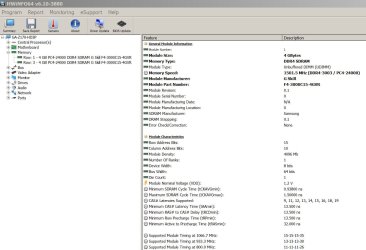
Download HWinfo
It's a portable. extract and run.
See your memory sticks specs.
 

Attachments

  • HWinfo.JPG
    HWinfo.JPG
    117.2 KB · Views: 25

My Computers My Computers

  • At a glance

    Windows 7 HP 64i5 6600K - 800MHz to 4200MHz4+4G GSkill DDR4 3000IG - Intel 530
    Computer type
    PC/Desktop
    Computer Manufacturer/Model Number
    custom build
    OS
    Windows 7 HP 64
    CPU
    i5 6600K - 800MHz to 4200MHz
    Motherboard
    GA-Z170-HD3P
    Memory
    4+4G GSkill DDR4 3000
    Graphics Card(s)
    IG - Intel 530
    Monitor(s) Displays
    Samsung 226BW
    Screen Resolution
    1680x1050
    Hard Drives
    (1) -1 SM951 – 128GB M.2 AHCI PCIe SSD drive for Windows 7 and Lubuntu
    (2) -1 WD SATA 3 - 1T for Data
    (3) -1 WD SATA 3 - 1T for backup
    PSU
    Thermaltake 450W TR2 gold
    Keyboard
    Old and good Chicony mechanical keyboard
    Mouse
    Logitech mX performance - 9 buttons (had to disable some)
    Internet Speed
    500Mb/s
    Browser
    Firefox 64
    Other Info
    TinyWall firewall
  • At a glance

    Windows 7 Proi7-4500U 800MHz to 3.0GHz(4+4)G DDR3 1600IG intel 4400 + NVIDIA GeForce GT 745M
    Computer type
    Laptop
    System Manufacturer/Model Number
    Asus Q550LF
    OS
    Windows 7 Pro
    CPU
    i7-4500U 800MHz to 3.0GHz
    Motherboard
    Asus Q550LF
    Memory
    (4+4)G DDR3 1600
    Graphics Card(s)
    IG intel 4400 + NVIDIA GeForce GT 745M
    Sound Card
    Realtek
    Monitor(s) Displays
    LG Display LP156WF4-SPH1
    Screen Resolution
    1920 x 1080
    Hard Drives
    BX500 120G SSD for Windows and programs +
    1T HDD for data
    Internet Speed
    500 Mb/s
    Browser
    Firefox
    Other Info
    TinyWall firewall
Call me dense but I'm not sure what I'm supposed to be looking for with HWInfo.

I did take out one memory stick and rebooted. System properties showed 2 GB with 1.85 GB usable. I plugged the second one in again and I get 4 GB reported with 2.61 GB usable.

If it was my computer, I'd simply wipe out the harddrive and reinstall windows from scratch. As it my's daughter's computer and she has emotional attachments to game programs installed on the machine even though she hasn't played them in years, that option is out.
 

My Computer My Computer

At a glance

Win 7 Ultimate x 64
Computer type
PC/Desktop
OS
Win 7 Ultimate x 64
Okay. New developments. This morning, I decided to pull the 8 GB out of the Gateway laptop and put it into the Acer.

The Acer now reports 8 GB with 6.4 GB usable. Is it reasonable that the built in Intel graphics would be using roughly 1.5 GB?

I put the 4 GB from the Acer into the Gateway and it reports 4 GB with 3.8 GB usable.
 

My Computer My Computer

At a glance

Win 7 Ultimate x 64
Computer type
PC/Desktop
OS
Win 7 Ultimate x 64
Are the two 4+4 G same brand and speed?
HWinfo will show all memory specs.
 
Last edited:

My Computers My Computers

  • At a glance

    Windows 7 HP 64i5 6600K - 800MHz to 4200MHz4+4G GSkill DDR4 3000IG - Intel 530
    Computer type
    PC/Desktop
    Computer Manufacturer/Model Number
    custom build
    OS
    Windows 7 HP 64
    CPU
    i5 6600K - 800MHz to 4200MHz
    Motherboard
    GA-Z170-HD3P
    Memory
    4+4G GSkill DDR4 3000
    Graphics Card(s)
    IG - Intel 530
    Monitor(s) Displays
    Samsung 226BW
    Screen Resolution
    1680x1050
    Hard Drives
    (1) -1 SM951 – 128GB M.2 AHCI PCIe SSD drive for Windows 7 and Lubuntu
    (2) -1 WD SATA 3 - 1T for Data
    (3) -1 WD SATA 3 - 1T for backup
    PSU
    Thermaltake 450W TR2 gold
    Keyboard
    Old and good Chicony mechanical keyboard
    Mouse
    Logitech mX performance - 9 buttons (had to disable some)
    Internet Speed
    500Mb/s
    Browser
    Firefox 64
    Other Info
    TinyWall firewall
  • At a glance

    Windows 7 Proi7-4500U 800MHz to 3.0GHz(4+4)G DDR3 1600IG intel 4400 + NVIDIA GeForce GT 745M
    Computer type
    Laptop
    System Manufacturer/Model Number
    Asus Q550LF
    OS
    Windows 7 Pro
    CPU
    i7-4500U 800MHz to 3.0GHz
    Motherboard
    Asus Q550LF
    Memory
    (4+4)G DDR3 1600
    Graphics Card(s)
    IG intel 4400 + NVIDIA GeForce GT 745M
    Sound Card
    Realtek
    Monitor(s) Displays
    LG Display LP156WF4-SPH1
    Screen Resolution
    1920 x 1080
    Hard Drives
    BX500 120G SSD for Windows and programs +
    1T HDD for data
    Internet Speed
    500 Mb/s
    Browser
    Firefox
    Other Info
    TinyWall firewall
Same brand. One is 666.7 Mhz, the other 800 Mhz.

For me, the odd thing is that when the memory was in the Gateway laptop, it showed over 7 GB as usable. In the Acer, it shows about a GB less.

Could the Acer have a different video processor that sucks up more RAM? Would a different sound system be sucking up RAM?

Acer Video Memory 3,333,048 KB, Intel HD Graphics 3000, Sandy bridge GT2

Gateway Video Memory 1,890,232 KB, Intel HD Graphics, Sandy Bridge GT2+
 

My Computer My Computer

At a glance

Win 7 Ultimate x 64
Computer type
PC/Desktop
OS
Win 7 Ultimate x 64
Back
Top