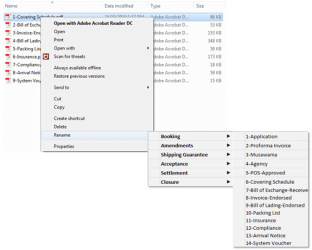
How do i add new Sub Item under Rename on Right Click Menu with an Action.
Requirement:
I have a Standard List of Renamings. So i want to Right Click on a File and Select a Specific Name from the List and the File has to be renamed.
Rename >
Booking >
1-Application
2-Proforma Invoice
3-Musawama
4-Agency
5-POS-Approved
6-Covering Schedule
7-Bill of Exchange-Received Copy
8-Invoice-Endorsed
9-Bill of Lading-Endorsed
10-Packing List
11-Insurance
12-Compliance
13-Arrival Notice
14-System Voucher
Amendments
1-Covering Schedule
2-Bill of Exchange-Received Copy
3-Invoice-Endorsed
4-Bill of Lading-Endorsed
5-Packing List
6-Insurance
7-Compliance
8-Arrival Notice
9-System Voucher
Shipping Guarantee
1-Application
2-Indemnity
3-Invoice-Endorsed
4-Bill of Lading-Endorsed
5-System Voucher
6-Customs Link
Acceptance
1-Bill of Exchanged-Signed
2-Letter of Undertaking
3-System Voucher-ACCPT
4-Customs Link
5-Acceptance SWIFT Message
Settlement
1-Arrival Notice-Signed
2-Maturity Advice-Signed
3-Request Letter
4-Exchange Rate
5-System Voucher-ACCPTCLS
6-System Voucher-Settlement
7-Settlement SWIFT Message
You might need to look into a specialized, non-free, clipboard utility that will keep all your names in its pot, at the ready if a right-click menu utility cannot be located.
My Computer
At a glance
Windows 7 Professional 64-bitDesktop i5; Acers i5 & i7desktop 16GB; 1 Acer 8GB & 1 Acer 16GB
Computer type
PC/Desktop
Computer Manufacturer/Model Number
Antec desktop; Acer Aspire laptops
OS
Windows 7 Professional 64-bit
CPU
Desktop i5; Acers i5 & i7
Memory
desktop 16GB; 1 Acer 8GB & 1 Acer 16GB
Hard Drives
1TB split into 2 equal partitions [OS and data] usable by RJS
Internet Speed
AT&T DSL
Browser
FF, GChrome, msIE
Other Info
Windows 7 Firewall, Emsisoft AM/AV, MSE [scan-only], SpywareBlaster, Ruiware/BillP combine
You might need to look into a specialized, non-free, clipboard utility that will keep all your names in its pot, at the ready if a right-click menu utility cannot be located.
You do make routine OS and data partition backups onto external media, correct? If not, begin; if yes, we continue. There might possibly be a solution -- resplendence's registrar registry manager, I think the free trial version is still out there. If a registry hack is possible, and very likely you will have to be hacking, testing, restarting, testing many many times, that program might be able to do it. If you try this route, ensure you have restorable full image backups on external media. Using tweaking.com's registry backup or anything similar, make registry backups at every step of the way, and keep a number of them in case you have back-pedal some. Remember you will be hacking the registry, without restorables, your Windows could very well be toast, and time for a Repair Install if not a clean reinstall.
My Computer
At a glance
Windows 7 Professional 64-bitDesktop i5; Acers i5 & i7desktop 16GB; 1 Acer 8GB & 1 Acer 16GB
Computer type
PC/Desktop
Computer Manufacturer/Model Number
Antec desktop; Acer Aspire laptops
OS
Windows 7 Professional 64-bit
CPU
Desktop i5; Acers i5 & i7
Memory
desktop 16GB; 1 Acer 8GB & 1 Acer 16GB
Hard Drives
1TB split into 2 equal partitions [OS and data] usable by RJS
Internet Speed
AT&T DSL
Browser
FF, GChrome, msIE
Other Info
Windows 7 Firewall, Emsisoft AM/AV, MSE [scan-only], SpywareBlaster, Ruiware/BillP combine
I don't believe what you want can be done with registry entries alone. Developers usually do this kind of thing with a custom context menu handler. This is not simple. It could be done with third party software but I don't know of anything with capabilities like that.
A second problem is that registry entries in themselves don't do anything. They only provide the information that must be interpreted and acted on by software.
These things seem simple if you don't consider the details. When you do things aren't so simple.
My Computer
At a glance
Windows 7 Pro 64 bitXeon W35208 GBNvidia Geforce 210