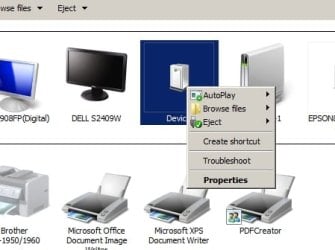
"Devices and Printers" displays correctly in one Profile but not in an

DHLipman

New member
Local time
8:56 AM
Messages
12
"Devices and Printers" displays correctly in one Profile but not in an

In my Day-2-Day Profile the "Devices and Printers" display is corrupted and appears as...


93533016_DevicesandPrinterView1.jpg.b31b3b90712f805042063d59e63d2689.jpg


In an alternate Profile, the "Devices and Printers" is displayed correctly as...


770023716_DeivcesandPrinterView2.jpg.2900ffe698dc3201c0cf2a985f8ee98a.jpg


Specifically in the corrupted Display. the CA-200 ( TEAC multi-memory card reader ) and USB 2.0 Storage Device show as just "device". The same happens as when I turn on an eSATA Western Digital MyBook external hard disk.

As well as the two Epson AIO don't show in the Printers and Faxes list. They have the same "Device" label with their associated Epson AIO Model.


I can't figure out what in my Profile is causing these devices to be improperly displayed but not when I login as another user.


Dunno.gif.e0b8be0c3c4018c29e394efa4f71ce15.gif
 

My Computer My Computer

At a glance

Win7 Professional/32i5 35708GBAMD Radeo R7200 and Intel HD Graphics
Computer type
PC/Desktop
Computer Manufacturer/Model Number
ASUS Home Built
OS
Win7 Professional/32
CPU
i5 3570
Motherboard
ASUS P8-277-V Pro
Memory
8GB
Graphics Card(s)
AMD Radeo R7200 and Intel HD Graphics
Sound Card
C-Media PCI Audio
Monitor(s) Displays
Dell 24", Del 19", Generic 17"
What type of user (administrator, guest, etc.) account is your "day to day" account?
 

My Computer My Computer

At a glance

Windows 7 Pro SP1 64 bit8 GB
Computer type
Laptop
Computer Manufacturer/Model Number
Dell M6500 Precision Work Station
OS
Windows 7 Pro SP1 64 bit
Memory
8 GB
Screen Resolution
1920x
Internet Speed
30 Mbps
Antivirus
Norton Security
Browser
IE 11
Danke


Both examples are demonstrated via an Administrator account.
 

My Computer My Computer

At a glance

Win7 Professional/32i5 35708GBAMD Radeo R7200 and Intel HD Graphics
Computer type
PC/Desktop
Computer Manufacturer/Model Number
ASUS Home Built
OS
Win7 Professional/32
CPU
i5 3570
Motherboard
ASUS P8-277-V Pro
Memory
8GB
Graphics Card(s)
AMD Radeo R7200 and Intel HD Graphics
Sound Card
C-Media PCI Audio
Monitor(s) Displays
Dell 24", Del 19", Generic 17"
I'm not at a point tonight for doing additional investigation but I didn't know you could have more than one administrator account. I guess you can under different names. I asked because, if you have a guest account, you would have to identify which devices are associated with it. I'll have more time tomorrow.
 

My Computer My Computer

At a glance

Windows 7 Pro SP1 64 bit8 GB
Computer type
Laptop
Computer Manufacturer/Model Number
Dell M6500 Precision Work Station
OS
Windows 7 Pro SP1 64 bit
Memory
8 GB
Screen Resolution
1920x
Internet Speed
30 Mbps
Antivirus
Norton Security
Browser
IE 11
Primary Account: Day-2-Day use and operation.
Secondary Account: System Maintenance and Backup System acct as well as Account for Data and Print Shares
 

My Computer My Computer

At a glance

Win7 Professional/32i5 35708GBAMD Radeo R7200 and Intel HD Graphics
Computer type
PC/Desktop
Computer Manufacturer/Model Number
ASUS Home Built
OS
Win7 Professional/32
CPU
i5 3570
Motherboard
ASUS P8-277-V Pro
Memory
8GB
Graphics Card(s)
AMD Radeo R7200 and Intel HD Graphics
Sound Card
C-Media PCI Audio
Monitor(s) Displays
Dell 24", Del 19", Generic 17"
If you right click on any of the devices not available in your primary account, does it provide an option to connect or disable it?

In the account type for each account, is each shown as an administrator account? Not sure what you meant by "demonstrated."
 

My Computer My Computer

At a glance

Windows 7 Pro SP1 64 bit8 GB
Computer type
Laptop
Computer Manufacturer/Model Number
Dell M6500 Precision Work Station
OS
Windows 7 Pro SP1 64 bit
Memory
8 GB
Screen Resolution
1920x
Internet Speed
30 Mbps
Antivirus
Norton Security
Browser
IE 11
When I captured the ScreenShot I "demonstrated" the Display of "Devices and Printers" in the two Windows Profiles and "demonstrated" two different displays where the two accounts should display relatively the same.

Both of the accounts are Administrators. That is if you go into the Control Panel applet "User Accounts" both accounts are made to have Administrative rights over the system and are indicated to be "Administrator".

All the same hardware is available and working correctly in both Profiles. What is different is how some Devices are displayed.


Right-Click ScreenShot
 

Attachments

  • Image1.jpg
    Image1.jpg
    19.8 KB · Views: 8

My Computer My Computer

At a glance

Win7 Professional/32i5 35708GBAMD Radeo R7200 and Intel HD Graphics
Computer type
PC/Desktop
Computer Manufacturer/Model Number
ASUS Home Built
OS
Win7 Professional/32
CPU
i5 3570
Motherboard
ASUS P8-277-V Pro
Memory
8GB
Graphics Card(s)
AMD Radeo R7200 and Intel HD Graphics
Sound Card
C-Media PCI Audio
Monitor(s) Displays
Dell 24", Del 19", Generic 17"
Thanks for the clarification. I didn't think that all devices were available and working in both profiles.

I don't why it's doing this but, I would right click on the "Devices" to determine what each one is and remove one that is either incorrect or is a duplicate. I would also remove the Epsom Artisan unless it's really installed. In that case, there's another issue since it doesn't show up in the secondary account.
 

My Computer My Computer

At a glance

Windows 7 Pro SP1 64 bit8 GB
Computer type
Laptop
Computer Manufacturer/Model Number
Dell M6500 Precision Work Station
OS
Windows 7 Pro SP1 64 bit
Memory
8 GB
Screen Resolution
1920x
Internet Speed
30 Mbps
Antivirus
Norton Security
Browser
IE 11
I have already removed the External USB Hard disk from the Device Manager and it made no difference when it was allowed ti Plug 'n Play back into the system when subsequently connected to another USB Port.


There are no duplicates.


We have perfectly working hardware in all respects. It is only the Display in "Devices and Printers" in one Profile that it askew.


The question is what in the User Profile is causing the Display ( of properly installed and working hardware ) in that profile to be incorrect ?
 

My Computer My Computer

At a glance

Win7 Professional/32i5 35708GBAMD Radeo R7200 and Intel HD Graphics
Computer type
PC/Desktop
Computer Manufacturer/Model Number
ASUS Home Built
OS
Win7 Professional/32
CPU
i5 3570
Motherboard
ASUS P8-277-V Pro
Memory
8GB
Graphics Card(s)
AMD Radeo R7200 and Intel HD Graphics
Sound Card
C-Media PCI Audio
Monitor(s) Displays
Dell 24", Del 19", Generic 17"
What I was getting at is that, for some reason, the primary sees 12 devices and the secondary only sees 10. I thought that maybe one of the two devices labeled as "Device" might be duplicates and removing one would help. Also, it's seeing the Artisan for some reason and I thought removing that along with one of the others would reconcile the display problem. Is the Artisan really installed?

What are the "Devices" shown in the primary account?

Note that I'm just grasping at straws at this point.
 

My Computer My Computer

At a glance

Windows 7 Pro SP1 64 bit8 GB
Computer type
Laptop
Computer Manufacturer/Model Number
Dell M6500 Precision Work Station
OS
Windows 7 Pro SP1 64 bit
Memory
8 GB
Screen Resolution
1920x
Internet Speed
30 Mbps
Antivirus
Norton Security
Browser
IE 11
Specifically in the corrupted Display...
The CA-200 ( TEAC multi-memory card reader ) and USB 2.0 Storage Device show as just "device".
The same happens when I turn on an eSATA Western Digital MyBook external hard disk it too shows as just "device".

The two Epson AIO don't show in the Printers and Faxes list. They have the same "Device" moniker with their associated Epson AIO Model Number. ( Epson Artisan 835 and Epson Small-in-One XP-850, both connected over IP )
 

My Computer My Computer

At a glance

Win7 Professional/32i5 35708GBAMD Radeo R7200 and Intel HD Graphics
Computer type
PC/Desktop
Computer Manufacturer/Model Number
ASUS Home Built
OS
Win7 Professional/32
CPU
i5 3570
Motherboard
ASUS P8-277-V Pro
Memory
8GB
Graphics Card(s)
AMD Radeo R7200 and Intel HD Graphics
Sound Card
C-Media PCI Audio
Monitor(s) Displays
Dell 24", Del 19", Generic 17"
Each Windows computer can have a few or several admin-level accounts. There is one built-in admin acct, and there is a Trusted Installer admin acct. Now, what is causing the duplicate icons, I do not know, so I will be watching and learning...
 
Last edited:

My Computer My Computer

At a glance

Windows 7 Professional 64-bitDesktop i5; Acers i5 & i7desktop 16GB; 1 Acer 8GB & 1 Acer 16GB
Computer type
PC/Desktop
Computer Manufacturer/Model Number
Antec desktop; Acer Aspire laptops
OS
Windows 7 Professional 64-bit
CPU
Desktop i5; Acers i5 & i7
Memory
desktop 16GB; 1 Acer 8GB & 1 Acer 16GB
Hard Drives
1TB split into 2 equal partitions [OS and data] usable by RJS
Internet Speed
AT&T DSL
Browser
FF, GChrome, msIE
Other Info
Windows 7 Firewall, Emsisoft AM/AV, MSE [scan-only], SpywareBlaster, Ruiware/BillP combine
Each Windows computer can have few or several admin-level accounts. There is one built-in admin acct, and there is a Trusted Installer admin acct. Now, what is causing the duplicate icons, I do not know, so I will be watching and learning...

I hate to say it but- Me Too!

The frustrating thing is that everything that is listed is accessible from either account. As a result, I don't see a need to check for Windows corrupt files or other checks. My understanding has always been that providing administrative rights to a standard user doesn't provide the same permissions as an administrator account.

I'm wondering if refreshing the thumbnail cache while using the primary account would help. Go to Accessories, System Tools and run Disk Cleanup on the C: drive. When it indicates how much space it can recover, check the box for Thumbnails (I also check the box for temporary files and recycle bin). Let it run. When done, reboot.
 

My Computer My Computer

At a glance

Windows 7 Pro SP1 64 bit8 GB
Computer type
Laptop
Computer Manufacturer/Model Number
Dell M6500 Precision Work Station
OS
Windows 7 Pro SP1 64 bit
Memory
8 GB
Screen Resolution
1920x
Internet Speed
30 Mbps
Antivirus
Norton Security
Browser
IE 11
I hate to say it but- Me Too!

I'm wondering if refreshing the thumbnail cache while using the primary account would help. Go to Accessories, System Tools and run Disk Cleanup on the C: drive. When it indicates how much space it can recover, check the box for Thumbnails (I also check the box for temporary files and recycle bin). Let it run. When done, reboot.


Done that including executing...

"%WINDIR%\system32\ie4uinit.exe" -ClearIconCache
 

My Computer My Computer

At a glance

Win7 Professional/32i5 35708GBAMD Radeo R7200 and Intel HD Graphics
Computer type
PC/Desktop
Computer Manufacturer/Model Number
ASUS Home Built
OS
Win7 Professional/32
CPU
i5 3570
Motherboard
ASUS P8-277-V Pro
Memory
8GB
Graphics Card(s)
AMD Radeo R7200 and Intel HD Graphics
Sound Card
C-Media PCI Audio
Monitor(s) Displays
Dell 24", Del 19", Generic 17"
I've never used that and don't know if it will regenerate the icons on reboot. If you want to use that, proceed at your own risk. Maybe set a system restore point before doing it.
 

My Computer My Computer

At a glance

Windows 7 Pro SP1 64 bit8 GB
Computer type
Laptop
Computer Manufacturer/Model Number
Dell M6500 Precision Work Station
OS
Windows 7 Pro SP1 64 bit
Memory
8 GB
Screen Resolution
1920x
Internet Speed
30 Mbps
Antivirus
Norton Security
Browser
IE 11
I thought either PaulB or Snick has an icon regenerator in a toolbox somewhere.
 

My Computer My Computer

At a glance

Windows 7 Professional 64-bitDesktop i5; Acers i5 & i7desktop 16GB; 1 Acer 8GB & 1 Acer 16GB
Computer type
PC/Desktop
Computer Manufacturer/Model Number
Antec desktop; Acer Aspire laptops
OS
Windows 7 Professional 64-bit
CPU
Desktop i5; Acers i5 & i7
Memory
desktop 16GB; 1 Acer 8GB & 1 Acer 16GB
Hard Drives
1TB split into 2 equal partitions [OS and data] usable by RJS
Internet Speed
AT&T DSL
Browser
FF, GChrome, msIE
Other Info
Windows 7 Firewall, Emsisoft AM/AV, MSE [scan-only], SpywareBlaster, Ruiware/BillP combine
I'm glad DHLipman mentioned the icons. After I responded, I shut down but got thinking about it and realized that I should have been pursuing icons, not thumbnails. Big Duh!

The icons are in this file- C:\Windows\System32\imageres.dll which can be accessed to change icons for the desktop, folders and files. However,

The thing that bothers me is that all the icons he needs are available but Windows is choosing to use different ones, depending on the user. However, I think that a particular device uses a .icm file that is provided in it's software so I'm not sure why they would be different user to user. Now I'm second guessing myself in regards to regenerating either thumbnails or icons.
 

My Computer My Computer

At a glance

Windows 7 Pro SP1 64 bit8 GB
Computer type
Laptop
Computer Manufacturer/Model Number
Dell M6500 Precision Work Station
OS
Windows 7 Pro SP1 64 bit
Memory
8 GB
Screen Resolution
1920x
Internet Speed
30 Mbps
Antivirus
Norton Security
Browser
IE 11
I think it goes further than merely choosing a different Icon.


Take the two Epson AIO. They should be classed as Printers and Faxes and listed with the Brother printers as well as the Adobe, PDFCreator and other Print-2-File services. Yet they are no longer where they were and moved into a generic device type category.


Since we are on Page 2, to make it easier to reference the appearance,
Here is the wrongly displayed ScreenCapture...


1223137538_DevicesandPrinterView1.thumb.jpg.eb6c31d18887bc6f1fa0fd65250d0206.jpg

Here is the correctly displayed ScreenCapture...


1006885487_DeivcesandPrinterView2.thumb.jpg.20b60025869ca2962caea65d28f2fbc3.jpg


The second view is how it used to appear in the Day2-Day Profile but for unknown reason, now shows as the first graphic.
 
Last edited:

My Computer My Computer

At a glance

Win7 Professional/32i5 35708GBAMD Radeo R7200 and Intel HD Graphics
Computer type
PC/Desktop
Computer Manufacturer/Model Number
ASUS Home Built
OS
Win7 Professional/32
CPU
i5 3570
Motherboard
ASUS P8-277-V Pro
Memory
8GB
Graphics Card(s)
AMD Radeo R7200 and Intel HD Graphics
Sound Card
C-Media PCI Audio
Monitor(s) Displays
Dell 24", Del 19", Generic 17"
I think we've been on the same page throughout this and we tried to address the Epsom devices earlier. You said the Epsom are connected by IP. Do you mean by Wi-Fi. If not, please explain the connection in more detail.
 

My Computer My Computer

At a glance

Windows 7 Pro SP1 64 bit8 GB
Computer type
Laptop
Computer Manufacturer/Model Number
Dell M6500 Precision Work Station
OS
Windows 7 Pro SP1 64 bit
Memory
8 GB
Screen Resolution
1920x
Internet Speed
30 Mbps
Antivirus
Norton Security
Browser
IE 11
One is Wired, the other is on WiFi.
However their connectivity is a moot point since they both; scan, fax and print over IP with no sequelae.
 

My Computer My Computer

At a glance

Win7 Professional/32i5 35708GBAMD Radeo R7200 and Intel HD Graphics
Computer type
PC/Desktop
Computer Manufacturer/Model Number
ASUS Home Built
OS
Win7 Professional/32
CPU
i5 3570
Motherboard
ASUS P8-277-V Pro
Memory
8GB
Graphics Card(s)
AMD Radeo R7200 and Intel HD Graphics
Sound Card
C-Media PCI Audio
Monitor(s) Displays
Dell 24", Del 19", Generic 17"
Back
Top