W7 is dead but updates keep coming

Orcadian

New member
Member
Local time
11:07 AM
Messages
37
Anyone else still receiving an almost-daily update for Windows Defender? They always have the same number: KB 915597. Still getting some for NET framework and malicious software removal tool, too. I had turned updates off as I thought all updates would stop on 14 Jan.

Windows 7 is increasingly slow to come up - and sometimes even to open programs. I confess to being slightly paranoid that Microsoft might introduce updates that make Windows 7 slow and fussy, in order to encourage us to move to W10. Stupid notion, right?
 

My Computer My Computer

Computer type
PC/Desktop
Computer Manufacturer/Model Number
Dell Precision
OS
Windows 7 Pro 64 bit and Windows 10 Pro 64 bit
Anyone else still receiving an almost-daily update for Windows Defender?
While W7 has reached end of support, Microsoft have stated that for all systems running MSE it will continue to be supported until 2023.
Microsoft said:
Microsoft will continue to release signature updates (including engine) to service systems currently running Microsoft Security Essentials untill 2023.
https://support.microsoft.com/en-us/help/17150/windows-7-what-is-microsoft-security-essentials


It would appear Defender updates are also to continue. The date 2023 is when the (paid for) Extended Security Updates will end, so it makes sense to keep the AV updates going until then.


How to get Extended Security Updates for eligible Windows 7 devices
 

My Computers My Computers

System One System Two

  • Computer type
    Laptop
    Computer Manufacturer/Model Number
    Toshiba satellite C650D
    OS
    Windows 7 Home Premium x64
    CPU
    AMD V120
    Memory
    4GB
    Internet Speed
    150 Mbps
    Antivirus
    MSE
    Browser
    IE11, Edge, Firefox
    Other Info
    I also have W7 Pro on my System Two, and several W7 Hyper-V VMs. My other machines run Windows 10/11. Their specs are in my Ten Forums & Eleven Forum profiles.
  • Computer type
    Laptop
    System Manufacturer/Model Number
    Lenovo Thinkpad T430
    OS
    Windows 7 Pro x64
    CPU
    Intel i5-3320M
    Memory
    8 GB
    Hard Drives
    250GB Samsung SSD 860 EVO
    Antivirus
    MSE
The virus/malware definitions will continue for some time, but there will be no updates to the Windows Defender itself I assume that .Net Framework is used by defender, and the MSRT is still active so is updated, the same as would apply to an office installation (office 2010 reaches end of life towards the end of the year). My Pro Malware suite gets at least twelve times a day so a daily update is not a lot

Nothing should have changed at Win7 EOL, you need to look at any other changes that could cause slowdown

Microsoft have no interest in selling you windows 10. The free upgrade that ended in 2015 is still working which shows this.

They actually increase their potential workload if they forced you to upgrade, at the moment your system with windows 7 has no maintenance and support costs. (they have to make the updates that you are getting for the businesses that are paying for extended support).

If you update to Windows 10 then Microsoft has an obligation to support you for 18 Months for each version issued (The annual win ten updates are only supported for 18 months not the five years full + five years extended that used to apply)
 

My Computers My Computers

System One System Two

  • Computer type
    PC/Desktop
    Computer Manufacturer/Model Number
    ChillBlast - Custom to my design
    OS
    Windows 11 Pro x64 [Latest Release and Release Preview]
    CPU
    Ryzen 9 5950X, 3.8 - 5.2 MHz
    Motherboard
    Asus Prime X570-Pro
    Memory
    64GB [2 x 32GB] DDR4 3200MHz
    Graphics Card(s)
    4GB NVIDIA GEFORCE GTX 1650 Ti
    Sound Card
    On-board SPDIF to 5.1 System + HDMI [5.1 system]
    Monitor(s) Displays
    32" UHD 32 Bit HDR Monitor + 43" UHD 4K 32Bit HDR TV
    Screen Resolution
    2 x 3840 x 2160 @60Hz
    Hard Drives
    1TB M2 SSD OS, 500GB Fast Access SSD, 2 x 8TB Data + Various Externals from 1TB to 4TB, 10TB NAS
    PSU
    NZXT C750 80 PLUS Gold 750W Modular PSU
    Case
    Workstation Case [Matt Black]
    Cooling
    NZXT Kraken X63 280mm CPU Cooler +2x Quiet Case fans
    Keyboard
    Logitech Wireless MX Keys & K400 + others
    Mouse
    Logitech Wireless MX Master 3S
    Internet Speed
    920 MB Down 50 MB Up
    Antivirus
    BitDefender Total Security Pro
    Browser
    Chrome (always run latest Non-Beta)
    Other Info
    Also run ...
    Laptop - Quad 8GB - Windows 10 Pro x64
    Nexus 7 Android tablet x2
    Samsung 10.2" tablet
    Blackview TAB 8 4G Android Tablet c/w Keyboard
    Wacom Intuos Pro Medium Pen Pad
    Wacom Intuos Pro Small Pen Pad
    Wacom Expresskeys Remote
    Loopdeck+ Graphics Controller
    Shuttle Pro v2 Control
  • Computer type
    Laptop
    System Manufacturer/Model Number
    Dell XPS 17 10750H
    OS
    Windows 11 Pro x64 Latest RP
    CPU
    Intel I7 10750H 5.0GHz
    Motherboard
    Dell XPS
    Memory
    32GB [2x16GB] DDR4 2933 MHz
    Graphics Card(s)
    nVidia GTX1650Ti 4 GB GDDR6
    Sound Card
    Stock [Realtek] 4 Speaker
    Monitor(s) Displays
    17" IPS UHD+ Infinity Edge Touchscreen
    Screen Resolution
    3840 x 2400
    Hard Drives
    2TB M2 NVMe, 4TB External + various 500GB & 1TB External NVMe (also have access to spinner HDD from
    PSU
    Stock
    Case
    Stock XPS Aluminium & Carbon Fibre
    Cooling
    Stock - Active Fan Control
    Keyboard
    Backlit + Various Logitech
    Mouse
    Stock Track Pad + Logitech MX Trackball
    Internet Speed
    72 MB Down 18MB Up
    Browser
    Chrome
    Other Info
    Also run ...
    Laptop - Quad 8GB - Windows 10 Pro x64
    Nexus 7 Android tablet x2
    10.2" tablet
    Sony Z3 Android Smartphone
    Wacom Intuos Pro Medium Pen Pad
    Wacom Intuos Pro Small Pen Pad
    Wacom Expresskeys Remote
    Loopdeck+ Graphics Controller
    Shuttle Pro v2 Control Pad
    10TB NAS
If you update to Windows 10 then Microsoft has an obligation to support you for 18 Months for each version issued (The annual win ten updates are only supported for 18 months not the five years full + five years extended that used to apply)


that part of Win10 support only applies usually to the Home & Pro editions of Win10, Barman58
where MS supports each Win10 release for about 18 months.


The Enterprise & Education editions of Win10, on the other hand, are supported for 30 months - assuming they are the September or fall/autumn releases. the spring or March releases of Win10 Enterprise & Education seem to be supported for 18 months


all written on this Windows lifecycle fact sheet:

https://support.microsoft.com/en-us/help/13853/windows-lifecycle-fact-sheet
 

My Computer My Computer

Computer type
PC/Desktop
Computer Manufacturer/Model Number
Dell Inspiron 620
OS
Windows 7 SP1 Home Premium 64bit [x64]
CPU
Intel(R) Core(TM) i5-2310 CPU @ 2.90GHz
Memory
6 GB
Graphics Card(s)
Intel HD Graphics 2000
Sound Card
Conexant CX20641 HD Audio
Hard Drives
Western Digital 1TB (1024GB) WD10EALX-759BA1
Internet Speed
Spectrum Cable Internet up to 100Mbps
I think the only thing we can state at present is that they are in flux ;)

The last I heard was that the the main changes issued would be in the spring and the September update would be limited minor new items and fixes to the previous spring update - basically the way that 1903 and 1909 were We may know more by the end of 2020 if Microsoft have changed their distribution policy yet again or that the 1903/1909 issue makeups are the standard going forward :confused:

Enterprise and education are variations on pro which should not be generally available to the "public", (just to VL licensees), plus they get the LTSC versions which are completely separate

IMHO None of the Win10 versions will ever again be supported by the old five year support plus five years, (or More), except of course if a particular VL customer negotiates a specific paid contract with Microsoft
 

My Computers My Computers

System One System Two

  • Computer type
    PC/Desktop
    Computer Manufacturer/Model Number
    ChillBlast - Custom to my design
    OS
    Windows 11 Pro x64 [Latest Release and Release Preview]
    CPU
    Ryzen 9 5950X, 3.8 - 5.2 MHz
    Motherboard
    Asus Prime X570-Pro
    Memory
    64GB [2 x 32GB] DDR4 3200MHz
    Graphics Card(s)
    4GB NVIDIA GEFORCE GTX 1650 Ti
    Sound Card
    On-board SPDIF to 5.1 System + HDMI [5.1 system]
    Monitor(s) Displays
    32" UHD 32 Bit HDR Monitor + 43" UHD 4K 32Bit HDR TV
    Screen Resolution
    2 x 3840 x 2160 @60Hz
    Hard Drives
    1TB M2 SSD OS, 500GB Fast Access SSD, 2 x 8TB Data + Various Externals from 1TB to 4TB, 10TB NAS
    PSU
    NZXT C750 80 PLUS Gold 750W Modular PSU
    Case
    Workstation Case [Matt Black]
    Cooling
    NZXT Kraken X63 280mm CPU Cooler +2x Quiet Case fans
    Keyboard
    Logitech Wireless MX Keys & K400 + others
    Mouse
    Logitech Wireless MX Master 3S
    Internet Speed
    920 MB Down 50 MB Up
    Antivirus
    BitDefender Total Security Pro
    Browser
    Chrome (always run latest Non-Beta)
    Other Info
    Also run ...
    Laptop - Quad 8GB - Windows 10 Pro x64
    Nexus 7 Android tablet x2
    Samsung 10.2" tablet
    Blackview TAB 8 4G Android Tablet c/w Keyboard
    Wacom Intuos Pro Medium Pen Pad
    Wacom Intuos Pro Small Pen Pad
    Wacom Expresskeys Remote
    Loopdeck+ Graphics Controller
    Shuttle Pro v2 Control
  • Computer type
    Laptop
    System Manufacturer/Model Number
    Dell XPS 17 10750H
    OS
    Windows 11 Pro x64 Latest RP
    CPU
    Intel I7 10750H 5.0GHz
    Motherboard
    Dell XPS
    Memory
    32GB [2x16GB] DDR4 2933 MHz
    Graphics Card(s)
    nVidia GTX1650Ti 4 GB GDDR6
    Sound Card
    Stock [Realtek] 4 Speaker
    Monitor(s) Displays
    17" IPS UHD+ Infinity Edge Touchscreen
    Screen Resolution
    3840 x 2400
    Hard Drives
    2TB M2 NVMe, 4TB External + various 500GB & 1TB External NVMe (also have access to spinner HDD from
    PSU
    Stock
    Case
    Stock XPS Aluminium & Carbon Fibre
    Cooling
    Stock - Active Fan Control
    Keyboard
    Backlit + Various Logitech
    Mouse
    Stock Track Pad + Logitech MX Trackball
    Internet Speed
    72 MB Down 18MB Up
    Browser
    Chrome
    Other Info
    Also run ...
    Laptop - Quad 8GB - Windows 10 Pro x64
    Nexus 7 Android tablet x2
    10.2" tablet
    Sony Z3 Android Smartphone
    Wacom Intuos Pro Medium Pen Pad
    Wacom Intuos Pro Small Pen Pad
    Wacom Expresskeys Remote
    Loopdeck+ Graphics Controller
    Shuttle Pro v2 Control Pad
    10TB NAS
While W7 has reached end of support, Microsoft have stated that for all systems running MSE it will continue to be supported until 2023. ...... It would appear Defender updates are also to continue. The date 2023 is when the (paid for) Extended Security Updates will end, so it makes sense to keep the AV updates going until then.
Thanks, Bree. I don't think I am running MSE. Certainly I've never bought it and nothing shows up in Installed Programs.

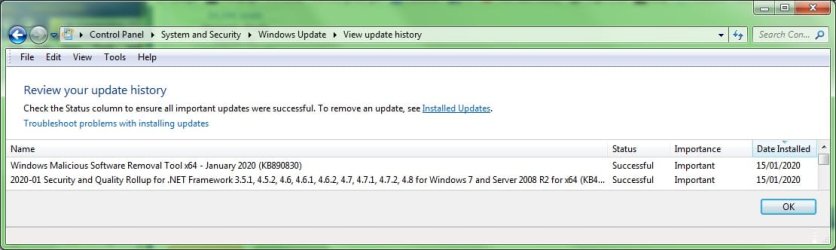
I've attached screenshots of the 'final' two updates, 15 Jan, and of the updates I have had since then (but have switched off). In the light of Barman58's remarks, I might well turn them on again.
.
 

Attachments

  • updates to 15.1.20.jpg
    updates to 15.1.20.jpg
    53.2 KB · Views: 0
  • updates since 15.1.20.jpg
    updates since 15.1.20.jpg
    61.1 KB · Views: 0

My Computer My Computer

Computer type
PC/Desktop
Computer Manufacturer/Model Number
Dell Precision
OS
Windows 7 Pro 64 bit and Windows 10 Pro 64 bit
Thanks, Bree. I don't think I am running MSE. Certainly I've never bought it and nothing shows up in Installed Programs.


The 'Defender' in W7 is little more than protection against unwanted programs (PUPs). It is not a proper full blown AV. It still uses definition updates though.


Microsoft Security Essentials is a free AV from Microsoft for Windows versions up to and including W7. It uses the same scan engine and definitions as currently used in W8/W10 Defender. MS have said they will remove it from their download servers now that W7 is at EoL, but for now it is still available.


https://www.microsoft.com/download/details.aspx?id=5201
 

My Computers My Computers

System One System Two

  • Computer type
    Laptop
    Computer Manufacturer/Model Number
    Toshiba satellite C650D
    OS
    Windows 7 Home Premium x64
    CPU
    AMD V120
    Memory
    4GB
    Internet Speed
    150 Mbps
    Antivirus
    MSE
    Browser
    IE11, Edge, Firefox
    Other Info
    I also have W7 Pro on my System Two, and several W7 Hyper-V VMs. My other machines run Windows 10/11. Their specs are in my Ten Forums & Eleven Forum profiles.
  • Computer type
    Laptop
    System Manufacturer/Model Number
    Lenovo Thinkpad T430
    OS
    Windows 7 Pro x64
    CPU
    Intel i5-3320M
    Memory
    8 GB
    Hard Drives
    250GB Samsung SSD 860 EVO
    Antivirus
    MSE
Microsoft Security Essentials is a free AV from Microsoft for Windows versions up to and including W7. It uses the same scan engine and definitions as currently used in W8/W10 Defender. MS have said they will remove it from their download servers now that W7 is at EoL, but for now it is still available. https://www.microsoft.com/download/details.aspx?id=5201
Thanks again! Problem is that to install MSE, I am advised to remove my antivirus. I don't really want to do that. However, I reckon I should download the installer now, in case it disappears. Any idea which of the two files one wants - both, perhaps? (One is 14.4Mb, the other 11.7Mb.) There's not much guidance on that page. Edit: Belay that; Wiki says 64-bit systems need the 14.4Mb file.
 

My Computer My Computer

Computer type
PC/Desktop
Computer Manufacturer/Model Number
Dell Precision
OS
Windows 7 Pro 64 bit and Windows 10 Pro 64 bit
Thanks again! Problem is that to install MSE, I am advised to remove my antivirus. I don't really want to do that. However, I reckon I should download the installer now, in case it disappears. Any idea which of the two files one wants - both, perhaps? (One is 14.4Mb, the other 11.7Mb.) There's not much guidance on that page. Edit: Belay that; Wiki says 64-bit systems need the 14.4Mb file.


Yes, one is for 32-bit Windows, the other for 64-bit. If your current AV is going to continue providing updates for W7 then you could stick with that. If they ever stop, well with the installer now downloaded you could switch to using MSE. That's supported until 2023.
 

My Computers My Computers

System One System Two

  • Computer type
    Laptop
    Computer Manufacturer/Model Number
    Toshiba satellite C650D
    OS
    Windows 7 Home Premium x64
    CPU
    AMD V120
    Memory
    4GB
    Internet Speed
    150 Mbps
    Antivirus
    MSE
    Browser
    IE11, Edge, Firefox
    Other Info
    I also have W7 Pro on my System Two, and several W7 Hyper-V VMs. My other machines run Windows 10/11. Their specs are in my Ten Forums & Eleven Forum profiles.
  • Computer type
    Laptop
    System Manufacturer/Model Number
    Lenovo Thinkpad T430
    OS
    Windows 7 Pro x64
    CPU
    Intel i5-3320M
    Memory
    8 GB
    Hard Drives
    250GB Samsung SSD 860 EVO
    Antivirus
    MSE
... If your current AV is going to continue providing updates for W7 then you could stick with that. If they ever stop, well with the installer now downloaded you could switch to using MSE. That's supported until 2023.
Gotcha. :-)
 

My Computer My Computer

Computer type
PC/Desktop
Computer Manufacturer/Model Number
Dell Precision
OS
Windows 7 Pro 64 bit and Windows 10 Pro 64 bit
Back
Top