8GB Ram no detect in 32bit & in 64bit it not running in its full speed

truemate

New member
Local time
3:33 PM
Messages
32
8GB Ram no detect in 32bit & in 64bit it not running in its full speed

ok it all start like this..

my board is GA-H61M-DS2 (rev. 4.0)

2 Hdd IN ONE I Have WIN 7 32BIT--- AND ON ANOTHER ONE I HAVE WIN 10 64bit


=============== Issue num 1- win7 32bit not detecting 8GB ram ==================

First, Info regarding memory Rams

i am using Corsair 4gb memory
Corsair Vengeance CMZ4GX3M1A1600C9 4GB Single Module DDR3 1600MHz
Computer Memory Type DDR3 SDRAM
Voltage 1.5 Volts
Memory Standard DDR3-1600/PC3-12800
Pins 240-pin
Buffered/Unbuffered Unbuffered
Memory Configuration: Single Module

-SPD Latency: 9-9-9-24; SPD Speed: 1600MHz; SPD Voltage: 1.5V, SPD Speed: 1333MHz
Frequency
1333 MHz (Specified), 1600 MHz (Test)
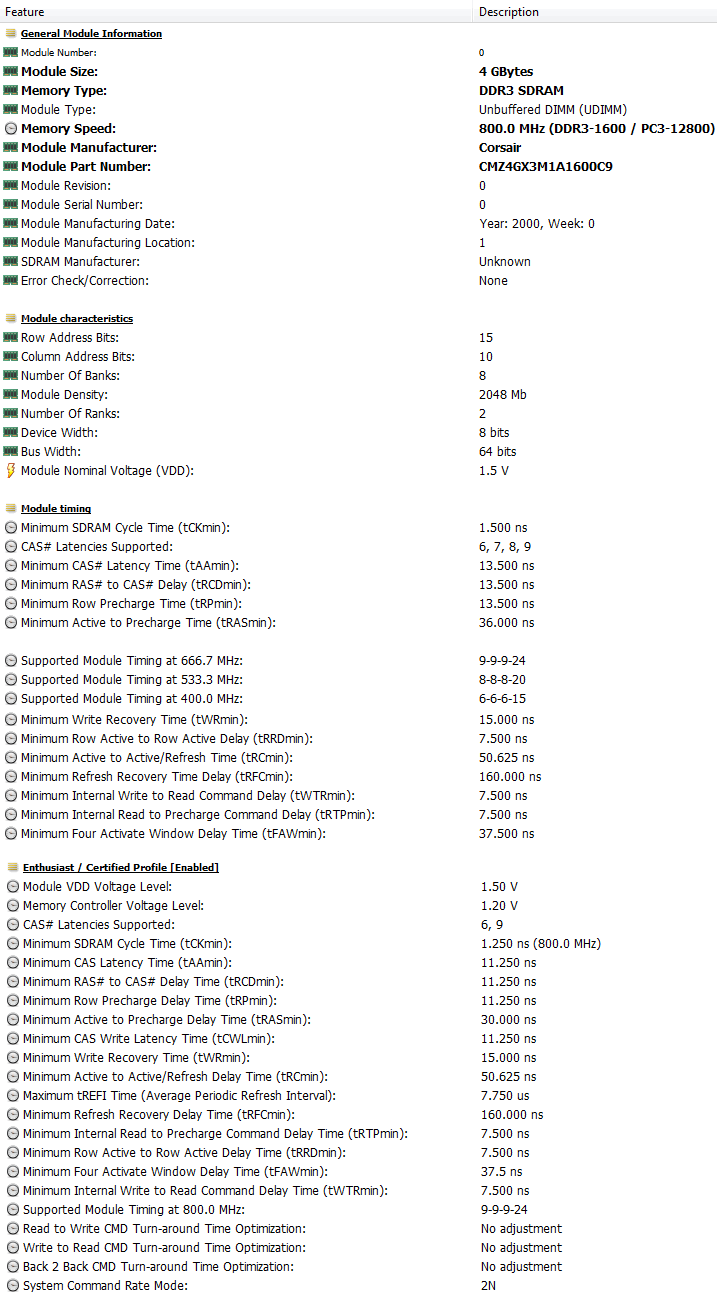

kGNbex2.png


By default it runs in DRAM freq - 665mhz
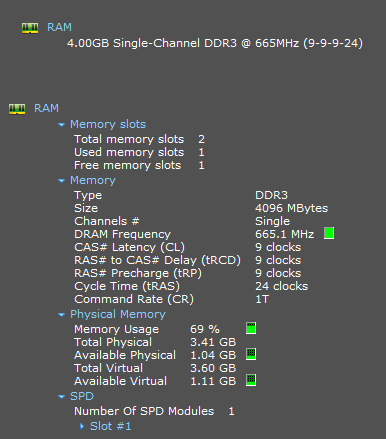
jZaEbk6.png


after OC (Overclocking -XMP) corsair DRAM freq goes to - 798mhz
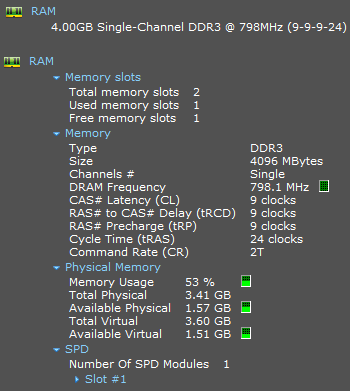
lyrsb2F.png

in this (XMP) change thru Bios - advanced memory settings, i notice little performance boost.


Now...
yesterday in another empty slot i inserted another DDR3 memory stick of kingston.. same size of 4gb.. same freq...

Memory: 4096 MBytes @ 798 MHz, 11-11-11-28
- 4096 MB PC12800 DDR3 SDRAM - Kingston 99P5474-013.A00LF
Maximum Clock Speed (MHz): 800 (JEDEC)
Maximum Transfer Speed (MHz): DDR3-1600
Maximum Bandwidth (MB/s): PC3-12800
Module Voltage: 1.5V
CAS Latencies Supported: 6 7 8 9 10 11
Timings @ Max Frequency (JEDEC): 11-11-11-28
Memory Capacity (MB): 4096
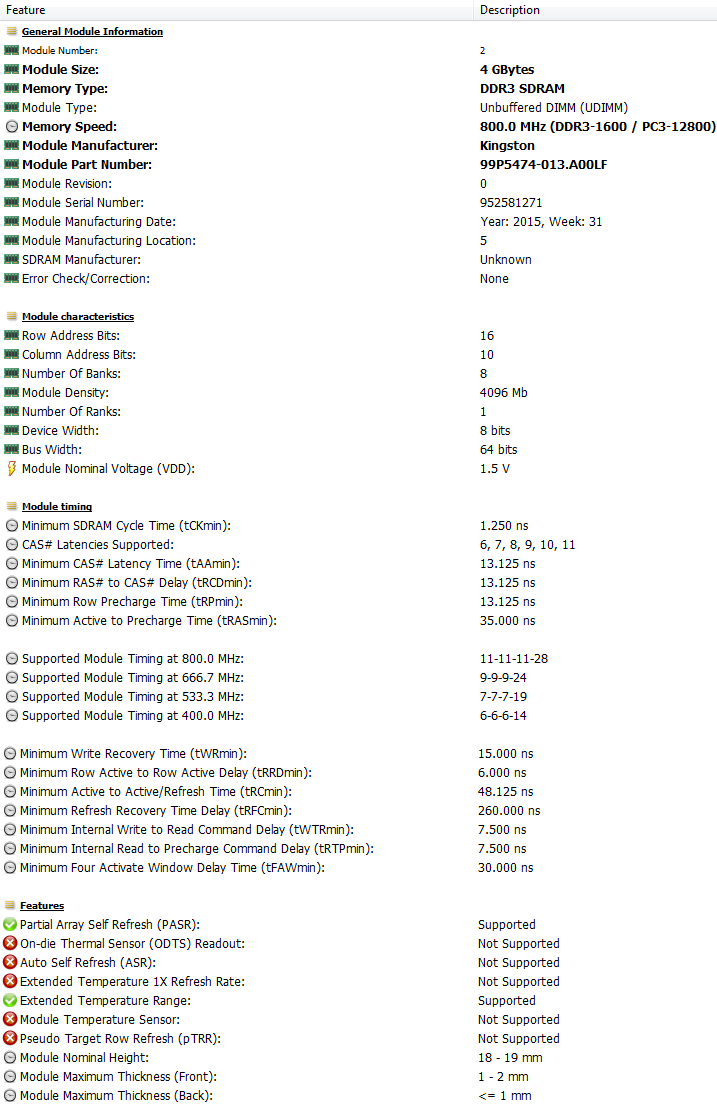

Kiqw6JN.png


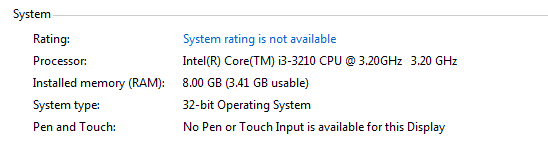
Now,, in win7 32bit it showing
lnBxENM.png


Is this due to its limit of excepting only 4gb in 32bit verions ???? means if we install even 16gb (2x8) it will take 4gb only..in 32Bits !


========= Issue num 2 - win10 64bit not running rams in their full Mhz speed :confused: =========


in win10 64bit it was showing some 7.54gb usable... so its like it detecting 8gb :party:

But one thing i notice that the rams are not running in 798Mhz DRAM Freq

if i use them separately one by one than they run in that 798mhz.. but when i use them together.. they fall back to 665mhz


An screenshot of kingston running alone - its DRAM speed also in that 798mhz (note it does not have any OC (XMP) option.. that 798 is its default speed ....wherz in corsair i have to OC (XMP) thru bios settings to make it 798mhz aka 1600mhz speed
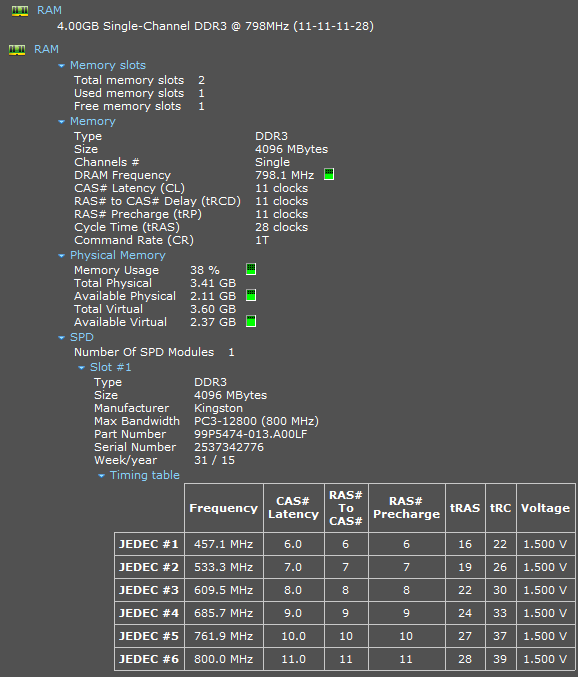
dg5EOH2.png


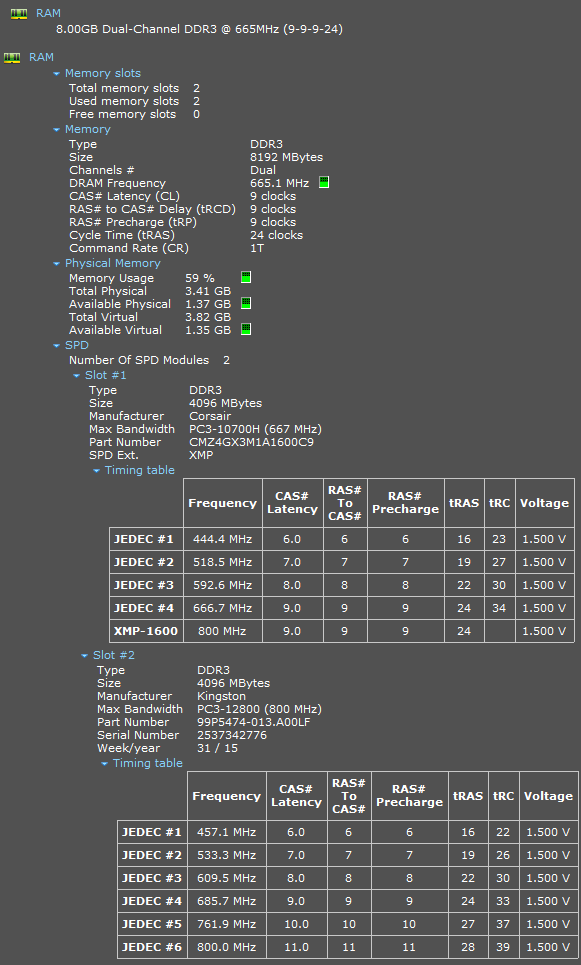
Now see when i use both ram... its speed falls to Dram 665mhz aka 1333mhz
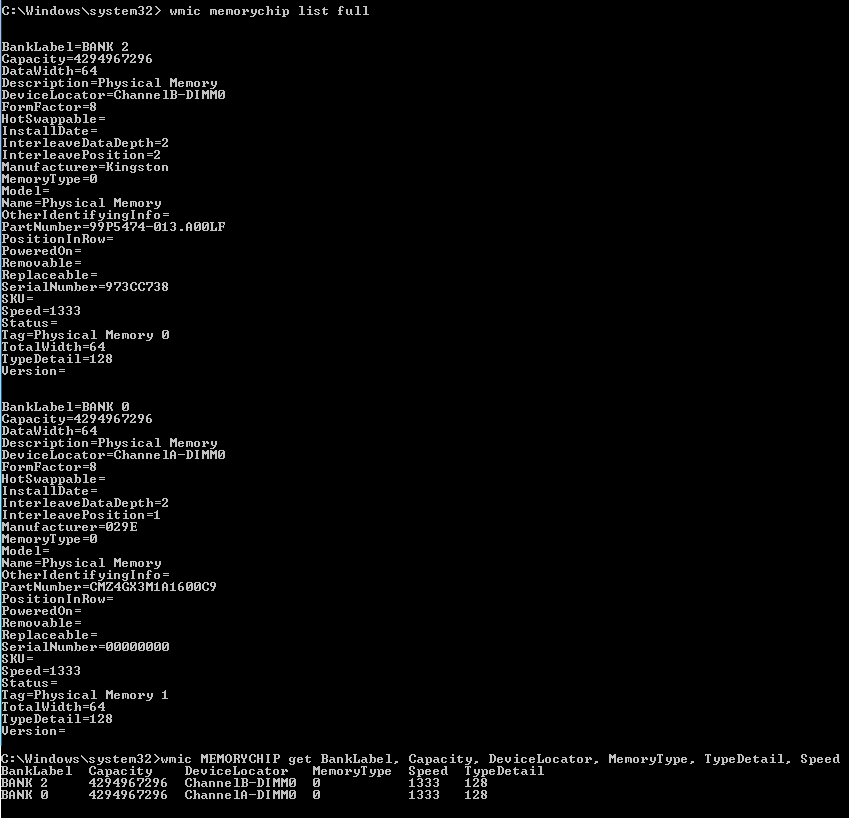
xxPErw7.png


Kt8uZ5n.png


Why this happening ? even both ram are of same size & frequency !


is this due to some of its diff Timings/ Latencies.. just check below pic.. at 800 speed both have diff CL /CAS
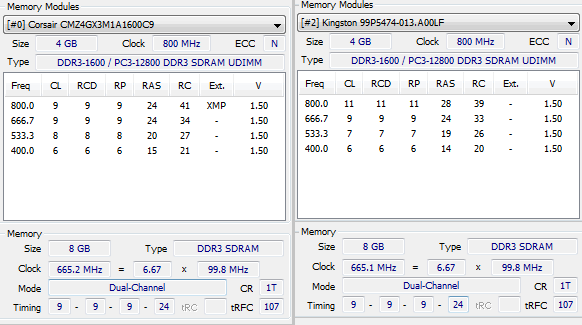
vSbWEOR.png


9-9-9-24
11-11-11-28

but at 665or666 they matched 9-9-9-24 ... is this why both ram running in that matched speed..timings.. instead of 8000mhz freq
 

My Computer My Computer

At a glance

Windows 7 Ultimate x64 & Win10 x64bit LTSC4gb/8GB
Computer type
PC/Desktop
OS
Windows 7 Ultimate x64 & Win10 x64bit LTSC
Memory
4gb/8GB
Hard Drives
WD SATA 500GB
Seagate Barracuda 1TB
Antivirus
EIS v13
=============== Issue num 1- win7 32bit not detecting 8GB ram ==================
The Max amount of addressable RAM in Windows 7 (or 8) 32-bit is 4GB.

========= Issue num 2 - win10 64bit not running rams in their full Mhz speed :confused: =========

You would have to check your Motherboard manual and BIOS for further information.

It could be just simply that the RAM sticks occupy the wrong slots, for max. speed. Or it could be that the BIOS does not recognise the RAM profile, and has defaulted to loading a lower RAM speed.
 

My Computer My Computer

At a glance

Windows 7 x64, Vista x64, 8.1 smartphoneIntel E8400 65W 64-bitDDR2 2 x 2GB, 1GB x 2XFX Radeon HD5750
Computer type
PC/Desktop
OS
Windows 7 x64, Vista x64, 8.1 smartphone
CPU
Intel E8400 65W 64-bit
Motherboard
Gigabyte EP45-UD3LR
Memory
DDR2 2 x 2GB, 1GB x 2
Graphics Card(s)
XFX Radeon HD5750
Sound Card
AMD High Definition Audio; Realtek High Definition Audio
Monitor(s) Displays
iiyama prolite X2377HDS
Screen Resolution
1920 x 1080
Hard Drives
500GB 7200 rpm Seagate ST3500413AS 16MB, 500GB 5400 rpm Toshiba MQ02ABF050H 32MB, 200GB 7200 rpm Seagate ST3200820AS 8MB, 2TB 7200 rpm Western Digital WD20EZRX 64MB
PSU
Enermax Liberty Modular
Case
Antec P193 Midi Tower
Keyboard
Mionix ZIBAL 60
Mouse
Razer USB 2.0 Diamondback Mouse or Huion Graphics Tablet
Browser
Internet Explorer, Lunascape, Firefox, Opera, Avast Safezone
^
...in win7 32bit it showing
lnBxENM.png


Is this due to its limit of excepting only 4gb in 32bit verions ???? means if we install even 16gb (2x8) it will take 4gb only..in 32Bits !


Yes, for a 32 bit address the maximum RAM that can be addressed is 2^32 - that's FFFFFFFF(hex) or 4,294,967,296(dec.). There's your 4GB limit.

In practice the RAM useable by the OS is less than this because some of the address space is set aside for addressing the video RAM.
 

My Computers My Computers

  • At a glance

    Windows 7 Home Premium x64AMD V1204GB
    Computer type
    Laptop
    Computer Manufacturer/Model Number
    Toshiba satellite C650D
    OS
    Windows 7 Home Premium x64
    CPU
    AMD V120
    Memory
    4GB
    Internet Speed
    150 Mbps
    Antivirus
    MSE
    Browser
    IE11, Edge, Firefox
    Other Info
    I also have W7 Pro on my System Two, and several W7 Hyper-V VMs. My other machines run Windows 10/11. Their specs are in my Ten Forums & Eleven Forum profiles.
  • At a glance

    Windows 7 Pro x64Intel i5-3320M8 GB
    Computer type
    Laptop
    System Manufacturer/Model Number
    Lenovo Thinkpad T430
    OS
    Windows 7 Pro x64
    CPU
    Intel i5-3320M
    Memory
    8 GB
    Hard Drives
    250GB Samsung SSD 860 EVO
    Antivirus
    MSE
You are using different memory modules, that is why it works on 665MHz.
The Corsair is a DDR3 1333 that under XMP works as DDR3 1600.
The Kingston is a DDR3 1600.
When you mix the two, they work on the lowest rate (DDR3 1333 - 665MHz)
 

My Computers My Computers

  • At a glance

    Windows 7 HP 64i5 6600K - 800MHz to 4200MHz4+4G GSkill DDR4 3000IG - Intel 530
    Computer type
    PC/Desktop
    Computer Manufacturer/Model Number
    custom build
    OS
    Windows 7 HP 64
    CPU
    i5 6600K - 800MHz to 4200MHz
    Motherboard
    GA-Z170-HD3P
    Memory
    4+4G GSkill DDR4 3000
    Graphics Card(s)
    IG - Intel 530
    Monitor(s) Displays
    Samsung 226BW
    Screen Resolution
    1680x1050
    Hard Drives
    (1) -1 SM951 – 128GB M.2 AHCI PCIe SSD drive for Windows 7 and Lubuntu
    (2) -1 WD SATA 3 - 1T for Data
    (3) -1 WD SATA 3 - 1T for backup
    PSU
    Thermaltake 450W TR2 gold
    Keyboard
    Old and good Chicony mechanical keyboard
    Mouse
    Logitech mX performance - 9 buttons (had to disable some)
    Internet Speed
    500Mb/s
    Browser
    Firefox 64
    Other Info
    TinyWall firewall
  • At a glance

    Windows 7 Proi7-4500U 800MHz to 3.0GHz(4+4)G DDR3 1600IG intel 4400 + NVIDIA GeForce GT 745M
    Computer type
    Laptop
    System Manufacturer/Model Number
    Asus Q550LF
    OS
    Windows 7 Pro
    CPU
    i7-4500U 800MHz to 3.0GHz
    Motherboard
    Asus Q550LF
    Memory
    (4+4)G DDR3 1600
    Graphics Card(s)
    IG intel 4400 + NVIDIA GeForce GT 745M
    Sound Card
    Realtek
    Monitor(s) Displays
    LG Display LP156WF4-SPH1
    Screen Resolution
    1920 x 1080
    Hard Drives
    BX500 120G SSD for Windows and programs +
    1T HDD for data
    Internet Speed
    500 Mb/s
    Browser
    Firefox
    Other Info
    TinyWall firewall
There is a workaround to the 3 gb limit on a 32-bit system but it can be extremely risky especially if you don't know what you are doing. Personally I haven't done it and I wouldn't do it however I am doing my due diligence by posting it. Unlock up to 64GB of RAM on 32-bit Windows With PAE Patch Another part of my due diligence is to say attempt at your own risk. If you read the comments you'll see that some people end up with stability issues. It would be safer to install 64 bit but that would require that you completely wipe Windows 7.
 

My Computers My Computers

  • At a glance

    Windows 7 pro/Windows 10 ProIntel i7 860 Quad core 2.8 ghz8 gbATI Radeon HD 5770 1 gb ram
    Computer type
    PC/Desktop
    Computer Manufacturer/Model Number
    HP Pavillion Elite HPE-250f
    OS
    Windows 7 pro/Windows 10 Pro
    CPU
    Intel i7 860 Quad core 2.8 ghz
    Memory
    8 gb
    Graphics Card(s)
    ATI Radeon HD 5770 1 gb ram
    Monitor(s) Displays
    Alienware 25 AW2521HF & Viewsonic
    Screen Resolution
    1920 x1080 & 1680x1050
    Hard Drives
    WD blue 1 tb & 500 gb.
    Browser
    FF of course.
    Other Info
    https://www.bestbuy.com/site/hp-pavilion-elite-desktop-intel-core-i7-processor-8gb-memory-1tb-hard-drive/9921493.p?skuId=9921493
  • At a glance

    Windows 2012 R2 Data center/Linux Minti3 9100 3.6GHz, 8M cache, 4C/4T8GB 2666MT/s DDR4 ECC UDIMM
    Computer type
    PC/Desktop
    System Manufacturer/Model Number
    Dell Poweredge T140
    OS
    Windows 2012 R2 Data center/Linux Mint
    CPU
    i3 9100 3.6GHz, 8M cache, 4C/4T
    Memory
    8GB 2666MT/s DDR4 ECC UDIMM
    Monitor(s) Displays
    Viewsonic
    Screen Resolution
    1680x1050
    Hard Drives
    1 TB & 750 GB
    Other Info
    https://www.dell.com/en-us/work/shop/productdetailstxn/poweredge-t140?~ck=bt
You would have to check your Motherboard manual and BIOS for further information.

It could be just simply that the RAM sticks occupy the wrong slots, for max. speed. Or it could be that the BIOS does not recognise the RAM profile, and has defaulted to loading a lower RAM speed.

there no profile for kington.. it fixed with those speed... wherz in corsair we can change it


^
Yes, for a 32 bit address the maximum RAM that can be addressed is 2^32 - that's FFFFFFFF(hex) or 4,294,967,296(dec.). There's your 4GB limit.
In practice the RAM useable by the OS is less than this because some of the address space is set aside for addressing the video RAM.

yup....


There is a workaround to the 3 gb limit on a 32-bit system but it can be extremely risky especially if you don't know what you are doing. Personally I haven't done it and I wouldn't do it however I am doing my due diligence by posting it. Unlock up to 64GB of RAM on 32-bit Windows With PAE Patch Another part of my due diligence is to say attempt at your own risk. If you read the comments you'll see that some people end up with stability issues. It would be safer to install 64 bit but that would require that you completely wipe Windows 7.

better safe and simple way to move it on 64bit :rolleyes:
 

My Computer My Computer

At a glance

Windows 7 Ultimate x64 & Win10 x64bit LTSC4gb/8GB
Computer type
PC/Desktop
OS
Windows 7 Ultimate x64 & Win10 x64bit LTSC
Memory
4gb/8GB
Hard Drives
WD SATA 500GB
Seagate Barracuda 1TB
Antivirus
EIS v13
You are using different memory modules, that is why it works on 665MHz.
The Corsair is a DDR3 1333 that under XMP works as DDR3 1600.
The Kingston is a DDR3 1600.
When you mix the two, they work on the lowest rate (DDR3 1333 - 665MHz)

shiiit thats why memory configuration has changed to the lower speed ?

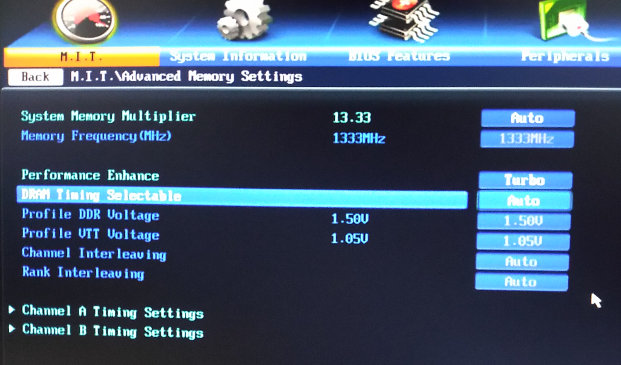
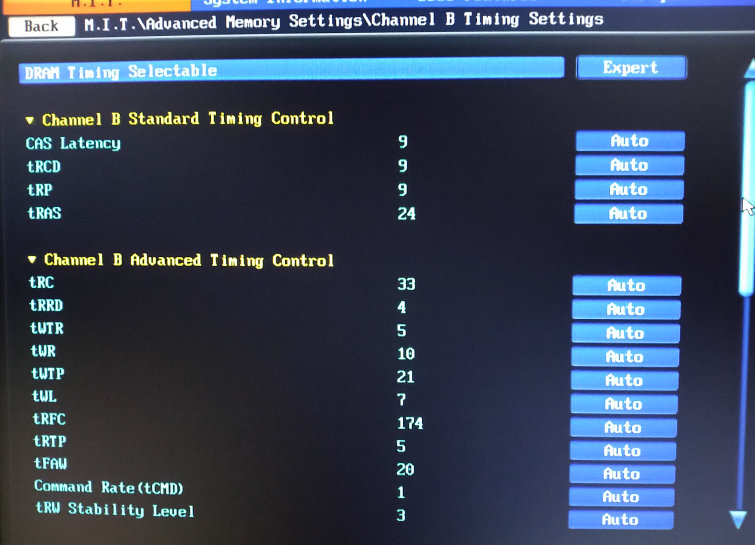
friend can Change RAM timings from 11-11-11-28 to 9-9-9-24

fUGo9H8.jpg


hW4uDXz.jpg


some thing can be done in those bios settings ?
 

My Computer My Computer

At a glance

Windows 7 Ultimate x64 & Win10 x64bit LTSC4gb/8GB
Computer type
PC/Desktop
OS
Windows 7 Ultimate x64 & Win10 x64bit LTSC
Memory
4gb/8GB
Hard Drives
WD SATA 500GB
Seagate Barracuda 1TB
Antivirus
EIS v13
there no profile for kington.. it fixed with those speed... wherz in corsair we can change it

Then you (or the memory controller) would change corsair to match kingston , and not the other way round.
 

My Computer My Computer

At a glance

Windows 7 x64, Vista x64, 8.1 smartphoneIntel E8400 65W 64-bitDDR2 2 x 2GB, 1GB x 2XFX Radeon HD5750
Computer type
PC/Desktop
OS
Windows 7 x64, Vista x64, 8.1 smartphone
CPU
Intel E8400 65W 64-bit
Motherboard
Gigabyte EP45-UD3LR
Memory
DDR2 2 x 2GB, 1GB x 2
Graphics Card(s)
XFX Radeon HD5750
Sound Card
AMD High Definition Audio; Realtek High Definition Audio
Monitor(s) Displays
iiyama prolite X2377HDS
Screen Resolution
1920 x 1080
Hard Drives
500GB 7200 rpm Seagate ST3500413AS 16MB, 500GB 5400 rpm Toshiba MQ02ABF050H 32MB, 200GB 7200 rpm Seagate ST3200820AS 8MB, 2TB 7200 rpm Western Digital WD20EZRX 64MB
PSU
Enermax Liberty Modular
Case
Antec P193 Midi Tower
Keyboard
Mionix ZIBAL 60
Mouse
Razer USB 2.0 Diamondback Mouse or Huion Graphics Tablet
Browser
Internet Explorer, Lunascape, Firefox, Opera, Avast Safezone
better safe and simple way to move it on 64bit :rolleyes:

I agree. I might want to test it on my Vista 32-bit virtual machine (with a snapshot) however I wouldn't want to do that on my base OS.
 

My Computers My Computers

  • At a glance

    Windows 7 pro/Windows 10 ProIntel i7 860 Quad core 2.8 ghz8 gbATI Radeon HD 5770 1 gb ram
    Computer type
    PC/Desktop
    Computer Manufacturer/Model Number
    HP Pavillion Elite HPE-250f
    OS
    Windows 7 pro/Windows 10 Pro
    CPU
    Intel i7 860 Quad core 2.8 ghz
    Memory
    8 gb
    Graphics Card(s)
    ATI Radeon HD 5770 1 gb ram
    Monitor(s) Displays
    Alienware 25 AW2521HF & Viewsonic
    Screen Resolution
    1920 x1080 & 1680x1050
    Hard Drives
    WD blue 1 tb & 500 gb.
    Browser
    FF of course.
    Other Info
    https://www.bestbuy.com/site/hp-pavilion-elite-desktop-intel-core-i7-processor-8gb-memory-1tb-hard-drive/9921493.p?skuId=9921493
  • At a glance

    Windows 2012 R2 Data center/Linux Minti3 9100 3.6GHz, 8M cache, 4C/4T8GB 2666MT/s DDR4 ECC UDIMM
    Computer type
    PC/Desktop
    System Manufacturer/Model Number
    Dell Poweredge T140
    OS
    Windows 2012 R2 Data center/Linux Mint
    CPU
    i3 9100 3.6GHz, 8M cache, 4C/4T
    Memory
    8GB 2666MT/s DDR4 ECC UDIMM
    Monitor(s) Displays
    Viewsonic
    Screen Resolution
    1680x1050
    Hard Drives
    1 TB & 750 GB
    Other Info
    https://www.dell.com/en-us/work/shop/productdetailstxn/poweredge-t140?~ck=bt
Then you (or the memory controller) would change corsair to match kingston , and not the other way round.

U mean to change timeing settings for corsair ?
Corsair XMP/profile option disappeared from bios settings when I attach both ram together.

And corsair alone runs in that DRAM 800mhz Freq in its max timing 9-9-9-24..
 

My Computer My Computer

At a glance

Windows 7 Ultimate x64 & Win10 x64bit LTSC4gb/8GB
Computer type
PC/Desktop
OS
Windows 7 Ultimate x64 & Win10 x64bit LTSC
Memory
4gb/8GB
Hard Drives
WD SATA 500GB
Seagate Barracuda 1TB
Antivirus
EIS v13
Plz reply fast...as the return policy time will end...and I can't return this RAM back...money wasted
 

My Computer My Computer

At a glance

Windows 7 Ultimate x64 & Win10 x64bit LTSC4gb/8GB
Computer type
PC/Desktop
OS
Windows 7 Ultimate x64 & Win10 x64bit LTSC
Memory
4gb/8GB
Hard Drives
WD SATA 500GB
Seagate Barracuda 1TB
Antivirus
EIS v13
You really need RAM with matched frequencies and latency timings. If the RAM has XMP profiles, then all the better.

If you still can return one of the RAMs in its original packaging, then I'd return the Kingston model.
 

My Computer My Computer

At a glance

Windows 7 x64, Vista x64, 8.1 smartphoneIntel E8400 65W 64-bitDDR2 2 x 2GB, 1GB x 2XFX Radeon HD5750
Computer type
PC/Desktop
OS
Windows 7 x64, Vista x64, 8.1 smartphone
CPU
Intel E8400 65W 64-bit
Motherboard
Gigabyte EP45-UD3LR
Memory
DDR2 2 x 2GB, 1GB x 2
Graphics Card(s)
XFX Radeon HD5750
Sound Card
AMD High Definition Audio; Realtek High Definition Audio
Monitor(s) Displays
iiyama prolite X2377HDS
Screen Resolution
1920 x 1080
Hard Drives
500GB 7200 rpm Seagate ST3500413AS 16MB, 500GB 5400 rpm Toshiba MQ02ABF050H 32MB, 200GB 7200 rpm Seagate ST3200820AS 8MB, 2TB 7200 rpm Western Digital WD20EZRX 64MB
PSU
Enermax Liberty Modular
Case
Antec P193 Midi Tower
Keyboard
Mionix ZIBAL 60
Mouse
Razer USB 2.0 Diamondback Mouse or Huion Graphics Tablet
Browser
Internet Explorer, Lunascape, Firefox, Opera, Avast Safezone
This no one told me before...that latency timing need to be matched too...all bloody sales guy in form of technician..they just want to sell their product..
Now when I come to know abt this issue they r like tight lip...half knowledge/brain is dangerous than empty brain.

So iko22, it's no way to tweak their settings to make them run in same latency timings to get 800mhz.
 

My Computer My Computer

At a glance

Windows 7 Ultimate x64 & Win10 x64bit LTSC4gb/8GB
Computer type
PC/Desktop
OS
Windows 7 Ultimate x64 & Win10 x64bit LTSC
Memory
4gb/8GB
Hard Drives
WD SATA 500GB
Seagate Barracuda 1TB
Antivirus
EIS v13
So iko22, it's no way to tweak their settings to make them run in same latency timings to get 800mhz.
Short answer, is yes you can tweak RAM sticks, but not those RAM sticks.

Longer answer:
Some people have quite successfully tweaked their RAM specifications in their computer rig. They buy special RAM with effective heat spreaders, on RAM models that have reputation for being able to tweak.

Your basic RAM (the Kingston model) is not designed for being used under such conditions. If you try change parameters in BIOS, I suspect the RAM will just fall over, and the operating system will fail.

If you change any RAM parameters, then always run MEMTEST afterwards, to test the reliability of your changes.
 

My Computer My Computer

At a glance

Windows 7 x64, Vista x64, 8.1 smartphoneIntel E8400 65W 64-bitDDR2 2 x 2GB, 1GB x 2XFX Radeon HD5750
Computer type
PC/Desktop
OS
Windows 7 x64, Vista x64, 8.1 smartphone
CPU
Intel E8400 65W 64-bit
Motherboard
Gigabyte EP45-UD3LR
Memory
DDR2 2 x 2GB, 1GB x 2
Graphics Card(s)
XFX Radeon HD5750
Sound Card
AMD High Definition Audio; Realtek High Definition Audio
Monitor(s) Displays
iiyama prolite X2377HDS
Screen Resolution
1920 x 1080
Hard Drives
500GB 7200 rpm Seagate ST3500413AS 16MB, 500GB 5400 rpm Toshiba MQ02ABF050H 32MB, 200GB 7200 rpm Seagate ST3200820AS 8MB, 2TB 7200 rpm Western Digital WD20EZRX 64MB
PSU
Enermax Liberty Modular
Case
Antec P193 Midi Tower
Keyboard
Mionix ZIBAL 60
Mouse
Razer USB 2.0 Diamondback Mouse or Huion Graphics Tablet
Browser
Internet Explorer, Lunascape, Firefox, Opera, Avast Safezone
So this kingston is like I can't do anything to it..
But what abt Corsair can it will be adjust thru parameters to make it adjust with kingston timings ?
 

My Computer My Computer

At a glance

Windows 7 Ultimate x64 & Win10 x64bit LTSC4gb/8GB
Computer type
PC/Desktop
OS
Windows 7 Ultimate x64 & Win10 x64bit LTSC
Memory
4gb/8GB
Hard Drives
WD SATA 500GB
Seagate Barracuda 1TB
Antivirus
EIS v13
Yes, in a nutshell, I think you are right.

But, it is not the brand "Kingston" that is the problem, it is because you have only invested in their budget memory sticks. If you had 8GB of Kingston model RAM, then you'd be okay, as you would not need to match any parameters manually.

The "corsair" model are better grade of RAM. Again, it is not the brand, it is because you have invested in better grade RAM sticks. BUT they do not match the "Kingston" for parameters. Therefore, you need to manually set the parameters for both RAM sticks, in BIOS, to match the values of the "Kingston". Then run MEMTEST to double check the RAM reliability.
 

My Computer My Computer

At a glance

Windows 7 x64, Vista x64, 8.1 smartphoneIntel E8400 65W 64-bitDDR2 2 x 2GB, 1GB x 2XFX Radeon HD5750
Computer type
PC/Desktop
OS
Windows 7 x64, Vista x64, 8.1 smartphone
CPU
Intel E8400 65W 64-bit
Motherboard
Gigabyte EP45-UD3LR
Memory
DDR2 2 x 2GB, 1GB x 2
Graphics Card(s)
XFX Radeon HD5750
Sound Card
AMD High Definition Audio; Realtek High Definition Audio
Monitor(s) Displays
iiyama prolite X2377HDS
Screen Resolution
1920 x 1080
Hard Drives
500GB 7200 rpm Seagate ST3500413AS 16MB, 500GB 5400 rpm Toshiba MQ02ABF050H 32MB, 200GB 7200 rpm Seagate ST3200820AS 8MB, 2TB 7200 rpm Western Digital WD20EZRX 64MB
PSU
Enermax Liberty Modular
Case
Antec P193 Midi Tower
Keyboard
Mionix ZIBAL 60
Mouse
Razer USB 2.0 Diamondback Mouse or Huion Graphics Tablet
Browser
Internet Explorer, Lunascape, Firefox, Opera, Avast Safezone
As with anything if your motherboard allows you to adjust your RAM parameters, you can adjust the fasted (best) to match the worst, there is no point in trying to set the parameters of the worst RAM to match the Best as it is incapable of achieving the speed of the best.

The other issue is that in a mixed RAM scenario, the system should automatically match the highest performance RAM to the Lower performance RAM, this is to prevent issues when running

If you overclocked the lower rated RAM to match the higher you might have an improvement overall for a short time - until the RAM failed.

You should only buy RAM from specialists - Online is usually best as they sell more so prices per unit are lower. always try to buy RAM in the size you require in total or if you upgrade ensure the additional RAM matches the Older
 

My Computers My Computers

  • At a glance

    Windows 11 Pro x64 [Latest Release and Releas...Ryzen 9 5950X, 3.8 - 5.2 MHz64GB [2 x 32GB] DDR4 3200MHz4GB NVIDIA GEFORCE GTX 1650 Ti
    Computer type
    PC/Desktop
    Computer Manufacturer/Model Number
    ChillBlast - Custom to my design
    OS
    Windows 11 Pro x64 [Latest Release and Release Preview]
    CPU
    Ryzen 9 5950X, 3.8 - 5.2 MHz
    Motherboard
    Asus Prime X570-Pro
    Memory
    64GB [2 x 32GB] DDR4 3200MHz
    Graphics Card(s)
    4GB NVIDIA GEFORCE GTX 1650 Ti
    Sound Card
    On-board SPDIF to 5.1 System + HDMI [5.1 system]
    Monitor(s) Displays
    32" UHD 32 Bit HDR Monitor + 43" UHD 4K 32Bit HDR TV
    Screen Resolution
    2 x 3840 x 2160 @60Hz
    Hard Drives
    1TB M2 SSD OS, 500GB Fast Access SSD, 2 x 8TB Data + Various Externals from 1TB to 4TB, 10TB NAS
    PSU
    NZXT C750 80 PLUS Gold 750W Modular PSU
    Case
    Workstation Case [Matt Black]
    Cooling
    NZXT Kraken X63 280mm CPU Cooler +2x Quiet Case fans
    Keyboard
    Logitech Wireless MX Keys & K400 + others
    Mouse
    Logitech Wireless MX Master 3S
    Internet Speed
    920 MB Down 50 MB Up
    Antivirus
    BitDefender Total Security Pro
    Browser
    Chrome (always run latest Non-Beta)
    Other Info
    Also run ...
    Laptop - Quad 8GB - Windows 10 Pro x64
    Nexus 7 Android tablet x2
    Samsung 10.2" tablet
    Blackview TAB 8 4G Android Tablet c/w Keyboard
    Wacom Intuos Pro Medium Pen Pad
    Wacom Intuos Pro Small Pen Pad
    Wacom Expresskeys Remote
    Loopdeck+ Graphics Controller
    Shuttle Pro v2 Control
  • At a glance

    Windows 11 Pro x64 Latest RPIntel I7 10750H 5.0GHz32GB [2x16GB] DDR4 2933 MHznVidia GTX1650Ti 4 GB GDDR6
    Computer type
    Laptop
    System Manufacturer/Model Number
    Dell XPS 17 10750H
    OS
    Windows 11 Pro x64 Latest RP
    CPU
    Intel I7 10750H 5.0GHz
    Motherboard
    Dell XPS
    Memory
    32GB [2x16GB] DDR4 2933 MHz
    Graphics Card(s)
    nVidia GTX1650Ti 4 GB GDDR6
    Sound Card
    Stock [Realtek] 4 Speaker
    Monitor(s) Displays
    17" IPS UHD+ Infinity Edge Touchscreen
    Screen Resolution
    3840 x 2400
    Hard Drives
    2TB M2 NVMe, 4TB External + various 500GB & 1TB External NVMe (also have access to spinner HDD from
    PSU
    Stock
    Case
    Stock XPS Aluminium & Carbon Fibre
    Cooling
    Stock - Active Fan Control
    Keyboard
    Backlit + Various Logitech
    Mouse
    Stock Track Pad + Logitech MX Trackball
    Internet Speed
    72 MB Down 18MB Up
    Browser
    Chrome
    Other Info
    Also run ...
    Laptop - Quad 8GB - Windows 10 Pro x64
    Nexus 7 Android tablet x2
    10.2" tablet
    Sony Z3 Android Smartphone
    Wacom Intuos Pro Medium Pen Pad
    Wacom Intuos Pro Small Pen Pad
    Wacom Expresskeys Remote
    Loopdeck+ Graphics Controller
    Shuttle Pro v2 Control Pad
    10TB NAS
The OP could adjust RAM parameters to underclock the better RAM to match the lower performing RAM.

While this is not a good idea when buying RAM, given that is what is now available to you, then that is the best and most reliable match.
 

My Computer My Computer

At a glance

Windows 7 x64, Vista x64, 8.1 smartphoneIntel E8400 65W 64-bitDDR2 2 x 2GB, 1GB x 2XFX Radeon HD5750
Computer type
PC/Desktop
OS
Windows 7 x64, Vista x64, 8.1 smartphone
CPU
Intel E8400 65W 64-bit
Motherboard
Gigabyte EP45-UD3LR
Memory
DDR2 2 x 2GB, 1GB x 2
Graphics Card(s)
XFX Radeon HD5750
Sound Card
AMD High Definition Audio; Realtek High Definition Audio
Monitor(s) Displays
iiyama prolite X2377HDS
Screen Resolution
1920 x 1080
Hard Drives
500GB 7200 rpm Seagate ST3500413AS 16MB, 500GB 5400 rpm Toshiba MQ02ABF050H 32MB, 200GB 7200 rpm Seagate ST3200820AS 8MB, 2TB 7200 rpm Western Digital WD20EZRX 64MB
PSU
Enermax Liberty Modular
Case
Antec P193 Midi Tower
Keyboard
Mionix ZIBAL 60
Mouse
Razer USB 2.0 Diamondback Mouse or Huion Graphics Tablet
Browser
Internet Explorer, Lunascape, Firefox, Opera, Avast Safezone
sorry friends for the late reply....

actually u all right,,, thats not possible to match this budget kingstone ram with corsair one.. i try every way.. even changed it timings but...nope... sys was getting little slow... as it jumping back to that 1300mhz speed...

So i decided to give it back...
Now running corsair in XMP mode to 1600mhz 9-9-9-24
and yea i even formatted my pc and now on 64bit..

i really see some performance by jumping to 64bit and running ram (xmp) in max freq :)
actually it performing better compare to that 2 RAM stick formula of diff Timings
 

My Computer My Computer

At a glance

Windows 7 Ultimate x64 & Win10 x64bit LTSC4gb/8GB
Computer type
PC/Desktop
OS
Windows 7 Ultimate x64 & Win10 x64bit LTSC
Memory
4gb/8GB
Hard Drives
WD SATA 500GB
Seagate Barracuda 1TB
Antivirus
EIS v13
Back
Top