Outlook - Office 2010 .pst Installation Question(s)

WIN7 NIGHTMARE

New member
Member
VIP
Local time
5:23 AM
Messages
101
Greetings all,

Will be reinstalling Office/Outlook 2010 onto a reformatted hard drive with Win 7 Ultimate computer shortly.

I have a couple of saved/recovered .pst files I may attempt to re-install into the aforementioned program...If i re-install the .pst file(s) and it is not "what I wanted" (layout, multiple accounts, etc.) can I or, HOW do I "undo" that .pst installation w/out having to totally uninstall outlook/office?

I remember reading about a pst combiner program that I may utilize to combine all saved pst files but, that is at the tail end of all this....Thanking you for your assistance.
 

My Computer My Computer

Computer type
PC/Desktop
Computer Manufacturer/Model Number
dell desktop
OS
windows 7 home premium 32 bit
CPU
3.2ghz
Motherboard
u/k
Memory
2gigs
Graphics Card(s)
stock
Hard Drives
(1) 250gb SATA
Browser
Firefox

My Computer My Computer

Computer type
PC/Desktop
Computer Manufacturer/Model Number
HP Desktop & Compaq Laptop
OS
Win 10 x64, Linux Lite, Win 7 x64, BlackArch, & Kali
Hard Drives
Samsung 850 Pro 256Gb,
Hitachi HDD 1Tb,
Crucial MX SSD 250Gb
Segate 3Tb USB 3.0 Ext. Backup HDD
Internet Speed
150Mbps dn, 20Mbps up
Antivirus
Avast Free, Malwarebytes Anti-Exploit & Anti-Ransomware
Browser
Firefox, Chrome, Opera, & VPN

My Computer My Computer

Computer type
PC/Desktop
Computer Manufacturer/Model Number
(7 different computers booting up to 10 systems)
OS
Linux Mint / XP / Win7 Home, Pro, Ultimate / Win8.1 / Win10
Other Info
Four desktops, two laptops, one notebook and one tablet
Thanks all for the reply(ies)!

Did read, but, unless I missed something, it did enlighten me but, didn't answer my question.

Let's say Office-Outlook is a fresh install and I find multiple ".pst"'s (or even one) I want to merge/install......If the layout or my desired end result is bad or some other thing I don't care for, HOW do I "undo what I just did?

In other words, How to I return Office-Outlook to its "bare installation" and before the merger of the .pst files?.....I would rather not have to uninstall Office-Outlook and then re-install it.
 

My Computer My Computer

Computer type
PC/Desktop
Computer Manufacturer/Model Number
dell desktop
OS
windows 7 home premium 32 bit
CPU
3.2ghz
Motherboard
u/k
Memory
2gigs
Graphics Card(s)
stock
Hard Drives
(1) 250gb SATA
Browser
Firefox
Between Snick and my answers you have what you need.
If you want to test before committing, use a copy of the pst files.
The DELETE key actually works.
 

My Computer My Computer

Computer type
PC/Desktop
Computer Manufacturer/Model Number
(7 different computers booting up to 10 systems)
OS
Linux Mint / XP / Win7 Home, Pro, Ultimate / Win8.1 / Win10
Other Info
Four desktops, two laptops, one notebook and one tablet
You wrote:

"Between Snick and my answers you have what you need. If you want to test before committing, use a copy of the pst files.The DELETE key actually works."

Thanks for the reply -


I am not sure you follow my question...If I install Outlook/Office and utilize a saved pst file, all the info in same will be "installed/placed" into Outlook/Office to include ,all folders. contacts, layout and so on....If I don't like it are you implying that I should go back, find that pst file and delete it?....If so, would that "restore" Outlook/Office to it's bare installation pre-install of that pst file??
 

My Computer My Computer

Computer type
PC/Desktop
Computer Manufacturer/Model Number
dell desktop
OS
windows 7 home premium 32 bit
CPU
3.2ghz
Motherboard
u/k
Memory
2gigs
Graphics Card(s)
stock
Hard Drives
(1) 250gb SATA
Browser
Firefox
Always test with a copy file.

Make a folder on your desktop.
Copy a PST file into the new desktop folder.
Follow instructions from Snick or me to load the copied PST file from the new desktop folder.

Not happy with the results? Delete from within Outlook.
 

My Computer My Computer

Computer type
PC/Desktop
Computer Manufacturer/Model Number
(7 different computers booting up to 10 systems)
OS
Linux Mint / XP / Win7 Home, Pro, Ultimate / Win8.1 / Win10
Other Info
Four desktops, two laptops, one notebook and one tablet
Thanks for the reply(ies),

Let's see if I understand you(s)...I have a copy of a pst file and "load it into Office/Outlook and I don't like the results...I simply find the pst file (a copy) and delete it?..That then will re-set Office/Outlook back to the point before I did the pst install?...If so, any listed procedure?
 

My Computer My Computer

Computer type
PC/Desktop
Computer Manufacturer/Model Number
dell desktop
OS
windows 7 home premium 32 bit
CPU
3.2ghz
Motherboard
u/k
Memory
2gigs
Graphics Card(s)
stock
Hard Drives
(1) 250gb SATA
Browser
Firefox
.......Nobody 'eh?...Oh well....
 

My Computer My Computer

Computer type
PC/Desktop
Computer Manufacturer/Model Number
dell desktop
OS
windows 7 home premium 32 bit
CPU
3.2ghz
Motherboard
u/k
Memory
2gigs
Graphics Card(s)
stock
Hard Drives
(1) 250gb SATA
Browser
Firefox
I have a couple of saved/recovered .pst files I may attempt to re-install into the aforementioned program...If i re-install the .pst file(s) and it is not "what I wanted" (layout, multiple accounts, etc.) can I or, HOW do I "undo" that .pst installation w/out having to totally uninstall outlook/office?


There is some ColdFusion about how Windows PC and software wrk.

1) Install is doe by ruing a installer for a deployment package to "install" or setup a program and all the required application files and register the application with Windows. The "installer" It adds the icon to the start menu and possible the desktop, and task bar.

2) Files are copied. This includes Outlook data files (.pst), word docs (.doc/.docx), etc.


Outlook's basic parts:

1) The program files. The default is usually the c:\program files folders

2) Application level settings. Usually stored in the system register. Some setting are by Machine, others by user profile.

3) User Profile folder Application setting files, like signatures, etc.

4) Application database files, like the PST and OST files


To migrate the data to a new machine, physically different PC or a reinstall of windows on the same PC, is basically the same thing. I urge you to use a software that will properly backup your data and user profiles. This allows you to restore it back just like it was.
 

My Computer My Computer

OS
Windows 7 Ultimate x64
*THANKS FOR THE REPLY

There is some ColdFusion about how Windows PC and software wrk.
*uh, coldfusion??...

3) User Profile folder Application setting files, like signatures, etc.
*yes, i know this point

4) Application database files, like the PST and OST files
*yes, i know this point


To migrate the data to a new machine, physically different PC or a reinstall of windows on the same PC, is basically the same thing. I urge you to use a software that will properly backup your data and user profiles. This allows you to restore it back just like it was.
*The pst files have already been backed up some time ago....My question remains that if I "shot-gun" a previously saved pst file into a new installation of office/outlook and I don't like it for whatever reason, HOW or what is the procedure to return office/outlook to the state that it was BEFORE I loaded the already saved pst file onto/into it??....Do I have to uninstall office/outlook and re-install it all over again?
 

My Computer My Computer

Computer type
PC/Desktop
Computer Manufacturer/Model Number
dell desktop
OS
windows 7 home premium 32 bit
CPU
3.2ghz
Motherboard
u/k
Memory
2gigs
Graphics Card(s)
stock
Hard Drives
(1) 250gb SATA
Browser
Firefox
There is some ColdFusion about how Windows PC and software wrk.
*uh, coldfusion??...
Sorry about th auto correct by the speak to text. coldfusion should have been confusion.


4) Application database files, like the PST and OST files
*yes, i know this point
Great, then you know about Office applications having a menu option to open and close files.

What happens when you open and close the old PST?
 

My Computer My Computer

OS
Windows 7 Ultimate x64
Greetings - Back to this -

I accessed my brothers' screwed up hard drive this morning and went here:

c:\users\username\AppData\Local\Microsoft\Outlook

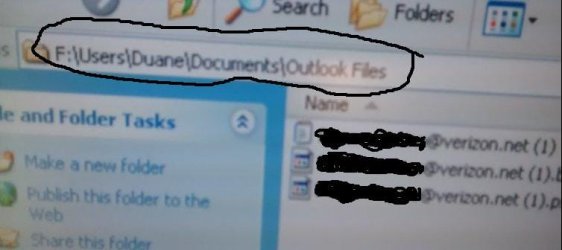
c:\users\username\Documents\Outlook Files


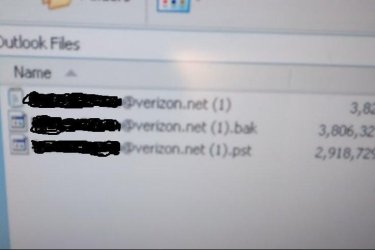
and found 3 files (see pict)..Can any of these be imported into Office/Outlook to restore his e-mails? Your earliest response is welcome as I am shipping his hd back today...THANKS!
 

Attachments

  • Picture0001a.JPG
    Picture0001a.JPG
    20.6 KB · Views: 11
  • Picture0002a.JPG
    Picture0002a.JPG
    13.8 KB · Views: 13
  • Picture0003a.JPG
    Picture0003a.JPG
    26.4 KB · Views: 0

My Computer My Computer

Computer type
PC/Desktop
Computer Manufacturer/Model Number
dell desktop
OS
windows 7 home premium 32 bit
CPU
3.2ghz
Motherboard
u/k
Memory
2gigs
Graphics Card(s)
stock
Hard Drives
(1) 250gb SATA
Browser
Firefox
Can any of these be imported into Office/Outlook to restore his e-mails?


No need to import. You can have both the current PST and the old one open at the same time!

See previous reply on how to do it.
 

My Computer My Computer

OS
Windows 7 Ultimate x64
Sorry about th auto correct by the speak to text. coldfusion should have been confusion.


Great, then you know about Office applications having a menu option to open and close files.

What happens when you open and close the old PST?

**********************

Thanks for the reply,

I shipped the HD back to my relative a few days ago....Regarding the "menu option", I don't use Win 7 or Office/Outlook but, I did read and saw picts of the "menu" you had mentioned.
Import email, contacts, and calendar from an Outlook .pst file - Office Support

In one of the picts I had posted, there are 3 files with the largest being ".bak".....I used a "pst" reader program and was able to view a few mails from i after changing the extension to .pst......

Since it is the largest of the 3 and "possibly" containing more info so-to-speak, could not I change the extension from .bak to ".pst" and copy and paste that into whatever folder it belongs in (once I find it again)?....Am I mistaken in assuming that I can select a setting deleting any duplicates?

Lastly, is there an "un-do" I can select if this craps out - meaning can I delete the copy and pasted .pst file to return outlook to "before I started"?
 

My Computer My Computer

Computer type
PC/Desktop
Computer Manufacturer/Model Number
dell desktop
OS
windows 7 home premium 32 bit
CPU
3.2ghz
Motherboard
u/k
Memory
2gigs
Graphics Card(s)
stock
Hard Drives
(1) 250gb SATA
Browser
Firefox
If yoo have Outlook installed, you don't need a separate PST reader. Outlook is the best tool to use to open and view a PST file.

A PST file is a type of database. TheA large fiel size does oit inidcate is has ore data. The file may not have been compacted after lots of items were deleted. The PST File does not automatically shrink in size after items are deleted. It will automatically grow in size, usually in "chunks".


It is possible to move or copy items between to Opened PST files. Ycan also drag items between PST files

I highly recommend making a backup of the PST files before you start moving or copying items.
 

My Computer My Computer

OS
Windows 7 Ultimate x64
Thanks for the reply!

If yoo have Outlook installed, you don't need a separate PST reader. Outlook is the best tool to use to open and view a PST file.
Yes, I know that...my question was more-so that, if/can I drag and drop another pst file where one already exits and, will they yield the combination of the 2 pst files?...Also, having saved the first one to a flash drive, if I do not like the outcome, can I delete the pst file to revert back to before I started?

A PST file is a type of database.
Yes, I am aware

TheA large fiel size does oit inidcate is has ore data.
huh? (I changed the bak extension to pst and it read fine but, do not know if it will "work" fine if installed).

The file may not have been compacted after lots of items were deleted. The PST File does not automatically shrink in size after items are deleted. It will automatically grow in size, usually in "chunks".
I see but, if "merged" will it restore data, settings, etc?

It is possible to move or copy items between to Opened PST files. Ycan also drag items between PST files
ok

I highly recommend making a backup of the PST files before you start moving or copying items
Already have
 
Last edited:

My Computer My Computer

Computer type
PC/Desktop
Computer Manufacturer/Model Number
dell desktop
OS
windows 7 home premium 32 bit
CPU
3.2ghz
Motherboard
u/k
Memory
2gigs
Graphics Card(s)
stock
Hard Drives
(1) 250gb SATA
Browser
Firefox
I think you may be over complicating and/or overthinking this.

Outlook is not that complicated to set up..

Not all Outlook data and settings are stored in the PST file. There are also files in the user profile folders. There are also Windows registry settings.

If you have a backup, you can also restore.

It would probably be best for you to set up a test environment and try it so you can learn how it works.

You may find the answers you want at Outlook and Exchange Solutions Center or HowTo-Outlook - Support for Microsoft Outlook, Exchange and Office 365
.
 

My Computer My Computer

OS
Windows 7 Ultimate x64
Thanks for the reply!

I think you may be over complicating and/or overthinking this.
Could very well be since I have never used this - I only have used Outlook Express or sign on and use web mail.

Outlook is not that complicated to set up..
Yeah, it is when you have NEVER use it!...grin:-)

Not all Outlook data and settings are stored in the PST file. There are also files in the user profile folders. There are also Windows registry settings.
Well I agree in part...Outlook-Office is installed and I have 2 or 3 back-ups saved on an external flash drive....The upgraded hard drive (Win 7 to Win Ultimate) was shipped back to my brother about a week ago...

I have a clone copy of his corrupted (Win 7) drive here.....He has downloaded hundreds of mails, all in the "IN BOX" but, nothing shows in the "SENT BOX" since he downloaded from his ISP server....I have made a clone copy of his "new" Win Ultimate" hard drive on an external 1TB hard drive and shipped it all back at one time....

Let me ask this this way -
1)...What saved file(s) do I tell him to copy and paste
or do the import method in Outlook (pst or bak - bak seems more recent and larger if memory serves) into the file folder containing his "current pst file"?

2)...Will Outlook-Office be able to load or recognize BOTH pst files in the same folder, loading his mail and contacts, etc.?

3)...If something gets screwed up, HOW do I return Outlook back to what it was before the attempted "import?..Nobody has told me this or, if they did, I missed it.

If you have a backup, you can also restore.
He has a back up of his pst that I rescued from his corrupt hard drive.

It would probably be best for you to set up a test environment and try it so you can learn how it works.
Too late for that since the drive is 800 miles away.

You may find the answers you want at Outlook and Exchange Solutions Center or HowTo-Outlook - Support for Microsoft Outlook, Exchange and Office 365
 
Last edited:

My Computer My Computer

Computer type
PC/Desktop
Computer Manufacturer/Model Number
dell desktop
OS
windows 7 home premium 32 bit
CPU
3.2ghz
Motherboard
u/k
Memory
2gigs
Graphics Card(s)
stock
Hard Drives
(1) 250gb SATA
Browser
Firefox
Ran into an issue....

When accessing my brothers' computer via net, followed the steps as described in the following link: YouTube

- and after locating the saved pst file (just that, and not the larger .bak file), clicked "next" to continue in the process but, was stopped immediately saying that I did not have permission to proceed...Where do I go from here?

1)...opened outlook
2)...located saved pst file
3)...launched outlook (2013)
4)...hit "file"
5)...selected "open"
6)...selected "import"
7)...selected "import from another file or program"
8)...clicked "next"
9)...selected outlook data file pst
10)...clicked "next"
11)...clicked "browse" and located saved pst file
12)...selected "do not import duplicates".
13)...CLICKED "NEXT" -

- AT THIS POINT I RECEIVED THE "I DON'T HAVE PERMISSIONS" MESSAGE AND WAS STOPPED COLD.

I also attempted to drag and drop the saved pst file into the Outlook folder where there is an existing pst file and nothing happened (looked in the "sent" Outlook mail and nothing was there), even after re-starting Outlook.


My Computer My Computer

Computer type
PC/Desktop
Computer Manufacturer/Model Number
dell desktop
OS
windows 7 home premium 32 bit
CPU
3.2ghz
Motherboard
u/k
Memory
2gigs
Graphics Card(s)
stock
Hard Drives
(1) 250gb SATA
Browser
Firefox
Back
Top