Advice needed on upgrading to Windows 10 Home.

If we stay on one thread it is easier for both of us. :-)
I get notification burnout. LOL

That works for me. Apparently you are a night owl as well. I have been napping in my recliner for a bit. My cat woke me up.

I have two processes going at once. The disc backup and the Windows 10 media is being downloaded or created. Not sure which. It has my laptop running a bit slow at the moment.

Well, my wife just walked in and asked if I had gotten any sleep. She is starting her work day. I'm retired so I can sleep when this is done.

Once the Windows 10 media is done with downloading, what is next? I guess I should wait for the backup to finish before I do anything else at that point.
 

My Computer My Computer

At a glance

Windows 7 64bit SP1Intel Core i5-24450M CPU @ 2.50GHz8.0 Gb?
Computer type
Laptop
Computer Manufacturer/Model Number
Dell Inspiron 17
OS
Windows 7 64bit SP1
CPU
Intel Core i5-24450M CPU @ 2.50GHz
Motherboard
?
Memory
8.0 Gb
Graphics Card(s)
?
Hard Drives
500 Gb
Internet Speed
74 to 110mps
Antivirus
Avast Premium
Browser
Opera
Once the Windows 10 media is done with downloading, what is next?


Did you read the Ten Forums tutorial I linked to in post #2 and that is linked to at the top of every Seven Forums page? It's written by Brink to be the easiest possible way to upgrade direct from W7 to W10 and requires no ISO to be created or burned to usb/DVD, nor does it require any key. Trying to create the media is just making life unnecessarily difficult for yourself.


Upgrade to Windows 10 from Windows 7 for Free | Tutorials
 

My Computers My Computers

  • At a glance

    Windows 7 Home Premium x64AMD V1204GB
    Computer type
    Laptop
    Computer Manufacturer/Model Number
    Toshiba satellite C650D
    OS
    Windows 7 Home Premium x64
    CPU
    AMD V120
    Memory
    4GB
    Internet Speed
    150 Mbps
    Antivirus
    MSE
    Browser
    IE11, Edge, Firefox
    Other Info
    I also have W7 Pro on my System Two, and several W7 Hyper-V VMs. My other machines run Windows 10/11. Their specs are in my Ten Forums & Eleven Forum profiles.
  • At a glance

    Windows 7 Pro x64Intel i5-3320M8 GB
    Computer type
    Laptop
    System Manufacturer/Model Number
    Lenovo Thinkpad T430
    OS
    Windows 7 Pro x64
    CPU
    Intel i5-3320M
    Memory
    8 GB
    Hard Drives
    250GB Samsung SSD 860 EVO
    Antivirus
    MSE
Hi Bree,

Yes, I did read the tutorial and I just read over it again. What is the difference between having the ISO burned to a disc and using it as
to installing Windows 10 without it? I thought that the ISO was part of the installation. Anyway, I did download it and burn it to a DVD
and I was looking at the files on the disc to see what is there and I see "setup.exe" in the list. Is this the Windows 10 installation application? I have been up all night working on this with Snick's help and guidance. At this point I guess that I am ready to do the installation procedure. Let me know if I have missed anything. Thanks for your help as well. I am most grateful to everyone who has
pitched in to help me through this.
 

My Computer My Computer

At a glance

Windows 7 64bit SP1Intel Core i5-24450M CPU @ 2.50GHz8.0 Gb?
Computer type
Laptop
Computer Manufacturer/Model Number
Dell Inspiron 17
OS
Windows 7 64bit SP1
CPU
Intel Core i5-24450M CPU @ 2.50GHz
Motherboard
?
Memory
8.0 Gb
Graphics Card(s)
?
Hard Drives
500 Gb
Internet Speed
74 to 110mps
Antivirus
Avast Premium
Browser
Opera
Hi Bree,

Yes, I did read the tutorial and I just read over it again. What is the difference between having the ISO burned to a disc and using it as to installing Windows 10 without it? I thought that the ISO was part of the installation. Anyway, I did download it and burn it to a DVD and I was looking at the files on the disc to see what is there and I see "setup.exe" in the list. Is this the Windows 10 installation application? I have been up all night working on this with Snick's help and guidance. At this point I guess that I am ready to do the installation procedure. Let me know if I have missed anything. Thanks for your help as well. I am most grateful to everyone who has
pitched in to help me through this.

The MCT can create an ISO, or it can 'upgrade this PC now'. The upgrade now option doesn't require mounting or burning an ISO, so is the easier option for a W7 user.

But you have made the DVD now, so you can use that instead - the end result will be the same. Yes, from within Windows run the Setup.exe you'll see on the root of the DVD to start the upgrade.

See this Ten Forums tutorial for more details, starting at Step 6. In particular, note the instruction at Step 11 to turn off checking for updates and drivers during the upgrade. This can avoid some potential upgrade problems. W10 can check for updates once it has upgraded successfully, so you're not going to miss out on anything.

Upgrade to Windows 10 | Tutorials
 

My Computers My Computers

  • At a glance

    Windows 7 Home Premium x64AMD V1204GB
    Computer type
    Laptop
    Computer Manufacturer/Model Number
    Toshiba satellite C650D
    OS
    Windows 7 Home Premium x64
    CPU
    AMD V120
    Memory
    4GB
    Internet Speed
    150 Mbps
    Antivirus
    MSE
    Browser
    IE11, Edge, Firefox
    Other Info
    I also have W7 Pro on my System Two, and several W7 Hyper-V VMs. My other machines run Windows 10/11. Their specs are in my Ten Forums & Eleven Forum profiles.
  • At a glance

    Windows 7 Pro x64Intel i5-3320M8 GB
    Computer type
    Laptop
    System Manufacturer/Model Number
    Lenovo Thinkpad T430
    OS
    Windows 7 Pro x64
    CPU
    Intel i5-3320M
    Memory
    8 GB
    Hard Drives
    250GB Samsung SSD 860 EVO
    Antivirus
    MSE
Using and ISO file (ISO is a compressed/zipped file) or running it from USB or DVD all work. You always have windows 7 running, then find setup.exe and run it for in place upgrade. If you just run the USB or DVD you are performing a clean/fresh install which includes formatting the drive which is not what you want to do.
If you use the media creation tool, you can choose the first option and follow the prompts. It will in place upgrade from Windows 7 to Windows 10 and you will have a backup file Windows.old on your C: drive.
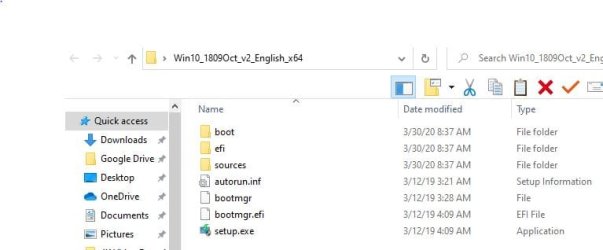
If you use the ISO created by the media creation tool, you have to unzip it with 7zip. Here's a snippet of the folder unzipping creates.

Capture.JPG
 

My Computer My Computer

At a glance

Win 10 x64, Linux Lite, Win 7 x64, BlackArch,...
Computer type
PC/Desktop
Computer Manufacturer/Model Number
HP Desktop & Compaq Laptop
OS
Win 10 x64, Linux Lite, Win 7 x64, BlackArch, & Kali
Hard Drives
Samsung 850 Pro 256Gb,
Hitachi HDD 1Tb,
Crucial MX SSD 250Gb
Segate 3Tb USB 3.0 Ext. Backup HDD
Internet Speed
150Mbps dn, 20Mbps up
Antivirus
Avast Free, Malwarebytes Anti-Exploit & Anti-Ransomware
Browser
Firefox, Chrome, Opera, & VPN
So, if I am understanding you correctly, if I run the setup.exe on the disc I burned which has the exact same files and folders you show in that example plus a folder labeled "Support", that will perform a clean install and wipe my drive. Is that correct?

Then what I need to do is run the Media creation tool and select "Upgrade this PC now" to install Windows 10 and leave all of my files intact. Is that correct?
 

My Computer My Computer

At a glance

Windows 7 64bit SP1Intel Core i5-24450M CPU @ 2.50GHz8.0 Gb?
Computer type
Laptop
Computer Manufacturer/Model Number
Dell Inspiron 17
OS
Windows 7 64bit SP1
CPU
Intel Core i5-24450M CPU @ 2.50GHz
Motherboard
?
Memory
8.0 Gb
Graphics Card(s)
?
Hard Drives
500 Gb
Internet Speed
74 to 110mps
Antivirus
Avast Premium
Browser
Opera
So, if I am understanding you correctly, if I run the setup.exe on the disc I burned which has the exact same files and folders you show in that example plus a folder labeled "Support", that will perform a clean install and wipe my drive. Is that correct?


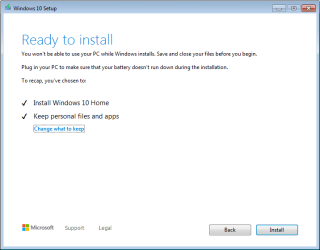
No, it should perform an upgrade, retaining your installed software and user files. This is what you should see a few steps into the process. At any point up to and including this screen you can cancel and back out without making any changes. Clicking Install will begin the upgrade.
 

Attachments

  • W7 to W10 upgrade.PNG
    W7 to W10 upgrade.PNG
    8.9 KB · Views: 8

My Computers My Computers

  • At a glance

    Windows 7 Home Premium x64AMD V1204GB
    Computer type
    Laptop
    Computer Manufacturer/Model Number
    Toshiba satellite C650D
    OS
    Windows 7 Home Premium x64
    CPU
    AMD V120
    Memory
    4GB
    Internet Speed
    150 Mbps
    Antivirus
    MSE
    Browser
    IE11, Edge, Firefox
    Other Info
    I also have W7 Pro on my System Two, and several W7 Hyper-V VMs. My other machines run Windows 10/11. Their specs are in my Ten Forums & Eleven Forum profiles.
  • At a glance

    Windows 7 Pro x64Intel i5-3320M8 GB
    Computer type
    Laptop
    System Manufacturer/Model Number
    Lenovo Thinkpad T430
    OS
    Windows 7 Pro x64
    CPU
    Intel i5-3320M
    Memory
    8 GB
    Hard Drives
    250GB Samsung SSD 860 EVO
    Antivirus
    MSE
Hey guys, I'm sending this email from my phone. The installation is underway and going smoothly thanks to you all. I will report back with an update when it is complete. Have a great day! ����
 

My Computer My Computer

At a glance

Windows 7 64bit SP1Intel Core i5-24450M CPU @ 2.50GHz8.0 Gb?
Computer type
Laptop
Computer Manufacturer/Model Number
Dell Inspiron 17
OS
Windows 7 64bit SP1
CPU
Intel Core i5-24450M CPU @ 2.50GHz
Motherboard
?
Memory
8.0 Gb
Graphics Card(s)
?
Hard Drives
500 Gb
Internet Speed
74 to 110mps
Antivirus
Avast Premium
Browser
Opera
Hey guys, I'm sending this email from my phone. The installation is underway and going smoothly thanks to you all. I will report back with an update when it is complete. Have a great day! ����


:thumbsup:


And don't forget, should you need more support Ten Forums is a sister-site and many of us are registered over there too.
 

My Computers My Computers

  • At a glance

    Windows 7 Home Premium x64AMD V1204GB
    Computer type
    Laptop
    Computer Manufacturer/Model Number
    Toshiba satellite C650D
    OS
    Windows 7 Home Premium x64
    CPU
    AMD V120
    Memory
    4GB
    Internet Speed
    150 Mbps
    Antivirus
    MSE
    Browser
    IE11, Edge, Firefox
    Other Info
    I also have W7 Pro on my System Two, and several W7 Hyper-V VMs. My other machines run Windows 10/11. Their specs are in my Ten Forums & Eleven Forum profiles.
  • At a glance

    Windows 7 Pro x64Intel i5-3320M8 GB
    Computer type
    Laptop
    System Manufacturer/Model Number
    Lenovo Thinkpad T430
    OS
    Windows 7 Pro x64
    CPU
    Intel i5-3320M
    Memory
    8 GB
    Hard Drives
    250GB Samsung SSD 860 EVO
    Antivirus
    MSE

My Computer My Computer

At a glance

Win 10 x64, Linux Lite, Win 7 x64, BlackArch,...
Computer type
PC/Desktop
Computer Manufacturer/Model Number
HP Desktop & Compaq Laptop
OS
Win 10 x64, Linux Lite, Win 7 x64, BlackArch, & Kali
Hard Drives
Samsung 850 Pro 256Gb,
Hitachi HDD 1Tb,
Crucial MX SSD 250Gb
Segate 3Tb USB 3.0 Ext. Backup HDD
Internet Speed
150Mbps dn, 20Mbps up
Antivirus
Avast Free, Malwarebytes Anti-Exploit & Anti-Ransomware
Browser
Firefox, Chrome, Opera, & VPN
TA DAAAAAA!!!!:thumbsup: It is done and it looks good! I'm so relieved that it seems that most of my programs are going to work although I have only tried a few so far but windows explorer is awesome now! This is my first time seeing Windows 10 but I like what I see so far. I have lots of exploring to do and my printer is connected again. OK, enough celebrating.

Suffice it to say that I am one happy camper right now thanks to you guys. :D I cannot thank you all enough for all of your help and advice. And Snick, I can't believe that we pulled an all nighter on this so a special thanks for your help and time. :thumbsup:

I am going to the Ten Forums right now to sign up. Thanks Bree for letting me know about that forum. I'm sure that I might have a question or two about Windows 10 very soon.

You guys take care of yourselves and your families and I'll keep in touch.
 

My Computer My Computer

At a glance

Windows 7 64bit SP1Intel Core i5-24450M CPU @ 2.50GHz8.0 Gb?
Computer type
Laptop
Computer Manufacturer/Model Number
Dell Inspiron 17
OS
Windows 7 64bit SP1
CPU
Intel Core i5-24450M CPU @ 2.50GHz
Motherboard
?
Memory
8.0 Gb
Graphics Card(s)
?
Hard Drives
500 Gb
Internet Speed
74 to 110mps
Antivirus
Avast Premium
Browser
Opera
TA DAAAAAA!!!!:thumbsup: It is done and it looks good! I'm so relieved that it seems that most of my programs are going to work although I have only tried a few so far but windows explorer is awesome now!


It's been renamed as File Explorer in W10. The rest of you programs should work, Setup would have asked you to uninstall anything that was incompatible.
 

My Computers My Computers

  • At a glance

    Windows 7 Home Premium x64AMD V1204GB
    Computer type
    Laptop
    Computer Manufacturer/Model Number
    Toshiba satellite C650D
    OS
    Windows 7 Home Premium x64
    CPU
    AMD V120
    Memory
    4GB
    Internet Speed
    150 Mbps
    Antivirus
    MSE
    Browser
    IE11, Edge, Firefox
    Other Info
    I also have W7 Pro on my System Two, and several W7 Hyper-V VMs. My other machines run Windows 10/11. Their specs are in my Ten Forums & Eleven Forum profiles.
  • At a glance

    Windows 7 Pro x64Intel i5-3320M8 GB
    Computer type
    Laptop
    System Manufacturer/Model Number
    Lenovo Thinkpad T430
    OS
    Windows 7 Pro x64
    CPU
    Intel i5-3320M
    Memory
    8 GB
    Hard Drives
    250GB Samsung SSD 860 EVO
    Antivirus
    MSE
It's been renamed as File Explorer in W10. The rest of you programs should work, Setup would have asked you to uninstall anything that was incompatible.

Thanks, that is good to know. I uninstalled my Avast anti virus before the installation. Should I reinstall it or does W10 have it's own anti virus? Seems that it was mentioned yesterday.
 

My Computer My Computer

At a glance

Windows 7 64bit SP1Intel Core i5-24450M CPU @ 2.50GHz8.0 Gb?
Computer type
Laptop
Computer Manufacturer/Model Number
Dell Inspiron 17
OS
Windows 7 64bit SP1
CPU
Intel Core i5-24450M CPU @ 2.50GHz
Motherboard
?
Memory
8.0 Gb
Graphics Card(s)
?
Hard Drives
500 Gb
Internet Speed
74 to 110mps
Antivirus
Avast Premium
Browser
Opera
Thanks, that is good to know. I uninstalled my Avast anti virus before the installation. Should I reinstall it or does W10 have it's own anti virus? Seems that it was mentioned yesterday.

It was mentioned because having a 3rd-party AV installed can sometimes cause an upgrade to fail.

W10's built-in Windows Security (aka Defender) is all I use, it's rated as a Top Product by AV-Test.

Test antivirus software for Windows 10 - February 2020 | AV-TEST
 

My Computers My Computers

  • At a glance

    Windows 7 Home Premium x64AMD V1204GB
    Computer type
    Laptop
    Computer Manufacturer/Model Number
    Toshiba satellite C650D
    OS
    Windows 7 Home Premium x64
    CPU
    AMD V120
    Memory
    4GB
    Internet Speed
    150 Mbps
    Antivirus
    MSE
    Browser
    IE11, Edge, Firefox
    Other Info
    I also have W7 Pro on my System Two, and several W7 Hyper-V VMs. My other machines run Windows 10/11. Their specs are in my Ten Forums & Eleven Forum profiles.
  • At a glance

    Windows 7 Pro x64Intel i5-3320M8 GB
    Computer type
    Laptop
    System Manufacturer/Model Number
    Lenovo Thinkpad T430
    OS
    Windows 7 Pro x64
    CPU
    Intel i5-3320M
    Memory
    8 GB
    Hard Drives
    250GB Samsung SSD 860 EVO
    Antivirus
    MSE
Thanks for the information. My Avast Premium runs out in June anyway and it drives me crazy with popups wanting me to upgrade it and add more features.
 

My Computer My Computer

At a glance

Windows 7 64bit SP1Intel Core i5-24450M CPU @ 2.50GHz8.0 Gb?
Computer type
Laptop
Computer Manufacturer/Model Number
Dell Inspiron 17
OS
Windows 7 64bit SP1
CPU
Intel Core i5-24450M CPU @ 2.50GHz
Motherboard
?
Memory
8.0 Gb
Graphics Card(s)
?
Hard Drives
500 Gb
Internet Speed
74 to 110mps
Antivirus
Avast Premium
Browser
Opera
Back
Top