Creating bootable Win7 file with installed software and settings

trolltk

New member
Local time
5:49 AM
Messages
4
Hello everybody.
I want to install fresh copy of Windows 7 x64.
Then I want to install all updates, drivers and programs required and the ones I use (office, av, chrome etc.)
Then I want to configure system the way i like it.
And here's my question:
After I have done all of this, is it possible to create a bootable file that i can use on my flashdrive with Windows and all the programs, updates and settings I have just done?
 

My Computer

Computer type
PC/Desktop
OS
Windows 7 x64
CPU
i5-4680k
Motherboard
AsRock Z97M Pro4
Memory
16GB DDR3
Graphics Card(s)
GTX 970
Hard Drives
SSD Sandisk 256GB
HDD Seagate 1TB
Antivirus
MSE
Browser
Chrome
Hi trolltk,

Welcome to SevenForums!

And here's my question:
After I have done all of this, is it possible to create a bootable file that I can use on my flashdrive with Windows and all the programs, updates and settings I have just done?

You can create a system image [which isn't bootable]. This way, if things go wrong in the future, you will be able to restore your OS back to the exact same state that includes the updates, drivers, programs required and the system configurations in a very short time. There are two imaging programs which are very popular among members here, the first is AOMEI Backupper Standard [FREE], and the second is Macrium Reflect [FREE].

I hope this helps!
 

My Computer

Computer type
Laptop
Computer Manufacturer/Model Number
Fujitsu LIFEBOOK
OS
Win 7 HP SP1 64-bit Vista HB SP2 32-bit Linux Mint 18.3
CPU
Intel(R) Pentium(R) CPU P6200 @ 2.13GHz
Motherboard
FUJITSU FJNBB06
Memory
4.00 GB
Graphics Card(s)
Intel(R) Graphics Media Accelerator HD
Sound Card
[1] Realtek High Definition Audio [2] Intel(R) Display Audio
Screen Resolution
1366 x 768 x 32 bits (4294967296 colors) @ 59 Hz
Hard Drives
TOSHIBA MK5076GSX
Antivirus
AVG FREE
Thanks, will it be bootable thou?
Sorry didn't notice [which isn't bootable]
 

My Computer

Computer type
PC/Desktop
OS
Windows 7 x64
CPU
i5-4680k
Motherboard
AsRock Z97M Pro4
Memory
16GB DDR3
Graphics Card(s)
GTX 970
Hard Drives
SSD Sandisk 256GB
HDD Seagate 1TB
Antivirus
MSE
Browser
Chrome

My Computer

Computer type
Laptop
Computer Manufacturer/Model Number
Fujitsu LIFEBOOK
OS
Win 7 HP SP1 64-bit Vista HB SP2 32-bit Linux Mint 18.3
CPU
Intel(R) Pentium(R) CPU P6200 @ 2.13GHz
Motherboard
FUJITSU FJNBB06
Memory
4.00 GB
Graphics Card(s)
Intel(R) Graphics Media Accelerator HD
Sound Card
[1] Realtek High Definition Audio [2] Intel(R) Display Audio
Screen Resolution
1366 x 768 x 32 bits (4294967296 colors) @ 59 Hz
Hard Drives
TOSHIBA MK5076GSX
Antivirus
AVG FREE
trolltk


Yes, as Paul Black commented, after you have organised your installation as you wish (all security updates, programs, tweaks, passwords etc blah and so on), make an image file of your disk with either - or preferably both - Macrium or Aomei (both freeware). You may also use the inbuilt Windows imaging program.


None of those imaging programs generate a bootable image file, but all of them allow you to make a bootable CD or USB installation that you use to restore your disk from the image file previously created. This is, I believe, the most efficient and cheapest method of guaranteeing full disk restore.


I use both Macrium and Aomei imaging twice a month, also Windows imaging. I have had to restore full disk twice in 18 months. I used Macrium as the 1st port of call both times and it worked flawlessly. I haven't needed to try Aomei although I have no reason to think it may not work. The Windows imaging is reserved as "last chance saloon" becase there are many reports on it failing at critical times.


So your initial question has an answer - freeware as well.
 

My Computer

Computer type
Laptop
Computer Manufacturer/Model Number
HP 250 G7
OS
Windows 7 Pro x64
CPU
Intel i5-8265U
Motherboard
Intel Coffee Lake
Memory
8gb
Graphics Card(s)
Intel Iris Plus 655
Sound Card
Realtek HDA
Monitor(s) Displays
Generic
Screen Resolution
1366 x 768
Hard Drives
Crucial P5 NVMe 1Tb internal
WD's 4Tb, 3Tb, 2 x 2Tb external
Mouse
Logi wireless
Internet Speed
45 Mbps
Antivirus
AVG
Browser
Firefox 88, Pale Moon 29, Brave 129
Other Info
Combination of i5-8265U with Crucial P5 achieves Crystal Bench scores > 5000

Iris Plus GPU (Whiskey Lake) driver from BioStar

HP 250 G7 is a budget machine
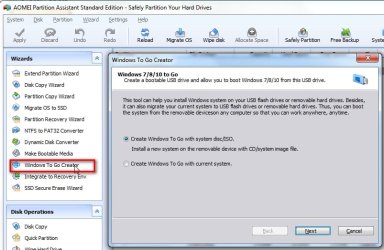
Aomei partition assistant can create windows to go. Only worth trying if you have usb 3. USB2 is much too slow

AOMEI-WINDOWS-TO-GO.jpg
 

My Computers

System One System Two

  • Computer type
    PC/Desktop
    OS
    7 X64
    CPU
    i5 8400
    Motherboard
    gigabyte b365m ds3h
    Memory
    2x8gb 3200mhz
    Hard Drives
    various
    PSU
    pure power 11 400w cm
    Case
    Coolermaster
    Cooling
    cryorig m9i
  • Computer type
    PC/Desktop
    OS
    7x64
    CPU
    g5400
    Motherboard
    ga b365m ds3h
    Memory
    8gb ddr4 2400
    PSU
    xfx pro 450w
SIW2


Yes, except that function is not operable in the freeware version.


Nonetheless, it is an option, I agree.
 

My Computer

Computer type
Laptop
Computer Manufacturer/Model Number
HP 250 G7
OS
Windows 7 Pro x64
CPU
Intel i5-8265U
Motherboard
Intel Coffee Lake
Memory
8gb
Graphics Card(s)
Intel Iris Plus 655
Sound Card
Realtek HDA
Monitor(s) Displays
Generic
Screen Resolution
1366 x 768
Hard Drives
Crucial P5 NVMe 1Tb internal
WD's 4Tb, 3Tb, 2 x 2Tb external
Mouse
Logi wireless
Internet Speed
45 Mbps
Antivirus
AVG
Browser
Firefox 88, Pale Moon 29, Brave 129
Other Info
Combination of i5-8265U with Crucial P5 achieves Crystal Bench scores > 5000

Iris Plus GPU (Whiskey Lake) driver from BioStar

HP 250 G7 is a budget machine
Finally I've decided to use AOMEI Backupper Standard and after installation and configuration I've created 14GB backup from 41GB partition. Thanks for help.
 

My Computer

Computer type
PC/Desktop
OS
Windows 7 x64
CPU
i5-4680k
Motherboard
AsRock Z97M Pro4
Memory
16GB DDR3
Graphics Card(s)
GTX 970
Hard Drives
SSD Sandisk 256GB
HDD Seagate 1TB
Antivirus
MSE
Browser
Chrome
Hi trolltk,

Finally I've decided to use AOMEI Backupper Standard and after installation and configuration I've created 14GB backup from 41GB partition. Thanks for help.

Thanks for sharing the solution, it will help other people visiting this thread that have the same problem/question.
Thank you! :thumbsup:
 

My Computer

Computer type
Laptop
Computer Manufacturer/Model Number
Fujitsu LIFEBOOK
OS
Win 7 HP SP1 64-bit Vista HB SP2 32-bit Linux Mint 18.3
CPU
Intel(R) Pentium(R) CPU P6200 @ 2.13GHz
Motherboard
FUJITSU FJNBB06
Memory
4.00 GB
Graphics Card(s)
Intel(R) Graphics Media Accelerator HD
Sound Card
[1] Realtek High Definition Audio [2] Intel(R) Display Audio
Screen Resolution
1366 x 768 x 32 bits (4294967296 colors) @ 59 Hz
Hard Drives
TOSHIBA MK5076GSX
Antivirus
AVG FREE
Finally I've decided to use AOMEI Backupper Standard and after installation and configuration I've created 14GB backup from 41GB partition. Thanks for help.

Is that 14 GB backup a bootable USB backup?

Does the free version of AOMEI Backupper Standard include all the options required for creating the usb flashdrive backup?
 

My Computer

Computer type
Laptop
Computer Manufacturer/Model Number
Acer Aspire E1-532
OS
Microsoft Windows 7 Home Premium 64-bit 7601 Multiprocessor Free Service Pack 1
CPU
Intel(R) Celeron(R) 2957U @ 1.40GHz
Motherboard
Acer EA50_HW
Memory
8.00 GB
Graphics Card(s)
Intel(R) HD Graphics
Sound Card
High Definition Audio Device
Screen Resolution
1366 x 768 x 32 bits (4294967296 colors) @ 59 Hz
Hard Drives
TOSHIBA MQ01ABD100 ATA Device
I have made recovery recently. I was able to create bootable usb drive, but it only used basic files to start Aomei, the system backup file was left on hard drive. While booting you had to choose backup file location. I had that file on ssd so recovery of entire partition took about 15 minutes.
 

My Computer

Computer type
PC/Desktop
OS
Windows 7 x64
CPU
i5-4680k
Motherboard
AsRock Z97M Pro4
Memory
16GB DDR3
Graphics Card(s)
GTX 970
Hard Drives
SSD Sandisk 256GB
HDD Seagate 1TB
Antivirus
MSE
Browser
Chrome
Does the free version of AOMEI Backupper Standard include all the options required for creating the usb flashdrive backup?


Yes.The usual method is to create bootable recovery media ( typically a usb stick). That contains the program needed to restore the image.

The image file itself can be stored just about anywhere. On an external hard disk, or on a separate internal hard disk, or in the cloud, or on a usb stick, etc.

If the bootable usb recovery stick is big enough, you could store the image file on there.
 

My Computers

System One System Two

  • Computer type
    PC/Desktop
    OS
    7 X64
    CPU
    i5 8400
    Motherboard
    gigabyte b365m ds3h
    Memory
    2x8gb 3200mhz
    Hard Drives
    various
    PSU
    pure power 11 400w cm
    Case
    Coolermaster
    Cooling
    cryorig m9i
  • Computer type
    PC/Desktop
    OS
    7x64
    CPU
    g5400
    Motherboard
    ga b365m ds3h
    Memory
    8gb ddr4 2400
    PSU
    xfx pro 450w
As already written, you can make a (Aomei or Macrium Reflect) boot able drive (CD or USB Flash). With it you can create an image or restore from an image you created earlier. With a USB drive you can have both (boot able and image) on same drive.
 

My Computers

System One System Two

  • Computer type
    PC/Desktop
    Computer Manufacturer/Model Number
    custom build
    OS
    Windows 7 HP 64
    CPU
    i5 6600K - 800MHz to 4200MHz
    Motherboard
    GA-Z170-HD3P
    Memory
    4+4G GSkill DDR4 3000
    Graphics Card(s)
    IG - Intel 530
    Monitor(s) Displays
    Samsung 226BW
    Screen Resolution
    1680x1050
    Hard Drives
    (1) -1 SM951 – 128GB M.2 AHCI PCIe SSD drive for Windows 7 and Lubuntu
    (2) -1 WD SATA 3 - 1T for Data
    (3) -1 WD SATA 3 - 1T for backup
    PSU
    Thermaltake 450W TR2 gold
    Keyboard
    Old and good Chicony mechanical keyboard
    Mouse
    Logitech mX performance - 9 buttons (had to disable some)
    Internet Speed
    500Mb/s
    Browser
    Firefox 64
    Other Info
    TinyWall firewall
  • Computer type
    Laptop
    System Manufacturer/Model Number
    Asus Q550LF
    OS
    Windows 7 Pro
    CPU
    i7-4500U 800MHz to 3.0GHz
    Motherboard
    Asus Q550LF
    Memory
    (4+4)G DDR3 1600
    Graphics Card(s)
    IG intel 4400 + NVIDIA GeForce GT 745M
    Sound Card
    Realtek
    Monitor(s) Displays
    LG Display LP156WF4-SPH1
    Screen Resolution
    1920 x 1080
    Hard Drives
    BX500 120G SSD for Windows and programs +
    1T HDD for data
    Internet Speed
    500 Mb/s
    Browser
    Firefox
    Other Info
    TinyWall firewall
Aomei partition assistant can create windows to go. Only worth trying if you have usb 3. USB2 is much too slow

USB2 this is greatly compatible with old and new motherboards.
But I will not stop anyone about exploring options that his hardware possibly it can support them.

I am using so far Ghost this never failed in my hands.
 

My Computer

Computer type
PC/Desktop
Computer Manufacturer/Model Number
custom build
OS
Win 7 Professional x64 UK (Retail) SP1 & SP2
CPU
Q6600
Motherboard
ASUS P5QC
Memory
4GB DDR3
Graphics Card(s)
HD5770
Sound Card
X-Fi Extreme Audio
Monitor(s) Displays
DELL 23"
Hard Drives
RAID1 - WD RAPTOR
PSU
750W
Cooling
Prolimatech - ARMAGEDON
Browser
Firefox
Back
Top