
Solved Can't read product key

FuturDreamz

Spacemonaut
Guru
Local time
5:01 AM
Messages
1,660
Location
Lethbridge, AB
I bought a used Thinkpad X1 Carbon 3rd gen that had the SSD removed. I got one installed but I can't seem to get Windows reinstalled. I wanted to reinstall the original OS so I could do the free upgrade to windows 10, I thought it was Windows 8 and I could use the bios key but the sticker is for windows 7 and I keep entering it but I seem to have a letter wrong or maybe it's the wrong version. what can i do to troubleshoot? 99% of the key is legible and I'm pretty sure it's for windows 7 pro.


Is it okay if i post a photo here of the coa? I tried using the microsoft downlaoder website but it keeps getting em an error message and it doesn't work with the free keys I found online to use on that website


thanks
 

My Computer

Computer type
PC/Desktop
Computer Manufacturer/Model Number
Apple 17" iMac MA199LL (Early 2006)
OS
Windows 8 Pro (32-bit)
CPU
1.83GHz Intel Core Duo
Memory
2GB 667MHz DDR2 SDRAM (PC2-5300) (upgrade)
Graphics Card(s)
ATI Radeon X1600 with 128MB GDDR3 memory
Monitor(s) Displays
17-inch TFT active-matrix LCD, millions of colors
Screen Resolution
1440 x 900
Hard Drives
Hitachi 320GB HDT721032SLA360 7200RPM SATA II (upgrade)
Keyboard
Microsoft Wired Keyboard 600
Mouse
Microsoft Basic Optical Mouse v2.0
Internet Speed
4 Mbps
Antivirus
Microsoft Security Essentials
Browser
Google Chrome
Other Info
WEI:
Base Score: 3.9 Processor: 4.4 Memory 4.7
Graphics: 3.9 Gaming Graphics: 4.1 Primary HD: 5.9
If its activated you can simply goto media creation tool hit upgrade now you dont need a key
 

My Computer

Computer type
PC/Desktop
OS
win 8 32 bit
..the sticker is for windows 7 and I keep entering it but I seem to have a letter wrong or maybe it's the wrong version. what can i do to troubleshoot? 99% of the key is legible and I'm pretty sure it's for windows 7 pro.
Download ShowKeyPlus, see Option Two in this tutorial.

Product Key Number for Windows 7 - Find and See

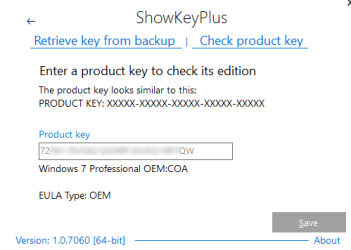
ShowKeyPlus has a 'Check Product Key' function. Type in a product key and it will tell you what version of W7/8/10 it is for, or that it isn't a valid key if you typed it wrong. Try a few variations for the characters you aren't sure of until ShowKeyPlus tells you it is a valid key.

Note that to avoid possible confusion MS do not use the numbers 015 or the letters AEIOULNSZ in any product key.

Is it okay if i post a photo here of the coa?
Not a good idea. If anyone could read it and then used it to activate their Windows install then it would remove any possibility of you being able to activate your Windows.
 

Attachments

  • showkey check product key.png
    showkey check product key.png
    14.7 KB · Views: 15

My Computers

System One System Two

  • Computer type
    Laptop
    Computer Manufacturer/Model Number
    Toshiba satellite C650D
    OS
    Windows 7 Home Premium x64
    CPU
    AMD V120
    Memory
    4GB
    Internet Speed
    150 Mbps
    Antivirus
    MSE
    Browser
    IE11, Edge, Firefox
    Other Info
    I also have W7 Pro on my System Two, and several W7 Hyper-V VMs. My other machines run Windows 10/11. Their specs are in my Ten Forums & Eleven Forum profiles.
  • Computer type
    Laptop
    System Manufacturer/Model Number
    Lenovo Thinkpad T430
    OS
    Windows 7 Pro x64
    CPU
    Intel i5-3320M
    Memory
    8 GB
    Hard Drives
    250GB Samsung SSD 860 EVO
    Other Info
    Antivirus: MSE
I should repeat that there was no reexisinng windows installation as when I got the computer there was no ssd or HDD or whatever installed. I'm preparing to do a fresh install but I don't even know if I got the right OS version
 

My Computer

Computer type
PC/Desktop
Computer Manufacturer/Model Number
Apple 17" iMac MA199LL (Early 2006)
OS
Windows 8 Pro (32-bit)
CPU
1.83GHz Intel Core Duo
Memory
2GB 667MHz DDR2 SDRAM (PC2-5300) (upgrade)
Graphics Card(s)
ATI Radeon X1600 with 128MB GDDR3 memory
Monitor(s) Displays
17-inch TFT active-matrix LCD, millions of colors
Screen Resolution
1440 x 900
Hard Drives
Hitachi 320GB HDT721032SLA360 7200RPM SATA II (upgrade)
Keyboard
Microsoft Wired Keyboard 600
Mouse
Microsoft Basic Optical Mouse v2.0
Internet Speed
4 Mbps
Antivirus
Microsoft Security Essentials
Browser
Google Chrome
Other Info
WEI:
Base Score: 3.9 Processor: 4.4 Memory 4.7
Graphics: 3.9 Gaming Graphics: 4.1 Primary HD: 5.9
hi

the coa key will show the version. home or pro

this was a lappy that had the optional built-in downgrade rights to w7

suspect showkey+ will show both 7/8 product keys


Roy
 

My Computer

Computer type
PC/Desktop
Computer Manufacturer/Model Number
medionl/Aspire 6930G/acer x55a
OS
W7 home premium 32bit/W7HP 64bit/w10 tp insider ring
CPU
E5300 dual core
Motherboard
medion MS7366
Memory
3gb
Graphics Card(s)
Nvidia Geforce 7100 Nforce 630i
Monitor(s) Displays
avixc
Internet Speed
n (isp resticted to 72)
Antivirus
mse/pands
Browser
palemoon
Other Info
Belkin Fd7050 n USB using Railink RT2870 drivers, more upto date
this was a lappy that had the optional built-in downgrade rights to w7

suspect showkey+ will show both 7/8 product keys
In that case there should be a W8 key in the bios as well as the CoA for W7. If so, then @FuturDreamz can clean install Windows 10 and it will find and use the embedded W8 key. There's no need to install W7 at all.

When booting from the W10 install usb you will know that Setup has found the W8 key because it will skip asking for a key, or what edition it should install. It will use the key from the bios to both choose the edition and to activate W10 with a digital licence.
 

My Computers

System One System Two

  • Computer type
    Laptop
    Computer Manufacturer/Model Number
    Toshiba satellite C650D
    OS
    Windows 7 Home Premium x64
    CPU
    AMD V120
    Memory
    4GB
    Internet Speed
    150 Mbps
    Antivirus
    MSE
    Browser
    IE11, Edge, Firefox
    Other Info
    I also have W7 Pro on my System Two, and several W7 Hyper-V VMs. My other machines run Windows 10/11. Their specs are in my Ten Forums & Eleven Forum profiles.
  • Computer type
    Laptop
    System Manufacturer/Model Number
    Lenovo Thinkpad T430
    OS
    Windows 7 Pro x64
    CPU
    Intel i5-3320M
    Memory
    8 GB
    Hard Drives
    250GB Samsung SSD 860 EVO
    Other Info
    Antivirus: MSE
That's what I was guessing, as this generation had windows 8 standard, but I didn't know if it got preinstalled with windows 7 at the factory and if they skip adding the bios key if it did.
 

My Computer

Computer type
PC/Desktop
Computer Manufacturer/Model Number
Apple 17" iMac MA199LL (Early 2006)
OS
Windows 8 Pro (32-bit)
CPU
1.83GHz Intel Core Duo
Memory
2GB 667MHz DDR2 SDRAM (PC2-5300) (upgrade)
Graphics Card(s)
ATI Radeon X1600 with 128MB GDDR3 memory
Monitor(s) Displays
17-inch TFT active-matrix LCD, millions of colors
Screen Resolution
1440 x 900
Hard Drives
Hitachi 320GB HDT721032SLA360 7200RPM SATA II (upgrade)
Keyboard
Microsoft Wired Keyboard 600
Mouse
Microsoft Basic Optical Mouse v2.0
Internet Speed
4 Mbps
Antivirus
Microsoft Security Essentials
Browser
Google Chrome
Other Info
WEI:
Base Score: 3.9 Processor: 4.4 Memory 4.7
Graphics: 3.9 Gaming Graphics: 4.1 Primary HD: 5.9
Hi
Bree

Absolutley correct, the lack of a harddrive, spinner/ssd is irrelevant


Roy
 

My Computer

Computer type
PC/Desktop
Computer Manufacturer/Model Number
medionl/Aspire 6930G/acer x55a
OS
W7 home premium 32bit/W7HP 64bit/w10 tp insider ring
CPU
E5300 dual core
Motherboard
medion MS7366
Memory
3gb
Graphics Card(s)
Nvidia Geforce 7100 Nforce 630i
Monitor(s) Displays
avixc
Internet Speed
n (isp resticted to 72)
Antivirus
mse/pands
Browser
palemoon
Other Info
Belkin Fd7050 n USB using Railink RT2870 drivers, more upto date
That's what I was guessing, as this generation had windows 8 standard, but I didn't know if it got preinstalled with windows 7 at the factory and if they skip adding the bios key if it did.


I'd be very surprised if they had. I have a used Dell built in 2016 that was one of the last to have W7 as a factory installed option before MS stopped allowing it. It had a Dell W7 OEM install on it when I bought it. Looking up its service tag on Dell support shows that it was supplied with W7 pre-installed, but it still had a W10 key in its bios.


You have nothing to loose by trying a clean install. If there is a key it won't ask you for one.
 

My Computers

System One System Two

  • Computer type
    Laptop
    Computer Manufacturer/Model Number
    Toshiba satellite C650D
    OS
    Windows 7 Home Premium x64
    CPU
    AMD V120
    Memory
    4GB
    Internet Speed
    150 Mbps
    Antivirus
    MSE
    Browser
    IE11, Edge, Firefox
    Other Info
    I also have W7 Pro on my System Two, and several W7 Hyper-V VMs. My other machines run Windows 10/11. Their specs are in my Ten Forums & Eleven Forum profiles.
  • Computer type
    Laptop
    System Manufacturer/Model Number
    Lenovo Thinkpad T430
    OS
    Windows 7 Pro x64
    CPU
    Intel i5-3320M
    Memory
    8 GB
    Hard Drives
    250GB Samsung SSD 860 EVO
    Other Info
    Antivirus: MSE
same with my asus, they only show W7 came with W8


Roy
 

My Computer

Computer type
PC/Desktop
Computer Manufacturer/Model Number
medionl/Aspire 6930G/acer x55a
OS
W7 home premium 32bit/W7HP 64bit/w10 tp insider ring
CPU
E5300 dual core
Motherboard
medion MS7366
Memory
3gb
Graphics Card(s)
Nvidia Geforce 7100 Nforce 630i
Monitor(s) Displays
avixc
Internet Speed
n (isp resticted to 72)
Antivirus
mse/pands
Browser
palemoon
Other Info
Belkin Fd7050 n USB using Railink RT2870 drivers, more upto date
well, it would beat spendign a couple hours futzing with windows 7 isos and rufus and that ****ing efi hack you ahve to do for usb media and aparrenlty disabling usb3 mode.


downlaoding windows 10 now, as i planend on using the upgrade tool which downlaod it again anyways
 

My Computer

Computer type
PC/Desktop
Computer Manufacturer/Model Number
Apple 17" iMac MA199LL (Early 2006)
OS
Windows 8 Pro (32-bit)
CPU
1.83GHz Intel Core Duo
Memory
2GB 667MHz DDR2 SDRAM (PC2-5300) (upgrade)
Graphics Card(s)
ATI Radeon X1600 with 128MB GDDR3 memory
Monitor(s) Displays
17-inch TFT active-matrix LCD, millions of colors
Screen Resolution
1440 x 900
Hard Drives
Hitachi 320GB HDT721032SLA360 7200RPM SATA II (upgrade)
Keyboard
Microsoft Wired Keyboard 600
Mouse
Microsoft Basic Optical Mouse v2.0
Internet Speed
4 Mbps
Antivirus
Microsoft Security Essentials
Browser
Google Chrome
Other Info
WEI:
Base Score: 3.9 Processor: 4.4 Memory 4.7
Graphics: 3.9 Gaming Graphics: 4.1 Primary HD: 5.9
well it didn't skip asking for a key or what edition to install... I'll see what happens when it tries to activate ovber the internet but I suspect I have to install windows 8 first then do the upgrade to 10 that registers my ahrdware as having a valid windowsw 10 key
 

My Computer

Computer type
PC/Desktop
Computer Manufacturer/Model Number
Apple 17" iMac MA199LL (Early 2006)
OS
Windows 8 Pro (32-bit)
CPU
1.83GHz Intel Core Duo
Memory
2GB 667MHz DDR2 SDRAM (PC2-5300) (upgrade)
Graphics Card(s)
ATI Radeon X1600 with 128MB GDDR3 memory
Monitor(s) Displays
17-inch TFT active-matrix LCD, millions of colors
Screen Resolution
1440 x 900
Hard Drives
Hitachi 320GB HDT721032SLA360 7200RPM SATA II (upgrade)
Keyboard
Microsoft Wired Keyboard 600
Mouse
Microsoft Basic Optical Mouse v2.0
Internet Speed
4 Mbps
Antivirus
Microsoft Security Essentials
Browser
Google Chrome
Other Info
WEI:
Base Score: 3.9 Processor: 4.4 Memory 4.7
Graphics: 3.9 Gaming Graphics: 4.1 Primary HD: 5.9
well it didn't skip asking for a key or what edition to install... I'll see what happens when it tries to activate ovber the internet but I suspect I have to install windows 8 first then do the upgrade to 10 that registers my hardware as having a valid windows 10 key

Well now you have a working OS you can run ShowKeyPlus and find out exactly what is embedded in its bios. It could have either a W8 key or a W7 SLP marker.

If there's a W8 key then you should be able to use that when doing another clean install of W10. You may even be able to activate W10 by changing its installed key to the W8 one, assuming its for the same edition as you installed. If not, then do a W10 clean install of the correct edition and use the W8 key.

If there is a W7 System Locked Preinstall marker, then others such as @SIW2 may be able to tell you how to do an OEM install of W7 that should self-activate from the SLP marker.
 

My Computers

System One System Two

  • Computer type
    Laptop
    Computer Manufacturer/Model Number
    Toshiba satellite C650D
    OS
    Windows 7 Home Premium x64
    CPU
    AMD V120
    Memory
    4GB
    Internet Speed
    150 Mbps
    Antivirus
    MSE
    Browser
    IE11, Edge, Firefox
    Other Info
    I also have W7 Pro on my System Two, and several W7 Hyper-V VMs. My other machines run Windows 10/11. Their specs are in my Ten Forums & Eleven Forum profiles.
  • Computer type
    Laptop
    System Manufacturer/Model Number
    Lenovo Thinkpad T430
    OS
    Windows 7 Pro x64
    CPU
    Intel i5-3320M
    Memory
    8 GB
    Hard Drives
    250GB Samsung SSD 860 EVO
    Other Info
    Antivirus: MSE
showkeyplus says "windows 7 OEM marker present in firmware" but doesn't provide a key. I'm taking that to mean that the system recognizes itself as a windows 7 system but does not internally contain a license for either windows 7 or 8? I can check if there's a digital license but since this was formerly a corporate computer I'd expect that if it had been upgraded to windows 10 it used a KMS server.

I bought a windows 7 pro license off ebay for $12 and I'll see if it gets recognized so i can activate it
 
Last edited:

My Computer

Computer type
PC/Desktop
Computer Manufacturer/Model Number
Apple 17" iMac MA199LL (Early 2006)
OS
Windows 8 Pro (32-bit)
CPU
1.83GHz Intel Core Duo
Memory
2GB 667MHz DDR2 SDRAM (PC2-5300) (upgrade)
Graphics Card(s)
ATI Radeon X1600 with 128MB GDDR3 memory
Monitor(s) Displays
17-inch TFT active-matrix LCD, millions of colors
Screen Resolution
1440 x 900
Hard Drives
Hitachi 320GB HDT721032SLA360 7200RPM SATA II (upgrade)
Keyboard
Microsoft Wired Keyboard 600
Mouse
Microsoft Basic Optical Mouse v2.0
Internet Speed
4 Mbps
Antivirus
Microsoft Security Essentials
Browser
Google Chrome
Other Info
WEI:
Base Score: 3.9 Processor: 4.4 Memory 4.7
Graphics: 3.9 Gaming Graphics: 4.1 Primary HD: 5.9
showkeyplus says "windows 7 OEM marker present in firmware" but doesn't provide a key
No, W7 never put a key in the bios, just an SLP marker that entitles this PC to run the OEM W7 install. A full key in the bios started with W8.


The OEM marker means that an OEM install will self-activate without needing to go on the internet. For that ideally you would need the W7 recovery disk for this model of Thinkpad X1 Carbon. @SIW2 may be able to help you modify W7 install media to recreate an OEM install that will activate.
 

My Computers

System One System Two

  • Computer type
    Laptop
    Computer Manufacturer/Model Number
    Toshiba satellite C650D
    OS
    Windows 7 Home Premium x64
    CPU
    AMD V120
    Memory
    4GB
    Internet Speed
    150 Mbps
    Antivirus
    MSE
    Browser
    IE11, Edge, Firefox
    Other Info
    I also have W7 Pro on my System Two, and several W7 Hyper-V VMs. My other machines run Windows 10/11. Their specs are in my Ten Forums & Eleven Forum profiles.
  • Computer type
    Laptop
    System Manufacturer/Model Number
    Lenovo Thinkpad T430
    OS
    Windows 7 Pro x64
    CPU
    Intel i5-3320M
    Memory
    8 GB
    Hard Drives
    250GB Samsung SSD 860 EVO
    Other Info
    Antivirus: MSE
No, W7 never put a key in the bios, just an SLP marker that entitles this PC to run the OEM W7 install. A full key in the bios started with W8.


The OEM marker means that an OEM install will self-activate without needing to go on the internet. For that ideally you would need the W7 recovery disk for this model of Thinkpad X1 Carbon. @SIW2 may be able to help you modify W7 install media to recreate an OEM install that will activate.

that assumes I have the key. and as far as i can tell I'm only like one or two characters off on my guesses but i cannot guess the right one
 

My Computer

Computer type
PC/Desktop
Computer Manufacturer/Model Number
Apple 17" iMac MA199LL (Early 2006)
OS
Windows 8 Pro (32-bit)
CPU
1.83GHz Intel Core Duo
Memory
2GB 667MHz DDR2 SDRAM (PC2-5300) (upgrade)
Graphics Card(s)
ATI Radeon X1600 with 128MB GDDR3 memory
Monitor(s) Displays
17-inch TFT active-matrix LCD, millions of colors
Screen Resolution
1440 x 900
Hard Drives
Hitachi 320GB HDT721032SLA360 7200RPM SATA II (upgrade)
Keyboard
Microsoft Wired Keyboard 600
Mouse
Microsoft Basic Optical Mouse v2.0
Internet Speed
4 Mbps
Antivirus
Microsoft Security Essentials
Browser
Google Chrome
Other Info
WEI:
Base Score: 3.9 Processor: 4.4 Memory 4.7
Graphics: 3.9 Gaming Graphics: 4.1 Primary HD: 5.9
that assumes I have the key. and as far as i can tell I'm only like one or two characters off on my guesses but i cannot guess the right one


The CoA key is an emergency backup for a clean install of W7 using standard MS install media. It was never used in the original OEM install.


The OEM W7 image that was originally put on this PC has a generic key specific to this manufacturer and a certificate identifying the OEM. As long as the SLP marker in the bios matched the the edition and OEM of the generic key it would self-activate. A clean install with the manufacturer's recovery media, or a factory reset from the recovery partition uses the generic key, an OEM certificate and the SLP marker to determine if the installed W7 should self-activate.


I understand there are ways to do a clean install of W7 without using a key, then activate it as if it was an OEM install. As I said, SIW2 is the expert on this.

SIW2 said:
Alternatively:

If your machine has the correct slic table in the bios, you could skip entering the key, then after installation, run 7oeminstaller instead of entering your COA key. 7oeminstaller. That would be offline activation.
Why does Microsoft have distinct ISO files for COEM & Standard W7 OS?


Failing that, you could test your guesses of the CoA key in ShowKeyPlus. type your guesses on its 'check product key' page until it says you have a valid key. When you get it right it will say its a 'Windows 7 OEM:COA' key and what edition it is for.


411821d1589581220-cant-read-product-key-showkey-check-product-key.png
 

My Computers

System One System Two

  • Computer type
    Laptop
    Computer Manufacturer/Model Number
    Toshiba satellite C650D
    OS
    Windows 7 Home Premium x64
    CPU
    AMD V120
    Memory
    4GB
    Internet Speed
    150 Mbps
    Antivirus
    MSE
    Browser
    IE11, Edge, Firefox
    Other Info
    I also have W7 Pro on my System Two, and several W7 Hyper-V VMs. My other machines run Windows 10/11. Their specs are in my Ten Forums & Eleven Forum profiles.
  • Computer type
    Laptop
    System Manufacturer/Model Number
    Lenovo Thinkpad T430
    OS
    Windows 7 Pro x64
    CPU
    Intel i5-3320M
    Memory
    8 GB
    Hard Drives
    250GB Samsung SSD 860 EVO
    Other Info
    Antivirus: MSE
wow, thta program is a pain because every time you make a mistake it wipes the whole line so you can't just change one letter
 

My Computer

Computer type
PC/Desktop
Computer Manufacturer/Model Number
Apple 17" iMac MA199LL (Early 2006)
OS
Windows 8 Pro (32-bit)
CPU
1.83GHz Intel Core Duo
Memory
2GB 667MHz DDR2 SDRAM (PC2-5300) (upgrade)
Graphics Card(s)
ATI Radeon X1600 with 128MB GDDR3 memory
Monitor(s) Displays
17-inch TFT active-matrix LCD, millions of colors
Screen Resolution
1440 x 900
Hard Drives
Hitachi 320GB HDT721032SLA360 7200RPM SATA II (upgrade)
Keyboard
Microsoft Wired Keyboard 600
Mouse
Microsoft Basic Optical Mouse v2.0
Internet Speed
4 Mbps
Antivirus
Microsoft Security Essentials
Browser
Google Chrome
Other Info
WEI:
Base Score: 3.9 Processor: 4.4 Memory 4.7
Graphics: 3.9 Gaming Graphics: 4.1 Primary HD: 5.9

My Computer

Computer type
PC/Desktop
Computer Manufacturer/Model Number
Apple 17" iMac MA199LL (Early 2006)
OS
Windows 8 Pro (32-bit)
CPU
1.83GHz Intel Core Duo
Memory
2GB 667MHz DDR2 SDRAM (PC2-5300) (upgrade)
Graphics Card(s)
ATI Radeon X1600 with 128MB GDDR3 memory
Monitor(s) Displays
17-inch TFT active-matrix LCD, millions of colors
Screen Resolution
1440 x 900
Hard Drives
Hitachi 320GB HDT721032SLA360 7200RPM SATA II (upgrade)
Keyboard
Microsoft Wired Keyboard 600
Mouse
Microsoft Basic Optical Mouse v2.0
Internet Speed
4 Mbps
Antivirus
Microsoft Security Essentials
Browser
Google Chrome
Other Info
WEI:
Base Score: 3.9 Processor: 4.4 Memory 4.7
Graphics: 3.9 Gaming Graphics: 4.1 Primary HD: 5.9

My Computer

Computer type
PC/Desktop
Computer Manufacturer/Model Number
medionl/Aspire 6930G/acer x55a
OS
W7 home premium 32bit/W7HP 64bit/w10 tp insider ring
CPU
E5300 dual core
Motherboard
medion MS7366
Memory
3gb
Graphics Card(s)
Nvidia Geforce 7100 Nforce 630i
Monitor(s) Displays
avixc
Internet Speed
n (isp resticted to 72)
Antivirus
mse/pands
Browser
palemoon
Other Info
Belkin Fd7050 n USB using Railink RT2870 drivers, more upto date
Back
Top