boot menu doesn't show up - XP and Win7 dual boot

diznanl

New member
Local time
9:42 AM
Messages
19
I have XP (x86) installed on one partition.

Last night I installed Windows 7 (x64) on a separate partition.

Anytime I had tried this in the past, using Vista, it always detected the Windows XP partition, and gave me a boot menu with "Earlier Version of Windows" option to boot to.

This is not so with Windows 7.

How can I get the boot menu to show both options, to boot to XP or to Win7?

Thank you :sarc:
 

My Computer My Computer

At a glance

Windows XP x86 / Windows 7 x64Intel Core 2 Duo E66004gb DDR-800EVGA 8800 GTX
Computer Manufacturer/Model Number
Custom
OS
Windows XP x86 / Windows 7 x64
CPU
Intel Core 2 Duo E6600
Motherboard
EVGA nForce 680i
Memory
4gb DDR-800
Graphics Card(s)
EVGA 8800 GTX
Sound Card
XtremeGamer (or XtremeAudio)
Monitor(s) Displays
Westinghouse LVM-37w3se
Hard Drives
Western Digital Caviar - 320gb x2
Western Digital Caviar - 640gb x2
PSU
Enermax 650 watt modular power supply
Case
Antec P180
Cooling
4 120mm fans

My Computer My Computer

At a glance

Windows 7 Professional x64Intel i7 2600K OC'd @ 4620 MHz16GB GSkill Sniper 2133 Mhz (4x4GB)EVGA GeForce GTX 480 SuperClocked+
Computer Manufacturer/Model Number
Custom
OS
Windows 7 Professional x64
CPU
Intel i7 2600K OC'd @ 4620 MHz
Motherboard
Asus P8Z68-V Pro
Memory
16GB GSkill Sniper 2133 Mhz (4x4GB)
Graphics Card(s)
EVGA GeForce GTX 480 SuperClocked+
Sound Card
Realtek High Definition Audio
Monitor(s) Displays
2x Acer S273HLbmii 27"
Screen Resolution
2 x 1920x1080
Hard Drives
64GB Crucial M4 SSD

Storage: Hitachi 1TB 5400RPM, Samsung 1.5TB 5400RPM
PSU
Corsair HW Series 750w (modular)
Case
Cooler Master HAF 932 Advanced Blue Edition
Cooling
CM Hyper 212+ CPU cooler, 3x 230mm + 1x 140mm case fans
Keyboard
Logitech MK320 (wireless)
Mouse
Logitech MK320 (wireless)
Internet Speed
30 Mb/s : 2 Mb/s
No go

I tried the tutorial... I used:

To create a new boot entry to load Windows XP from a partition on your disk:
NOTE: The example below uses F: as the Windows XP partition. Replace with your xp drive letter.bcdedit /create {ntldr} /d "Windows XP"

bcdedit /set {ntldr} device partition=F:

bcdedit /set {ntldr} path \ntldr

bcdedit /displayorder {ntldr} /addlast

(I substituted the "F:" for the actual location of my XP partition)

No go. Any ideas?
 

My Computer My Computer

At a glance

Windows XP x86 / Windows 7 x64Intel Core 2 Duo E66004gb DDR-800EVGA 8800 GTX
Computer Manufacturer/Model Number
Custom
OS
Windows XP x86 / Windows 7 x64
CPU
Intel Core 2 Duo E6600
Motherboard
EVGA nForce 680i
Memory
4gb DDR-800
Graphics Card(s)
EVGA 8800 GTX
Sound Card
XtremeGamer (or XtremeAudio)
Monitor(s) Displays
Westinghouse LVM-37w3se
Hard Drives
Western Digital Caviar - 320gb x2
Western Digital Caviar - 640gb x2
PSU
Enermax 650 watt modular power supply
Case
Antec P180
Cooling
4 120mm fans
bcdedit /set {ntldr} device boot

At a guess ;) - I probably won't be around when you post the screenie.
 

My Computers My Computers

  • At a glance

    7 X64i5 84002x8gb 3200mhz
    Computer type
    PC/Desktop
    OS
    7 X64
    CPU
    i5 8400
    Motherboard
    gigabyte b365m ds3h
    Memory
    2x8gb 3200mhz
    Hard Drives
    various
    PSU
    pure power 11 400w cm
    Case
    Coolermaster
    Cooling
    cryorig m9i
  • At a glance

    7x64g54008gb ddr4 2400
    Computer type
    PC/Desktop
    OS
    7x64
    CPU
    g5400
    Motherboard
    ga b365m ds3h
    Memory
    8gb ddr4 2400
    PSU
    xfx pro 450w
Still not there

I tried this:

bcdedit /set {ntldr} device boot

This is reflected in the attached image

... didn't work. I DID see the dual boot option, but got an error saying that NTLDR was missing or could not be found.

So I changed it to what is displayed below:


locale en-US
inherit {7ea2e1ac-2e61-4728-aaa3-896d9d0a9f0e}
default {4e4775e1-c505-11de-83dd-8e04539615eb}
resumeobject {4e4775e0-c505-11de-83dd-8e04539615eb}
displayorder {4e4775e1-c505-11de-83dd-8e04539615eb}
{466f5a88-0af2-4f76-9038-095b170dc21c}
toolsdisplayorder {b2721d73-1db4-4c62-bf78-c548a880142d}
timeout 30

Windows Boot Loader
-------------------
identifier {4e4775e1-c505-11de-83dd-8e04539615eb}
device partition=C:
path \Windows\system32\winload.exe
description Windows 7
locale en-US
inherit {6efb52bf-1766-41db-a6b3-0ee5eff72bd7}
recoverysequence {4e4775e2-c505-11de-83dd-8e04539615eb}
recoveryenabled Yes
bootdebug No
osdevice partition=C:
systemroot \Windows
resumeobject {4e4775e0-c505-11de-83dd-8e04539615eb}
nx OptIn
pae ForceDisable
sos No
debug No

Windows Legacy OS Loader
------------------------
identifier {466f5a88-0af2-4f76-9038-095b170dc21c}
device partition=D:
path \ntldr
description Windows XP


This still doesn't work. When I select "Windows XP", the screen just goes black and reboots the computer.

Never had this problem until I installed Windows 7, so I KNOW it's not an XP problem.
 

Attachments

  • EasyBCDImage.jpg
    EasyBCDImage.jpg
    39.2 KB · Views: 159

My Computer My Computer

At a glance

Windows XP x86 / Windows 7 x64Intel Core 2 Duo E66004gb DDR-800EVGA 8800 GTX
Computer Manufacturer/Model Number
Custom
OS
Windows XP x86 / Windows 7 x64
CPU
Intel Core 2 Duo E6600
Motherboard
EVGA nForce 680i
Memory
4gb DDR-800
Graphics Card(s)
EVGA 8800 GTX
Sound Card
XtremeGamer (or XtremeAudio)
Monitor(s) Displays
Westinghouse LVM-37w3se
Hard Drives
Western Digital Caviar - 320gb x2
Western Digital Caviar - 640gb x2
PSU
Enermax 650 watt modular power supply
Case
Antec P180
Cooling
4 120mm fans
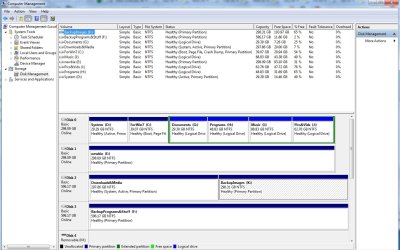
Really need a screenshot of Disk Management window.
 

My Computers My Computers

  • At a glance

    7 X64i5 84002x8gb 3200mhz
    Computer type
    PC/Desktop
    OS
    7 X64
    CPU
    i5 8400
    Motherboard
    gigabyte b365m ds3h
    Memory
    2x8gb 3200mhz
    Hard Drives
    various
    PSU
    pure power 11 400w cm
    Case
    Coolermaster
    Cooling
    cryorig m9i
  • At a glance

    7x64g54008gb ddr4 2400
    Computer type
    PC/Desktop
    OS
    7x64
    CPU
    g5400
    Motherboard
    ga b365m ds3h
    Memory
    8gb ddr4 2400
    PSU
    xfx pro 450w

Attachments

  • diskmgmnt.jpg
    diskmgmnt.jpg
    144.3 KB · Views: 311

My Computer My Computer

At a glance

Windows XP x86 / Windows 7 x64Intel Core 2 Duo E66004gb DDR-800EVGA 8800 GTX
Computer Manufacturer/Model Number
Custom
OS
Windows XP x86 / Windows 7 x64
CPU
Intel Core 2 Duo E6600
Motherboard
EVGA nForce 680i
Memory
4gb DDR-800
Graphics Card(s)
EVGA 8800 GTX
Sound Card
XtremeGamer (or XtremeAudio)
Monitor(s) Displays
Westinghouse LVM-37w3se
Hard Drives
Western Digital Caviar - 320gb x2
Western Digital Caviar - 640gb x2
PSU
Enermax 650 watt modular power supply
Case
Antec P180
Cooling
4 120mm fans
Hi,

Go to Folder Options - show Hideen files and protected o/s files - see if ntldr is on the Downloads and Media partition.

(If you have changed the Bios boot order - it may be somewhere else - have a look and see )

If it is there:

Then try giving the Downloads and Media a drive letter - S is good.

Open Easybcd - go to Add/Remove entries and remove the XP entry >Save

Then add a new XP entry - select S as the drive letter. Click Add Entry.
 

My Computers My Computers

  • At a glance

    7 X64i5 84002x8gb 3200mhz
    Computer type
    PC/Desktop
    OS
    7 X64
    CPU
    i5 8400
    Motherboard
    gigabyte b365m ds3h
    Memory
    2x8gb 3200mhz
    Hard Drives
    various
    PSU
    pure power 11 400w cm
    Case
    Coolermaster
    Cooling
    cryorig m9i
  • At a glance

    7x64g54008gb ddr4 2400
    Computer type
    PC/Desktop
    OS
    7x64
    CPU
    g5400
    Motherboard
    ga b365m ds3h
    Memory
    8gb ddr4 2400
    PSU
    xfx pro 450w
Hi,

Go to Folder Options - show Hideen files and protected o/s files - see if ntldr is on the Downloads and Media partition.

(If you have changed the Bios boot order - it may be somewhere else - have a look and see )

If it is there:

Then try giving the Downloads and Media a drive letter - S is good.

Open Easybcd - go to Add/Remove entries and remove the XP entry >Save

Then add a new XP entry - select S as the drive letter. Click Add Entry.


SIW2 - We are seeing about one of these a day, where the ntldr is on a data partition. How does it get there? Is it desirable to leave it there, as what if they swap out that S: data partition, which happens frequently?
 
It appears I've a similar problem as diznanl - Windows 7’s boot menu doesn’t show up after a fresh install on a hdd with 2 partitions of WinXP on it.

A brief OS installations history of this hdd might help. Initially this hdd was dual booting WinXP x86 and Vista x64 on it. A problem occurred when I tried to ghost over both partitions to a new hdd. This caused me to remove Vista x64 and installed WinXP x64 on a new partition while retaining the original WinXP x86 on the same hdd.

I have used the bootsect.exe /nt52 ALL /force to remove Vista’s boot menu. So that leaves me with a legacy dual boot of WinXP x86 and x64.
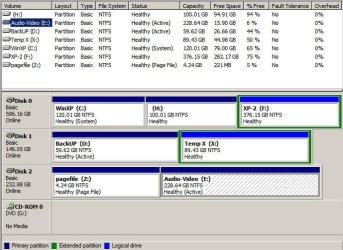
Disk Management.JPGWin7's on H:

Fast forward a couple of months, I then decided to install and multi boot Win7 along with both XPs. When Win7’s boot menu did not pop up as expected, I tried using the command prompt in Win7’s DVD to run:
Bootrec.exe /fixMBR
Bootrec.exe /fixBoot

The commands ran fine but I was still getting XP’s legacy boot menu without Win7. Next, I tried to “Reinstall the Vista Bootloader” using EasyBCD. It did not help either.
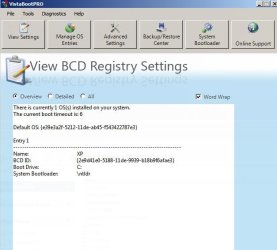
Interestingly, EasyBCD showed remnant settings from my previous XP-Vista dual boot. The BCD displayed 1 XP entry – kindly please refer to attached pic.
BCD.JPG

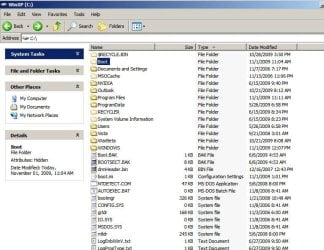
I’ve verified ntldr is on XP’s c: and not on some other data partition.
C.JPG

Current boot.ini
View attachment boot.ini.txt

Would you guys kindly help me to resolve this issue as well please?
 

My Computer My Computer

At a glance

WinXP x86 & Win7 x64Intel E66004GB8800GTS 512MB
Computer Manufacturer/Model Number
n/a
OS
WinXP x86 & Win7 x64
CPU
Intel E6600
Motherboard
Asus Asus P5W DH Deluxe
Memory
4GB
Graphics Card(s)
8800GTS 512MB
Sound Card
X-Fi
Monitor(s) Displays
Samsung 971p
Hard Drives
WD 640GB & 120GB
Seagate 250GB
There was no NTLDR on the Downloads&Media partition... but there WAS a bootmgr file.

I tried to set "S:" as the partition to boot from in EasyBCD, but I got a "missing NTLDR" error.

Is there a way to repair a Windows XP partition after Windows 7 is installed? I think the problem has to do with XP, not Windows 7.

Should I just try to install XP via Windows 7 over my old installation? Would that work?
 

My Computer My Computer

At a glance

Windows XP x86 / Windows 7 x64Intel Core 2 Duo E66004gb DDR-800EVGA 8800 GTX
Computer Manufacturer/Model Number
Custom
OS
Windows XP x86 / Windows 7 x64
CPU
Intel Core 2 Duo E6600
Motherboard
EVGA nForce 680i
Memory
4gb DDR-800
Graphics Card(s)
EVGA 8800 GTX
Sound Card
XtremeGamer (or XtremeAudio)
Monitor(s) Displays
Westinghouse LVM-37w3se
Hard Drives
Western Digital Caviar - 320gb x2
Western Digital Caviar - 640gb x2
PSU
Enermax 650 watt modular power supply
Case
Antec P180
Cooling
4 120mm fans
It appears I've a similar problem as diznanl - Windows 7’s boot menu doesn’t show up after a fresh install on a hdd with 2 partitions of WinXP on it.

A brief OS installations history of this hdd might help. Initially this hdd was dual booting WinXP x86 and Vista x64 on it. A problem occurred when I tried to ghost over both partitions to a new hdd. This caused me to remove Vista x64 and installed WinXP x64 on a new partition while retaining the original WinXP x86 on the same hdd.

I have used the bootsect.exe /nt52 ALL /force to remove Vista’s boot menu. So that leaves me with a legacy dual boot of WinXP x86 and x64.
View attachment 34307Win7's on H:

Fast forward a couple of months, I then decided to install and multi boot Win7 along with both XPs. When Win7’s boot menu did not pop up as expected, I tried using the command prompt in Win7’s DVD to run:
Bootrec.exe /fixMBR
Bootrec.exe /fixBoot

The commands ran fine but I was still getting XP’s legacy boot menu without Win7. Next, I tried to “Reinstall the Vista Bootloader” using EasyBCD. It did not help either.
Interestingly, EasyBCD showed remnant settings from my previous XP-Vista dual boot. The BCD displayed 1 XP entry – kindly please refer to attached pic.
View attachment 34308

I’ve verified ntldr is on XP’s c: and not on some other data partition.
View attachment 34309

Current boot.ini
View attachment 34310

Would you guys kindly help me to resolve this issue as well please?

The automated way to try this is to boot into Win7 Installer Repair console and run Startup repair repeatedly.

If/when it boots up to the 7 desktop, if necessary run a repair install (which is an in-place Upgrade) so that 7 will reconfigure the boot menu and re-establish itself correctly as last installed. You will need to reactivate.

If 7 doesn't configure the boot menu correctly, use EasyBCD to post back here a screenshot of entries given along with a screenshot of your Disk Management map. http://www.sevenforums.com/tutorials/9733-how-post-screenshot-seven-forums.html
 
So, I'm back in XP. I loaded UBCD for Windows, used a couple of the partition programs to fix it so I could boot into XP.

For some odd reason, Windows 7 wants to set my Downloads&Media drive as a boot partition!! I don't get it!

I'm booting straight into XP now, no Windows 7 bootmanager. I figured I'd try to get the bootmanager back using the Win7 disk and Startup Repair. Well, it just changed the boot partition to Downloads&Media again ... I got the NTLDR is Missing error.

So, I used the UBCD to change the Downloads&Media to a NON-bootable partition.

And I loaded in to XP again, no problems.

How do I get my Windows 7 back, along with a solid way to get into XP?
 

My Computer My Computer

At a glance

Windows XP x86 / Windows 7 x64Intel Core 2 Duo E66004gb DDR-800EVGA 8800 GTX
Computer Manufacturer/Model Number
Custom
OS
Windows XP x86 / Windows 7 x64
CPU
Intel Core 2 Duo E6600
Motherboard
EVGA nForce 680i
Memory
4gb DDR-800
Graphics Card(s)
EVGA 8800 GTX
Sound Card
XtremeGamer (or XtremeAudio)
Monitor(s) Displays
Westinghouse LVM-37w3se
Hard Drives
Western Digital Caviar - 320gb x2
Western Digital Caviar - 640gb x2
PSU
Enermax 650 watt modular power supply
Case
Antec P180
Cooling
4 120mm fans
What I would do at this point is unplug all other drives except the XP/Win7 dual boot drive, boot from the Win7 installer and reinstall Win7 to it's (formatted) partition to re=establish the dual boot correctly without any chance of the bootloader being derailed to another drive.

IF you can use Win7 startup repair to get into 7 then you only need to run a repair install (upgrade over installation) which will also reconfigure the boot correctly with those other drives unplugged.

There have been a number of these cases and they underline the importance of unplugging all other drives except where you want to install Win7 or dual boot with another OS.
 
What I would do at this point is unplug all other drives except the XP/Win7 dual boot drive, boot from the Win7 installer and reinstall Win7 to re=establish the dual boot correctly without any chance of the bootloader being derailed to another drive.

IF you can use Win7 startup repair to get into 7 then you only need to run a repair install (upgrade over installation) which will also reconfigure the boot correctly with those other drives unplugged.

I hear you ... that sounds like a logical plan. I just want to know why Win7 is changing the XP boot partition... it's just WEIRD. It doesn't even give me an option to NOT do this. Why is it messing with XP?

In any case, I have Windows 7 still installed. Is there a way to re-apply the bootmanager for Windows 7 without having to reinstall?
 

My Computer My Computer

At a glance

Windows XP x86 / Windows 7 x64Intel Core 2 Duo E66004gb DDR-800EVGA 8800 GTX
Computer Manufacturer/Model Number
Custom
OS
Windows XP x86 / Windows 7 x64
CPU
Intel Core 2 Duo E6600
Motherboard
EVGA nForce 680i
Memory
4gb DDR-800
Graphics Card(s)
EVGA 8800 GTX
Sound Card
XtremeGamer (or XtremeAudio)
Monitor(s) Displays
Westinghouse LVM-37w3se
Hard Drives
Western Digital Caviar - 320gb x2
Western Digital Caviar - 640gb x2
PSU
Enermax 650 watt modular power supply
Case
Antec P180
Cooling
4 120mm fans
Win7 was looking for partition marked active.

Mark WIn7 active using XP disk management or Partition Wizard disk. Unplug other drives and Run startup repair repeatedly from Win7 installer repair console.
 
Win7 was looking for partition marked active.

Mark WIn7 active using XP disk management or Partition Wizard disk. Unplug other drives and Run startup repair repeatedly from Win7 installer repair console.

I marked the Win7 as active...

I shutdown and disconnected the other drives

I loaded the Win7 disk and it repaired the Win7 partition/boot

I loaded EasyBCD and added Windows XP

The bootloader showed XP and Windows 7 (recovered)

I loaded XP ... worked fine

I loaded Win7 ... worked fine

Shutdown and reconnected the other drives

Tested both XP and Win7 again ... success.

Thank you gregrocker and SIW2 for all the help! Kudos / reputation points have been left for you!
 

My Computer My Computer

At a glance

Windows XP x86 / Windows 7 x64Intel Core 2 Duo E66004gb DDR-800EVGA 8800 GTX
Computer Manufacturer/Model Number
Custom
OS
Windows XP x86 / Windows 7 x64
CPU
Intel Core 2 Duo E6600
Motherboard
EVGA nForce 680i
Memory
4gb DDR-800
Graphics Card(s)
EVGA 8800 GTX
Sound Card
XtremeGamer (or XtremeAudio)
Monitor(s) Displays
Westinghouse LVM-37w3se
Hard Drives
Western Digital Caviar - 320gb x2
Western Digital Caviar - 640gb x2
PSU
Enermax 650 watt modular power supply
Case
Antec P180
Cooling
4 120mm fans
gregrocker's suggestion worked for me too! :D

firstly i removed active from all data partitions, but did not set Win7's partition as active.
next, i formatted Win7's partition and reinstalled it.

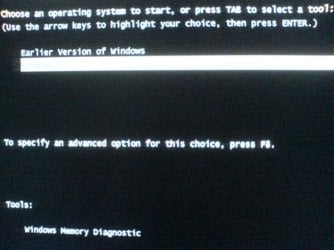
installation then rebooted and i was greeted by Win7's boot loader:
1.JPG

if i were to choose "Earlier Version of Windows" it would take me to XP's boot loader:
2.JPG

is there a way i can intergrate all three OS into one boot loader directly? meaning having Windows 7, Old XP and New XP appear together on the boot loader.
i tried messing about with EasyBCD 2.0 beta but couldn't get anywhere with it.

Thank you gregrocker!
 

My Computer My Computer

At a glance

WinXP x86 & Win7 x64Intel E66004GB8800GTS 512MB
Computer Manufacturer/Model Number
n/a
OS
WinXP x86 & Win7 x64
CPU
Intel E6600
Motherboard
Asus Asus P5W DH Deluxe
Memory
4GB
Graphics Card(s)
8800GTS 512MB
Sound Card
X-Fi
Monitor(s) Displays
Samsung 971p
Hard Drives
WD 640GB & 120GB
Seagate 250GB
Back
Top