
Solved What are the arguments for limiting the RAM maximum for a service?

Toydotgam

Person (I think)
Local time
1:37 AM
Messages
33
Location
Gold Coast
Hi,

I have the Windows Update service disabled on my computer due to it putting [quite literally] my RAM usage to 99-100%.

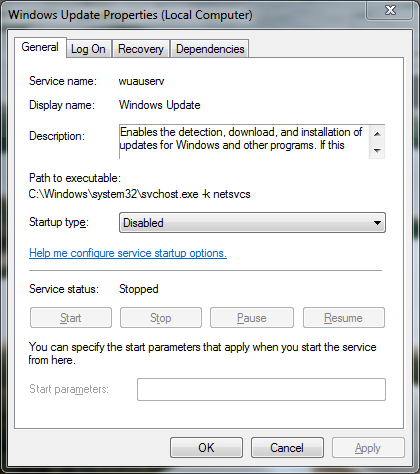
I've noticed that there is a Start parameters box in the service's properties:
T9eg68S.png


Is there such thing as an argument to set the maximum amount of RAM to be used by the service to a more sensible number?
 

My Computer My Computer

At a glance

Arch Linux (5.11.6-arch1-1) x86_64Intel Pentium T9900 (3.06GHz)8GB (2x 4GB) DDR2 (800MHz) SO-DIMMMobile Intel(R) 4 Series Express Chipset
Computer type
Laptop
Computer Manufacturer/Model Number
Dell Inspiron 1545
OS
Arch Linux (5.11.6-arch1-1) x86_64
CPU
Intel Pentium T9900 (3.06GHz)
Memory
8GB (2x 4GB) DDR2 (800MHz) SO-DIMM
Graphics Card(s)
Mobile Intel(R) 4 Series Express Chipset
Monitor(s) Displays
Acer K242HQL
Screen Resolution
1920x1080
Hard Drives
1TB WD Blue SSD G5 BICS4 (415000WD)
Keyboard
HP Business Slim Keyboard
Mouse
Fnova M88 Gaming Mouse
Internet Speed
10Mbps Download / 5Mbps Upload
Browser
Mozilla Firefox
Other Info
Pending eGPU upgrade.
Windows 7 is now out of support, (at End of Life), there are therefore no planned updates for the main operating system planned, There are some remaining updates for the basic Built-in security options for a short while that are still active for a few more months.

I personally cannot see any advantage of keeping the updater running especially if the operation causes issues for your limited RAM
 

My Computers My Computers

  • At a glance

    Windows 11 Pro x64 [Latest Release and Releas...Ryzen 9 5950X, 3.8 - 5.2 MHz64GB [2 x 32GB] DDR4 3200MHz4GB NVIDIA GEFORCE GTX 1650 Ti
    Computer type
    PC/Desktop
    Computer Manufacturer/Model Number
    ChillBlast - Custom to my design
    OS
    Windows 11 Pro x64 [Latest Release and Release Preview]
    CPU
    Ryzen 9 5950X, 3.8 - 5.2 MHz
    Motherboard
    Asus Prime X570-Pro
    Memory
    64GB [2 x 32GB] DDR4 3200MHz
    Graphics Card(s)
    4GB NVIDIA GEFORCE GTX 1650 Ti
    Sound Card
    On-board SPDIF to 5.1 System + HDMI [5.1 system]
    Monitor(s) Displays
    32" UHD 32 Bit HDR Monitor + 43" UHD 4K 32Bit HDR TV
    Screen Resolution
    2 x 3840 x 2160 @60Hz
    Hard Drives
    1TB M2 SSD OS, 500GB Fast Access SSD, 2 x 8TB Data + Various Externals from 1TB to 4TB, 10TB NAS
    PSU
    NZXT C750 80 PLUS Gold 750W Modular PSU
    Case
    Workstation Case [Matt Black]
    Cooling
    NZXT Kraken X63 280mm CPU Cooler +2x Quiet Case fans
    Keyboard
    Logitech Wireless MX Keys & K400 + others
    Mouse
    Logitech Wireless MX Master 3S
    Internet Speed
    920 MB Down 50 MB Up
    Antivirus
    BitDefender Total Security Pro
    Browser
    Chrome (always run latest Non-Beta)
    Other Info
    Also run ...
    Laptop - Quad 8GB - Windows 10 Pro x64
    Nexus 7 Android tablet x2
    Samsung 10.2" tablet
    Blackview TAB 8 4G Android Tablet c/w Keyboard
    Wacom Intuos Pro Medium Pen Pad
    Wacom Intuos Pro Small Pen Pad
    Wacom Expresskeys Remote
    Loopdeck+ Graphics Controller
    Shuttle Pro v2 Control
  • At a glance

    Windows 11 Pro x64 Latest RPIntel I7 10750H 5.0GHz32GB [2x16GB] DDR4 2933 MHznVidia GTX1650Ti 4 GB GDDR6
    Computer type
    Laptop
    System Manufacturer/Model Number
    Dell XPS 17 10750H
    OS
    Windows 11 Pro x64 Latest RP
    CPU
    Intel I7 10750H 5.0GHz
    Motherboard
    Dell XPS
    Memory
    32GB [2x16GB] DDR4 2933 MHz
    Graphics Card(s)
    nVidia GTX1650Ti 4 GB GDDR6
    Sound Card
    Stock [Realtek] 4 Speaker
    Monitor(s) Displays
    17" IPS UHD+ Infinity Edge Touchscreen
    Screen Resolution
    3840 x 2400
    Hard Drives
    2TB M2 NVMe, 4TB External + various 500GB & 1TB External NVMe (also have access to spinner HDD from
    PSU
    Stock
    Case
    Stock XPS Aluminium & Carbon Fibre
    Cooling
    Stock - Active Fan Control
    Keyboard
    Backlit + Various Logitech
    Mouse
    Stock Track Pad + Logitech MX Trackball
    Internet Speed
    72 MB Down 18MB Up
    Browser
    Chrome
    Other Info
    Also run ...
    Laptop - Quad 8GB - Windows 10 Pro x64
    Nexus 7 Android tablet x2
    10.2" tablet
    Sony Z3 Android Smartphone
    Wacom Intuos Pro Medium Pen Pad
    Wacom Intuos Pro Small Pen Pad
    Wacom Expresskeys Remote
    Loopdeck+ Graphics Controller
    Shuttle Pro v2 Control Pad
    10TB NAS
Windows 7 is now out of support, (at End of Life), there are therefore no planned updates for the main operating system planned, There are some remaining updates for the basic Built-in security options for a short while that are still active for a few more months.

I personally cannot see any advantage of keeping the updater running especially if the operation causes issues for your limited RAM

Yeah, I'd planned to completely disable the Windows Update service in the end. My reason for wanting this however was because I'd installed Windows 7 in January from a really old install disk that had no updates on it. [Obviously] I know for a fact that in the 11 years Microsoft had supported it, there was a bunch of updates. Since then, I've installed two updates manually from .msu files. I also know that in 2016 Microsoft released a psuedo-servicepack update, which I've checked; and I do not have it.

Installing updates is painful with 100% RAM usage so I want to make it capped to 50% or a similar number so I can get the last few updates installed then disable it permanently.
 

My Computer My Computer

At a glance

Arch Linux (5.11.6-arch1-1) x86_64Intel Pentium T9900 (3.06GHz)8GB (2x 4GB) DDR2 (800MHz) SO-DIMMMobile Intel(R) 4 Series Express Chipset
Computer type
Laptop
Computer Manufacturer/Model Number
Dell Inspiron 1545
OS
Arch Linux (5.11.6-arch1-1) x86_64
CPU
Intel Pentium T9900 (3.06GHz)
Memory
8GB (2x 4GB) DDR2 (800MHz) SO-DIMM
Graphics Card(s)
Mobile Intel(R) 4 Series Express Chipset
Monitor(s) Displays
Acer K242HQL
Screen Resolution
1920x1080
Hard Drives
1TB WD Blue SSD G5 BICS4 (415000WD)
Keyboard
HP Business Slim Keyboard
Mouse
Fnova M88 Gaming Mouse
Internet Speed
10Mbps Download / 5Mbps Upload
Browser
Mozilla Firefox
Other Info
Pending eGPU upgrade.
One of our Senior Members SIW2 has created and is maintaining a system for updating older versions of Windows 7, this uses a 3rd party updater and the ability to modify the installer to suit needs, He should now see this post and hopefully be able to help you ...
 

My Computers My Computers

  • At a glance

    Windows 11 Pro x64 [Latest Release and Releas...Ryzen 9 5950X, 3.8 - 5.2 MHz64GB [2 x 32GB] DDR4 3200MHz4GB NVIDIA GEFORCE GTX 1650 Ti
    Computer type
    PC/Desktop
    Computer Manufacturer/Model Number
    ChillBlast - Custom to my design
    OS
    Windows 11 Pro x64 [Latest Release and Release Preview]
    CPU
    Ryzen 9 5950X, 3.8 - 5.2 MHz
    Motherboard
    Asus Prime X570-Pro
    Memory
    64GB [2 x 32GB] DDR4 3200MHz
    Graphics Card(s)
    4GB NVIDIA GEFORCE GTX 1650 Ti
    Sound Card
    On-board SPDIF to 5.1 System + HDMI [5.1 system]
    Monitor(s) Displays
    32" UHD 32 Bit HDR Monitor + 43" UHD 4K 32Bit HDR TV
    Screen Resolution
    2 x 3840 x 2160 @60Hz
    Hard Drives
    1TB M2 SSD OS, 500GB Fast Access SSD, 2 x 8TB Data + Various Externals from 1TB to 4TB, 10TB NAS
    PSU
    NZXT C750 80 PLUS Gold 750W Modular PSU
    Case
    Workstation Case [Matt Black]
    Cooling
    NZXT Kraken X63 280mm CPU Cooler +2x Quiet Case fans
    Keyboard
    Logitech Wireless MX Keys & K400 + others
    Mouse
    Logitech Wireless MX Master 3S
    Internet Speed
    920 MB Down 50 MB Up
    Antivirus
    BitDefender Total Security Pro
    Browser
    Chrome (always run latest Non-Beta)
    Other Info
    Also run ...
    Laptop - Quad 8GB - Windows 10 Pro x64
    Nexus 7 Android tablet x2
    Samsung 10.2" tablet
    Blackview TAB 8 4G Android Tablet c/w Keyboard
    Wacom Intuos Pro Medium Pen Pad
    Wacom Intuos Pro Small Pen Pad
    Wacom Expresskeys Remote
    Loopdeck+ Graphics Controller
    Shuttle Pro v2 Control
  • At a glance

    Windows 11 Pro x64 Latest RPIntel I7 10750H 5.0GHz32GB [2x16GB] DDR4 2933 MHznVidia GTX1650Ti 4 GB GDDR6
    Computer type
    Laptop
    System Manufacturer/Model Number
    Dell XPS 17 10750H
    OS
    Windows 11 Pro x64 Latest RP
    CPU
    Intel I7 10750H 5.0GHz
    Motherboard
    Dell XPS
    Memory
    32GB [2x16GB] DDR4 2933 MHz
    Graphics Card(s)
    nVidia GTX1650Ti 4 GB GDDR6
    Sound Card
    Stock [Realtek] 4 Speaker
    Monitor(s) Displays
    17" IPS UHD+ Infinity Edge Touchscreen
    Screen Resolution
    3840 x 2400
    Hard Drives
    2TB M2 NVMe, 4TB External + various 500GB & 1TB External NVMe (also have access to spinner HDD from
    PSU
    Stock
    Case
    Stock XPS Aluminium & Carbon Fibre
    Cooling
    Stock - Active Fan Control
    Keyboard
    Backlit + Various Logitech
    Mouse
    Stock Track Pad + Logitech MX Trackball
    Internet Speed
    72 MB Down 18MB Up
    Browser
    Chrome
    Other Info
    Also run ...
    Laptop - Quad 8GB - Windows 10 Pro x64
    Nexus 7 Android tablet x2
    10.2" tablet
    Sony Z3 Android Smartphone
    Wacom Intuos Pro Medium Pen Pad
    Wacom Intuos Pro Small Pen Pad
    Wacom Expresskeys Remote
    Loopdeck+ Graphics Controller
    Shuttle Pro v2 Control Pad
    10TB NAS
One of our Senior Members SIW2 has created and is maintaining a system for updating older versions of Windows 7, this uses a 3rd party updater and the ability to modify the installer to suit needs, He should now see this post and hopefully be able to help you ...

Oh, thanks very much!
 

My Computer My Computer

At a glance

Arch Linux (5.11.6-arch1-1) x86_64Intel Pentium T9900 (3.06GHz)8GB (2x 4GB) DDR2 (800MHz) SO-DIMMMobile Intel(R) 4 Series Express Chipset
Computer type
Laptop
Computer Manufacturer/Model Number
Dell Inspiron 1545
OS
Arch Linux (5.11.6-arch1-1) x86_64
CPU
Intel Pentium T9900 (3.06GHz)
Memory
8GB (2x 4GB) DDR2 (800MHz) SO-DIMM
Graphics Card(s)
Mobile Intel(R) 4 Series Express Chipset
Monitor(s) Displays
Acer K242HQL
Screen Resolution
1920x1080
Hard Drives
1TB WD Blue SSD G5 BICS4 (415000WD)
Keyboard
HP Business Slim Keyboard
Mouse
Fnova M88 Gaming Mouse
Internet Speed
10Mbps Download / 5Mbps Upload
Browser
Mozilla Firefox
Other Info
Pending eGPU upgrade.
Probably easiest just to run simplix update pack on your current system. It will detect if any updates are missing and install them. It will reboot and cleanup if necessary.

UpdatePack7R2-20.5.20 .exe
 

My Computers My Computers

  • At a glance

    7 X64i5 84002x8gb 3200mhz
    Computer type
    PC/Desktop
    OS
    7 X64
    CPU
    i5 8400
    Motherboard
    gigabyte b365m ds3h
    Memory
    2x8gb 3200mhz
    Hard Drives
    various
    PSU
    pure power 11 400w cm
    Case
    Coolermaster
    Cooling
    cryorig m9i
  • At a glance

    7x64g54008gb ddr4 2400
    Computer type
    PC/Desktop
    OS
    7x64
    CPU
    g5400
    Motherboard
    ga b365m ds3h
    Memory
    8gb ddr4 2400
    PSU
    xfx pro 450w
I am quite certain that there are no arguments that would restrict a services memory.

In Windows most services, including Windows Update, are implemented as a number of threads running under an instance of svchost.exe. Threads do not own memory. Memory is owned by the process. It would seem highly problematic to restrict the memory used by a process running under a system account.

You need to find another way.
 

My Computer My Computer

At a glance

Windows 7 Pro 64 bitXeon W35208 GBNvidia Geforce 210
Computer type
PC/Desktop
Computer Manufacturer/Model Number
HP
OS
Windows 7 Pro 64 bit
CPU
Xeon W3520
Memory
8 GB
Graphics Card(s)
Nvidia Geforce 210
Back
Top