Zone Alarm in registry interfering with installation

So uninstall my AVG and then install the ZA, now Checkpoint, Internet Suite? Then I remove that and start again?

Yes, it's worth a try. Maybe the new version will clean out ZA for good. Or maybe it will allow the removal tool to work.
 

My Computer My Computer

At a glance

XP, Seven, 2008R2AMD, Intel, VIACorsair, Kingston, etc.ATI, NVIDIA
Computer Manufacturer/Model Number
Too many to list.
OS
XP, Seven, 2008R2
CPU
AMD, Intel, VIA
Motherboard
Various
Memory
Corsair, Kingston, etc.
Graphics Card(s)
ATI, NVIDIA
Monitor(s) Displays
Samsung
Hard Drives
Maxtor, Western Digital
Keyboard
qwerty
Internet Speed
22 Mb/s @ home, 1 Gb/s @ server
Other Info
All of my systems still run fastest on XP 32-bit for the most part. Win7 is fun to play with, but I still prefer XP for raw speed, security, and functionality.
So uninstall my AVG and then install the ZA, now Checkpoint, Internet Suite? Then I remove that and start again?

Yes, it's worth a try. Maybe the new version will clean out ZA for good. Or maybe it will allow the removal tool to work.

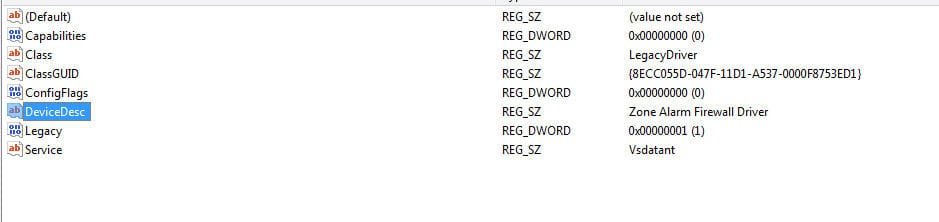
No go. Deleted it using Revo Uninstaller and the program itself. I cleaned out the registry, and those entries are still there. There are three of them.
 

Attachments

  • snap.jpg
    snap.jpg
    17 KB · Views: 11

My Computer My Computer

At a glance

Vista 64 bit but trying to install Win 7Intel 2 Quad6 GBnVidia Geforce 9800 GT

Computer Manufacturer/Model Number
Dell Studio 540
OS
Vista 64 bit but trying to install Win 7
CPU
Intel 2 Quad
Motherboard
?
Memory
6 GB
Graphics Card(s)
nVidia Geforce 9800 GT
Sound Card
Realtek High Def Audio
Monitor(s) Displays
Dell E207WFP
Hard Drives
640GB internal
320GB external
PSU
?
Case
?
Cooling
?
I see you've posted this question in ZA forums, which is good. Here is some info from the FAQ:

7. Before upgrading to the Windows 7 operating system will there be anything a ZoneAlarm user needs to do?
  • ZoneAlarm 9 on Windows Vista: You will need to uninstall ZoneAlarm and install the Windows 7 compatible version of ZoneAlarm before upgrading to the official release of Windows 7.
  • ZoneAlarm 9 on Windows XP: You can upgrade to the official release of Windows 7 with your ZoneAlarm 9 product installed. You may update ZoneAlarm before or after you upgrade to Windows 7, but we recommend updating beforehand
  • Other ZoneAlarm users: If you are running a ZoneAlarm product that is older than ZoneAlarm 9, you will need to upgrade to the Windows 7 compatible version of ZoneAlarm before upgrading your operating system
 

My Computer My Computer

At a glance

XP, Seven, 2008R2AMD, Intel, VIACorsair, Kingston, etc.ATI, NVIDIA
Computer Manufacturer/Model Number
Too many to list.
OS
XP, Seven, 2008R2
CPU
AMD, Intel, VIA
Motherboard
Various
Memory
Corsair, Kingston, etc.
Graphics Card(s)
ATI, NVIDIA
Monitor(s) Displays
Samsung
Hard Drives
Maxtor, Western Digital
Keyboard
qwerty
Internet Speed
22 Mb/s @ home, 1 Gb/s @ server
Other Info
All of my systems still run fastest on XP 32-bit for the most part. Win7 is fun to play with, but I still prefer XP for raw speed, security, and functionality.
Manually Uninstall ZoneAlarm

Instructions to manually uninstall ZoneAlarm. These instructions are on the ZoneLabs help website, I had to do this on one computer and it did work while the official removal tool evidently did nothing and the uninstall shortcut would not even run. This was an earlier ZoneAlarm version than v9.
 

My Computer My Computer

At a glance

XP SP3 32bit, Vista HP 64bit, Seven Pro 64bitQ6600 G0 @ 3.2GHz4Gb OCZnVidia GTX275 896Mb
OS
XP SP3 32bit, Vista HP 64bit, Seven Pro 64bit
CPU
Q6600 G0 @ 3.2GHz
Motherboard
GA-P965-DS3
Memory
4Gb OCZ
Graphics Card(s)
nVidia GTX275 896Mb
Sound Card
X-Fi Fatal1ty Platinum
Monitor(s) Displays
Acer H243H
Screen Resolution
1920x1080
Hard Drives
Samsung 1Tb SATA2
MAXTOR 1Tb SATA2
MAXTOR 500Gb SATA2
MAXTOR 300Gb SATA2
PSU
Antec 650 Trio
Cooling
Zalman 9700
Keyboard
G15,G13
Mouse
MX518
Internet Speed
330Kbps down
I see you've posted this question in ZA forums, which is good. Here is some info from the FAQ:


7. Before upgrading to the Windows 7 operating system will there be anything a ZoneAlarm user needs to do?
  • ZoneAlarm 9 on Windows Vista: You will need to uninstall ZoneAlarm and install the Windows 7 compatible version of ZoneAlarm before upgrading to the official release of Windows 7.
  • ZoneAlarm 9 on Windows XP: You can upgrade to the official release of Windows 7 with your ZoneAlarm 9 product installed. You may update ZoneAlarm before or after you upgrade to Windows 7, but we recommend updating beforehand
  • Other ZoneAlarm users: If you are running a ZoneAlarm product that is older than ZoneAlarm 9, you will need to upgrade to the Windows 7 compatible version of ZoneAlarm before upgrading your operating system

That would be fine if I had ZA 7, but I had no ZA at all. I even did a search for all the possible files it would have left behind, but there were none. I installed the newest version I could download before. I'm guessing it was 9 because it was the only one I could find. I wish I knew where those files came from in the registry.

I got this computer in Feb., not a huge fan of Vista I figured I'd leave it as it was and just use the Windows firewall. However, I did backup lots of stuff from my old XP computer except for anything in the registry and any of the OS. So it couldn't have come from there. But I'm also stuck with a folder on my desktop with 2 folders inside for Diskeeper that won't delete either. I know the right thing to do would be to back it all up and start clean, but I don't want to go thru reinstalling all my stuff that needs listings in the registry. I could probably call Dell, but they couldn't get rid of the empty folders on the desktop either, so I doubt they can clean the registry. This is so disappointing.
 

My Computer My Computer

At a glance

Vista 64 bit but trying to install Win 7Intel 2 Quad6 GBnVidia Geforce 9800 GT
Computer Manufacturer/Model Number
Dell Studio 540
OS
Vista 64 bit but trying to install Win 7
CPU
Intel 2 Quad
Motherboard
?
Memory
6 GB
Graphics Card(s)
nVidia Geforce 9800 GT
Sound Card
Realtek High Def Audio
Monitor(s) Displays
Dell E207WFP
Hard Drives
640GB internal
320GB external
PSU
?
Case
?
Cooling
?
Got it installed. Not sure how. It took a long time, but it's in. Now I have to deal with this terrible email program. :)

Thanks for the help guys. I appreciate it.
 

My Computer My Computer

At a glance

Vista 64 bit but trying to install Win 7Intel 2 Quad6 GBnVidia Geforce 9800 GT
Computer Manufacturer/Model Number
Dell Studio 540
OS
Vista 64 bit but trying to install Win 7
CPU
Intel 2 Quad
Motherboard
?
Memory
6 GB
Graphics Card(s)
nVidia Geforce 9800 GT
Sound Card
Realtek High Def Audio
Monitor(s) Displays
Dell E207WFP
Hard Drives
640GB internal
320GB external
PSU
?
Case
?
Cooling
?
Now, to marked this thread as solved, click on the red triangle above your post, and let the staff know.
 

My Computer My Computer

At a glance

Windows 7 Professional x64Intel i7 2600K OC'd @ 4620 MHz16GB GSkill Sniper 2133 Mhz (4x4GB)EVGA GeForce GTX 480 SuperClocked+
Computer Manufacturer/Model Number
Custom
OS
Windows 7 Professional x64
CPU
Intel i7 2600K OC'd @ 4620 MHz
Motherboard
Asus P8Z68-V Pro
Memory
16GB GSkill Sniper 2133 Mhz (4x4GB)
Graphics Card(s)
EVGA GeForce GTX 480 SuperClocked+
Sound Card
Realtek High Definition Audio
Monitor(s) Displays
2x Acer S273HLbmii 27"
Screen Resolution
2 x 1920x1080
Hard Drives
64GB Crucial M4 SSD

Storage: Hitachi 1TB 5400RPM, Samsung 1.5TB 5400RPM
PSU
Corsair HW Series 750w (modular)
Case
Cooler Master HAF 932 Advanced Blue Edition
Cooling
CM Hyper 212+ CPU cooler, 3x 230mm + 1x 140mm case fans
Keyboard
Logitech MK320 (wireless)
Mouse
Logitech MK320 (wireless)
Internet Speed
30 Mb/s : 2 Mb/s
Back
Top