
Star Wars Ep. I Racer

CJW

New member
Power User
VIP
Local time
4:41 AM
Messages
439
My son's computer doesn't want to play Star Wars Ep. I Racer & I was hoping someone can help me.

His computer:
PSU: Bestec ATX-250-12Z D7R: 250W
Mobo: Asus IPIBL-LB
CPU: Intel Pentium Dual-Core E200: 2.50GHz
Mem: Qimonda AG - 3x 1024GB DDR2-800MHz: 3GB total
Video: Onboard Video: I can't find information about this
Sound: Onboard Audio: I can't find information about this
OS: 7 Pro 64Bit

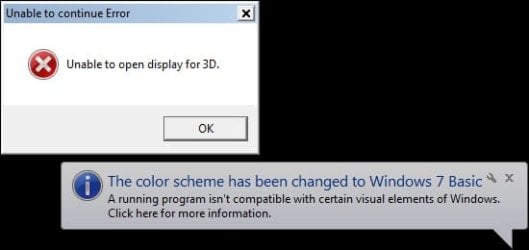
We get this error message:
 

Attachments
  • Racer.jpg
    Racer.jpg
    14.9 KB · Views: 9

My Computer My Computer

Computer type
PC/Desktop
Computer Manufacturer/Model Number
Self built comfuser
OS
10 Pro. 64Bit
CPU
AMD FX 4100, 4-Core Black Edition. Socket AM3+ ~ 3.60GHz
Motherboard
ASUS M5A97 LE R2.0
Memory
2x 4GB Kingston HyperX DDR3-1866 (PC3-14900) - 8GB Total
Graphics Card(s)
ASUS Radeon HD 6670-2GD3
Sound Card
Onboard High Definition Audio Device
Monitor(s) Displays
HP 2009m LCD
Screen Resolution
1600x900, True Color (32bit), 60Hertz
Hard Drives
WD Blue - 1TB, 3D NAND - SATA SSD
PSU
XFX Pro 450W Core Edition - Fully Wired
Case
Antec Super Lanboy
Cooling
Stock CPU fan + 2 (1 front, 1 back) 120mm Antec fans
Keyboard
Logitech MK700/MK710
Mouse
Logitech M705
Internet Speed
Frontier FiOS 50/50
Antivirus
Windows Security
Browser
Vivaldi
Other Info
1x ASUS DRW-24B1ST Multi-DVD Rewriter
1x RocketFish AIO Media Card Reader
1x WD 1TB Passport USB External Drive
I'll try the Direct X 9.0c later tonight, thanks.

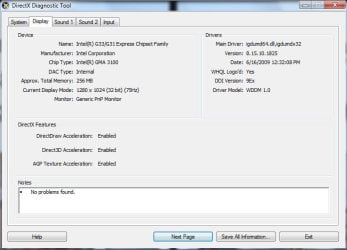
When I use DxDiag on his computer, it shows the computer is running DirectX 11 & here is a screenshot of his GPU:
 

Attachments

  • DxDiag.jpg
    DxDiag.jpg
    41.9 KB · Views: 8

My Computer My Computer

Computer type
PC/Desktop
Computer Manufacturer/Model Number
Self built comfuser
OS
10 Pro. 64Bit
CPU
AMD FX 4100, 4-Core Black Edition. Socket AM3+ ~ 3.60GHz
Motherboard
ASUS M5A97 LE R2.0
Memory
2x 4GB Kingston HyperX DDR3-1866 (PC3-14900) - 8GB Total
Graphics Card(s)
ASUS Radeon HD 6670-2GD3
Sound Card
Onboard High Definition Audio Device
Monitor(s) Displays
HP 2009m LCD
Screen Resolution
1600x900, True Color (32bit), 60Hertz
Hard Drives
WD Blue - 1TB, 3D NAND - SATA SSD
PSU
XFX Pro 450W Core Edition - Fully Wired
Case
Antec Super Lanboy
Cooling
Stock CPU fan + 2 (1 front, 1 back) 120mm Antec fans
Keyboard
Logitech MK700/MK710
Mouse
Logitech M705
Internet Speed
Frontier FiOS 50/50
Antivirus
Windows Security
Browser
Vivaldi
Other Info
1x ASUS DRW-24B1ST Multi-DVD Rewriter
1x RocketFish AIO Media Card Reader
1x WD 1TB Passport USB External Drive
My son's computer doesn't want to play Star Wars Ep. I Racer & I was hoping someone can help me.

I had a look, and it is a known issue that this game only works on 32-bit OSes. It wont work on a 64-bit operating system.

As you are using 64-bit OS, then the game version over at GOG.com should work for you.
 

My Computer My Computer

Computer type
PC/Desktop
OS
Windows 7 x64, Vista x64, 8.1 smartphone
CPU
Intel E8400 65W 64-bit
Motherboard
Gigabyte EP45-UD3LR
Memory
DDR2 2 x 2GB, 1GB x 2
Graphics Card(s)
XFX Radeon HD5750
Sound Card
AMD High Definition Audio; Realtek High Definition Audio
Monitor(s) Displays
iiyama prolite X2377HDS
Screen Resolution
1920 x 1080
Hard Drives
500GB 7200 rpm Seagate ST3500413AS 16MB, 500GB 5400 rpm Toshiba MQ02ABF050H 32MB, 200GB 7200 rpm Seagate ST3200820AS 8MB, 2TB 7200 rpm Western Digital WD20EZRX 64MB
PSU
Enermax Liberty Modular
Case
Antec P193 Midi Tower
Keyboard
Mionix ZIBAL 60
Mouse
Razer USB 2.0 Diamondback Mouse or Huion Graphics Tablet
Browser
Internet Explorer, Lunascape, Firefox, Opera, Avast Safezone
I did install Direct X 9.0c (it blinked by in under 1 second, so I don't know if it installed correctly) & rebooted, but the game still gives me the "Unable to open display for 3D" error.

I had a look, and it is a known issue that this game only works on 32-bit OSes. It wont work on a 64-bit operating system.
As you are using 64-bit OS, then the game version over at GOG.com should work for you.
Yes, he has Windows 7 Pro, 64-bit & I am using the GOG version.
And what's odd is that the game is working just fine on my Windows 10 Pro 64-bit comfuser.
 

My Computer My Computer

Computer type
PC/Desktop
Computer Manufacturer/Model Number
Self built comfuser
OS
10 Pro. 64Bit
CPU
AMD FX 4100, 4-Core Black Edition. Socket AM3+ ~ 3.60GHz
Motherboard
ASUS M5A97 LE R2.0
Memory
2x 4GB Kingston HyperX DDR3-1866 (PC3-14900) - 8GB Total
Graphics Card(s)
ASUS Radeon HD 6670-2GD3
Sound Card
Onboard High Definition Audio Device
Monitor(s) Displays
HP 2009m LCD
Screen Resolution
1600x900, True Color (32bit), 60Hertz
Hard Drives
WD Blue - 1TB, 3D NAND - SATA SSD
PSU
XFX Pro 450W Core Edition - Fully Wired
Case
Antec Super Lanboy
Cooling
Stock CPU fan + 2 (1 front, 1 back) 120mm Antec fans
Keyboard
Logitech MK700/MK710
Mouse
Logitech M705
Internet Speed
Frontier FiOS 50/50
Antivirus
Windows Security
Browser
Vivaldi
Other Info
1x ASUS DRW-24B1ST Multi-DVD Rewriter
1x RocketFish AIO Media Card Reader
1x WD 1TB Passport USB External Drive
I would suspect a 64bit OS with only 3MB ram. and possibly onboard graphics.
Art.
 

My Computer My Computer

Computer type
PC/Desktop
Computer Manufacturer/Model Number
Home built
OS
Win7 sp1 Pro 64bit / XP sp2 Pro (games only)
CPU
Intel Core 2 Duo E8400 @ 3.00GHz
Motherboard
Intel Corporation DP35DP (CPU1)
Memory
8.00 GB Dual-Channel DDR2 @ 400MHz (5-5-5-18)
Graphics Card(s)
1024MB GeForce GTX 560
Sound Card
NVIDIA High Definition Audio
Monitor(s) Displays
SyncMaster (2048x1152@60Hz)
Hard Drives
240GB Sandisc Extreme Pro SSD
244GB Seagate ST3250410AS
488GB Seagate ST500DM002-1BD142
931GB Western Digital WDC WD1003FZEX
PSU
Corsair 720
Case
ATX
Keyboard
HID Keyboard Device Logitech
Mouse
HID-compliant mouse Microsoft
Other Info
TSSTcorp CDDVDW SH-S223L

HL-DT-ST BD-RE BH12LS35
When I use DxDiag on his computer, it shows the computer is running DirectX 11 & here is a screenshot of his GPU:


Yeah, you'll have DirectX 11 as that is what is in Windows 7, but it may not have the DX 9c version of DLLs, etc.

Did you run the DirectX 9c installer as Admin by chance?

Puzzled why this would run on Windows 10 64 and not this OS version that is 64. It looks like your GPU meets the minimum requirements.
 

My Computer My Computer

Computer type
PC/Desktop
OS
Windows 7 Ultimate x64
If you run DXDIAG again and use the 64 bit version that shows up at the bottom, are there any issues that show up under each tab?
 

My Computer My Computer

Computer type
PC/Desktop
OS
Windows 7 Ultimate x64
I found this on the website:


Set your resolution before you play, 5/5 May 1, 2018 Verified owner
Quick hint for everyone: run the video settings program before you run the game. I just pressed play right away after the game installed, and it'd crash on launch every time. Instead, set your in-game resolution to your desktop resolution, and then run the game. Presto, no more bugs! No more crashes! Just one of the best racing games ever made!
Is this helpful to you?
(97 of 100 users found this helpful)


You might also try turning the refresh rate down and run as administrator. You might also what to see Star Wars Episode I: Racer – Play Old PC Games
 

My Computers My Computers

System One System Two

Back
Top