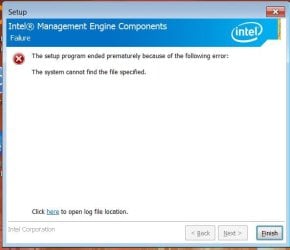
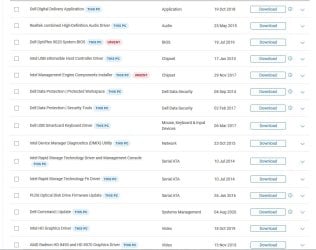
Been tweaking a refurb'd 9020 I got last week. Came w/10, which any thinking person simply HATES  so I formatted the SSD & loaded & activated 7 home 64, updating to SP1. I can get online, able to drive 2 monitors, audio seems ok. Added a 4 SATA 6G PCI card, and 5 drives, including the OS one. But it's been a PITA updating all the drivers & software, much more than I anticipated, and I say that as someone who's built several PC's. Some things like the printer driver loaded fine, but others, like the Logitech utility for my wireless K400 do absolutely nothing when I click the .exe. Brief rotating circle, then nothing. Also can't load the office 2010 I have, gets about 3/4 done, then says "an error occurred" or some similarly worthless message. Tried loading Libre office suite, seems like it's going to load, unpacks, etc., but gets about 3/4 done and tells me a I need KB2999226. Dl'd it, tried to load it, just get an error "This is not for this OS" or words to that effect. Another weirdy; I sometimes run a VPN, which still works fine on the older PC, but when I run it on the new one, it connects to the server & acts like it's going to work, then just keeps "failing" & trying again. Looking at the Dell update page for this PC (entering my service tag#) I get the following list of drivers, etc., which have been updated since the machine was 1st built (~2013), or which I otherwise need. Note that the BIOS running is the most recent, thank god (I can just imagine the hell replacing the bios would be at this point). I have installed some of these, but this has been so fiddly and dragged-out, I frankly have forgotten which I've already added (anywhere on the PC I can look that up?). Some of these don't load, and I'm wondering if I need to add them in a certain order. Any input would be appreciated, THANKS!
so I formatted the SSD & loaded & activated 7 home 64, updating to SP1. I can get online, able to drive 2 monitors, audio seems ok. Added a 4 SATA 6G PCI card, and 5 drives, including the OS one. But it's been a PITA updating all the drivers & software, much more than I anticipated, and I say that as someone who's built several PC's. Some things like the printer driver loaded fine, but others, like the Logitech utility for my wireless K400 do absolutely nothing when I click the .exe. Brief rotating circle, then nothing. Also can't load the office 2010 I have, gets about 3/4 done, then says "an error occurred" or some similarly worthless message. Tried loading Libre office suite, seems like it's going to load, unpacks, etc., but gets about 3/4 done and tells me a I need KB2999226. Dl'd it, tried to load it, just get an error "This is not for this OS" or words to that effect. Another weirdy; I sometimes run a VPN, which still works fine on the older PC, but when I run it on the new one, it connects to the server & acts like it's going to work, then just keeps "failing" & trying again. Looking at the Dell update page for this PC (entering my service tag#) I get the following list of drivers, etc., which have been updated since the machine was 1st built (~2013), or which I otherwise need. Note that the BIOS running is the most recent, thank god (I can just imagine the hell replacing the bios would be at this point). I have installed some of these, but this has been so fiddly and dragged-out, I frankly have forgotten which I've already added (anywhere on the PC I can look that up?). Some of these don't load, and I'm wondering if I need to add them in a certain order. Any input would be appreciated, THANKS!Attachments
My Computer
At a glance
7 Home 64 bit, 7 Pro 64 bit
- Computer type
- PC/Desktop
- OS
- 7 Home 64 bit, 7 Pro 64 bit