Why is it now taking much longer to re-boot my modem?

debodun

Member
Member
VIP
Local time
3:01 PM
Messages
295
Location
upstate NY
I've re-booted my Motorola SB5101 modem before, so I know about how long it used to take. The other day I thought I hadn't done it for while do I did, but on powering back up, it took an extraordinarily long time. The online light just kept blinking for about 10 minutes, like it couldn't make a connection. Finally it did, but about 15 minutes later it re-booted itself and the same thing happened. Since then it's seemed okay, but one time after that, it wouldn't open my browser homepage. I had to close the browser and try again, Fortunately, it's worked since then.


I contacted my ISP and this is the reply:


Your OS and modem are so old and out of date that it is no longer approved for use on Spectrum's network. Chances are that Spectrum's local head-end server loaded your modem with generic semi-compatible code, but you should immediately make plans about what new model of DOCSIS 3.0 or 3.1 modem. However, a system running Window7 with SP1 may not be compatible with a new modem. Suggest installing Windows 10 or purchasing a new system.


Why is my modem suddenly considered out of date? Is the ISP reply a reasonable response?
 

My Computer My Computer

At a glance

Windows 7 Ultimate x641.86 GHz Intrel Core 23 GB Dual Channel DDR2 @ 3.32 MHzIntel Q965/Q963 Express chipset
Computer type
PC/Desktop
Computer Manufacturer/Model Number
refurb in an HP/Compaq case
OS
Windows 7 Ultimate x64
CPU
1.86 GHz Intrel Core 2
Motherboard
HP 0A60h XU1
Memory
3 GB Dual Channel DDR2 @ 3.32 MHz
Graphics Card(s)
Intel Q965/Q963 Express chipset
Monitor(s) Displays
Dell CRT
Hard Drives
977GB Samsung HD 103 SI ATA
Case
HP Compaq DC5800
Mouse
wired optical
Antivirus
Microsoft Security Essentials, MalwareBytes, Spyware Blaster
Browser
Firefox 32-bit
The modem is probably outdated, your OS is fully capable of using a new modem. That bit was crap, absolute crap.

Your modem is DOCSIS 2.0, you'll want 3.0 or 3.1 as was said.

Why are you constantly rebooting your modem?

There are security considerations with a modem as well. At least make sure it's not using the default username and password, and if it has a built-in firewall use it.
 

My Computer My Computer

At a glance

Windows 7 Ultimate x64
Computer type
PC/Desktop
OS
Windows 7 Ultimate x64
Spectrum has moved away from the Motorola SurfBoard series modems to the Arris TouchStone series modems in my area.
I had a Motorola until Spectrum upgraded me to an Arris in July 2017.
It supports faster broadband speeds and dual band wireless.
It works fine for me in all OS's from Windows Vista to Windows 10.
 

My Computer My Computer

At a glance

Windows 7 Professional SP1 64-bitIntel Core i7-4790 3.60 GHz32 GB DDR3-1600 MHzIntegrated Intel HD Graphics 4600
Computer type
PC/Desktop
Computer Manufacturer/Model Number
Dell OptiPlex 9020
OS
Windows 7 Professional SP1 64-bit
CPU
Intel Core i7-4790 3.60 GHz
Memory
32 GB DDR3-1600 MHz
Graphics Card(s)
Integrated Intel HD Graphics 4600
Monitor(s) Displays
Viewsonic 32" LCD
Hard Drives
Kingston SATA 3 240 GB SSD
Internet Speed
Spectrum Internet 1000 Mbps
Thanks for the encouraging responses. Will a new modem automatically connect between the computer and Internet, or is some manipulation required?
 

My Computer My Computer

At a glance

Windows 7 Ultimate x641.86 GHz Intrel Core 23 GB Dual Channel DDR2 @ 3.32 MHzIntel Q965/Q963 Express chipset
Computer type
PC/Desktop
Computer Manufacturer/Model Number
refurb in an HP/Compaq case
OS
Windows 7 Ultimate x64
CPU
1.86 GHz Intrel Core 2
Motherboard
HP 0A60h XU1
Memory
3 GB Dual Channel DDR2 @ 3.32 MHz
Graphics Card(s)
Intel Q965/Q963 Express chipset
Monitor(s) Displays
Dell CRT
Hard Drives
977GB Samsung HD 103 SI ATA
Case
HP Compaq DC5800
Mouse
wired optical
Antivirus
Microsoft Security Essentials, MalwareBytes, Spyware Blaster
Browser
Firefox 32-bit
If a Spectrum technician comes to your home and upgrades your modem, make sure it's properly configured and your computer has a working internet connection before he leaves.
 

My Computer My Computer

At a glance

Windows 7 Professional SP1 64-bitIntel Core i7-4790 3.60 GHz32 GB DDR3-1600 MHzIntegrated Intel HD Graphics 4600
Computer type
PC/Desktop
Computer Manufacturer/Model Number
Dell OptiPlex 9020
OS
Windows 7 Professional SP1 64-bit
CPU
Intel Core i7-4790 3.60 GHz
Memory
32 GB DDR3-1600 MHz
Graphics Card(s)
Integrated Intel HD Graphics 4600
Monitor(s) Displays
Viewsonic 32" LCD
Hard Drives
Kingston SATA 3 240 GB SSD
Internet Speed
Spectrum Internet 1000 Mbps
Thanks for the encouraging responses. Will a new modem automatically connect between the computer and Internet, or is some manipulation required?

You will need to call your ISP when you get the new modem and probably have to read off the MAC address on the bottom of modem or some other serial number. You don't need a Tech come to your house. At least this is the case for me with Comcast. Just make sure it's your cell phone and not a VoIP phone using Internet.

The main reason why your modem is not syncing up as fast as it once was is either due to to old DOCSIS (Data Over Cable Service Interface Specification) version where your ISP is trying to push its newer version to your modem, you have a bad modem, or there's something wrong with your drop between the house and modem. In the latter case I doubt it, but you can run this and see. If yo don't see your advertised speed and the latency and jitter is high it could be a bad drop. Then again, it could justr be due to the old DOCSIS version as well.

I would get a DOCSIS 3.1 capable modem. That version is the latest and should last longer than your modem. Your modem using DOCSIS 2.0 was created in 2001. DOCSIS 3.1 was created in 2013.

For opinions on what modem to purchase, I would ask at broadbandreports.com

Edit -

Looks like there is a DOCSIS version 4, but your ISP would have to support it. Though, it looks like DOCSIS is a backwards compatible schema for lack of the right term. So if you had a DOCSIS 4.0 capable modem, your ISP might only use 3.1, so your modem should support it. At least that's the case with 3.0 and 3.1.
 

My Computer My Computer

At a glance

Windows 7 Ultimate x64
Computer type
PC/Desktop
OS
Windows 7 Ultimate x64
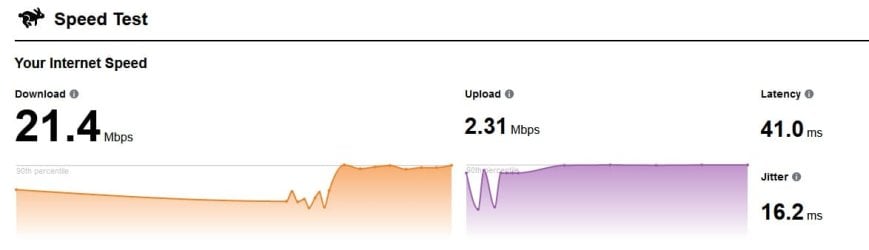
I ran that speed test from that link you posted. Here is a screen shot of the results. What does it mean?
 

Attachments

  • speed.jpg
    speed.jpg
    19.8 KB · Views: 0

My Computer My Computer

At a glance

Windows 7 Ultimate x641.86 GHz Intrel Core 23 GB Dual Channel DDR2 @ 3.32 MHzIntel Q965/Q963 Express chipset
Computer type
PC/Desktop
Computer Manufacturer/Model Number
refurb in an HP/Compaq case
OS
Windows 7 Ultimate x64
CPU
1.86 GHz Intrel Core 2
Motherboard
HP 0A60h XU1
Memory
3 GB Dual Channel DDR2 @ 3.32 MHz
Graphics Card(s)
Intel Q965/Q963 Express chipset
Monitor(s) Displays
Dell CRT
Hard Drives
977GB Samsung HD 103 SI ATA
Case
HP Compaq DC5800
Mouse
wired optical
Antivirus
Microsoft Security Essentials, MalwareBytes, Spyware Blaster
Browser
Firefox 32-bit
Jitter and latency look fine. What are you paying for Internet speed?
 

My Computer My Computer

At a glance

Windows 7 Ultimate x64
Computer type
PC/Desktop
OS
Windows 7 Ultimate x64
I am paying $70 a month for "basic" Internet. That includes the $10 modem rental fee.
 
Last edited:

My Computer My Computer

At a glance

Windows 7 Ultimate x641.86 GHz Intrel Core 23 GB Dual Channel DDR2 @ 3.32 MHzIntel Q965/Q963 Express chipset
Computer type
PC/Desktop
Computer Manufacturer/Model Number
refurb in an HP/Compaq case
OS
Windows 7 Ultimate x64
CPU
1.86 GHz Intrel Core 2
Motherboard
HP 0A60h XU1
Memory
3 GB Dual Channel DDR2 @ 3.32 MHz
Graphics Card(s)
Intel Q965/Q963 Express chipset
Monitor(s) Displays
Dell CRT
Hard Drives
977GB Samsung HD 103 SI ATA
Case
HP Compaq DC5800
Mouse
wired optical
Antivirus
Microsoft Security Essentials, MalwareBytes, Spyware Blaster
Browser
Firefox 32-bit
If you're paying for a modem, then they need to give you a new one. I'm surprised they didn't even mention that on the phone. Basic Internet to me sounds like the speed I'm seeing there. And it's a horrendous price.

I helped another guy out with Spectrum and they seem as bad as Comcast. Only difference is Comcast is a tier 1 provider.
 

My Computer My Computer

At a glance

Windows 7 Ultimate x64
Computer type
PC/Desktop
OS
Windows 7 Ultimate x64
Ran it again today when my modem kept going offline. I tried to reset the modem through the ISPs website. It ran about 15 minutes then said "Unable to reset equipment." I made an appt. for later this week for a tech to come and straighten out this chronic problem.
 

Attachments

  • speed.jpg
    speed.jpg
    23.2 KB · Views: 0

My Computer My Computer

At a glance

Windows 7 Ultimate x641.86 GHz Intrel Core 23 GB Dual Channel DDR2 @ 3.32 MHzIntel Q965/Q963 Express chipset
Computer type
PC/Desktop
Computer Manufacturer/Model Number
refurb in an HP/Compaq case
OS
Windows 7 Ultimate x64
CPU
1.86 GHz Intrel Core 2
Motherboard
HP 0A60h XU1
Memory
3 GB Dual Channel DDR2 @ 3.32 MHz
Graphics Card(s)
Intel Q965/Q963 Express chipset
Monitor(s) Displays
Dell CRT
Hard Drives
977GB Samsung HD 103 SI ATA
Case
HP Compaq DC5800
Mouse
wired optical
Antivirus
Microsoft Security Essentials, MalwareBytes, Spyware Blaster
Browser
Firefox 32-bit
Have the tech give you a new modem. I already mentioned that your ISP should be giving you a new modem since you already lease one.

In the future you don't need to use their website to reset the modem. Just a press and hold of the modem's rest button for at least 10 seconds is all you need to do.
 

My Computer My Computer

At a glance

Windows 7 Ultimate x64
Computer type
PC/Desktop
OS
Windows 7 Ultimate x64
i got the same issue before, basely i will suggest you contact your ISP and ask them reply a new one for your. all modem problem can just forward to your ISP, they will send a engineer to help you check your modem and network speed relative.
 

My Computer My Computer

At a glance

-
Computer type
PC/Desktop
OS
-
I had a service tech here and he determined the main problem was a bad cable line. That was replaced and while here he gave me a new modem. It worked great for a few days, now I an getting lagging again.
 

My Computer My Computer

At a glance

Windows 7 Ultimate x641.86 GHz Intrel Core 23 GB Dual Channel DDR2 @ 3.32 MHzIntel Q965/Q963 Express chipset
Computer type
PC/Desktop
Computer Manufacturer/Model Number
refurb in an HP/Compaq case
OS
Windows 7 Ultimate x64
CPU
1.86 GHz Intrel Core 2
Motherboard
HP 0A60h XU1
Memory
3 GB Dual Channel DDR2 @ 3.32 MHz
Graphics Card(s)
Intel Q965/Q963 Express chipset
Monitor(s) Displays
Dell CRT
Hard Drives
977GB Samsung HD 103 SI ATA
Case
HP Compaq DC5800
Mouse
wired optical
Antivirus
Microsoft Security Essentials, MalwareBytes, Spyware Blaster
Browser
Firefox 32-bit
I had a service tech here and he determined the main problem was a bad cable line. That was replaced and while here he gave me a new modem. It worked great for a few days, now I an getting lagging again.

I'm in IN and using Spectrum. I have the Aaris modem. I noticed some time ago that rebooting it seems to take longer than it used to. I have had this modem several years and I have had them out with trouble on the box on the exterior line to the house twice in the last couple of years. Rain got in the box and corroded some connectors. He said he "cleaned" them off. The second time supposedly they replace some connectors in the box. I believe they also replaced the line from the pole to the house too. Anyway, a year or so ago I had to switch to streaming because the cable TV just got too expensive. I had no premium networks. Just the second tier of the basic so I could also get MSNBC. With the TV, Internet and WiFi, it was approaching $200 a month! Now I'm paying 79.99 plus 5 for WiFi. And so far I can afford a decent streaming plan. But I digress...

I got used to some late night outages that happens around midnight because they are probably performing maintenance and it'll be back on in the morning. But for several weeks now, off and on, I will experience serious lagging that almost freezes my laptop or disconnect and lose my Internet and WiFi altogether. A reboot will generally fix it, but it can happen several times a day. Then things will be fine for awhile until the next time.

In fact, I called them yesterday. They keep telling me everything is fine on my end. I keep telling them it is not. So now I am logging the occurrences for the next time I will be calling them.

I guess this is my roundabout way of saying that I think the problems we have are at Spectrum's end and not ours. And frankly I don't think there is a darned thing we can do about it. These companies have figured out a way to own us.
 

My Computer My Computer

At a glance

Windows 7 Home Premium 64bit
Computer type
Laptop
Computer Manufacturer/Model Number
HP
OS
Windows 7 Home Premium 64bit
I had a service tech here and he determined the main problem was a bad cable line. That was replaced and while here he gave me a new modem. It worked great for a few days, now I an getting lagging again.


Was the line that was replaced the line that goes from your house to the tap (round looking peg in the ground)? The line that goes from the back of your house to the tap is called the drop. If the drop wasn't replaced, then it may be the source of the issue, but a tech would have to connect their meter from the outside of the house to get a signal read out from your end to the tap its self minus everything else connected to the cable line.

And this is cable, correct? Not DSL over a phone line? Not sure what Spectrum offers.

What is the make and model of the new modem? Do you get the same behavior with another computer or device?
 

My Computer My Computer

At a glance

Windows 7 Ultimate x64
Computer type
PC/Desktop
OS
Windows 7 Ultimate x64
Back
Top