Solved Can the Windows Defender icon be made to show in the notification area

robls99

New member
Member
Local time
8:20 AM
Messages
96
I recently ditched my AV and started using Windows Defender.

I like the comfort of seeing the WD icon in the lower right notification area so I know it wasn't accidentally or maliciously turned off but it doesn't show up in the regular Properties of that area.

I don't want to pin it to the lower left area. (I noticed my wife's Win 10 does show the icon in that location)

I know I have to update to Win10 shortly and I will but is there a similar solution for my Win7?
 

My Computer My Computer

At a glance

Windows 7 Pro 644gb
Computer type
PC/Desktop
Computer Manufacturer/Model Number
cutom
OS
Windows 7 Pro 64
Memory
4gb
Hard Drives
500GB
I recently ditched my AV and started using Windows Defender.

I like the comfort of seeing the WD icon in the lower right notification area so I know it wasn't accidentally or maliciously turned off but it doesn't show up in the regular Properties of that area.

I don't want to pin it to the lower left area. (I noticed my wife's Win 10 does show the icon in that location)

I know I have to update to Win10 shortly and I will but is there a similar solution for my Win7?


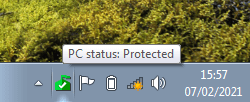
The 'Defender' in Win7 isn't a proper AV, it only detects PUPs (potentially unwanted programs). For all my W7 machines I install Microsoft Security Essentials, a proper AV that uses the same scan engine and definitions as W10's Defender. It will have that reassuring icon in the system tray.

You can still download it here: https://www.microsoft.com/en-gb/download/details.aspx?id=5201

There are two to choose from, the larger download will be the x64 version, the smaller should be for x86.


Although updates for W7 stopped when W7 reached end of support, Microsoft have said that MSE updates will continue until 2023.

Microsoft said:
Microsoft will continue to release signature updates (including engine) to service systems currently running Microsoft Security Essentials until 2023.
What is Microsoft Security Essentials?
 

Attachments

  • MSE.png
    MSE.png
    14.9 KB · Views: 11

My Computers My Computers

  • At a glance

    Windows 7 Home Premium x64AMD V1204GB
    Computer type
    Laptop
    Computer Manufacturer/Model Number
    Toshiba satellite C650D
    OS
    Windows 7 Home Premium x64
    CPU
    AMD V120
    Memory
    4GB
    Internet Speed
    150 Mbps
    Antivirus
    MSE
    Browser
    IE11, Edge, Firefox
    Other Info
    I also have W7 Pro on my System Two, and several W7 Hyper-V VMs. My other machines run Windows 10/11. Their specs are in my Ten Forums & Eleven Forum profiles.
  • At a glance

    Windows 7 Pro x64Intel i5-3320M8 GB
    Computer type
    Laptop
    System Manufacturer/Model Number
    Lenovo Thinkpad T430
    OS
    Windows 7 Pro x64
    CPU
    Intel i5-3320M
    Memory
    8 GB
    Hard Drives
    250GB Samsung SSD 860 EVO
    Antivirus
    MSE
Bree,

Thanks for that GREAT info.
I downloaded the 64k version and you were absolutely right that now I have my notification icon.

Can I still use my Malwarebytes along with MSE?
 

My Computer My Computer

At a glance

Windows 7 Pro 644gb
Computer type
PC/Desktop
Computer Manufacturer/Model Number
cutom
OS
Windows 7 Pro 64
Memory
4gb
Hard Drives
500GB
Bree,

Thanks for that GREAT info.
I downloaded the 64k version and you were absolutely right that now I have my notification icon.

Can I still use my Malwarebytes along with MSE?

I don't use Malwarebytes myself. You can certainly run an on demand scan with Malwarebytes (or anything else) while another AV such as MSE is running. As for real time protection it's not generally a good idea to have two AVs running at the same time.

Do you have the paid version of Malwarebytes with the real time protection? In Windows 10 installing Malwarebytes (or any other AV) with real time protection will disable the built in Microsoft AV and take over from it. Though from what I've read it's possible in W7 to have both MSE and Malwarebyte running side by side. See here....

Clarification of Exclusions needed running alongside Microsoft MSE - Malwarebytes for Windows Support Forum - Malwarebytes Forums
 

My Computers My Computers

  • At a glance

    Windows 7 Home Premium x64AMD V1204GB
    Computer type
    Laptop
    Computer Manufacturer/Model Number
    Toshiba satellite C650D
    OS
    Windows 7 Home Premium x64
    CPU
    AMD V120
    Memory
    4GB
    Internet Speed
    150 Mbps
    Antivirus
    MSE
    Browser
    IE11, Edge, Firefox
    Other Info
    I also have W7 Pro on my System Two, and several W7 Hyper-V VMs. My other machines run Windows 10/11. Their specs are in my Ten Forums & Eleven Forum profiles.
  • At a glance

    Windows 7 Pro x64Intel i5-3320M8 GB
    Computer type
    Laptop
    System Manufacturer/Model Number
    Lenovo Thinkpad T430
    OS
    Windows 7 Pro x64
    CPU
    Intel i5-3320M
    Memory
    8 GB
    Hard Drives
    250GB Samsung SSD 860 EVO
    Antivirus
    MSE
Bree,

Thanks for the addl. info.

It gets a little complicated but I'll make sure to exclude each one from the other.

Have a great week,

Rob
 

My Computer My Computer

At a glance

Windows 7 Pro 644gb
Computer type
PC/Desktop
Computer Manufacturer/Model Number
cutom
OS
Windows 7 Pro 64
Memory
4gb
Hard Drives
500GB
:thumbsup:
 

My Computers My Computers

  • At a glance

    Windows 7 Home Premium x64AMD V1204GB
    Computer type
    Laptop
    Computer Manufacturer/Model Number
    Toshiba satellite C650D
    OS
    Windows 7 Home Premium x64
    CPU
    AMD V120
    Memory
    4GB
    Internet Speed
    150 Mbps
    Antivirus
    MSE
    Browser
    IE11, Edge, Firefox
    Other Info
    I also have W7 Pro on my System Two, and several W7 Hyper-V VMs. My other machines run Windows 10/11. Their specs are in my Ten Forums & Eleven Forum profiles.
  • At a glance

    Windows 7 Pro x64Intel i5-3320M8 GB
    Computer type
    Laptop
    System Manufacturer/Model Number
    Lenovo Thinkpad T430
    OS
    Windows 7 Pro x64
    CPU
    Intel i5-3320M
    Memory
    8 GB
    Hard Drives
    250GB Samsung SSD 860 EVO
    Antivirus
    MSE
Back
Top