
DarthDankSaber
New member
- Local time
- 4:39 AM
- Messages
- 8
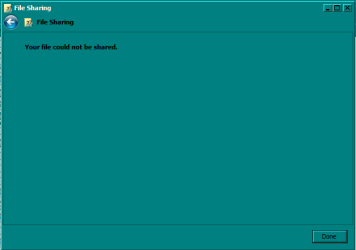
Hi. So I am on my Administrator-User account on my Windows 7 Ultimate x64. Just the other day, when I encrypted a bunch of files using certificates I made myself, I was having no issues. I made no changes, but now when I try to open something, Windows won't let me open it.
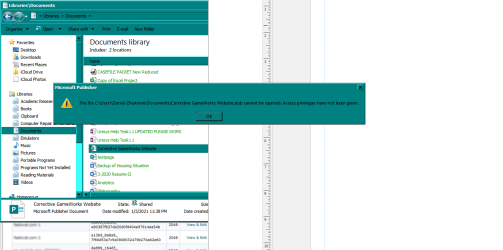
For some more information, I tried changing the file owner, and permissions. I tried disabling Encrypting File System. I tried changing Share settings, with right-click. No avail, there, as it still denies access. I tried turning off the file encryption, but it blocks that, too. When trying to open up one of my spreadsheets I made myself with Excel, it tells me that the file cannot be opened because it is set to read-only, or is encrypted. I tried going into the Microsoft Excel settings, and tried all those solutions (That would be Trusted Installer options) but none of those worked.
Mozilla also won't open certain PDF's that got encrypted, because of the similar error I'm describing where Windows doesn't seem to see me as the owner and administrator, with full control privileges.
I tried decrypting with the command prompt at well, but it also fails.
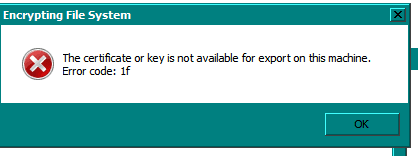
Now, I did NOT lose my private key. I have my private key backed up, but after a bunch of digging through settings Googling and Youtubing, I can't get around this issue.
I also cannot read the private key when I open the file up, where I have the private key backed up.
For some more information, I tried changing the file owner, and permissions. I tried disabling Encrypting File System. I tried changing Share settings, with right-click. No avail, there, as it still denies access. I tried turning off the file encryption, but it blocks that, too. When trying to open up one of my spreadsheets I made myself with Excel, it tells me that the file cannot be opened because it is set to read-only, or is encrypted. I tried going into the Microsoft Excel settings, and tried all those solutions (That would be Trusted Installer options) but none of those worked.
Mozilla also won't open certain PDF's that got encrypted, because of the similar error I'm describing where Windows doesn't seem to see me as the owner and administrator, with full control privileges.
I tried decrypting with the command prompt at well, but it also fails.
Now, I did NOT lose my private key. I have my private key backed up, but after a bunch of digging through settings Googling and Youtubing, I can't get around this issue.
I also cannot read the private key when I open the file up, where I have the private key backed up.
Attachments


My Computer
At a glance
Windows 7 Ultimate x64IntelG.Skill RipjawsGTX 1070 ACX 3.0
- Computer type
- PC/Desktop
- Computer Manufacturer/Model Number
- Asus
- OS
- Windows 7 Ultimate x64
- CPU
- Intel
- Motherboard
- Asus Z97-A USB 3.1
- Memory
- G.Skill Ripjaws
- Graphics Card(s)
- GTX 1070 ACX 3.0
- Hard Drives
- Crucial MX300, 1TB, 2.5 inch form factor
- Antivirus
- Kaspersky
- Browser
- Mozilla Firefox


 Been trying stuff, nothing's working yet.