VMware vCenter Converter Standalone v. 6.2.0 build-8466193

multiweb

New member
Local time
2:03 PM
Messages
23
Converting HD to VM (access denied to drive)

I'm trying to virtualize a box running Windows 7 Ultimate 64bit to an external 8TB Segate Barracuda HD.
The issue I'm getting is a Microsoft issue with the Volume Shadow Copy service. So says VMware after Googling. (VMware vCenter Converter Standalone v. 6.2.0 build-8466193)

The event viewer shows the application log as:

"Volume Shadow Copy Service error: An internal inconsistency was detected in trying to contact shadow copy service writers. The Registry Writer failed to respond to a query from VSS. Check to see that the Event Service and Volume Shadow Copy Service are operating properly, and please check the Application event log for any other events."

I can start the service and stop it manually. It works. I also checked the following in CMD:


/*****************************************/

Microsoft Windows [Version 6.1.7601]
Copyright (c) 2009 Microsoft Corporation. All rights reserved.

C:\Users\marc yg aragnou>vssadmin list providers
vssadmin 1.1 - Volume Shadow Copy Service administrative command-line tool:

Microsoft Windows [Version 6.1.7601]
Copyright (c) 2009 Microsoft Corporation. All rights reserved.

C:\Users\marc yg aragnou>vssadmin list providers
vssadmin 1.1 - Volume Shadow Copy Service administrative command-line tool
(C) Copyright 2001-2005 Microsoft Corp.

Provider name: 'Microsoft Software Shadow Copy provider 1.0'
Provider type: System
Provider Id: {b5946137-7b9f-4925-af80-51abd60b20d5}
Version: 1.0.0.7


C:\Users\marc yg aragnou>vssadmin list writers
vssadmin 1.1 - Volume Shadow Copy Service administrative command-line tool
(C) Copyright 2001-2005 Microsoft Corp.

Writer name: 'Task Scheduler Writer'
Writer Id: {d61d61c8-d73a-4eee-8cdd-f6f9786b7124}
Writer Instance Id: {1bddd48e-5052-49db-9b07-b96f96727e6b}
State: [1] Stable
Last error: No error

Writer name: 'VSS Metadata Store Writer'
Writer Id: {75dfb225-e2e4-4d39-9ac9-ffaff65ddf06}
Writer Instance Id: {088e7a7d-09a8-4cc6-a609-ad90e75ddc93}
State: [1] Stable
Last error: No error

Writer name: 'Performance Counters Writer'
Writer Id: {0bada1de-01a9-4625-8278-69e735f39dd2}
Writer Instance Id: {f0086dda-9efc-47c5-8eb6-a944c3d09381}
State: [1] Stable
Last error: No error

Writer name: 'System Writer'
Writer Id: {e8132975-6f93-4464-a53e-1050253ae220}
Writer Instance Id: {68b03bb3-d41e-4531-ab94-44bd8fbbbad0}
State: [1] Stable
Last error: No error

Writer name: 'ASR Writer'
Writer Id: {be000cbe-11fe-4426-9c58-531aa6355fc4}
Writer Instance Id: {8cdca3eb-9eed-4b88-a3b3-05915265aae0}
State: [1] Stable
Last error: No error

Writer name: 'MSSearch Service Writer'
Writer Id: {cd3f2362-8bef-46c7-9181-d62844cdc0b2}
Writer Instance Id: {97ae8e9b-4835-4248-a45e-3ba57c821acf}
State: [1] Stable
Last error: No error

Writer name: 'Registry Writer'
Writer Id: {afbab4a2-367d-4d15-a586-71dbb18f8485}
Writer Instance Id: {4ed44ef3-98b4-47b4-a55b-875f47101679}
State: [1] Stable
Last error: No error

Writer name: 'Shadow Copy Optimization Writer'
Writer Id: {4dc3bdd4-ab48-4d07-adb0-3bee2926fd7f}
Writer Instance Id: {cb70e5a6-c3e1-4a31-b765-647affbce262}
State: [1] Stable
Last error: No error

Writer name: 'BITS Writer'
Writer Id: {4969d978-be47-48b0-b100-f328f07ac1e0}
Writer Instance Id: {38ed4101-b203-45d6-b73c-fc3f5b79e4de}
State: [1] Stable
Last error: No error

Writer name: 'COM+ REGDB Writer'
Writer Id: {542da469-d3e1-473c-9f4f-7847f01fc64f}
Writer Instance Id: {7edf9eb6-0e5d-46df-bcc5-95d4e2291b1e}
State: [1] Stable
Last error: No error

Writer name: 'WMI Writer'
Writer Id: {a6ad56c2-b509-4e6c-bb19-49d8f43532f0}
Writer Instance Id: {e0caeb82-c937-4a86-b568-168fe6874227}
State: [1] Stable
Last error: No error


C:\Users\marc yg aragnou>


/*****************************************/

So this is what I'm at now. Can you help and if so what do you need from me?
Thank you very much.
 
Last edited:

My Computer My Computer

At a glance

Window 7 Professional x64I724GBATI
Computer Manufacturer/Model Number
ASUS
OS
Window 7 Professional x64
CPU
I7
Motherboard
ASUS
Memory
24GB
Graphics Card(s)
ATI
Sound Card
onboard
Monitor(s) Displays
2
Hard Drives
3x1TB
Cooling
Water Corsair
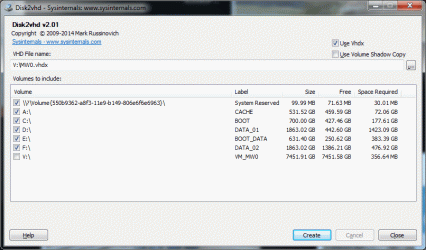
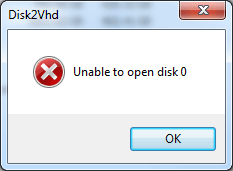
Today I tried Disk2vhd v2.01 so tried to go the HyperV way. Same issue with VSS so the common denominator is the OS now. Disk2vhd has an option not to use volume shadow copy so I ticked that off but still got an error: "unable to open disk 0" which is the system reserved partition on my windows 7 installation. Any idea?

Event Logs say:

"Volume Shadow Copy Service error: Unexpected error querying for the IVssWriterCallback interface. hr = 0x80070005, Access is denied.
. This is often caused by incorrect security settings in either the writer or requestor process.

Operation:
Gathering Writer Data

Context:
Writer Class Id: {e8132975-6f93-4464-a53e-1050253ae220}
Writer Name: System Writer
Writer Instance ID: {a50657ee-bec6-4bdc-8760-671f03228a48}"

Same error (Access is denied) if I isolate disc 0, 1 or 2 and try to do them separately.
 

Attachments

  • vm.gif
    vm.gif
    37.2 KB · Views: 0

My Computer My Computer

At a glance

Window 7 Professional x64I724GBATI
Computer Manufacturer/Model Number
ASUS
OS
Window 7 Professional x64
CPU
I7
Motherboard
ASUS
Memory
24GB
Graphics Card(s)
ATI
Sound Card
onboard
Monitor(s) Displays
2
Hard Drives
3x1TB
Cooling
Water Corsair
It may be that the system reserved partition is full. Read here: How to fix VMware Converter error "FAILED: The VSS snapshots cannot be stored" - Mike Tabor

Not sure if this is the issue or not though.

Good day, thanks for the links. I had a read about the drives permissions and had a look at my settings. They're all set to full control for SYSTEM and Administrators. I ran the tools as Admin. Turned the Acronis/Forticlient/Macrium services off manually. Didn't make any difference. It is also not drive specific. I get the "Access Denied" even trying to isolate each drive.
 

My Computer My Computer

At a glance

Window 7 Professional x64I724GBATI
Computer Manufacturer/Model Number
ASUS
OS
Window 7 Professional x64
CPU
I7
Motherboard
ASUS
Memory
24GB
Graphics Card(s)
ATI
Sound Card
onboard
Monitor(s) Displays
2
Hard Drives
3x1TB
Cooling
Water Corsair
Did you follow everything in that link I gave you? Because it's more than just permissions. It's about assigning a drive letter, setting permissions, and executing some commands. Then you have to reverse some steps.

In addition to that, have a read here: Volume Shadow Copy Service Error 0x80070005

There's something interfering with the Volume Shadow Copy Service. Whether it's permissions, A DLL or a program.
 

My Computer My Computer

At a glance

Windows 7 Ultimate x64
Computer type
PC/Desktop
OS
Windows 7 Ultimate x64

My Computer My Computer

At a glance

Window 7 Professional x64I724GBATI
Computer Manufacturer/Model Number
ASUS
OS
Window 7 Professional x64
CPU
I7
Motherboard
ASUS
Memory
24GB
Graphics Card(s)
ATI
Sound Card
onboard
Monitor(s) Displays
2
Hard Drives
3x1TB
Cooling
Water Corsair
Did you follow everything in that link I gave you? Because it's more than just permissions. It's about assigning a drive letter, setting permissions, and executing some commands. Then you have to reverse some steps.

In addition to that, have a read here: Volume Shadow Copy Service Error 0x80070005

There's something interfering with the Volume Shadow Copy Service. Whether it's permissions, A DLL or a program.

Went through all the steps successfully including the registry. I don't get the VSS error in the application log in the event viewer anymore but I do get an access denied still using disk2vhd.
 

My Computer My Computer

At a glance

Window 7 Professional x64I724GBATI
Computer Manufacturer/Model Number
ASUS
OS
Window 7 Professional x64
CPU
I7
Motherboard
ASUS
Memory
24GB
Graphics Card(s)
ATI
Sound Card
onboard
Monitor(s) Displays
2
Hard Drives
3x1TB
Cooling
Water Corsair
Hmm, is your Windows account an administrator account? Have you tried running disk2vhd as an administrator?

Just to be sure, this is in Windows 7?

Installing disk2vhd to the root of C drive may help bypass the protections of the programs folder. So C:\disk2vhd would be the folder name.
 

My Computer My Computer

At a glance

Windows 7 Ultimate x64
Computer type
PC/Desktop
OS
Windows 7 Ultimate x64
Hmm, is your Windows account an administrator account? Have you tried running disk2vhd as an administrator?

Just to be sure, this is in Windows 7?

Installing disk2vhd to the root of C drive may help bypass the protections of the programs folder. So C:\disk2vhd would be the folder name.

Yes I checked this morning and I'm signed in under an administrator profile. I copied the executable to C:\disk2vhd\ but still getting the same drive access issue. It doesn't matter which drive, System Partition, C: or any other individual drive in the machine. It definitely looks like a permission issue independent from VSS and I tried two different software, but bugger if I know what's going on. Running out of ideas now.

I also thought than the 8TB external drive I'm trying to create the image to in a USB3.0 dock was possibly the issue as I 'm getting messages (information level) in the windows system log:

Device \Device\HarddiskVolumeShadowCopyXX has been surprise removed (IRP_MN_SURPRISE_REMOVAL)

But then I tried to image to an internal drive in the machine and got the same issue.
 

My Computer My Computer

At a glance

Window 7 Professional x64I724GBATI
Computer Manufacturer/Model Number
ASUS
OS
Window 7 Professional x64
CPU
I7
Motherboard
ASUS
Memory
24GB
Graphics Card(s)
ATI
Sound Card
onboard
Monitor(s) Displays
2
Hard Drives
3x1TB
Cooling
Water Corsair
I didn't say copy the executable to another drive, I said install. You have to uninstall and reinstall to a folder on C drive. Doing this will allow you out of the restrictions of the programs folder, but it probably won't matter. It's worth a shot though.

Following the information from this link, you did change the system reserved partition to Z drive as the instructions say?
 

My Computer My Computer

At a glance

Windows 7 Ultimate x64
Computer type
PC/Desktop
OS
Windows 7 Ultimate x64
I didn't say copy the executable to another drive, I said install. You have to uninstall and reinstall to a folder on C drive. Doing this will allow you out of the restrictions of the programs folder, but it probably won't matter. It's worth a shot though.
The download I got for disk2chd was only a zip file containing 3 files including the executable. It's not an install. I copied the directory on the C: drive and ran the executable from there. Previously it was located on my desktop. Running it from the C: drive made no difference.

Following the information from this link, you did change the system reserved partition to Z drive as the instructions say?
Yes I did go through all the steps and assigned a W: drive letter to the System Reserved Partition (Z: was already used in a mapped drive). But when I added Everyone to Full control in the Permissions settings I got an access denied popup box. Also the sequence of instructions in CMD as admin failed:

Microsoft Windows [Version 6.1.7601]
Copyright (c) 2009 Microsoft Corporation. All rights reserved.

C:\Users\marc yg aragnou>w:

W:\>fltmc unload aafsflt

Unload failed with error: 0x801f0013
The system could not find the filter specified.

W:\>cd "System Volume Information"
Access is denied.

W:\>

Here's the list of filters:


W:\>fltmc

Filter Name Num Instances Altitude Frame
------------------------------ ------------- ------------ -----
FsDepends 9 407000 0
mrigflt 6 401913 0
FortiAptFilter 13 324930 0
fortimon3 13 324920 0
FortiShield 12 324900 0
file_tracker 0 281420 0
file_protector 5 227000 0
luafv 1 135000 0
virtual_file 0 132400 0
FileInfo 13 45000 0

W:\>
 

My Computer My Computer

At a glance

Window 7 Professional x64I724GBATI
Computer Manufacturer/Model Number
ASUS
OS
Window 7 Professional x64
CPU
I7
Motherboard
ASUS
Memory
24GB
Graphics Card(s)
ATI
Sound Card
onboard
Monitor(s) Displays
2
Hard Drives
3x1TB
Cooling
Water Corsair
I had a look for \windows\system32\DRIVERS\AAFsFlt.sys on my Win7 system. It's not even there. Is it something supposed to be in Windows 7? Or am I missing something.
 

My Computer My Computer

At a glance

Window 7 Professional x64I724GBATI
Computer Manufacturer/Model Number
ASUS
OS
Window 7 Professional x64
CPU
I7
Motherboard
ASUS
Memory
24GB
Graphics Card(s)
ATI
Sound Card
onboard
Monitor(s) Displays
2
Hard Drives
3x1TB
Cooling
Water Corsair
Can you tell me the exact errors you're seeing with disk2vhd? Is there something in the error log? Just throwing this out there, but anti-virus of some kind of firewall software can mess with things.

Is it something supposed to be in Windows 7? Or am I missing something.

I don't see it in my OS either.
 

My Computer My Computer

At a glance

Windows 7 Ultimate x64
Computer type
PC/Desktop
OS
Windows 7 Ultimate x64
Can you tell me the exact errors you're seeing with disk2vhd? Is there something in the error log? Just throwing this out there, but anti-virus of some kind of firewall software can mess with things.


I don't see it in my OS either.

I get an unable to open disk 0 warning. There are no errors in the event log anymore. Just info.
That's the first thing I did. Check the firewall was off and took off the AV service down. Also any services that might interfere.
 

Attachments

  • D2V_00.gif
    D2V_00.gif
    28 KB · Views: 10
  • D2V_01.gif
    D2V_01.gif
    9.5 KB · Views: 10
  • D2V_02.gif
    D2V_02.gif
    101.7 KB · Views: 2

My Computer My Computer

At a glance

Window 7 Professional x64I724GBATI
Computer Manufacturer/Model Number
ASUS
OS
Window 7 Professional x64
CPU
I7
Motherboard
ASUS
Memory
24GB
Graphics Card(s)
ATI
Sound Card
onboard
Monitor(s) Displays
2
Hard Drives
3x1TB
Cooling
Water Corsair
Is the "Virtual Disk" service on and set to automatic?

This bit of Info. seems to indicate it's just a warning that can be ignored, but in your case it's preventing an actual snapshot being generated. The event ID is different though. I'm assuming that's because it was generated in Windows 8.


Something I see here is that all volumes are checked off when you just want to turn volume V (8TB drive) into a virtual disk. You'd uncheck all volumes except volume V. This may be the reason to the error due to high IO load.

You could try VSS Doctor and see what it reports and if their fix feature works for VSS if you do have VSS errors in the OS.

The free community version of Veeam might be an alternative. It says it performs "replications" which are apparently bootable copies of a system. But I don't know if that's in a VMware or other virtual machine format. I'd have to run the software and see what it's capable of.
 

My Computer My Computer

At a glance

Windows 7 Ultimate x64
Computer type
PC/Desktop
OS
Windows 7 Ultimate x64
Downloading VSS doctor and running it gave me some very useful feedback. The more I go the more I am convinced it is a security/access issue. You mentioned in a previous post if my profile had admin rights.

In the registry I added manually my profile and the default Administrator in the VSSAccessControl and that took care of some of the warnings I had. I also had to change a few things in the services for the run types auto vs. automatic as prompted by VSS Doctor. So I went through everything until I had all green ticks.

I still get the access to drive (X) denied and that points to a security issue as this is the common denominator now between the standalone VMware converter or Disk2VHD. I have the latest Wireshark 3.4.4 installed on my machine. Do you think I could put a filter in place while I'm initiating the Disk2VHD process and monitor in real time a trace that could pinpoint where the bottle neck is?
 

My Computer My Computer

At a glance

Window 7 Professional x64I724GBATI
Computer Manufacturer/Model Number
ASUS
OS
Window 7 Professional x64
CPU
I7
Motherboard
ASUS
Memory
24GB
Graphics Card(s)
ATI
Sound Card
onboard
Monitor(s) Displays
2
Hard Drives
3x1TB
Cooling
Water Corsair
So, Wireshark is just a packet capture program. Unless you're trying to turn a network drive into a virtual hard disk file, it won't be much of any use. Unless I'm missing something here. Does VMware Convertor or Disk2VHD use a network connection to create a virtual disk file?

What you'd most likely want to do is monitor the file system and processes to see exactly what is going on behind the scenes. I'll make a list here for you to check out.

Process Explorer: Process Explorer - Windows Sysinternals | Microsoft Docs

Process Hacker: Overview - Process Hacker

Process Monitor: Process Monitor - Windows Sysinternals | Microsoft Docs

RegFromApp: RegFromApp - Generate RegEdit .reg file from Registry changes made by application

What Changed portable (This one will take a God awful long time to run and take a snapshot: WhatChanged Portable (registry and file change utility) | PortableApps.com

Disk Pulse (This one will monitor changes on the fly with filtering ability. I use it as a sanity check for a secure PC): DiskPulse - Disk Change Monitor

I gave a link to Veeam above as a possible and better alternative. Without me downloading and trying Veeam myself, I wanted to know if it actually made a virtual disk from a host. Reading here it looks like that is possible. I need to try the software myself. That link I gave is for a free community addition.
 

My Computer My Computer

At a glance

Windows 7 Ultimate x64
Computer type
PC/Desktop
OS
Windows 7 Ultimate x64
Off topic really quick. I watch Skynews out of Australia and saw a few weeks ago about the floods in New South Wales. How did you manage that? It looked analogous to hurricane Katrina here in the U.S., state of Louisiana.
 

My Computer My Computer

At a glance

Windows 7 Ultimate x64
Computer type
PC/Desktop
OS
Windows 7 Ultimate x64
So, Wireshark is just a packet capture program. Unless you're trying to turn a network drive into a virtual hard disk file, it won't be much of any use. Unless I'm missing something here. Does VMware Convertor or Disk2VHD use a network connection to create a virtual disk file?

What you'd most likely want to do is monitor the file system and processes to see exactly what is going on behind the scenes. I'll make a list here for you to check out.

Process Explorer: Process Explorer - Windows Sysinternals | Microsoft Docs

Process Hacker: Overview - Process Hacker

Process Monitor: Process Monitor - Windows Sysinternals | Microsoft Docs

RegFromApp: RegFromApp - Generate RegEdit .reg file from Registry changes made by application

What Changed portable (This one will take a God awful long time to run and take a snapshot: WhatChanged Portable (registry and file change utility) | PortableApps.com

Disk Pulse (This one will monitor changes on the fly with filtering ability. I use it as a sanity check for a secure PC): DiskPulse - Disk Change Monitor

I gave a link to Veeam above as a possible and better alternative. Without me downloading and trying Veeam myself, I wanted to know if it actually made a virtual disk from a host. Reading here it looks like that is possible. I need to try the software myself. That link I gave is for a free community addition.

Thanks. Downloading now and will have a look.

Off topic really quick. I watch Skynews out of Australia and saw a few weeks ago about the floods in New South Wales. How did you manage that? It looked analogous to hurricane Katrina here in the U.S., state of Louisiana.

It got bad in parts but we weren't affected were we are. Northern NSW and the coast bore the brunt of it.

Historic Floods in New South Wales
 

My Computer My Computer

At a glance

Window 7 Professional x64I724GBATI
Computer Manufacturer/Model Number
ASUS
OS
Window 7 Professional x64
CPU
I7
Motherboard
ASUS
Memory
24GB
Graphics Card(s)
ATI
Sound Card
onboard
Monitor(s) Displays
2
Hard Drives
3x1TB
Cooling
Water Corsair
It got bad in parts but we weren't affected were we are. Northern NSW and the coast bore the brunt of it.

Historic Floods in New South Wales

Pretty crazy that's where those massive wildfires were and now this. They mention La Niña which means we could see a lot of rain which would be great since we've had hundreds upon thousand of square miles of wildfires here in the Rockies near where I live. This was due to a very dry season. I fear that once the run off occurs from the snow melt the water supply will be contaminated so I need to stock up on a massive amount of water. Colorado gets its water from the snow melt in the Rocky Mountains. California as well has had their fair share of fires, though, for that state it's like the freaking Norm. We are in a tornado prone area so I hope La Niña doesn't spur that on if it's related. Several years ago a town just east was hit by a massive tornado. Tornado outbreak sequence of May 22–31, 2008 - Wikipedia

Looking here, I see La Niña was pretty strong for the years 2007-2008, and it was 2008 when the massive EF3 tornado hit in Windosr. So far it looks like this year is moderate. Certainly not weak so I'm predicting some tornado bull crap coming up.

I've been into radio communications for about 25 years now and have yet to get my amateur radio license. I've always just listened to public safety and what have you. Back in high school I did try getting my license but failed because I was studying an older book using the old question pool of 300 questions for the test of 35 questions. After that I never picked it up again. Now I'm studying with an App, and I feel like I REALLY should get my license soon before tornado season. Also, there is a license here for something called GMRS (General Mobile Radio Service) around ~462 MHz. It doesn't require a test, just a fee and covers your whole immediate family, and the FCC (Federal Communications Commission) is lowering that fee to $35. When that happens I'm applying so that I have that availability as well. There are at least two GMRS repeaters here and a whole Colorado state wide amateur radio repeater system. Which means I can be practically anywhere in Colorado and talk to anyone in Colorado. Not all areas are covered, but a good portion of the state is. A lot of these repeaters use microwave links and what have you.
 

My Computer My Computer

At a glance

Windows 7 Ultimate x64
Computer type
PC/Desktop
OS
Windows 7 Ultimate x64
Back
Top