How to change name of program that appears when using "Open With"

JackNaylorPE

New member
Member
VIP
Local time
3:21 AM
Messages
159
How to change name of program that appears when using "Open With"

Windows 7 Using AutoCAD. Each year Autodesk has a new release, we generally keep 2 active installations installed ... say "AutoCAD 2018" and AutoCAD 2020 ... or AutoCAD 2020 and AutoCAD 2022. This is because some things just don't work as expected from version to version and we choose the version accordingly.

When hitting the Start Button, I see say:

AutoCAD 2018
AutoCAD 2020

The Icons say:
AutoCAD 2018
AutoCAD 2020

The Installations Folders and executables are: C:\ProgramFiles\Autodesk\
AutoCAD 2018\acad.exe
AutoCAD 2020\acad.exe

My problem is that when I right click a *.dwg file and select "Open With: ", I see:

AutoCAD Application
AutoCAD Application

And inevitably, as luck would have it, which ever one I pick 1st, is the wrong one . Any way to edit that description so I know which version I am opening ? Right now I am opening the program and then double clicking the file
 

My Computer My Computer

At a glance

Windows 7 - 64 biti7 920Mushkin 998692GTX 295 FTW Edition 1792MB
Computer Manufacturer/Model Number
Home Built
OS
Windows 7 - 64 bit
CPU
i7 920
Motherboard
Asus Rampage II Extreme
Memory
Mushkin 998692
Graphics Card(s)
GTX 295 FTW Edition 1792MB
Sound Card
Sounblaster Xi Fi Extreme
Monitor(s) Displays
Dekk U2410
Hard Drives
Seagate 7200.12
PSU
Antec SG-850
Case
Antec 1200
Cooling
Prolimatech Megashadow
I'm bookmarking this thread, I have the same question. My first wild guess is somewhere within the Registry...
 

My Computer My Computer

At a glance

Windows 7 Professional 64-bitDesktop i5; Acers i5 & i7desktop 16GB; 1 Acer 8GB & 1 Acer 16GB
Computer type
PC/Desktop
Computer Manufacturer/Model Number
Antec desktop; Acer Aspire laptops
OS
Windows 7 Professional 64-bit
CPU
Desktop i5; Acers i5 & i7
Memory
desktop 16GB; 1 Acer 8GB & 1 Acer 16GB
Hard Drives
1TB split into 2 equal partitions [OS and data] usable by RJS
Internet Speed
AT&T DSL
Browser
FF, GChrome, msIE
Other Info
Windows 7 Firewall, Emsisoft AM/AV, MSE [scan-only], SpywareBlaster, Ruiware/BillP combine
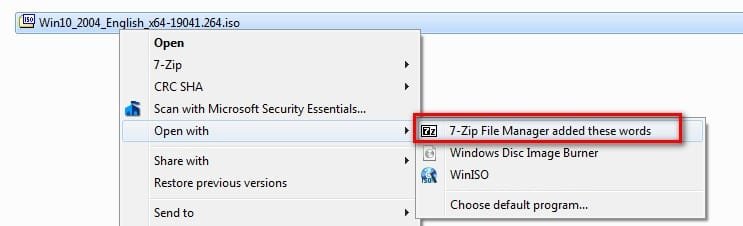
HKEY_CURRENT_USER\Software\Classes\Local Settings\Software\Microsoft\Windows\Shell\MuiCache

The names you see are there. You can change them

muicache-1.jpg


added these words

muicache-3.jpg


muicache-2.jpg


Code:
Windows Registry Editor Version 5.00

[HKEY_CURRENT_USER\Software\Classes\Local Settings\Software\Microsoft\Windows\Shell\MuiCache]
"C:\\Program Files\\7-Zip\\7zFM.exe"="7-Zip File Manager added these words"
 
Last edited:

My Computers My Computers

  • At a glance

    7 X64i5 84002x8gb 3200mhz
    Computer type
    PC/Desktop
    OS
    7 X64
    CPU
    i5 8400
    Motherboard
    gigabyte b365m ds3h
    Memory
    2x8gb 3200mhz
    Hard Drives
    various
    PSU
    pure power 11 400w cm
    Case
    Coolermaster
    Cooling
    cryorig m9i
  • At a glance

    7x64g54008gb ddr4 2400
    Computer type
    PC/Desktop
    OS
    7x64
    CPU
    g5400
    Motherboard
    ga b365m ds3h
    Memory
    8gb ddr4 2400
    PSU
    xfx pro 450w
If your paths are:

C:\ProgramFiles\Autodesk\AutoCAD 2018\acad.exe
C:\ProgramFiles\Autodesk\AutoCAD 2020\acad.exe


Code:
Windows Registry Editor Version 5.00

[HKEY_CURRENT_USER\Software\Classes\Local Settings\Software\Microsoft\Windows\Shell\MuiCache]
"C:\\ProgramFiles\\Autodesk\\AutoCAD 2018\\acad.exe"="AutoCAD 2018"

"C:\\ProgramFiles\\Autodesk\\AutoCAD 2020\\acad.exe"="AutoCAD 2020"
 

My Computers My Computers

  • At a glance

    7 X64i5 84002x8gb 3200mhz
    Computer type
    PC/Desktop
    OS
    7 X64
    CPU
    i5 8400
    Motherboard
    gigabyte b365m ds3h
    Memory
    2x8gb 3200mhz
    Hard Drives
    various
    PSU
    pure power 11 400w cm
    Case
    Coolermaster
    Cooling
    cryorig m9i
  • At a glance

    7x64g54008gb ddr4 2400
    Computer type
    PC/Desktop
    OS
    7x64
    CPU
    g5400
    Motherboard
    ga b365m ds3h
    Memory
    8gb ddr4 2400
    PSU
    xfx pro 450w

My Computer My Computer

At a glance

Windows 7 Ultimate x64
Computer type
PC/Desktop
OS
Windows 7 Ultimate x64
F22

There's dozens of CAD programs out there and they are easy to use, inexpensive and work fine ... in their own realm ... but compatibility with AutoCAD is poor. I get surveys and other drawings from subconsultants and we have an cost adder in our proposals if the user is not using AutoDesk. I have spent hours to days fixing incompatibilities.
 

My Computer My Computer

At a glance

Windows 7 - 64 biti7 920Mushkin 998692GTX 295 FTW Edition 1792MB
Computer Manufacturer/Model Number
Home Built
OS
Windows 7 - 64 bit
CPU
i7 920
Motherboard
Asus Rampage II Extreme
Memory
Mushkin 998692
Graphics Card(s)
GTX 295 FTW Edition 1792MB
Sound Card
Sounblaster Xi Fi Extreme
Monitor(s) Displays
Dekk U2410
Hard Drives
Seagate 7200.12
PSU
Antec SG-850
Case
Antec 1200
Cooling
Prolimatech Megashadow
All:

Thanks for the help .... easy fix ... hard part is knowing where to look ... Muchos Grassyass
 

My Computer My Computer

At a glance

Windows 7 - 64 biti7 920Mushkin 998692GTX 295 FTW Edition 1792MB
Computer Manufacturer/Model Number
Home Built
OS
Windows 7 - 64 bit
CPU
i7 920
Motherboard
Asus Rampage II Extreme
Memory
Mushkin 998692
Graphics Card(s)
GTX 295 FTW Edition 1792MB
Sound Card
Sounblaster Xi Fi Extreme
Monitor(s) Displays
Dekk U2410
Hard Drives
Seagate 7200.12
PSU
Antec SG-850
Case
Antec 1200
Cooling
Prolimatech Megashadow
:-)
 

My Computers My Computers

  • At a glance

    7 X64i5 84002x8gb 3200mhz
    Computer type
    PC/Desktop
    OS
    7 X64
    CPU
    i5 8400
    Motherboard
    gigabyte b365m ds3h
    Memory
    2x8gb 3200mhz
    Hard Drives
    various
    PSU
    pure power 11 400w cm
    Case
    Coolermaster
    Cooling
    cryorig m9i
  • At a glance

    7x64g54008gb ddr4 2400
    Computer type
    PC/Desktop
    OS
    7x64
    CPU
    g5400
    Motherboard
    ga b365m ds3h
    Memory
    8gb ddr4 2400
    PSU
    xfx pro 450w
F22

There's dozens of CAD programs out there and they are easy to use, inexpensive and work fine ... in their own realm ... but compatibility with AutoCAD is poor. I get surveys and other drawings from subconsultants and we have an cost adder in our proposals if the user is not using AutoDesk. I have spent hours to days fixing incompatibilities.

I figured that was the case, but posted the links in case you may not know about them or if someone else comes along.
 

My Computer My Computer

At a glance

Windows 7 Ultimate x64
Computer type
PC/Desktop
OS
Windows 7 Ultimate x64
Back
Top