How to find out if current LAN speed is 100 Mbps or 1 Gbps?

pstein

New member
Member
VIP
Local time
12:14 AM
Messages
244
The LAN port on the motherboard of my notebook is theoretical capable to serve a maximum LAN speed of 1 Gbps.

However I use my notebook with LAN cable in several places. Some of the routers on the partner side
can serve only 100 Mbps others 1 Gbps.

Does Win7 AUTOMATICALLY adjust its maximum LAN speed to the maximum possible?

Or do I have to switch it manually?

How can I find out INSIDE my Win7 the current max LAN speed?

I don't want to use benchmark tools. I guess there must be a network adapter setting which tells me the current max speed. Where can I find it?

Maybe a diagnostics tool help?
 

My Computer My Computer

At a glance

win7pro 64bit
Computer type
PC/Desktop
OS
win7pro 64bit
Open the Network And Sharing Center window.
You can check the connection speed by clicking on the blue highlighted "Ethernet" link.

You should also check to see if your connection is listed as "Private" or "Public".
If you're connecting at different locations, it may appear as "Public".
 

My Computer My Computer

At a glance

Windows 7 Professional SP1 64-bitIntel Core i7-4790 3.60 GHz32 GB DDR3-1600 MHzIntegrated Intel HD Graphics 4600
Computer type
PC/Desktop
Computer Manufacturer/Model Number
Dell OptiPlex 9020
OS
Windows 7 Professional SP1 64-bit
CPU
Intel Core i7-4790 3.60 GHz
Memory
32 GB DDR3-1600 MHz
Graphics Card(s)
Integrated Intel HD Graphics 4600
Monitor(s) Displays
Viewsonic 32" LCD
Hard Drives
Kingston SATA 3 240 GB SSD
Internet Speed
Spectrum Internet 1000 Mbps
There might be an easier way to do this, but off the top of my head you wanna just go by the type of hardware you have and look it up to see it's specifications.

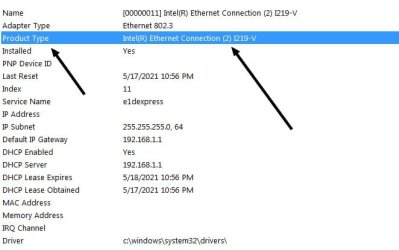
One way to do this is to simply type system information into the search box under the start orb bottom left. Now in the System Information box click on Network | Adapter.

Scroll though until you find the adapter you're using. When you find the adapter you're using, find the "Product Type" information.

Now Google that and you might be able to get some Info. on what that network adapter is capable of. Intel seems pretty good at listing their specifications. In my case I googled, Intel(R) Ethernet Connection (2) I219-V and found out that my network interface card (NIC) is capable of 1 Gbps. See here: Intel(R) Ethernet Connection I219-V Product Specifications It's under data rate per port.

To make this easier, highlight the Product Type Info. and press and hold the control key and hit C. Now that text is in the clipboard. Paste that in Google by right clicking in the search box and select paste. The "Product Type" verbiage will come along for the ride, but it should be alright and you should be able to acquire the needed NIC specifications.

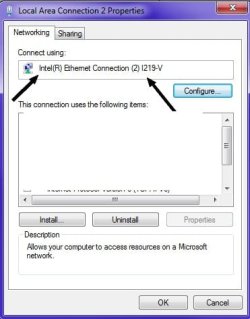
There will be other adapters listed. You can verify what you have by going to Network Connections. And herein lies another option. Type Network And Sharing Center in the search box in the start orb. Now go to the adapters. Right click the adapter and chose properties. At the top will be the name. Google that.

See screenshots.
 

Attachments

  • 1.jpg
    1.jpg
    27 KB · Views: 16
  • 2.jpg
    2.jpg
    23.6 KB · Views: 17

My Computer My Computer

At a glance

Windows 7 Ultimate x64
Computer type
PC/Desktop
OS
Windows 7 Ultimate x64
Does Win7 AUTOMATICALLY adjust its maximum LAN speed to the maximum possible?

There is no such setting, nor there is any need for it. Windows by itself doesn't throttles network connections in any way, so you always get whatever your NIC is capable of.
Of course, the link itself may go slower than its maximum, for instance when connecting to slower routers. The key factor is that a network connection will always run at the speed of the slowest component, be it the network interfaces or the software running in either side.
But no, there is no need to change any setting to get the maximum out of your network, even when switching between them.


How can I find out INSIDE my Win7 the current max LAN speed?

You can get tyour NIC max speed in task manager, network tab. The list at the bottom has a column showing the network speed, which should match your notebook specifications.

Note that this shows the maximum capabilities of your network card, not the effective network speed, which is further limited by external factors such as other network equipment and software on both ends.
 

My Computer My Computer

At a glance

Windows 7 Ultimate x64Intel Core i7-740QM8 GB DDR3NVIDIA GeForce 330GT
Computer type
Laptop
Computer Manufacturer/Model Number
Toshiba Sattelite A665-S6092
OS
Windows 7 Ultimate x64
CPU
Intel Core i7-740QM
Memory
8 GB DDR3
Graphics Card(s)
NVIDIA GeForce 330GT
Screen Resolution
1366x768
Hard Drives
Samsung 840 SSD 500GB
1TB USB3 external HD
Cooling
Coolermaster Notepal U3 notebook cooling pad
Internet Speed
3mbps ASDL
Antivirus
ClamWin 0.98.7
Browser
Opera 12.17 x86 (main), Firefox 38 (sec), IE11 (last resort)
This is all wrong!

My RJ45 NIC card offers 1 Gbps, my router offers 1 Gbps but the current LAN speed is only 100 Mbps (as shown in Task Manager as suggested)

Whats wrong?

How can I increase manually to max speed?
 

My Computer My Computer

At a glance

win7pro 64bit
Computer type
PC/Desktop
OS
win7pro 64bit
That's correct. If you did as I said and looked up your NIC you'd get the real speed capability. What Task Manager is showing is that perhaps your router or Ethernet cable is limited to 100 Mbps.

If an Ethernet cable is only using two one pair of wires you'll get a max of 100 Mbps. If the Ethernet cable is using all four two pairs of wires you'll get 1 Gbps.

Again, your router may play a factor as well. I highly doubt anything is wrong with your NIC in the computer.
 
Last edited:

My Computer My Computer

At a glance

Windows 7 Ultimate x64
Computer type
PC/Desktop
OS
Windows 7 Ultimate x64

My Computer My Computer

At a glance

win7pro 64bit
Computer type
PC/Desktop
OS
win7pro 64bit

My Computer My Computer

At a glance

Windows 7 Ultimate x64
Computer type
PC/Desktop
OS
Windows 7 Ultimate x64
Back
Top