
You are using an out of date browser. It may not display this or other websites correctly.
You should upgrade or use an alternative browser.
You should upgrade or use an alternative browser.
Updating windows 7 to windows 10
- Thread starter fegsdc
- Start date

Here's a tutorial over at Ten forums that shows you how - Upgrade to Windows 10 from Windows 7 for Free | Tutorials
My Computer
- Computer type
- PC/Desktop
- OS
- Windows 11

Thank you so much, i was able to downgrade to windows 10!
Save your windows.old folder.
You may discover that win 7 is still the best OS
My Computers
System One System Two
-
- Computer type
- PC/Desktop
- Computer Manufacturer/Model Number
- custom build
- OS
- Windows 7 HP 64
- CPU
- i5 6600K - 800MHz to 4200MHz
- Motherboard
- GA-Z170-HD3P
- Memory
- 4+4G GSkill DDR4 3000
- Graphics Card(s)
- IG - Intel 530
- Monitor(s) Displays
- Samsung 226BW
- Screen Resolution
- 1680x1050
- Hard Drives
- (1) -1 SM951 – 128GB M.2 AHCI PCIe SSD drive for Windows 7 and Lubuntu
(2) -1 WD SATA 3 - 1T for Data
(3) -1 WD SATA 3 - 1T for backup
- PSU
- Thermaltake 450W TR2 gold
- Keyboard
- Old and good Chicony mechanical keyboard
- Mouse
- Logitech mX performance - 9 buttons (had to disable some)
- Internet Speed
- 500Mb/s
- Browser
- Firefox 64
- Other Info
- TinyWall firewall
-
- Computer type
- Laptop
- System Manufacturer/Model Number
- Asus Q550LF
- OS
- Windows 7 Pro
- CPU
- i7-4500U 800MHz to 3.0GHz
- Motherboard
- Asus Q550LF
- Memory
- (4+4)G DDR3 1600
- Graphics Card(s)
- IG intel 4400 + NVIDIA GeForce GT 745M
- Sound Card
- Realtek
- Monitor(s) Displays
- LG Display LP156WF4-SPH1
- Screen Resolution
- 1920 x 1080
- Hard Drives
- BX500 120G SSD for Windows and programs +
1T HDD for data
- Internet Speed
- 500 Mb/s
- Browser
- Firefox
- Other Info
- TinyWall firewall
Hey, sorry what do i need the windows old folder for and where to find it?? Save it where and how?? I have already changed to windows 10 yesterday though....
My Computer
- Computer type
- PC/Desktop
- OS
- Windows 7
Windows old has the old and good win 7 files.
Set explorer to show system and hidden files.
Set explorer to show system and hidden files.
My Computers
System One System Two
-
- Computer type
- PC/Desktop
- Computer Manufacturer/Model Number
- custom build
- OS
- Windows 7 HP 64
- CPU
- i5 6600K - 800MHz to 4200MHz
- Motherboard
- GA-Z170-HD3P
- Memory
- 4+4G GSkill DDR4 3000
- Graphics Card(s)
- IG - Intel 530
- Monitor(s) Displays
- Samsung 226BW
- Screen Resolution
- 1680x1050
- Hard Drives
- (1) -1 SM951 – 128GB M.2 AHCI PCIe SSD drive for Windows 7 and Lubuntu
(2) -1 WD SATA 3 - 1T for Data
(3) -1 WD SATA 3 - 1T for backup
- PSU
- Thermaltake 450W TR2 gold
- Keyboard
- Old and good Chicony mechanical keyboard
- Mouse
- Logitech mX performance - 9 buttons (had to disable some)
- Internet Speed
- 500Mb/s
- Browser
- Firefox 64
- Other Info
- TinyWall firewall
-
- Computer type
- Laptop
- System Manufacturer/Model Number
- Asus Q550LF
- OS
- Windows 7 Pro
- CPU
- i7-4500U 800MHz to 3.0GHz
- Motherboard
- Asus Q550LF
- Memory
- (4+4)G DDR3 1600
- Graphics Card(s)
- IG intel 4400 + NVIDIA GeForce GT 745M
- Sound Card
- Realtek
- Monitor(s) Displays
- LG Display LP156WF4-SPH1
- Screen Resolution
- 1920 x 1080
- Hard Drives
- BX500 120G SSD for Windows and programs +
1T HDD for data
- Internet Speed
- 500 Mb/s
- Browser
- Firefox
- Other Info
- TinyWall firewall
My PC is in Portuguese, im not sure i understand what i am supposed to do with that file, save it where? My external hard drive does not work because it has been formated using an apple PC now it does not work on this pc.......I have found the file though it is on my computer......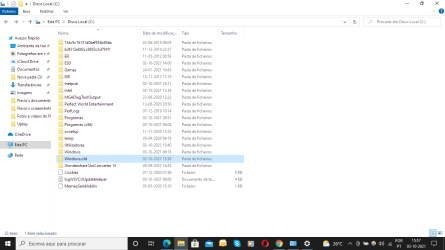
My Computer
- Computer type
- PC/Desktop
- OS
- Windows 7

- Local time
- 7:11 AM
- Messages
- 16,786
Why cant you format your external disk to something windows can use. ? Free 3rd party partition managers can do that kind of thing.
My Computers
System One System Two
-
- Computer type
- PC/Desktop
- OS
- 7 X64
- CPU
- i5 8400
- Motherboard
- gigabyte b365m ds3h
- Memory
- 2x8gb 3200mhz
- Hard Drives
- various
- PSU
- pure power 11 400w cm
- Case
- Coolermaster
- Cooling
- cryorig m9i
-
- Computer type
- PC/Desktop
- OS
- 7x64
- CPU
- g5400
- Motherboard
- ga b365m ds3h
- Memory
- 8gb ddr4 2400
- PSU
- xfx pro 450w
I used a video from youtube i think that made me format my external hard drive using a mac pc to load a file from it but my daughter didnt let me use her pc again and it got stolen, so now i need to format it back using a mac pc which i dont have......i just plugged in the external hard drive, there is a plugged in sound coming out of it but nothing shows up on the pc.....
My Computer
- Computer type
- PC/Desktop
- OS
- Windows 7
- Local time
- 7:11 AM
- Messages
- 16,786
You wont see it in windows explorer if it doesnt have a drive letter.
Take a look with diskgenius - free version.
See if it recognizes that the disk is there and let you format it as NTFS. That is if you dont want any data that might be currently on there.
Free Download DiskGenius Online
page 14 how to format
https://www.diskgenius.com/manual/DiskGenius_User_Guide.pdf
Take a look with diskgenius - free version.
See if it recognizes that the disk is there and let you format it as NTFS. That is if you dont want any data that might be currently on there.
Free Download DiskGenius Online
page 14 how to format
https://www.diskgenius.com/manual/DiskGenius_User_Guide.pdf
My Computers
System One System Two
-
- Computer type
- PC/Desktop
- OS
- 7 X64
- CPU
- i5 8400
- Motherboard
- gigabyte b365m ds3h
- Memory
- 2x8gb 3200mhz
- Hard Drives
- various
- PSU
- pure power 11 400w cm
- Case
- Coolermaster
- Cooling
- cryorig m9i
-
- Computer type
- PC/Desktop
- OS
- 7x64
- CPU
- g5400
- Motherboard
- ga b365m ds3h
- Memory
- 8gb ddr4 2400
- PSU
- xfx pro 450w
Ok thanks a lot for the software, it worked fine I formatted my external hard drive into NTFS but there are 2 extra things i am not sure what they are ESP and MSR.....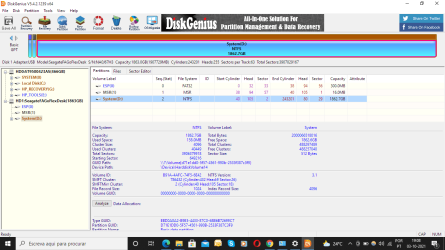
My Computer
- Computer type
- PC/Desktop
- OS
- Windows 7
- Local time
- 7:11 AM
- Messages
- 16,786
Those are two partitions used by windows if it is installed to that gpt disk in efi mode. The disk is in gpt partition style which was probably done by the mac you used on it it previously.
It doesnt matter, if that disk is just for data, those two little partitions wont be used.
It is a 2tb disk, so you could convert it to mbr partition style if you want, easily done with diskgenius
It doesnt matter, if that disk is just for data, those two little partitions wont be used.
It is a 2tb disk, so you could convert it to mbr partition style if you want, easily done with diskgenius
My Computers
System One System Two
-
- Computer type
- PC/Desktop
- OS
- 7 X64
- CPU
- i5 8400
- Motherboard
- gigabyte b365m ds3h
- Memory
- 2x8gb 3200mhz
- Hard Drives
- various
- PSU
- pure power 11 400w cm
- Case
- Coolermaster
- Cooling
- cryorig m9i
-
- Computer type
- PC/Desktop
- OS
- 7x64
- CPU
- g5400
- Motherboard
- ga b365m ds3h
- Memory
- 8gb ddr4 2400
- PSU
- xfx pro 450w
Okay so should i just copy and paste the windows old folder from the pc to my external hard drive or something?? Am i going to need it for later or something?
My Computer
- Computer type
- PC/Desktop
- OS
- Windows 7
- Local time
- 7:11 AM
- Messages
- 16,786
If you leave the windows.old folder on its current location, win10 deletes it after a short period. Iirc it is 10 days. So you couldnt roll back to win7 after 10 days.
I think megahertz was suggesting copying it to another disk so it can be used later if you want to roll back to win7 later.
I would suggest FIRST copying it to another disk so you know it is safe there.
Then on your current disk, rename it to something like windows.oldwin7
I suspect win10 wont delete it after it has been renamed. If so, then at any time you could name it back to windows.old and presumably could be restored as is.
I havent tested that renaming idea on win10, but I suspect it will work.
I think megahertz was suggesting copying it to another disk so it can be used later if you want to roll back to win7 later.
I would suggest FIRST copying it to another disk so you know it is safe there.
Then on your current disk, rename it to something like windows.oldwin7
I suspect win10 wont delete it after it has been renamed. If so, then at any time you could name it back to windows.old and presumably could be restored as is.
I havent tested that renaming idea on win10, but I suspect it will work.
My Computers
System One System Two
-
- Computer type
- PC/Desktop
- OS
- 7 X64
- CPU
- i5 8400
- Motherboard
- gigabyte b365m ds3h
- Memory
- 2x8gb 3200mhz
- Hard Drives
- various
- PSU
- pure power 11 400w cm
- Case
- Coolermaster
- Cooling
- cryorig m9i
-
- Computer type
- PC/Desktop
- OS
- 7x64
- CPU
- g5400
- Motherboard
- ga b365m ds3h
- Memory
- 8gb ddr4 2400
- PSU
- xfx pro 450w
You can use Diskpart CMD to clean all partitions on the external drive
Open a CMD window as administrator and type:
diskpart
list disk (it will list all drives. Identify the USB drive number)
select disk n (replace n by the USB drive number obtained with list disk)
clean
create part primary
select part 1
format fs=NTFS quick
assign
exit (to exit diskpart)
Open a CMD window as administrator and type:
diskpart
list disk (it will list all drives. Identify the USB drive number)
select disk n (replace n by the USB drive number obtained with list disk)
clean
create part primary
select part 1
format fs=NTFS quick
assign
exit (to exit diskpart)
My Computers
System One System Two
-
- Computer type
- PC/Desktop
- Computer Manufacturer/Model Number
- custom build
- OS
- Windows 7 HP 64
- CPU
- i5 6600K - 800MHz to 4200MHz
- Motherboard
- GA-Z170-HD3P
- Memory
- 4+4G GSkill DDR4 3000
- Graphics Card(s)
- IG - Intel 530
- Monitor(s) Displays
- Samsung 226BW
- Screen Resolution
- 1680x1050
- Hard Drives
- (1) -1 SM951 – 128GB M.2 AHCI PCIe SSD drive for Windows 7 and Lubuntu
(2) -1 WD SATA 3 - 1T for Data
(3) -1 WD SATA 3 - 1T for backup
- PSU
- Thermaltake 450W TR2 gold
- Keyboard
- Old and good Chicony mechanical keyboard
- Mouse
- Logitech mX performance - 9 buttons (had to disable some)
- Internet Speed
- 500Mb/s
- Browser
- Firefox 64
- Other Info
- TinyWall firewall
-
- Computer type
- Laptop
- System Manufacturer/Model Number
- Asus Q550LF
- OS
- Windows 7 Pro
- CPU
- i7-4500U 800MHz to 3.0GHz
- Motherboard
- Asus Q550LF
- Memory
- (4+4)G DDR3 1600
- Graphics Card(s)
- IG intel 4400 + NVIDIA GeForce GT 745M
- Sound Card
- Realtek
- Monitor(s) Displays
- LG Display LP156WF4-SPH1
- Screen Resolution
- 1920 x 1080
- Hard Drives
- BX500 120G SSD for Windows and programs +
1T HDD for data
- Internet Speed
- 500 Mb/s
- Browser
- Firefox
- Other Info
- TinyWall firewall
- Local time
- 7:11 AM
- Messages
- 16,786
Why? It has already been formatted ntfs.
My Computers
System One System Two
-
- Computer type
- PC/Desktop
- OS
- 7 X64
- CPU
- i5 8400
- Motherboard
- gigabyte b365m ds3h
- Memory
- 2x8gb 3200mhz
- Hard Drives
- various
- PSU
- pure power 11 400w cm
- Case
- Coolermaster
- Cooling
- cryorig m9i
-
- Computer type
- PC/Desktop
- OS
- 7x64
- CPU
- g5400
- Motherboard
- ga b365m ds3h
- Memory
- 8gb ddr4 2400
- PSU
- xfx pro 450w
Why? It has already been formatted ntfs.
Only to show that a third party program isn't needed and /or to get rid of those useless partitions. Not very important.
My Computers
System One System Two
-
- Computer type
- PC/Desktop
- Computer Manufacturer/Model Number
- custom build
- OS
- Windows 7 HP 64
- CPU
- i5 6600K - 800MHz to 4200MHz
- Motherboard
- GA-Z170-HD3P
- Memory
- 4+4G GSkill DDR4 3000
- Graphics Card(s)
- IG - Intel 530
- Monitor(s) Displays
- Samsung 226BW
- Screen Resolution
- 1680x1050
- Hard Drives
- (1) -1 SM951 – 128GB M.2 AHCI PCIe SSD drive for Windows 7 and Lubuntu
(2) -1 WD SATA 3 - 1T for Data
(3) -1 WD SATA 3 - 1T for backup
- PSU
- Thermaltake 450W TR2 gold
- Keyboard
- Old and good Chicony mechanical keyboard
- Mouse
- Logitech mX performance - 9 buttons (had to disable some)
- Internet Speed
- 500Mb/s
- Browser
- Firefox 64
- Other Info
- TinyWall firewall
-
- Computer type
- Laptop
- System Manufacturer/Model Number
- Asus Q550LF
- OS
- Windows 7 Pro
- CPU
- i7-4500U 800MHz to 3.0GHz
- Motherboard
- Asus Q550LF
- Memory
- (4+4)G DDR3 1600
- Graphics Card(s)
- IG intel 4400 + NVIDIA GeForce GT 745M
- Sound Card
- Realtek
- Monitor(s) Displays
- LG Display LP156WF4-SPH1
- Screen Resolution
- 1920 x 1080
- Hard Drives
- BX500 120G SSD for Windows and programs +
1T HDD for data
- Internet Speed
- 500 Mb/s
- Browser
- Firefox
- Other Info
- TinyWall firewall
Hey yesterday i let the pc and external hard drive on the whole night and today i got an error message from the external hard drive, i do not have any other devices to save anything..... What am i supposed to do now, re format it??
- - - Updated - - -
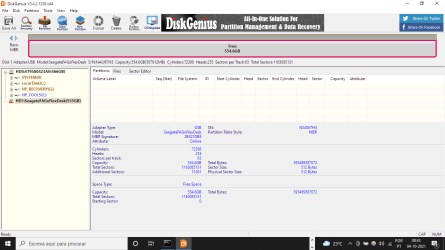 Now it says that my seagate is 555GBs, ive been trying to fix the external hard drive now but no success.........
What am i supposed to do now, re format it??- - - Updated - - -
Now it says that my seagate is 555GBs, ive been trying to fix the external hard drive now but no success.........My Computer
- Computer type
- PC/Desktop
- OS
- Windows 7
- Local time
- 7:11 AM
- Messages
- 16,786
Have a look with seagate for windows
SeaTools (Windows) |
Seagate
 Fix a broken HDD or SSD with free software: Seatools from Seagate - YouTube
SeaTools (Windows) |
Seagate
Fix a broken HDD or SSD with free software: Seatools from Seagate - YouTubeMy Computers
System One System Two
-
- Computer type
- PC/Desktop
- OS
- 7 X64
- CPU
- i5 8400
- Motherboard
- gigabyte b365m ds3h
- Memory
- 2x8gb 3200mhz
- Hard Drives
- various
- PSU
- pure power 11 400w cm
- Case
- Coolermaster
- Cooling
- cryorig m9i
-
- Computer type
- PC/Desktop
- OS
- 7x64
- CPU
- g5400
- Motherboard
- ga b365m ds3h
- Memory
- 8gb ddr4 2400
- PSU
- xfx pro 450w
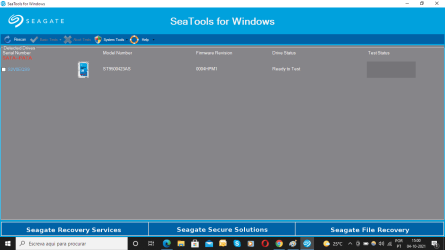 Only my PC's hard drive shows up on the list, i already plugged and unplugged the seagate external hard drive and nothing works, it does not show up on the list.....
My Computer
- Computer type
- PC/Desktop
- OS
- Windows 7
Similar threads
- Replies
- 1
- Views
- 16K

- Replies
- 15
- Views
- 6K
- Replies
- 2
- Views
- 1K
- Replies
- 2
- Views
- 6K
