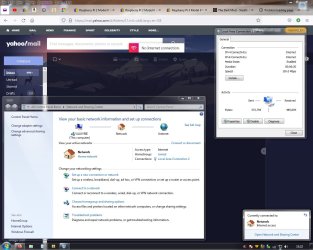
Internet connection showing as connected with data in/out but no web ?

BloatWarez7

New member
Local time
5:07 AM
Messages
36
Hey guys seem to be having a little trouble with my internet. IVe reinstalled Win 7 last week and am setting everything back up. I have connected to the internet and downloaded software and accessed a few basic websites but now I cant seem to access any ? My Network Sharing Center shows that i am connected via a new RJ45 cable plugged into the motherboard RJ45 socket and directly into the router. I has an amber light and a flashing yellow light on the motherboard socket and i think the amber should be green but I'm unsure. Anyway id love to hear what options you think i should check first. Sometimes a simple restart of the PC will solve the problem but other times it wont. Ideas ?
 

My Computer My Computer

At a glance

Win 7 64 BitIntel Q66004GbR9 270
Computer type
PC/Desktop
Computer Manufacturer/Model Number
Custom Build
OS
Win 7 64 Bit
CPU
Intel Q6600
Motherboard
Asus P5Q-E
Memory
4Gb
Graphics Card(s)
R9 270
Hard Drives
250 Gb Sata SSD
500Gb Sata SSD
xxx Gb HD
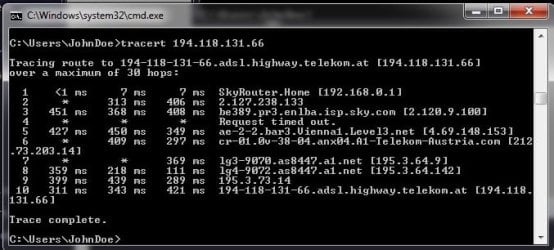
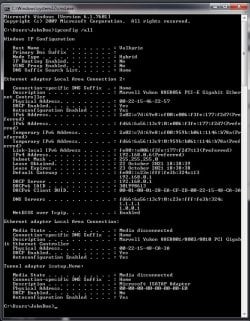
Open a cmd prompt type

Ipconfig /all
tracert adobe.com
tracert 194.118.131.66

post all results
 

My Computer My Computer

At a glance

win 8 32 bit
Computer type
PC/Desktop
OS
win 8 32 bit
Open a cmd prompt type

Ipconfig /all
tracert adobe.com
tracert 194.118.131.66

post all results

01-IPconfigALL.jpg
02-TracerT AdobeDotCom.jpg
03-TracerT 194 118 131 66.jpg

Hope this works. couldn't cut n paste text in cmd for some reason :/
 

My Computer My Computer

At a glance

Win 7 64 BitIntel Q66004GbR9 270
Computer type
PC/Desktop
Computer Manufacturer/Model Number
Custom Build
OS
Win 7 64 Bit
CPU
Intel Q6600
Motherboard
Asus P5Q-E
Memory
4Gb
Graphics Card(s)
R9 270
Hard Drives
250 Gb Sata SSD
500Gb Sata SSD
xxx Gb HD
That shows your getting the correct IP range and you can resolve dns and trace show everything is working so you online ok

To improve it set you DNS to 1.1.1.1 & 1.0.0.1 as thats a lot faster dns andmay resolve the sites problem.

What errors do you get and with what ie Firefox, IE
 

My Computer My Computer

At a glance

win 8 32 bit
Computer type
PC/Desktop
OS
win 8 32 bit
That shows your getting the correct IP range and you can resolve dns and trace show everything is working so you online ok

To improve it set you DNS to 1.1.1.1 & 1.0.0.1 as thats a lot faster dns andmay resolve the sites problem.

What errors do you get and with what ie Firefox, IE


Basically once i get online it works .. OK.. Albeit a little slow. However this only lasts from anywhere from a few minutes to a few hours then webpages will just start to time out. The router is fine ! Ive a laptop running Win 10 over wireless connection and speed and reliability are good. We also have a coople of phones in the house and they are, as you would expect for phones. My partner is out mostly so she is not an issue and her net usage is light anyway. I on the otherhand do a fair bit of downloading and often movies etc but have shut down all downloads without any increase in performance on the Win 7 machine ! Basically all that happens, when it goes, is that any website im tryin to access times out using firefox or tor. Dont use IE,chrome,opera,safari or any other's currently. So when it times out and im sitting there watching the spinning ball for a minute or two i realise its FUBAR again so i try restarting Fire Fox but this has no effect. I then check my connection and it shows as connected with data being sent and recieved. Seems normal. But i cant access the web. So i try disabling my Marvell Yukon Ethernet Controller, to reset it !, and then Enable it again but even then it wont work. So i do a full Restart or Shut Down Restart and that, sometimes, can fix the problem a % of the time but not always and repeated efforts to shut down/restart has no increased chance of resolving the issue. Meaining it will not deffinately fix it even after 10 restarts, so i give up and go use my laptop if i need to do something or just go do someting else entirely. When i come back to my win 7 PC later it, so far, often as not, works just fine at least untill it stops and by then im usually ready for bed so !! Yea its unreliavble as hell !! Other times i come back to the Win 7 PC and it works and i think great only got it to fail again in under 5 minutes :/

EDIT : PS Can you remind me where I configure my DNS again ? Its been a while :/ I went to Start > Control Panel > Network and Sharing Center > Clicked on Change Adapter Settings > Selected Local Area Connection 2 > Right Clicked and selected Properties selected Internet Protocol Version 4 (TCP/IPv4) and selected its Properties. I then put a dot in Use the following DNS Server Addresses and set 1.1.1.1 as Preferred DNS server and 1.0.0.1 as Alternate DNS server.

I dont know if what i did was correct but ive seen no improvement to the connectivity issue. FYI when i am connected and working reliabally I did a BroadBand Speed Test and im getting about 15 MB/s downloads so its not slow internet thats the issue ! Theres a block or a failure in the connection somehow !

Connected - No Internet.jpg
 
Last edited:

My Computer My Computer

At a glance

Win 7 64 BitIntel Q66004GbR9 270
Computer type
PC/Desktop
Computer Manufacturer/Model Number
Custom Build
OS
Win 7 64 Bit
CPU
Intel Q6600
Motherboard
Asus P5Q-E
Memory
4Gb
Graphics Card(s)
R9 270
Hard Drives
250 Gb Sata SSD
500Gb Sata SSD
xxx Gb HD
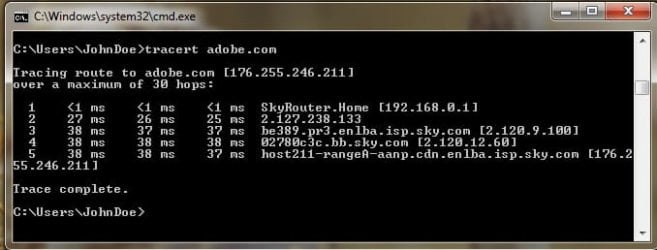
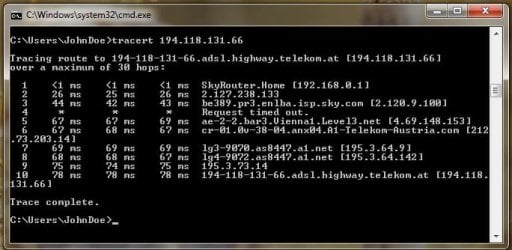
When it drops again redo the post 2 I want to see if it drops its IP. Does it happen if you dont use tor?
 

My Computer My Computer

At a glance

win 8 32 bit
Computer type
PC/Desktop
OS
win 8 32 bit
When it drops again redo the post 2 I want to see if it drops its IP. Does it happen if you dont use tor?

Hi Again, Ive not been using TOR on this PC as yet as the connection is too unreliable to even bother with filesharing ! So ive redone post 2 and have taken screenshots of the CMD window with the results. I will post these below. Tonight I completed a download of about 850 Mb but it took 50 minutes to complete. Meanwhile my Yahoo Mail was saying No Internet and refresshing open tabs with webpages returned Timeout errors so im suspecting it a REALLY SLOW connection that might be causing the problem. I dont have access to the router setings as yet but will get them from my partner when i can. It a time issue as well as a mood issue with her :/ Anyway on with the screenshots.

01-2nd IP config ALL.jpg

02-2nd Tracert AdobeDotCom.jpg

03-2ndTracert-194 118 131 66.jpg
 

My Computer My Computer

At a glance

Win 7 64 BitIntel Q66004GbR9 270
Computer type
PC/Desktop
Computer Manufacturer/Model Number
Custom Build
OS
Win 7 64 Bit
CPU
Intel Q6600
Motherboard
Asus P5Q-E
Memory
4Gb
Graphics Card(s)
R9 270
Hard Drives
250 Gb Sata SSD
500Gb Sata SSD
xxx Gb HD
Can you check all browser and see if a proxy is set if ir is remove it. start firefox in safe mode Troubleshoot extensions, themes and hardware acceleration issues to solve common Firefox problems | Firefox Help
Does it work then

I would try removing avg as it can give these problems as it shows AVG Technologies USA, LLC -> AVG Technologies CZ, s.r.o.) C:\Program Files\AVG\Antivirus\wsc_proxy.exe it has a proxy runing you may need to goto avg site and get a tool to remove what it leaves behind
 

My Computer My Computer

At a glance

win 8 32 bit
Computer type
PC/Desktop
OS
win 8 32 bit
This is a fresh install on a new SSD with a sourced version of Win 7. Firefox was then added, very recently, maybe 2 weeks ago, no modifications , themes etc have been done. However i will try the Refresh Firefox option as described in the link as i can see no harm in trying but i get poor internet access with TOR as well but its 'based' on Firefox ? Will update you on any progress. Will also investigate AVG. I'm also considering installing a PCI Network Ethernet Card as currently i can only use either of two R&45 sockets mounted on the main board and maybe there is something wrong there ? Just to eliminate that as a possibility. Not sure what is a good PCI Network card though !
 

My Computer My Computer

At a glance

Win 7 64 BitIntel Q66004GbR9 270
Computer type
PC/Desktop
Computer Manufacturer/Model Number
Custom Build
OS
Win 7 64 Bit
CPU
Intel Q6600
Motherboard
Asus P5Q-E
Memory
4Gb
Graphics Card(s)
R9 270
Hard Drives
250 Gb Sata SSD
500Gb Sata SSD
xxx Gb HD
as its a new install
the ethernet driver might be out of date
i would also dissable ipv6

depending on your sky router, the password might be on the side/bottom, enter 192.168.0.1 (from your browser)
default password could be in use try admin
 

My Computer My Computer

At a glance

W7 home premium 32bit/W7HP 64bit/w10 tp insid...E5300 dual core3gbNvidia Geforce 7100 Nforce 630i
Computer type
PC/Desktop
Computer Manufacturer/Model Number
medionl/Aspire 6930G/acer x55a
OS
W7 home premium 32bit/W7HP 64bit/w10 tp insider ring
CPU
E5300 dual core
Motherboard
medion MS7366
Memory
3gb
Graphics Card(s)
Nvidia Geforce 7100 Nforce 630i
Monitor(s) Displays
avixc
Internet Speed
n (isp resticted to 72)
Antivirus
mse/pands
Browser
palemoon
Other Info
Belkin Fd7050 n USB using Railink RT2870 drivers, more upto date
as its a new install
the ethernet driver might be out of date
i would also dissable ipv6

depending on your sky router, the password might be on the side/bottom, enter 192.168.0.1 (from your browser)
default password could be in use try admin
Can you tell me how to check if my Ethernet driver i out of date ? Also if it is what do i do about that ? Then i will need to know how to disable ipv6 ? I used to be it support back in the 90s so it was all win 95,98 and NT4 but im getting old and been away from IT for a LOOOONG time so i've forgotten most of what i knew :/

- - - Updated - - -

Can you check all browser and see if a proxy is set if ir is remove it. start firefox in safe mode Troubleshoot extensions, themes and hardware acceleration issues to solve common Firefox problems | Firefox Help
Does it work then

I would try removing avg as it can give these problems as it shows AVG Technologies USA, LLC -> AVG Technologies CZ, s.r.o.) C:\Program Files\AVG\Antivirus\wsc_proxy.exe it has a proxy runing you may need to goto avg site and get a tool to remove what it leaves behind


Uninstalling AVG appears to have resolved the issue ! FF and IE both now load most sites normally and with reasonable responsiveness given my internet is a little slow. I can even connect to router admin page and do new google searches. Seems all good. Only thing is i have no Anti Virus now ! So do i just reinstall AVG or should i go for an alternative ? Ive never encountered issues with AVG before and Ive used it for maybe 20 years now so given its good record id prefer to stick with it , if that's possible ? If its a Major hassle to avoid the conflict its caused though then I'm open to suggestions on what FREE anti virus software to try next ! ??
 

My Computer My Computer

At a glance

Win 7 64 BitIntel Q66004GbR9 270
Computer type
PC/Desktop
Computer Manufacturer/Model Number
Custom Build
OS
Win 7 64 Bit
CPU
Intel Q6600
Motherboard
Asus P5Q-E
Memory
4Gb
Graphics Card(s)
R9 270
Hard Drives
250 Gb Sata SSD
500Gb Sata SSD
xxx Gb HD
glad its sorted, AV's can be a pain.

Free AV's tend to be restricted to a single user, per Email address, as i run 3 got 3 different
On my 2 W7 rigs i run Bitdefender & Kaspersky not had a problem with either
Bitdefender --- really light on the system because its pretty basic no bells and whistles
Kaspersky -- loads of additional features, including a vpn option, not loaded by default
 

My Computer My Computer

At a glance

W7 home premium 32bit/W7HP 64bit/w10 tp insid...E5300 dual core3gbNvidia Geforce 7100 Nforce 630i
Computer type
PC/Desktop
Computer Manufacturer/Model Number
medionl/Aspire 6930G/acer x55a
OS
W7 home premium 32bit/W7HP 64bit/w10 tp insider ring
CPU
E5300 dual core
Motherboard
medion MS7366
Memory
3gb
Graphics Card(s)
Nvidia Geforce 7100 Nforce 630i
Monitor(s) Displays
avixc
Internet Speed
n (isp resticted to 72)
Antivirus
mse/pands
Browser
palemoon
Other Info
Belkin Fd7050 n USB using Railink RT2870 drivers, more upto date
Back
Top