Solved Unable to wirelessly connect to Internet following a router change

Datango

New member
Local time
9:15 PM
Messages
10
Since installing a new router I have been unable to wirelessly connect to the Internet even with both the hardware and software Firewalls disabled.

I can however:


  • connect wirelessly to network resources on the LAN
  • connect to the Internet using a wired Ethernet connection
  • connect wirelessly to the Internet using another device (Win 10)

I have tried deleting the wireless connection and recreating it but the issue persists.

I have also tried a different wireless connection but that also failed to connect to the Internet.

The configuration of the settings in the Network and Sharing Center appear to be correct.

If anybody has any suggestions how to resolve this issue they will be much appreciated.

--
Win 7 Pro SP1
Router: ARRIS TG2492LG-85
Network Adapter: Intel PRO/Wireless 3945ABG
 

My Computers My Computers

  • At a glance

    Windows 7 Pro SP1 64bitIntel Core 2 1.73GHz2GB
    Computer type
    Laptop
    Computer Manufacturer/Model Number
    Gateway
    OS
    Windows 7 Pro SP1 64bit
    CPU
    Intel Core 2 1.73GHz
    Motherboard
    Gateway 77.14
    Memory
    2GB
  • Computer type
    PC/Desktop
Hi
check which band is being used by the router, 2.4 or 5, then in the device Adapter driver settings >>Advanced<< tab
and amend accordingly
 

My Computer My Computer

At a glance

W7 home premium 32bit/W7HP 64bit/w10 tp insid...E5300 dual core3gbNvidia Geforce 7100 Nforce 630i
Computer type
PC/Desktop
Computer Manufacturer/Model Number
medionl/Aspire 6930G/acer x55a
OS
W7 home premium 32bit/W7HP 64bit/w10 tp insider ring
CPU
E5300 dual core
Motherboard
medion MS7366
Memory
3gb
Graphics Card(s)
Nvidia Geforce 7100 Nforce 630i
Monitor(s) Displays
avixc
Internet Speed
n (isp resticted to 72)
Antivirus
mse/pands
Browser
palemoon
Other Info
Belkin Fd7050 n USB using Railink RT2870 drivers, more upto date
Hi
check which band is being used by the router, 2.4 or 5, then in the device Adapter driver settings >>Advanced<< tab
and amend accordingly

Thanks for your response torchwood.

The router is using the 2.4 band, but I cannot find an option to change the device adapter driver > Advanced settings to change from 5 to 2.4.
 

My Computers My Computers

  • At a glance

    Windows 7 Pro SP1 64bitIntel Core 2 1.73GHz2GB
    Computer type
    Laptop
    Computer Manufacturer/Model Number
    Gateway
    OS
    Windows 7 Pro SP1 64bit
    CPU
    Intel Core 2 1.73GHz
    Motherboard
    Gateway 77.14
    Memory
    2GB
  • Computer type
    PC/Desktop
Is that router supplied by Virgin iSP? If so, you could ask them.

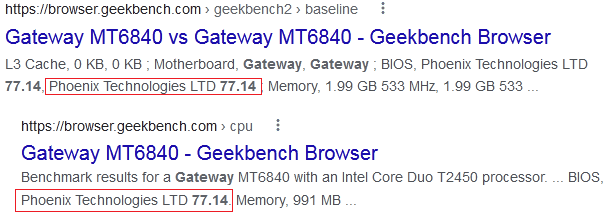
Your old laptop is interesting. Is there a motherboard called Gateway 77.14 ?

I cant see it mentioned when searching tinternet.
 

My Computers My Computers

  • At a glance

    7 X64i5 84002x8gb 3200mhz
    Computer type
    PC/Desktop
    OS
    7 X64
    CPU
    i5 8400
    Motherboard
    gigabyte b365m ds3h
    Memory
    2x8gb 3200mhz
    Hard Drives
    various
    PSU
    pure power 11 400w cm
    Case
    Coolermaster
    Cooling
    cryorig m9i
  • At a glance

    7x64g54008gb ddr4 2400
    Computer type
    PC/Desktop
    OS
    7x64
    CPU
    g5400
    Motherboard
    ga b365m ds3h
    Memory
    8gb ddr4 2400
    PSU
    xfx pro 450w
image.png
 

My Computers My Computers

  • At a glance

    Windows 7 Pro 64-bitI7-970032 GB
    Computer type
    PC/Desktop
    Computer Manufacturer/Model Number
    HP Elite 800 G5
    OS
    Windows 7 Pro 64-bit
    CPU
    I7-9700
    Memory
    32 GB
  • At a glance

    Windows 7 Pro 64-bit
    Computer type
    Laptop
    System Manufacturer/Model Number
    ASUS UX305C
    OS
    Windows 7 Pro 64-bit
hi,

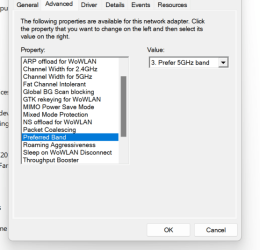
different driver but same options, click the little down arrow change to 2.4
 

Attachments

  • wifi.png
    wifi.png
    27.9 KB · Views: 15

My Computer My Computer

At a glance

W7 home premium 32bit/W7HP 64bit/w10 tp insid...E5300 dual core3gbNvidia Geforce 7100 Nforce 630i
Computer type
PC/Desktop
Computer Manufacturer/Model Number
medionl/Aspire 6930G/acer x55a
OS
W7 home premium 32bit/W7HP 64bit/w10 tp insider ring
CPU
E5300 dual core
Motherboard
medion MS7366
Memory
3gb
Graphics Card(s)
Nvidia Geforce 7100 Nforce 630i
Monitor(s) Displays
avixc
Internet Speed
n (isp resticted to 72)
Antivirus
mse/pands
Browser
palemoon
Other Info
Belkin Fd7050 n USB using Railink RT2870 drivers, more upto date
Is that router supplied by Virgin iSP? If so, you could ask them.

Your old laptop is interesting. Is there a motherboard called Gateway 77.14 ?

I cant see it mentioned when searching tinternet.
.

SIW2 thanks for your message.

It is a VM supplied router, but they are most unhelpful in connecting devices to it!!

The Gateway 77.14 motherboard is what is returned from a Belarc Advisor system scan, but the laptop is quite old

- - - Updated - - -

- - - Updated - - -

- - - Updated - - -

hi,

different driver but same options, click the little down arrow change to 2.4

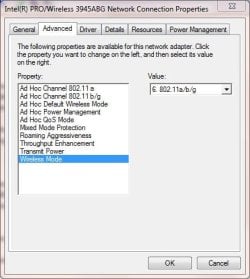
Thanks torchwood. I definitely don't have an option for Preferred Band. This is what I have

SnowWindow.JPG
 

My Computers My Computers

  • At a glance

    Windows 7 Pro SP1 64bitIntel Core 2 1.73GHz2GB
    Computer type
    Laptop
    Computer Manufacturer/Model Number
    Gateway
    OS
    Windows 7 Pro SP1 64bit
    CPU
    Intel Core 2 1.73GHz
    Motherboard
    Gateway 77.14
    Memory
    2GB
  • Computer type
    PC/Desktop

My Computer My Computer

At a glance

W7 home premium 32bit/W7HP 64bit/w10 tp insid...E5300 dual core3gbNvidia Geforce 7100 Nforce 630i
Computer type
PC/Desktop
Computer Manufacturer/Model Number
medionl/Aspire 6930G/acer x55a
OS
W7 home premium 32bit/W7HP 64bit/w10 tp insider ring
CPU
E5300 dual core
Motherboard
medion MS7366
Memory
3gb
Graphics Card(s)
Nvidia Geforce 7100 Nforce 630i
Monitor(s) Displays
avixc
Internet Speed
n (isp resticted to 72)
Antivirus
mse/pands
Browser
palemoon
Other Info
Belkin Fd7050 n USB using Railink RT2870 drivers, more upto date
Hi

have a look at my post #3 in this thread
Intel PRO/Wireless 3945ABG is not recognized - Windows 10 Forums


Im using a Virgin hub 3..... it should have been set up with dual band as default.... got equipement running both bands

Hmm, I cannot see any post by you in that thread.

Post #3 is by hawkman.

In any case the issue I have is not that the network adapter is not being recognised ( I can connect wirelessly to other network resources on the LAN). but just relates to being unable to connect to the Internet.
 

My Computers My Computers

  • At a glance

    Windows 7 Pro SP1 64bitIntel Core 2 1.73GHz2GB
    Computer type
    Laptop
    Computer Manufacturer/Model Number
    Gateway
    OS
    Windows 7 Pro SP1 64bit
    CPU
    Intel Core 2 1.73GHz
    Motherboard
    Gateway 77.14
    Memory
    2GB
  • Computer type
    PC/Desktop
Hi

I am Hawkman on 10.....

Bit remiss of me
There is something odd about your Advanced tab screenshot
It seems to be missing the first 2 options
see this link
Adapter Settings
(i've got a comp running the 5100 wifi card--shows all options)

did you actually try what i said in that post
 

My Computer My Computer

At a glance

W7 home premium 32bit/W7HP 64bit/w10 tp insid...E5300 dual core3gbNvidia Geforce 7100 Nforce 630i
Computer type
PC/Desktop
Computer Manufacturer/Model Number
medionl/Aspire 6930G/acer x55a
OS
W7 home premium 32bit/W7HP 64bit/w10 tp insider ring
CPU
E5300 dual core
Motherboard
medion MS7366
Memory
3gb
Graphics Card(s)
Nvidia Geforce 7100 Nforce 630i
Monitor(s) Displays
avixc
Internet Speed
n (isp resticted to 72)
Antivirus
mse/pands
Browser
palemoon
Other Info
Belkin Fd7050 n USB using Railink RT2870 drivers, more upto date
Hi

I am Hawkman on 10.....

Bit remiss of me
There is something odd about your Advanced tab screenshot
It seems to be missing the first 2 options
see this link
Adapter Settings
(i've got a comp running the 5100 wifi card--shows all options)

did you actually try what i said in that post

Thanks torchwood.

Could it be that those options have been made available in later Operating Systems?

I did try your suggestion but as before I can access network resources on the LAN but no Internet.
 

My Computers My Computers

  • At a glance

    Windows 7 Pro SP1 64bitIntel Core 2 1.73GHz2GB
    Computer type
    Laptop
    Computer Manufacturer/Model Number
    Gateway
    OS
    Windows 7 Pro SP1 64bit
    CPU
    Intel Core 2 1.73GHz
    Motherboard
    Gateway 77.14
    Memory
    2GB
  • Computer type
    PC/Desktop

My Computers My Computers

  • At a glance

    7 X64i5 84002x8gb 3200mhz
    Computer type
    PC/Desktop
    OS
    7 X64
    CPU
    i5 8400
    Motherboard
    gigabyte b365m ds3h
    Memory
    2x8gb 3200mhz
    Hard Drives
    various
    PSU
    pure power 11 400w cm
    Case
    Coolermaster
    Cooling
    cryorig m9i
  • At a glance

    7x64g54008gb ddr4 2400
    Computer type
    PC/Desktop
    OS
    7x64
    CPU
    g5400
    Motherboard
    ga b365m ds3h
    Memory
    8gb ddr4 2400
    PSU
    xfx pro 450w
Since installing a new router I have been unable to wirelessly connect to the Internet even with both the hardware and software Firewalls disabled.

I can however:


  • connect wirelessly to network resources on the LAN
  • connect to the Internet using a wired Ethernet connection
  • connect wirelessly to the Internet using another device (Win 10)

I have tried deleting the wireless connection and recreating it but the issue persists.

I have also tried a different wireless connection but that also failed to connect to the Internet.

The configuration of the settings in the Network and Sharing Center appear to be correct.

If anybody has any suggestions how to resolve this issue they will be much appreciated.

--
Win 7 Pro SP1
Router: ARRIS TG2492LG-85
Network Adapter: Intel PRO/Wireless 3945ABG

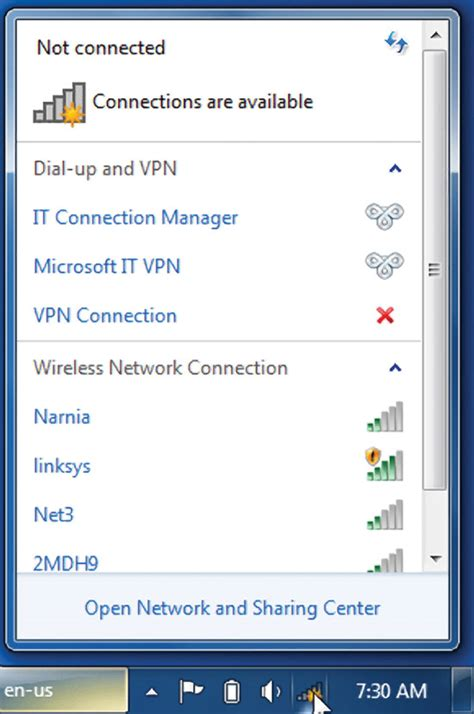
When you say you can't connect could you be more specific - does the SSID for your VM router show up in the wireless network list?

image.png


If it does what happens when you try to connect?
 

My Computer My Computer

At a glance

Windows 7 Pro x64
Computer type
PC/Desktop
OS
Windows 7 Pro x64
What is the driver version and date?

On a different note. how come you are running win7 amd64 on only 2gb ram? You could probably upgrade your ram for pennies at CEX.

Something like 2 sticks of single sided ddr2
2048MB-667MHz DDR2-667 PC2-5300 SODIMM ( it will run at 533 )
https://uk.webuy.com/product-detail...-667mhz-200-pin-memory&referredFrom=boxsearch

The driver version is 12.4.1.4 dated 26/03/2009.

Thanks for your suggestion regarding upgrading the memory. However, the installed memory is adequate for these particular needs.

- - - Updated - - -

When you say you can't connect could you be more specific - does the SSID for your VM router show up in the wireless network list?


image.png


If it does what happens when you try to connect?

The SSID is shown in the Wireless Network Connection list.

However, although it is shown as Connected, it also states No Internet access.

It is possible to connect wirelessly to network resources on the LAN
 

My Computers My Computers

  • At a glance

    Windows 7 Pro SP1 64bitIntel Core 2 1.73GHz2GB
    Computer type
    Laptop
    Computer Manufacturer/Model Number
    Gateway
    OS
    Windows 7 Pro SP1 64bit
    CPU
    Intel Core 2 1.73GHz
    Motherboard
    Gateway 77.14
    Memory
    2GB
  • Computer type
    PC/Desktop
Hi

OK, lets go ballistic.....
turn off your Ethernet device
REMOVE the driver for the Wlan card

REBOOT

the system should then pick up the driver i mentioned in my earlier post

Silly question time is the Wlan card turned on by default on your comp.... most have an on/off button of some description either via an "F" key or a seperate dedicated button
 

My Computer My Computer

At a glance

W7 home premium 32bit/W7HP 64bit/w10 tp insid...E5300 dual core3gbNvidia Geforce 7100 Nforce 630i
Computer type
PC/Desktop
Computer Manufacturer/Model Number
medionl/Aspire 6930G/acer x55a
OS
W7 home premium 32bit/W7HP 64bit/w10 tp insider ring
CPU
E5300 dual core
Motherboard
medion MS7366
Memory
3gb
Graphics Card(s)
Nvidia Geforce 7100 Nforce 630i
Monitor(s) Displays
avixc
Internet Speed
n (isp resticted to 72)
Antivirus
mse/pands
Browser
palemoon
Other Info
Belkin Fd7050 n USB using Railink RT2870 drivers, more upto date
Hi

OK, lets go ballistic.....
turn off your Ethernet device
REMOVE the driver for the Wlan card

REBOOT

the system should then pick up the driver i mentioned in my earlier post

Silly question time is the Wlan card turned on by default on your comp.... most have an on/off button of some description either via an "F" key or a seperate dedicated button

Hi torchwood, and thanks for sticking with this issue.

WLAN driver is reinstalled, but the issue persists.

The WLAN card is not turned off.
 

My Computers My Computers

  • At a glance

    Windows 7 Pro SP1 64bitIntel Core 2 1.73GHz2GB
    Computer type
    Laptop
    Computer Manufacturer/Model Number
    Gateway
    OS
    Windows 7 Pro SP1 64bit
    CPU
    Intel Core 2 1.73GHz
    Motherboard
    Gateway 77.14
    Memory
    2GB
  • Computer type
    PC/Desktop
what is actually showing in the bar
A yellow like bomb or an X
They relate to different failure reasons
if its a bomb --- network related (dont forget your new router will have a different SSID--- 12 digit code)
X --- means driver
 

My Computer My Computer

At a glance

W7 home premium 32bit/W7HP 64bit/w10 tp insid...E5300 dual core3gbNvidia Geforce 7100 Nforce 630i
Computer type
PC/Desktop
Computer Manufacturer/Model Number
medionl/Aspire 6930G/acer x55a
OS
W7 home premium 32bit/W7HP 64bit/w10 tp insider ring
CPU
E5300 dual core
Motherboard
medion MS7366
Memory
3gb
Graphics Card(s)
Nvidia Geforce 7100 Nforce 630i
Monitor(s) Displays
avixc
Internet Speed
n (isp resticted to 72)
Antivirus
mse/pands
Browser
palemoon
Other Info
Belkin Fd7050 n USB using Railink RT2870 drivers, more upto date
what is actually showing in the bar
A yellow like bomb or an X
They relate to different failure reasons
if its a bomb --- network related (dont forget your new router will have a different SSID--- 12 digit code)
X --- means driver

torchwood thanks for your message.

The taskbar shows an exclamation mark in a yellow triangle.

The PC is correctly configured for the new router's SSID.
 

My Computers My Computers

  • At a glance

    Windows 7 Pro SP1 64bitIntel Core 2 1.73GHz2GB
    Computer type
    Laptop
    Computer Manufacturer/Model Number
    Gateway
    OS
    Windows 7 Pro SP1 64bit
    CPU
    Intel Core 2 1.73GHz
    Motherboard
    Gateway 77.14
    Memory
    2GB
  • Computer type
    PC/Desktop

My Computer My Computer

At a glance

W7 home premium 32bit/W7HP 64bit/w10 tp insid...E5300 dual core3gbNvidia Geforce 7100 Nforce 630i
Computer type
PC/Desktop
Computer Manufacturer/Model Number
medionl/Aspire 6930G/acer x55a
OS
W7 home premium 32bit/W7HP 64bit/w10 tp insider ring
CPU
E5300 dual core
Motherboard
medion MS7366
Memory
3gb
Graphics Card(s)
Nvidia Geforce 7100 Nforce 630i
Monitor(s) Displays
avixc
Internet Speed
n (isp resticted to 72)
Antivirus
mse/pands
Browser
palemoon
Other Info
Belkin Fd7050 n USB using Railink RT2870 drivers, more upto date

My Computers My Computers

  • At a glance

    Windows 7 Pro SP1 64bitIntel Core 2 1.73GHz2GB
    Computer type
    Laptop
    Computer Manufacturer/Model Number
    Gateway
    OS
    Windows 7 Pro SP1 64bit
    CPU
    Intel Core 2 1.73GHz
    Motherboard
    Gateway 77.14
    Memory
    2GB
  • Computer type
    PC/Desktop
Back
Top