How repair Win 7 that doesn't start but keep files ??

glnz

New member
Member
VIP
Local time
3:59 PM
Messages
135
Hey fellow geezers with Win 7 --

My Dell Optiplex 7010 MT dual-boots Win 7 Pro 64-bit and Win 10 Pro 64-bit. The Win 10 starts, but the Win 7 doesn't. The Win 7 gets as far as the four glowing MS flags but no further (although they continue to pulse and glow, forever).

Is there a way to repair my Win 7 Pro 64-bit while preserving apps and files, when I can't start it?

If not, if I boot up into my Win 10, is there anything I can then do to fix/repair the Win 7 while preserving its stuff?

If not, then FOR HEAVEN'S SAKE WHAT????

Thanks.
 

My Computer My Computer

At a glance

Dual boot - Win 10 Pro 64-bit (good) and Win ...Intel Core i5 3470 @ 3.2GHz16GB RAM DDR3 (Four x 4GB)Intel HD Graphics (on the CPU)
Computer type
PC/Desktop
Computer Manufacturer/Model Number
Dell Optiplex 7010 MT
OS
Dual boot - Win 10 Pro 64-bit (good) and Win 7 Pro 64-bit (won't boot on the NVMe)
CPU
Intel Core i5 3470 @ 3.2GHz
Motherboard
Dell 0GY6Y8 - what would the Intel number be? - Q77 chipset
Memory
16GB RAM DDR3 (Four x 4GB)
Graphics Card(s)
Intel HD Graphics (on the CPU)
Sound Card
Realtek High Definition Audio - and Intel Display Audio
Monitor(s) Displays
Dell E176FP - nothing fancy
Screen Resolution
1280 x 1024 @ 60 Hz
Hard Drives
Now a Samsung 970 EVO Plus SSD NVMe, which works for the Win 10 only

Used to be two 500GB WDC WD5000AAKX (SATA @ 6GB/sec)

- External WD My Book 1110 USB device
PSU
What means PSU? I'm at sea level
Cooling
Ice cubes
Keyboard
Noisy
Mouse
Micky
Internet Speed
Verizon FIOS 500 Mbps (was 1Gbps but I can't type that fast)
Antivirus
Win 10 Windows Defender - Win 7 Avast Free
Browser
Firefox only with lots of security drives my wife crazy
Other Info
Also I still have an old but important XP SP3 machine that can run - Optiplex 755 Desktop w 4GB RAM and Momentus XT hybrid HD-SSD 500 GB hard drive. Used the registry hack to get more updates through "XP Embedded" or "POS" so now the machine rings like a cash register and the CD drawer opens to give change.
You can boot a win7 install disk and choose repair
 

My Computer My Computer

At a glance

win 8 32 bit
Computer type
PC/Desktop
OS
win 8 32 bit
Samuria - thanks for good news. A few Qs -
  1. Is it possible to make a new Win 7 install disk or the equivalent from a download from somewhere?
  2. Can I put it instead on a bootable USB stick?
  3. How can I run it if I can't start Win 7 now? Or does it take care of itself?
  4. My PC is actually dual-booting Win 7 Pro 64-bit and Win 10 Pro 64-bit. How do I run the repair so it fixes only the Win 7 and doesn't touch the Win 10?
  5. Is there a tutorial?
Thanks!
 

My Computer My Computer

At a glance

Dual boot - Win 10 Pro 64-bit (good) and Win ...Intel Core i5 3470 @ 3.2GHz16GB RAM DDR3 (Four x 4GB)Intel HD Graphics (on the CPU)
Computer type
PC/Desktop
Computer Manufacturer/Model Number
Dell Optiplex 7010 MT
OS
Dual boot - Win 10 Pro 64-bit (good) and Win 7 Pro 64-bit (won't boot on the NVMe)
CPU
Intel Core i5 3470 @ 3.2GHz
Motherboard
Dell 0GY6Y8 - what would the Intel number be? - Q77 chipset
Memory
16GB RAM DDR3 (Four x 4GB)
Graphics Card(s)
Intel HD Graphics (on the CPU)
Sound Card
Realtek High Definition Audio - and Intel Display Audio
Monitor(s) Displays
Dell E176FP - nothing fancy
Screen Resolution
1280 x 1024 @ 60 Hz
Hard Drives
Now a Samsung 970 EVO Plus SSD NVMe, which works for the Win 10 only

Used to be two 500GB WDC WD5000AAKX (SATA @ 6GB/sec)

- External WD My Book 1110 USB device
PSU
What means PSU? I'm at sea level
Cooling
Ice cubes
Keyboard
Noisy
Mouse
Micky
Internet Speed
Verizon FIOS 500 Mbps (was 1Gbps but I can't type that fast)
Antivirus
Win 10 Windows Defender - Win 7 Avast Free
Browser
Firefox only with lots of security drives my wife crazy
Other Info
Also I still have an old but important XP SP3 machine that can run - Optiplex 755 Desktop w 4GB RAM and Momentus XT hybrid HD-SSD 500 GB hard drive. Used the registry hack to get more updates through "XP Embedded" or "POS" so now the machine rings like a cash register and the CD drawer opens to give change.
When you say, "Dual Booting", are you saying that you have both OS's installed on the same hard drive?
Ooooo!
I have a Two OS PC myself, but, the two OS's are on separate drives. Two SSD's actually.

Actually, I do have Windows 7 on a Flash Drive. I downloaded it from a site that I trust, on the internet. You can certainly do the same.

Good Luck!
TM :cool:
 

My Computer My Computer

At a glance

Win 7 Pro, SP1, x86, Win-11/Pro/64AMD8GB CrucialVarious
Computer type
PC/Desktop
Computer Manufacturer/Model Number
Various
OS
Win 7 Pro, SP1, x86, Win-11/Pro/64
CPU
AMD
Motherboard
Various
Memory
8GB Crucial
Graphics Card(s)
Various
Sound Card
OnBoard
Monitor(s) Displays
Acer 21.5"
Hard Drives
Crucial SSD, 500 GB
PSU
OEM
Case
SFF Slim Line Case
Cooling
OEM
Keyboard
eMachines
Mouse
Logitech Wireless
Internet Speed
varies
Antivirus
Windows Defender/Super Anti-Spyware
Browser
Firefox
You can use Rufus to download the Windows 7 ISO file and use it to make a bootable flash drive.

1. Run Rufus
2. Insert blank USB flash drive
3. Select this drive for Device
4. Select DOWNLOAD
5. Select Windows 7 Pro 64-bit
6. Select Download
7. For Partition scheme/Target system select as appropriate: MBR/BIOS or GPT/UEFI
8. Select START
9. When Status says READY you are done creating the bootable flash drive
 

Attachments

  • boot.jpg
    boot.jpg
    174.3 KB · Views: 4

My Computers My Computers

  • At a glance

    Windows 7 Home Premium 64-bitsAMD FX-8350GSKILL Ripjaw-X PC3 12800 8GB (2x4GB)ASUS ROG STRIX GTX 1060 6GB
    Computer type
    PC/Desktop
    Computer Manufacturer/Model Number
    Custom build
    OS
    Windows 7 Home Premium 64-bits
    CPU
    AMD FX-8350
    Motherboard
    Gigabyte GA-990FXA-UD3 (AM3+)
    Memory
    GSKILL Ripjaw-X PC3 12800 8GB (2x4GB)
    Graphics Card(s)
    ASUS ROG STRIX GTX 1060 6GB
    Sound Card
    Integrated
    Monitor(s) Displays
    Asus VE228H (21.5-in)
    Screen Resolution
    1920x1080 60Hz
    Hard Drives
    SAMSUNG 870 EVO 2.5 Inch SATA SSD (1TB)
    SAMSUNG 870 EVO 2.5 Inch SATA SSD (1TB)
    SAMSUNG 870 EVO 2.5 Inch SATA SSD (1TB)
    PSU
    Corsair RM750x (750 watts)
    Case
    Corsair Carbide Series 200R
    Cooling
    Corsair Hydro Series H60 (CWCH60)
    Keyboard
    Logitech Elite
    Mouse
    Logitech M510 Wireless Mouse
    Internet Speed
    Comcast Gigabit Extra (1200Mbps down / 35Mbps up)
    Antivirus
    Malwarebytes
    Browser
    Firefox, Edge, Chrome
    Other Info
    ASUS DRW-24B1ST DVD-RW (24X) optical drive
    Seagate Expansion Desk (5TB) external SATA/USB HDD
    Comcast XB8 Internet Gateway
  • At a glance

    Windows 7 Pro (64-bit)AMD Phenom II 960T X4Corsair XMS2 DDR2-800 8GB (4x2GB)ASUS ENGTX560 DCII OC/2DI/1GD5 1GB
    Computer type
    PC/Desktop
    System Manufacturer/Model Number
    Custom
    OS
    Windows 7 Pro (64-bit)
    CPU
    AMD Phenom II 960T X4
    Motherboard
    ASUS M4N82 Deluxe
    Memory
    Corsair XMS2 DDR2-800 8GB (4x2GB)
    Graphics Card(s)
    ASUS ENGTX560 DCII OC/2DI/1GD5 1GB
    Monitor(s) Displays
    Samsung 930B 19-inch LCD
    Screen Resolution
    1280x1024
    Hard Drives
    Samsung SSD 870 EVO 1000 GB (Windows 10)
    Seagate ST1000DM003 1000 GB (Windows 7)
    PSU
    Antec TruePower (new) TP-650
    Case
    Antec Three Hundred
    Cooling
    AMD stock cooler from FX8350
    Mouse
    Logitech M100
    Internet Speed
    Xfinity Gigabit Extra 1200/35 Mbps
MisterEd - many thanks. It's the first time anyone has shown me HOW to run rufus. Very helpful.

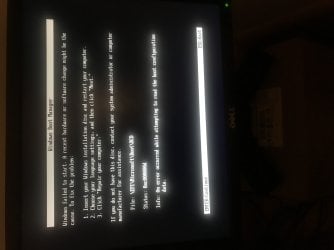
Unfortunately, it doesn't work to boot my PC into anything. I ran rufus twice from scratch very carefully and can see the resulting USB key's files look good. See attached pic for the error message I got consistently. And I get that after maybe one second of my PC starting to show lines being run from the USB key.

The only difference between your instructions and my rufus settings is that I selected UEFI, not MBR. My PC is fully UEFI-GPT.

Any ideas?
 

Attachments

  • IMG_2377.jpg
    IMG_2377.jpg
    554.2 KB · Views: 3

My Computer My Computer

At a glance

Dual boot - Win 10 Pro 64-bit (good) and Win ...Intel Core i5 3470 @ 3.2GHz16GB RAM DDR3 (Four x 4GB)Intel HD Graphics (on the CPU)
Computer type
PC/Desktop
Computer Manufacturer/Model Number
Dell Optiplex 7010 MT
OS
Dual boot - Win 10 Pro 64-bit (good) and Win 7 Pro 64-bit (won't boot on the NVMe)
CPU
Intel Core i5 3470 @ 3.2GHz
Motherboard
Dell 0GY6Y8 - what would the Intel number be? - Q77 chipset
Memory
16GB RAM DDR3 (Four x 4GB)
Graphics Card(s)
Intel HD Graphics (on the CPU)
Sound Card
Realtek High Definition Audio - and Intel Display Audio
Monitor(s) Displays
Dell E176FP - nothing fancy
Screen Resolution
1280 x 1024 @ 60 Hz
Hard Drives
Now a Samsung 970 EVO Plus SSD NVMe, which works for the Win 10 only

Used to be two 500GB WDC WD5000AAKX (SATA @ 6GB/sec)

- External WD My Book 1110 USB device
PSU
What means PSU? I'm at sea level
Cooling
Ice cubes
Keyboard
Noisy
Mouse
Micky
Internet Speed
Verizon FIOS 500 Mbps (was 1Gbps but I can't type that fast)
Antivirus
Win 10 Windows Defender - Win 7 Avast Free
Browser
Firefox only with lots of security drives my wife crazy
Other Info
Also I still have an old but important XP SP3 machine that can run - Optiplex 755 Desktop w 4GB RAM and Momentus XT hybrid HD-SSD 500 GB hard drive. Used the registry hack to get more updates through "XP Embedded" or "POS" so now the machine rings like a cash register and the CD drawer opens to give change.
Hi

W7 does not like Secure Boot and Fast startup please dissable them
 

My Computer My Computer

At a glance

W7 home premium 32bit/W7HP 64bit/w10 tp insid...E5300 dual core3gbNvidia Geforce 7100 Nforce 630i
Computer type
PC/Desktop
Computer Manufacturer/Model Number
medionl/Aspire 6930G/acer x55a
OS
W7 home premium 32bit/W7HP 64bit/w10 tp insider ring
CPU
E5300 dual core
Motherboard
medion MS7366
Memory
3gb
Graphics Card(s)
Nvidia Geforce 7100 Nforce 630i
Monitor(s) Displays
avixc
Internet Speed
n (isp resticted to 72)
Antivirus
mse/pands
Browser
palemoon
Other Info
Belkin Fd7050 n USB using Railink RT2870 drivers, more upto date
A simple way to make bootable usb is use disk managment or any decent 3rd party partitioner to format the usb stick as fat32, then copy the contents of the iso onto the usb stick.

or use this: View attachment Usb7ice.zip

In the unlikely event that a file is larger than the fat32 size limit of 4gb , e.g. a customized install.wim, it can be split.
 
Last edited:

My Computers My Computers

  • At a glance

    7 X64i5 84002x8gb 3200mhz
    Computer type
    PC/Desktop
    OS
    7 X64
    CPU
    i5 8400
    Motherboard
    gigabyte b365m ds3h
    Memory
    2x8gb 3200mhz
    Hard Drives
    various
    PSU
    pure power 11 400w cm
    Case
    Coolermaster
    Cooling
    cryorig m9i
  • At a glance

    7x64g54008gb ddr4 2400
    Computer type
    PC/Desktop
    OS
    7x64
    CPU
    g5400
    Motherboard
    ga b365m ds3h
    Memory
    8gb ddr4 2400
    PSU
    xfx pro 450w
All - I've tried a lot of things, and I can't get my dual-booting PC to start in Win 7. I get the four glowing MS flags but it gets stuck there and the flags just glow all night.

My default OS is my Win 10, and I can start into the 10 just fine.

Questions -
  1. while in Win 10, is there a way to set msconfig so the next boot will be Win 7's safe mode?
    But only once, NOT as a default boot (or then I'm in big trouble). If I mistakenly set 7 as the default boot, I'll never be able to start my PC again!
  2. while in Win 10, is there a way to use EasyBCD to add a third boot entry that is Win 7's safe mode? (EasyBCD alrrady shows both my Win 10, which is the default, and my Win 7. So could I add a Win 7 safe mode?)
  3. while in Win 10, is there a way to set the startup parameters for Win 7 so that it does NOT use Fast Mode?

Thanks.
 

My Computer My Computer

At a glance

Dual boot - Win 10 Pro 64-bit (good) and Win ...Intel Core i5 3470 @ 3.2GHz16GB RAM DDR3 (Four x 4GB)Intel HD Graphics (on the CPU)
Computer type
PC/Desktop
Computer Manufacturer/Model Number
Dell Optiplex 7010 MT
OS
Dual boot - Win 10 Pro 64-bit (good) and Win 7 Pro 64-bit (won't boot on the NVMe)
CPU
Intel Core i5 3470 @ 3.2GHz
Motherboard
Dell 0GY6Y8 - what would the Intel number be? - Q77 chipset
Memory
16GB RAM DDR3 (Four x 4GB)
Graphics Card(s)
Intel HD Graphics (on the CPU)
Sound Card
Realtek High Definition Audio - and Intel Display Audio
Monitor(s) Displays
Dell E176FP - nothing fancy
Screen Resolution
1280 x 1024 @ 60 Hz
Hard Drives
Now a Samsung 970 EVO Plus SSD NVMe, which works for the Win 10 only

Used to be two 500GB WDC WD5000AAKX (SATA @ 6GB/sec)

- External WD My Book 1110 USB device
PSU
What means PSU? I'm at sea level
Cooling
Ice cubes
Keyboard
Noisy
Mouse
Micky
Internet Speed
Verizon FIOS 500 Mbps (was 1Gbps but I can't type that fast)
Antivirus
Win 10 Windows Defender - Win 7 Avast Free
Browser
Firefox only with lots of security drives my wife crazy
Other Info
Also I still have an old but important XP SP3 machine that can run - Optiplex 755 Desktop w 4GB RAM and Momentus XT hybrid HD-SSD 500 GB hard drive. Used the registry hack to get more updates through "XP Embedded" or "POS" so now the machine rings like a cash register and the CD drawer opens to give change.
All - I've tried a lot of things, and I can't get my dual-booting PC to start in Win 7. I get the four glowing MS flags but it gets stuck there and the flags just glow all night.

My default OS is my Win 10, and I can start into the 10 just fine.

Questions -
  1. while in Win 10, is there a way to set msconfig so the next boot will be Win 7's safe mode?
    But only once, NOT as a default boot (or then I'm in big trouble). If I mistakenly set 7 as the default boot, I'll never be able to start my PC again!
  2. while in Win 10, is there a way to use EasyBCD to add a third boot entry that is Win 7's safe mode? (EasyBCD alrrady shows both my Win 10, which is the default, and my Win 7. So could I add a Win 7 safe mode?)
  3. while in Win 10, is there a way to set the startup parameters for Win 7 so that it does NOT use Fast Mode?

Thanks.
If you can't boot to Windows 7 then Safe Mode won't work either.

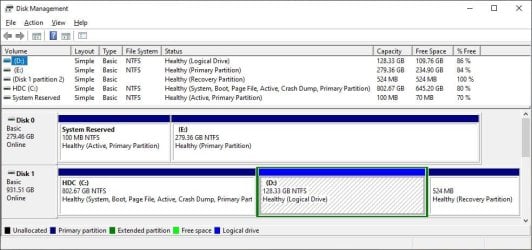
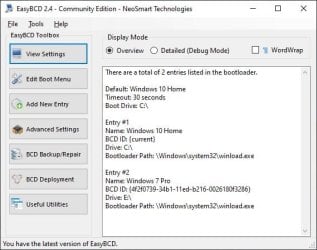
Let's back up to see how your computer is set up. I will show how mine is set up in Windows 10 as an example.

Disk0: Partition E: has Windows 7. (Note when I boot Windows 7 this is shown as C:)
Disk1: Partition C: has Windows 10

Note both disks are MBR. This is an old computer that doesn't support UEFI. I had to select MBR/BIOS when I created the USB flash drives for Windows 7 and Windows 10.
 

Attachments

  • 2023-01-22 01_19_51-Disk Management.jpg
    2023-01-22 01_19_51-Disk Management.jpg
    69.1 KB · Views: 1
  • 2023-01-22 01_21_20-EasyBCD 2.4 - Community Edition - NeoSmart Technologies.jpg
    2023-01-22 01_21_20-EasyBCD 2.4 - Community Edition - NeoSmart Technologies.jpg
    37.2 KB · Views: 34

My Computers My Computers

  • At a glance

    Windows 7 Home Premium 64-bitsAMD FX-8350GSKILL Ripjaw-X PC3 12800 8GB (2x4GB)ASUS ROG STRIX GTX 1060 6GB
    Computer type
    PC/Desktop
    Computer Manufacturer/Model Number
    Custom build
    OS
    Windows 7 Home Premium 64-bits
    CPU
    AMD FX-8350
    Motherboard
    Gigabyte GA-990FXA-UD3 (AM3+)
    Memory
    GSKILL Ripjaw-X PC3 12800 8GB (2x4GB)
    Graphics Card(s)
    ASUS ROG STRIX GTX 1060 6GB
    Sound Card
    Integrated
    Monitor(s) Displays
    Asus VE228H (21.5-in)
    Screen Resolution
    1920x1080 60Hz
    Hard Drives
    SAMSUNG 870 EVO 2.5 Inch SATA SSD (1TB)
    SAMSUNG 870 EVO 2.5 Inch SATA SSD (1TB)
    SAMSUNG 870 EVO 2.5 Inch SATA SSD (1TB)
    PSU
    Corsair RM750x (750 watts)
    Case
    Corsair Carbide Series 200R
    Cooling
    Corsair Hydro Series H60 (CWCH60)
    Keyboard
    Logitech Elite
    Mouse
    Logitech M510 Wireless Mouse
    Internet Speed
    Comcast Gigabit Extra (1200Mbps down / 35Mbps up)
    Antivirus
    Malwarebytes
    Browser
    Firefox, Edge, Chrome
    Other Info
    ASUS DRW-24B1ST DVD-RW (24X) optical drive
    Seagate Expansion Desk (5TB) external SATA/USB HDD
    Comcast XB8 Internet Gateway
  • At a glance

    Windows 7 Pro (64-bit)AMD Phenom II 960T X4Corsair XMS2 DDR2-800 8GB (4x2GB)ASUS ENGTX560 DCII OC/2DI/1GD5 1GB
    Computer type
    PC/Desktop
    System Manufacturer/Model Number
    Custom
    OS
    Windows 7 Pro (64-bit)
    CPU
    AMD Phenom II 960T X4
    Motherboard
    ASUS M4N82 Deluxe
    Memory
    Corsair XMS2 DDR2-800 8GB (4x2GB)
    Graphics Card(s)
    ASUS ENGTX560 DCII OC/2DI/1GD5 1GB
    Monitor(s) Displays
    Samsung 930B 19-inch LCD
    Screen Resolution
    1280x1024
    Hard Drives
    Samsung SSD 870 EVO 1000 GB (Windows 10)
    Seagate ST1000DM003 1000 GB (Windows 7)
    PSU
    Antec TruePower (new) TP-650
    Case
    Antec Three Hundred
    Cooling
    AMD stock cooler from FX8350
    Mouse
    Logitech M100
    Internet Speed
    Xfinity Gigabit Extra 1200/35 Mbps
MisterEd - Both my OSes are on Disk 0, and they used to work just fine. I'm UEFI-GPT with Secure Boot OFF. I have two other disks for Files and Backup.

How can I post screenshots of stuff the neat way you do? Then I could show you graphically.

Thanks.
 

My Computer My Computer

At a glance

Dual boot - Win 10 Pro 64-bit (good) and Win ...Intel Core i5 3470 @ 3.2GHz16GB RAM DDR3 (Four x 4GB)Intel HD Graphics (on the CPU)
Computer type
PC/Desktop
Computer Manufacturer/Model Number
Dell Optiplex 7010 MT
OS
Dual boot - Win 10 Pro 64-bit (good) and Win 7 Pro 64-bit (won't boot on the NVMe)
CPU
Intel Core i5 3470 @ 3.2GHz
Motherboard
Dell 0GY6Y8 - what would the Intel number be? - Q77 chipset
Memory
16GB RAM DDR3 (Four x 4GB)
Graphics Card(s)
Intel HD Graphics (on the CPU)
Sound Card
Realtek High Definition Audio - and Intel Display Audio
Monitor(s) Displays
Dell E176FP - nothing fancy
Screen Resolution
1280 x 1024 @ 60 Hz
Hard Drives
Now a Samsung 970 EVO Plus SSD NVMe, which works for the Win 10 only

Used to be two 500GB WDC WD5000AAKX (SATA @ 6GB/sec)

- External WD My Book 1110 USB device
PSU
What means PSU? I'm at sea level
Cooling
Ice cubes
Keyboard
Noisy
Mouse
Micky
Internet Speed
Verizon FIOS 500 Mbps (was 1Gbps but I can't type that fast)
Antivirus
Win 10 Windows Defender - Win 7 Avast Free
Browser
Firefox only with lots of security drives my wife crazy
Other Info
Also I still have an old but important XP SP3 machine that can run - Optiplex 755 Desktop w 4GB RAM and Momentus XT hybrid HD-SSD 500 GB hard drive. Used the registry hack to get more updates through "XP Embedded" or "POS" so now the machine rings like a cash register and the CD drawer opens to give change.
if you can boot into windows 10 you can use the snipping tool.

did you try F8 to get to the advanced boot options screen ?

Advanced Boot Options
 

My Computers My Computers

  • At a glance

    7 X64i5 84002x8gb 3200mhz
    Computer type
    PC/Desktop
    OS
    7 X64
    CPU
    i5 8400
    Motherboard
    gigabyte b365m ds3h
    Memory
    2x8gb 3200mhz
    Hard Drives
    various
    PSU
    pure power 11 400w cm
    Case
    Coolermaster
    Cooling
    cryorig m9i
  • At a glance

    7x64g54008gb ddr4 2400
    Computer type
    PC/Desktop
    OS
    7x64
    CPU
    g5400
    Motherboard
    ga b365m ds3h
    Memory
    8gb ddr4 2400
    PSU
    xfx pro 450w
SIW2 - How do I get to that first screenshot in your link?

I have not seen that once in my efforts. I sometimes get the screen for selecting an OS that's big white boxes on a blue background, not the white letters on the black background in that first picture at your link.

I would LOVE to try what you suggest - how can I get that option?

Thanks!
 

My Computer My Computer

At a glance

Dual boot - Win 10 Pro 64-bit (good) and Win ...Intel Core i5 3470 @ 3.2GHz16GB RAM DDR3 (Four x 4GB)Intel HD Graphics (on the CPU)
Computer type
PC/Desktop
Computer Manufacturer/Model Number
Dell Optiplex 7010 MT
OS
Dual boot - Win 10 Pro 64-bit (good) and Win 7 Pro 64-bit (won't boot on the NVMe)
CPU
Intel Core i5 3470 @ 3.2GHz
Motherboard
Dell 0GY6Y8 - what would the Intel number be? - Q77 chipset
Memory
16GB RAM DDR3 (Four x 4GB)
Graphics Card(s)
Intel HD Graphics (on the CPU)
Sound Card
Realtek High Definition Audio - and Intel Display Audio
Monitor(s) Displays
Dell E176FP - nothing fancy
Screen Resolution
1280 x 1024 @ 60 Hz
Hard Drives
Now a Samsung 970 EVO Plus SSD NVMe, which works for the Win 10 only

Used to be two 500GB WDC WD5000AAKX (SATA @ 6GB/sec)

- External WD My Book 1110 USB device
PSU
What means PSU? I'm at sea level
Cooling
Ice cubes
Keyboard
Noisy
Mouse
Micky
Internet Speed
Verizon FIOS 500 Mbps (was 1Gbps but I can't type that fast)
Antivirus
Win 10 Windows Defender - Win 7 Avast Free
Browser
Firefox only with lots of security drives my wife crazy
Other Info
Also I still have an old but important XP SP3 machine that can run - Optiplex 755 Desktop w 4GB RAM and Momentus XT hybrid HD-SSD 500 GB hard drive. Used the registry hack to get more updates through "XP Embedded" or "POS" so now the machine rings like a cash register and the CD drawer opens to give change.
when you get the choice of win7 or win10 on your boot menu, highlight win7 and press F8

when you get to the advanced screen it might be worth trying "last known good configuration" instead of safe mode.

It is also possible to change the bcd entry from booted media, in cases when f8 key doesnt work.

- - - Updated - - -

If there is only one system partition on your machine, it can be done quite easily from booted media ( winpe of some kind ) or another os if you are multibooting.

like this:

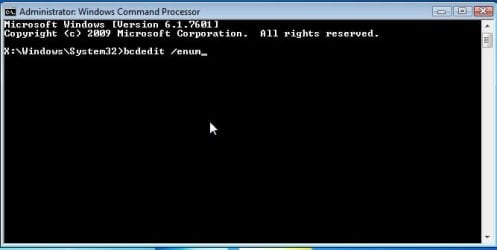
from another OS ( or booted winpe) open cmd prompt and type
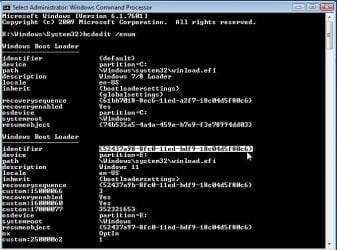
bcdedit /enum
(then press enter )

then find the {identifier} of the os you want to boot into safemode

then type
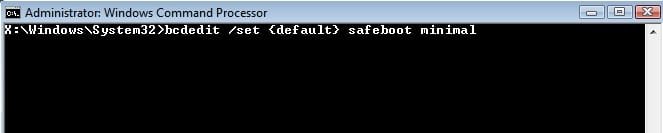
bcdedit /set {identifier} safeboot minimal
(then press enter )

to change it back to normal boot afterwards
bcdedit /deletevalue (identifier} safeboot
(then press enter )


---------------------------------------------------------------------------------------------------------

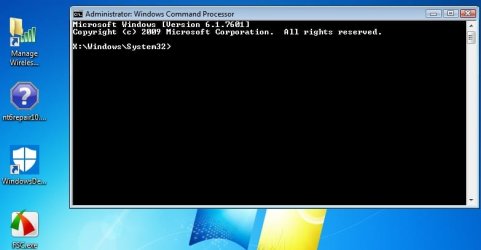
open cmd prompt

set-safeboot.jpg

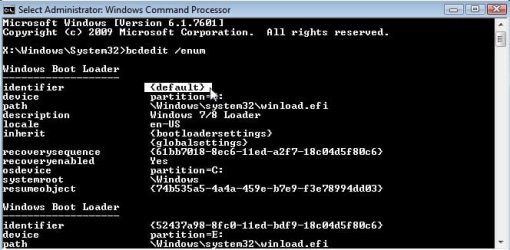
type bcdedit /enum
set-safeboot2.jpg

In the example below there are 2 operating systems listed.

find the {identifier} for the os. Highlight it and rt click will copy it to clipboard

in this case win11 has has the identifier {52437a98-8fc0-11ed-bdf9-18c04d5f80c6}

we dont want that one

set-safeboot4.jpg

and win7 has the identifier {default}

that is the one we want

set-safeboot3.jpg

then type

bcdedit /set and rt click and paste in the identifier safeboot minmal
(then press enter )

set-safeboot5.jpg

Because you can boot into win10, you can run the commands from within windows 10 instead of booting into winpe:

It is the same

bcdedit /enum
(then press enter )

find the identifier for the windows 7 entry

then type

bcdedit /set {whatever is the win 7 identifier} safeboot minimal
(then press enter )
 
Last edited:

My Computers My Computers

  • At a glance

    7 X64i5 84002x8gb 3200mhz
    Computer type
    PC/Desktop
    OS
    7 X64
    CPU
    i5 8400
    Motherboard
    gigabyte b365m ds3h
    Memory
    2x8gb 3200mhz
    Hard Drives
    various
    PSU
    pure power 11 400w cm
    Case
    Coolermaster
    Cooling
    cryorig m9i
  • At a glance

    7x64g54008gb ddr4 2400
    Computer type
    PC/Desktop
    OS
    7x64
    CPU
    g5400
    Motherboard
    ga b365m ds3h
    Memory
    8gb ddr4 2400
    PSU
    xfx pro 450w
SIW2 - you are a great man? woman? bird! to respond so frequently with such good detail. Many thanks!

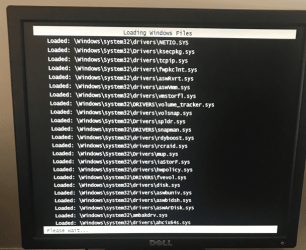
Since my last post, I managed to get into Win 7 Safe Mode, using a combination of Msconfig and EasyBCD, but it did not help. It hangs at the end of its list of loaded drivers. See the pic below. I've run it many times now.

image.png

What I really need is a screen at the beginning of Win 7 with "Last Known Good Configuration", as can be seen at your link above. How to get it?

I will try again your suggestion to hit F8, but when I select the "Win 7" box (white box on blue background), it usually just starts - no opportunity to hit F8. Thoughts?

Finally, I have been unable to get my PC to boot from a USB stick with a version of the Win 7 installation on it - I want to try "Repair". But such attempt to boot from the USB only throws an error message that my hardware has changed with reference to an EFI file.
Very frustrating.

Anyway, what's the magic sauce for being able to select Win 7 and then being able to hit F8?

Thanks.

- - - Updated - - -

SIW2 - In my other thread, you added the following, which I'm copying here to have all your good advice in one place:

bcdedit /set {identifier} lastknowngood on

a simpler way is to change to the grownup boot menu

bcdedit /set {current} bootmenupolicy legacy

So, using the identifier for my Win 7 (which won't start), I ran your
bcdedit /set {identifier} lastknowngood on
and I can see in EasyBCD (which I run from my Win 10) that it shows as added to the Win 7.

However, I still cannot actually get to the screen with white letters against a black background that would give me the option to do "Last known good configuration". If I get the OS selection screen (white boxes against a blue background) and move its focus to the Win 7 box, hitting F8 does nothing, and if I hit that Win 7 box and then start hitting F8, my keyboard is ignored, I don't get to the screen with white letters against a black background, Win 7 tries to start, and I'm again left with the four glowing flags forever.
It seems my keyboard is NOT connected as soon as Win 7 tries to start and so hitting F8 does nothing.

While in my Win 10, is there a way to reboot into Win 7 with "Last Known Configuration" pre-selected or some other way to pre-select the screen (white letters on black background) that will give me the "Last Known Configuration" option? And, as always, if it doesn't work, I need to be able to re-boot into my Win 10 at least. (Win 7 should never become a hard default that I cannot change.)

Thanks again.
 

My Computer My Computer

At a glance

Dual boot - Win 10 Pro 64-bit (good) and Win ...Intel Core i5 3470 @ 3.2GHz16GB RAM DDR3 (Four x 4GB)Intel HD Graphics (on the CPU)
Computer type
PC/Desktop
Computer Manufacturer/Model Number
Dell Optiplex 7010 MT
OS
Dual boot - Win 10 Pro 64-bit (good) and Win 7 Pro 64-bit (won't boot on the NVMe)
CPU
Intel Core i5 3470 @ 3.2GHz
Motherboard
Dell 0GY6Y8 - what would the Intel number be? - Q77 chipset
Memory
16GB RAM DDR3 (Four x 4GB)
Graphics Card(s)
Intel HD Graphics (on the CPU)
Sound Card
Realtek High Definition Audio - and Intel Display Audio
Monitor(s) Displays
Dell E176FP - nothing fancy
Screen Resolution
1280 x 1024 @ 60 Hz
Hard Drives
Now a Samsung 970 EVO Plus SSD NVMe, which works for the Win 10 only

Used to be two 500GB WDC WD5000AAKX (SATA @ 6GB/sec)

- External WD My Book 1110 USB device
PSU
What means PSU? I'm at sea level
Cooling
Ice cubes
Keyboard
Noisy
Mouse
Micky
Internet Speed
Verizon FIOS 500 Mbps (was 1Gbps but I can't type that fast)
Antivirus
Win 10 Windows Defender - Win 7 Avast Free
Browser
Firefox only with lots of security drives my wife crazy
Other Info
Also I still have an old but important XP SP3 machine that can run - Optiplex 755 Desktop w 4GB RAM and Momentus XT hybrid HD-SSD 500 GB hard drive. Used the registry hack to get more updates through "XP Embedded" or "POS" so now the machine rings like a cash register and the CD drawer opens to give change.
You are using the kindergarten boot menu with the blue squares.

why not change to the grown up boot menu ?
 

My Computers My Computers

  • At a glance

    7 X64i5 84002x8gb 3200mhz
    Computer type
    PC/Desktop
    OS
    7 X64
    CPU
    i5 8400
    Motherboard
    gigabyte b365m ds3h
    Memory
    2x8gb 3200mhz
    Hard Drives
    various
    PSU
    pure power 11 400w cm
    Case
    Coolermaster
    Cooling
    cryorig m9i
  • At a glance

    7x64g54008gb ddr4 2400
    Computer type
    PC/Desktop
    OS
    7x64
    CPU
    g5400
    Motherboard
    ga b365m ds3h
    Memory
    8gb ddr4 2400
    PSU
    xfx pro 450w
SIW2 - thanks very much for your encouragement to get that Legacy boot menu - I was able to get it following your hints and the BCDEdit / set article from Microsoft Learn.

Unfortunately, after selecting Win 7, hitting F8 and selecting Last Known Good Configuration (Advanced), my PC still does not start up into Win 7. Same getting stuck at the four glowing flags.

Did that twice.

Then I did Enable Boot Logging, but the resulting ntbtlog.txt is dated 2019 (the last time I enabled boot log), so nothing helpful.

I might try selecting the Win 10, then F8, then Last Known Good Configuration, but could I make things worse?

Looks like I'm going to have to do a Repair Install of the Win 7, but my PC will NOT boot from a USB stick with a Win 7 iso on it. I might have to buy a double-capacity DVD-R and burin the 2018 heidoc.ney Win 7 Media install onto it. Not even sure the PC will boot from that.

Here is one clue about my stuck Win 7 start: At the beginning, the lights under my mouse and on my keyboard are on, then they turn off as the Win 7 start proceeds and never come back on. The mouse and keyboard remain dead as the four MS flags glow.

Also, I have a TP-Link WiFi network adapter plugged into this PC's USB3 - that's how I get connected to my home's WiFi and Internet signal. Its power light does not come on at all during the attempts to start Win 7. Also, I tried one of my boots without this attached just in case it triggered the halt, but that did not help.

Any ideas other than a Repair Install?

Should I do a Last Known Good Configuration for the Win 10 (which is starting good)?

Thanks very much,.
 

My Computer My Computer

At a glance

Dual boot - Win 10 Pro 64-bit (good) and Win ...Intel Core i5 3470 @ 3.2GHz16GB RAM DDR3 (Four x 4GB)Intel HD Graphics (on the CPU)
Computer type
PC/Desktop
Computer Manufacturer/Model Number
Dell Optiplex 7010 MT
OS
Dual boot - Win 10 Pro 64-bit (good) and Win 7 Pro 64-bit (won't boot on the NVMe)
CPU
Intel Core i5 3470 @ 3.2GHz
Motherboard
Dell 0GY6Y8 - what would the Intel number be? - Q77 chipset
Memory
16GB RAM DDR3 (Four x 4GB)
Graphics Card(s)
Intel HD Graphics (on the CPU)
Sound Card
Realtek High Definition Audio - and Intel Display Audio
Monitor(s) Displays
Dell E176FP - nothing fancy
Screen Resolution
1280 x 1024 @ 60 Hz
Hard Drives
Now a Samsung 970 EVO Plus SSD NVMe, which works for the Win 10 only

Used to be two 500GB WDC WD5000AAKX (SATA @ 6GB/sec)

- External WD My Book 1110 USB device
PSU
What means PSU? I'm at sea level
Cooling
Ice cubes
Keyboard
Noisy
Mouse
Micky
Internet Speed
Verizon FIOS 500 Mbps (was 1Gbps but I can't type that fast)
Antivirus
Win 10 Windows Defender - Win 7 Avast Free
Browser
Firefox only with lots of security drives my wife crazy
Other Info
Also I still have an old but important XP SP3 machine that can run - Optiplex 755 Desktop w 4GB RAM and Momentus XT hybrid HD-SSD 500 GB hard drive. Used the registry hack to get more updates through "XP Embedded" or "POS" so now the machine rings like a cash register and the CD drawer opens to give change.
Should I do a Last Known Good Configuration for the Win 10 (which is starting good)?

no.

Repair install has to be done from within win7. You cant get into win7 so you cant do a repair install.
 

My Computers My Computers

  • At a glance

    7 X64i5 84002x8gb 3200mhz
    Computer type
    PC/Desktop
    OS
    7 X64
    CPU
    i5 8400
    Motherboard
    gigabyte b365m ds3h
    Memory
    2x8gb 3200mhz
    Hard Drives
    various
    PSU
    pure power 11 400w cm
    Case
    Coolermaster
    Cooling
    cryorig m9i
  • At a glance

    7x64g54008gb ddr4 2400
    Computer type
    PC/Desktop
    OS
    7x64
    CPU
    g5400
    Motherboard
    ga b365m ds3h
    Memory
    8gb ddr4 2400
    PSU
    xfx pro 450w
SIW2 - Not even if I have a Win 7 installation DVD? (Which I have not yet tried.)

See, for example,
Startup Repair

Or - what if I create a new (third) partition and newly install Win 7 Pro 64-bit on it (with nothing else). Can I then run a repair Install but point it to my original non-starting Win 7?

What else could I try?
 

My Computer My Computer

At a glance

Dual boot - Win 10 Pro 64-bit (good) and Win ...Intel Core i5 3470 @ 3.2GHz16GB RAM DDR3 (Four x 4GB)Intel HD Graphics (on the CPU)
Computer type
PC/Desktop
Computer Manufacturer/Model Number
Dell Optiplex 7010 MT
OS
Dual boot - Win 10 Pro 64-bit (good) and Win 7 Pro 64-bit (won't boot on the NVMe)
CPU
Intel Core i5 3470 @ 3.2GHz
Motherboard
Dell 0GY6Y8 - what would the Intel number be? - Q77 chipset
Memory
16GB RAM DDR3 (Four x 4GB)
Graphics Card(s)
Intel HD Graphics (on the CPU)
Sound Card
Realtek High Definition Audio - and Intel Display Audio
Monitor(s) Displays
Dell E176FP - nothing fancy
Screen Resolution
1280 x 1024 @ 60 Hz
Hard Drives
Now a Samsung 970 EVO Plus SSD NVMe, which works for the Win 10 only

Used to be two 500GB WDC WD5000AAKX (SATA @ 6GB/sec)

- External WD My Book 1110 USB device
PSU
What means PSU? I'm at sea level
Cooling
Ice cubes
Keyboard
Noisy
Mouse
Micky
Internet Speed
Verizon FIOS 500 Mbps (was 1Gbps but I can't type that fast)
Antivirus
Win 10 Windows Defender - Win 7 Avast Free
Browser
Firefox only with lots of security drives my wife crazy
Other Info
Also I still have an old but important XP SP3 machine that can run - Optiplex 755 Desktop w 4GB RAM and Momentus XT hybrid HD-SSD 500 GB hard drive. Used the registry hack to get more updates through "XP Embedded" or "POS" so now the machine rings like a cash register and the CD drawer opens to give change.
I just looked back at post #6. You should never have seen an error message like that.

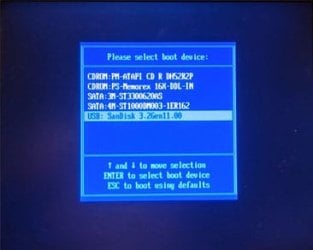
To boot from a USB flash drive you first have to find out what key you need to press when the computer starts to bring up the boot menu. This is important because even for the same manufacturer it varies. For example, for my 12 years old ASUS motherboard I have to use the F8 key to bring up the boot menu.

I went back and used Rufus to create a flash drive with Windows 7 Pro on it. When done I inserted the flash drive into the computer.

1. After my computer started up I started tapping the F8 key repeatedly.
About 5 or 10 seconds later I saw the boot menu.
I scrolled down and selected the Sandisk flash drive
I pressed the Enter key

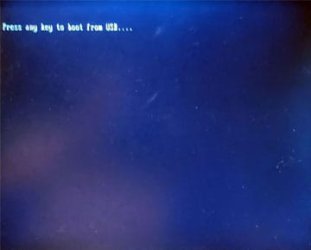
2. I then had to press a key to verify I wanted to boot from the flash drive.

3. Maybe 30 seconds later I saw the Windows 7 setup menu
 

Attachments

  • boot1b.jpg
    boot1b.jpg
    33.7 KB · Views: 17
  • boot2b.jpg
    boot2b.jpg
    24 KB · Views: 17
  • boot3b.jpg
    boot3b.jpg
    35.7 KB · Views: 18

My Computers My Computers

  • At a glance

    Windows 7 Home Premium 64-bitsAMD FX-8350GSKILL Ripjaw-X PC3 12800 8GB (2x4GB)ASUS ROG STRIX GTX 1060 6GB
    Computer type
    PC/Desktop
    Computer Manufacturer/Model Number
    Custom build
    OS
    Windows 7 Home Premium 64-bits
    CPU
    AMD FX-8350
    Motherboard
    Gigabyte GA-990FXA-UD3 (AM3+)
    Memory
    GSKILL Ripjaw-X PC3 12800 8GB (2x4GB)
    Graphics Card(s)
    ASUS ROG STRIX GTX 1060 6GB
    Sound Card
    Integrated
    Monitor(s) Displays
    Asus VE228H (21.5-in)
    Screen Resolution
    1920x1080 60Hz
    Hard Drives
    SAMSUNG 870 EVO 2.5 Inch SATA SSD (1TB)
    SAMSUNG 870 EVO 2.5 Inch SATA SSD (1TB)
    SAMSUNG 870 EVO 2.5 Inch SATA SSD (1TB)
    PSU
    Corsair RM750x (750 watts)
    Case
    Corsair Carbide Series 200R
    Cooling
    Corsair Hydro Series H60 (CWCH60)
    Keyboard
    Logitech Elite
    Mouse
    Logitech M510 Wireless Mouse
    Internet Speed
    Comcast Gigabit Extra (1200Mbps down / 35Mbps up)
    Antivirus
    Malwarebytes
    Browser
    Firefox, Edge, Chrome
    Other Info
    ASUS DRW-24B1ST DVD-RW (24X) optical drive
    Seagate Expansion Desk (5TB) external SATA/USB HDD
    Comcast XB8 Internet Gateway
  • At a glance

    Windows 7 Pro (64-bit)AMD Phenom II 960T X4Corsair XMS2 DDR2-800 8GB (4x2GB)ASUS ENGTX560 DCII OC/2DI/1GD5 1GB
    Computer type
    PC/Desktop
    System Manufacturer/Model Number
    Custom
    OS
    Windows 7 Pro (64-bit)
    CPU
    AMD Phenom II 960T X4
    Motherboard
    ASUS M4N82 Deluxe
    Memory
    Corsair XMS2 DDR2-800 8GB (4x2GB)
    Graphics Card(s)
    ASUS ENGTX560 DCII OC/2DI/1GD5 1GB
    Monitor(s) Displays
    Samsung 930B 19-inch LCD
    Screen Resolution
    1280x1024
    Hard Drives
    Samsung SSD 870 EVO 1000 GB (Windows 10)
    Seagate ST1000DM003 1000 GB (Windows 7)
    PSU
    Antec TruePower (new) TP-650
    Case
    Antec Three Hundred
    Cooling
    AMD stock cooler from FX8350
    Mouse
    Logitech M100
    Internet Speed
    Xfinity Gigabit Extra 1200/35 Mbps
Back
Top