Solved I Have 32GB of RAM, Game Consumes 12GB but Crashes to "Out of Memory"

TurtleShroom

New member
Local time
3:40 AM
Messages
31
Location
Northeast Georgia, USA
I Have 32GB of RAM, Game Consumes 12GB but Crashes to "Out of Memory"

Good afternoon.

The error I am experiencing is exactly what it says on the tin.

I have thirty-two gigabytes of RAM. I have a video game (called "Rimworld") that consumes twelve to fourteen gigabytes of RAM, and then crashes because it thinks that it is out of memory. I reported it to the company that made the game, and they told me that what I was experiencing was a problem with my operating system.

They said that in spite of my thirty-two gigabytes of RAM, my Windows installation insisted on not allocating more. As such, I am screwed unless I can fix this problem.

How would I go about fixing this?


-TURTLESHROOM


P.S.: My DXDIAG data is attached to this post. You can find it below.
 

Attachments

My Computer My Computer

At a glance

Windows VII Professional (Sixty Four Bit)Intel Core I7-4770 CPU (at 3.400 Gigahertz/3....32GB RAMNVIDIA Geforce GTX 1660
Computer type
PC/Desktop
Computer Manufacturer/Model Number
Dell Optiplex 9020
OS
Windows VII Professional (Sixty Four Bit)
CPU
Intel Core I7-4770 CPU (at 3.400 Gigahertz/3.39 Gigahertz)
Motherboard
Intel
Memory
32GB RAM
Graphics Card(s)
NVIDIA Geforce GTX 1660
Sound Card
Standard
Monitor(s) Displays
MULTISYNC LCD 1530V + Evoyo Display
Screen Resolution
1024 x 768
Hard Drives
Four Terabyte Solid State Drive
PSU
Gold Standard
Case
Original
Cooling
Traditional
Keyboard
Compaq Internet Keyboard (KU-9978)
Mouse
Genius Net Scroll Serial
Antivirus
Kaspersky
Browser
Supermium; Google Chrome; Firefox 28
Other Info
Jesus loves you and died for you!
Only the mini tower and small form factor support 32 GB. Is this what you have? https://www.dell.com/support/kbdoc/en-us/000132428/dell-optiplex-memory-compatibility-guide


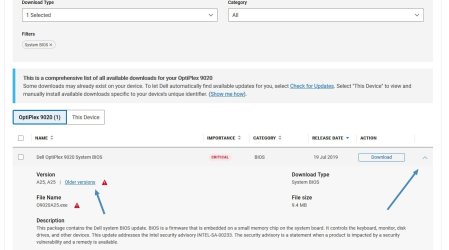
I see your BIOS is quite old. Looking at the newer versions since your version of A07 I don't see any that address a RAM issue, but it may be worthwhile updating to the latest BIOS. Unfortunately, there are a ton of them. The rule is to only skip three at a time, install, reboot and then install the third next in line. So, I did this for you and you want to install the following in this order starting with A08:

A24

A22

A17

A13

A08

https://www.dell.com/support/home/en-us/product-support/product/optiplex-9020-desktop/drivers


gfbnhfgnfgt.jpg


- - - Updated - - -

Oops, Home Premium only supports up to 16 GB. More helpful Info. here

Though, that doesn't fix the issue as the game is using less than 16 GB. I'd try to reduce the amount of installed memory to 16 GB and try the game again and see what happens. Again, A BIOS update and some BIOS configuration may need to be in order.
 
Last edited:

My Computer My Computer

At a glance

Windows 7 Ultimate x64
Computer type
PC/Desktop
OS
Windows 7 Ultimate x64
F22 Simpilot is spot on with the comment about Home Premium only supporting 16GB of RAM. Looking at the attached file it contains this:

Memory: 32768MB RAM
Available OS Memory: 16384MB RAM

Windows knows that you have 32GB, but only allows to use 16, so in practice that's your actual RAM. Since the game consumes up to 14GB it's not too surprising that you're short of RAM, considering that other programs and the rest of the system also uses quite a bit of memory. The tech support is right in its call.

There are a few options:
  • Upgrade Windows to at least profesional so that it agrees to use the whole RAM.
  • Increase pagefile size so that it can be used to supplement RAM.
  • Close other programs running at the moment to free up more memory.
  • Try to reduce the game RAM usage, for example by lowering graphics settings and the like.
 

My Computer My Computer

At a glance

Windows 7 Ultimate x64Intel Core i7-740QM8 GB DDR3NVIDIA GeForce 330GT
Computer type
Laptop
Computer Manufacturer/Model Number
Toshiba Sattelite A665-S6092
OS
Windows 7 Ultimate x64
CPU
Intel Core i7-740QM
Memory
8 GB DDR3
Graphics Card(s)
NVIDIA GeForce 330GT
Screen Resolution
1366x768
Hard Drives
Samsung 840 SSD 500GB
1TB USB3 external HD
Cooling
Coolermaster Notepal U3 notebook cooling pad
Internet Speed
3mbps ASDL
Antivirus
ClamWin 0.98.7
Browser
Opera 12.17 x86 (main), Firefox 38 (sec), IE11 (last resort)
Only the mini tower and small form factor support 32 GB. Is this what you have? https://www.dell.com/support/kbdoc/en-us/000132428/dell-optiplex-memory-compatibility-guide
[...]
Though, that doesn't fix the issue as the game is using less than 16 GB. I'd try to reduce the amount of installed memory to 16 GB and try the game again and see what happens. Again, A BIOS update and some BIOS configuration may need to be in order.
Yes, I checked and my Dell Optiplex 9020 PC said its maximum supported RAM is thirty-two gigabytes. However, when I checked the System Properties, it did indeed say that only sixteen gigabytes of RAM is usable.

Is there something wrong with my configuration, or do I need to get a higher version of "Windows VII"? I assume the Ultimate Edition would give me thirty-two gigabytes?

Glob, I asked for more RAM for Christmas and my family wasted their money...

- - - Updated - - -

If I may ask, how exactly do I upgrade to the Professional version, which is the one that supports thirty-two gigabytes of RAM?

The Windows Any Time Upgrade no longer exists.
 

My Computer My Computer

At a glance

Windows VII Professional (Sixty Four Bit)Intel Core I7-4770 CPU (at 3.400 Gigahertz/3....32GB RAMNVIDIA Geforce GTX 1660
Computer type
PC/Desktop
Computer Manufacturer/Model Number
Dell Optiplex 9020
OS
Windows VII Professional (Sixty Four Bit)
CPU
Intel Core I7-4770 CPU (at 3.400 Gigahertz/3.39 Gigahertz)
Motherboard
Intel
Memory
32GB RAM
Graphics Card(s)
NVIDIA Geforce GTX 1660
Sound Card
Standard
Monitor(s) Displays
MULTISYNC LCD 1530V + Evoyo Display
Screen Resolution
1024 x 768
Hard Drives
Four Terabyte Solid State Drive
PSU
Gold Standard
Case
Original
Cooling
Traditional
Keyboard
Compaq Internet Keyboard (KU-9978)
Mouse
Genius Net Scroll Serial
Antivirus
Kaspersky
Browser
Supermium; Google Chrome; Firefox 28
Other Info
Jesus loves you and died for you!
You would have no choice to backup your data and install Pro. I don't think you can get a legit Pro key these days.


You gave me Rep and said it fixed your problem. What exactly fixed your problem?

32 GB is massive overkill, even for today.

It's Windows 7, not the Roman numeral VII.
 

My Computer My Computer

At a glance

Windows 7 Ultimate x64
Computer type
PC/Desktop
OS
Windows 7 Ultimate x64
I doubt that RimWorld even needs 16GB of RAM since it is such an old game.

By installing 32GB of RAM of which Windows 7 Home can only use 16GB confused the game. A lot of games will use as much RAM as you have. The game probably tried to use more than 16GB RAM but was stopped by Windows 7 Home from doing so. This probably caused the game to crash.

BTW, I have two desktop computers with Windows 7 that I play games on. They both only have 8GB of RAM. I have never had a problem with any game saying I didn't have enough memory.

You have two choices:
  • Keep Windows 7 Home but reduce your RAM to 16GB
  • Upgrade Windows 7 Home to Windows 7 Pro and use all 32GB of RAM

Upgrading Upgrade Windows 7 Home to Windows 7 Pro is easier than you think
1. Buy the product key for Windows 7 Pro
2. Go into Windows settings and select change product key
3. Enter Windows 7 Pro product key
4. Windows will then proceed to upgrade to Windows 7 Pro

Note, I did this last summer so can verify that this works

BTW, because of forum rules I can't say where to buy the Windows 7 Pro product key. You can find it online for less than 30 USD. Maybe someone can PM you more information.
 

My Computers My Computers

  • At a glance

    Windows 7 Professional 64bit / Windows 10 Hom...AMD FX-8350GSKILL Ripjaw-X PC3 12800 12GB (2x4GB, 2x2GB)ASUS ENGTX560 DCII OC/2DI/1GD5 1GB
    Computer type
    PC/Desktop
    Computer Manufacturer/Model Number
    Custom build
    OS
    Windows 7 Professional 64bit / Windows 10 Home 64bit
    CPU
    AMD FX-8350
    Motherboard
    Gigabyte GA-990FXA-UD3 (AM3+) Rev. 4.0
    Memory
    GSKILL Ripjaw-X PC3 12800 12GB (2x4GB, 2x2GB)
    Graphics Card(s)
    ASUS ENGTX560 DCII OC/2DI/1GD5 1GB
    Sound Card
    Integrated
    Monitor(s) Displays
    Asus VE228H (21.5-in)
    Screen Resolution
    1920x1080 60Hz
    Hard Drives
    SAMSUNG 870 EVO 1TB (2.5" SATA SSD)
    SAMSUNG 870 EVO 500GB (2.5" SATA SSD)
    PSU
    Antec TruePower (new) TP-650 (650 watts)
    Case
    Antec Three Hundred
    Cooling
    AMD stock (plan to upgrade to Cooler Master Hyper 212 EVO)
    Keyboard
    Logitech K540 (wireless)
    Mouse
    Logitech M310 (wireless)
    Internet Speed
    Comcast Gigabit X2 Internet (2100Mbps down / 300Mbps up)
    Browser
    Firefox, Edge, Chrome
    Other Info
    Optical drive: ASUS DRW-24B3ST/BLK/G (Black) (24X)
    External hard drives: 2TB & 6TB
    Internet Gateway: Comcast XB8
  • Computer type
    PC/Desktop
You gave me Rep and said it fixed your problem. What exactly fixed your problem?

Updating to "Windows VII Professional" solved my problem. I apologize for not thanking you back then!
 

My Computer My Computer

At a glance

Windows VII Professional (Sixty Four Bit)Intel Core I7-4770 CPU (at 3.400 Gigahertz/3....32GB RAMNVIDIA Geforce GTX 1660
Computer type
PC/Desktop
Computer Manufacturer/Model Number
Dell Optiplex 9020
OS
Windows VII Professional (Sixty Four Bit)
CPU
Intel Core I7-4770 CPU (at 3.400 Gigahertz/3.39 Gigahertz)
Motherboard
Intel
Memory
32GB RAM
Graphics Card(s)
NVIDIA Geforce GTX 1660
Sound Card
Standard
Monitor(s) Displays
MULTISYNC LCD 1530V + Evoyo Display
Screen Resolution
1024 x 768
Hard Drives
Four Terabyte Solid State Drive
PSU
Gold Standard
Case
Original
Cooling
Traditional
Keyboard
Compaq Internet Keyboard (KU-9978)
Mouse
Genius Net Scroll Serial
Antivirus
Kaspersky
Browser
Supermium; Google Chrome; Firefox 28
Other Info
Jesus loves you and died for you!
Back
Top