Questions regarding Windows 7 Home Premium

importer

New member
Local time
1:05 AM
Messages
3
Hi there,

I tried calling MS sales about this one, but they were no help.

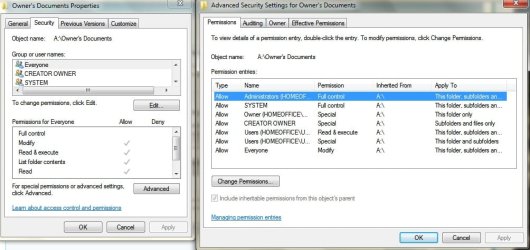
I wanted to know if Windows 7 Home Premium has the same or similar file sharing security features as Windows XP Pro which allowed you to give individual permissions of Read and Write to the PC admin user and to everyone else on the network (Permissions, Security, etc...)

Also, does Home Premium come with Remote Desktop?


Thank you
 

My Computer My Computer

OS
XP
Home premium does have remote desktop connection, as for the permissions yes you can. As for the how I am unsure as I am still finding my way around
 

My Computer My Computer

Computer type
PC/Desktop
Computer Manufacturer/Model Number
Me
OS
Windows 7 Home Premium x64
CPU
AMD Bulldozer FX-8 8120 Black Edition @ 4GHz
Motherboard
Asus Crosshair V Formula 990FX
Memory
Corsair Vengeance 16GB DDR3 PC3-12800C9 1600MHz
Graphics Card(s)
MSI nVidia Geforce GTX 670 OC 2048MB GDDR5
Sound Card
Sound Blaster X-Fi 2 MB 2
Monitor(s) Displays
Samsung SyncMaster SA350 22" LED HDMI
Screen Resolution
1920x1080
Hard Drives
Seagate Barracuda SATA II 500GB 16MB Cache 7200.12
PSU
Corsair Professional Series Gold AX1200 (1200Watts)
Case
Antec 1200 Ultimate Gaming Case
Cooling
Antec Kuhler H20 620
Keyboard
Logitech G510
Mouse
Microsoft Wireless 3000
Internet Speed
Upto 40Mb/s Fibre Optic Broadband
Home premium does have remote desktop connection, as for the permissions yes you can. As for the how I am unsure as I am still finding my way around

So you still have something like this in Home Premium?

2chom7b.jpg
 

My Computer My Computer

OS
XP
You mean this...:)

Hope this Helps..

EDIT: I am running Professional but I am 99.9% sure that Home has this also..
 

Attachments

  • Untitled25.jpg
    Untitled25.jpg
    69.7 KB · Views: 101

My Computer My Computer

Computer Manufacturer/Model Number
HP Pavilion dv5 Notebook PC
OS
Windows Seven x64
CPU
2.2 GHz Dual Core
Motherboard
Quanta 3600
Memory
4GB
Graphics Card(s)
ATI Mobility RADEON HD 3470
Sound Card
ATI
Monitor(s) Displays
Laptop
Hard Drives
ATA Hitachi HTS543215 (5400RPM)
Case
Laptop
Cooling
Fan
Internet Speed
Basic DSL 1.5 up and Down
Also, does Home Premium come with Remote Desktop?
It comes with the client to connect to other boxes which are running the remote desktop host functionality. But it doesn't allow you to simply turn remote desktop on and connect to it from another machine
 

My Computer My Computer

Computer Manufacturer/Model Number
Self-Built in July 2009
OS
Windows 7 Ultimate x64
CPU
Intel Q9550 2.83Ghz OC'd to 3.40Ghz
Motherboard
Gigabyte GA-EP45-UD3R rev. 1.1, F12 BIOS
Memory
8GB G.Skill PI DDR2-800, 4-4-4-12 timings
Graphics Card(s)
EVGA 1280MB Nvidia GeForce GTX570
Sound Card
Realtek ALC899A 8 channel onboard audio
Monitor(s) Displays
23" Acer x233H
Screen Resolution
1920x1080
Hard Drives
Intel X25-M 80GB Gen 2 SSD
Western Digital 1TB Caviar Black, 32MB cache. WD1001FALS
PSU
Corsair 620HX modular
Case
Antec P182
Cooling
stock
Keyboard
ABS M1 Mechanical
Mouse
Logitech G9 Laser Mouse
Internet Speed
15/2 cable modem
Other Info
Windows and Linux enthusiast. Logitech G35 Headset.
You mean this...:)

Hope this Helps..

EDIT: I am running Professional but I am 99.9% sure that Home has this also..


Ah, but Windows XP Home didn't have this and it was one of the selling point for XP Pro, so that 0.1% chance seems to have an edge now :p

Also, does Home Premium come with Remote Desktop?
It comes with the client to connect to other boxes which are running the remote desktop host functionality. But it doesn't allow you to simply turn remote desktop on and connect to it from another machine

Just like XP Home, guess MS is using the same strategy, thanks, guess I'll stick with XP Pro, no sense loosing this feature.
 

My Computer My Computer

OS
XP
It´s possible.

1. open ( run as administrator) regedit.exe and go to

HKEY_LOCAL_MACHINE\SYSTEM\CurrentControlSet\Control\Terminal Server\

e change the value of key "fDenyTSConnections" from 1 to 0


2. In Firewall, create a RULE to permit incomming TCP port 3889

Control Panel > Windows Firewall > Advanced Settings > Inbound Rules > New Rule.

3. Restart to computer


4. Test the conection with MSTSC.EXE (from other computer)
 

My Computer My Computer

OS
win7
CPU
AMD TURION 64 X2
Back
Top