Windows Installer not working for .msi installations.

BarronN30

New member
Local time
1:50 PM
Messages
8
Hi, I just upgrade my laptop (SONY VAIO VGN-SR430J) from Vista 64 bit to Windows 7 Home Premium 64 bit.
Everything seemed to be working normally until when I tried to install an antivirus (NOD32 Smart Security).
Its a .msi installer and when I tried to run it, it gave me an error "This installation package could not be opened. Contact the application vendor to verify that this is a valid Windows Installer package."
I googled this message and saw a few solutions but none of them had worked so far.
The first thing I did was download Windows Installer (WindowsInstaller-KB893803-v2-x86) and when I tried to run it, it says "Not enough storage is available to process this command."
Another post had also suggested to redownload the Windows update Agent and that did not do anything either.
Then I tried the solutions on this site. (Error message when you try to add or remove a program on a computer that is running Windows XP or Windows Server 2003: "The Windows Installer service could not be accessed").
Method 1 did not solve it and when I tried to do method 2, it keeps saying access denied in the cmd box even though I rightclicked and ran as admin.
Anyone got any other ideas?
I have alot of data on the laptop and I have been trying to avoid a complete installation.
 

My Computer

OS
Windows 7 Home Premium
CPU
Dual Core 2.53 GHz
Memory
4 GB Ram @ 800 MHz
Graphics Card(s)
ATI Radeon HD 4760
Screen Resolution
1280 x 800
Hard Drives
320 gb @ 7200 RPM
Hi and welcome to SevenForums.

Have you tried sfc /scannow in command promt ,ran as admin?This will detect and try to fix corrupted files.

And by chance,did you check that it is compatable with Windows 7?
 

My Computer

Computer Manufacturer/Model Number
Blue Shards 1.0
OS
Windows 7 Ultimate 64bit
CPU
AMD Phenom II 555 Black Edition Quad Core OC'd to 4.0GHz
Motherboard
ASUS M4A88T-M
Memory
G Skill RipJaw 1333MHz 4GB
Graphics Card(s)
ATI raideon 4250 HD/XFX ATI Radeon 1GB HD4650
Sound Card
Realteck HD Audio
Monitor(s) Displays
2x 22" Widescreen HD Monitors
Hard Drives
500GB Sata 7500RPM
80GB IDE
PSU
850W OCUK Modular
Case
Antec Dark Fleet DF-30
Cooling
Titan Fenrir Pro (CPU)
Keyboard
Logitech Wireless
Mouse
Logitech Wireless
Internet Speed
24Meg
Other Info
Getting soon-
2TB 7200RPM HDD
+8GB RAM
30GB SSD
HD6950/70
Thanks!
Yeah I also have the same program for my PC and it installed fine (It is also a Windows 7 64 bit).
I just ran sfc /scannow and it says Windows Resource Protection did not find any integrity violations.
 

My Computer

OS
Windows 7 Home Premium
CPU
Dual Core 2.53 GHz
Memory
4 GB Ram @ 800 MHz
Graphics Card(s)
ATI Radeon HD 4760
Screen Resolution
1280 x 800
Hard Drives
320 gb @ 7200 RPM
The access denied could be becasue you have not clicked see hidden folders in folder options.

Control panel>change to small icon view>folder options>view>change to see hidden folders.

See if that works as its the quickest,then try to take ownership of the windows folder
Take Ownership of file - Vista Forums

Use method 2,the file path you want is is C:\Windows

Then try step 2 of the link you posted.You could also try start-up repair from the OS disc>just insert it>boot from cd>let it load the files up>select country etc> click repair computer in the bottom left when the window opens.

Then select your OS from the list and use the top option>next

Try start up repair.

This should reinstall Windows Installer,becasue as i understand it,it reinstalls Win7 while keeping your files and settings (you dont even notice it)

Dan
 

My Computer

Computer Manufacturer/Model Number
Blue Shards 1.0
OS
Windows 7 Ultimate 64bit
CPU
AMD Phenom II 555 Black Edition Quad Core OC'd to 4.0GHz
Motherboard
ASUS M4A88T-M
Memory
G Skill RipJaw 1333MHz 4GB
Graphics Card(s)
ATI raideon 4250 HD/XFX ATI Radeon 1GB HD4650
Sound Card
Realteck HD Audio
Monitor(s) Displays
2x 22" Widescreen HD Monitors
Hard Drives
500GB Sata 7500RPM
80GB IDE
PSU
850W OCUK Modular
Case
Antec Dark Fleet DF-30
Cooling
Titan Fenrir Pro (CPU)
Keyboard
Logitech Wireless
Mouse
Logitech Wireless
Internet Speed
24Meg
Other Info
Getting soon-
2TB 7200RPM HDD
+8GB RAM
30GB SSD
HD6950/70
I tried the method you mentioned and I still receive the same message.
This is how it looks like
Imageshack - errork

I didn't bring my Windows 7 Upgrade CD up to my campus with me but I will try your second technique when I get back home.
Thanks for the help!

Edit: I will reply back once I try the other method and let you know if it worked or not.
 

My Computer

OS
Windows 7 Home Premium
CPU
Dual Core 2.53 GHz
Memory
4 GB Ram @ 800 MHz
Graphics Card(s)
ATI Radeon HD 4760
Screen Resolution
1280 x 800
Hard Drives
320 gb @ 7200 RPM
I tried the method you mentioned and I still receive the same message.
This is how it looks like
Imageshack - errork

I didn't bring my Windows 7 Upgrade CD up to my campus with me but I will try your second technique when I get back home.
Thanks for the help!

Edit: I will reply back once I try the other method and let you know if it worked or not.
Ok,i thought there would be issues as it was for xp.

Try this,unsure if it will work
http://www.microsoft.com/downloads/...6F-60B6-4412-95B9-54D056D6F9F4&displaylang=en

Then download this
Download CCleaner 2.25.1025 - Crap Cleaner is a system optimization tool used by millions across the globe - Softpedia

Click registry,scan for problems.

Could someone confirm this is ok to use,it came up from google,but as it messes with the registry im wary of it.
http://www.vista123.net/content/fix-problemwindows-installer-service-could-not-be-accessed
 

My Computer

Computer Manufacturer/Model Number
Blue Shards 1.0
OS
Windows 7 Ultimate 64bit
CPU
AMD Phenom II 555 Black Edition Quad Core OC'd to 4.0GHz
Motherboard
ASUS M4A88T-M
Memory
G Skill RipJaw 1333MHz 4GB
Graphics Card(s)
ATI raideon 4250 HD/XFX ATI Radeon 1GB HD4650
Sound Card
Realteck HD Audio
Monitor(s) Displays
2x 22" Widescreen HD Monitors
Hard Drives
500GB Sata 7500RPM
80GB IDE
PSU
850W OCUK Modular
Case
Antec Dark Fleet DF-30
Cooling
Titan Fenrir Pro (CPU)
Keyboard
Logitech Wireless
Mouse
Logitech Wireless
Internet Speed
24Meg
Other Info
Getting soon-
2TB 7200RPM HDD
+8GB RAM
30GB SSD
HD6950/70
Hmm, I just tried the 1st solution and it said its not applicable to my Windows.
For the CCleaner, it found a few registry problems which I clicked to fix issues but the problem still exist.
I haven't tried the 3rd one yet though.
 

My Computer

OS
Windows 7 Home Premium
CPU
Dual Core 2.53 GHz
Memory
4 GB Ram @ 800 MHz
Graphics Card(s)
ATI Radeon HD 4760
Screen Resolution
1280 x 800
Hard Drives
320 gb @ 7200 RPM
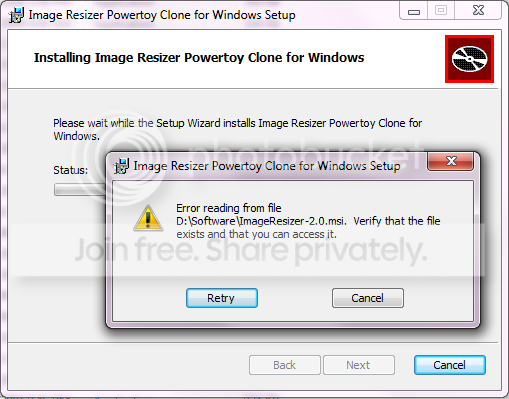
Two of my computers are doing the same thing. I installed Windows 7 Ultimate Edition on both, and I cannot use Windows Installer files. For instance, I try installing a Image Resizer powertoy clone that I used in Vista, and it says:
Untitled.png


If I try to extract the MSI, it tells me "This installation package could not be opened. Contact the application vendor to verify that this is a valid Windows Installer package." (like the error above). I think this is a Windows 7 bug. Curious if it has something to do with me turning off UAC... going to turn that back on and see if I have the same problem.
 

My Computer

Computer Manufacturer/Model Number
Home built :)
OS
Windows 7 Ultimate
CPU
Intel Core 2 Duo E8400 - Wolfdale
Motherboard
Gigabyte EP45-UD3P
Memory
4GB PC2-6400
Monitor(s) Displays
ASUS VH242H - 24" with HDMI
Screen Resolution
1920x1080
Internet Speed
Time Warner - 12Mb down, 375 up
nope... tried turning UAC back to default setting and rebooting... that did nothing. :(
 

My Computer

Computer Manufacturer/Model Number
Home built :)
OS
Windows 7 Ultimate
CPU
Intel Core 2 Duo E8400 - Wolfdale
Motherboard
Gigabyte EP45-UD3P
Memory
4GB PC2-6400
Monitor(s) Displays
ASUS VH242H - 24" with HDMI
Screen Resolution
1920x1080
Internet Speed
Time Warner - 12Mb down, 375 up
I got that on a couple of .msi's . All the rest are fine.

Could be they are corrupt in some way.

Did you rt click and select Properties - check they are Unblocked?

Did you transfer them from another pc or o/s. ?

Could you d/l fresh copies and see if you get the same?
 

My Computers

System One System Two

  • Computer type
    PC/Desktop
    OS
    7 X64
    CPU
    i5 8400
    Motherboard
    gigabyte b365m ds3h
    Memory
    2x8gb 3200mhz
    Hard Drives
    various
    PSU
    pure power 11 400w cm
    Case
    Coolermaster
    Cooling
    cryorig m9i
  • Computer type
    PC/Desktop
    OS
    7x64
    CPU
    g5400
    Motherboard
    ga b365m ds3h
    Memory
    8gb ddr4 2400
    PSU
    xfx pro 450w
Quote:

Did you rt click and select Properties - check they are Unblocked?
- yes

Did you transfer them from another pc or o/s. ?
- well, I already had copies of those installers that I carried over from Vista on a separate partition/volume

Could you d/l fresh copies and see if you get the same?
- I already did, and then I tried those same copies on XP machine with no problem.
 

My Computer

Computer Manufacturer/Model Number
Home built :)
OS
Windows 7 Ultimate
CPU
Intel Core 2 Duo E8400 - Wolfdale
Motherboard
Gigabyte EP45-UD3P
Memory
4GB PC2-6400
Monitor(s) Displays
ASUS VH242H - 24" with HDMI
Screen Resolution
1920x1080
Internet Speed
Time Warner - 12Mb down, 375 up
Is there any .msi that will install ?

If not - it is extremely odd you get it on 2 pc's.

You could try Compatibility mode - see if that helps.
 

My Computers

System One System Two

  • Computer type
    PC/Desktop
    OS
    7 X64
    CPU
    i5 8400
    Motherboard
    gigabyte b365m ds3h
    Memory
    2x8gb 3200mhz
    Hard Drives
    various
    PSU
    pure power 11 400w cm
    Case
    Coolermaster
    Cooling
    cryorig m9i
  • Computer type
    PC/Desktop
    OS
    7x64
    CPU
    g5400
    Motherboard
    ga b365m ds3h
    Memory
    8gb ddr4 2400
    PSU
    xfx pro 450w
I just tried three random ones... ImageResizer, LockoutStatus tool, and Folder Size. All three gave the same error message that I posted a screenshot of earlier. I am a Windows Admin by trade so I have worked this thing to death and I am still scratching my head.
 

My Computer

Computer Manufacturer/Model Number
Home built :)
OS
Windows 7 Ultimate
CPU
Intel Core 2 Duo E8400 - Wolfdale
Motherboard
Gigabyte EP45-UD3P
Memory
4GB PC2-6400
Monitor(s) Displays
ASUS VH242H - 24" with HDMI
Screen Resolution
1920x1080
Internet Speed
Time Warner - 12Mb down, 375 up
Give me a link to one of those - I will have a go on mine - a smallish one preferably - where do I get the exact same .msi you have?

Did you get it from here?

http://downloads.sourceforge.net/foldersize/FolderSize-x64-2.4.msi

It does say this:

Folder Size for Windows runs on Windows 2000 and XP, though has been tested almost exclusively on Windows XP. Sorry, not Vista.

You can download and use LockoutStatus.exe on any of the following platforms:

* Windows 2000 with Service Pack 3 or later
* Windows XP
* Windows Server 2003

Pretty sure Image Resizer is for XP also.

Did you try an .msi that is intended for at least Vista , if not 7?
 

My Computers

System One System Two

  • Computer type
    PC/Desktop
    OS
    7 X64
    CPU
    i5 8400
    Motherboard
    gigabyte b365m ds3h
    Memory
    2x8gb 3200mhz
    Hard Drives
    various
    PSU
    pure power 11 400w cm
    Case
    Coolermaster
    Cooling
    cryorig m9i
  • Computer type
    PC/Desktop
    OS
    7x64
    CPU
    g5400
    Motherboard
    ga b365m ds3h
    Memory
    8gb ddr4 2400
    PSU
    xfx pro 450w
This sounds like a permissions problem. Take a look at whatever folder these files are in - check the security properties and see if the SYSTEM user has full access, and also look to see if there are any unknown user ids in there. Remember, if SYSTEM isn't in there, when you add it and give it full access, make sure to propagate the changes to all subfiles and subfolders.
 

My Computer

Computer Manufacturer/Model Number
Dell XPS 15 L502x
OS
Windows 7 Ultimate x64 SP1
CPU
Core i7-2670QM
Memory
8GB DDR3 PC3-10600
Graphics Card(s)
Intel HD Graphics 3000 + GeForce GT 540M
Screen Resolution
1920x1080
Hard Drives
1TB 5400RPM Seagate
I just d/l Folder Size x64 - the installer starts to run just fine for me.
 

My Computers

System One System Two

  • Computer type
    PC/Desktop
    OS
    7 X64
    CPU
    i5 8400
    Motherboard
    gigabyte b365m ds3h
    Memory
    2x8gb 3200mhz
    Hard Drives
    various
    PSU
    pure power 11 400w cm
    Case
    Coolermaster
    Cooling
    cryorig m9i
  • Computer type
    PC/Desktop
    OS
    7x64
    CPU
    g5400
    Motherboard
    ga b365m ds3h
    Memory
    8gb ddr4 2400
    PSU
    xfx pro 450w
Hey SIW2, the .msi I had was blocked but after I unblocked it, it was still giving the same error. They were also a fresh download from the website.
The .msi I had is designed for Windows 7/Vista as well.
I just downloaded the FolderSize .msi and the installation worked perfectly fine.
I am not sure why the NOD32 .msi did not work.

kegobeer: For mine, permission is all granted.

This is where I went
ESET Knowledgebase - 'This installation package could not be opened' error
and it didnt work at all
 

My Computer

OS
Windows 7 Home Premium
CPU
Dual Core 2.53 GHz
Memory
4 GB Ram @ 800 MHz
Graphics Card(s)
ATI Radeon HD 4760
Screen Resolution
1280 x 800
Hard Drives
320 gb @ 7200 RPM
7 seems picky about which .msi's you can install.
 

My Computers

System One System Two

  • Computer type
    PC/Desktop
    OS
    7 X64
    CPU
    i5 8400
    Motherboard
    gigabyte b365m ds3h
    Memory
    2x8gb 3200mhz
    Hard Drives
    various
    PSU
    pure power 11 400w cm
    Case
    Coolermaster
    Cooling
    cryorig m9i
  • Computer type
    PC/Desktop
    OS
    7x64
    CPU
    g5400
    Motherboard
    ga b365m ds3h
    Memory
    8gb ddr4 2400
    PSU
    xfx pro 450w
Hey SIW2, the .msi I had was blocked but after I unblocked it, it was still giving the same error. They were also a fresh download from the website.
The .msi I had is designed for Windows 7/Vista as well.
I just downloaded the FolderSize .msi and the installation worked perfectly fine.
I am not sure why the NOD32 .msi did not work.

kegobeer: For mine, permission is all granted.

This is where I went
ESET Knowledgebase - 'This installation package could not be opened' error
and it didnt work at all

The SYSTEM user was in there? Are these files on a different partition, or are they on the system drive (C:)?
 

My Computer

Computer Manufacturer/Model Number
Dell XPS 15 L502x
OS
Windows 7 Ultimate x64 SP1
CPU
Core i7-2670QM
Memory
8GB DDR3 PC3-10600
Graphics Card(s)
Intel HD Graphics 3000 + GeForce GT 540M
Screen Resolution
1920x1080
Hard Drives
1TB 5400RPM Seagate
Yeah, its on my Desktop right now.
This is what I see in the security tab:
SYSTEM (allowed on full control,modify,read & execute,read,write)
Barron (Barron-PC\Barron) (allowed on the same listed above)
Administrators (Barron-PC\Administrators) (allowed on the same listed above)

Only thing thats weird is that the file I just downloaded (Foldersize) worked and it was also in .msi.
While the Smart Security .msi from ESET doesnt work here but it works on my PC back at home which is also Windows 7 64 bit (Only difference is that its Professional back at home and I am using Home Premium).
 

My Computer

OS
Windows 7 Home Premium
CPU
Dual Core 2.53 GHz
Memory
4 GB Ram @ 800 MHz
Graphics Card(s)
ATI Radeon HD 4760
Screen Resolution
1280 x 800
Hard Drives
320 gb @ 7200 RPM
Back
Top