Why is my D drive included (mandatory) in system image?

Another thing that can cause huge backups is those useless Libraries. If you have a reference to another drive's data then that gets added to the backup, or at least it was when Win7 first came out and I stopped using Libraries because of it.
That is only the case if you change the default location of the folders. Not if you make new folders for Documents, Pictures, etc. on the other drive.
 

My Computer My Computer

At a glance

Vista, Windows7, Mint Mate, Zorin, Windows 8from 1.6GHz Duo to i7
Computer Manufacturer/Model Number
HP, Dell, Gateway, Toshiba - 4 laptops and 2 desktops
OS
Vista, Windows7, Mint Mate, Zorin, Windows 8
CPU
from 1.6GHz Duo to i7
Monitor(s) Displays
2x HP w2207
Hard Drives
5x HDD, 7x SSD, 12x Externals
Keyboard
with trackball - no mices
Mouse
Trackball mice
Internet Speed
DSL 6000
I don't really use Windows Media Center much but I recall including some music files located on another drive and Windows imaging wanted to include that other drive/partition.
 

My Computer My Computer

At a glance

Windows 7x64 Home Premium SP1Intel i7 2600kG.Skill Ripjaws (DDR3-1600) 2x4GBNvidia GeForce GTS 450; Intel HD Graphics 300...
Computer type
PC/Desktop
Computer Manufacturer/Model Number
Own build
OS
Windows 7x64 Home Premium SP1
CPU
Intel i7 2600k
Motherboard
ASUS P8Z68 Deluxe
Memory
G.Skill Ripjaws (DDR3-1600) 2x4GB
Graphics Card(s)
Nvidia GeForce GTS 450; Intel HD Graphics 3000(GT2+)
Monitor(s) Displays
Dell Ultrasharp IPS panel U2311H, Samsung SyncMaster P2350
Screen Resolution
1920x1080
Hard Drives
Samsung 850 Pro SSD 256GB, Samsung SSD 840 120GB, Seagates 1TB Barracuda ST31000528AS x2
PSU
Seasonic M12II 520W
Case
Lian Li Lancool PC-K60
Cooling
Case: 1x120mm, 3x140mm CPU: Hyper 212+
Keyboard
Logitech MK520 (wireless)
Mouse
Logitech MK520
Internet Speed
6-7 Mbps
Antivirus
Norton Security Premium, Malwarebytes on 2 (MSE on 3rd PC)
Browser
FireFox
Other Info
Audio: Logitech Z523 2.1
I don't really use Windows Media Center much but I recall including some music files located on another drive and Windows imaging wanted to include that other drive/partition.

I can see that because in this case the location was system controlled. I am sure there are several of those cases that can get you into trouble.
 

My Computer My Computer

At a glance

Vista, Windows7, Mint Mate, Zorin, Windows 8from 1.6GHz Duo to i7
Computer Manufacturer/Model Number
HP, Dell, Gateway, Toshiba - 4 laptops and 2 desktops
OS
Vista, Windows7, Mint Mate, Zorin, Windows 8
CPU
from 1.6GHz Duo to i7
Monitor(s) Displays
2x HP w2207
Hard Drives
5x HDD, 7x SSD, 12x Externals
Keyboard
with trackball - no mices
Mouse
Trackball mice
Internet Speed
DSL 6000
D and R are still marked ACTIVE so possible boot partitions. Mark them INACTIVE

Windows 7 has the nice option to mark something as active, but no option to mark them as inactive (as far as I know)... so how would one go at this?


@whs: ah yes indeed! It's plugged into a SATA3 port, I remember now. So, yay ^^

For the libraries: I don't use "My Documents" and such (I just have D:\Documents but it's not linked to windows' own stuff) but I did have the V drive for video mapped to WMP because I used to play the videos from an XboX360. But I don't anymore, so I probably should get rid of that indeed :)

Thanks for the advice everyone, it has helped me out tremendously! Really, much appreciated!
 

My Computer My Computer

At a glance

Windows 7 Ultimate x64
OS
Windows 7 Ultimate x64

My Computer My Computer

At a glance

Windows 7x64 Home Premium SP1Intel i7 2600kG.Skill Ripjaws (DDR3-1600) 2x4GBNvidia GeForce GTS 450; Intel HD Graphics 300...
Computer type
PC/Desktop
Computer Manufacturer/Model Number
Own build
OS
Windows 7x64 Home Premium SP1
CPU
Intel i7 2600k
Motherboard
ASUS P8Z68 Deluxe
Memory
G.Skill Ripjaws (DDR3-1600) 2x4GB
Graphics Card(s)
Nvidia GeForce GTS 450; Intel HD Graphics 3000(GT2+)
Monitor(s) Displays
Dell Ultrasharp IPS panel U2311H, Samsung SyncMaster P2350
Screen Resolution
1920x1080
Hard Drives
Samsung 850 Pro SSD 256GB, Samsung SSD 840 120GB, Seagates 1TB Barracuda ST31000528AS x2
PSU
Seasonic M12II 520W
Case
Lian Li Lancool PC-K60
Cooling
Case: 1x120mm, 3x140mm CPU: Hyper 212+
Keyboard
Logitech MK520 (wireless)
Mouse
Logitech MK520
Internet Speed
6-7 Mbps
Antivirus
Norton Security Premium, Malwarebytes on 2 (MSE on 3rd PC)
Browser
FireFox
Other Info
Audio: Logitech Z523 2.1
D and R are still marked ACTIVE so possible boot partitions. Mark them INACTIVE

Windows 7 has the nice option to mark something as active, but no option to mark them as inactive (as far as I know)... so how would one go at this?


@whs: ah yes indeed! It's plugged into a SATA3 port, I remember now. So, yay ^^

For the libraries: I don't use "My Documents" and such (I just have D:\Documents but it's not linked to windows' own stuff) but I did have the V drive for video mapped to WMP because I used to play the videos from an XboX360. But I don't anymore, so I probably should get rid of that indeed :)

Thanks for the advice everyone, it has helped me out tremendously! Really, much appreciated!
use DISKPART in elevated command prompt to mark a partition inactive
How To: Mark Partition As Inactive | TommyNation.com
 

My Computer My Computer

At a glance

Microsoft Windows 7 Home Premium 64-bits 7601...Intel(R) Core(TM) i3 CPU M 370 @ 2.40GHz4,00 GBATI Mobility Radeon HD 5400 Series
Computer type
Laptop
Computer Manufacturer/Model Number
ACER ASPIRE 5742G
OS
Microsoft Windows 7 Home Premium 64-bits 7601 Multiprocessor Free Service Pack 1
CPU
Intel(R) Core(TM) i3 CPU M 370 @ 2.40GHz
Motherboard
Acer Aspire 5742G
Memory
4,00 GB
Graphics Card(s)
ATI Mobility Radeon HD 5400 Series
Sound Card
(1) AMD High Definition Audio Device (2) Realtek High Defi
Screen Resolution
1366 x 768 x 32 bits (4294967296 colors) @ 60 Hz
Hard Drives
WDC WD5000BEVT-22ZAT0
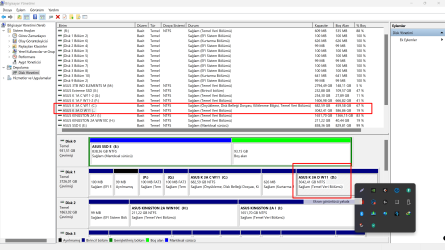
I would like to ask something different about the problem of adding drive D with C in the Windows backup screen. It is stated here that drives C and D are separate external disks. I have the same problem but in this way: I split my 4TB M2 SSD disk into two parts and one part is C and the other part is D. So C and D drives are in the same SSD disk. Can you suggest me a solution for this situation? Currently, windows requires me to have a backup space of 3.15 TB (C+D) in order to backup.
 

My Computers My Computers

  • At a glance

    win 11
    OS
    win 11
  • Computer type
    PC/Desktop
Your D partition must contain something that is considered part of the os.

post a screenshot of disk management window and we can probably tell from that and suggest a simple fix.
 

My Computers My Computers

  • At a glance

    7 X64i5 84002x8gb 3200mhz
    Computer type
    PC/Desktop
    OS
    7 X64
    CPU
    i5 8400
    Motherboard
    gigabyte b365m ds3h
    Memory
    2x8gb 3200mhz
    Hard Drives
    various
    PSU
    pure power 11 400w cm
    Case
    Coolermaster
    Cooling
    cryorig m9i
  • At a glance

    7x64g54008gb ddr4 2400
    Computer type
    PC/Desktop
    OS
    7x64
    CPU
    g5400
    Motherboard
    ga b365m ds3h
    Memory
    8gb ddr4 2400
    PSU
    xfx pro 450w
Have you installed any programs to D

check where the recovery sequence is pointing

admin cmd prompt
reagentc /info
 

My Computers My Computers

  • At a glance

    7 X64i5 84002x8gb 3200mhz
    Computer type
    PC/Desktop
    OS
    7 X64
    CPU
    i5 8400
    Motherboard
    gigabyte b365m ds3h
    Memory
    2x8gb 3200mhz
    Hard Drives
    various
    PSU
    pure power 11 400w cm
    Case
    Coolermaster
    Cooling
    cryorig m9i
  • At a glance

    7x64g54008gb ddr4 2400
    Computer type
    PC/Desktop
    OS
    7x64
    CPU
    g5400
    Motherboard
    ga b365m ds3h
    Memory
    8gb ddr4 2400
    PSU
    xfx pro 450w
Have you installed any programs to D
check where the recovery sequence is pointing
admin cmd prompt
reagentc /info

C:\Windows\System32>reagentc /info
Windows Recovery Environment (Windows RE) and system reset configuration
Information:

Windows RE status: Disabled
Windows RE location:
Boot Configuration Data (BCD) identifier: 93fc632e-88ab-11ed-b72e-d7c9ed12ded6
Recovery image location:
Recovery image index: 0
Custom image location:
Custom image index: 0

REAGENTC.EXE: Operation Successful.
 

My Computers My Computers

  • At a glance

    win 11
    OS
    win 11
  • Computer type
    PC/Desktop

My Computers My Computers

  • At a glance

    7 X64i5 84002x8gb 3200mhz
    Computer type
    PC/Desktop
    OS
    7 X64
    CPU
    i5 8400
    Motherboard
    gigabyte b365m ds3h
    Memory
    2x8gb 3200mhz
    Hard Drives
    various
    PSU
    pure power 11 400w cm
    Case
    Coolermaster
    Cooling
    cryorig m9i
  • At a glance

    7x64g54008gb ddr4 2400
    Computer type
    PC/Desktop
    OS
    7x64
    CPU
    g5400
    Motherboard
    ga b365m ds3h
    Memory
    8gb ddr4 2400
    PSU
    xfx pro 450w
Back
Top