
Outlook 2007 hangs on sending html emails in Windows 7

icelatte

New member
Local time
6:05 AM
Messages
16
Location
South East Asia
Hi

I have been using Win7 64bit for around 2 weeks and previously was on Vista 32bit. Everything is pretty smooth except for Office 2007 Outlook.

As far as it is, I have attempted to forward html emails but failed. Outlook will freeze and the round hourglass cursor will keep turning. Anymore clicking will cause Outlook to show "Not responding" and either it will pop up "Restart Program." or "Close Program".

I have tried leaving it for a few to see if the email goes out. And no, it didn't work too. The email that I tried to send does not appear in the Draft, Outbox or anywhere, even after Outlook restarts. The freeze appears to happen when i click Send button on any html emails that i try to forward. Be it Amazon invoice, edms from hotels or promotional emails from Macy's.

There will be no problem if i'm sending a normal text email and in fact, it sends out really fast too.

I have also repair Outlook, Scanpst on my pst, did a uninstall and reinstall, run in compatibility mode for Winxp SP3, Winvista. None seems to work. I didn't get the problem when i was on Vista.

I googled quite a bit but unfortunately no solutions i can find. Perhaps it's something that i've overlooked and maybe it's something with Win7 on Outlook 2007.

Can someone help? :(
 

My Computer My Computer

At a glance

Windows 7 Ultimate x64Intel Core2Duo 8200 2.66ghz2xCorsair 2GB + 2xCorsair 1GBATi Radeon HD5850
OS
Windows 7 Ultimate x64
CPU
Intel Core2Duo 8200 2.66ghz
Motherboard
MSI P35 Neo3 bios v1.4
Memory
2xCorsair 2GB + 2xCorsair 1GB
Graphics Card(s)
ATi Radeon HD5850
Sound Card
Realtek HD Audio
Monitor(s) Displays
Samsung SW2333 23" DVI
Hard Drives
Hitachi Sata-II 160GB
WD Blue Caviar 320GB
WD Black Caviar 500GB
PSU
OCZstream True 600W Modular PSU
Case
Centurion 5
Cooling
Coolermaster LED fans and such
Keyboard
Logitech MX250 Wireless
Mouse
Razer Krait and Logitech, rest are in the cage.
Internet Speed
Starhub Maxonline 100mbps Ultimate
Other Info
Linksys Cisco WRT320N with DD-Wrt cfw.
Motorola SB6120 100mbps modem
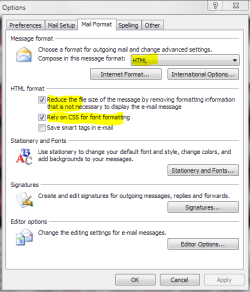
If you go to tools, options, mail format tab - what is your default sending format? I attached a screenshot of my settings which seem to work ok.

The messages that you are forwarding, is the content blocked? That could cause a hang since Outlook would have to download the images etc in order to compose the forwarded html message.

As a test haev you tried composing and HTML message and sending it to yourself, then try forwarding it?

Its an annoying problem I know. But we'll get to the bottom of it.
 

Attachments

  • Settings.PNG
    Settings.PNG
    18.1 KB · Views: 274

My Computer My Computer

At a glance

Windows 7 Ultimate (x86)Intel 2.20 Dual Core4 GBnVidia 9400 GT (512 MB)
Computer Manufacturer/Model Number
Dell Dimension E520
OS
Windows 7 Ultimate (x86)
CPU
Intel 2.20 Dual Core
Memory
4 GB
Graphics Card(s)
nVidia 9400 GT (512 MB)
Sound Card
Sigmatel C Major HD
Monitor(s) Displays
22" Samsung 2232 bw
Screen Resolution
1680x1050
Mouse
Microsoft Arc
Other Info
Wacom Graphire 4 (6x8) Tablet
Hello there.

My settings are just the way like yours.
I have a few observations which may be useful.

  1. The html emails seems to be lagging when i click on them to view. The image placeholders load up real slow.
  2. When i click 'Forward', the new message window opens up sluggishly and the image placeholders appear again, trying to load the images.
  3. Even typing on the 'To:' field seems to be lagging as well.
It feels like the program is trying very hard to load up the html image/frame or sort. Not sure what is it anyway.

I have tried using Office Word to do simple table form with images and email to myself, then forwarding it. It works fine probably due to the simplicity of it.

Those html emails from commercial vendors are usually complex with links, etc. I'm not too sure at it.

I have AVGfree installed btw, Office 2007 is now updated to the new SP2. (the problem appears and persists before and after updates.) Windows 7 is fresh clean install on a new harddisk as well.
 

My Computer My Computer

At a glance

Windows 7 Ultimate x64Intel Core2Duo 8200 2.66ghz2xCorsair 2GB + 2xCorsair 1GBATi Radeon HD5850
OS
Windows 7 Ultimate x64
CPU
Intel Core2Duo 8200 2.66ghz
Motherboard
MSI P35 Neo3 bios v1.4
Memory
2xCorsair 2GB + 2xCorsair 1GB
Graphics Card(s)
ATi Radeon HD5850
Sound Card
Realtek HD Audio
Monitor(s) Displays
Samsung SW2333 23" DVI
Hard Drives
Hitachi Sata-II 160GB
WD Blue Caviar 320GB
WD Black Caviar 500GB
PSU
OCZstream True 600W Modular PSU
Case
Centurion 5
Cooling
Coolermaster LED fans and such
Keyboard
Logitech MX250 Wireless
Mouse
Razer Krait and Logitech, rest are in the cage.
Internet Speed
Starhub Maxonline 100mbps Ultimate
Other Info
Linksys Cisco WRT320N with DD-Wrt cfw.
Motorola SB6120 100mbps modem
Have you tried disabling the email scanner in AVG? I tried AVG for a short time but had to abbandon it for performance reasons.

Also for the HTML messages haev you added the sender/domain to the safe sender list?
 

My Computer My Computer

At a glance

Windows 7 Ultimate (x86)Intel 2.20 Dual Core4 GBnVidia 9400 GT (512 MB)
Computer Manufacturer/Model Number
Dell Dimension E520
OS
Windows 7 Ultimate (x86)
CPU
Intel 2.20 Dual Core
Memory
4 GB
Graphics Card(s)
nVidia 9400 GT (512 MB)
Sound Card
Sigmatel C Major HD
Monitor(s) Displays
22" Samsung 2232 bw
Screen Resolution
1680x1050
Mouse
Microsoft Arc
Other Info
Wacom Graphire 4 (6x8) Tablet
Have you tried disabling the email scanner in AVG? I tried AVG for a short time but had to abbandon it for performance reasons.

Also for the HTML messages haev you added the sender/domain to the safe sender list?


I did disable the email scanner in AVG and it shouldn't be scanning the emails. But that didn't improve much. I had AVG on vista previously too.

Although i usually or never did adding sender/domain to safe list, I tried adding different senders for this problem. Unfortunately, it's a no-help.

Any idea why would the images in the html load up slowly?
 

My Computer My Computer

At a glance

Windows 7 Ultimate x64Intel Core2Duo 8200 2.66ghz2xCorsair 2GB + 2xCorsair 1GBATi Radeon HD5850
OS
Windows 7 Ultimate x64
CPU
Intel Core2Duo 8200 2.66ghz
Motherboard
MSI P35 Neo3 bios v1.4
Memory
2xCorsair 2GB + 2xCorsair 1GB
Graphics Card(s)
ATi Radeon HD5850
Sound Card
Realtek HD Audio
Monitor(s) Displays
Samsung SW2333 23" DVI
Hard Drives
Hitachi Sata-II 160GB
WD Blue Caviar 320GB
WD Black Caviar 500GB
PSU
OCZstream True 600W Modular PSU
Case
Centurion 5
Cooling
Coolermaster LED fans and such
Keyboard
Logitech MX250 Wireless
Mouse
Razer Krait and Logitech, rest are in the cage.
Internet Speed
Starhub Maxonline 100mbps Ultimate
Other Info
Linksys Cisco WRT320N with DD-Wrt cfw.
Motorola SB6120 100mbps modem
Not sure why the images would DL so slow. What happens if you foward it as an attachment? CTRL+ALT+F

Edit on another forum someone suggested its related to IE's phishing filter (smart screen filter).
 

My Computer My Computer

At a glance

Windows 7 Ultimate (x86)Intel 2.20 Dual Core4 GBnVidia 9400 GT (512 MB)
Computer Manufacturer/Model Number
Dell Dimension E520
OS
Windows 7 Ultimate (x86)
CPU
Intel 2.20 Dual Core
Memory
4 GB
Graphics Card(s)
nVidia 9400 GT (512 MB)
Sound Card
Sigmatel C Major HD
Monitor(s) Displays
22" Samsung 2232 bw
Screen Resolution
1680x1050
Mouse
Microsoft Arc
Other Info
Wacom Graphire 4 (6x8) Tablet
Forwarding as an attachment is working as normal.

Does the Smart Screen Filter check emails as well? I always put that as Turn off anyway.
 

My Computer My Computer

At a glance

Windows 7 Ultimate x64Intel Core2Duo 8200 2.66ghz2xCorsair 2GB + 2xCorsair 1GBATi Radeon HD5850
OS
Windows 7 Ultimate x64
CPU
Intel Core2Duo 8200 2.66ghz
Motherboard
MSI P35 Neo3 bios v1.4
Memory
2xCorsair 2GB + 2xCorsair 1GB
Graphics Card(s)
ATi Radeon HD5850
Sound Card
Realtek HD Audio
Monitor(s) Displays
Samsung SW2333 23" DVI
Hard Drives
Hitachi Sata-II 160GB
WD Blue Caviar 320GB
WD Black Caviar 500GB
PSU
OCZstream True 600W Modular PSU
Case
Centurion 5
Cooling
Coolermaster LED fans and such
Keyboard
Logitech MX250 Wireless
Mouse
Razer Krait and Logitech, rest are in the cage.
Internet Speed
Starhub Maxonline 100mbps Ultimate
Other Info
Linksys Cisco WRT320N with DD-Wrt cfw.
Motorola SB6120 100mbps modem
Actually it does. Outlook uses IE for rendering and downloading external content. I did soem more reading on the topic and a few people say that turning smartscreen/phishing filter on, resolved the problem. So if you have it disabled, it might be worth a try to enable it.
 

My Computer My Computer

At a glance

Windows 7 Ultimate (x86)Intel 2.20 Dual Core4 GBnVidia 9400 GT (512 MB)
Computer Manufacturer/Model Number
Dell Dimension E520
OS
Windows 7 Ultimate (x86)
CPU
Intel 2.20 Dual Core
Memory
4 GB
Graphics Card(s)
nVidia 9400 GT (512 MB)
Sound Card
Sigmatel C Major HD
Monitor(s) Displays
22" Samsung 2232 bw
Screen Resolution
1680x1050
Mouse
Microsoft Arc
Other Info
Wacom Graphire 4 (6x8) Tablet
Turning it on or off doesn't work.

Was hoping it could just be the vendors' html emails being buggy and causing problems but it's like every other html emails.. so what are the chances.

I read the Event Viewer and found a few occurrences of:
This session lasted xxx seconds with 0 seconds of active time. This session ended with a hang.

EDIT: even after rebooting.
 

My Computer My Computer

At a glance

Windows 7 Ultimate x64Intel Core2Duo 8200 2.66ghz2xCorsair 2GB + 2xCorsair 1GBATi Radeon HD5850
OS
Windows 7 Ultimate x64
CPU
Intel Core2Duo 8200 2.66ghz
Motherboard
MSI P35 Neo3 bios v1.4
Memory
2xCorsair 2GB + 2xCorsair 1GB
Graphics Card(s)
ATi Radeon HD5850
Sound Card
Realtek HD Audio
Monitor(s) Displays
Samsung SW2333 23" DVI
Hard Drives
Hitachi Sata-II 160GB
WD Blue Caviar 320GB
WD Black Caviar 500GB
PSU
OCZstream True 600W Modular PSU
Case
Centurion 5
Cooling
Coolermaster LED fans and such
Keyboard
Logitech MX250 Wireless
Mouse
Razer Krait and Logitech, rest are in the cage.
Internet Speed
Starhub Maxonline 100mbps Ultimate
Other Info
Linksys Cisco WRT320N with DD-Wrt cfw.
Motorola SB6120 100mbps modem
Right now, i try to print the html email out.

same issue arises. it hangs outlook and i can't print it at all.
discovering more issues.
 

My Computer My Computer

At a glance

Windows 7 Ultimate x64Intel Core2Duo 8200 2.66ghz2xCorsair 2GB + 2xCorsair 1GBATi Radeon HD5850
OS
Windows 7 Ultimate x64
CPU
Intel Core2Duo 8200 2.66ghz
Motherboard
MSI P35 Neo3 bios v1.4
Memory
2xCorsair 2GB + 2xCorsair 1GB
Graphics Card(s)
ATi Radeon HD5850
Sound Card
Realtek HD Audio
Monitor(s) Displays
Samsung SW2333 23" DVI
Hard Drives
Hitachi Sata-II 160GB
WD Blue Caviar 320GB
WD Black Caviar 500GB
PSU
OCZstream True 600W Modular PSU
Case
Centurion 5
Cooling
Coolermaster LED fans and such
Keyboard
Logitech MX250 Wireless
Mouse
Razer Krait and Logitech, rest are in the cage.
Internet Speed
Starhub Maxonline 100mbps Ultimate
Other Info
Linksys Cisco WRT320N with DD-Wrt cfw.
Motorola SB6120 100mbps modem
This is an odd problem to nail down. The only other thing I can think of to try is to run Outlook with no addons.

Start, Run..
Code:
"C:\Program Files\Microsoft Office\Office12\OUTLOOK.EXE" /noextensions

Aside from that, I can only imagine its the remote server(s) where the HTML content is coming from. I havent found much on that event log entry. Everything I've read is in relation to crashing or Outlook not functionaing at all. But I'll keep looking.
 

My Computer My Computer

At a glance

Windows 7 Ultimate (x86)Intel 2.20 Dual Core4 GBnVidia 9400 GT (512 MB)
Computer Manufacturer/Model Number
Dell Dimension E520
OS
Windows 7 Ultimate (x86)
CPU
Intel 2.20 Dual Core
Memory
4 GB
Graphics Card(s)
nVidia 9400 GT (512 MB)
Sound Card
Sigmatel C Major HD
Monitor(s) Displays
22" Samsung 2232 bw
Screen Resolution
1680x1050
Mouse
Microsoft Arc
Other Info
Wacom Graphire 4 (6x8) Tablet
disabling addons didn't work as well.
i'll do a few more runs and update in awhile.

EDIT: btw, im on 64bit so it is Program Files (x86) and also outlook.exe /safe didn't solve it too
 

My Computer My Computer

At a glance

Windows 7 Ultimate x64Intel Core2Duo 8200 2.66ghz2xCorsair 2GB + 2xCorsair 1GBATi Radeon HD5850
OS
Windows 7 Ultimate x64
CPU
Intel Core2Duo 8200 2.66ghz
Motherboard
MSI P35 Neo3 bios v1.4
Memory
2xCorsair 2GB + 2xCorsair 1GB
Graphics Card(s)
ATi Radeon HD5850
Sound Card
Realtek HD Audio
Monitor(s) Displays
Samsung SW2333 23" DVI
Hard Drives
Hitachi Sata-II 160GB
WD Blue Caviar 320GB
WD Black Caviar 500GB
PSU
OCZstream True 600W Modular PSU
Case
Centurion 5
Cooling
Coolermaster LED fans and such
Keyboard
Logitech MX250 Wireless
Mouse
Razer Krait and Logitech, rest are in the cage.
Internet Speed
Starhub Maxonline 100mbps Ultimate
Other Info
Linksys Cisco WRT320N with DD-Wrt cfw.
Motorola SB6120 100mbps modem
I was re-reading the posts hoping to spot something I overlooked. Then I realized in your first post you said even typing in the 'to' box is sluggish.

Thats independant of downloading any HTML content for the message. Just to ensure its not an AVG issue, could you disable it completely? Just to test a couple things in Outlook. Then restore it.
 

My Computer My Computer

At a glance

Windows 7 Ultimate (x86)Intel 2.20 Dual Core4 GBnVidia 9400 GT (512 MB)
Computer Manufacturer/Model Number
Dell Dimension E520
OS
Windows 7 Ultimate (x86)
CPU
Intel 2.20 Dual Core
Memory
4 GB
Graphics Card(s)
nVidia 9400 GT (512 MB)
Sound Card
Sigmatel C Major HD
Monitor(s) Displays
22" Samsung 2232 bw
Screen Resolution
1680x1050
Mouse
Microsoft Arc
Other Info
Wacom Graphire 4 (6x8) Tablet
Just to recap.
the sluggish typing in the "To:" box is only when the email is html format.

I'll do the AVG disabling on the Win7 system and update back again.
thank you.
 

My Computer My Computer

At a glance

Windows 7 Ultimate x64Intel Core2Duo 8200 2.66ghz2xCorsair 2GB + 2xCorsair 1GBATi Radeon HD5850
OS
Windows 7 Ultimate x64
CPU
Intel Core2Duo 8200 2.66ghz
Motherboard
MSI P35 Neo3 bios v1.4
Memory
2xCorsair 2GB + 2xCorsair 1GB
Graphics Card(s)
ATi Radeon HD5850
Sound Card
Realtek HD Audio
Monitor(s) Displays
Samsung SW2333 23" DVI
Hard Drives
Hitachi Sata-II 160GB
WD Blue Caviar 320GB
WD Black Caviar 500GB
PSU
OCZstream True 600W Modular PSU
Case
Centurion 5
Cooling
Coolermaster LED fans and such
Keyboard
Logitech MX250 Wireless
Mouse
Razer Krait and Logitech, rest are in the cage.
Internet Speed
Starhub Maxonline 100mbps Ultimate
Other Info
Linksys Cisco WRT320N with DD-Wrt cfw.
Motorola SB6120 100mbps modem
Updates: Tried uninstalled AVG and it didn't help.
 

My Computer My Computer

At a glance

Windows 7 Ultimate x64Intel Core2Duo 8200 2.66ghz2xCorsair 2GB + 2xCorsair 1GBATi Radeon HD5850
OS
Windows 7 Ultimate x64
CPU
Intel Core2Duo 8200 2.66ghz
Motherboard
MSI P35 Neo3 bios v1.4
Memory
2xCorsair 2GB + 2xCorsair 1GB
Graphics Card(s)
ATi Radeon HD5850
Sound Card
Realtek HD Audio
Monitor(s) Displays
Samsung SW2333 23" DVI
Hard Drives
Hitachi Sata-II 160GB
WD Blue Caviar 320GB
WD Black Caviar 500GB
PSU
OCZstream True 600W Modular PSU
Case
Centurion 5
Cooling
Coolermaster LED fans and such
Keyboard
Logitech MX250 Wireless
Mouse
Razer Krait and Logitech, rest are in the cage.
Internet Speed
Starhub Maxonline 100mbps Ultimate
Other Info
Linksys Cisco WRT320N with DD-Wrt cfw.
Motorola SB6120 100mbps modem
Well now having ruled out AVG it seems what we are left with is long downlaod time to get the content from the server.

Have you tried pinging the domain that the messages/images are coming from just to see what the response time is?
 

My Computer My Computer

At a glance

Windows 7 Ultimate (x86)Intel 2.20 Dual Core4 GBnVidia 9400 GT (512 MB)
Computer Manufacturer/Model Number
Dell Dimension E520
OS
Windows 7 Ultimate (x86)
CPU
Intel 2.20 Dual Core
Memory
4 GB
Graphics Card(s)
nVidia 9400 GT (512 MB)
Sound Card
Sigmatel C Major HD
Monitor(s) Displays
22" Samsung 2232 bw
Screen Resolution
1680x1050
Mouse
Microsoft Arc
Other Info
Wacom Graphire 4 (6x8) Tablet
actually this website sends promo ads on regular basis, other emails from it actually loads fast. only some other html emails are pretty slow.

but it doesn't affect forwarding right?
still at it but signs are i'm giving up soon, reload vista and get on.

does system locale matters? how about spybot s&d?
 

My Computer My Computer

At a glance

Windows 7 Ultimate x64Intel Core2Duo 8200 2.66ghz2xCorsair 2GB + 2xCorsair 1GBATi Radeon HD5850
OS
Windows 7 Ultimate x64
CPU
Intel Core2Duo 8200 2.66ghz
Motherboard
MSI P35 Neo3 bios v1.4
Memory
2xCorsair 2GB + 2xCorsair 1GB
Graphics Card(s)
ATi Radeon HD5850
Sound Card
Realtek HD Audio
Monitor(s) Displays
Samsung SW2333 23" DVI
Hard Drives
Hitachi Sata-II 160GB
WD Blue Caviar 320GB
WD Black Caviar 500GB
PSU
OCZstream True 600W Modular PSU
Case
Centurion 5
Cooling
Coolermaster LED fans and such
Keyboard
Logitech MX250 Wireless
Mouse
Razer Krait and Logitech, rest are in the cage.
Internet Speed
Starhub Maxonline 100mbps Ultimate
Other Info
Linksys Cisco WRT320N with DD-Wrt cfw.
Motorola SB6120 100mbps modem
I dont know about Spybot. I've never used it. It could be a locale issue. If you have the patience you could try using Open DNS OpenDNS > Use OpenDNS

Go with the free plan if you do. I just started using it and noticed a slight increase of page rendering.

Im not sure I understand the 'but it doesn't affect forwarding right?' so correct me is needed. Even though its slow when forwarding a message, it will still work just fine. The recipient may not have any problems loading the content.

Forwarding as an attachment is the other alternative. At least there arent any speed issues with that.
 

My Computer My Computer

At a glance

Windows 7 Ultimate (x86)Intel 2.20 Dual Core4 GBnVidia 9400 GT (512 MB)
Computer Manufacturer/Model Number
Dell Dimension E520
OS
Windows 7 Ultimate (x86)
CPU
Intel 2.20 Dual Core
Memory
4 GB
Graphics Card(s)
nVidia 9400 GT (512 MB)
Sound Card
Sigmatel C Major HD
Monitor(s) Displays
22" Samsung 2232 bw
Screen Resolution
1680x1050
Mouse
Microsoft Arc
Other Info
Wacom Graphire 4 (6x8) Tablet
Similar Outlook Hanging issue caused by html content

Looking at the original post on this topic you describe a very similar issue we have had in our company for some time although this has been on Vista but still exists on Win7. We have found that a number of users who subscribe to complinet complete bulletins receive emails in html format and upon a fresh launch of Outlook, they open one of these emails and the html content cannot be loaded (the images have a red cross). This in turn effects any other email containing html content in Outlook when forwarding, copying, pasting content whereby the client will hang and stop responding. If Outlook is restarted functionality is resumed providing the Complinet emails are not opened. We had to get users to change their complinet profile to send them emails in plaintext as the html emails just kept breaking everything. So you might want to check that it's not a third party email that is having a knock on effect on everything. We have contacted Complinet but they are unable to say what the root cause is and this remains an issue for us. I'm still trying to get to the bottom of it so will post back if we find a solution.
 

My Computer My Computer

At a glance

Windows 7
OS
Windows 7
I had similar issues for a while with Outlook 2003 and Hughes as my ISP. Forwarding anything with imbedded content would go to the inbox, but never get sent. I discovered that if I sent the message from a different account (i.e. Hotmail, instead of Hughes), it would transmit normally. This problem was intermittent, and only popped up when Hughes provided marginal connectivity (about 2/3 of the time - sigh). Repairing Outlook, changing editors, etc. did not affect the problem.

Your issue is probably different from the one I described. However, it would be interesting to see if your forwarded messages can be sent with a WLH, Yahoo, or Gmail account.
 

My Computer My Computer

At a glance

Windows 7 Home Premium, 64-bitIntel Core i7-920 processor (8 MB L3 cache, 2...8 GB Dual Channel DDR3 SDRAM at 1066 MHz – 4 ...ATI Radeon HD 5450 1GB DDR3
Computer Manufacturer/Model Number
Dell XPS 9000 Desktop
OS
Windows 7 Home Premium, 64-bit
CPU
Intel Core i7-920 processor (8 MB L3 cache, 2.66 GHz)
Memory
8 GB Dual Channel DDR3 SDRAM at 1066 MHz – 4 DIMMs
Graphics Card(s)
ATI Radeon HD 5450 1GB DDR3
Sound Card
Integrated 7.1 channel audio
Monitor(s) Displays
Dell UltraSharp 2007FP with AS501 Sound Bar
Hard Drives
640 GB 7200 rpm SATA hard drive
FreeAgent Go 320 GB external hard drive
Internet Speed
AT&T 3G wireless via Sierra Wireless USBConnect device
Other Info
Microsoft Security Essentials
Windows Firewall
Back
Top